chapter 18 modelling rich interaction
Modelling Rich Interaction status–event analysis rich environments in task analysis sensor-based systems
status–event analysis events – things that happen e.g.  alarm bell, beeps, keystrokes status – things that are e.g.  screen display, watch face, mouse position unifying framework  –  system (formal analysis) –  user (psychology & heuristics) time behaviour – detect delays,  select feedback transferable phenomena e.g.  polling  –  active agent discovers status change
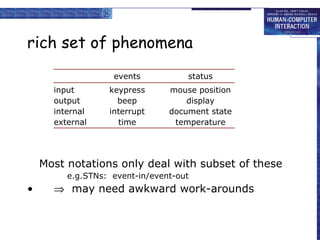
rich set of phenomena events status input keypress mouse position output beep display internal interrupt document state external time temperature Most notations only deal with subset of these e.g. STNs:  event-in/event-out    may need awkward work-arounds
rich set of behaviour  actions: state change at (user initiated) event  status change events: e.g.  stock drops below re-order level  interstitial behaviour: between actions – e.g. dragging an icon standard notations:   usually,    sometimes,    never!
Properties of events status change event the passing of a time actual and perceived events usually some gap polling glance at watch face status change becomes perceived event granularity birthday – days appointment – minutes
Design implications actual/perceived lag… matches application timescale? too slow response to event too late e.g., power plant emergency too fast interrupt more immediate task e.g., stock level low
Naïve psychology Predict where the user is looking mouse – when positioning insertion point – intermittently when typing screen – if you're lucky Immediate events audible bell – when in room (and hearing) peripheral vision – movement or large change Closure lose attention (inc. mouse) concurrent activity
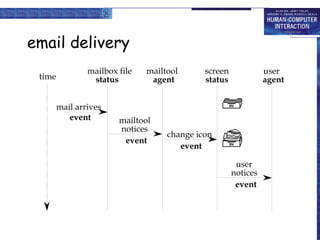
email delivery
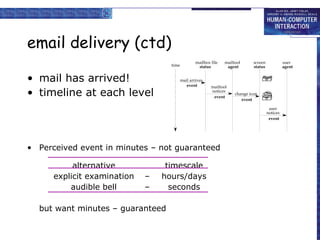
email delivery (ctd) mail has arrived! timeline at each level Perceived event in minutes – not guaranteed alternative timescale explicit examination – hours/days audible bell – seconds but want minutes – guaranteed
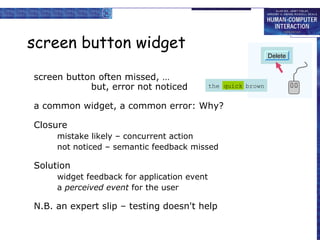
screen button widget screen button often missed, … but, error not noticed a common widget, a common error: Why? Closure mistake likely – concurrent action not noticed – semantic feedback missed Solution widget feedback for application event a  perceived event  for the user N.B. an expert slip – testing doesn't help Delete the quick brown quick the quick brown quick Delete the quick brown quick Delete Delete the quick brown quick
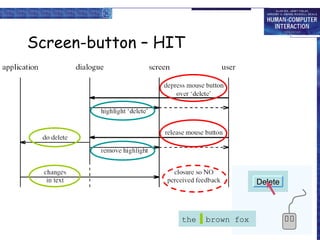
Screen-button – HIT Delete the quick brown quick the quick brown quick Delete Delete the quick brown quick Delete the  brown fox
Screen button – MISS Delete the quick brown quick the quick brown quick Delete the quick brown quick Delete Delete the quick brown quick
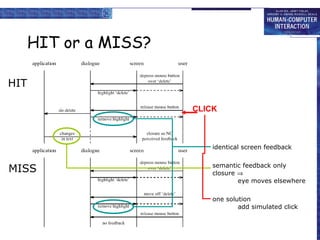
HIT or a MISS? identical screen feedback semantic feedback only closure   eye moves elsewhere one solution add simulated click HIT MISS CLICK
rich contexts
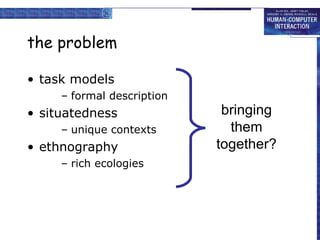
the problem task models formal description situatedness unique contexts ethnography rich ecologies bringing them together?
collaboration already in several notations e.g. CTT, GTA add artefacts too ?
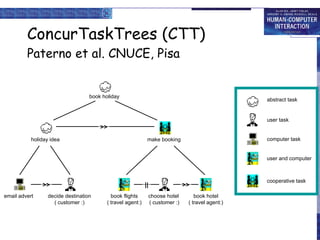
ConcurTaskTrees (CTT) Paterno et al. CNUCE, Pisa abstract task user task computer task user and computer cooperative task email advert book holiday make booking decide destination ( customer :) book flights ( travel agent:) choose hotel  ( customer :) book hotel ( travel agent:) || >> >> holiday idea >>
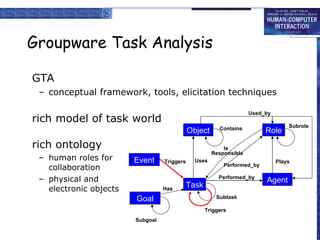
Groupware Task Analysis GTA conceptual framework, tools, elicitation techniques rich model of task world rich ontology human roles for collaboration physical and electronic objects Task Agent Role Object Contains Responsible Performed_by Plays Triggers Subtask Uses Used_by Subrole Is Performed_by Event Goal Has Subgoal Triggers
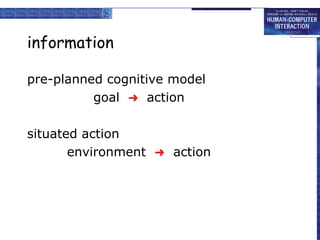
information pre-planned cognitive model goal     action situated action environment     action
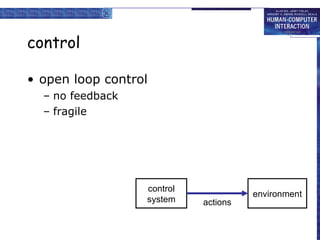
control open loop control no feedback fragile control system environment actions
control open loop control no feedback fragile closed loop control uses feedback robust control system environment actions feedback
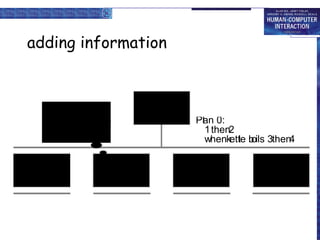
adding information
adding information (ctd) information required when subtask involves input  (or output) some kind of choice  (how to know what to do) subtask repeated  (but iterations unspecified) sources of information part of existing task  (e.g. phone number entered) user remembers it  (e.g. recall number after directory enquiry) on device display  (e.g. PDA address book, then dial)   in the environment pre-existing   (e.g. phone directory) created in task   (e.g. write number down on paper)   GUI easy  (lots of space)  mobile/PDA need to think
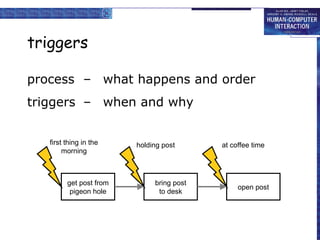
triggers process – what happens and order get post from pigeon hole bring post to desk open post
triggers process – what happens and order triggers – when and why first thing in the morning holding post at coffee time get post from pigeon hole bring post to desk open post
common triggers immediate straight after previous task temporal at a particular time sporadic when someone thinks of it! external event when something happens, e.g. phone call environmental cue something prompts action  …  artefacts
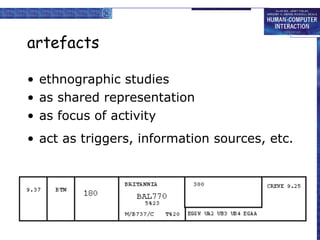
artefacts ethnographic studies as shared representation as focus of activity act as triggers, information sources, etc.
placeholders knowing where you are in a process like a program counter coding: memory explicit (e.g. to do list) in artefacts
where are you?
step 1. choose new flight level
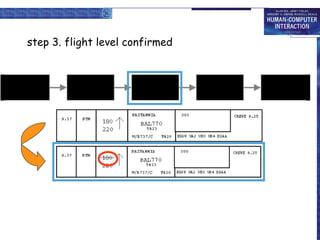
step 3. flight level confirmed
step 5. new flight level acheived
tracing placeholders a form of information, may be … in people’s heads remembering what to do next explicitly in the environment to-do lists, planning charts, flight strips, workflow implicitly in the environment location and disposition of artefacts electronic environments … fewer affordances for artefacts danger for careless design! papers tidy or skewed letter open or closed
low intention and  sensor-based interaction
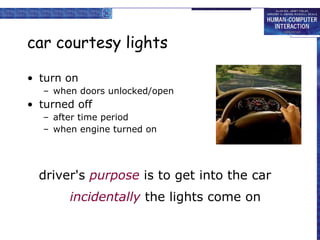
car courtesy lights turn on when doors unlocked/open turned off after time period when engine turned on incidentally  the lights come on driver's  purpose  is to get into the car
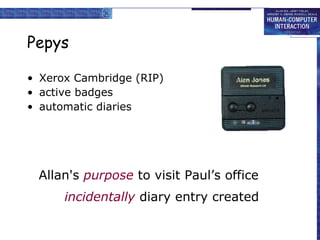
Pepys Xerox Cambridge (RIP) active badges automatic diaries incidentally  diary entry created Allan's  purpose  to visit Paul’s office
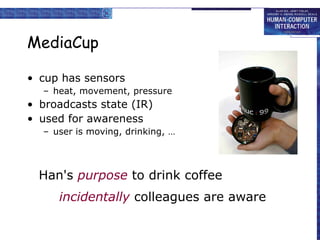
MediaCup cup has sensors heat, movement, pressure broadcasts state (IR) used for awareness user is moving, drinking, … incidentally  colleagues are aware Han's  purpose  to drink coffee
shopping cart goods in shopping cart analysed e.g. Amazon books used to build knowledge about books people who like X also like Y used to give you suggestions “ you might like to look at …”, “special offer …” incidentally  shown related titles my  purpose  to buy a book
onCue ‘ intelligent’ toolbar appropriate intelligence make it good when it works don’t make it hard of it doesn’t analyses clipboard contents suggests things to do with it incidentally  alternative things to do user's  purpose  to copy text elsewhere
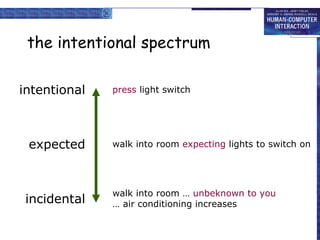
the intentional spectrum press  light switch  intentional expected walk into room  expecting  lights to switch on incidental walk into room …  unbeknown to you …  air conditioning increases
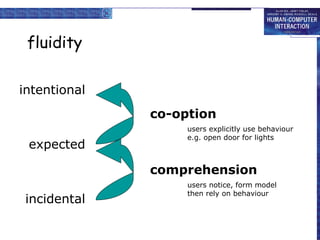
fluidity intentional expected incidental comprehension users notice, form model then rely on behaviour co-option users explicitly use behaviour e.g. open door for lights
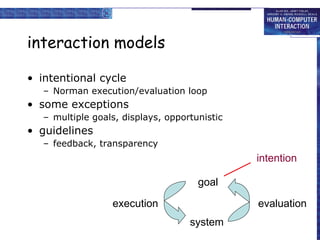
interaction models intentional cycle Norman execution/evaluation loop some exceptions multiple goals, displays, opportunistic guidelines feedback, transparency system evaluation execution goal intention
cognition physical things (inanimate) directness of effect locality of effect visibility of state computational things (also animate) complex effects non locality of effect distance – networks;  time – delays, memory large hidden state
cognition understanding innate intelligences physical, natural/animal, social, physiological rational thought imagination interfaces GUI, VR, AR, tangible recruit physical/tangible intelligence ubicomp, ambient, incidental ? ? ? homunculi,  haunted houses
designing incidental interaction need richer representations of the world, of devices, of artefacts wider ecological concerns two tasks purposeful task – for interpretation supported task – for actions
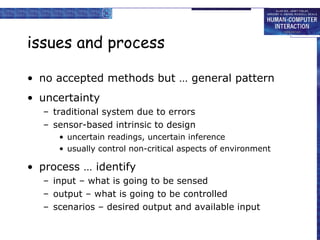
issues and process no accepted methods but … general pattern uncertainty traditional system due to errors sensor-based intrinsic to design uncertain readings, uncertain inference usually control non-critical aspects of environment process … identify input – what is going to be sensed output – what is going to be controlled scenarios – desired output and available input
designing a car courtesy light available input door open, car engine desired output light! identify scenario label steps 0  don’t care +, ++, …  want light – , ––, …  don’t want it legal requirements light off whilst driving safety approaching car??  deactivate alarm 0 walk up to car  key in door – open door & take key + get in ++ close door 0 adjust seat + find road map ++ look up route +++ find right key + key in ignition – start car 0 seat belt light flashes 0 fasten seat belt + drive off ––––– illegal to drive with interior light on safe? light advertises presence
implementation sensors not used for original purpose open architectures, self-discovering, self-configuring privacy internet–enables kettle broadcasts to the world! context inferring activity from sensor readings – status not event data filtering and fusion using several sensors to build context inference hand-coded or machine-learning must be used control something (lights) or modify user actions (TV on)
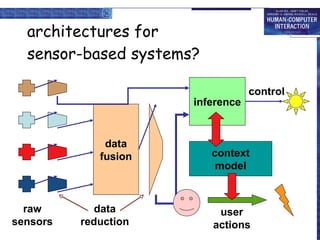
architectures for  sensor-based systems? raw sensors data reduction data fusion context model inference user actions control

HCI 3e - Ch 18: Modelling rich interaction

  • 1.
    chapter 18 modellingrich interaction
  • 2.
    Modelling Rich Interactionstatus–event analysis rich environments in task analysis sensor-based systems
  • 3.
    status–event analysis events– things that happen e.g. alarm bell, beeps, keystrokes status – things that are e.g. screen display, watch face, mouse position unifying framework – system (formal analysis) – user (psychology & heuristics) time behaviour – detect delays, select feedback transferable phenomena e.g. polling – active agent discovers status change
  • 4.
    rich set ofphenomena events status input keypress mouse position output beep display internal interrupt document state external time temperature Most notations only deal with subset of these e.g. STNs: event-in/event-out  may need awkward work-arounds
  • 5.
    rich set ofbehaviour  actions: state change at (user initiated) event  status change events: e.g. stock drops below re-order level  interstitial behaviour: between actions – e.g. dragging an icon standard notations:  usually,  sometimes,  never!
  • 6.
    Properties of eventsstatus change event the passing of a time actual and perceived events usually some gap polling glance at watch face status change becomes perceived event granularity birthday – days appointment – minutes
  • 7.
    Design implications actual/perceivedlag… matches application timescale? too slow response to event too late e.g., power plant emergency too fast interrupt more immediate task e.g., stock level low
  • 8.
    Naïve psychology Predictwhere the user is looking mouse – when positioning insertion point – intermittently when typing screen – if you're lucky Immediate events audible bell – when in room (and hearing) peripheral vision – movement or large change Closure lose attention (inc. mouse) concurrent activity
  • 9.
  • 10.
    email delivery (ctd)mail has arrived! timeline at each level Perceived event in minutes – not guaranteed alternative timescale explicit examination – hours/days audible bell – seconds but want minutes – guaranteed
  • 11.
    screen button widgetscreen button often missed, … but, error not noticed a common widget, a common error: Why? Closure mistake likely – concurrent action not noticed – semantic feedback missed Solution widget feedback for application event a perceived event for the user N.B. an expert slip – testing doesn't help Delete the quick brown quick the quick brown quick Delete the quick brown quick Delete Delete the quick brown quick
  • 12.
    Screen-button – HITDelete the quick brown quick the quick brown quick Delete Delete the quick brown quick Delete the brown fox
  • 13.
    Screen button –MISS Delete the quick brown quick the quick brown quick Delete the quick brown quick Delete Delete the quick brown quick
  • 14.
    HIT or aMISS? identical screen feedback semantic feedback only closure  eye moves elsewhere one solution add simulated click HIT MISS CLICK
  • 15.
  • 16.
    the problem taskmodels formal description situatedness unique contexts ethnography rich ecologies bringing them together?
  • 17.
    collaboration already inseveral notations e.g. CTT, GTA add artefacts too ?
  • 18.
    ConcurTaskTrees (CTT) Paternoet al. CNUCE, Pisa abstract task user task computer task user and computer cooperative task email advert book holiday make booking decide destination ( customer :) book flights ( travel agent:) choose hotel ( customer :) book hotel ( travel agent:) || >> >> holiday idea >>
  • 19.
    Groupware Task AnalysisGTA conceptual framework, tools, elicitation techniques rich model of task world rich ontology human roles for collaboration physical and electronic objects Task Agent Role Object Contains Responsible Performed_by Plays Triggers Subtask Uses Used_by Subrole Is Performed_by Event Goal Has Subgoal Triggers
  • 20.
    information pre-planned cognitivemodel goal  action situated action environment  action
  • 21.
    control open loopcontrol no feedback fragile control system environment actions
  • 22.
    control open loopcontrol no feedback fragile closed loop control uses feedback robust control system environment actions feedback
  • 23.
  • 24.
    adding information (ctd)information required when subtask involves input (or output) some kind of choice (how to know what to do) subtask repeated (but iterations unspecified) sources of information part of existing task (e.g. phone number entered) user remembers it (e.g. recall number after directory enquiry) on device display (e.g. PDA address book, then dial) in the environment pre-existing (e.g. phone directory) created in task (e.g. write number down on paper) GUI easy (lots of space) mobile/PDA need to think
  • 25.
    triggers process –what happens and order get post from pigeon hole bring post to desk open post
  • 26.
    triggers process –what happens and order triggers – when and why first thing in the morning holding post at coffee time get post from pigeon hole bring post to desk open post
  • 27.
    common triggers immediatestraight after previous task temporal at a particular time sporadic when someone thinks of it! external event when something happens, e.g. phone call environmental cue something prompts action … artefacts
  • 28.
    artefacts ethnographic studiesas shared representation as focus of activity act as triggers, information sources, etc.
  • 29.
    placeholders knowing whereyou are in a process like a program counter coding: memory explicit (e.g. to do list) in artefacts
  • 30.
  • 31.
    step 1. choosenew flight level
  • 32.
    step 3. flightlevel confirmed
  • 33.
    step 5. newflight level acheived
  • 34.
    tracing placeholders aform of information, may be … in people’s heads remembering what to do next explicitly in the environment to-do lists, planning charts, flight strips, workflow implicitly in the environment location and disposition of artefacts electronic environments … fewer affordances for artefacts danger for careless design! papers tidy or skewed letter open or closed
  • 35.
    low intention and sensor-based interaction
  • 36.
    car courtesy lightsturn on when doors unlocked/open turned off after time period when engine turned on incidentally the lights come on driver's purpose is to get into the car
  • 37.
    Pepys Xerox Cambridge(RIP) active badges automatic diaries incidentally diary entry created Allan's purpose to visit Paul’s office
  • 38.
    MediaCup cup hassensors heat, movement, pressure broadcasts state (IR) used for awareness user is moving, drinking, … incidentally colleagues are aware Han's purpose to drink coffee
  • 39.
    shopping cart goodsin shopping cart analysed e.g. Amazon books used to build knowledge about books people who like X also like Y used to give you suggestions “ you might like to look at …”, “special offer …” incidentally shown related titles my purpose to buy a book
  • 40.
    onCue ‘ intelligent’toolbar appropriate intelligence make it good when it works don’t make it hard of it doesn’t analyses clipboard contents suggests things to do with it incidentally alternative things to do user's purpose to copy text elsewhere
  • 41.
    the intentional spectrumpress light switch intentional expected walk into room expecting lights to switch on incidental walk into room … unbeknown to you … air conditioning increases
  • 42.
    fluidity intentional expectedincidental comprehension users notice, form model then rely on behaviour co-option users explicitly use behaviour e.g. open door for lights
  • 43.
    interaction models intentionalcycle Norman execution/evaluation loop some exceptions multiple goals, displays, opportunistic guidelines feedback, transparency system evaluation execution goal intention
  • 44.
    cognition physical things(inanimate) directness of effect locality of effect visibility of state computational things (also animate) complex effects non locality of effect distance – networks; time – delays, memory large hidden state
  • 45.
    cognition understanding innateintelligences physical, natural/animal, social, physiological rational thought imagination interfaces GUI, VR, AR, tangible recruit physical/tangible intelligence ubicomp, ambient, incidental ? ? ? homunculi, haunted houses
  • 46.
    designing incidental interactionneed richer representations of the world, of devices, of artefacts wider ecological concerns two tasks purposeful task – for interpretation supported task – for actions
  • 47.
    issues and processno accepted methods but … general pattern uncertainty traditional system due to errors sensor-based intrinsic to design uncertain readings, uncertain inference usually control non-critical aspects of environment process … identify input – what is going to be sensed output – what is going to be controlled scenarios – desired output and available input
  • 48.
    designing a carcourtesy light available input door open, car engine desired output light! identify scenario label steps 0 don’t care +, ++, … want light – , ––, … don’t want it legal requirements light off whilst driving safety approaching car?? deactivate alarm 0 walk up to car  key in door – open door & take key + get in ++ close door 0 adjust seat + find road map ++ look up route +++ find right key + key in ignition – start car 0 seat belt light flashes 0 fasten seat belt + drive off ––––– illegal to drive with interior light on safe? light advertises presence
  • 49.
    implementation sensors notused for original purpose open architectures, self-discovering, self-configuring privacy internet–enables kettle broadcasts to the world! context inferring activity from sensor readings – status not event data filtering and fusion using several sensors to build context inference hand-coded or machine-learning must be used control something (lights) or modify user actions (TV on)
  • 50.
    architectures for sensor-based systems? raw sensors data reduction data fusion context model inference user actions control