Introduction to
Computer Applications
Lecture # 2
Objective of Lecture
 Classification of computers
 Generation of computers
Classification of Computer
 There are two types of classes
 Classes by size
 Classes by Functions
Classes by size
 Microcomputers (Personal computers)
 Minicomputers (Midrange computers)
 Mainframe computers
 Supercomputer
Classes by functions
 Servers
 Workstations
 Information appliances
 Embedded computers
Microcomputers
Microcomputers can designed for use by a single
person. They are among the smallest computer created
for people to use. Microcomputers are the most common
type of computers used by people today, whether in a
workplace, at school or on the desk at home. e.g.
 Desktop computers
 Notebook computers
 Handheld PC
 Tablet PC
 Smart phones
Contd..
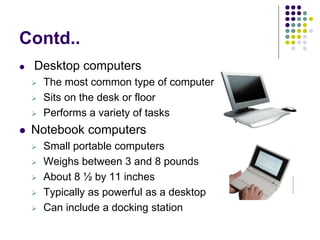
 Desktop computers
 The most common type of computer
 Sits on the desk or floor
 Performs a variety of tasks
 Notebook computers
 Small portable computers
 Weighs between 3 and 8 pounds
 About 8 ½ by 11 inches
 Typically as powerful as a desktop
 Can include a docking station
Contd..
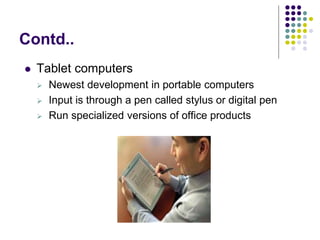
 Tablet computers
 Newest development in portable computers
 Input is through a pen called stylus or digital pen
 Run specialized versions of office products
Contd..
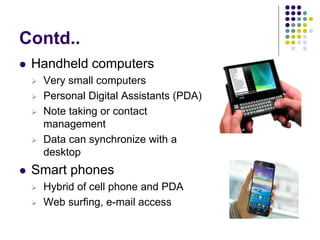
 Handheld computers
 Very small computers
 Personal Digital Assistants (PDA)
 Note taking or contact
management
 Data can synchronize with a
desktop
 Smart phones
 Hybrid of cell phone and PDA
 Web surfing, e-mail access
Minicomputers
 Contemporary term for this class of system is midrange
computer.
 Lies in the middle range of the computing variety in
between the smallest multi-user systems (mainframe
computers) and the largest single-user systems
(microcomputers or personal computers), Power
between mainframe and desktops.
 Class of multi-user computers handled by hundred of
users.
 Used in smaller organizations
 Users access through a terminal
Mainframe
 Used in large organizations.
 A very large and expensive computer capable of
supporting hundreds, or even thousands, of users
simultaneously.
 Also called enterprise servers.
 There are multiple processors in these
computers(2,4,12).
 Banks and shopping marts are interconnected
through mainframe computers.
SuperComputers
 All of the resources to tackle one problem
 Used for very complex operations
 Rocket launching
 Weather prediction
 Aeronautics
 Testing of nuclear weapons
 Carry160 millions instructions /second
 160 trillion bytes storage
 6 trillion bytes memory
Comparison between Minicomputer,
Mainframe & Supercomputer
 In some ways, mainframes are more powerful than
supercomputers as they support more simultaneous
programs. But supercomputers can execute a single
program faster than a mainframe.
 The distinction between small mainframes and
minicomputers is vague, depending really on how the
manufacturer wants to market its machines.
Servers
Server is a physical computer (a hardware system)
dedicated to running one or more such services (as a
host) to serve the needs of users of the other
computers on the network.
 Network servers
 Centralized computer
 All other computers connect
 Provides access to network resources
 Multiple servers are called server farms
 Often simply a powerful desktop
Types of Servers
 Depending on the computing service that it
offers it could be
1. Database server
2. File server
3. Mail server
4. Print server
5. Web server
Database Server
 Provides database services to other computers as
defined by the client-server model.
 DBMS provide database server functionality,
 In a master-slave model, database master servers
are central and primary locations of data while
database slave servers are synchronized backups
of the master acting as proxies.
e.g.
 Oracle, DB2, SQL server
File Server
Computer attached to a network with primary purpose
of providing a location for shared disk access,
i.e. shared storage of computer files (such as
documents, sound files, photographs, movies,
images, databases, etc.) that can be accessed by
the workstations that are attached to the computer
network
Mail Server
 Every email that is sent passes through a series
of mail servers
 A complex series of transfers takes place.
 Without this series of mail servers, email can be
sent to the email address of the same domain.
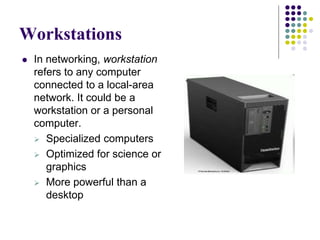
Workstations
 In networking, workstation
refers to any computer
connected to a local-area
network. It could be a
workstation or a personal
computer.
 Specialized computers
 Optimized for science or
graphics
 More powerful than a
desktop
Information appliance
In information appliance or information device is
any machine or device that is usable for the purposes
of computing, telecommunicating, reproducing, and
presenting encoded information in innumerable forms
and applications.
Embedded computers
Embedded computers can be compared to
"computers on a chip". All in one , so to speak.
You will find them in all kind of devices surrounding
us where you need to regulate something, control or
check something
e.g.
 Home automation devices e.g. Washing machines,
Sewing machines, Microwave
 Ticket machines at the subway,
 Cameras, clocks, Cell phone, Video games, Global
Positioning System
 Automobiles, cars, motors
Mobile Devices
 Handheld Computers
 Personal Digital Assistant (PDA)
 Smart Phones
 GPS
Generations of Computer
1. First Generation VACUUM TUBES: (1942-1955)
2. Second Generation TRANSISTORS: (1955-1964)
3. Third Generation INTEGRATED CIRCUITS: (1964-1975)
4. Fourth Generation Microprocessors: (1975- PRESENT)
5. Fifth Generation Artificial Intelligence: (Present and
Beyond)
First Generation Computers
1942-1955
 The first generation of computers, characterized by
vacuum tubes used in the duration of 1942-1955.
Examples:
 ENIVAC (Electronic Numerical Integrator and
Calculator) First Electronic Computer
 UNIVAC (Universal Automatic Computer) – First
Digital Computer used in business and industries.
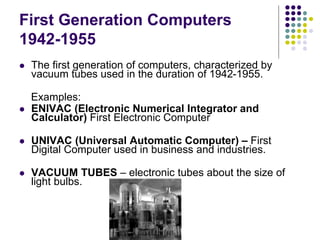
 VACUUM TUBES – electronic tubes about the size of
light bulbs.
Advantages
 Vacuum tubes were the only components available during
those days.
 Vacuum tube technology made possible to make
electronic digital computers.
 These Computers could calculate data in milliseconds.
.
Disadvantages
 Very large in size.
 Consumed large amount of energy.
 Heated very soon due to thousand of vacuum tubes.
 Not very reliable.
 Air conditioning was required.
 Non-portable.
 Costly commercial production.
 Very slow speed.
 Used machine language only
 Used punch cards for input
 Not versatile and very faulty.
Second Generation Computers 1955-1964
 Used Transistors.
 Transistors are developed in Bell Laboratories in 1947.
 The size of computer decreases by replacing vacuum
tubes by Transistors.
 Examples:
IBM 7097 series, IBM 1400 Series
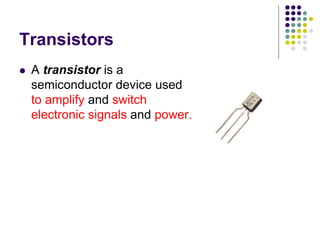
Transistors
 A transistor is a
semiconductor device used
to amplify and switch
electronic signals and power.
Advantages
 Smaller in size as compared to first generation
computers.
 More reliable.
 Used less energy and were not heated.
 Better portability.
 Better speed and could calculate data in microseconds.
 Accuracy improved
Disadvantages
 Air conditioning was required.
 Constant maintenance required.
 Only used for specific purpose.
 Costly and not versatile.
 Punch cards were used for input.
Third Generation Computers 1964-
1975
 Used Integrated Circuits.
 First IC was invented and used in 1961.
 The size of an IC is about ¼ square inch.
 A single IC contain thousands of transistors.
 Examples:
IBM 370, IBM System/360
Advantages
 Smaller in size as compare to previous.
 More reliable.
 Use less energy.
 Produce less heat as compare to previous.
 Better speed could calculate data in nanoseconds.
 Versatile to an extent.
 Used fan for heat discharge.
 Low maintenance cost because hardware failure is rare.
 Totally General purpose.
 Good Storage, Less expansive, better accuracy.
 Key board and mouse for input
Disadvantages
 Air Conditioning was required.
 High sophisticated technology required for the
manufacturing of IC chips.
Fourth Generation Computers 1975-
PRESENT
 Starts with the invention of Microprocessors.
 Microprocessor contains thousands of ICs.
 Ted Hof creates first Microprocessor for Intel in 1971.
 Examples:
Apple Macintosh & IBM PC
Advantages
 More powerful and reliable then previous.
 Very small in size
 Less power consumption.
 Less heat generation.
 Used fan for heat discharge.
 No air condition is required.
 Totally General purpose.
 Less need of repairing.
 Cheapest among all the generations.
 Best speed to read instructions (One million per second).
Fifth Generation Computers Present
and Beyond
 Based on the technique of Artificial Intelligence (AI).
 Computers can understand spoken words.
 Scientists are working to increase the speed of
computers.
 The advancement in modern technologies will
revolutionize the computer in future.
Questions??

Itc lec 2 classification and generation of computer

  • 1.
  • 2.
    Objective of Lecture Classification of computers  Generation of computers
  • 3.
    Classification of Computer There are two types of classes  Classes by size  Classes by Functions
  • 4.
    Classes by size Microcomputers (Personal computers)  Minicomputers (Midrange computers)  Mainframe computers  Supercomputer
  • 5.
    Classes by functions Servers  Workstations  Information appliances  Embedded computers
  • 6.
    Microcomputers Microcomputers can designedfor use by a single person. They are among the smallest computer created for people to use. Microcomputers are the most common type of computers used by people today, whether in a workplace, at school or on the desk at home. e.g.  Desktop computers  Notebook computers  Handheld PC  Tablet PC  Smart phones
  • 7.
    Contd..  Desktop computers The most common type of computer  Sits on the desk or floor  Performs a variety of tasks  Notebook computers  Small portable computers  Weighs between 3 and 8 pounds  About 8 ½ by 11 inches  Typically as powerful as a desktop  Can include a docking station
  • 8.
    Contd..  Tablet computers Newest development in portable computers  Input is through a pen called stylus or digital pen  Run specialized versions of office products
  • 9.
    Contd..  Handheld computers Very small computers  Personal Digital Assistants (PDA)  Note taking or contact management  Data can synchronize with a desktop  Smart phones  Hybrid of cell phone and PDA  Web surfing, e-mail access
  • 10.
    Minicomputers  Contemporary termfor this class of system is midrange computer.  Lies in the middle range of the computing variety in between the smallest multi-user systems (mainframe computers) and the largest single-user systems (microcomputers or personal computers), Power between mainframe and desktops.  Class of multi-user computers handled by hundred of users.  Used in smaller organizations  Users access through a terminal
  • 11.
    Mainframe  Used inlarge organizations.  A very large and expensive computer capable of supporting hundreds, or even thousands, of users simultaneously.  Also called enterprise servers.  There are multiple processors in these computers(2,4,12).  Banks and shopping marts are interconnected through mainframe computers.
  • 12.
    SuperComputers  All ofthe resources to tackle one problem  Used for very complex operations  Rocket launching  Weather prediction  Aeronautics  Testing of nuclear weapons  Carry160 millions instructions /second  160 trillion bytes storage  6 trillion bytes memory
  • 13.
    Comparison between Minicomputer, Mainframe& Supercomputer  In some ways, mainframes are more powerful than supercomputers as they support more simultaneous programs. But supercomputers can execute a single program faster than a mainframe.  The distinction between small mainframes and minicomputers is vague, depending really on how the manufacturer wants to market its machines.
  • 14.
    Servers Server is aphysical computer (a hardware system) dedicated to running one or more such services (as a host) to serve the needs of users of the other computers on the network.  Network servers  Centralized computer  All other computers connect  Provides access to network resources  Multiple servers are called server farms  Often simply a powerful desktop
  • 15.
    Types of Servers Depending on the computing service that it offers it could be 1. Database server 2. File server 3. Mail server 4. Print server 5. Web server
  • 16.
    Database Server  Providesdatabase services to other computers as defined by the client-server model.  DBMS provide database server functionality,  In a master-slave model, database master servers are central and primary locations of data while database slave servers are synchronized backups of the master acting as proxies. e.g.  Oracle, DB2, SQL server
  • 17.
    File Server Computer attachedto a network with primary purpose of providing a location for shared disk access, i.e. shared storage of computer files (such as documents, sound files, photographs, movies, images, databases, etc.) that can be accessed by the workstations that are attached to the computer network
  • 18.
    Mail Server  Everyemail that is sent passes through a series of mail servers  A complex series of transfers takes place.  Without this series of mail servers, email can be sent to the email address of the same domain.
  • 19.
    Workstations  In networking,workstation refers to any computer connected to a local-area network. It could be a workstation or a personal computer.  Specialized computers  Optimized for science or graphics  More powerful than a desktop
  • 20.
    Information appliance In informationappliance or information device is any machine or device that is usable for the purposes of computing, telecommunicating, reproducing, and presenting encoded information in innumerable forms and applications.
  • 21.
    Embedded computers Embedded computerscan be compared to "computers on a chip". All in one , so to speak. You will find them in all kind of devices surrounding us where you need to regulate something, control or check something e.g.  Home automation devices e.g. Washing machines, Sewing machines, Microwave  Ticket machines at the subway,  Cameras, clocks, Cell phone, Video games, Global Positioning System  Automobiles, cars, motors
  • 22.
    Mobile Devices  HandheldComputers  Personal Digital Assistant (PDA)  Smart Phones  GPS
  • 23.
    Generations of Computer 1.First Generation VACUUM TUBES: (1942-1955) 2. Second Generation TRANSISTORS: (1955-1964) 3. Third Generation INTEGRATED CIRCUITS: (1964-1975) 4. Fourth Generation Microprocessors: (1975- PRESENT) 5. Fifth Generation Artificial Intelligence: (Present and Beyond)
  • 24.
    First Generation Computers 1942-1955 The first generation of computers, characterized by vacuum tubes used in the duration of 1942-1955. Examples:  ENIVAC (Electronic Numerical Integrator and Calculator) First Electronic Computer  UNIVAC (Universal Automatic Computer) – First Digital Computer used in business and industries.  VACUUM TUBES – electronic tubes about the size of light bulbs.
  • 25.
    Advantages  Vacuum tubeswere the only components available during those days.  Vacuum tube technology made possible to make electronic digital computers.  These Computers could calculate data in milliseconds. .
  • 26.
    Disadvantages  Very largein size.  Consumed large amount of energy.  Heated very soon due to thousand of vacuum tubes.  Not very reliable.  Air conditioning was required.  Non-portable.  Costly commercial production.  Very slow speed.  Used machine language only  Used punch cards for input  Not versatile and very faulty.
  • 27.
    Second Generation Computers1955-1964  Used Transistors.  Transistors are developed in Bell Laboratories in 1947.  The size of computer decreases by replacing vacuum tubes by Transistors.  Examples: IBM 7097 series, IBM 1400 Series
  • 28.
    Transistors  A transistoris a semiconductor device used to amplify and switch electronic signals and power.
  • 29.
    Advantages  Smaller insize as compared to first generation computers.  More reliable.  Used less energy and were not heated.  Better portability.  Better speed and could calculate data in microseconds.  Accuracy improved
  • 30.
    Disadvantages  Air conditioningwas required.  Constant maintenance required.  Only used for specific purpose.  Costly and not versatile.  Punch cards were used for input.
  • 31.
    Third Generation Computers1964- 1975  Used Integrated Circuits.  First IC was invented and used in 1961.  The size of an IC is about ¼ square inch.  A single IC contain thousands of transistors.  Examples: IBM 370, IBM System/360
  • 32.
    Advantages  Smaller insize as compare to previous.  More reliable.  Use less energy.  Produce less heat as compare to previous.  Better speed could calculate data in nanoseconds.  Versatile to an extent.  Used fan for heat discharge.  Low maintenance cost because hardware failure is rare.  Totally General purpose.  Good Storage, Less expansive, better accuracy.  Key board and mouse for input
  • 33.
    Disadvantages  Air Conditioningwas required.  High sophisticated technology required for the manufacturing of IC chips.
  • 34.
    Fourth Generation Computers1975- PRESENT  Starts with the invention of Microprocessors.  Microprocessor contains thousands of ICs.  Ted Hof creates first Microprocessor for Intel in 1971.  Examples: Apple Macintosh & IBM PC
  • 35.
    Advantages  More powerfuland reliable then previous.  Very small in size  Less power consumption.  Less heat generation.  Used fan for heat discharge.  No air condition is required.  Totally General purpose.  Less need of repairing.  Cheapest among all the generations.  Best speed to read instructions (One million per second).
  • 36.
    Fifth Generation ComputersPresent and Beyond  Based on the technique of Artificial Intelligence (AI).  Computers can understand spoken words.  Scientists are working to increase the speed of computers.  The advancement in modern technologies will revolutionize the computer in future.
  • 37.