COMPUTER SOFTWARE &
SYSTEM
Introduction to ComputingCHAPTER # 3
Introduction to Computing 2Chapter # 3
Computer System
 System
 A group or combination of interrelated, interdependent, or
interacting elements forming a collective entity.
 Computer System
 A functionally related group of elements, especially a
network of related computer hardware, software and data
transmission.
 So a system of one or more computers and associated
software with common storage
Introduction to Computing 3Chapter # 3
Computer System
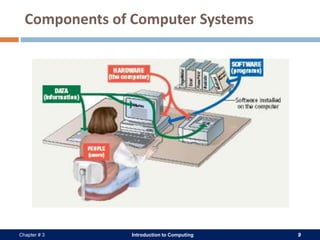
 A complete computer system includes hardware, software,
data, and users
 Hardware consists of electronic devices, the parts you can
touch
 Software (programs) consists of instructions that control the
computer
 Data can be text, numbers, sounds, and images that the
computer manipulates
 People who operate computers are called users
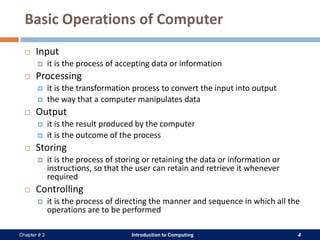
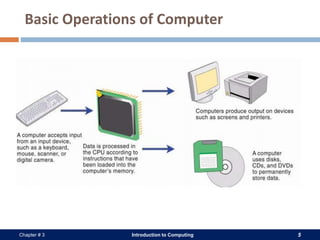
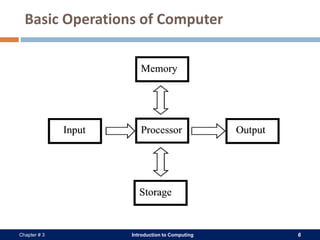
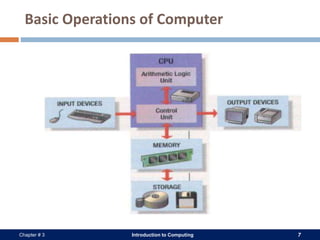
 To manipulate data, the computer performs basic operations
which includes data input, processing, output, and storage
Introduction to Computing 4Chapter # 3
Basic Operations of Computer
 Input
 it is the process of accepting data or information
 Processing
 it is the transformation process to convert the input into output
 the way that a computer manipulates data
 Output
 it is the result produced by the computer
 it is the outcome of the process
 Storing
 it is the process of storing or retaining the data or information or
instructions, so that the user can retain and retrieve it whenever
required
 Controlling
 it is the process of directing the manner and sequence in which all the
operations are to be performed
Introduction to Computing 5Chapter # 3
Basic Operations of Computer
Introduction to Computing 6Chapter # 3
Basic Operations of Computer
Introduction to Computing 7Chapter # 3
Basic Operations of Computer
Introduction to Computing 8Chapter # 3
Components of Computer System
 A computer system has four components
 Hardware
 Software
 User
 Data
Introduction to Computing 9Chapter # 3
Components of Computer Systems
Introduction to Computing 10Chapter # 3
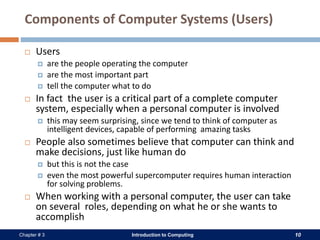
Components of Computer Systems (Users)
 Users
 are the people operating the computer
 are the most important part
 tell the computer what to do
 In fact the user is a critical part of a complete computer
system, especially when a personal computer is involved
 this may seem surprising, since we tend to think of computer as
intelligent devices, capable of performing amazing tasks
 People also sometimes believe that computer can think and
make decisions, just like human do
 but this is not the case
 even the most powerful supercomputer requires human interaction
for solving problems.
 When working with a personal computer, the user can take
on several roles, depending on what he or she wants to
accomplish
Introduction to Computing 11Chapter # 3
Components of Computer Systems (Data)
 Data
 Pieces of information
 Computer organize and present data
 Data is collection of facts as values or measurements.
 It can be numbers, words, observations or even just description of
things
 This information may be in the form of
 Text documents
 Images
 Audio clips
 Software programs, or other types of data
 Communications devices perform both input and output functions,
allowing computers to share information
 In a computer, data consists of small pieces of information that, by
themselves, may not make sense to a person
 The computer manipulates data into useful information
Introduction to Computing 12Chapter # 3
Components of Computer Systems (Hardware)
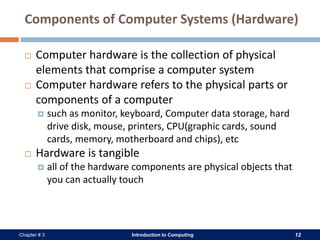
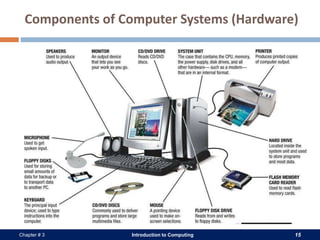
 Computer hardware is the collection of physical
elements that comprise a computer system
 Computer hardware refers to the physical parts or
components of a computer
 such as monitor, keyboard, Computer data storage, hard
drive disk, mouse, printers, CPU(graphic cards, sound
cards, memory, motherboard and chips), etc
 Hardware is tangible
 all of the hardware components are physical objects that
you can actually touch
Introduction to Computing 13Chapter # 3
Components of Computer Systems (Hardware)
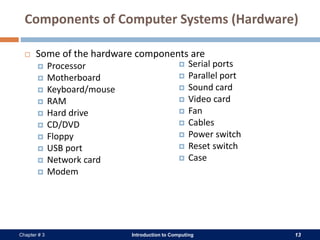
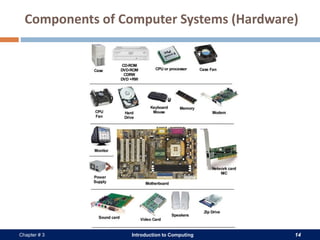
 Some of the hardware components are
 Processor
 Motherboard
 Keyboard/mouse
 RAM
 Hard drive
 CD/DVD
 Floppy
 USB port
 Network card
 Modem
 Serial ports
 Parallel port
 Sound card
 Video card
 Fan
 Cables
 Power switch
 Reset switch
 Case
Introduction to Computing 14Chapter # 3
Components of Computer Systems (Hardware)
Introduction to Computing 15Chapter # 3
Components of Computer Systems (Hardware)
Introduction to Computing 16Chapter # 3
Components of Computer Systems (Software)
 Computer software is a collection of computer programs and related data that
provides the instructions for telling a computer what to do and how to do it
 It is not tangible
 it has no substance
 Software tells the hardware what to do
 Through software we interact with the hardware
 software convert human understandable language in to computer understandable language
 It helps manage the computer hardware and provides common services for
efficient execution of various application software
 We use operating system software to help analyze, configure, optimize and
maintain the computer
Introduction to Computing 17Chapter # 3
Components of Computer Systems (Software)
 Software are use for
 Security purposes
 Educational purposes like teaching and self learning
 Banking system e.g. ATMs, online banking etc
 Airline reservations
 Chatting, video conferences etc
 They are even used to run many application software’s
 Other software applications are used
 In many medical devices that monitor or control patients
are predominantly controlled by software e.g. heart rate,
blood pressure and breath rate checking monitors
 to make design of buildings, roads, traffic signals, bridges
 to protect the computers from viruses and prevent from a
loss
Introduction to Computing 18Chapter # 3
Computer Program
 Software is a collection of computer programs
 A computer program is written in a computer language (such
as C++, Java, Python, or others) by programmers
 The computer language is in a text format (source code) and
can be read by a person
 if you do not understand the structure and rules of the language you
may not understand it very well
 Once a program is written, an operation is performed on it
which is called compiling
 it converts the source code into a form (binary language)
understandable by the computer hardware
Introduction to Computing 19Chapter # 3
Software Types
 There are two general types of software
 Application Software
 System software
Introduction to Computing 20Chapter # 3
Application Software
 Application software is computer software designed to help the user to
perform specific tasks
 They are also known as an application or an app
 in recent years, the abbreviation "app" has specifically come to mean
application software written for mobile devices
 Examples include enterprise software, accounting software, office suites,
graphics software and media players
 Applications may be bundled with the computer and its system software,
or may be published separately
 Application programs are written in a computer language like any other
program
Introduction to Computing 21Chapter # 3
Application Software
 There are two major categories of application software
 General Purpose
 These software are general purpose and available on retail shops or through internet
 They can be freeware or COTS (commercial off the shelf)
 e.g. Microsoft Word, PowerPoint, Adobe Photoshop, Jet Audio etc.
 Custom
 These software are purposely custom build according to the needs of the user
 e.g. Riphah Campus Management System, HBL Banking System etc.
 Some program packages come in a set with multiple programs included to
provide multiple capabilities such as the Microsoft Office suite of
programs
 Microsoft Word is a program that gives the user the ability to write documents
 Microsoft Outlook is used to send and receive e-mail
 Other examples are word processors, spreadsheets, media players,
database applications etc.
Introduction to Computing 22Chapter # 3
System Software
 System software is computer software designed to
 operate the computer hardware
 provide basic functionality, and
 provide a platform for running application software
 System software includes device drivers, operating systems,
servers, utilities, and window system
 It is responsible for managing a variety of independent
hardware components
 so that they can work together harmoniously
 Its purpose is to unburden the application software
programmer from the often complex details of the particular
computer being used
 including such accessories as communications devices, printers, device
readers, displays and keyboards, and also to partition the computer's
resources such as memory and processor time in a safe and stable
manner
Introduction to Computing 23Chapter # 3
System Software
 Device drivers
 They provides basic functionality to operate and control the hardware
connected to or built into the computer
 Operating system
 It allows the parts of a computer to work together by performing tasks like
transferring data between memory and disks or rendering output onto a
display device
 e.g. Microsoft Windows, Mac OS X and Linux
 It also provides a platform to run high-level system software and application
software
 Utility software
 it helps to analyze, configure, optimize and maintain the computer
 Software Development Tools
 like a compiler, linker or debugger
 BIOS
Introduction to Computing 24Chapter # 3
Operating Systems
 The operating system is the core software component of your
computer
 It performs many functions and is, in very basic terms
 an interface between your computer and the outside world
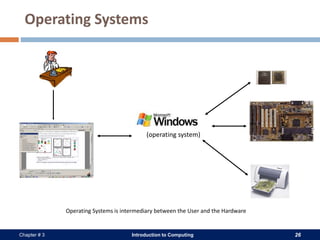
 Act as an intermediary between the user and the hardware
 Manage the resources of the computer
 Functions of Operating System
 Processor management
 assignment of processor to different tasks being performed by the computer system
 Establishment and enforcement of a priority system
 it determines and maintains the order in which jobs are to be executed in the
computer system
 Automatic transition from job to job as directed by special control
statements
 Interpretation of commands and instructions
Introduction to Computing 25Chapter # 3
Operating Systems
 An operating system performs
 Resource Management
 CPU management
 Memory management
 File System management
 I/O management
 Resource Sharing
 Among Users
 Among CPUs
 Interfacing between hardware and users
 OS provides an interface to several component including
 monitor, keyboard, mouse etc using drivers
Introduction to Computing 26Chapter # 3
Operating Systems
(operating system)
Operating Systems is intermediary between the User and the Hardware
Introduction to Computing 27Chapter # 3
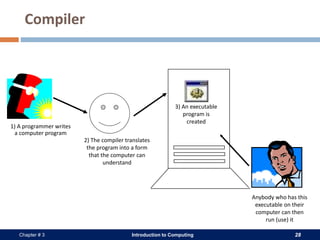
Compiler
 A compiler is a computer program (or set of programs) that transforms
source code written in a programming language (the source language)
into computer understandable language (machine Language)
 The name "compiler" is primarily used for programs that translate source
code (written in binary code) from a high-level programming language to
a lower level language (e.g., assembly language or machine code)
 Compilers bridge source programs in high-level languages with the
underlying hardware
 De Compilation
 is a anti compilation process in which low level language is translated back to a
higher level
Introduction to Computing 28Chapter # 3
Compiler
1) A programmer writes
a computer program
2) The compiler translates
the program into a form
that the computer can
understand
3) An executable
program is
created
Anybody who has this
executable on their
computer can then
run (use) it
Introduction to Computing 29Chapter # 3
Device Drivers
 A device driver is a program that controls a particular type of
device that is attached to your computer
 The operating system provides an interface to several
component
 including your monitor, keyboard, mouse etc using what is referred to
as "drivers"
 This is why sometimes when you install a new printer or
other piece of hardware, your system will ask you to install
more software called a driver
 There are device drivers for different hardware components
like printers, scanners and so on
Introduction to Computing 30Chapter # 3
BIOS (Basic Input Output System)
 BIOS contains all the code required to control the keyboard,
display screen, disk drives, serial communications, and a
number of miscellaneous functions.
 BIOS software is stored on a non-volatile ROM chip built into
the system on the mother board.
 The BIOS provides a small library of basic input/output
functions used to operate and control devices
 such as the keyboard, text display functions and so forth, and these
software library functions are callable by external software
Introduction to Computing 31Chapter # 3
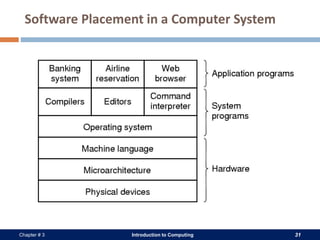
Software Placement in a Computer System

Itc chapter # 3

  • 1.
  • 2.
    Introduction to Computing2Chapter # 3 Computer System  System  A group or combination of interrelated, interdependent, or interacting elements forming a collective entity.  Computer System  A functionally related group of elements, especially a network of related computer hardware, software and data transmission.  So a system of one or more computers and associated software with common storage
  • 3.
    Introduction to Computing3Chapter # 3 Computer System  A complete computer system includes hardware, software, data, and users  Hardware consists of electronic devices, the parts you can touch  Software (programs) consists of instructions that control the computer  Data can be text, numbers, sounds, and images that the computer manipulates  People who operate computers are called users  To manipulate data, the computer performs basic operations which includes data input, processing, output, and storage
  • 4.
    Introduction to Computing4Chapter # 3 Basic Operations of Computer  Input  it is the process of accepting data or information  Processing  it is the transformation process to convert the input into output  the way that a computer manipulates data  Output  it is the result produced by the computer  it is the outcome of the process  Storing  it is the process of storing or retaining the data or information or instructions, so that the user can retain and retrieve it whenever required  Controlling  it is the process of directing the manner and sequence in which all the operations are to be performed
  • 5.
    Introduction to Computing5Chapter # 3 Basic Operations of Computer
  • 6.
    Introduction to Computing6Chapter # 3 Basic Operations of Computer
  • 7.
    Introduction to Computing7Chapter # 3 Basic Operations of Computer
  • 8.
    Introduction to Computing8Chapter # 3 Components of Computer System  A computer system has four components  Hardware  Software  User  Data
  • 9.
    Introduction to Computing9Chapter # 3 Components of Computer Systems
  • 10.
    Introduction to Computing10Chapter # 3 Components of Computer Systems (Users)  Users  are the people operating the computer  are the most important part  tell the computer what to do  In fact the user is a critical part of a complete computer system, especially when a personal computer is involved  this may seem surprising, since we tend to think of computer as intelligent devices, capable of performing amazing tasks  People also sometimes believe that computer can think and make decisions, just like human do  but this is not the case  even the most powerful supercomputer requires human interaction for solving problems.  When working with a personal computer, the user can take on several roles, depending on what he or she wants to accomplish
  • 11.
    Introduction to Computing11Chapter # 3 Components of Computer Systems (Data)  Data  Pieces of information  Computer organize and present data  Data is collection of facts as values or measurements.  It can be numbers, words, observations or even just description of things  This information may be in the form of  Text documents  Images  Audio clips  Software programs, or other types of data  Communications devices perform both input and output functions, allowing computers to share information  In a computer, data consists of small pieces of information that, by themselves, may not make sense to a person  The computer manipulates data into useful information
  • 12.
    Introduction to Computing12Chapter # 3 Components of Computer Systems (Hardware)  Computer hardware is the collection of physical elements that comprise a computer system  Computer hardware refers to the physical parts or components of a computer  such as monitor, keyboard, Computer data storage, hard drive disk, mouse, printers, CPU(graphic cards, sound cards, memory, motherboard and chips), etc  Hardware is tangible  all of the hardware components are physical objects that you can actually touch
  • 13.
    Introduction to Computing13Chapter # 3 Components of Computer Systems (Hardware)  Some of the hardware components are  Processor  Motherboard  Keyboard/mouse  RAM  Hard drive  CD/DVD  Floppy  USB port  Network card  Modem  Serial ports  Parallel port  Sound card  Video card  Fan  Cables  Power switch  Reset switch  Case
  • 14.
    Introduction to Computing14Chapter # 3 Components of Computer Systems (Hardware)
  • 15.
    Introduction to Computing15Chapter # 3 Components of Computer Systems (Hardware)
  • 16.
    Introduction to Computing16Chapter # 3 Components of Computer Systems (Software)  Computer software is a collection of computer programs and related data that provides the instructions for telling a computer what to do and how to do it  It is not tangible  it has no substance  Software tells the hardware what to do  Through software we interact with the hardware  software convert human understandable language in to computer understandable language  It helps manage the computer hardware and provides common services for efficient execution of various application software  We use operating system software to help analyze, configure, optimize and maintain the computer
  • 17.
    Introduction to Computing17Chapter # 3 Components of Computer Systems (Software)  Software are use for  Security purposes  Educational purposes like teaching and self learning  Banking system e.g. ATMs, online banking etc  Airline reservations  Chatting, video conferences etc  They are even used to run many application software’s  Other software applications are used  In many medical devices that monitor or control patients are predominantly controlled by software e.g. heart rate, blood pressure and breath rate checking monitors  to make design of buildings, roads, traffic signals, bridges  to protect the computers from viruses and prevent from a loss
  • 18.
    Introduction to Computing18Chapter # 3 Computer Program  Software is a collection of computer programs  A computer program is written in a computer language (such as C++, Java, Python, or others) by programmers  The computer language is in a text format (source code) and can be read by a person  if you do not understand the structure and rules of the language you may not understand it very well  Once a program is written, an operation is performed on it which is called compiling  it converts the source code into a form (binary language) understandable by the computer hardware
  • 19.
    Introduction to Computing19Chapter # 3 Software Types  There are two general types of software  Application Software  System software
  • 20.
    Introduction to Computing20Chapter # 3 Application Software  Application software is computer software designed to help the user to perform specific tasks  They are also known as an application or an app  in recent years, the abbreviation "app" has specifically come to mean application software written for mobile devices  Examples include enterprise software, accounting software, office suites, graphics software and media players  Applications may be bundled with the computer and its system software, or may be published separately  Application programs are written in a computer language like any other program
  • 21.
    Introduction to Computing21Chapter # 3 Application Software  There are two major categories of application software  General Purpose  These software are general purpose and available on retail shops or through internet  They can be freeware or COTS (commercial off the shelf)  e.g. Microsoft Word, PowerPoint, Adobe Photoshop, Jet Audio etc.  Custom  These software are purposely custom build according to the needs of the user  e.g. Riphah Campus Management System, HBL Banking System etc.  Some program packages come in a set with multiple programs included to provide multiple capabilities such as the Microsoft Office suite of programs  Microsoft Word is a program that gives the user the ability to write documents  Microsoft Outlook is used to send and receive e-mail  Other examples are word processors, spreadsheets, media players, database applications etc.
  • 22.
    Introduction to Computing22Chapter # 3 System Software  System software is computer software designed to  operate the computer hardware  provide basic functionality, and  provide a platform for running application software  System software includes device drivers, operating systems, servers, utilities, and window system  It is responsible for managing a variety of independent hardware components  so that they can work together harmoniously  Its purpose is to unburden the application software programmer from the often complex details of the particular computer being used  including such accessories as communications devices, printers, device readers, displays and keyboards, and also to partition the computer's resources such as memory and processor time in a safe and stable manner
  • 23.
    Introduction to Computing23Chapter # 3 System Software  Device drivers  They provides basic functionality to operate and control the hardware connected to or built into the computer  Operating system  It allows the parts of a computer to work together by performing tasks like transferring data between memory and disks or rendering output onto a display device  e.g. Microsoft Windows, Mac OS X and Linux  It also provides a platform to run high-level system software and application software  Utility software  it helps to analyze, configure, optimize and maintain the computer  Software Development Tools  like a compiler, linker or debugger  BIOS
  • 24.
    Introduction to Computing24Chapter # 3 Operating Systems  The operating system is the core software component of your computer  It performs many functions and is, in very basic terms  an interface between your computer and the outside world  Act as an intermediary between the user and the hardware  Manage the resources of the computer  Functions of Operating System  Processor management  assignment of processor to different tasks being performed by the computer system  Establishment and enforcement of a priority system  it determines and maintains the order in which jobs are to be executed in the computer system  Automatic transition from job to job as directed by special control statements  Interpretation of commands and instructions
  • 25.
    Introduction to Computing25Chapter # 3 Operating Systems  An operating system performs  Resource Management  CPU management  Memory management  File System management  I/O management  Resource Sharing  Among Users  Among CPUs  Interfacing between hardware and users  OS provides an interface to several component including  monitor, keyboard, mouse etc using drivers
  • 26.
    Introduction to Computing26Chapter # 3 Operating Systems (operating system) Operating Systems is intermediary between the User and the Hardware
  • 27.
    Introduction to Computing27Chapter # 3 Compiler  A compiler is a computer program (or set of programs) that transforms source code written in a programming language (the source language) into computer understandable language (machine Language)  The name "compiler" is primarily used for programs that translate source code (written in binary code) from a high-level programming language to a lower level language (e.g., assembly language or machine code)  Compilers bridge source programs in high-level languages with the underlying hardware  De Compilation  is a anti compilation process in which low level language is translated back to a higher level
  • 28.
    Introduction to Computing28Chapter # 3 Compiler 1) A programmer writes a computer program 2) The compiler translates the program into a form that the computer can understand 3) An executable program is created Anybody who has this executable on their computer can then run (use) it
  • 29.
    Introduction to Computing29Chapter # 3 Device Drivers  A device driver is a program that controls a particular type of device that is attached to your computer  The operating system provides an interface to several component  including your monitor, keyboard, mouse etc using what is referred to as "drivers"  This is why sometimes when you install a new printer or other piece of hardware, your system will ask you to install more software called a driver  There are device drivers for different hardware components like printers, scanners and so on
  • 30.
    Introduction to Computing30Chapter # 3 BIOS (Basic Input Output System)  BIOS contains all the code required to control the keyboard, display screen, disk drives, serial communications, and a number of miscellaneous functions.  BIOS software is stored on a non-volatile ROM chip built into the system on the mother board.  The BIOS provides a small library of basic input/output functions used to operate and control devices  such as the keyboard, text display functions and so forth, and these software library functions are callable by external software
  • 31.
    Introduction to Computing31Chapter # 3 Software Placement in a Computer System