0
What you will learn in this chapter
●● The main principles of the legislation relating to the use of ICT/computer
systems
●● Health and safety when using ICT
●● Physical safety
●● How good design can minimise health problems of ICT
●● How ICT can enhance the lives of people
Legal, Social, Ethical
and Environmental
Issues when Using ICT
Computer use and the law
With so many people using computers today, and with many of the
computers connected to the internet, many users worry that others will
misuse their computers and, e.g. steal their data to commit fraud. Over the
years, a number of laws have been passed to make misusing computers to do
harm to others, steal their ideas or their data or to reveal information about
others illegal. While the laws will not stop people misusing computers, they
do act as a deterrent to try and prevent computer misuse and to offer the
victims some way of recovering their losses.
Computer Misuse Act(s)
This Act of Parliament relates to:
●● the unauthorised accessing of materials stored on computers, which
means that any access to materials that you do not have permission
to view is against this law, as is using a computer to access data or
programs stored on other computer; this is often what people refer to
as ‘hacking’ but hacking is only illegal if you do not have permission
to access the data or use the computer to access the data
●● any access to computer material with the intention of using the infor-
mation to commit further offences is against this law; this means that
if you access information, even if you have permission to do so, with
the intention of using it to commit, e.g. fraud, you are breaking this law
6
HE22623.indb 96 23/07/2010 13:43
6: Legal, Social, Ethical and Environmental Issues 97
● any unauthorised alterations you make to computer materials is
against this law; this means that if you change some materials stored
on computer when you do not have permission, then this is breaking
this law; for instance, if you access someone else’s computer files and
change the contents, then you are breaking this law; also, unauthorised
altering of files to make the computer malfunction, alter its workings
or damage other data breaks this law – so sending a virus is against
this law.
Penalties for breaking this law can be a prison term of several years, or fines,
or both.
Data Protection Act
The Data Protection Act aims to protect the rights of the owners of the data.
It does not actually protect the data. The Act sets out rules on how the data
should be stored and used and provides a means for the owners of the data
to complain and sometimes to claim compensation if their data is misused.
Data on ICT systems
Storing data on computers makes it easier for that data to be accessed and
retrieved by the user, but it can also make it more available to those who
would misuse it.
The Data Protection Act tries to protect individuals by giving them
rights to access any data stored by others and to try and make sure that
the data is processed appropriately. Further, many people would prefer that
their personal data is kept private and not known by everyone.
Everyone has the right to know what data is stored about them on
computer systems and the right to view it. If someone feels that they are
not being allowed to view the personal data stored about them, or that the
data is not being processed properly according to the Act, they can contact
the Government Information Commissioner’s Office and ask for help.
The Information Commissioner’s Office will investigate the matter and if
necessary can enforce any actions to deal with the complaint.
The Data Protection Act lays down eight principles about how personal
data should be handled by anyone storing the data.
These principles are that:
● Personal data must be fairly and lawfully processed.
This means that personal data must not be collected by deceiving or
misleading the person into providing it and the personal data can only
be used lawfully.
● Personal data must be processed for limited purposes.
This means that personal data must only be used for the purpose
for which it was obtained. For instance, a person’s email address
WEBLINK
http://www.teach-
ict.com/gcse/
theory/computer_
misuse_act/
miniweb/index.htm
This provides an
explanation of the
Computer Misuse
Act.
ACTIVITY 1
Find out and make
a list of the types
of data that your
school keeps about
you. Do not list the
actual data but write
down items such as:
● name
● date of birth
HE22623.indb 97 23/07/2010 13:43
98 Unit 1 OCR ICT FOR GCSE
– collected so that a company can reply to enquiries – must not be
used, without the person’s permission, for any other purpose.
● Personal data must be adequate, relevant and not excessive.
This means that personal data that is stored should be just enough
for the task to be carried out, only relevant to the task and should not
include other data. A bank would only need to hold a customer’s name
address, for instance, and not any details of their medical records,
while a hospital would hold the patient’s name and address and
medical details but not their back account details.
● Personal data must be accurate and up to date.
This means the person storing the data has a duty to ensure that any
data they hold is accurate and free from errors. This is the principle
that most people worry about because inaccurate data stored by, e.g.
banks and credit companies can cause many difficulties. Most people
who ask to see what data is being held about them are concerned that
companies hold data that is not accurate and want to get it corrected.
● Personal data must not be kept for longer than is necessary.
Data should be discarded when it is no longer needed. However, the
data should be discarded in a way that others cannot read or access it.
● Personal data must be processed in line with your rights.
This principle ensures that the person’s data is processed so that a
person’s rights are respected.
● Personal data must be kept secure.
Any stored data must be kept secure. The Data Protection Act ensures
that people who hold data take all technical and organisational
precautions against its loss, unauthorised access and damage. The
Act does not dictate what measures must be taken but it means that a
company must use proper security to protect the data. Companies will
set passwords, levels of access and use physical methods of protecting
their data to comply with part of the Act.
● Personal data must not be transferred to other countries outside of the
European Economic Area that do not have adequate data protection.
Other countries around the world may not have the same level of data
protection as the UK, so the Act states that personal date must not be sent
to countries with levels of Data Protection lower than in force in the UK.
Copyright, Design and Patents Act(s)
Computers make copying of many publications so much easier! Multiple
copies of, e.g. video, music, images and documents are easily made with the
aid of computers so authors are concerned that their works be protected
and that they earn the royalties that they deserve.
In the UK, unlike some other countries, there is no copyright regis-
tration. An author of, e.g. a book automatically owns the copyright to that
WEBLINKS
http://www.
teach-ict.com/
gcse/theory/dpa/
miniweb/index.htm
This provides an
explanation of the
Data Protection Act.
HE22623.indb 98 23/07/2010 13:43
6: Legal, Social, Ethical and Environmental Issues 99
book when the book is created. Copyright applies to any work of art, music,
book, dramatic work, e.g. a play, and is subject to international treaties so
that other countries recognise the copyright as well.
Copyright lasts for many years after the initial publication of the work
but only gives limited protection to creative work. Owning copyright to a
piece of work will not stop others from copying it but only allow the author
to bring action in the courts, and often the person copying the work cannot
be traced. This is particularly a problem with computer software, images
and other digital data, e.g. audio and video files where copies are so easily
made and shared.
Any copying or sharing of digital files that you have not created yourself
is a breach of copyright; copying and sharing MP3 files made from music
CDs, copying movies from DVDs and using other people’s images are all
breaches of copyright.
Health and Safety at Work Act(s)
Almost everyone, not just all employees and employers, have a duty under
the Health and Safety at Work Acts to work and behave safely; also the
Act makes it illegal to act recklessly or intentionally act in such a way as to
endanger yourself or others. Employees must take reasonable care for their
own and others safety and cooperate with their employers in doing so.
The Act applies to those using computers for their work but not neces-
sarily to those using them at home – unless the person is working at home.
It would, however, be very silly not to take care when using computers
at home as prolonged use of computers may damage your health. There
are a number of conditions that may be caused by long periods of use of
computers.
Health
Repetitive Strain Injury (RSI) may be caused by the repetitive clicking of the
buttons of a mouse or a keyboard and shows itself as pain in the arms; the
pain gets worse with any activity and the area affected may be weak. RSI is
a term that is often used to cover other conditions such as Carpel Tunnel
Syndrome (CTS) where there is muscle paralysis or numbness in the hands
caused by damage to the nerves in the wrist and arms. It is not certain that
RSI or CTS is actually caused by repetitive actions when using computers
but these actions do seem to make the conditions worse.
Headaches are often caused by problems with vision and having a
computer monitor too far way, too dim or too bright, or having the text on
the screen at the wrong size, may cause headaches.
Neck or back pain may be associated with incorrect postures. Sitting
at the wrong height, distance or for long periods at computer desks may
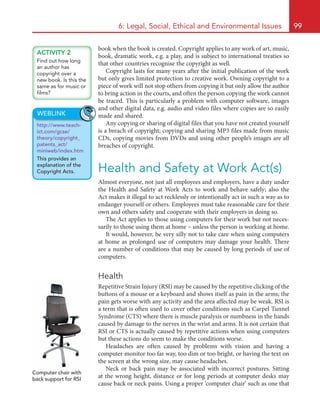
cause back or neck pains. Using a proper ‘computer chair’ such as one that
ACTIVITY 2
Find out how long
an author has
copyright over a
new book. Is this the
same as for music or
films?
WEBLINK
http://www.teach-
ict.com/gcse/
theory/copyright_
patents_act/
miniweb/index.htm
This provides an
explanation of the
Copyright Acts.
Computer chair with
back support for RSI
HE22623.indb 99 23/07/2010 13:43
100 Unit 1 OCR ICT FOR GCSE
provides proper back support and is adjustable will lower the risk of back
pain or damage. Also, having computer monitors at the wrong distance or
angle may cause neck or back pains.
Eyestrain or sore eyes may be caused by using computers for long
periods. Staring at a computer screen for long periods without blinking will
cause the eye to dry out, having the wrong size text on screen will strain
the eyes when trying to read it, having too bright or dim colours will cause
eyestrain and not setting the resolution of the monitor appropriately will
strain the eyes. Another consideration is the light level and reflections for
monitors as these can affect how easily the work on the screen is seen. Using
computers will not damage your eyes but might make them sore or cause
headaches.
WEBLINK
http://www.teach-
ict.com/gcse/
theory/healthsafety/
miniweb/index.htm
This provides
explanations about
health and safety.
Physical safety
Using computers can also cause physical damage to you if you are not
sensible. You should:
● use a proper office chair with proper back support and adjustable
height; the chair should have a single, central leg that allows the chair
to swing around and that leg should have at least five supporting
points, possibly each with a wheel so that the chair can move easily
● not drink or eat when using a computer due to the possible electrical
hazards, and the possible spillage of food and drink into the computer
itself!
● not tamper with any cables or computer parts
● place the computer equipment safely so it cannot fall or be knocked
over
● not behave in a manner to cause possible damage to the computer
equipment or place others in danger, e.g. don’t run around or push
people or place bags in throughways.
ACTIVITY 3
Copy out and fill in this table with all the hazards you can find:
Health
problem
Description of how the
problem might happen
How to try and
prevent it
ACTIVITY 4
Obtain a copy or
make a copy of the
rules about using
the computers and
computer rooms at
school.
Next to each rule
write down why the
rule is imposed.
HE22623.indb 100 23/07/2010 13:43
6: Legal, Social, Ethical and Environmental Issues 101
Design of computer rooms
When computers and computer rooms are designed, the designers take into
account the safety of the users. Computers and peripherals are all made to a
high level of electrical safety, have no sharp edges and will withstand some
misuse without becoming dangerous.
Computer rooms must have safe electrical installations, have proper and
adequate surfaces for computers, be secure from unauthorised access, have
easy and safe exit routes in case of, e.g. fire and provide adequate working
space for each individual.
How ICT can enhance the lives of
people
ICT has made many everyday tasks easier or safer and many persons with
disabilities or impairments have found that the use of ICT has made their
life easier and allowed them to take part in employment or other aspects of
life that would normally be denied to them.
Computer software often has facilities which many people do not
normally use but which can make using it far easier:
● Voice recognition will take spoken words or sounds and turn them
into commands or words on a screen. This can be used by persons
physically unable to type to create documents, make the computer
carry out tasks or to initiate or answer telephone calls when driving. In
most circumstances, using a mobile telephone while driving is illegal
but answering by voice command is still allowed.
● Voice synthesis will turn words on a screen into vocal sounds so it can
be used to tell a visually impaired user what is on the screen. Drivers
can have incoming text messages on their mobile phones read to them
while driving. This makes driving safer.
ACTIVITY 5
Copy out and fill in this table from the information on the previous page:
Safety hazard
in the room
What might happen Prevention
Equipment
not placed
properly
A monitor might fall on
someone and hurt them
Place all equipment
properly
Food and drink
in the room
ACTIVITY 6
Draw a sketch of
your computer
room at school and
mark on it the exit
routes and where
the fire extinguishers
are. Are the
extinguishers the
correct type? Find
out what each type
of extinguisher is
used for.
HE22623.indb 101 23/07/2010 13:43
102	 Unit 1 OCR ICT FOR GCSE
●● Zooming into parts of a screen can make the images or text easier to
read.
●● Predictive text can save time when typing a text message on a mobile
phone.
Persons with limited physical abilities can control computers by using
specialised input devices.
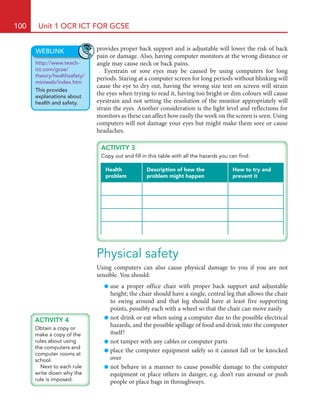
	 A puff-suck switch (also called a sip and suck switch) is used by simply
sucking or puffing down a tube and the action is input into a computer via
an interface box.
	 A mouse can be adapted for use by a foot rather by a hand. These
switches are pressure-sensitive and can be made to respond to one touch or
several so as to emulate mouse clicks or movements.
	 Head pointers work by tracking the movements of your head so that
up-down, left-right, etc. inputs can be made into the computer.
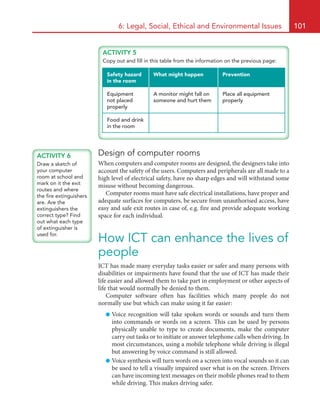
	 Braille keyboards are designed for the visually impaired and allow entry
of characters just like a normal keyboard. This is a typical Braille keyboard:
Puff-suck switch
Braille keyboard
	 Some Braille keyboards have specially designed connections to the keys
to allow easy editing of characters, e.g. the key is pressed on one edge and
the character can be removed.
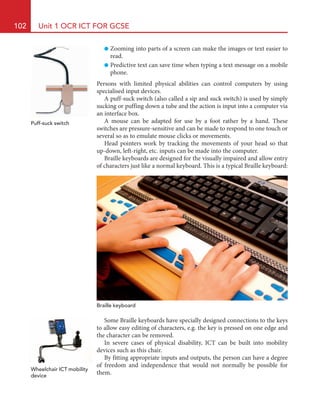
	 In severe cases of physical disability, ICT can be built into mobility
devices such as this chair.
	 By fitting appropriate inputs and outputs, the person can have a degree
of freedom and independence that would not normally be possible for
them.
Wheelchair ICT mobility
device
HE22623.indb 102 23/07/2010 13:43
6: Legal, Social, Ethical and Environmental Issues 103
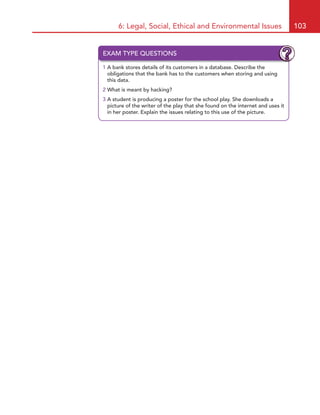
EXAM TYPE QUESTIONS
1 A bank stores details of its customers in a database. Describe the
obligations that the bank has to the customers when storing and using
this data.
2 What is meant by hacking?
3 A student is producing a poster for the school play. She downloads a
picture of the writer of the play that she found on the internet and uses it
in her poster. Explain the issues relating to this use of the picture.
HE22623.indb 103 23/07/2010 13:43

Issues related to ict

  • 1.
    0 What you willlearn in this chapter ●● The main principles of the legislation relating to the use of ICT/computer systems ●● Health and safety when using ICT ●● Physical safety ●● How good design can minimise health problems of ICT ●● How ICT can enhance the lives of people Legal, Social, Ethical and Environmental Issues when Using ICT Computer use and the law With so many people using computers today, and with many of the computers connected to the internet, many users worry that others will misuse their computers and, e.g. steal their data to commit fraud. Over the years, a number of laws have been passed to make misusing computers to do harm to others, steal their ideas or their data or to reveal information about others illegal. While the laws will not stop people misusing computers, they do act as a deterrent to try and prevent computer misuse and to offer the victims some way of recovering their losses. Computer Misuse Act(s) This Act of Parliament relates to: ●● the unauthorised accessing of materials stored on computers, which means that any access to materials that you do not have permission to view is against this law, as is using a computer to access data or programs stored on other computer; this is often what people refer to as ‘hacking’ but hacking is only illegal if you do not have permission to access the data or use the computer to access the data ●● any access to computer material with the intention of using the infor- mation to commit further offences is against this law; this means that if you access information, even if you have permission to do so, with the intention of using it to commit, e.g. fraud, you are breaking this law 6 HE22623.indb 96 23/07/2010 13:43
  • 2.
    6: Legal, Social,Ethical and Environmental Issues 97 ● any unauthorised alterations you make to computer materials is against this law; this means that if you change some materials stored on computer when you do not have permission, then this is breaking this law; for instance, if you access someone else’s computer files and change the contents, then you are breaking this law; also, unauthorised altering of files to make the computer malfunction, alter its workings or damage other data breaks this law – so sending a virus is against this law. Penalties for breaking this law can be a prison term of several years, or fines, or both. Data Protection Act The Data Protection Act aims to protect the rights of the owners of the data. It does not actually protect the data. The Act sets out rules on how the data should be stored and used and provides a means for the owners of the data to complain and sometimes to claim compensation if their data is misused. Data on ICT systems Storing data on computers makes it easier for that data to be accessed and retrieved by the user, but it can also make it more available to those who would misuse it. The Data Protection Act tries to protect individuals by giving them rights to access any data stored by others and to try and make sure that the data is processed appropriately. Further, many people would prefer that their personal data is kept private and not known by everyone. Everyone has the right to know what data is stored about them on computer systems and the right to view it. If someone feels that they are not being allowed to view the personal data stored about them, or that the data is not being processed properly according to the Act, they can contact the Government Information Commissioner’s Office and ask for help. The Information Commissioner’s Office will investigate the matter and if necessary can enforce any actions to deal with the complaint. The Data Protection Act lays down eight principles about how personal data should be handled by anyone storing the data. These principles are that: ● Personal data must be fairly and lawfully processed. This means that personal data must not be collected by deceiving or misleading the person into providing it and the personal data can only be used lawfully. ● Personal data must be processed for limited purposes. This means that personal data must only be used for the purpose for which it was obtained. For instance, a person’s email address WEBLINK http://www.teach- ict.com/gcse/ theory/computer_ misuse_act/ miniweb/index.htm This provides an explanation of the Computer Misuse Act. ACTIVITY 1 Find out and make a list of the types of data that your school keeps about you. Do not list the actual data but write down items such as: ● name ● date of birth HE22623.indb 97 23/07/2010 13:43
  • 3.
    98 Unit 1OCR ICT FOR GCSE – collected so that a company can reply to enquiries – must not be used, without the person’s permission, for any other purpose. ● Personal data must be adequate, relevant and not excessive. This means that personal data that is stored should be just enough for the task to be carried out, only relevant to the task and should not include other data. A bank would only need to hold a customer’s name address, for instance, and not any details of their medical records, while a hospital would hold the patient’s name and address and medical details but not their back account details. ● Personal data must be accurate and up to date. This means the person storing the data has a duty to ensure that any data they hold is accurate and free from errors. This is the principle that most people worry about because inaccurate data stored by, e.g. banks and credit companies can cause many difficulties. Most people who ask to see what data is being held about them are concerned that companies hold data that is not accurate and want to get it corrected. ● Personal data must not be kept for longer than is necessary. Data should be discarded when it is no longer needed. However, the data should be discarded in a way that others cannot read or access it. ● Personal data must be processed in line with your rights. This principle ensures that the person’s data is processed so that a person’s rights are respected. ● Personal data must be kept secure. Any stored data must be kept secure. The Data Protection Act ensures that people who hold data take all technical and organisational precautions against its loss, unauthorised access and damage. The Act does not dictate what measures must be taken but it means that a company must use proper security to protect the data. Companies will set passwords, levels of access and use physical methods of protecting their data to comply with part of the Act. ● Personal data must not be transferred to other countries outside of the European Economic Area that do not have adequate data protection. Other countries around the world may not have the same level of data protection as the UK, so the Act states that personal date must not be sent to countries with levels of Data Protection lower than in force in the UK. Copyright, Design and Patents Act(s) Computers make copying of many publications so much easier! Multiple copies of, e.g. video, music, images and documents are easily made with the aid of computers so authors are concerned that their works be protected and that they earn the royalties that they deserve. In the UK, unlike some other countries, there is no copyright regis- tration. An author of, e.g. a book automatically owns the copyright to that WEBLINKS http://www. teach-ict.com/ gcse/theory/dpa/ miniweb/index.htm This provides an explanation of the Data Protection Act. HE22623.indb 98 23/07/2010 13:43
  • 4.
    6: Legal, Social,Ethical and Environmental Issues 99 book when the book is created. Copyright applies to any work of art, music, book, dramatic work, e.g. a play, and is subject to international treaties so that other countries recognise the copyright as well. Copyright lasts for many years after the initial publication of the work but only gives limited protection to creative work. Owning copyright to a piece of work will not stop others from copying it but only allow the author to bring action in the courts, and often the person copying the work cannot be traced. This is particularly a problem with computer software, images and other digital data, e.g. audio and video files where copies are so easily made and shared. Any copying or sharing of digital files that you have not created yourself is a breach of copyright; copying and sharing MP3 files made from music CDs, copying movies from DVDs and using other people’s images are all breaches of copyright. Health and Safety at Work Act(s) Almost everyone, not just all employees and employers, have a duty under the Health and Safety at Work Acts to work and behave safely; also the Act makes it illegal to act recklessly or intentionally act in such a way as to endanger yourself or others. Employees must take reasonable care for their own and others safety and cooperate with their employers in doing so. The Act applies to those using computers for their work but not neces- sarily to those using them at home – unless the person is working at home. It would, however, be very silly not to take care when using computers at home as prolonged use of computers may damage your health. There are a number of conditions that may be caused by long periods of use of computers. Health Repetitive Strain Injury (RSI) may be caused by the repetitive clicking of the buttons of a mouse or a keyboard and shows itself as pain in the arms; the pain gets worse with any activity and the area affected may be weak. RSI is a term that is often used to cover other conditions such as Carpel Tunnel Syndrome (CTS) where there is muscle paralysis or numbness in the hands caused by damage to the nerves in the wrist and arms. It is not certain that RSI or CTS is actually caused by repetitive actions when using computers but these actions do seem to make the conditions worse. Headaches are often caused by problems with vision and having a computer monitor too far way, too dim or too bright, or having the text on the screen at the wrong size, may cause headaches. Neck or back pain may be associated with incorrect postures. Sitting at the wrong height, distance or for long periods at computer desks may cause back or neck pains. Using a proper ‘computer chair’ such as one that ACTIVITY 2 Find out how long an author has copyright over a new book. Is this the same as for music or films? WEBLINK http://www.teach- ict.com/gcse/ theory/copyright_ patents_act/ miniweb/index.htm This provides an explanation of the Copyright Acts. Computer chair with back support for RSI HE22623.indb 99 23/07/2010 13:43
  • 5.
    100 Unit 1OCR ICT FOR GCSE provides proper back support and is adjustable will lower the risk of back pain or damage. Also, having computer monitors at the wrong distance or angle may cause neck or back pains. Eyestrain or sore eyes may be caused by using computers for long periods. Staring at a computer screen for long periods without blinking will cause the eye to dry out, having the wrong size text on screen will strain the eyes when trying to read it, having too bright or dim colours will cause eyestrain and not setting the resolution of the monitor appropriately will strain the eyes. Another consideration is the light level and reflections for monitors as these can affect how easily the work on the screen is seen. Using computers will not damage your eyes but might make them sore or cause headaches. WEBLINK http://www.teach- ict.com/gcse/ theory/healthsafety/ miniweb/index.htm This provides explanations about health and safety. Physical safety Using computers can also cause physical damage to you if you are not sensible. You should: ● use a proper office chair with proper back support and adjustable height; the chair should have a single, central leg that allows the chair to swing around and that leg should have at least five supporting points, possibly each with a wheel so that the chair can move easily ● not drink or eat when using a computer due to the possible electrical hazards, and the possible spillage of food and drink into the computer itself! ● not tamper with any cables or computer parts ● place the computer equipment safely so it cannot fall or be knocked over ● not behave in a manner to cause possible damage to the computer equipment or place others in danger, e.g. don’t run around or push people or place bags in throughways. ACTIVITY 3 Copy out and fill in this table with all the hazards you can find: Health problem Description of how the problem might happen How to try and prevent it ACTIVITY 4 Obtain a copy or make a copy of the rules about using the computers and computer rooms at school. Next to each rule write down why the rule is imposed. HE22623.indb 100 23/07/2010 13:43
  • 6.
    6: Legal, Social,Ethical and Environmental Issues 101 Design of computer rooms When computers and computer rooms are designed, the designers take into account the safety of the users. Computers and peripherals are all made to a high level of electrical safety, have no sharp edges and will withstand some misuse without becoming dangerous. Computer rooms must have safe electrical installations, have proper and adequate surfaces for computers, be secure from unauthorised access, have easy and safe exit routes in case of, e.g. fire and provide adequate working space for each individual. How ICT can enhance the lives of people ICT has made many everyday tasks easier or safer and many persons with disabilities or impairments have found that the use of ICT has made their life easier and allowed them to take part in employment or other aspects of life that would normally be denied to them. Computer software often has facilities which many people do not normally use but which can make using it far easier: ● Voice recognition will take spoken words or sounds and turn them into commands or words on a screen. This can be used by persons physically unable to type to create documents, make the computer carry out tasks or to initiate or answer telephone calls when driving. In most circumstances, using a mobile telephone while driving is illegal but answering by voice command is still allowed. ● Voice synthesis will turn words on a screen into vocal sounds so it can be used to tell a visually impaired user what is on the screen. Drivers can have incoming text messages on their mobile phones read to them while driving. This makes driving safer. ACTIVITY 5 Copy out and fill in this table from the information on the previous page: Safety hazard in the room What might happen Prevention Equipment not placed properly A monitor might fall on someone and hurt them Place all equipment properly Food and drink in the room ACTIVITY 6 Draw a sketch of your computer room at school and mark on it the exit routes and where the fire extinguishers are. Are the extinguishers the correct type? Find out what each type of extinguisher is used for. HE22623.indb 101 23/07/2010 13:43
  • 7.
    102 Unit 1OCR ICT FOR GCSE ●● Zooming into parts of a screen can make the images or text easier to read. ●● Predictive text can save time when typing a text message on a mobile phone. Persons with limited physical abilities can control computers by using specialised input devices. A puff-suck switch (also called a sip and suck switch) is used by simply sucking or puffing down a tube and the action is input into a computer via an interface box. A mouse can be adapted for use by a foot rather by a hand. These switches are pressure-sensitive and can be made to respond to one touch or several so as to emulate mouse clicks or movements. Head pointers work by tracking the movements of your head so that up-down, left-right, etc. inputs can be made into the computer. Braille keyboards are designed for the visually impaired and allow entry of characters just like a normal keyboard. This is a typical Braille keyboard: Puff-suck switch Braille keyboard Some Braille keyboards have specially designed connections to the keys to allow easy editing of characters, e.g. the key is pressed on one edge and the character can be removed. In severe cases of physical disability, ICT can be built into mobility devices such as this chair. By fitting appropriate inputs and outputs, the person can have a degree of freedom and independence that would not normally be possible for them. Wheelchair ICT mobility device HE22623.indb 102 23/07/2010 13:43
  • 8.
    6: Legal, Social,Ethical and Environmental Issues 103 EXAM TYPE QUESTIONS 1 A bank stores details of its customers in a database. Describe the obligations that the bank has to the customers when storing and using this data. 2 What is meant by hacking? 3 A student is producing a poster for the school play. She downloads a picture of the writer of the play that she found on the internet and uses it in her poster. Explain the issues relating to this use of the picture. HE22623.indb 103 23/07/2010 13:43