





Is BCS Dead? What's Next for Bringing
External Content into SharePoint?
@jefffried
Jeff Fried
CTO, BA Insight
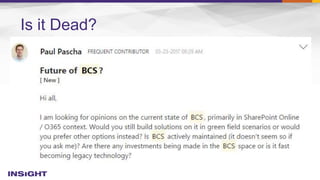
Is it Dead?
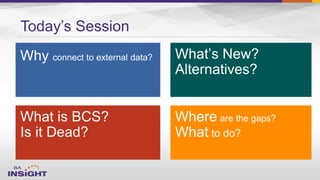
Today’s Session
Focused on Search and
SharePoint since 2004
Longtime
Search Nerd
• CTO, BA Insight
• Senior PM, Microsoft
• VP, FAST
• SVP, LingoMotors
About Jeff Fried
Passionate About
• Search
• SharePoint
• Search-driven
applications
• Information Strategy
Blog:
BAinsight.com/blog
Technet Column
“A View from the
Crawlspace”
jeff.fried@bainsight.com
About BA Insight


– Connectivity
– Applications -
– Classification -
– Analytics

6
Some Reasons for Connecting to External Data




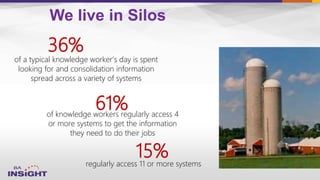
We live in Silos
of knowledge workers regularly access 4
or more systems to get the information
they need to do their jobs
61%
regularly access 11 or more systems
of a typical knowledge worker’s day is spent
looking for and consolidation information
spread across a variety of systems
36%
15%
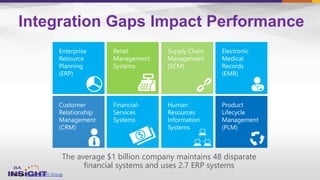
The average $1 billion company maintains 48 disparate
financial systems and uses 2.7 ERP systems
Integration Gaps Impact Performance
Source: The Hackett Group
The problem is getting worse

–

–
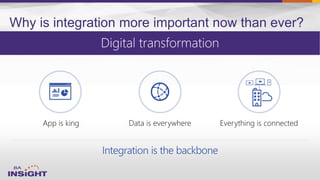
Why is integration more important now than ever?
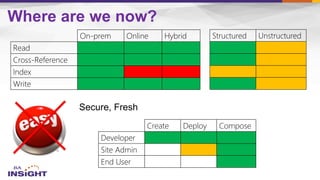
Read
Cross-Reference
Index
Write
On-prem Online Hybrid
Web Parts, List View
Lookup, Report
Search, CBS, Delve
Update, Create
Structured Unstructured
Developer
Site Admin
End User
Create Deploy Compose
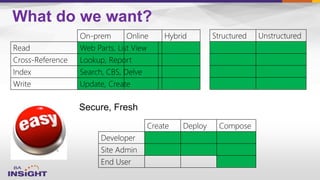
What do we want?
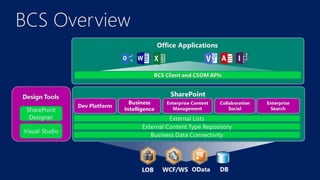
BCS Overview
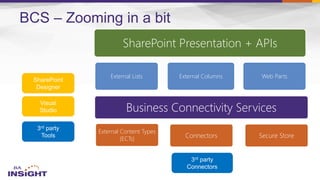
SharePoint Presentation + APIs
External Lists External Columns Web Parts
Business Connectivity Services
External Content Types
(ECTs) Connectors Secure Store
BCS – Zooming in a bit
16
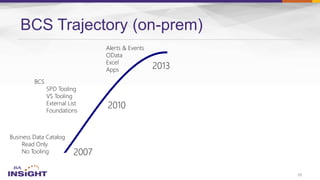
BCS Trajectory (on-prem)
Business Data Catalog
Read Only
No Tooling
BCS
SPD Tooling
VS Tooling
External List
Foundations
Alerts & Events
OData
Excel
Apps
17
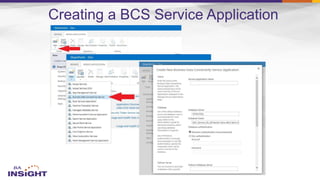
Creating a BCS Service Application
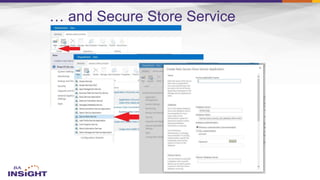
… and Secure Store Service
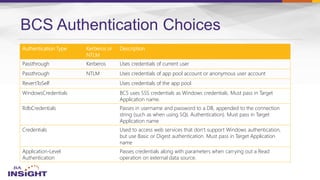
BCS Authentication Choices
Authentication Type Kerberos or
NTLM
Description
Passthrough Kerberos Uses credentials of current user
Passthrough NTLM Uses credentials of app pool account or anonymous user account
RevertToSelf Uses credentials of the app pool
WindowsCredentials BCS uses SSS credentials as Windows credentials. Must pass in Target
Application name.
RdbCredentials Passes in username and password to a DB, appended to the connection
string (such as when using SQL Authentication). Must pass in Target
Application name
Credentials Used to access web services that don’t support Windows authentication,
but use Basic or Digest authentication. Must pass in Target Application
name
Application-Level
Authentication
Passes credentials along with parameters when carrying out a Read
operation on external data source.
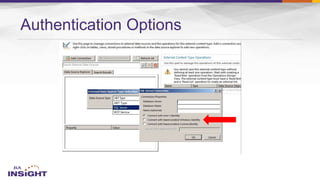
Authentication Options
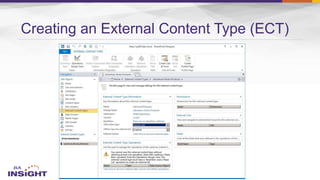
Creating an External Content Type (ECT)
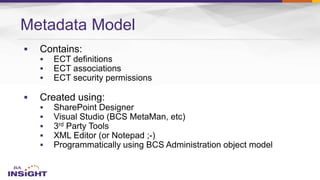
Metadata Model










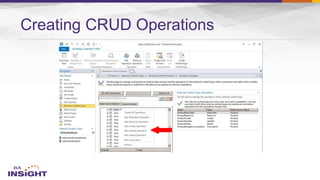
Creating CRUD Operations
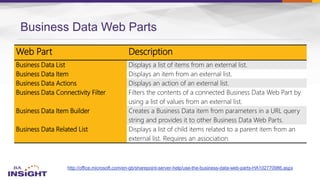
Business Data Web Parts
http://office.microsoft.com/en-gb/sharepoint-server-help/use-the-business-data-web-parts-HA102770986.aspx
Web Part Description
Business Data List Displays a list of items from an external list.
Business Data Item Displays an item from an external list.
Business Data Actions Displays an action of an external list.
Business Data Connectivity Filter Filters the contents of a connected Business Data Web Part by
using a list of values from an external list.
Business Data Item Builder Creates a Business Data item from parameters in a URL query
string and provides it to other Business Data Web Parts.
Business Data Related List Displays a list of child items related to a parent item from an
external list. Requires an association.
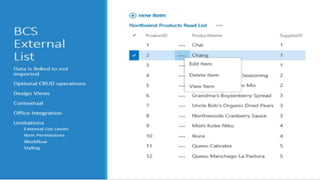
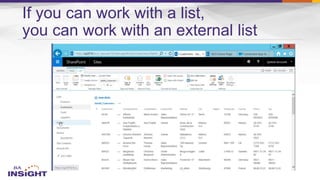
If you can work with a list,
you can work with an external list
–
–
–
–
–
–
–
–
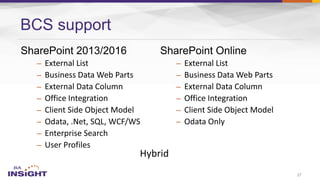
BCS support
27
–
–
–
–
–
–
Hybrid
Resources
Business Connectivity Services in SharePoint 2013
http://office.microsoft.com/en-gb/sharepoint-server-help/introduction-to-external-data-HA102891586.aspx
http://technet.microsoft.com/en-us/library/ee661740.aspx
http://msdn.microsoft.com/en-us/library/jj163251.aspx
BCS & Secure Store PowerShell Cmdlets
http://technet.microsoft.com/en-us/library/ff793361.aspx
http://technet.microsoft.com/en-us/library/ee906549.aspx
Compare Feature Availability
http://technet.microsoft.com/en-us/library/jj819267.aspx
Business Data Web Parts
http://office.microsoft.com/en-gb/sharepoint-server-help/use-the-business-data-web-parts-HA102770986.aspx
BCS Meta Man by Lightning Tools:
http://lightningtools.com/bcs/bcs-meta-man.aspx
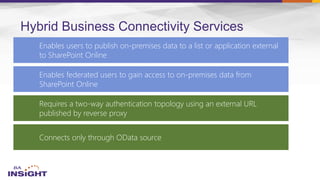
Hybrid Business Connectivity Services
Enables users to publish on-premises data to a list or application external
to SharePoint Online
Enables federated users to gain access to on-premises data from
SharePoint Online
Requires a two-way authentication topology using an external URL
published by reverse proxy
Connects only through OData source
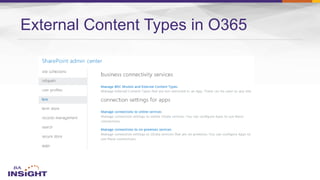
External Content Types in O365
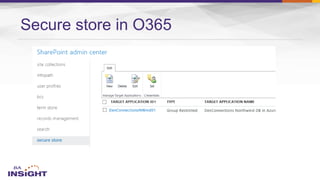
Secure store in O365
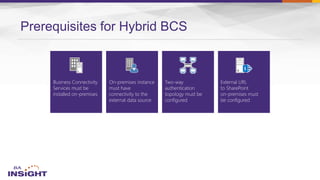
Prerequisites for Hybrid BCS
Two-way
authentication
topology must be
configured
Business Connectivity
Services must be
installed on-premises
On-premises instance
must have
connectivity to the
external data source
External URL
to SharePoint
on-premises must
be configured
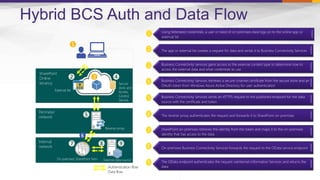
Using federated credentials, a user in need of on-premises data logs on to the online app or
external list
The app or external list creates a request for data and sends it to Business Connectivity Services
Business Connectivity Services gains access to the external content type to determine how to
access the external data and what credentials to use
Business Connectivity Services retrieves a secure-channel certificate from the secure store and an
OAuth token from Windows Azure Active Directory for user authentication
Business Connectivity Services sends an HTTPS request to the published endpoint for the data
source with the certificate and token
The reverse proxy authenticates the request and forwards it to SharePoint on-premises
SharePoint on-premises retrieves the identity from the token and maps it to the on-premises
identity that has access to the data
On-premises Business Connectivity Services forwards the request to the OData service endpoint
The OData endpoint authenticates the request viaInternet Information Services and returns the
data
❶
SharePoint
Online
tenancy
External list Business Connectivity Services
Secure
store and
Access
Control
Service
Perimeter
network
Reverse proxy
Internal
network
On-premises SharePoint farm External data source
Authentication flow
Data flow
❷ ❸
❼
❻
❹
❾
❺
❽
Hybrid BCS Auth and Data Flow
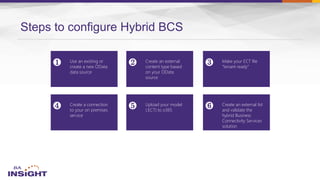
Steps to configure Hybrid BCS
Create a connection
to your on premises
service
Make your ECT file
“tenant ready”
Create an external
content type based
on your OData
source
❶ ❷ ❸
❹ ❻
Use an existing or
create a new OData
data source
Create an external list
and validate the
hybrid Business
Connectivity Services
solution
❺ Upload your model
(.ECT) to o365
Read
Cross-Reference
Index
Write
On-prem Online Hybrid Structured Unstructured
Developer
Site Admin
End User
Create Deploy Compose
Where are we now?
36
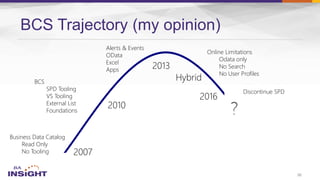
BCS Trajectory (my opinion)
Business Data Catalog
Read Only
No Tooling
BCS
SPD Tooling
VS Tooling
External List
Foundations
Alerts & Events
OData
Excel
Apps
Online Limitations
Odata only
No Search
No User Profiles
Discontinue SPD
37
38
39





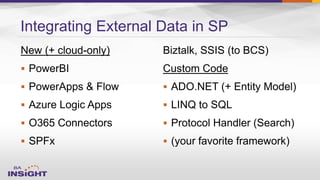
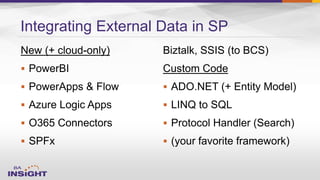
Integrating External Data in SP




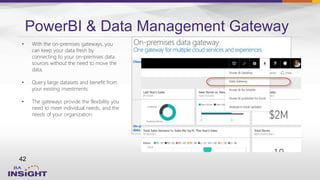
PowerBI & Data Management Gateway
42
• With the on-premises gateways, you
can keep your data fresh by
connecting to your on-premises data
sources without the need to move the
data.
• Query large datasets and benefit from
your existing investments.
• The gateways provide the flexibility you
need to meet individual needs, and the
needs of your organization.
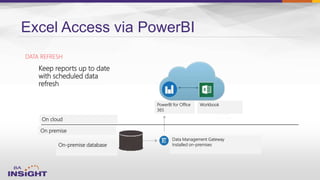
Excel Access via PowerBI
Keep reports up to date
with scheduled data
refresh
PowerBI for Office
365
Data Management Gateway
Installed on-premisesOn-premise database
Workbook
On cloud
On premise
DATA REFRESH
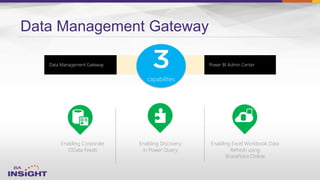
Data Management Gateway
Enabling Corporate
OData Feeds
Enabling Excel Workbook Data
Refresh using
SharePoint Online
Enabling Discovery
in Power Query
capabilities
Power BI Admin CenterData Management Gateway
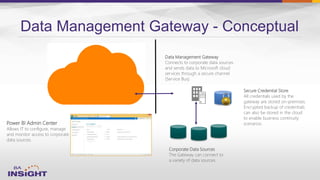
Data Management Gateway - Conceptual
Power BI Admin Center
Allows IT to configure, manage
and monitor access to corporate
data sources.
Data Management Gateway
Connects to corporate data sources
and sends data to Microsoft cloud
services through a secure channel
(Service Bus).
Corporate Data Sources
The Gateway can connect to
a variety of data sources.
Secure Credential Store
All credentials used by the
gateway are stored on-premises.
Encrypted backup of credentials
can also be stored in the cloud
to enable business continuity
scenarios.
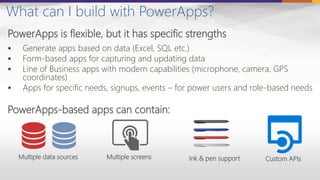
What can I build with PowerApps?
PowerApps is flexible, but it has specific strengths
 Generate apps based on data (Excel, SQL etc.)
 Form-based apps for capturing and updating data
 Line of Business apps with modern capabilities (microphone, camera, GPS
coordinates)
 Apps for specific needs, signups, events – for power users and role-based needs
PowerApps-based apps can contain:
Multiple data sources Multiple screens Ink & pen support Custom APIs
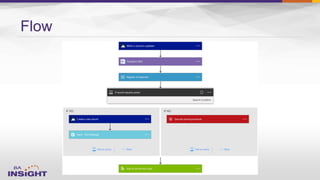
Flow
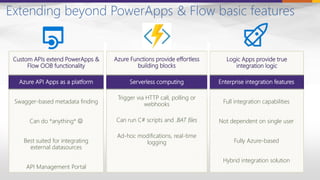
Extending beyond PowerApps & Flow basic features
Custom APIs extend PowerApps &
Flow OOB functionality
Azure Functions provide effortless
building blocks
Logic Apps provide true
integration logic
Serverless computing
Trigger via HTTP call, polling or
webhooks
Can run C# scripts and .BAT files
Ad-hoc modifications, real-time
logging
Azure API Apps as a platform
Swagger-based metadata finding
Can do *anything* 
Best suited for integrating
external datasources
API Management Portal
Enterprise integration features
Full integration capabilities
Not dependent on single user
Fully Azure-based
Hybrid integration solution
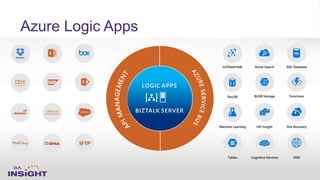
Azure Logic Apps
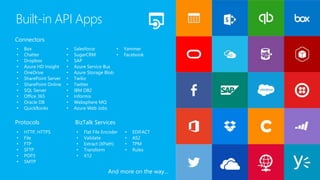
• Box
• Chatter
• Dropbox
• Azure HD Insight
• OneDrive
• SharePoint Server
• SharePoint Online
• SQL Server
• Office 365
• Oracle DB
• QuickBooks
• Salesforce
• SugarCRM
• SAP
• Azure Service Bus
• Azure Storage Blob
• Twilio
• Twitter
• IBM DB2
• Informix
• Websphere MQ
• Azure Web Jobs
• Yammer
• Facebook
• HTTP, HTTPS
• File
• FTP
• SFTP
• POP3
• SMTP
• Flat File Encoder
• Validate
• Extract (XPath)
• Transform
• X12
• EDIFACT
• AS2
• TPM
• Rules
Connectors
Protocols BizTalk Services
Built-in API Apps
And more on the way…
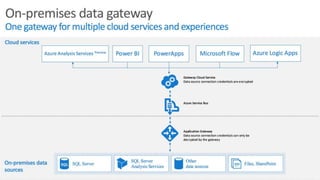
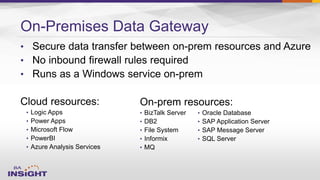
On-Premises Data Gateway
•
•
•
• Logic Apps
• Power Apps
• Microsoft Flow
• PowerBI
• Azure Analysis Services
On-prem resources:
• BizTalk Server
• DB2
• File System
• Informix
• MQ
• Oracle Database
• SAP Application Server
• SAP Message Server
• SQL Server
On-Premises Data Gateway
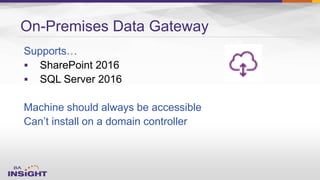
Supports…
 SharePoint 2016
 SQL Server 2016
Machine should always be accessible
Can’t install on a domain controller
Read
Cross-Reference
Index
Write
On-prem Online Hybrid Structured Unstructured
Developer
Site Admin
End User
Create Deploy Compose
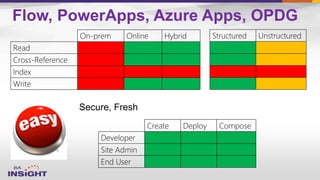
Flow, PowerApps, Azure Apps, OPDG
Resources – PowerBI, PowerApps, ....

 https://powerbi.microsoft.com/
 https://powerbi.microsoft.com/developers
 https://support.powerbi.com/

 https://msdn.microsoft.com/en-US/library/mt186542.aspx

 https://msdn.microsoft.com/en-us/library/mt147898.aspx

 https://powerapps.microsoft.com/en-us/tutorials/formula-reference/

 https://blogs.msdn.microsoft.com/carlosag/2016/05/09/using-azure-functions-
in-powerapps/

 https://powerapps.microsoft.com/en-us/blog/using-azure-functions-in-
powerapps/
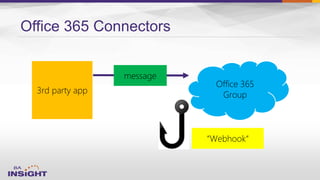
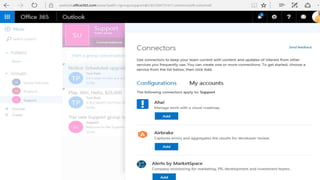
Office 365 Connectors
3rd party app
Office 365
Group
message
“Webhook“
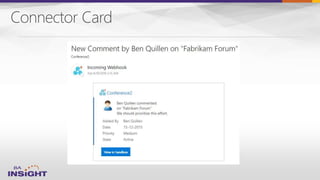
Connector Card
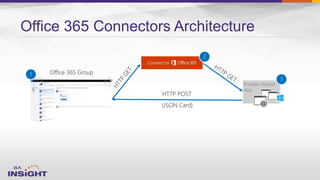
Office 365 Connectors Architecture
HTTP POST
(JSON Card)
Office 365 Group1
Provider Hosted
App
3
2
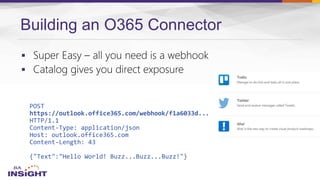
Building an O365 Connector


POST
https://outlook.office365.com/webhook/f1a6033d...
HTTP/1.1
Content-Type: application/json
Host: outlook.office365.com
Content-Length: 43
{"Text":"Hello World! Buzz...Buzz...Buzz!"}





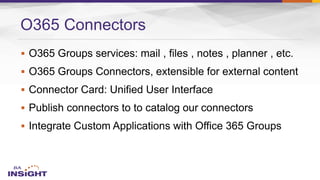
O365 Connectors
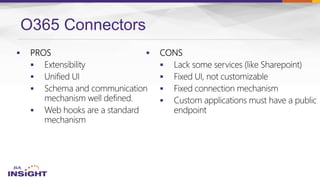
O365 Connectors










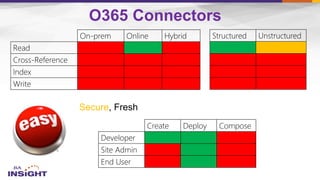
Read
Cross-Reference
Index
Write
On-prem Online Hybrid Structured Unstructured
Secure
Developer
Site Admin
End User
Create Deploy Compose
O365 Connectors
 http://aka.ms/o365-connectors
 https://dev.outlook.com/Connectors/GetStarted
 http://aka.ms/connectorplayground
 https://dev.outlook.com/connectors/reference
 https://outlook.office.com/connectors/publish
 http://winampplugins.co.uk/curl/
 http://officespdev.uservoice.com/connectors
 https://dev.outlook.com/Connectors
Resources – O365 Connectors
65





Integrating External Data in SP




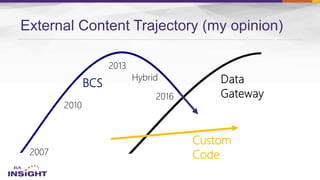
External Content Trajectory (my opinion)
BCS
Custom
Code
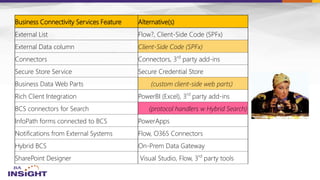
Business Connectivity Services Feature Alternative(s)
External List Flow?, Client-Side Code (SPFx)
External Data column Client-Side Code (SPFx)
Connectors Connectors, 3rd
party add-ins
Secure Store Service Secure Credential Store
Business Data Web Parts (custom client-side web parts)
Rich Client Integration PowerBI (Excel), 3rd
party add-ins
BCS connectors for Search (protocol handlers w Hybrid Search)
InfoPath forms connected to BCS PowerApps
Notifications from External Systems Flow, O365 Connectors
Hybrid BCS On-Prem Data Gateway
SharePoint Designer Visual Studio, Flow, 3rd
party tools
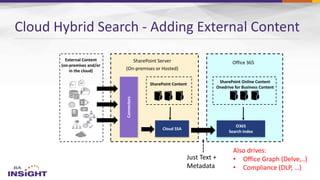
External Content
(on-premises and/or
in the cloud)
SharePoint Server
(On-premises or Hosted)
Office 365
SharePoint Online Content
Onedrive for Business Content
Connectors
SharePoint Content
Cloud Hybrid Search - Adding External Content
Also drives:
• Office Graph (Delve,..)
• Compliance (DLP, …)
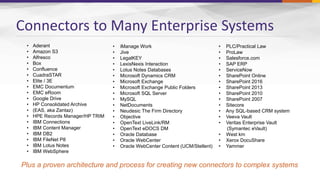
Connectors to Many Enterprise Systems
• Aderant
• Amazon S3
• Alfresco
• Box
• Confluence
• CuadraSTAR
• Elite / 3E
• EMC Documentum
• EMC eRoom
• Google Drive
• HP Consolidated Archive
• (EAS, aka Zantaz)
• HPE Records Manager/HP TRIM
• IBM Connections
• IBM Content Manager
• IBM DB2
• IBM FileNet P8
• IBM Lotus Notes
• IBM WebSphere
• iManage Work
• Jive
• LegalKEY
• LexisNexis Interaction
• Lotus Notes Databases
• Microsoft Dynamics CRM
• Microsoft Exchange
• Microsoft Exchange Public Folders
• Microsoft SQL Server
• MySQL
• NetDocuments
• Neudesic The Firm Directory
• Objective
• OpenText LiveLink/RM
• OpenText eDOCS DM
• Oracle Database
• Oracle WebCenter
• Oracle WebCenter Content (UCM/Stellent)
• PLC/Practical Law
• ProLaw
• Salesforce.com
• SAP ERP
• ServiceNow
• SharePoint Online
• SharePoint 2016
• SharePoint 2013
• SharePoint 2010
• SharePoint 2007
• Sitecore
• Any SQL-based CRM system
• Veeva Vault
• Veritas Enterprise Vault
(Symantec eVault)
• West km
• Xerox DocuShare
• Yammer
Plus a proven architecture and process for creating new connectors to complex systems

–
–

–
–
What to do?
Contact:
Jeff.Fried@BAinsight.com
www.BAinsight.com
Questions

Is BCS Dead?

  • 1.
    Is BCS Dead?What's Next for Bringing External Content into SharePoint? @jefffried Jeff Fried CTO, BA Insight
  • 2.
  • 3.
  • 4.
    Focused on Searchand SharePoint since 2004 Longtime Search Nerd • CTO, BA Insight • Senior PM, Microsoft • VP, FAST • SVP, LingoMotors About Jeff Fried Passionate About • Search • SharePoint • Search-driven applications • Information Strategy Blog: BAinsight.com/blog Technet Column “A View from the Crawlspace” jeff.fried@bainsight.com
  • 5.
    About BA Insight   –Connectivity – Applications - – Classification - – Analytics 
  • 6.
  • 7.
    Some Reasons forConnecting to External Data    
  • 8.
    We live inSilos of knowledge workers regularly access 4 or more systems to get the information they need to do their jobs 61% regularly access 11 or more systems of a typical knowledge worker’s day is spent looking for and consolidation information spread across a variety of systems 36% 15%
  • 9.
    The average $1billion company maintains 48 disparate financial systems and uses 2.7 ERP systems Integration Gaps Impact Performance Source: The Hackett Group
  • 10.
    The problem isgetting worse  –  –
  • 11.
    Why is integrationmore important now than ever?
  • 12.
    Read Cross-Reference Index Write On-prem Online Hybrid WebParts, List View Lookup, Report Search, CBS, Delve Update, Create Structured Unstructured Developer Site Admin End User Create Deploy Compose What do we want?
  • 14.
  • 15.
    SharePoint Presentation +APIs External Lists External Columns Web Parts Business Connectivity Services External Content Types (ECTs) Connectors Secure Store BCS – Zooming in a bit
  • 16.
    16 BCS Trajectory (on-prem) BusinessData Catalog Read Only No Tooling BCS SPD Tooling VS Tooling External List Foundations Alerts & Events OData Excel Apps
  • 17.
  • 18.
    Creating a BCSService Application
  • 19.
    … and SecureStore Service
  • 20.
    BCS Authentication Choices AuthenticationType Kerberos or NTLM Description Passthrough Kerberos Uses credentials of current user Passthrough NTLM Uses credentials of app pool account or anonymous user account RevertToSelf Uses credentials of the app pool WindowsCredentials BCS uses SSS credentials as Windows credentials. Must pass in Target Application name. RdbCredentials Passes in username and password to a DB, appended to the connection string (such as when using SQL Authentication). Must pass in Target Application name Credentials Used to access web services that don’t support Windows authentication, but use Basic or Digest authentication. Must pass in Target Application name Application-Level Authentication Passes credentials along with parameters when carrying out a Read operation on external data source.
  • 21.
  • 22.
    Creating an ExternalContent Type (ECT)
  • 23.
  • 24.
  • 25.
    Business Data WebParts http://office.microsoft.com/en-gb/sharepoint-server-help/use-the-business-data-web-parts-HA102770986.aspx Web Part Description Business Data List Displays a list of items from an external list. Business Data Item Displays an item from an external list. Business Data Actions Displays an action of an external list. Business Data Connectivity Filter Filters the contents of a connected Business Data Web Part by using a list of values from an external list. Business Data Item Builder Creates a Business Data item from parameters in a URL query string and provides it to other Business Data Web Parts. Business Data Related List Displays a list of child items related to a parent item from an external list. Requires an association.
  • 26.
    If you canwork with a list, you can work with an external list
  • 27.
  • 28.
    Resources Business Connectivity Servicesin SharePoint 2013 http://office.microsoft.com/en-gb/sharepoint-server-help/introduction-to-external-data-HA102891586.aspx http://technet.microsoft.com/en-us/library/ee661740.aspx http://msdn.microsoft.com/en-us/library/jj163251.aspx BCS & Secure Store PowerShell Cmdlets http://technet.microsoft.com/en-us/library/ff793361.aspx http://technet.microsoft.com/en-us/library/ee906549.aspx Compare Feature Availability http://technet.microsoft.com/en-us/library/jj819267.aspx Business Data Web Parts http://office.microsoft.com/en-gb/sharepoint-server-help/use-the-business-data-web-parts-HA102770986.aspx BCS Meta Man by Lightning Tools: http://lightningtools.com/bcs/bcs-meta-man.aspx
  • 29.
    Hybrid Business ConnectivityServices Enables users to publish on-premises data to a list or application external to SharePoint Online Enables federated users to gain access to on-premises data from SharePoint Online Requires a two-way authentication topology using an external URL published by reverse proxy Connects only through OData source
  • 30.
  • 31.
  • 32.
    Prerequisites for HybridBCS Two-way authentication topology must be configured Business Connectivity Services must be installed on-premises On-premises instance must have connectivity to the external data source External URL to SharePoint on-premises must be configured
  • 33.
    Using federated credentials,a user in need of on-premises data logs on to the online app or external list The app or external list creates a request for data and sends it to Business Connectivity Services Business Connectivity Services gains access to the external content type to determine how to access the external data and what credentials to use Business Connectivity Services retrieves a secure-channel certificate from the secure store and an OAuth token from Windows Azure Active Directory for user authentication Business Connectivity Services sends an HTTPS request to the published endpoint for the data source with the certificate and token The reverse proxy authenticates the request and forwards it to SharePoint on-premises SharePoint on-premises retrieves the identity from the token and maps it to the on-premises identity that has access to the data On-premises Business Connectivity Services forwards the request to the OData service endpoint The OData endpoint authenticates the request viaInternet Information Services and returns the data ❶ SharePoint Online tenancy External list Business Connectivity Services Secure store and Access Control Service Perimeter network Reverse proxy Internal network On-premises SharePoint farm External data source Authentication flow Data flow ❷ ❸ ❼ ❻ ❹ ❾ ❺ ❽ Hybrid BCS Auth and Data Flow
  • 34.
    Steps to configureHybrid BCS Create a connection to your on premises service Make your ECT file “tenant ready” Create an external content type based on your OData source ❶ ❷ ❸ ❹ ❻ Use an existing or create a new OData data source Create an external list and validate the hybrid Business Connectivity Services solution ❺ Upload your model (.ECT) to o365
  • 35.
    Read Cross-Reference Index Write On-prem Online HybridStructured Unstructured Developer Site Admin End User Create Deploy Compose Where are we now?
  • 36.
    36 BCS Trajectory (myopinion) Business Data Catalog Read Only No Tooling BCS SPD Tooling VS Tooling External List Foundations Alerts & Events OData Excel Apps Online Limitations Odata only No Search No User Profiles Discontinue SPD
  • 37.
  • 38.
  • 39.
  • 40.
  • 42.
    PowerBI & DataManagement Gateway 42 • With the on-premises gateways, you can keep your data fresh by connecting to your on-premises data sources without the need to move the data. • Query large datasets and benefit from your existing investments. • The gateways provide the flexibility you need to meet individual needs, and the needs of your organization.
  • 43.
    Excel Access viaPowerBI Keep reports up to date with scheduled data refresh PowerBI for Office 365 Data Management Gateway Installed on-premisesOn-premise database Workbook On cloud On premise DATA REFRESH
  • 44.
    Data Management Gateway EnablingCorporate OData Feeds Enabling Excel Workbook Data Refresh using SharePoint Online Enabling Discovery in Power Query capabilities Power BI Admin CenterData Management Gateway
  • 45.
    Data Management Gateway- Conceptual Power BI Admin Center Allows IT to configure, manage and monitor access to corporate data sources. Data Management Gateway Connects to corporate data sources and sends data to Microsoft cloud services through a secure channel (Service Bus). Corporate Data Sources The Gateway can connect to a variety of data sources. Secure Credential Store All credentials used by the gateway are stored on-premises. Encrypted backup of credentials can also be stored in the cloud to enable business continuity scenarios.
  • 46.
    What can Ibuild with PowerApps? PowerApps is flexible, but it has specific strengths  Generate apps based on data (Excel, SQL etc.)  Form-based apps for capturing and updating data  Line of Business apps with modern capabilities (microphone, camera, GPS coordinates)  Apps for specific needs, signups, events – for power users and role-based needs PowerApps-based apps can contain: Multiple data sources Multiple screens Ink & pen support Custom APIs
  • 47.
  • 48.
    Extending beyond PowerApps& Flow basic features Custom APIs extend PowerApps & Flow OOB functionality Azure Functions provide effortless building blocks Logic Apps provide true integration logic Serverless computing Trigger via HTTP call, polling or webhooks Can run C# scripts and .BAT files Ad-hoc modifications, real-time logging Azure API Apps as a platform Swagger-based metadata finding Can do *anything*  Best suited for integrating external datasources API Management Portal Enterprise integration features Full integration capabilities Not dependent on single user Fully Azure-based Hybrid integration solution
  • 49.
  • 50.
    • Box • Chatter •Dropbox • Azure HD Insight • OneDrive • SharePoint Server • SharePoint Online • SQL Server • Office 365 • Oracle DB • QuickBooks • Salesforce • SugarCRM • SAP • Azure Service Bus • Azure Storage Blob • Twilio • Twitter • IBM DB2 • Informix • Websphere MQ • Azure Web Jobs • Yammer • Facebook • HTTP, HTTPS • File • FTP • SFTP • POP3 • SMTP • Flat File Encoder • Validate • Extract (XPath) • Transform • X12 • EDIFACT • AS2 • TPM • Rules Connectors Protocols BizTalk Services Built-in API Apps And more on the way…
  • 52.
    On-Premises Data Gateway • • • •Logic Apps • Power Apps • Microsoft Flow • PowerBI • Azure Analysis Services On-prem resources: • BizTalk Server • DB2 • File System • Informix • MQ • Oracle Database • SAP Application Server • SAP Message Server • SQL Server
  • 53.
    On-Premises Data Gateway Supports… SharePoint 2016  SQL Server 2016 Machine should always be accessible Can’t install on a domain controller
  • 54.
    Read Cross-Reference Index Write On-prem Online HybridStructured Unstructured Developer Site Admin End User Create Deploy Compose Flow, PowerApps, Azure Apps, OPDG
  • 55.
    Resources – PowerBI,PowerApps, ....   https://powerbi.microsoft.com/  https://powerbi.microsoft.com/developers  https://support.powerbi.com/   https://msdn.microsoft.com/en-US/library/mt186542.aspx   https://msdn.microsoft.com/en-us/library/mt147898.aspx   https://powerapps.microsoft.com/en-us/tutorials/formula-reference/   https://blogs.msdn.microsoft.com/carlosag/2016/05/09/using-azure-functions- in-powerapps/   https://powerapps.microsoft.com/en-us/blog/using-azure-functions-in- powerapps/
  • 56.
    Office 365 Connectors 3rdparty app Office 365 Group message “Webhook“
  • 57.
  • 59.
    Office 365 ConnectorsArchitecture HTTP POST (JSON Card) Office 365 Group1 Provider Hosted App 3 2
  • 60.
    Building an O365Connector   POST https://outlook.office365.com/webhook/f1a6033d... HTTP/1.1 Content-Type: application/json Host: outlook.office365.com Content-Length: 43 {"Text":"Hello World! Buzz...Buzz...Buzz!"}
  • 61.
  • 62.
  • 63.
    Read Cross-Reference Index Write On-prem Online HybridStructured Unstructured Secure Developer Site Admin End User Create Deploy Compose O365 Connectors
  • 64.
     http://aka.ms/o365-connectors  https://dev.outlook.com/Connectors/GetStarted http://aka.ms/connectorplayground  https://dev.outlook.com/connectors/reference  https://outlook.office.com/connectors/publish  http://winampplugins.co.uk/curl/  http://officespdev.uservoice.com/connectors  https://dev.outlook.com/Connectors Resources – O365 Connectors
  • 65.
  • 66.
  • 67.
    External Content Trajectory(my opinion) BCS Custom Code
  • 68.
    Business Connectivity ServicesFeature Alternative(s) External List Flow?, Client-Side Code (SPFx) External Data column Client-Side Code (SPFx) Connectors Connectors, 3rd party add-ins Secure Store Service Secure Credential Store Business Data Web Parts (custom client-side web parts) Rich Client Integration PowerBI (Excel), 3rd party add-ins BCS connectors for Search (protocol handlers w Hybrid Search) InfoPath forms connected to BCS PowerApps Notifications from External Systems Flow, O365 Connectors Hybrid BCS On-Prem Data Gateway SharePoint Designer Visual Studio, Flow, 3rd party tools
  • 69.
    External Content (on-premises and/or inthe cloud) SharePoint Server (On-premises or Hosted) Office 365 SharePoint Online Content Onedrive for Business Content Connectors SharePoint Content Cloud Hybrid Search - Adding External Content Also drives: • Office Graph (Delve,..) • Compliance (DLP, …)
  • 70.
    Connectors to ManyEnterprise Systems • Aderant • Amazon S3 • Alfresco • Box • Confluence • CuadraSTAR • Elite / 3E • EMC Documentum • EMC eRoom • Google Drive • HP Consolidated Archive • (EAS, aka Zantaz) • HPE Records Manager/HP TRIM • IBM Connections • IBM Content Manager • IBM DB2 • IBM FileNet P8 • IBM Lotus Notes • IBM WebSphere • iManage Work • Jive • LegalKEY • LexisNexis Interaction • Lotus Notes Databases • Microsoft Dynamics CRM • Microsoft Exchange • Microsoft Exchange Public Folders • Microsoft SQL Server • MySQL • NetDocuments • Neudesic The Firm Directory • Objective • OpenText LiveLink/RM • OpenText eDOCS DM • Oracle Database • Oracle WebCenter • Oracle WebCenter Content (UCM/Stellent) • PLC/Practical Law • ProLaw • Salesforce.com • SAP ERP • ServiceNow • SharePoint Online • SharePoint 2016 • SharePoint 2013 • SharePoint 2010 • SharePoint 2007 • Sitecore • Any SQL-based CRM system • Veeva Vault • Veritas Enterprise Vault (Symantec eVault) • West km • Xerox DocuShare • Yammer Plus a proven architecture and process for creating new connectors to complex systems
  • 71.
  • 73.

Editor's Notes

  • #4 REMEMBER – An intranet project is not just a significant change project, it has the potential to be transformative to the way a company operates. Adoption is key to achieving this, so a clear plan for engagement and communication is crucial, based around your three areas of focus…
  • #9 REMEMBER – OoTB - Behaviour is how people are using SP not about the users themselves
  • #10 Most of us use at least one LOB system such as ERP, CRM, PLM, etc., on a regular basis In fact, as you can see, the average $1 billion organization maintains 48 disparate financial systems and uses 2.7 ERP systems The business-critical data within these systems gets stuck in siloes more often than not – keep in mind the term business-critical can change from company to company. What we mean by that is a function that is essential to the core mission of your organization This siloed data results in a lot of disconnect between departments Most companies have different departments that use these systems, as you can see on the screen LOB systems were created to help optimize every day jobs and for the most part, they do what we want them to do, yet they are focused on a specific function within the org (e.g. sales, HR, supply chain, etc.) With that in mind, most IT departments have about 30% of their budget to spend on investments each year to improve their LOB systems The options are to rip-and-replace one of these systems to optimize it or take the value in these systems that you’ve already invested in and spread that value across the organization to bridge integration gaps created by having information stuck in siloed systems There are many examples of how integration gaps impact organizational performance: A doctor prescribes medicine to a patient, but doesn’t know if it is in the pharmacy inventory because he doesn’t have insight into the LOB system responsible for inventory If the doctor could see both the clinical data and the inventory information, he could make a more informed decision for his patient, saving time for both himself and his patient Another example… NPL Construction Company was spending more than $130,000 annually in printing and delivering paper paystubs to employees. Human Resources personnel were overwhelmed with requests for reprints of past paystubs. W-2 tax forms were also a burden, as their payroll team had to consider ad-hoc employee requests for tax information from previous years. Keeping up with reissue requests was time time-consuming and costly since all this information was siloed in the company’s SAP system and only specialized employees could access it. By integrating SAP with SharePoint, NPL empowered employees with self-service capabilities, automated the payment process, and increased cost savings by an estimated 346% for the first three years of deployment Reference: http://www.microsoft.com/casestudies/Case_Study_Detail.aspx?CaseStudyID=710000001698
  • #12 Businesses are seen as being innovative IT is seen as catching up to innovation 3 components: proliferation of apps, data as management nightmare, smart devices that need to interact
  • #48 Create business processes and workflows visually Integrate with SaaS and enterprise applications Unlock value across on-premises and cloud Automate EAI, B2B/EDI, and business processes Leverage Integration Platform as a Service (iPaaS) Transform workflows into intelligent actions
  • #50 Its not just about the products, we have a pool of out-of-the-box connectors that help connect to many SaaS applications. Secret sauce is really the Azure services. Azure is now at your fingertips – opens doors to numerous possibilities. Traditional integration vendors, ask customers to build silo-ed integration solutions. That approach is not going to allow you to scale to your customer needs. With Azure, you can build holistic solutions. I can do more than integration – once you have your connected system, you can perform analytics on the data using HD insight, machine learning, to gain insight on your data. This is going to help customers make great business decisions. Some of you have IoT practices today, this is how you can leverage integration and IoT together. At MSFT, we think that there are multiple points of entry into integration: Think about your customers who reach out to you about mobile development, about IoT solutions, any e-commerce applications, eventually they are going to need a solid integration platform – and that’s what MSFT offers. 2 key differentiating factors to highlight again: Hybrid 2. Azure Services
  • #51 All the connectivity and tools you need to automate your modern business – with over 40 connectors and growing all the time with the ability for any 3rd party to contribute to our gallery.
  • #57 Any trigger creates a message card… A user creates an invoice in ERP system which then is sent to a group Website form is filled out and sent to a group Ticket system / Support contact or support group Activities in Social Media shall be available for product or project groups.
  • #62 This is a important slide , the summary of all presentation.
  • #63 In my opinion what is the cool part , and the less coolest.
  • #65 http://aka.ms/o365-connectors https://dev.outlook.com/Connectors/GetStarted http://aka.ms/connectorplayground https://dev.outlook.com/connectors/reference CURL Tool: https://curl.haxx.se/ or https://github.com/curl/curl or exe from http://winampplugins.co.uk/curl/