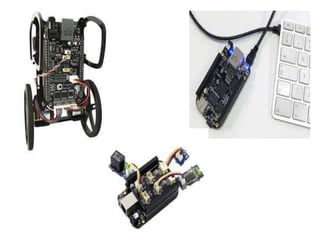
What is Beagle Bone Black..?
 It is a low-cost, development platform for
developers.
 Boot Linux in under 10 seconds and get
started on development in less than 5 minutes
with just a single USB cable.
Nuts & Bolts
Beagle Board Means
• Bring your own peripherals
• Entry-level cost ($149/179)
• ARM Cortex-A8 (superscalar)
• Graphics and DSP accelerated
• Linux and open source community
• Environment for innovators
Hardware
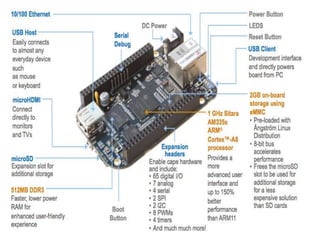
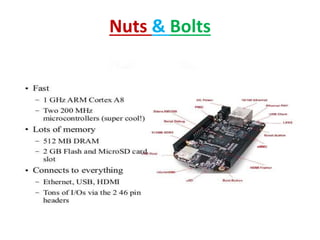
Processor: AM335x 1GHz ARM® Cortex-A8
• 512MB DD3 RAM
• 2GB 8-bit eMMC on-board flash storage
• 3D graphics accelerator
Connectivity
• USB client for power and communications
• USB host
• Ethernet
• HDMI
• 2x46 pin headers
Software Compatibility
• Angstrom Linux
• Android
• Cloud9 IDE on Node.js w/ Bone Script Library
History
• It has two versions 1)BEAGLE BOARD
2)BEAGLE BOARD XM
• Feb 2008: Rev A concept demonstrated at meeting with key
kernel maintainers and open source developers at TIDC
• Jun 2008: Rev B launched broad availability with Digit-Key.
• May 2009: Rev C doubles RAM to 256MB
• Jan 2010: Rev C4 bumps performance to 720MHz and resolves
USB power supply stability issue.
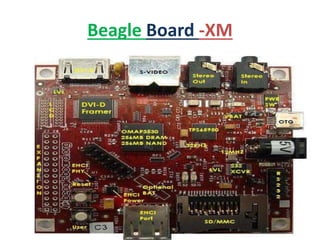
Beagle Board -XM
• A modified version of the Beagle Board called the Beagle Board-XM
started shipping on August 27, 2010.
• It measures in at 82.55 by 82.55 mm and has a faster CPU core
(clocked at 1 GHz compared to the 720 MHz of the Beagle Board).
• RAM (512 MB compared to 256 MB), onboard Ethernet and 4 port
USB hub.
• It has micro SD card.
• The addition of the Camera port to the -XM provides a simple way
of importing videos.
Beagle Board -XM
Browsing Your Beagle Board
• Firstly, just test that the
connection is active by trying
to connect to the BBB with a
browser.
• Connect to the URL
http://192.168.7.2
• You should see a helpful
introductory web page
served by the Beagle Board
itself
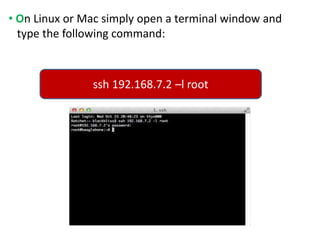
• On Linux or Mac simply open a terminal window and
type the following command:
ssh 192.168.7.2 –l root
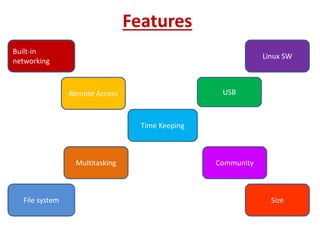
Features
Built-in
networking
Remote Access
Time Keeping
Linux SW
Multitasking
File system Size
USB
Community
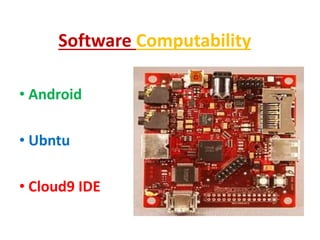
Software Computability
• Android
• Ubntu
• Cloud9 IDE
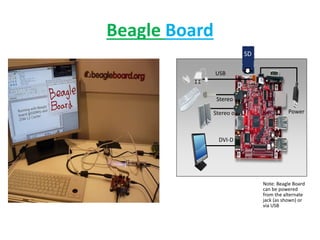
Beagle Board
Note: Beagle Board
can be powered
from the alternate
jack (as shown) or
via USB
Stereo in
SD
Power
DVI-D
USB
Stereo out
Why Beagle Board XM To Be Used
 In beagle board there is no over voltage
protection circuit.
 It is having only one USB, no insertion of
memory card, camera header, various
expansions.
 It is having only 256mb of memory as
compare to the beagle board XM.
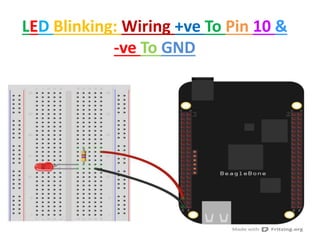
LED Blinking: Wiring +ve To Pin 10 &
-ve To GND
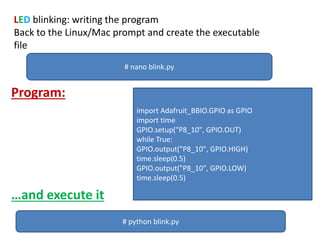
LED blinking: writing the program
Back to the Linux/Mac prompt and create the executable
file
Program:
…and execute it
# nano blink.py
import Adafruit_BBIO.GPIO as GPIO
import time
GPIO.setup("P8_10", GPIO.OUT)
while True:
GPIO.output("P8_10", GPIO.HIGH)
time.sleep(0.5)
GPIO.output("P8_10", GPIO.LOW)
time.sleep(0.5)
# python blink.py
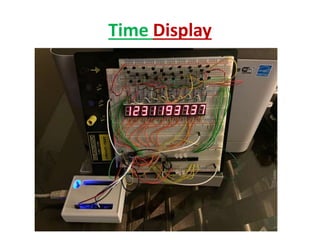
Time Display
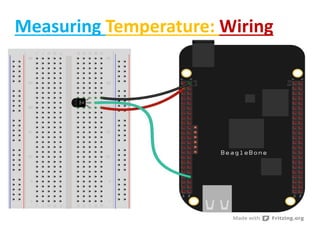
Measuring Temperature: Wiring
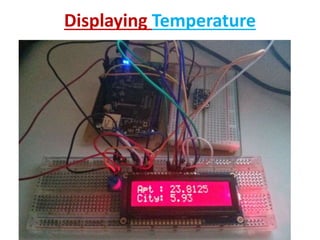
Displaying Temperature
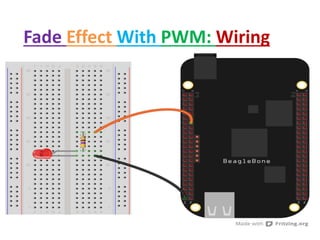
Fade Effect With PWM: Wiring
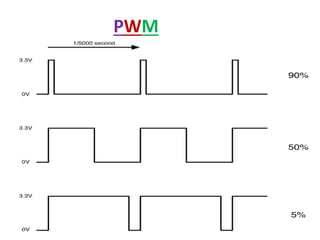
PWM
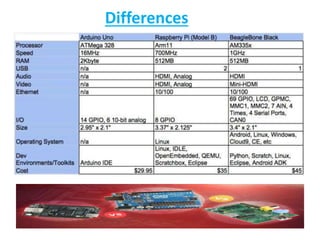
Differences
It is perfect for physical computing and smaller
embedded applications.
It can be complemented with cape plug-in boards.
Capes are expansion boards which can be stacked
onto the beagle bone board (up to four at one time).
Application
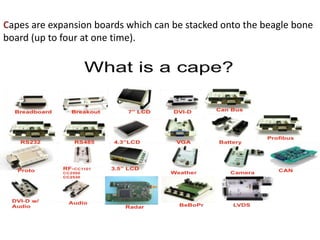
Capes are expansion boards which can be stacked onto the beagle bone
board (up to four at one time).
Exiting Applications
 Interfacing to all of your robotics motor drivers.
location or pressure sensors.
 2D or 3D cameras.
 Running Open CV, Open NI and other image collection.
 Analysis software to recognize the objects around your
robot and the gestures you might make to control it.
Recommended Readings
Getting Started with Beagle Bone Black Make
By Matt Richardson
Building Embedded Linux System
O’Reilly
By Karim Yaghmour, Jon Masters, Gilad Ben
Yassef, and Philippe Gerum
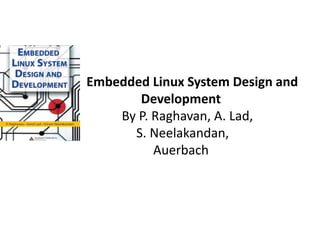
Embedded Linux System Design and
Development
By P. Raghavan, A. Lad,
S. Neelakandan,
Auerbach
Links
www.beagleboard.org
http://www.angstrom-distribution.org/
http://wiki.openembedded.net/index.php/Main_Page
http://focus.ti.com/docs/prod/folders/print/omap3530.html
Introduction To The Beagleboard

Introduction To The Beagleboard

  • 2.
    What is BeagleBone Black..?  It is a low-cost, development platform for developers.  Boot Linux in under 10 seconds and get started on development in less than 5 minutes with just a single USB cable.
  • 4.
  • 5.
    Beagle Board Means •Bring your own peripherals • Entry-level cost ($149/179) • ARM Cortex-A8 (superscalar) • Graphics and DSP accelerated • Linux and open source community • Environment for innovators
  • 6.
    Hardware Processor: AM335x 1GHzARM® Cortex-A8 • 512MB DD3 RAM • 2GB 8-bit eMMC on-board flash storage • 3D graphics accelerator Connectivity • USB client for power and communications • USB host • Ethernet • HDMI • 2x46 pin headers Software Compatibility • Angstrom Linux • Android • Cloud9 IDE on Node.js w/ Bone Script Library
  • 7.
    History • It hastwo versions 1)BEAGLE BOARD 2)BEAGLE BOARD XM • Feb 2008: Rev A concept demonstrated at meeting with key kernel maintainers and open source developers at TIDC • Jun 2008: Rev B launched broad availability with Digit-Key. • May 2009: Rev C doubles RAM to 256MB • Jan 2010: Rev C4 bumps performance to 720MHz and resolves USB power supply stability issue.
  • 8.
    Beagle Board -XM •A modified version of the Beagle Board called the Beagle Board-XM started shipping on August 27, 2010. • It measures in at 82.55 by 82.55 mm and has a faster CPU core (clocked at 1 GHz compared to the 720 MHz of the Beagle Board). • RAM (512 MB compared to 256 MB), onboard Ethernet and 4 port USB hub. • It has micro SD card. • The addition of the Camera port to the -XM provides a simple way of importing videos.
  • 9.
  • 10.
    Browsing Your BeagleBoard • Firstly, just test that the connection is active by trying to connect to the BBB with a browser. • Connect to the URL http://192.168.7.2 • You should see a helpful introductory web page served by the Beagle Board itself
  • 11.
    • On Linuxor Mac simply open a terminal window and type the following command: ssh 192.168.7.2 –l root
  • 12.
    Features Built-in networking Remote Access Time Keeping LinuxSW Multitasking File system Size USB Community
  • 13.
  • 14.
    Beagle Board Note: BeagleBoard can be powered from the alternate jack (as shown) or via USB Stereo in SD Power DVI-D USB Stereo out
  • 15.
    Why Beagle BoardXM To Be Used  In beagle board there is no over voltage protection circuit.  It is having only one USB, no insertion of memory card, camera header, various expansions.  It is having only 256mb of memory as compare to the beagle board XM.
  • 16.
    LED Blinking: Wiring+ve To Pin 10 & -ve To GND
  • 17.
    LED blinking: writingthe program Back to the Linux/Mac prompt and create the executable file Program: …and execute it # nano blink.py import Adafruit_BBIO.GPIO as GPIO import time GPIO.setup("P8_10", GPIO.OUT) while True: GPIO.output("P8_10", GPIO.HIGH) time.sleep(0.5) GPIO.output("P8_10", GPIO.LOW) time.sleep(0.5) # python blink.py
  • 18.
  • 19.
  • 20.
  • 21.
    Fade Effect WithPWM: Wiring
  • 22.
  • 23.
  • 24.
    It is perfectfor physical computing and smaller embedded applications. It can be complemented with cape plug-in boards. Capes are expansion boards which can be stacked onto the beagle bone board (up to four at one time). Application
  • 25.
    Capes are expansionboards which can be stacked onto the beagle bone board (up to four at one time).
  • 26.
    Exiting Applications  Interfacingto all of your robotics motor drivers. location or pressure sensors.  2D or 3D cameras.  Running Open CV, Open NI and other image collection.  Analysis software to recognize the objects around your robot and the gestures you might make to control it.
  • 29.
    Recommended Readings Getting Startedwith Beagle Bone Black Make By Matt Richardson Building Embedded Linux System O’Reilly By Karim Yaghmour, Jon Masters, Gilad Ben Yassef, and Philippe Gerum
  • 30.
    Embedded Linux SystemDesign and Development By P. Raghavan, A. Lad, S. Neelakandan, Auerbach
  • 31.