Embedded Systems Design: P1 - Introduction
Embedded Systems Design P1 1
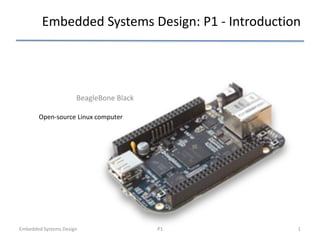
BeagleBone Black
Open-source Linux computer
BeagleBoneBlack
2
Complete development system
Ecosystem from prototype to
product
Flexible open hardware and
software development platform
• 1 GHz performance
• On-board HDMI to connect
directly to TVs and
monitors
• 512MB DDR3
• On-board flash storage
frees up the microSD card
slot
• Support for existing
Cape plug-in boards
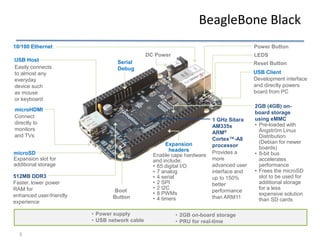
BeagleBone Black
BeagleBone Black
3
Boot
Button
Reset Button
LEDS
10/100 Ethernet
DC Power
USB Client
Serial
Debug
USB Host
microHDMI
microSD
Expansion slot for
additional storage
2GB (4GB) on-
board storage
using eMMC
• Pre-loaded with
Ångström Linux
Distribution
(Debian for newer
boards)
• 8-bit bus
accelerates
performance
• Frees the microSD
slot to be used for
additional storage
for a less
expensive solution
than SD cards
1 GHz Sitara
AM335x
ARM®
Cortex™-A8
processor
Easily connects
to almost any
everyday
device such
as mouse
or keyboard
512MB DDR3
Faster, lower power
RAM for
enhanced user-friendly
experience
Provides a
more
advanced user
interface and
up to 150%
better
performance
than ARM11
Connect
directly to
monitors
and TVs
Development interface
and directly powers
board from PC
Expansion
headers
Enable cape hardware
and include:
• 65 digital I/O
• 7 analog
• 4 serial
• 2 SPI
• 2 I2C
• 8 PWMs
• 4 timers
Power Button
• Power supply
• USB network cable
• 2GB on-board storage
• PRU for real-time
BeagleBone Black Raspberry Pi Raspberry Pi 3
1GHz armv7 (3,319.96 DMIPS*) 700MHz armv6 (809.06
DMIPS*)
4× ARM Cortex-A53, 1.2GHz
(~2760 DMIPS)
$45 MSRP from over 35
distributors
$35/$25 from 2 distributors (+
resellers)
$35 from multiple distributors
1 USB host + 1 USB client 2 USB host 4x USB 2.0 host ports
Power via USB Power via USB connector with
wall-wart
Power via USB connector with
wall-wart
92-pin expansion (65 GPIO, 8
PWMs, 7 channel ADC, 2 SPI, 2
I2C, 4 UART, ...)
26-pin expansion (8 GPIO, 1
PWM, 1 SPI, 1 I2C, 1 UART)
40-pin header (26 –GPIO, UART,
SPI, I2C, PCM/I2S, 2xPWM) +
CSI (camera) + DSI (display)
2-200MHz programmable
realtime units
N/A N/A
PowerVR 3D graphics Videocore IV GPU VideoCore IV @ 300/400 MHz
Open hardware Closed hardware Closed hardware
Open source boot + optional 3D
binary
Closed 3D binary required to
boot
Closed 3D binary required to
boot
Pre-programmed on-board 4GB
flash
N/A N/A
Included USB cable N/A N/A
No Wi-Fi No Wi-Fi Wi-Fi
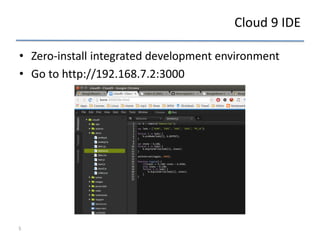
Cloud 9 IDE
• Zero-install integrated development environment
• Go to http://192.168.7.2:3000
5
“Capes”
Breadboard Breakout LCD DVI-D CANBus
Profibus
RS232 RS485
7”, 4.3” or 3.5”
VGA Battery
CAN
Proto RF-CC1101
CC2500
CC2530
Weather Camera
LVDS
BeBoPr 3D
Printer
Radar
Audio
DVI-D
w/Audio
Cape expansion headers
7
Power limitations on the pins
8
Managing GPIOs (and LEDs)
9
Blinking LED
10
11
Wide set of existing projects
Open Source
12
Open source gives people the freedom to control their technology while
sharing knowledge and encouraging commerce through the open
exchange of designs and code
Development
Unchained
Open Source for hardware and software
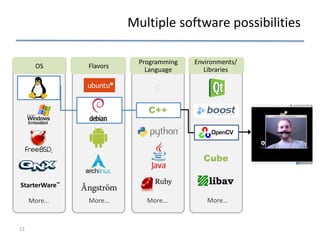
Multiple software possibilities
13
OS
Programming
Language
Environments/
Libraries
Flavors
StarterWare™
More… More…
C
C++
Cube
More… More…
Angström
14
How Does It Work? Layers
15
BSP “Layers”
• Layers contain extensions and customizations to base system
• Can include image customizations, additional recipes, modifying
recipes, adding extra configuration
• Really just another directory to look for recipes in
• Added to the BBLAYERS variable in build/conf/bblayers.conf
• BSPs are layers that add machine settings and recipes
• Machine settings are specified in a layer's conf/machine/xxx.conf
file(s)
• Examples:
• Sandy Bridge + Cougar Point:
• meta-intel/conf/meta-sugarbay/machine/sugarbay.conf
• Routerstation Pro (MIPS)
• yocto/meta/conf/machine/routerstationpro.conf
16
Source Fetching
• Recipes call out location of all sources, whether on the internet or
local (Look for SRC_URI in *.bb files)
• Bitbake can get sources from git, svn, bzr, from tarballs, and many,
many more*
17
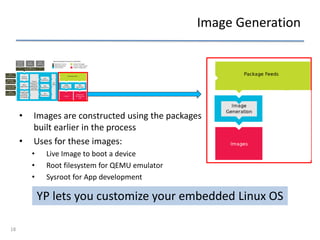
Image Generation
• Images are constructed using the packages
built earlier in the process
• Uses for these images:
• Live Image to boot a device
• Root filesystem for QEMU emulator
• Sysroot for App development
YP lets you customize your embedded Linux OS
18
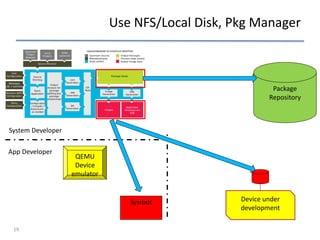
Use NFS/Local Disk, Pkg Manager
System Developer
App Developer
Package
Repository
QEMU
Device
emulator
Device under
development
Sysroot
19
Use NFS/Local Disk, Pkg Manager
System Developer
App Developer
Sysroot
Package
Repository
QEMU
Device
emulator
Device under
development
Device and App Development Models Supported
Package
Manager
20

Presentacion_p1.pdf

  • 1.
    Embedded Systems Design:P1 - Introduction Embedded Systems Design P1 1 BeagleBone Black Open-source Linux computer
  • 2.
    BeagleBoneBlack 2 Complete development system Ecosystemfrom prototype to product Flexible open hardware and software development platform • 1 GHz performance • On-board HDMI to connect directly to TVs and monitors • 512MB DDR3 • On-board flash storage frees up the microSD card slot • Support for existing Cape plug-in boards BeagleBone Black
  • 3.
    BeagleBone Black 3 Boot Button Reset Button LEDS 10/100Ethernet DC Power USB Client Serial Debug USB Host microHDMI microSD Expansion slot for additional storage 2GB (4GB) on- board storage using eMMC • Pre-loaded with Ångström Linux Distribution (Debian for newer boards) • 8-bit bus accelerates performance • Frees the microSD slot to be used for additional storage for a less expensive solution than SD cards 1 GHz Sitara AM335x ARM® Cortex™-A8 processor Easily connects to almost any everyday device such as mouse or keyboard 512MB DDR3 Faster, lower power RAM for enhanced user-friendly experience Provides a more advanced user interface and up to 150% better performance than ARM11 Connect directly to monitors and TVs Development interface and directly powers board from PC Expansion headers Enable cape hardware and include: • 65 digital I/O • 7 analog • 4 serial • 2 SPI • 2 I2C • 8 PWMs • 4 timers Power Button • Power supply • USB network cable • 2GB on-board storage • PRU for real-time
  • 4.
    BeagleBone Black RaspberryPi Raspberry Pi 3 1GHz armv7 (3,319.96 DMIPS*) 700MHz armv6 (809.06 DMIPS*) 4× ARM Cortex-A53, 1.2GHz (~2760 DMIPS) $45 MSRP from over 35 distributors $35/$25 from 2 distributors (+ resellers) $35 from multiple distributors 1 USB host + 1 USB client 2 USB host 4x USB 2.0 host ports Power via USB Power via USB connector with wall-wart Power via USB connector with wall-wart 92-pin expansion (65 GPIO, 8 PWMs, 7 channel ADC, 2 SPI, 2 I2C, 4 UART, ...) 26-pin expansion (8 GPIO, 1 PWM, 1 SPI, 1 I2C, 1 UART) 40-pin header (26 –GPIO, UART, SPI, I2C, PCM/I2S, 2xPWM) + CSI (camera) + DSI (display) 2-200MHz programmable realtime units N/A N/A PowerVR 3D graphics Videocore IV GPU VideoCore IV @ 300/400 MHz Open hardware Closed hardware Closed hardware Open source boot + optional 3D binary Closed 3D binary required to boot Closed 3D binary required to boot Pre-programmed on-board 4GB flash N/A N/A Included USB cable N/A N/A No Wi-Fi No Wi-Fi Wi-Fi
  • 5.
    Cloud 9 IDE •Zero-install integrated development environment • Go to http://192.168.7.2:3000 5
  • 6.
    “Capes” Breadboard Breakout LCDDVI-D CANBus Profibus RS232 RS485 7”, 4.3” or 3.5” VGA Battery CAN Proto RF-CC1101 CC2500 CC2530 Weather Camera LVDS BeBoPr 3D Printer Radar Audio DVI-D w/Audio
  • 7.
  • 8.
  • 9.
  • 10.
  • 11.
    11 Wide set ofexisting projects
  • 12.
    Open Source 12 Open sourcegives people the freedom to control their technology while sharing knowledge and encouraging commerce through the open exchange of designs and code Development Unchained Open Source for hardware and software
  • 13.
  • 14.
  • 15.
    How Does ItWork? Layers 15
  • 16.
    BSP “Layers” • Layerscontain extensions and customizations to base system • Can include image customizations, additional recipes, modifying recipes, adding extra configuration • Really just another directory to look for recipes in • Added to the BBLAYERS variable in build/conf/bblayers.conf • BSPs are layers that add machine settings and recipes • Machine settings are specified in a layer's conf/machine/xxx.conf file(s) • Examples: • Sandy Bridge + Cougar Point: • meta-intel/conf/meta-sugarbay/machine/sugarbay.conf • Routerstation Pro (MIPS) • yocto/meta/conf/machine/routerstationpro.conf 16
  • 17.
    Source Fetching • Recipescall out location of all sources, whether on the internet or local (Look for SRC_URI in *.bb files) • Bitbake can get sources from git, svn, bzr, from tarballs, and many, many more* 17
  • 18.
    Image Generation • Imagesare constructed using the packages built earlier in the process • Uses for these images: • Live Image to boot a device • Root filesystem for QEMU emulator • Sysroot for App development YP lets you customize your embedded Linux OS 18
  • 19.
    Use NFS/Local Disk,Pkg Manager System Developer App Developer Package Repository QEMU Device emulator Device under development Sysroot 19
  • 20.
    Use NFS/Local Disk,Pkg Manager System Developer App Developer Sysroot Package Repository QEMU Device emulator Device under development Device and App Development Models Supported Package Manager 20