Introduction
 BBB is a low cost development
platform.
 B-Bring your own peripherals.
 E-Entry level cost.
 A-ARM Cortex AM335X processor.
 G-Graphics and DSP accelerated.
 L-Linux and open source community.
 E-Environment for innovators.
Contd…
 Linux is booted under 10 seconds and
development process can be started in
less than 5 minutes.
 BeagleBone Black features a Sitara
ARM A8 processor which runs at 1 GHz.
and a 2 GB on-board flash memory.
 This can be programmed using C/C++
to perform real world applications.
Literature Survey
 Beagleboard was developed in 2008
 Beagleboard Rev C4 was developed in
2009
 BeagleBone-xM was developed in 2010
 BeagleBone was developed in 2011
 BeagleBone Black was developed in
2013
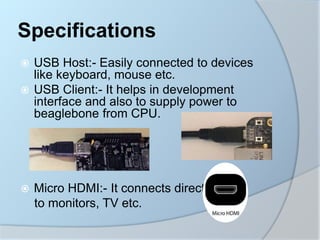
 USB Host:- Easily connected to devices
like keyboard, mouse etc.
 USB Client:- It helps in development
interface and also to supply power to
beaglebone from CPU.
 Micro HDMI:- It connects directly
to monitors, TV etc.
Specifications
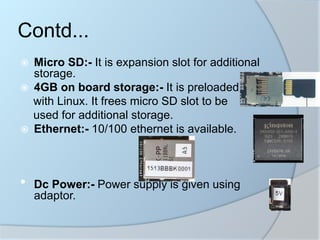
 Micro SD:- It is expansion slot for additional
storage.
 4GB on board storage:- It is preloaded
with Linux. It frees micro SD slot to be
used for additional storage.
 Ethernet:- 10/100 ethernet is available.
• Dc Power:- Power supply is given using
adaptor.
Contd...
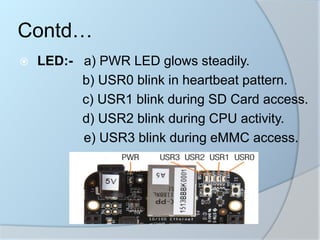
 LED:- a) PWR LED glows steadily.
b) USR0 blink in heartbeat pattern.
c) USR1 blink during SD Card access.
d) USR2 blink during CPU activity.
e) USR3 blink during eMMC access.
Contd…
Contd…
 Power button:- To power on the
beaglebone.
 Reset button:- To reset the beaglebone.
 Boot button:- To boot beaglebone.
 2 Programmable Real-time Units:- PRU
are 32 bit micro controllers. It gives single
cycle I/O access to pins and full access to
internal memory and peripherals on
processor.
 NEON accelerator:- It accelerates signal
processing algorithms-audio and video.
 512 mb DDR3 SD RAM:- Data transfer rate is
high and transferred on both rising and falling
edges of clock pulse.
 Graphic accelerator:- It increases speed of
visual data.
 DSP accelerator:- It has built-in DSP chips
where computer can access for additional
power.
Contd…
 Operating System : Linux, Android,
Windows,
Embedded CE.
 On-Chip Memory : 128 KB.
 Graphics Acceleration : 1 3D.
 Power : 7mW.
 IO Supply (V) : 3.3V.
 Operating temperature : -40 to 90.
 On-Chip L1 Cache : 64KB.
 On-Chip L2 Cache : 256KB.
 General Purpose Memory: 1 16 bit(SRAM)
 DRAM : 1 16 bit(DDR)
Contd…
 BBB also contains
a) 65 digital pins(3.3V).
b) 7 analog pins (1.8V).
c) 4 serial ports.
d) 2 serial peripheral interface.
e) 4 timers.
Contd…
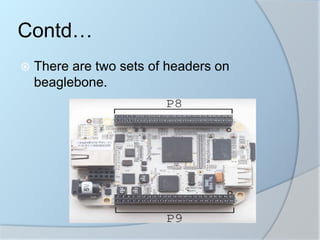
 There are two sets of headers on
beaglebone.
Contd…
 Initially latest version of angstrom demo
image must be verified if pre installed or
should be installed from the site
http://beagleboard.org/static/beaglebone
/latest/README.htm
 On the included micro sd card angstrom
distribution of linux is configured for
beaglebone hardware.
Starting a BeagleBone:
 One can start using beaglebone in two
ways.
1) By plugging beaglebone to PC
through USB cable and ejecting
its disk image and connecting to
network interface that appear.
Contd…
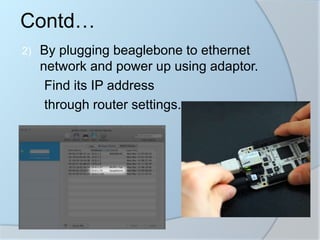
2) By plugging beaglebone to ethernet
network and power up using adaptor.
Find its IP address
through router settings.
Contd…
 Open terminal app and use SSH to connect
beaglebone’s IP by code
$ssh root@10.0.1.74
 Authentication of IP is not directly established
and it displays key fingerprint. It asks whether
you are sure to continue connection. Type
‘yes’.
 Then it adds IP address to list of known hosts.
 Later it asks for password. In general there is
no password so press enter.
 Then you are logged in and this is the
command prompt for beaglebone.
Using method 2:
 Cathode side of an led to ground and anode side of
an led to 220 ohm resistor to pin 3 of header 8.
 Pin 3 is GPIO1_6.
 The beagle bone refers to each pin with a chip
number followed by a pin number, upto 32 pins for
each chip labelled 0 to 31.
 The first number refers to GPIO chip and the second
number refers to number of that pin.
 To find the number we will be using to reference this
pin in linux and multiply the chip number by 32 and
add the second number.
 (1*32)+6=38. So for GPIO 1_6 is referred to this pin
as 38.
Contd…
 Program:
echo 38 > /sys/class/gpio/export; exporting pin
that is used.
echo out > /sys/class/gpio38/direction; defining
direction.
echo 1 > /sys/class/gpio/gpio38/value; making
led on.
echo 0 > /sys/class/gpio/gpio38/value; making
led off.
echo 38 > /sys/class/gpio/unexport;
unexporting pin.
Contd…
Result
Applications
 Robotics
 Media
 Home automation
Advantages
Disadvantages
 The BeagleBone
Black is good choice
for projects that
require both the
functionality if linux
and real time behavior
for controlling physical
systems.
 Size and weight of
BeagleBone Black is
less
 BeagleBone Black is
open source platform
 HMDI resolution
results in color
limitations
Future Scope
 Video decode/encode hardware can be
implemented in BeagleBone Black.
 Inbuilt battery can be implemented.
References
 https://beagleboard.org/black
 https://cdn-
shop.adafruit.com/datasheets/BBB_SR
M.pdf
Thank You!

BeagleBone black

  • 2.
    Introduction  BBB isa low cost development platform.  B-Bring your own peripherals.  E-Entry level cost.  A-ARM Cortex AM335X processor.  G-Graphics and DSP accelerated.  L-Linux and open source community.  E-Environment for innovators.
  • 3.
    Contd…  Linux isbooted under 10 seconds and development process can be started in less than 5 minutes.  BeagleBone Black features a Sitara ARM A8 processor which runs at 1 GHz. and a 2 GB on-board flash memory.  This can be programmed using C/C++ to perform real world applications.
  • 4.
    Literature Survey  Beagleboardwas developed in 2008  Beagleboard Rev C4 was developed in 2009  BeagleBone-xM was developed in 2010  BeagleBone was developed in 2011  BeagleBone Black was developed in 2013
  • 5.
     USB Host:-Easily connected to devices like keyboard, mouse etc.  USB Client:- It helps in development interface and also to supply power to beaglebone from CPU.  Micro HDMI:- It connects directly to monitors, TV etc. Specifications
  • 6.
     Micro SD:-It is expansion slot for additional storage.  4GB on board storage:- It is preloaded with Linux. It frees micro SD slot to be used for additional storage.  Ethernet:- 10/100 ethernet is available. • Dc Power:- Power supply is given using adaptor. Contd...
  • 7.
     LED:- a)PWR LED glows steadily. b) USR0 blink in heartbeat pattern. c) USR1 blink during SD Card access. d) USR2 blink during CPU activity. e) USR3 blink during eMMC access. Contd…
  • 8.
    Contd…  Power button:-To power on the beaglebone.  Reset button:- To reset the beaglebone.  Boot button:- To boot beaglebone.  2 Programmable Real-time Units:- PRU are 32 bit micro controllers. It gives single cycle I/O access to pins and full access to internal memory and peripherals on processor.
  • 9.
     NEON accelerator:-It accelerates signal processing algorithms-audio and video.  512 mb DDR3 SD RAM:- Data transfer rate is high and transferred on both rising and falling edges of clock pulse.  Graphic accelerator:- It increases speed of visual data.  DSP accelerator:- It has built-in DSP chips where computer can access for additional power. Contd…
  • 10.
     Operating System: Linux, Android, Windows, Embedded CE.  On-Chip Memory : 128 KB.  Graphics Acceleration : 1 3D.  Power : 7mW.  IO Supply (V) : 3.3V.  Operating temperature : -40 to 90.  On-Chip L1 Cache : 64KB.  On-Chip L2 Cache : 256KB.  General Purpose Memory: 1 16 bit(SRAM)  DRAM : 1 16 bit(DDR) Contd…
  • 11.
     BBB alsocontains a) 65 digital pins(3.3V). b) 7 analog pins (1.8V). c) 4 serial ports. d) 2 serial peripheral interface. e) 4 timers. Contd…
  • 12.
     There aretwo sets of headers on beaglebone. Contd…
  • 16.
     Initially latestversion of angstrom demo image must be verified if pre installed or should be installed from the site http://beagleboard.org/static/beaglebone /latest/README.htm  On the included micro sd card angstrom distribution of linux is configured for beaglebone hardware. Starting a BeagleBone:
  • 17.
     One canstart using beaglebone in two ways. 1) By plugging beaglebone to PC through USB cable and ejecting its disk image and connecting to network interface that appear. Contd…
  • 18.
    2) By pluggingbeaglebone to ethernet network and power up using adaptor. Find its IP address through router settings. Contd…
  • 19.
     Open terminalapp and use SSH to connect beaglebone’s IP by code $ssh root@10.0.1.74  Authentication of IP is not directly established and it displays key fingerprint. It asks whether you are sure to continue connection. Type ‘yes’.  Then it adds IP address to list of known hosts.  Later it asks for password. In general there is no password so press enter.  Then you are logged in and this is the command prompt for beaglebone. Using method 2:
  • 20.
     Cathode sideof an led to ground and anode side of an led to 220 ohm resistor to pin 3 of header 8.  Pin 3 is GPIO1_6.  The beagle bone refers to each pin with a chip number followed by a pin number, upto 32 pins for each chip labelled 0 to 31.  The first number refers to GPIO chip and the second number refers to number of that pin.  To find the number we will be using to reference this pin in linux and multiply the chip number by 32 and add the second number.  (1*32)+6=38. So for GPIO 1_6 is referred to this pin as 38. Contd…
  • 21.
     Program: echo 38> /sys/class/gpio/export; exporting pin that is used. echo out > /sys/class/gpio38/direction; defining direction. echo 1 > /sys/class/gpio/gpio38/value; making led on. echo 0 > /sys/class/gpio/gpio38/value; making led off. echo 38 > /sys/class/gpio/unexport; unexporting pin. Contd…
  • 22.
  • 23.
  • 24.
    Advantages Disadvantages  The BeagleBone Blackis good choice for projects that require both the functionality if linux and real time behavior for controlling physical systems.  Size and weight of BeagleBone Black is less  BeagleBone Black is open source platform  HMDI resolution results in color limitations
  • 25.
    Future Scope  Videodecode/encode hardware can be implemented in BeagleBone Black.  Inbuilt battery can be implemented.
  • 26.
  • 27.