Introduction to
numpy
Term paper-
Programming II
Submitted to:
Dr. Dharmendra Singh
Submitted by :
Gaurav
19mslsbf03
Table of Contents
 Introduction
 Operations using NumPy
 NumPy – A Replacement for MatLab
Installation of numpy package on Linux-Ubuntu
Numpy-ndarray
Numpy-matplotlib
Introduction
• NumPy is a Python package. It stands for 'Numerical
Python'. It is a library consisting of multidimensional array
objects and a collection of routines for processing of array.
• Numeric, the ancestor of NumPy, was developed by Jim
Hugunin. Another package Numarray was also developed,
having some additional functionalities. In 2005, Travis
Oliphant created NumPy package by incorporating the
features of Numarray into Numeric package. There are
many contributors to this open source project.
Operations using NumPy
Using NumPy, a developer can perform the following operations −
Mathematical and logical operations on arrays.
Fourier transforms and routines for shape manipulation.
Operations related to linear algebra. NumPy has in-built functions for
linear algebra and random number generation.
NumPy – A Replacement for MatLab
NumPy is often used along with packages like SciPy (Scientific
Python) and Mat−plotlib (plotting library). This combination is
widely used as a replacement for MatLab, a popular platform for
technical computing. However, Python alternative to MatLab is now
seen as a more modern and complete programming language.
It is open source, which is an added advantage of NumPy.
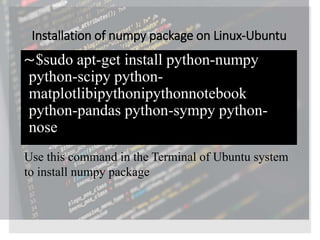
Installation of numpy package on Linux-Ubuntu
⁓$sudo apt-get install python-numpy
python-scipy python-
matplotlibipythonipythonnotebook
python-pandas python-sympy python-
nose
Use this command in the Terminal of Ubuntu system
to install numpy package
Numpy-ndarray
• The most important object defined in NumPy is an N-dimensional
array type called ndarray. It describes the collection of items of
the same type. Items in the collection can be accessed using a
zero-based index.
• Every item in an ndarray takes the same size of block in the
memory. Each element in ndarray is an object of data-type object
(called dtype).
Example
import numpy as np
a = np.array([1,2,3])
print a
import numpy as np
a = np.array([[1, 2], [3, 4]])
print a
import numpy as np
a = np.array([1, 2, 3,4,5], ndmin = 2)
print a
import numpy as np
a = np.array([1, 2, 3], dtype = complex)
print a
Numpy-Matplotlib
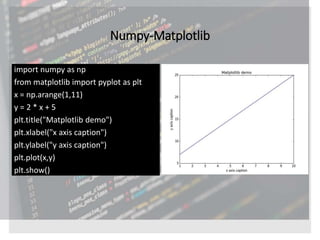
import numpy as np
from matplotlib import pyplot as plt
x = np.arange(1,11)
y = 2 * x + 5
plt.title("Matplotlib demo")
plt.xlabel("x axis caption")
plt.ylabel("y axis caption")
plt.plot(x,y)
plt.show()
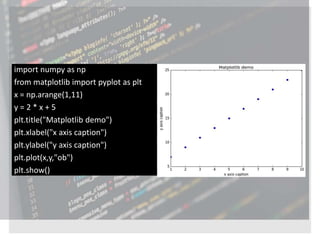
import numpy as np
from matplotlib import pyplot as plt
x = np.arange(1,11)
y = 2 * x + 5
plt.title("Matplotlib demo")
plt.xlabel("x axis caption")
plt.ylabel("y axis caption")
plt.plot(x,y,"ob")
plt.show()
import numpy as np
import matplotlib.pyplot as plt
# Compute the x and y coordinates
for points on a sine curve
x = np.arange(0, 3 * np.pi, 0.1)
y = np.sin(x)
plt.title("sine wave form")
# Plot the points using matplotlib
plt.plot(x, y)
plt.show()
Sine Wave Plot
bar()
from matplotlib import pyplot as plt
x = [5,8,10]
y = [12,16,6]
x2 = [6,9,11]
y2 = [6,15,7]
plt.bar(x, y, align = 'center')
plt.bar(x2, y2, color = 'g', align = 'center')
plt.title('Bar graph')
plt.ylabel('Y axis')
plt.xlabel('X axis')
plt.show()
References
https://www.tutorialspoint.com/numpy
https://www.tutorialspoint.com/numpy/numpy_matplotlib.htm
https://www.tutorialspoint.com/numpy/numpy_ndarray_object.
htm

Introduction to numpy

  • 1.
  • 2.
    Term paper- Programming II Submittedto: Dr. Dharmendra Singh Submitted by : Gaurav 19mslsbf03
  • 3.
    Table of Contents Introduction  Operations using NumPy  NumPy – A Replacement for MatLab Installation of numpy package on Linux-Ubuntu Numpy-ndarray Numpy-matplotlib
  • 4.
    Introduction • NumPy isa Python package. It stands for 'Numerical Python'. It is a library consisting of multidimensional array objects and a collection of routines for processing of array. • Numeric, the ancestor of NumPy, was developed by Jim Hugunin. Another package Numarray was also developed, having some additional functionalities. In 2005, Travis Oliphant created NumPy package by incorporating the features of Numarray into Numeric package. There are many contributors to this open source project.
  • 5.
    Operations using NumPy UsingNumPy, a developer can perform the following operations − Mathematical and logical operations on arrays. Fourier transforms and routines for shape manipulation. Operations related to linear algebra. NumPy has in-built functions for linear algebra and random number generation. NumPy – A Replacement for MatLab NumPy is often used along with packages like SciPy (Scientific Python) and Mat−plotlib (plotting library). This combination is widely used as a replacement for MatLab, a popular platform for technical computing. However, Python alternative to MatLab is now seen as a more modern and complete programming language. It is open source, which is an added advantage of NumPy.
  • 6.
    Installation of numpypackage on Linux-Ubuntu ⁓$sudo apt-get install python-numpy python-scipy python- matplotlibipythonipythonnotebook python-pandas python-sympy python- nose Use this command in the Terminal of Ubuntu system to install numpy package
  • 7.
    Numpy-ndarray • The mostimportant object defined in NumPy is an N-dimensional array type called ndarray. It describes the collection of items of the same type. Items in the collection can be accessed using a zero-based index. • Every item in an ndarray takes the same size of block in the memory. Each element in ndarray is an object of data-type object (called dtype).
  • 8.
    Example import numpy asnp a = np.array([1,2,3]) print a import numpy as np a = np.array([[1, 2], [3, 4]]) print a import numpy as np a = np.array([1, 2, 3,4,5], ndmin = 2) print a import numpy as np a = np.array([1, 2, 3], dtype = complex) print a
  • 9.
    Numpy-Matplotlib import numpy asnp from matplotlib import pyplot as plt x = np.arange(1,11) y = 2 * x + 5 plt.title("Matplotlib demo") plt.xlabel("x axis caption") plt.ylabel("y axis caption") plt.plot(x,y) plt.show()
  • 10.
    import numpy asnp from matplotlib import pyplot as plt x = np.arange(1,11) y = 2 * x + 5 plt.title("Matplotlib demo") plt.xlabel("x axis caption") plt.ylabel("y axis caption") plt.plot(x,y,"ob") plt.show()
  • 11.
    import numpy asnp import matplotlib.pyplot as plt # Compute the x and y coordinates for points on a sine curve x = np.arange(0, 3 * np.pi, 0.1) y = np.sin(x) plt.title("sine wave form") # Plot the points using matplotlib plt.plot(x, y) plt.show() Sine Wave Plot
  • 12.
    bar() from matplotlib importpyplot as plt x = [5,8,10] y = [12,16,6] x2 = [6,9,11] y2 = [6,15,7] plt.bar(x, y, align = 'center') plt.bar(x2, y2, color = 'g', align = 'center') plt.title('Bar graph') plt.ylabel('Y axis') plt.xlabel('X axis') plt.show()
  • 13.