What is NumPy?
⚫NumPyis a python library used for working with arrays.
⚫It also has functions for working in domain of linear
algebra,and matrices.
⚫NumPy was created in 2005 by Travis Oliphant. It is an
open source project and you can use it freely.
⚫NumPy stands for Numerical Python.
3.
⚫NumPy is aPython package. It stands for 'Numerical
Python'. It is a library consisting of multidimensional
array objects and a collection of routines(functions)
for processing of array.
4.
Why Use NumPy?
⚫In Python we have lists that serve the purpose of arrays,
but they are slow to process.
⚫NumPy aims to provide an array object that is up to 50x
faster that traditional Python lists.
5.
Which Language isNumPy written
in?
⚫NumPy is a Python library and is written partially in
Python, but most of the parts that require fast
computation are written in C or C++.
6.
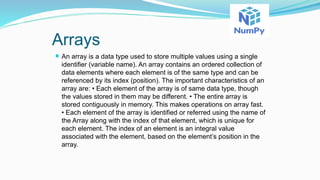
Arrays
⚫ An arrayis a data type used to store multiple values using a single
identifier (variable name). An array contains an ordered collection of
data elements where each element is of the same type and can be
referenced by its index (position). The important characteristics of an
array are: • Each element of the array is of same data type, though
the values stored in them may be different. • The entire array is
stored contiguously in memory. This makes operations on array fast.
• Each element of the array is identified or referred using the name of
the Array along with the index of that element, which is unique for
each element. The index of an element is an integral value
associated with the element, based on the element’s position in the
array.
7.
⚫ For exampleconsider an array with 5 numbers: [ 10,
9, 99, 71, 90 ] Here, the 1st value in the array is 10
and has the index value [0] associated with it; the
2nd value in the array is 9 and has the index value
[1] associated with it, and so on. The last value (in
this case the 5th value) in this array has an index [4].
This is called zero based indexing. This is very
similar to the indexing of lists in Python. The idea of
arrays is so important that almost all programming
languages support it in one form or another
9.
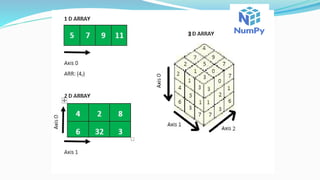
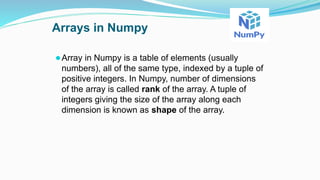
Arrays in Numpy
⚫Arrayin Numpy is a table of elements (usually
numbers), all of the same type, indexed by a tuple of
positive integers. In Numpy, number of dimensions
of the array is called rank of the array. A tuple of
integers giving the size of the array along each
dimension is known as shape of the array.
Import NumPy
Once NumPyis installed, import it in your applications by adding
the import keyword:
We Can Import by Using Following Ways:
⚫ import numpy
⚫ import numpy as np
⚫ from numpy import *
Now NumPy is imported and ready to use.
12.
NumPy - NdarrayObject
The most important object defined in NumPy is an N-dimensional
array type called ndarray. It describes the collection of items of the
same type. Items in the collection can be accessed using a zero-
based index.
Every item in an ndarray takes the same size of block in the memory.
13.
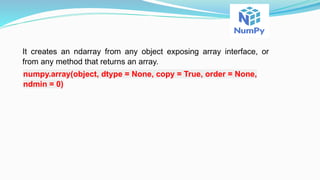
It creates anndarray from any object exposing array interface, or
from any method that returns an array.
numpy.array(object, dtype = None, copy = True, order = None,
ndmin = 0)
14.
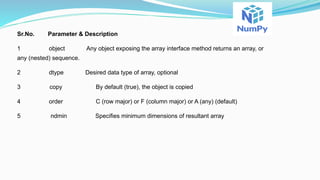
Sr.No. Parameter &Description
1 object Any object exposing the array interface method returns an array, or
any (nested) sequence.
2 dtype Desired data type of array, optional
3 copy By default (true), the object is copied
4 order C (row major) or F (column major) or A (any) (default)
5 ndmin Specifies minimum dimensions of resultant array
16.
Creation of NumPyArrays from List
⚫We can create a NumPy ndarray object by using
the array() function.
⚫Example
import numpy as np
arr = np.array([1, 2, 3, 4, 5])
print(arr)
print(type(arr))
17.
Output
⚫[1 2 34 5]
<class 'numpy.ndarray'>
type(): This built-in Python function tells us the type of
the object passed to it. Like in above code it shows
that arr is numpy.ndarray type.
18.
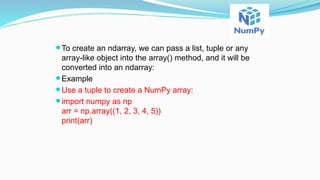
⚫To create anndarray, we can pass a list, tuple or any
array-like object into the array() method, and it will be
converted into an ndarray:
⚫Example
⚫Use a tuple to create a NumPy array:
⚫import numpy as np
arr = np.array((1, 2, 3, 4, 5))
print(arr)
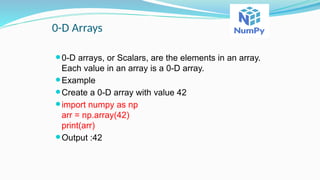
0-D Arrays
⚫0-D arrays,or Scalars, are the elements in an array.
Each value in an array is a 0-D array.
⚫Example
⚫Create a 0-D array with value 42
⚫import numpy as np
arr = np.array(42)
print(arr)
⚫Output :42
21.
1-D Arrays
⚫An arraythat has 0-D arrays as its elements is called uni-
dimensional or 1-D array.
⚫These are the most common and basic arrays.
⚫Example
⚫Create a 1-D array containing the values 1,2,3,4,5:
⚫import numpy as np
arr = np.array([1, 2, 3, 4, 5])
print(arr)
22.
2-D Arrays
⚫An arraythat has 1-D arrays as its elements is called a 2-
D array.
⚫These are often used to represent matrix or 2nd order
tensors.
⚫Example
⚫Create a 2-D array containing two arrays with the values
1,2,3 and 4,5,6:
⚫import numpy as np
arr = np.array([[1, 2, 3], [4, 5, 6],[7,8,4]])
print(arr)
Output:
[1 2 3]
[4 5 6]]
[7,8,4]
23.
Example
# dtype parameter
importnumpy as np
a = np.array([1, 2, 3], dtype = complex)
print(a)
The output is as follows −
[ 1.+0.j, 2.+0.j, 3.+0.j]
24.
Array Attributes
ndarray.shape
This arrayattribute returns a tuple consisting of array
dimensions. It can also be used to resize the array.
Example 1
import numpy as np
a = np.array([[1,2,3],[4,5,6]])
print(a.shape)
The output is as follows −
(2, 3)
25.
Example 2
# thisresizes the ndarray
import numpy as np
a = np.array([[1,2,3],[4,5,6]])
a.shape = (3,2)
print(a)
The output is as follows −
[[1, 2]
[3, 4]
[5, 6]]
26.
Example 3
NumPy alsoprovides a reshape function to resize an array.
import numpy as np
a = np.array([[1,2,3],[4,5,6]])
b = a.reshape(3,2)
print(b)
The output is as follows −
[[1, 2]
[3, 4]
[5, 6]]
27.
ndarray.ndim
This array attributereturns the number of array
dimensions.
Example 1
# an array of evenly spaced numbers
import numpy as np
a = np.arange(24)
print(a)
The output is as follows −
[0 1 2 3 4 5 6 7 8 9 10 11 12 13 14 15 16 17 18
19 20 21 22 23]
28.
numpy.itemsize
This array attributereturns the length of each element of
array in bytes.
Example 1
# dtype of array is int8 (1 byte)
import numpy as np
x = np.array([1,2,3,4,5])
print (x.itemsize)
The output is as follows −
4
29.
Example 2
# dtypeof array is now float32 (4 bytes)
import numpy as np
x=np.array([1,2,3,4,5], dtype = np.float32)
print(x.itemsize)
The output is as follows −
4
31.
Array Attributes
ndarray.shape
This arrayattribute returns a tuple consisting of array
dimensions. It can also be used to resize the array.
Example 1
import numpy as np
a = np.array([[1,2,3],[4,5,6]])
print(a.shape)
The output is as follows −
(2, 3)
32.
Example 2
# thisresizes the ndarray
import numpy as np
a = np.array([[1,2,3],[4,5,6]])
a.shape = (3,2)
print(a)
The output is as follows −
[[1, 2]
[3, 4]
[5, 6]]
33.
Example 3
NumPy alsoprovides a reshape function to resize an array.
import numpy as np
a = np.array([[1,2,3],[4,5,6]])
b = a.reshape(3,2)
print(b)
The output is as follows −
[[1, 2]
[3, 4]
[5, 6]]
34.
ndarray.ndim
This array attributereturns the number of array
dimensions.
Example 1
# an array of evenly spaced numbers
import numpy as np
a = np.arange(24)
print(a)
The output is as follows −
[0 1 2 3 4 5 6 7 8 9 10 11 12 13 14 15 16 17 18
19 20 21 22 23]
35.
numpy.itemsize
This array attributereturns the length of each element of
array in bytes.
Example 1
# dtype of array is int8 (1 byte)
import numpy as np
x = np.array([1,2,3,4,5])
print (x.itemsize)
The output is as follows −
4
36.
Example 2
# dtypeof array is now float32 (4 bytes)
import numpy as np
x=np.array([1,2,3,4,5], dtype = np.float32)
print(x.itemsize)
The output is as follows −
4
38.
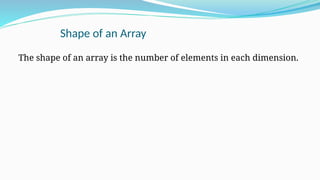
Shape of anArray
The shape of an array is the number of elements in each dimension.
39.
Example
Print the shapeof a 2-D array:
import numpy as np
arr = np.array([[1, 2, 3, 4], [5, 6, 7, 8],[8,4,9,12]])
print(arr.shape)
The example above returns (3, 4), which means that the array has 3
dimensions, and each dimension has 4 elements.


![⚫ For example consider an array with 5 numbers: [ 10,
9, 99, 71, 90 ] Here, the 1st value in the array is 10
and has the index value [0] associated with it; the
2nd value in the array is 9 and has the index value
[1] associated with it, and so on. The last value (in
this case the 5th value) in this array has an index [4].
This is called zero based indexing. This is very
similar to the indexing of lists in Python. The idea of
arrays is so important that almost all programming
languages support it in one form or another](https://image.slidesharecdn.com/1-250722083700-2f214148/85/1-NumPy-is-a-Python-library-used-for-wor-7-320.jpg)


![Creation of NumPy Arrays from List
⚫We can create a NumPy ndarray object by using
the array() function.
⚫Example
import numpy as np
arr = np.array([1, 2, 3, 4, 5])
print(arr)
print(type(arr))](https://image.slidesharecdn.com/1-250722083700-2f214148/85/1-NumPy-is-a-Python-library-used-for-wor-16-320.jpg)
![Output
⚫[1 2 3 4 5]
<class 'numpy.ndarray'>
type(): This built-in Python function tells us the type of
the object passed to it. Like in above code it shows
that arr is numpy.ndarray type.](https://image.slidesharecdn.com/1-250722083700-2f214148/85/1-NumPy-is-a-Python-library-used-for-wor-17-320.jpg)
![⚫Output:
⚫[1 2 3 4 5]](https://image.slidesharecdn.com/1-250722083700-2f214148/85/1-NumPy-is-a-Python-library-used-for-wor-19-320.jpg)
![1-D Arrays
⚫An array that has 0-D arrays as its elements is called uni-
dimensional or 1-D array.
⚫These are the most common and basic arrays.
⚫Example
⚫Create a 1-D array containing the values 1,2,3,4,5:
⚫import numpy as np
arr = np.array([1, 2, 3, 4, 5])
print(arr)](https://image.slidesharecdn.com/1-250722083700-2f214148/85/1-NumPy-is-a-Python-library-used-for-wor-21-320.jpg)
![2-D Arrays
⚫An array that has 1-D arrays as its elements is called a 2-
D array.
⚫These are often used to represent matrix or 2nd order
tensors.
⚫Example
⚫Create a 2-D array containing two arrays with the values
1,2,3 and 4,5,6:
⚫import numpy as np
arr = np.array([[1, 2, 3], [4, 5, 6],[7,8,4]])
print(arr)
Output:
[1 2 3]
[4 5 6]]
[7,8,4]](https://image.slidesharecdn.com/1-250722083700-2f214148/85/1-NumPy-is-a-Python-library-used-for-wor-22-320.jpg)
![Example
# dtype parameter
import numpy as np
a = np.array([1, 2, 3], dtype = complex)
print(a)
The output is as follows −
[ 1.+0.j, 2.+0.j, 3.+0.j]](https://image.slidesharecdn.com/1-250722083700-2f214148/85/1-NumPy-is-a-Python-library-used-for-wor-23-320.jpg)
![Array Attributes
ndarray.shape
This array attribute returns a tuple consisting of array
dimensions. It can also be used to resize the array.
Example 1
import numpy as np
a = np.array([[1,2,3],[4,5,6]])
print(a.shape)
The output is as follows −
(2, 3)](https://image.slidesharecdn.com/1-250722083700-2f214148/85/1-NumPy-is-a-Python-library-used-for-wor-24-320.jpg)
![Example 2
# this resizes the ndarray
import numpy as np
a = np.array([[1,2,3],[4,5,6]])
a.shape = (3,2)
print(a)
The output is as follows −
[[1, 2]
[3, 4]
[5, 6]]](https://image.slidesharecdn.com/1-250722083700-2f214148/85/1-NumPy-is-a-Python-library-used-for-wor-25-320.jpg)
![Example 3
NumPy also provides a reshape function to resize an array.
import numpy as np
a = np.array([[1,2,3],[4,5,6]])
b = a.reshape(3,2)
print(b)
The output is as follows −
[[1, 2]
[3, 4]
[5, 6]]](https://image.slidesharecdn.com/1-250722083700-2f214148/85/1-NumPy-is-a-Python-library-used-for-wor-26-320.jpg)
![ndarray.ndim
This array attribute returns the number of array
dimensions.
Example 1
# an array of evenly spaced numbers
import numpy as np
a = np.arange(24)
print(a)
The output is as follows −
[0 1 2 3 4 5 6 7 8 9 10 11 12 13 14 15 16 17 18
19 20 21 22 23]](https://image.slidesharecdn.com/1-250722083700-2f214148/85/1-NumPy-is-a-Python-library-used-for-wor-27-320.jpg)
![numpy.itemsize
This array attribute returns the length of each element of
array in bytes.
Example 1
# dtype of array is int8 (1 byte)
import numpy as np
x = np.array([1,2,3,4,5])
print (x.itemsize)
The output is as follows −
4](https://image.slidesharecdn.com/1-250722083700-2f214148/85/1-NumPy-is-a-Python-library-used-for-wor-28-320.jpg)
![Example 2
# dtype of array is now float32 (4 bytes)
import numpy as np
x=np.array([1,2,3,4,5], dtype = np.float32)
print(x.itemsize)
The output is as follows −
4](https://image.slidesharecdn.com/1-250722083700-2f214148/85/1-NumPy-is-a-Python-library-used-for-wor-29-320.jpg)

![Array Attributes
ndarray.shape
This array attribute returns a tuple consisting of array
dimensions. It can also be used to resize the array.
Example 1
import numpy as np
a = np.array([[1,2,3],[4,5,6]])
print(a.shape)
The output is as follows −
(2, 3)](https://image.slidesharecdn.com/1-250722083700-2f214148/85/1-NumPy-is-a-Python-library-used-for-wor-31-320.jpg)
![Example 2
# this resizes the ndarray
import numpy as np
a = np.array([[1,2,3],[4,5,6]])
a.shape = (3,2)
print(a)
The output is as follows −
[[1, 2]
[3, 4]
[5, 6]]](https://image.slidesharecdn.com/1-250722083700-2f214148/85/1-NumPy-is-a-Python-library-used-for-wor-32-320.jpg)
![Example 3
NumPy also provides a reshape function to resize an array.
import numpy as np
a = np.array([[1,2,3],[4,5,6]])
b = a.reshape(3,2)
print(b)
The output is as follows −
[[1, 2]
[3, 4]
[5, 6]]](https://image.slidesharecdn.com/1-250722083700-2f214148/85/1-NumPy-is-a-Python-library-used-for-wor-33-320.jpg)
![ndarray.ndim
This array attribute returns the number of array
dimensions.
Example 1
# an array of evenly spaced numbers
import numpy as np
a = np.arange(24)
print(a)
The output is as follows −
[0 1 2 3 4 5 6 7 8 9 10 11 12 13 14 15 16 17 18
19 20 21 22 23]](https://image.slidesharecdn.com/1-250722083700-2f214148/85/1-NumPy-is-a-Python-library-used-for-wor-34-320.jpg)
![numpy.itemsize
This array attribute returns the length of each element of
array in bytes.
Example 1
# dtype of array is int8 (1 byte)
import numpy as np
x = np.array([1,2,3,4,5])
print (x.itemsize)
The output is as follows −
4](https://image.slidesharecdn.com/1-250722083700-2f214148/85/1-NumPy-is-a-Python-library-used-for-wor-35-320.jpg)
![Example 2
# dtype of array is now float32 (4 bytes)
import numpy as np
x=np.array([1,2,3,4,5], dtype = np.float32)
print(x.itemsize)
The output is as follows −
4](https://image.slidesharecdn.com/1-250722083700-2f214148/85/1-NumPy-is-a-Python-library-used-for-wor-36-320.jpg)

![Example
Print the shape of a 2-D array:
import numpy as np
arr = np.array([[1, 2, 3, 4], [5, 6, 7, 8],[8,4,9,12]])
print(arr.shape)
The example above returns (3, 4), which means that the array has 3
dimensions, and each dimension has 4 elements.](https://image.slidesharecdn.com/1-250722083700-2f214148/85/1-NumPy-is-a-Python-library-used-for-wor-39-320.jpg)


![NUMPY [Autosaved] .pptx](https://cdn.slidesharecdn.com/ss_thumbnails/numpyautosaved-240106041504-989a0cc3-thumbnail.jpg?width=640&height=640&fit=bounds)


![7.__Developing_a_Research_Proposal[1].pptx](https://cdn.slidesharecdn.com/ss_thumbnails/7-260131073037-df92dd7d-thumbnail.jpg?width=640&height=640&fit=bounds)


![제 23회 보아즈(BOAZ) 빅데이터 컨퍼런스 - [MBOAX] : ABSA를 활용한 소비자 반응 분석 기반 운영 효율화 대시보드 설계](https://cdn.slidesharecdn.com/ss_thumbnails/3-1boaz23rdconferencemboax-260203102709-9d519923-thumbnail.jpg?width=640&height=640&fit=bounds)