Muhammad Abdur Rahman AdnaN jhoroTEK.com [email_address]
COMP519: Web Programming   (University of Liverpool) http://www.csc.liv.ac.uk/~martin/teaching/comp519/ http://www.w3schools.com
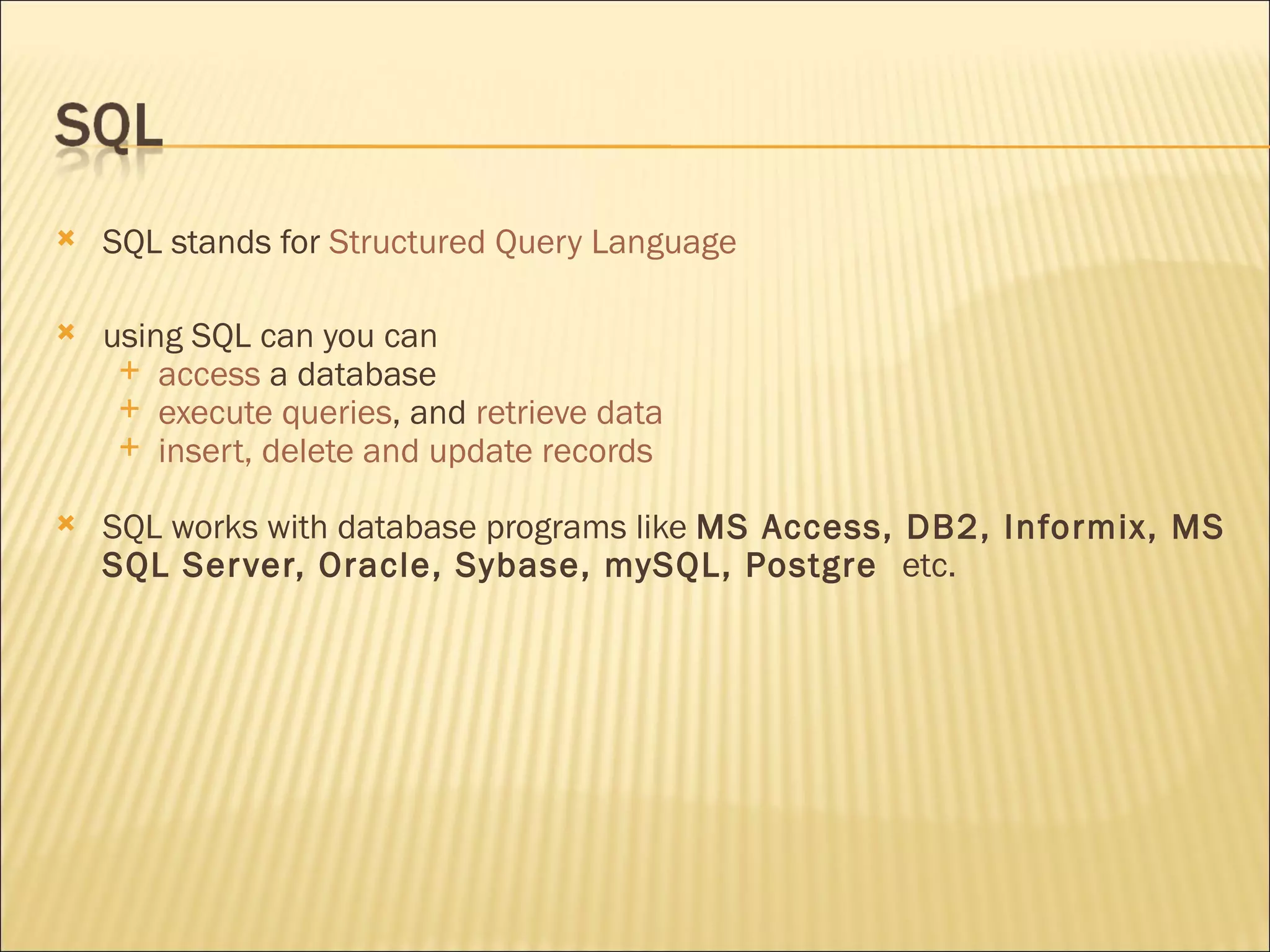
SQL stands for  Structured Query Language using SQL can you can access  a database execute queries , and  retrieve data insert, delete and update records SQL works with database programs like  MS Access, DB2, Informix, MS SQL Server, Oracle, Sybase, mySQL, Postgre   etc.
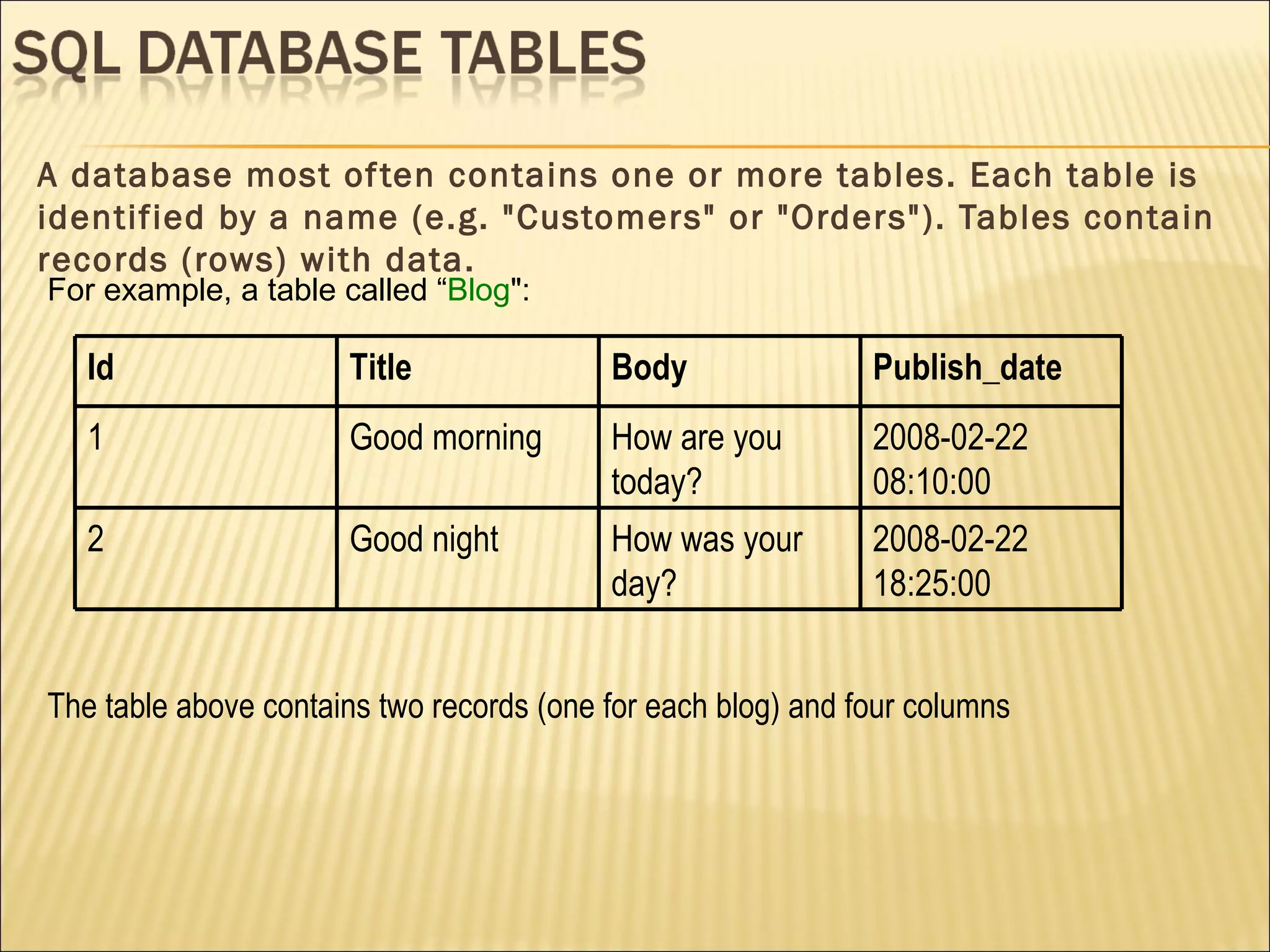
A database most often contains one or more tables. Each table is identified by a name (e.g. "Customers" or "Orders"). Tables contain records (rows) with data. The table above contains two records (one for each blog) and four columns For example, a table called “ Blog ": Id Title Body Publish_date 1 Good morning  How are you today? 2008-02-22 08:10:00 2 Good night How was your day? 2008-02-22 18:25:00
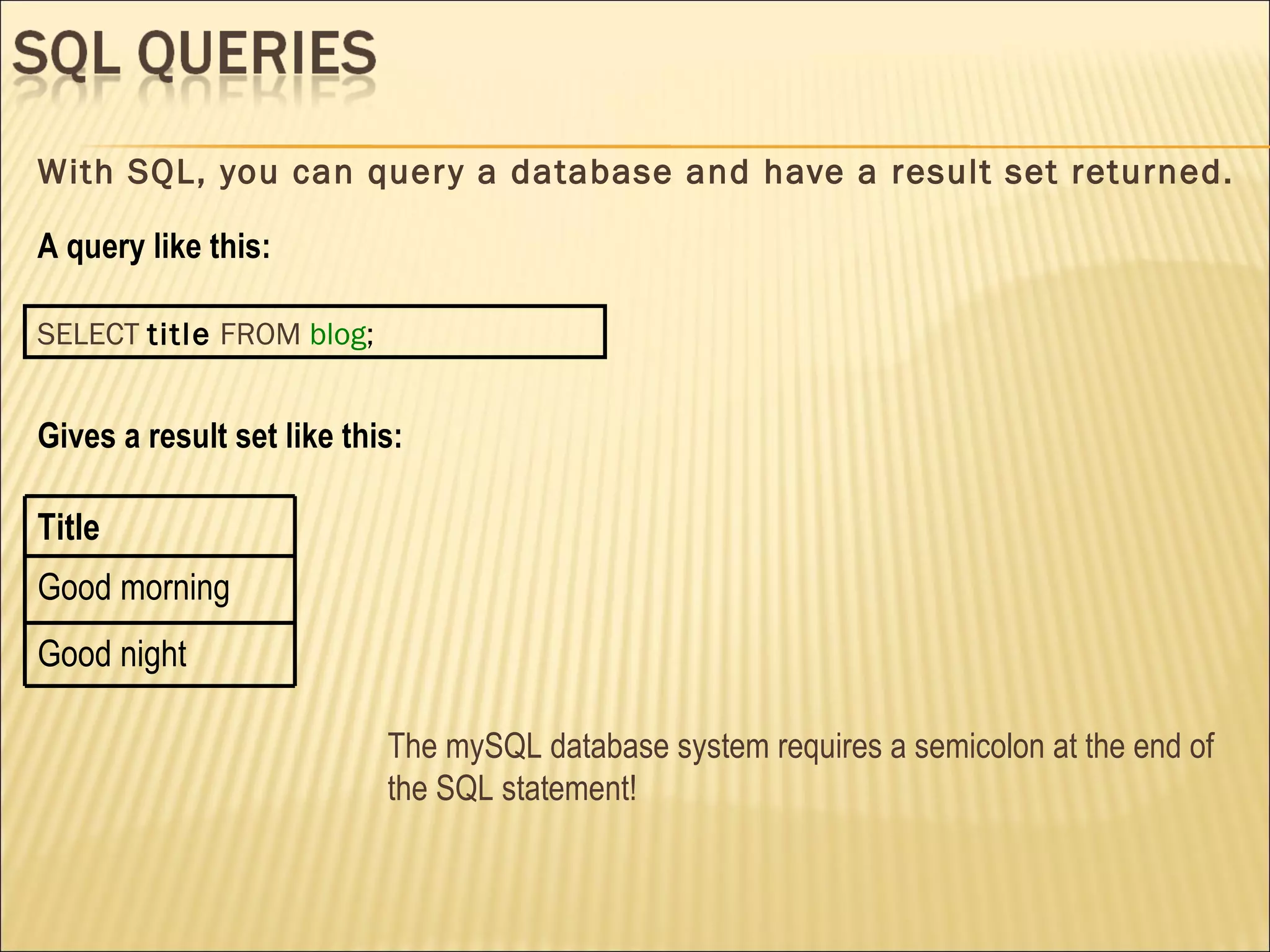
With SQL, you can query a database and have a result set returned. A query like this: SELECT   title   FROM   blog ; Gives a result set like this: The mySQL database system requires a semicolon at the end of the SQL statement! Title Good morning  Good night
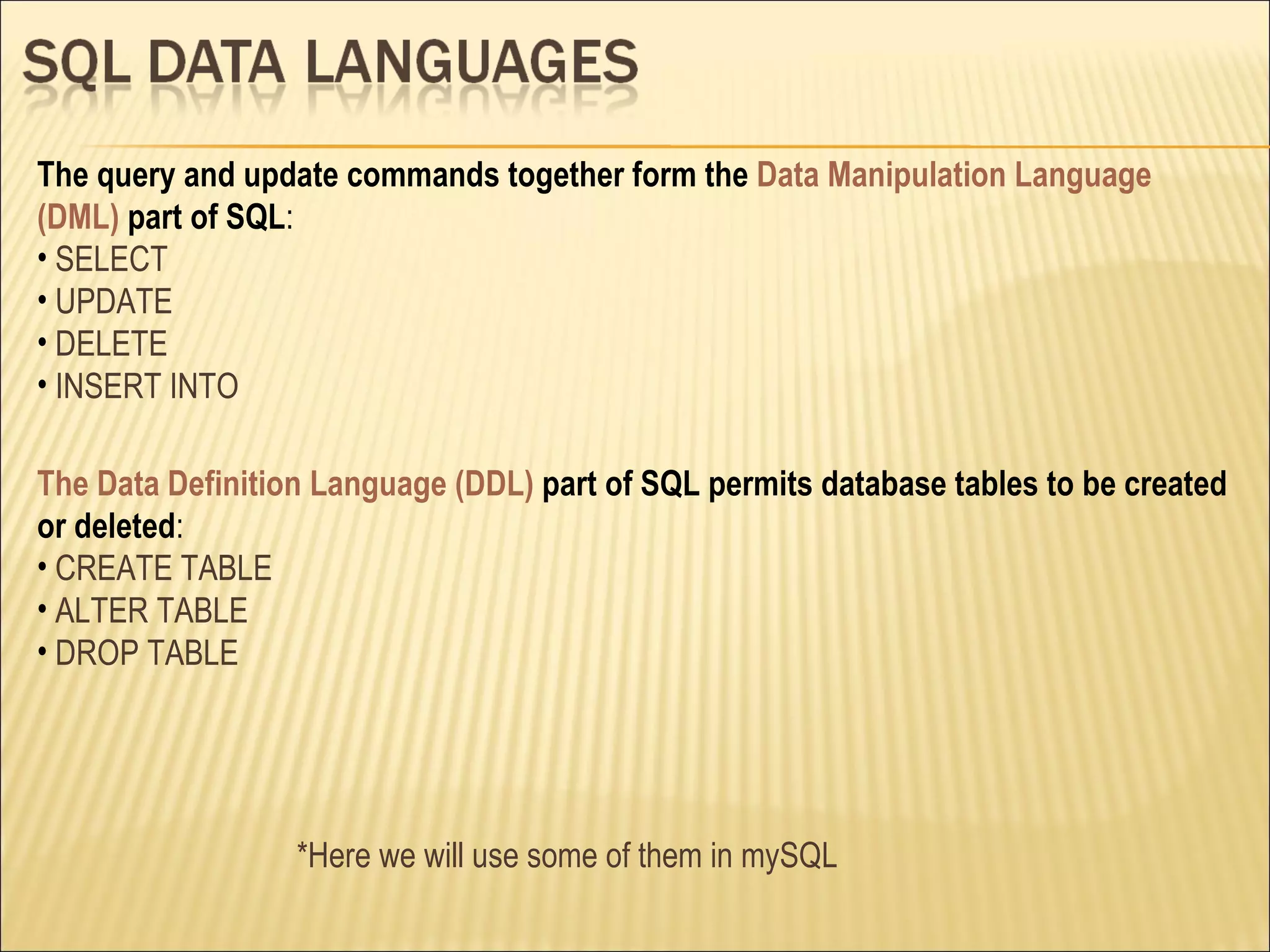
The Data Definition Language (DDL)  part of SQL permits database tables to be created or deleted : CREATE TABLE ALTER TABLE DROP TABLE The query and update commands together form the  Data Manipulation Language (DML)  part of SQL : SELECT UPDATE DELETE INSERT INTO *Here we will use some of them in mySQL
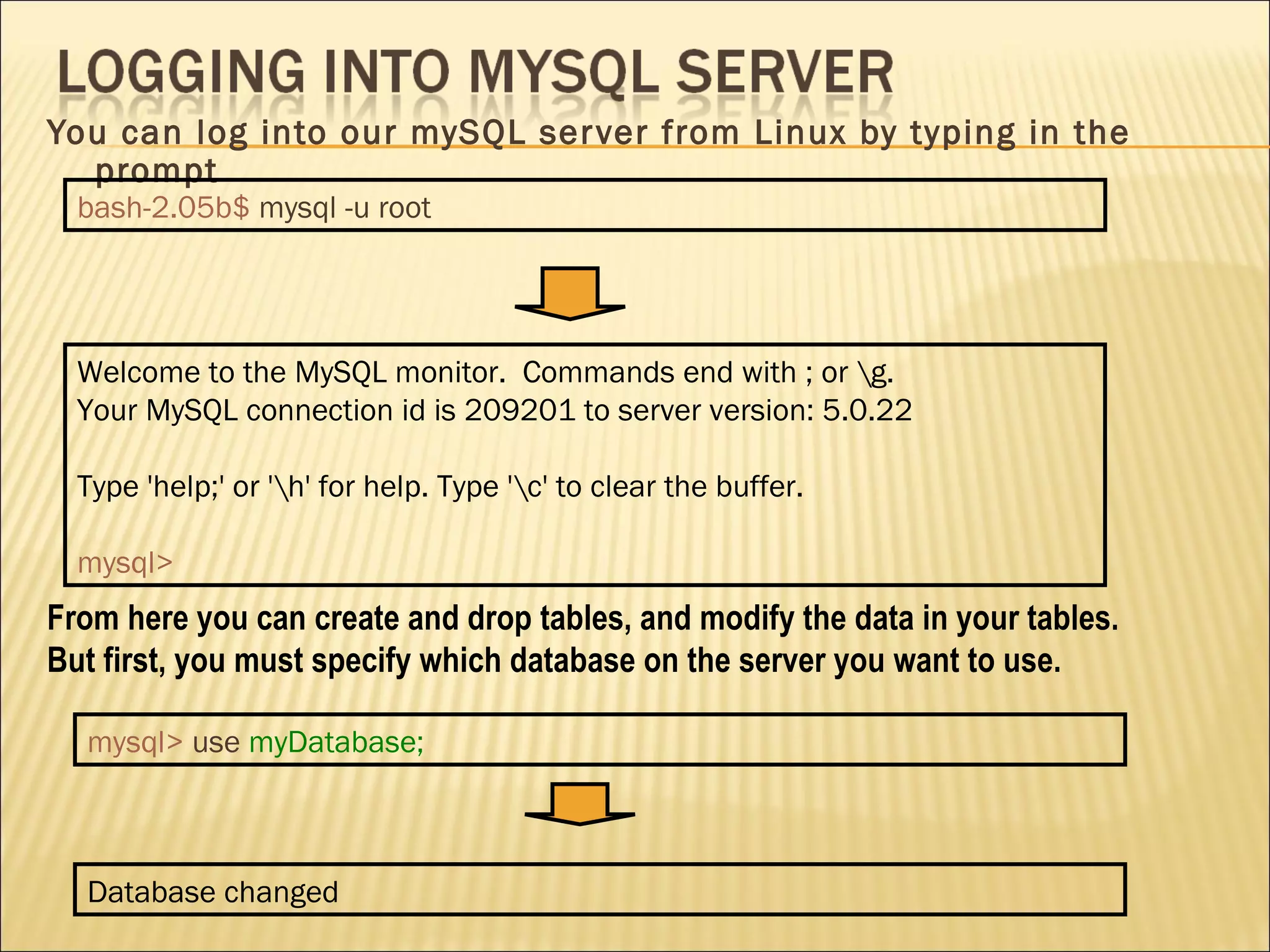
You can log into our mySQL server from Linux by typing in the prompt From here you can create and drop tables, and modify the data in your tables. But first, you must specify which database on the server you want to use. bash-2.05b$   mysql -u root Welcome to the MySQL monitor.  Commands end with ; or \g. Your MySQL connection id is 209201 to server version: 5.0.22 Type 'help;' or '\h' for help. Type '\c' to clear the buffer. mysql> mysql>   use   myDatabase; Database changed
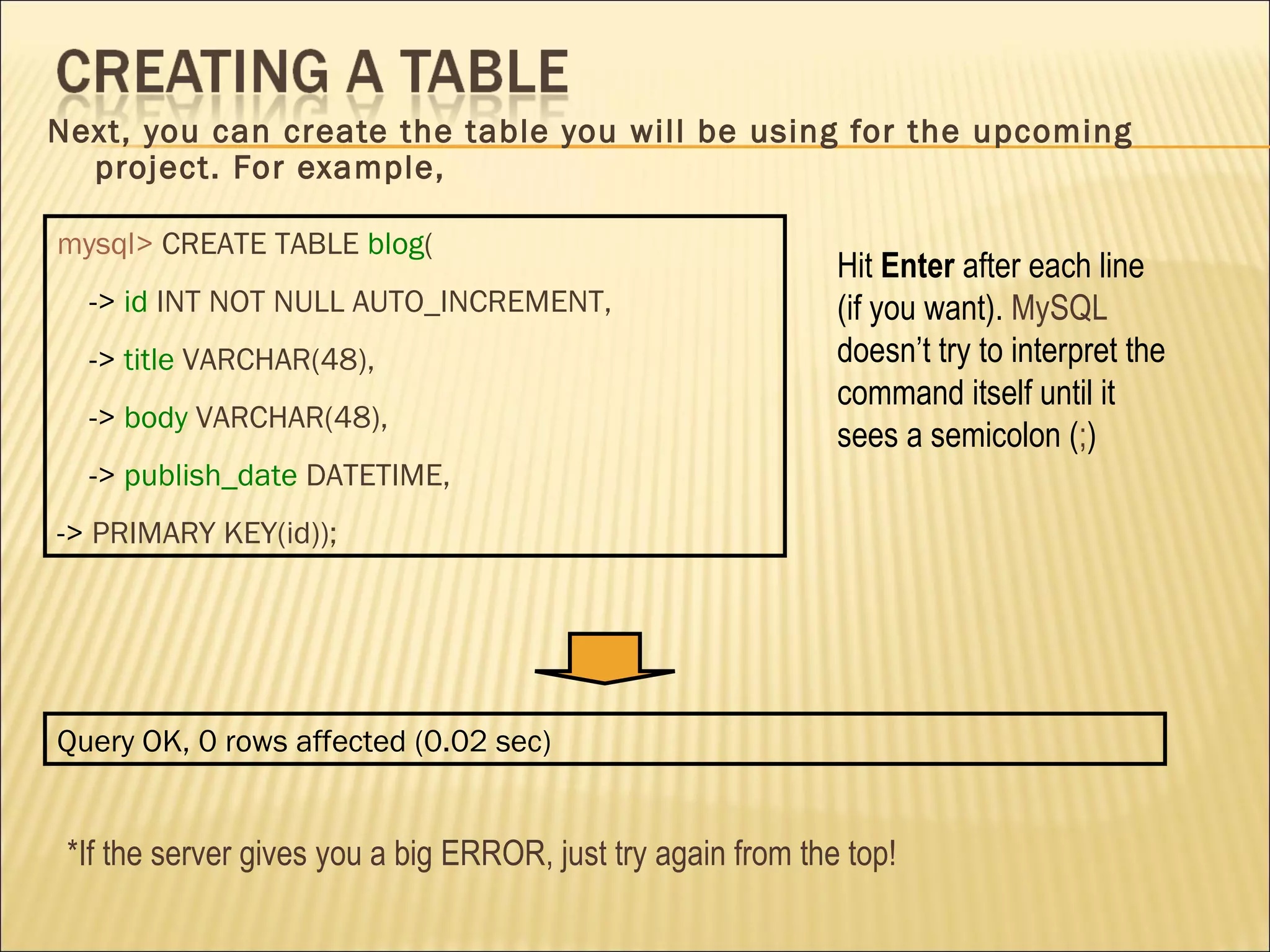
Next, you can create the table you will be using for the upcoming project. For example, mysql>   CREATE TABLE   blog ( ->  id   INT NOT NULL AUTO_INCREMENT, ->  title   VARCHAR(48), ->  body   VARCHAR(48), ->  publish_date   DATETIME, ->  PRIMARY KEY(id)); Hit  Enter  after each line (if you want).  MySQL  doesn’t try to interpret the command itself until it sees a semicolon ( ; ) Query OK, 0 rows affected (0.02 sec) *If the server gives you a big ERROR, just try again from the top!
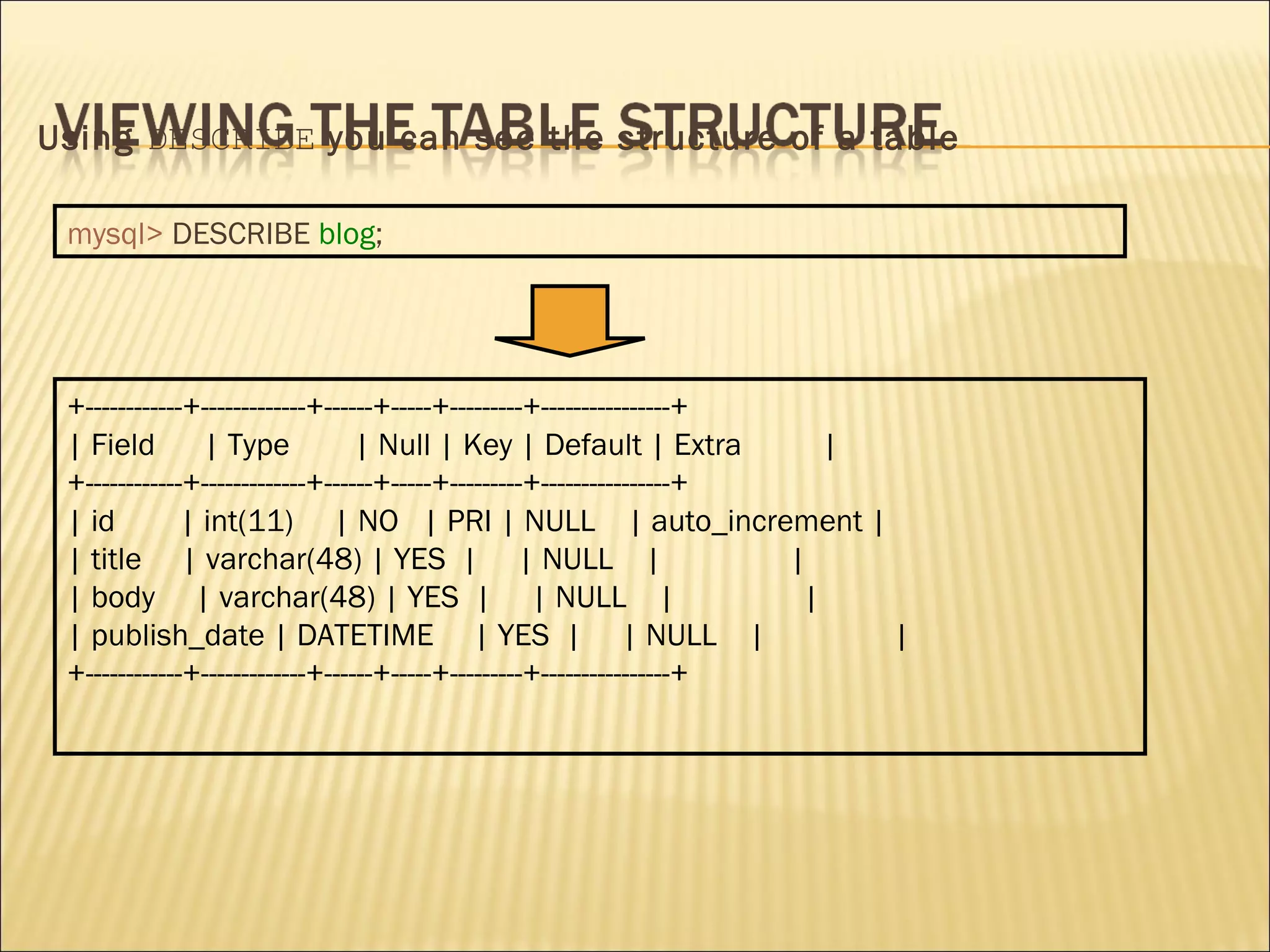
Using  DESCRIBE  you can see the structure of a table mysql>   DESCRIBE   blog ; +------------+-------------+------+-----+---------+----------------+ | Field  | Type  | Null | Key | Default | Extra  | +------------+-------------+------+-----+---------+----------------+ | id  | int(11)  | NO  | PRI | NULL  | auto_increment | | title  | varchar(48) | YES  |  | NULL  |  | | body  | varchar(48) | YES  |  | NULL  |  | | publish_date | DATETIME  | YES  |  | NULL  |  | +------------+-------------+------+-----+---------+----------------+
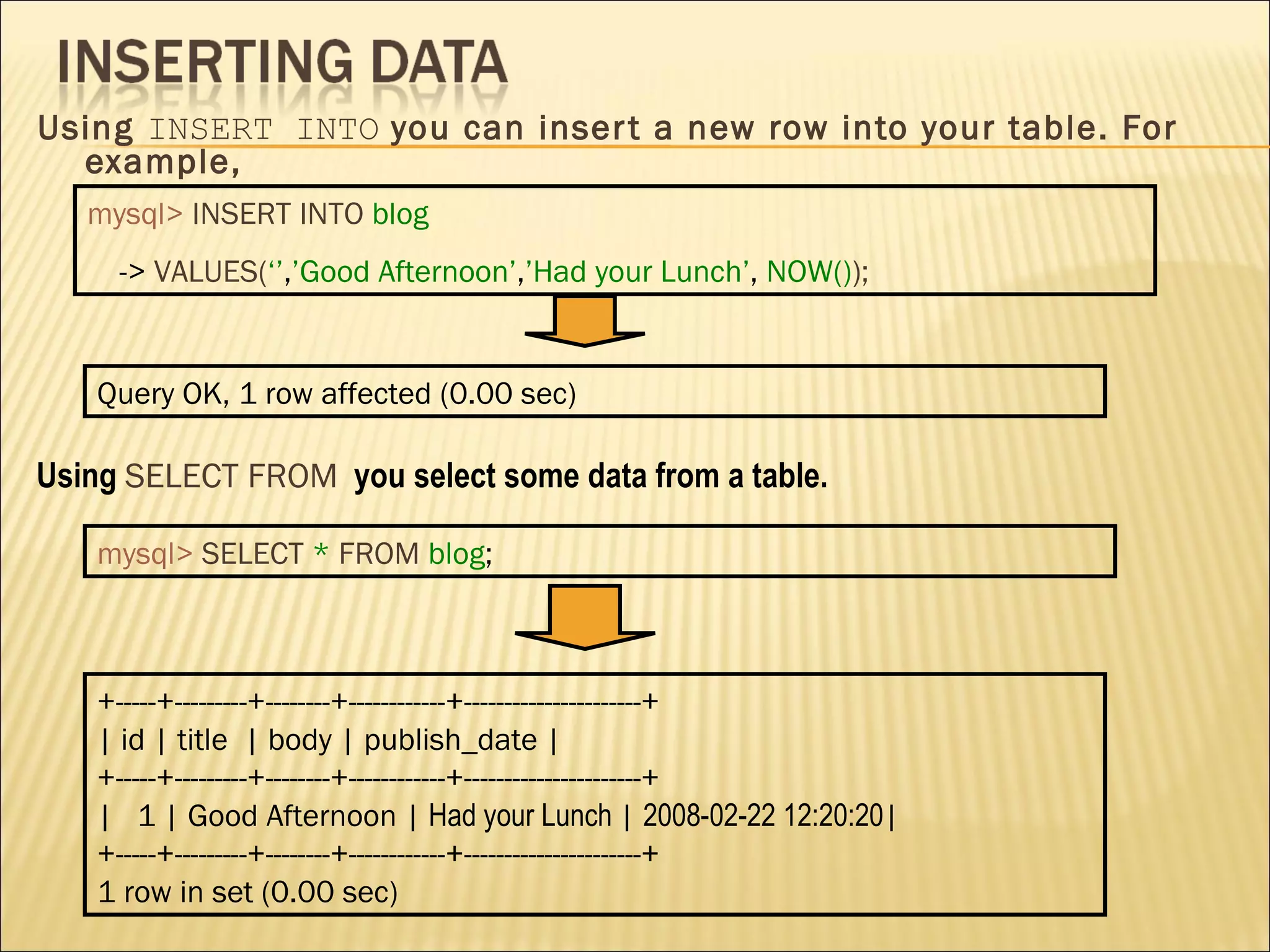
Using  INSERT INTO  you can insert a new row into your table. For example, mysql>   INSERT INTO   blog ->  VALUES( ‘’ , ’Good Afternoon’ , ’Had your Lunch’ ,  NOW() ); Query OK, 1 row affected (0.00 sec) Using  SELECT FROM   you   select some data from a table. mysql>   SELECT   *   FROM   blog ; +-----+---------+--------+------------+----------------------+ | id | title  | body | publish_date | +-----+---------+--------+------------+----------------------+ |  1 | Good Afternoon |  Had your Lunch  |  2008-02-22 12:20:20 | +-----+---------+--------+------------+----------------------+ 1 row in set (0.00 sec)
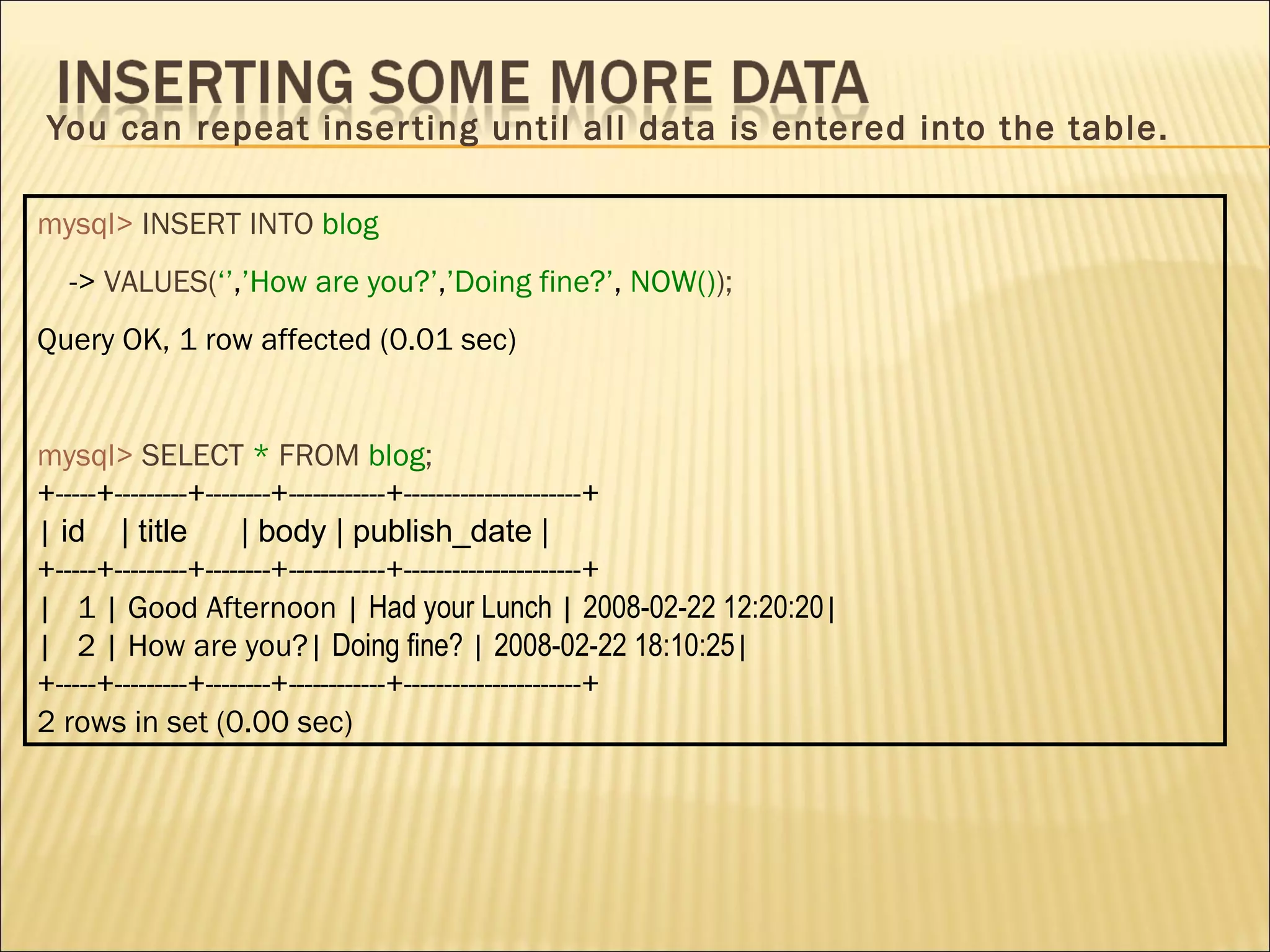
You can repeat inserting until all data is entered into the table. mysql>   INSERT INTO   blog ->  VALUES( ‘’ , ’How are you?’ , ’Doing fine?’ ,  NOW() ); Query OK, 1 row affected (0.01 sec) mysql>   SELECT   *   FROM   blog ; +-----+---------+--------+------------+----------------------+ |  id  | title  | body | publish_date | +-----+---------+--------+------------+----------------------+ |  1 | Good Afternoon |  Had your Lunch  |  2008-02-22 12:20:20 | |  2 | How are you?|  Doing fine?  |  2008-02-22 18:10:25 | +-----+---------+--------+------------+----------------------+ 2 rows in set (0.00 sec)
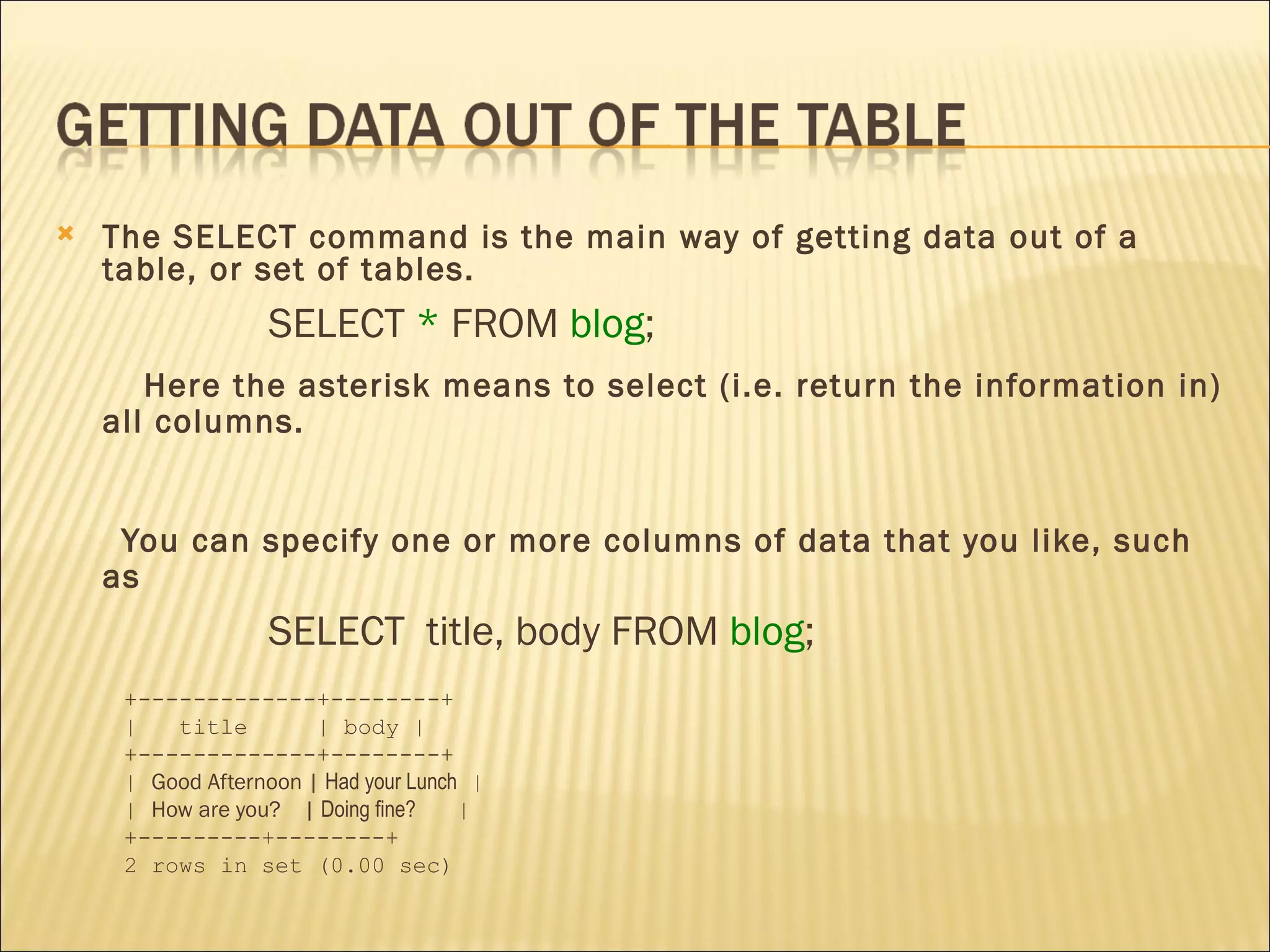
The SELECT command is the main way of getting data out of a table, or set of tables.  SELECT  *  FROM  blog ;  Here the asterisk means to select (i.e. return the information in) all columns.  You can specify one or more columns of data that you like, such as  SELECT  title, body FROM  blog ; +-------------+--------+ |  title  | body | +-------------+--------+ |  Good Afternoon |  Had your Lunch  | |  How are you?  |  Doing fine?   | +---------+--------+ 2 rows in set (0.00 sec)
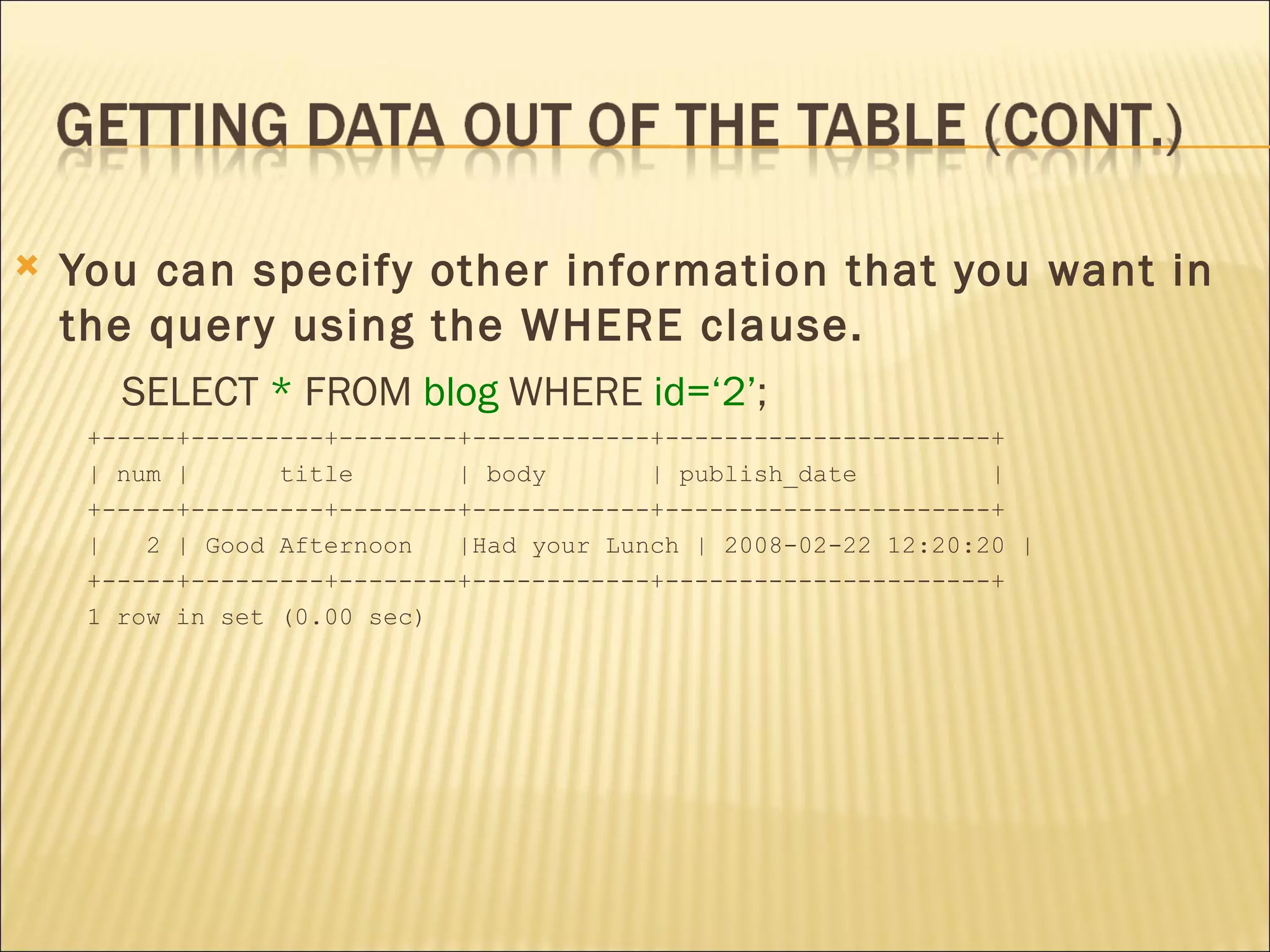
You can specify other information that you want in the query using the WHERE clause.  SELECT  *  FROM  blog  WHERE  id=‘2’ ; +-----+---------+--------+------------+----------------------+ | num |  title  | body  | publish_date  | +-----+---------+--------+------------+----------------------+ |  2 | Good Afternoon  |Had your Lunch | 2008-02-22 12:20:20 | +-----+---------+--------+------------+----------------------+ 1 row in set (0.00 sec)
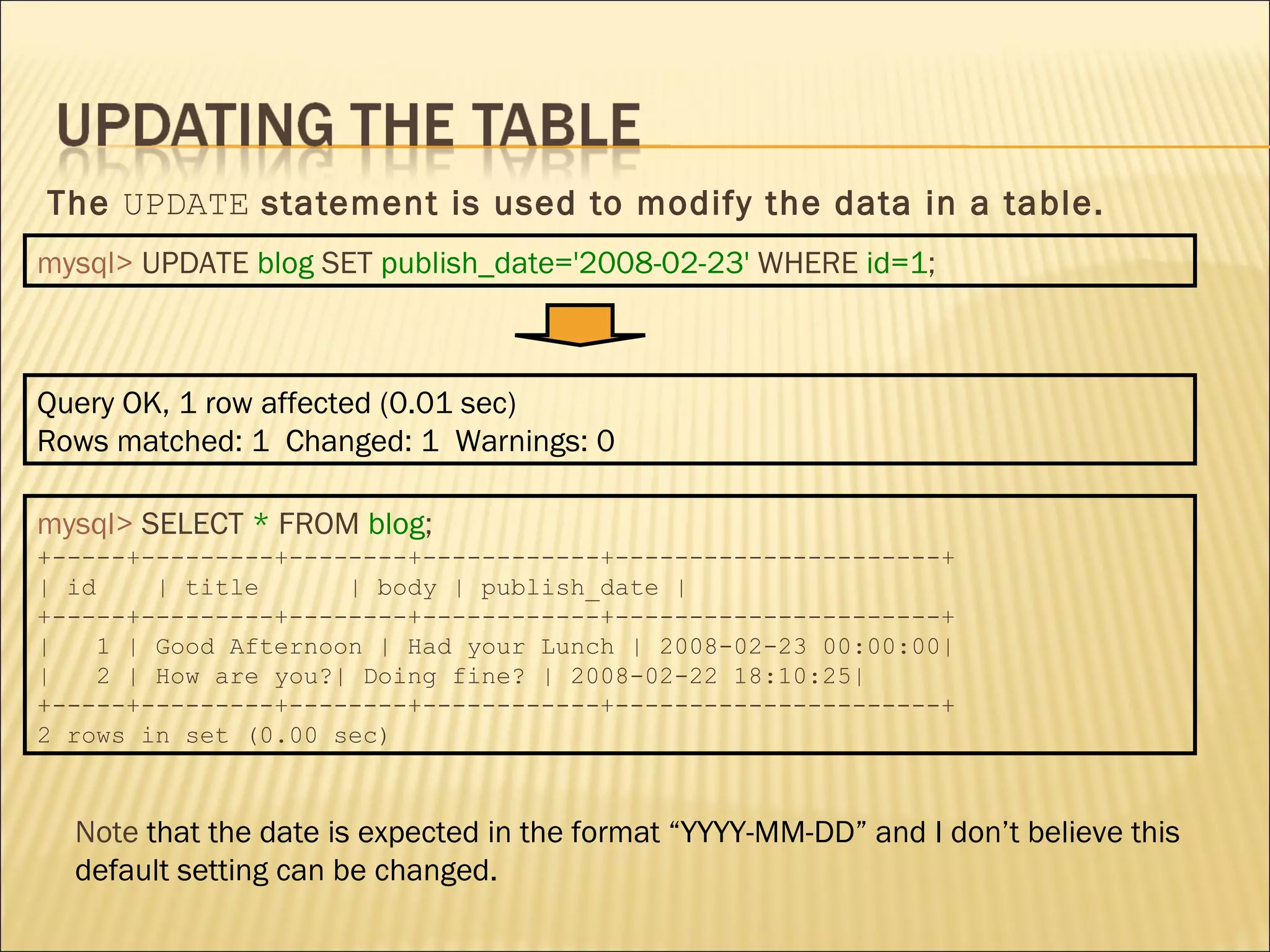
The  UPDATE  statement is used to modify the data in a table. mysql>   UPDATE   blog   SET   publish_date='2008-02-23'   WHERE   id=1 ; mysql>   SELECT   *   FROM   blog ; +-----+---------+--------+------------+----------------------+ | id  | title  | body | publish_date | +-----+---------+--------+------------+----------------------+ |  1 | Good Afternoon | Had your Lunch | 2008-02-23 00:00:00| |  2 | How are you?| Doing fine? | 2008-02-22 18:10:25| +-----+---------+--------+------------+----------------------+ 2 rows in set (0.00 sec) Note  that the date is expected in the format “YYYY-MM-DD” and I don’t believe this default setting can be changed. Query OK, 1 row affected (0.01 sec) Rows matched: 1  Changed: 1  Warnings: 0
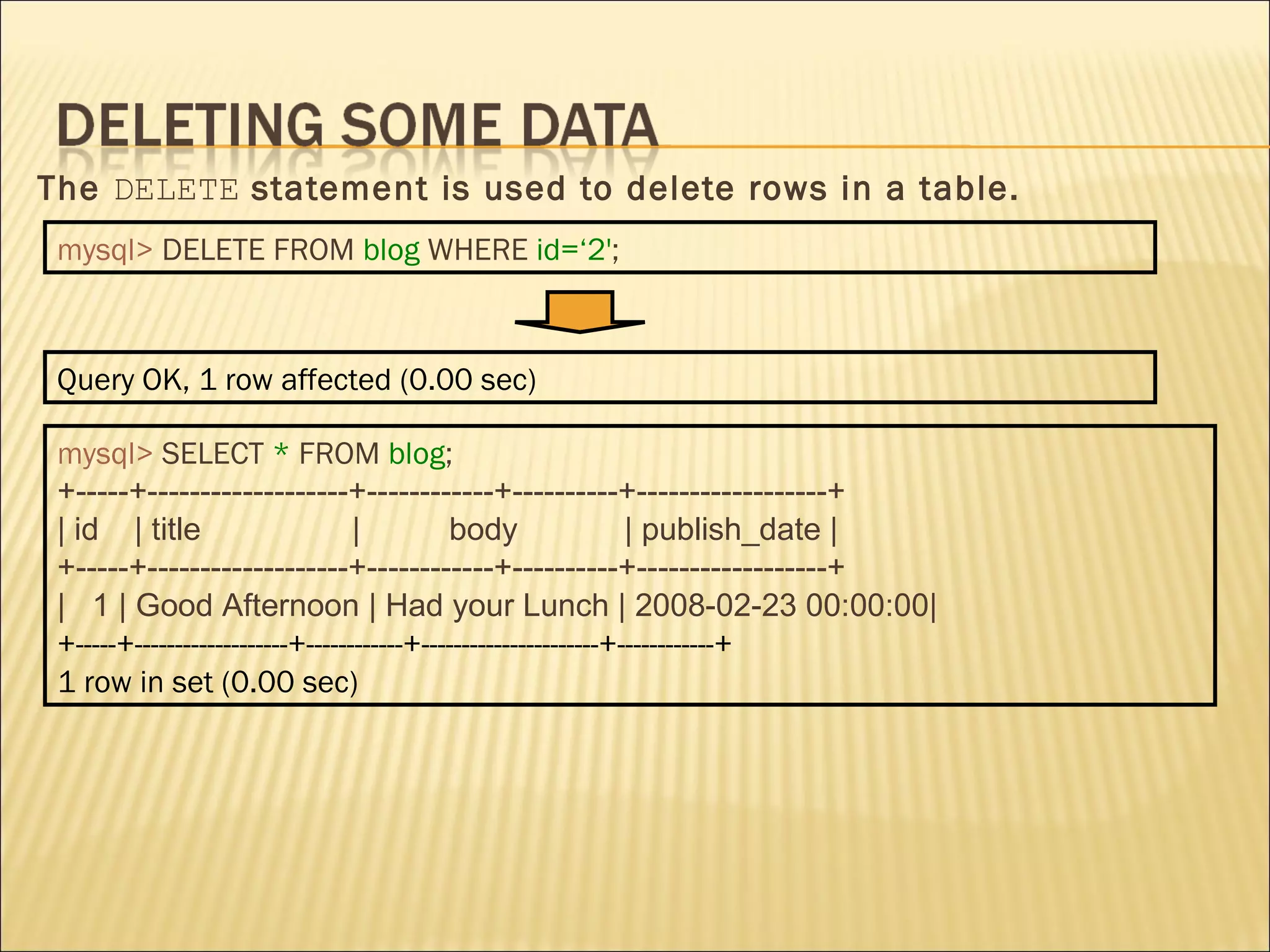
The  DELETE  statement is used to delete rows in a table. mysql>   DELETE FROM   blog   WHERE   id=‘2' ; mysql>   SELECT   *   FROM   blog ; +-----+-------------------+------------+----------+------------------+ | id  | title  |  body  | publish_date | +-----+-------------------+------------+----------+------------------+ |  1 | Good Afternoon | Had your Lunch | 2008-02-23 00:00:00| +-----+-------------------+------------+----------------------+------------+ 1 row in set (0.00 sec) Query OK, 1 row affected (0.00 sec)
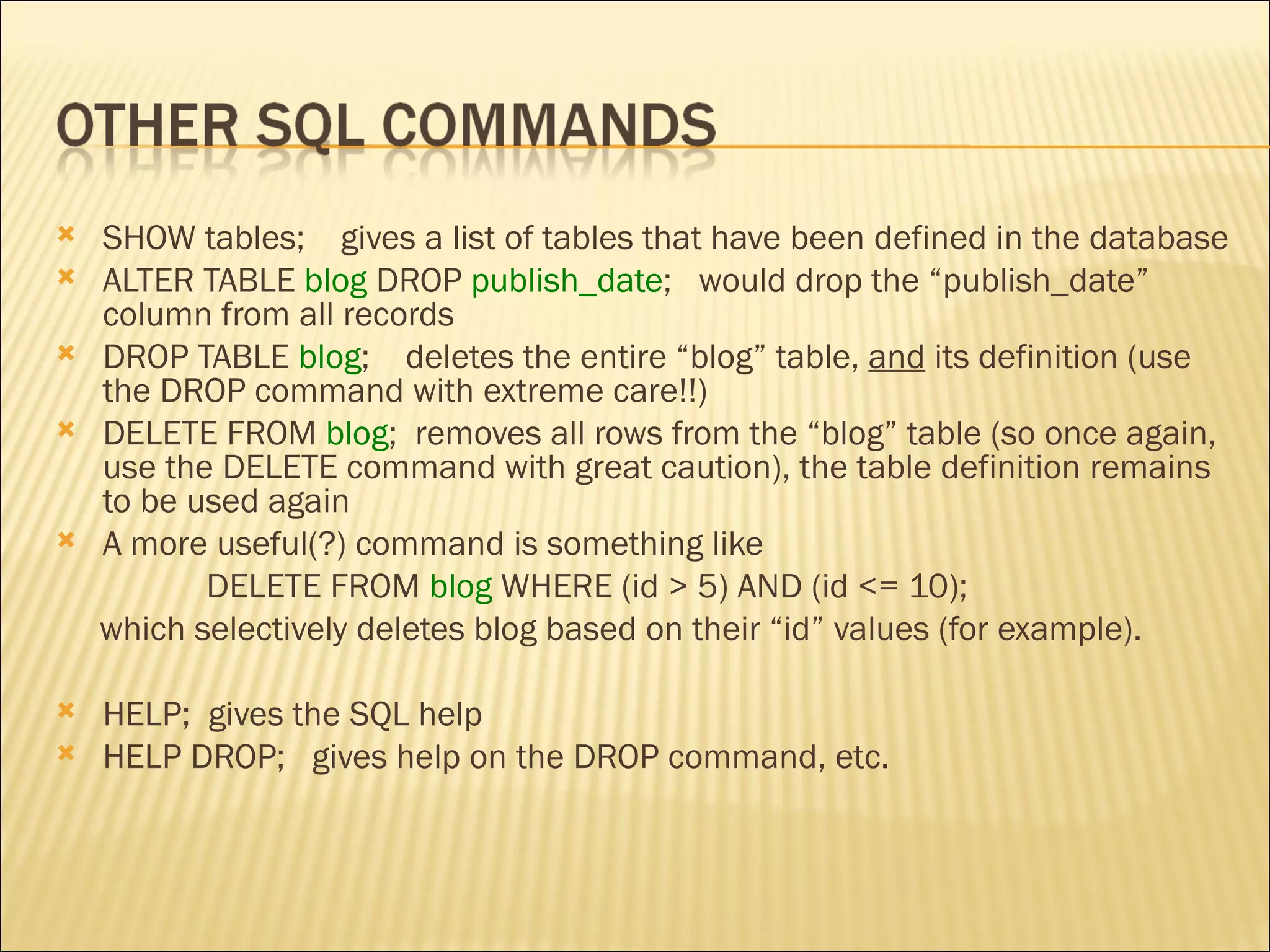
SHOW tables;  gives a list of tables that have been defined in the database ALTER TABLE  blog  DROP  publish_date ;  would drop the “publish_date” column from all records DROP TABLE  blog ;  deletes the entire “blog” table,  and  its definition (use the DROP command with extreme care!!) DELETE FROM  blog ;  removes all rows from the “blog” table (so once again, use the DELETE command with great caution), the table definition remains to be used again A more useful(?) command is something like  DELETE FROM  blog  WHERE   (id > 5) AND (id <= 10); which selectively deletes blog based on their “id” values (for example).  HELP;  gives the SQL help HELP DROP;  gives help on the DROP command, etc.
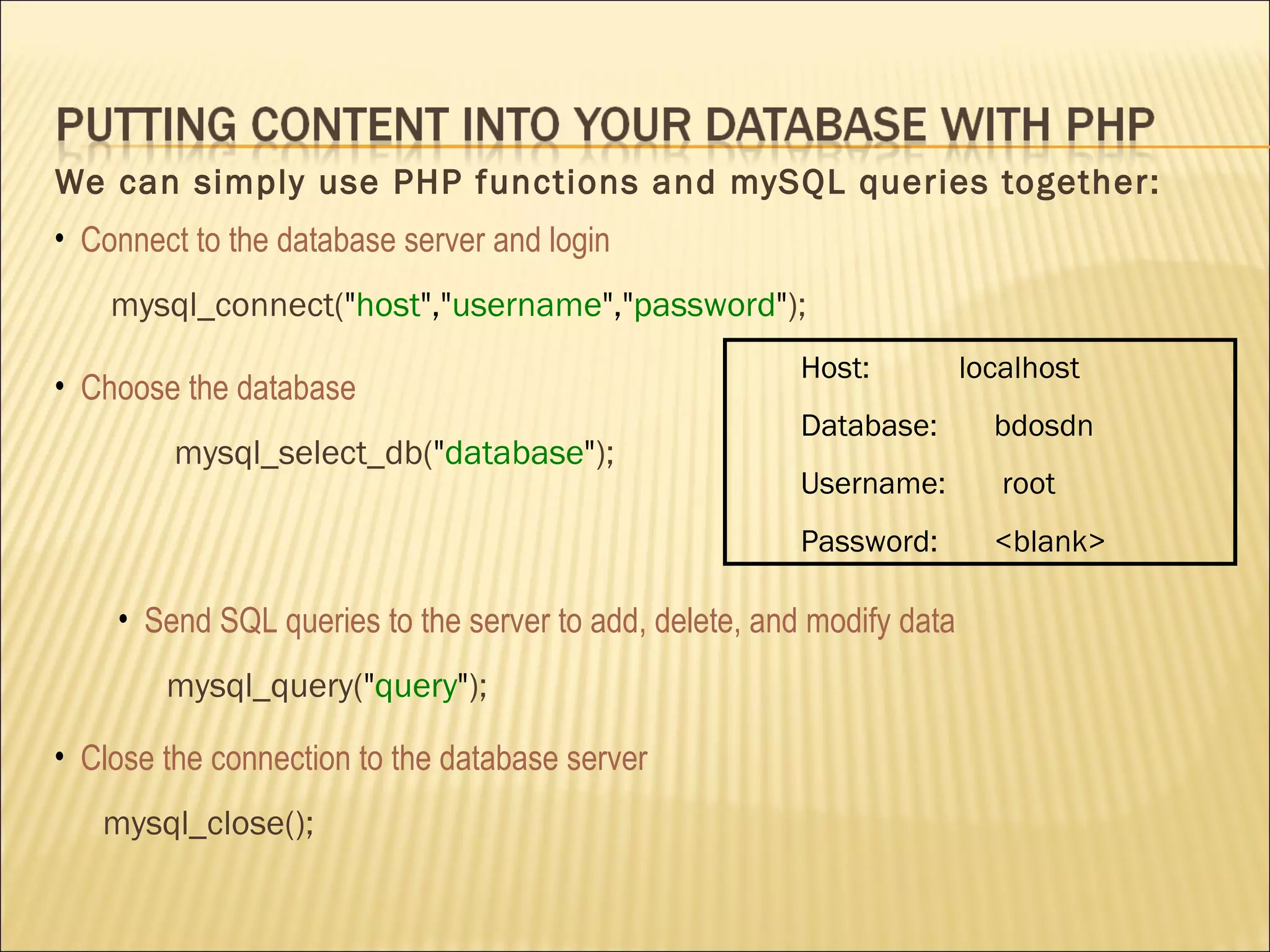
We can simply use PHP functions and mySQL queries together: Host:  localhost Database:  bdosdn  Username:  root Password:  <blank> Connect to the database server and login mysql_connect( &quot; host &quot;,&quot; username &quot;,&quot; password &quot; ); Choose the database mysql_select_db( &quot; database &quot; ); Send SQL queries to the server to add, delete, and modify data mysql_query( &quot; query &quot; ); Close  the connection to the database server mysql_close();
<html> <head> <title>Putting Data in the DB</title> </head> <body> <?php /*insert blogs into DB*/ if(isset($_POST[&quot;submit&quot;]))  { $db = mysql_connect(&quot;localhost&quot;, &quot;root&quot;, &quot;root&quot;) or die('DB connection error!'); mysql_select_db(&quot;bdosdn&quot;); $date=date(&quot;Y-m-d&quot;);  /*  Get the current date in the right SQL format  */ $sql=&quot;INSERT INTO blog  VALUES('','&quot; . $_POST[&quot;title&quot;] . &quot;','&quot; . $_POST[&quot;body&quot;] . &quot;', NOW())&quot;;  /*  construct the query  */ mysql_query($sql); mysql_close(); echo&quot;<h3>Thank you. The data has been entered.</h3> \n&quot;; echo'<p><a href=&quot;blog_entry.php&quot;>Back to post</a></p>' . &quot;\n&quot;; echo'<p><a href=&quot;blog_view.php &quot;>View the blog lists</a></p>' .&quot;\n&quot;; } Blog_entry.php
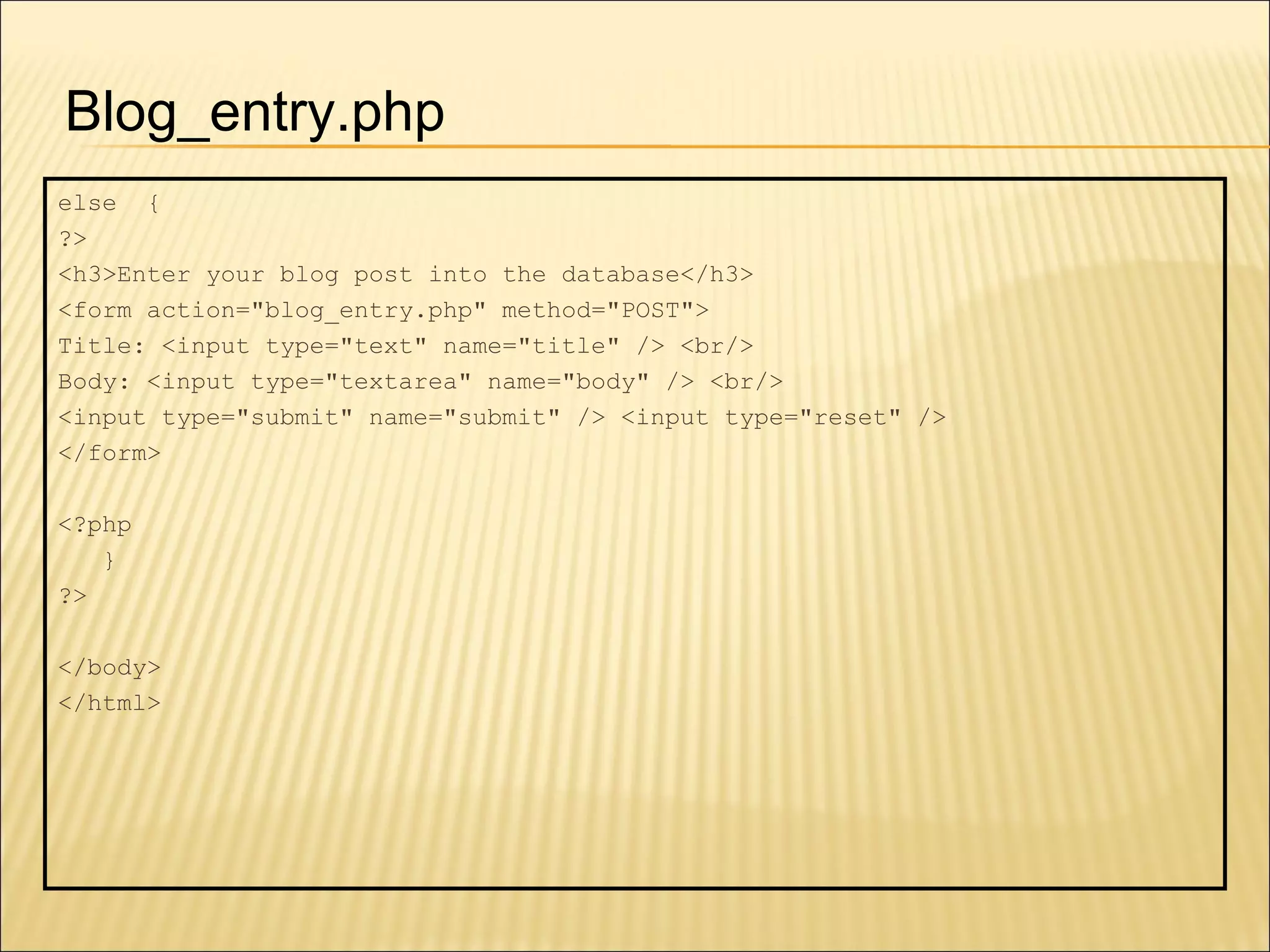
else  { ?>  <h3>Enter your blog post into the database</h3> <form action=&quot;blog_entry.php&quot; method=&quot;POST&quot;> Title: <input type=&quot;text&quot; name=&quot;title&quot; /> <br/> Body: <input type=&quot;textarea&quot; name=&quot;body&quot; /> <br/> <input type=&quot;submit&quot; name=&quot;submit&quot; /> <input type=&quot;reset&quot; /> </form> <?php } ?> </body> </html> Blog_entry.php
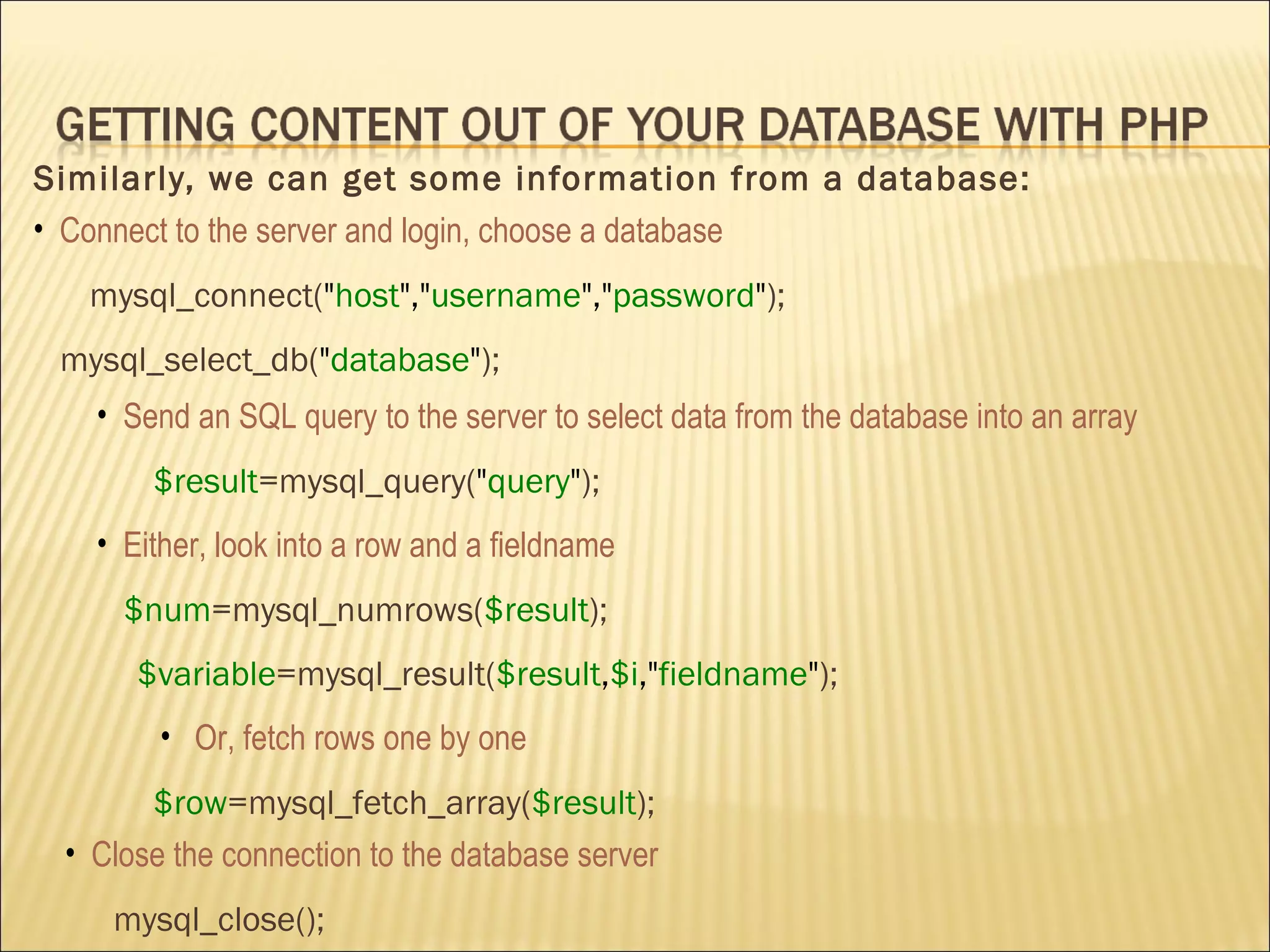
Similarly, we can get some information from a database: Connect to the server and login, choose a database mysql_connect( &quot; host &quot;,&quot; username &quot;,&quot; password &quot; ); mysql_select_db( &quot; database &quot; ); Send an SQL query to the server to select data from the database into  an array $result =mysql_query( &quot; query &quot; ); Either, look into a row and a fieldname $num =mysql_numrows( $result ); $variable =mysql_result( $result , $i ,&quot; fieldname &quot; ); Or,  fetch rows one by one $row =mysql_fetch_array( $result ); Close  the connection to the database server mysql_close();
<html> <head> <title>Getting Data out of the DB</title> </head> <body> <h1> Blog Database </h1> <?php  /*get blog from the DB */ $db = mysql_connect(&quot;localhost&quot;, &quot;root&quot;, &quot;root&quot;) or die('DB connection error!'); mysql_select_db(&quot;bdosdn&quot;, $db); $sql = &quot;SELECT * FROM blog ORDER BY id desc&quot;;  $result=mysql_query($sql); while($row=mysql_fetch_array($result)){ echo &quot;<h4> Title: &quot; . $row[&quot;title&quot;] . &quot;</h4> \n&quot;; echo &quot;<h5> Publish Date: &quot; . $row[&quot;publish_date&quot;] . &quot;<br/> Body: &quot; . $row[&quot;body&quot;] . &quot;</h5> \n&quot;; echo '<hr>'; } mysql_close(); ?> </body> </html> Blog_view.php
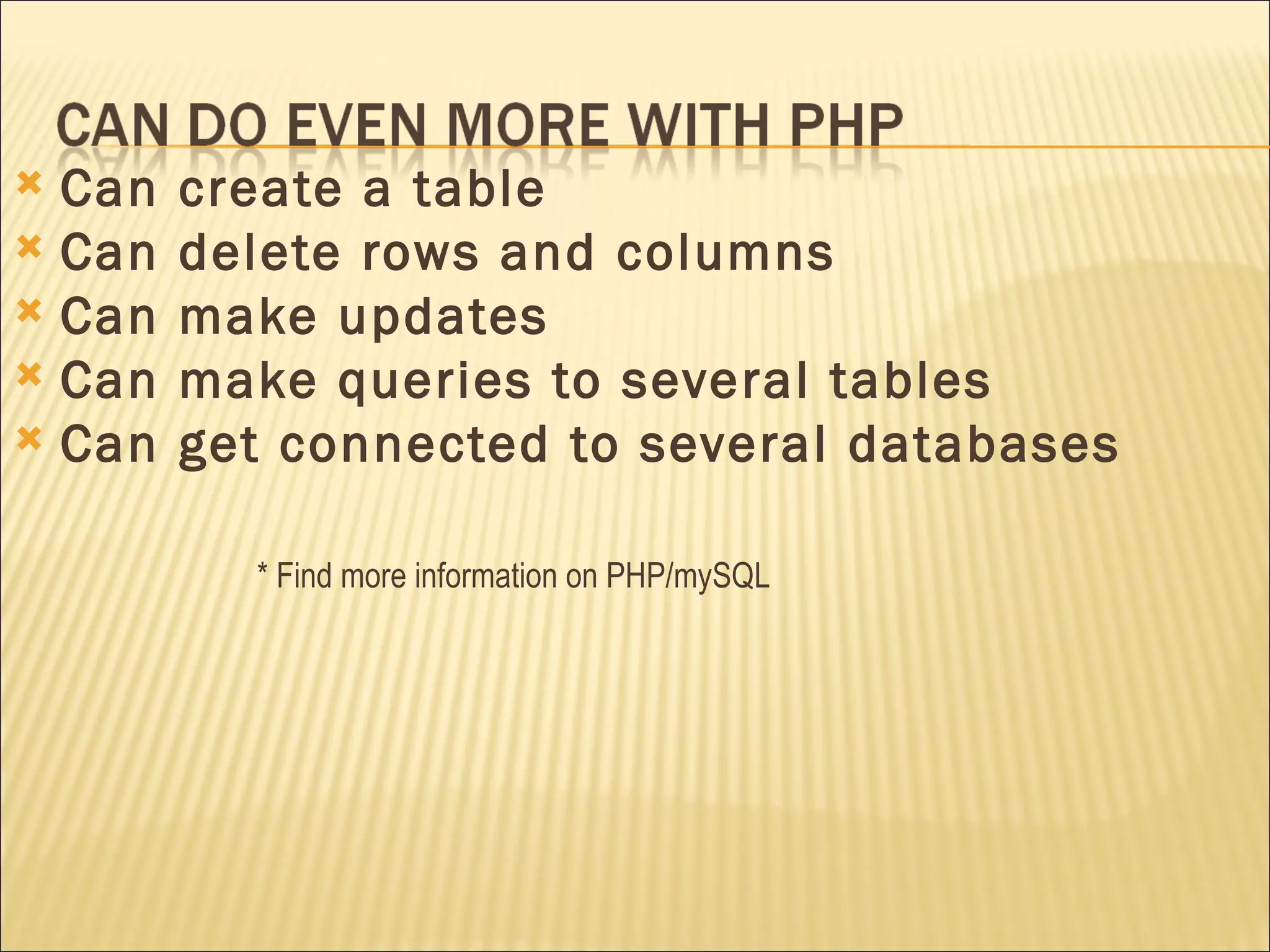
Can create a table Can delete rows and columns Can make updates Can make queries to several tables Can get connected to several databases * Find more information on PHP/mySQL
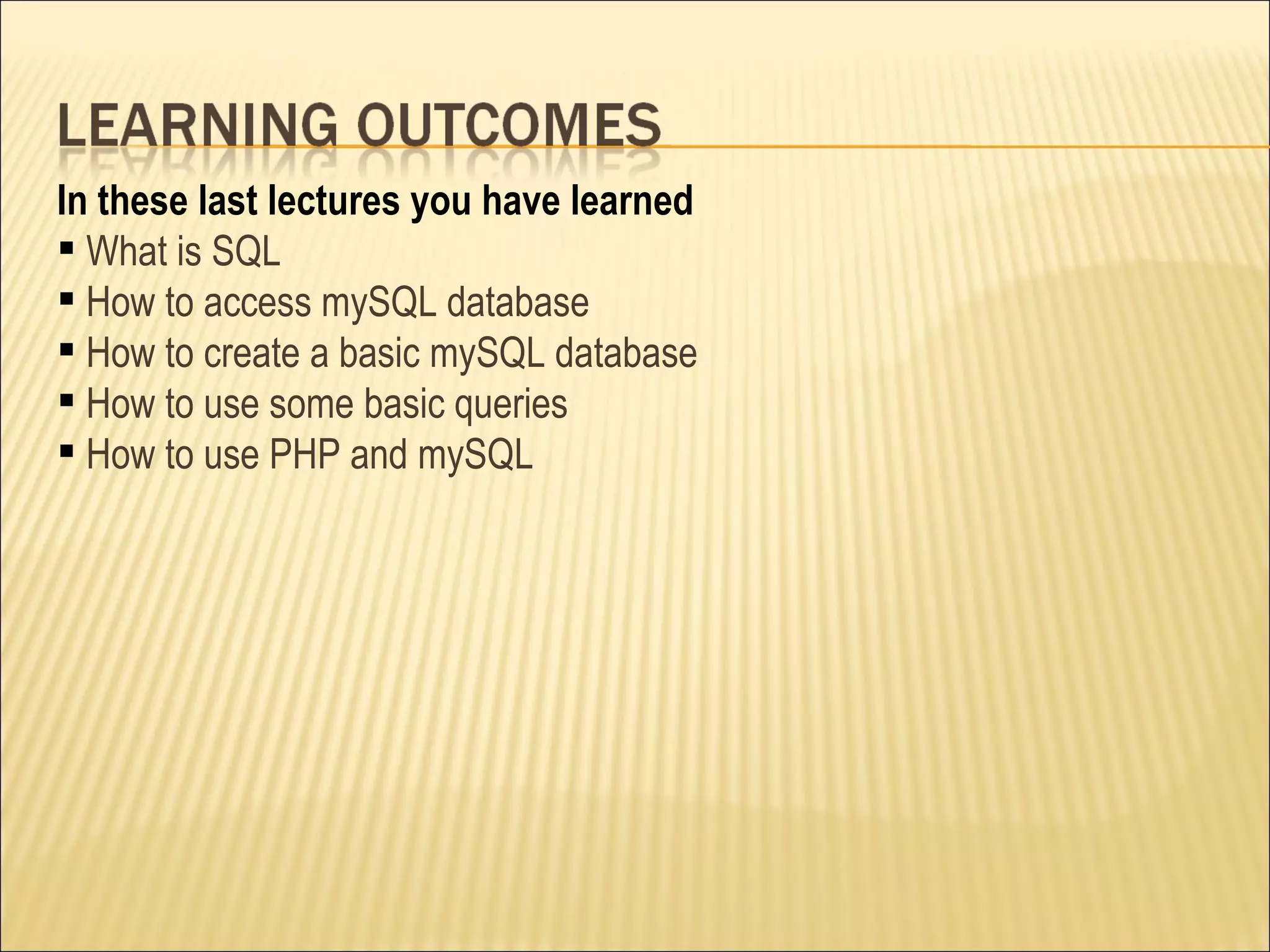
In these last lectures you have learned What is SQL How to access mySQL database How to create a basic mySQL database How to use some basic queries How to use PHP and mySQL
 

Introduction To Lamp P2

  • 1.
    Muhammad Abdur RahmanAdnaN jhoroTEK.com [email_address]
  • 2.
    COMP519: Web Programming (University of Liverpool) http://www.csc.liv.ac.uk/~martin/teaching/comp519/ http://www.w3schools.com
  • 3.
    SQL stands for Structured Query Language using SQL can you can access a database execute queries , and retrieve data insert, delete and update records SQL works with database programs like MS Access, DB2, Informix, MS SQL Server, Oracle, Sybase, mySQL, Postgre etc.
  • 4.
    A database mostoften contains one or more tables. Each table is identified by a name (e.g. &quot;Customers&quot; or &quot;Orders&quot;). Tables contain records (rows) with data. The table above contains two records (one for each blog) and four columns For example, a table called “ Blog &quot;: Id Title Body Publish_date 1 Good morning How are you today? 2008-02-22 08:10:00 2 Good night How was your day? 2008-02-22 18:25:00
  • 5.
    With SQL, youcan query a database and have a result set returned. A query like this: SELECT title FROM blog ; Gives a result set like this: The mySQL database system requires a semicolon at the end of the SQL statement! Title Good morning Good night
  • 6.
    The Data DefinitionLanguage (DDL) part of SQL permits database tables to be created or deleted : CREATE TABLE ALTER TABLE DROP TABLE The query and update commands together form the Data Manipulation Language (DML) part of SQL : SELECT UPDATE DELETE INSERT INTO *Here we will use some of them in mySQL
  • 7.
    You can loginto our mySQL server from Linux by typing in the prompt From here you can create and drop tables, and modify the data in your tables. But first, you must specify which database on the server you want to use. bash-2.05b$ mysql -u root Welcome to the MySQL monitor. Commands end with ; or \g. Your MySQL connection id is 209201 to server version: 5.0.22 Type 'help;' or '\h' for help. Type '\c' to clear the buffer. mysql> mysql> use myDatabase; Database changed
  • 8.
    Next, you cancreate the table you will be using for the upcoming project. For example, mysql> CREATE TABLE blog ( -> id INT NOT NULL AUTO_INCREMENT, -> title VARCHAR(48), -> body VARCHAR(48), -> publish_date DATETIME, -> PRIMARY KEY(id)); Hit Enter after each line (if you want). MySQL doesn’t try to interpret the command itself until it sees a semicolon ( ; ) Query OK, 0 rows affected (0.02 sec) *If the server gives you a big ERROR, just try again from the top!
  • 9.
    Using DESCRIBE you can see the structure of a table mysql> DESCRIBE blog ; +------------+-------------+------+-----+---------+----------------+ | Field | Type | Null | Key | Default | Extra | +------------+-------------+------+-----+---------+----------------+ | id | int(11) | NO | PRI | NULL | auto_increment | | title | varchar(48) | YES | | NULL | | | body | varchar(48) | YES | | NULL | | | publish_date | DATETIME | YES | | NULL | | +------------+-------------+------+-----+---------+----------------+
  • 10.
    Using INSERTINTO you can insert a new row into your table. For example, mysql> INSERT INTO blog -> VALUES( ‘’ , ’Good Afternoon’ , ’Had your Lunch’ , NOW() ); Query OK, 1 row affected (0.00 sec) Using SELECT FROM you select some data from a table. mysql> SELECT * FROM blog ; +-----+---------+--------+------------+----------------------+ | id | title | body | publish_date | +-----+---------+--------+------------+----------------------+ | 1 | Good Afternoon | Had your Lunch | 2008-02-22 12:20:20 | +-----+---------+--------+------------+----------------------+ 1 row in set (0.00 sec)
  • 11.
    You can repeatinserting until all data is entered into the table. mysql> INSERT INTO blog -> VALUES( ‘’ , ’How are you?’ , ’Doing fine?’ , NOW() ); Query OK, 1 row affected (0.01 sec) mysql> SELECT * FROM blog ; +-----+---------+--------+------------+----------------------+ | id | title | body | publish_date | +-----+---------+--------+------------+----------------------+ | 1 | Good Afternoon | Had your Lunch | 2008-02-22 12:20:20 | | 2 | How are you?| Doing fine? | 2008-02-22 18:10:25 | +-----+---------+--------+------------+----------------------+ 2 rows in set (0.00 sec)
  • 12.
    The SELECT commandis the main way of getting data out of a table, or set of tables. SELECT * FROM blog ; Here the asterisk means to select (i.e. return the information in) all columns. You can specify one or more columns of data that you like, such as SELECT title, body FROM blog ; +-------------+--------+ | title | body | +-------------+--------+ | Good Afternoon | Had your Lunch | | How are you? | Doing fine? | +---------+--------+ 2 rows in set (0.00 sec)
  • 13.
    You can specifyother information that you want in the query using the WHERE clause. SELECT * FROM blog WHERE id=‘2’ ; +-----+---------+--------+------------+----------------------+ | num | title | body | publish_date | +-----+---------+--------+------------+----------------------+ | 2 | Good Afternoon |Had your Lunch | 2008-02-22 12:20:20 | +-----+---------+--------+------------+----------------------+ 1 row in set (0.00 sec)
  • 14.
    The UPDATE statement is used to modify the data in a table. mysql> UPDATE blog SET publish_date='2008-02-23' WHERE id=1 ; mysql> SELECT * FROM blog ; +-----+---------+--------+------------+----------------------+ | id | title | body | publish_date | +-----+---------+--------+------------+----------------------+ | 1 | Good Afternoon | Had your Lunch | 2008-02-23 00:00:00| | 2 | How are you?| Doing fine? | 2008-02-22 18:10:25| +-----+---------+--------+------------+----------------------+ 2 rows in set (0.00 sec) Note that the date is expected in the format “YYYY-MM-DD” and I don’t believe this default setting can be changed. Query OK, 1 row affected (0.01 sec) Rows matched: 1 Changed: 1 Warnings: 0
  • 15.
    The DELETE statement is used to delete rows in a table. mysql> DELETE FROM blog WHERE id=‘2' ; mysql> SELECT * FROM blog ; +-----+-------------------+------------+----------+------------------+ | id | title | body | publish_date | +-----+-------------------+------------+----------+------------------+ | 1 | Good Afternoon | Had your Lunch | 2008-02-23 00:00:00| +-----+-------------------+------------+----------------------+------------+ 1 row in set (0.00 sec) Query OK, 1 row affected (0.00 sec)
  • 16.
    SHOW tables; gives a list of tables that have been defined in the database ALTER TABLE blog DROP publish_date ; would drop the “publish_date” column from all records DROP TABLE blog ; deletes the entire “blog” table, and its definition (use the DROP command with extreme care!!) DELETE FROM blog ; removes all rows from the “blog” table (so once again, use the DELETE command with great caution), the table definition remains to be used again A more useful(?) command is something like DELETE FROM blog WHERE (id > 5) AND (id <= 10); which selectively deletes blog based on their “id” values (for example). HELP; gives the SQL help HELP DROP; gives help on the DROP command, etc.
  • 17.
    We can simplyuse PHP functions and mySQL queries together: Host: localhost Database: bdosdn Username: root Password: <blank> Connect to the database server and login mysql_connect( &quot; host &quot;,&quot; username &quot;,&quot; password &quot; ); Choose the database mysql_select_db( &quot; database &quot; ); Send SQL queries to the server to add, delete, and modify data mysql_query( &quot; query &quot; ); Close the connection to the database server mysql_close();
  • 18.
    <html> <head> <title>PuttingData in the DB</title> </head> <body> <?php /*insert blogs into DB*/ if(isset($_POST[&quot;submit&quot;])) { $db = mysql_connect(&quot;localhost&quot;, &quot;root&quot;, &quot;root&quot;) or die('DB connection error!'); mysql_select_db(&quot;bdosdn&quot;); $date=date(&quot;Y-m-d&quot;); /* Get the current date in the right SQL format */ $sql=&quot;INSERT INTO blog VALUES('','&quot; . $_POST[&quot;title&quot;] . &quot;','&quot; . $_POST[&quot;body&quot;] . &quot;', NOW())&quot;; /* construct the query */ mysql_query($sql); mysql_close(); echo&quot;<h3>Thank you. The data has been entered.</h3> \n&quot;; echo'<p><a href=&quot;blog_entry.php&quot;>Back to post</a></p>' . &quot;\n&quot;; echo'<p><a href=&quot;blog_view.php &quot;>View the blog lists</a></p>' .&quot;\n&quot;; } Blog_entry.php
  • 19.
    else {?> <h3>Enter your blog post into the database</h3> <form action=&quot;blog_entry.php&quot; method=&quot;POST&quot;> Title: <input type=&quot;text&quot; name=&quot;title&quot; /> <br/> Body: <input type=&quot;textarea&quot; name=&quot;body&quot; /> <br/> <input type=&quot;submit&quot; name=&quot;submit&quot; /> <input type=&quot;reset&quot; /> </form> <?php } ?> </body> </html> Blog_entry.php
  • 20.
    Similarly, we canget some information from a database: Connect to the server and login, choose a database mysql_connect( &quot; host &quot;,&quot; username &quot;,&quot; password &quot; ); mysql_select_db( &quot; database &quot; ); Send an SQL query to the server to select data from the database into an array $result =mysql_query( &quot; query &quot; ); Either, look into a row and a fieldname $num =mysql_numrows( $result ); $variable =mysql_result( $result , $i ,&quot; fieldname &quot; ); Or, fetch rows one by one $row =mysql_fetch_array( $result ); Close the connection to the database server mysql_close();
  • 21.
    <html> <head> <title>GettingData out of the DB</title> </head> <body> <h1> Blog Database </h1> <?php /*get blog from the DB */ $db = mysql_connect(&quot;localhost&quot;, &quot;root&quot;, &quot;root&quot;) or die('DB connection error!'); mysql_select_db(&quot;bdosdn&quot;, $db); $sql = &quot;SELECT * FROM blog ORDER BY id desc&quot;; $result=mysql_query($sql); while($row=mysql_fetch_array($result)){ echo &quot;<h4> Title: &quot; . $row[&quot;title&quot;] . &quot;</h4> \n&quot;; echo &quot;<h5> Publish Date: &quot; . $row[&quot;publish_date&quot;] . &quot;<br/> Body: &quot; . $row[&quot;body&quot;] . &quot;</h5> \n&quot;; echo '<hr>'; } mysql_close(); ?> </body> </html> Blog_view.php
  • 22.
    Can create atable Can delete rows and columns Can make updates Can make queries to several tables Can get connected to several databases * Find more information on PHP/mySQL
  • 23.
    In these lastlectures you have learned What is SQL How to access mySQL database How to create a basic mySQL database How to use some basic queries How to use PHP and mySQL
  • 24.