Confoo Vancouver
December 6th 2016
MySQL’s
JSON
& Docstore
"THE FOLLOWING IS INTENDED TO OUTLINE OUR
GENERAL PRODUCT DIRECTION. IT IS INTENDED
FOR INFORMATION PURPOSES ONLY, AND MAY NOT
BE INCORPORATED INTO ANY CONTRACT. IT IS NOT
A COMMITMENT TO DELIVER ANY MATERIAL, CODE,
OR FUNCTIONALITY, AND SHOULD NOT BE RELIED
UPON IN MAKING PURCHASING DECISIONS. THE
DEVELOPMENT, RELEASE, AND TIMING OF ANY
FEATURES OR FUNCTIONALITY DESCRIBED FOR
ORACLE'S PRODUCTS REMAINS AT THE SOLE
DISCRETION OF ORACLE."
Safe Harbor Agreement
● Dave Stokes
− Started using PHP when it was called Personal
Home Page (and moved from Msql to MySQL
about the same time)
− Was hired at MySQL AB as a PHP Programmer
in the MySQL Certification Group
− Now MySQL Community Manager for Oracle
− Lives in Justin Texas
● Have pickup truck and hound dog as required by law
david.stokes@oracle.com @Stoker
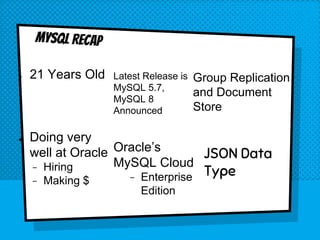
● 21 Years Old Latest Release is
MySQL 5.7,
MySQL 8
Announced
Group Replication
and Document
Store
Oracle’s
MySQL Cloud
− Enterprise
Edition
● Doing very
well at Oracle
− Hiring
− Making $
MySQL Recap
JSON Data
Type
JSON Standard
https://tools.ietf.org/h
tml/rfc7159
&
http://www.ecma-inter
national.org/publicati
ons/standards/Ecma-
404.htm
{
"id": 1,
"name": "A green door",
"price": 12.50,
"tags": ["home", "green"]
}
JSON Example
UTF8MB4
The JSON standards
specify that all JSON
documents will be in
the UTF8MB4
character set.
Not Jason
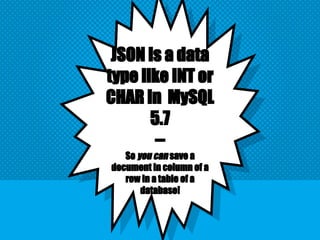
JSON is a data
type like INT or
CHAR in MySQL
5.7
--
So you can save a
document in column of a
row in a table of a
database!
Note:
MySQL handles strings used in JSON context
using the utf8mb4 character set and
utf8mb4_bin collation. Strings in other
character sets are converted to utf8mb4 as
necessary. (For strings in the ascii or utf8
character sets, no conversion is needed
because ascii and utf8 are subsets of
utf8mb4.)
--https://dev.mysql.com/doc/refman/5.7/en/json.html
Optimized storage format: JSON documents
stored in JSON columns are converted to an
internal format that permits quick read access to
document elements. When the server later must
read a JSON value stored in this binary format, the
value need not be parsed from a text
representation. The binary format is structured
to enable the server to look up subobjects or
nested values directly by key or array index
without reading all values before or after them in
the document.
You could store
JSON data in a
CHAR/Varchar/text
field but there are
no easy to use
functions to help or
you end up using
regex -- ughh!!!!
mysql>CREATE TABLE foobar (foo INT, bar JSON);
mysql>INSERT INTO foobar VALUES (1,'{ "name" :
"dave", "home" : [ "Justin", "Texas", 76247 ]}');
mysql> SELECT * FROM foobar;
+------+------------------------------------------------------+
| foo | bar |
+------+------------------------------------------------------+
| 1 | {"home": ["Justin", "Texas", 76247], "name": "dave"} |
+------+------------------------------------------------------+
1 row in set (0.00 sec)
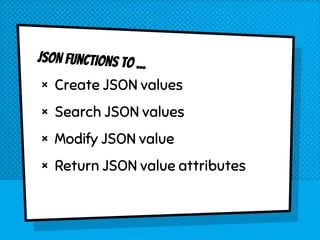
JSON Functions to ...
× Create JSON values
× Search JSON values
× Modify JSON value
× Return JSON value attributes
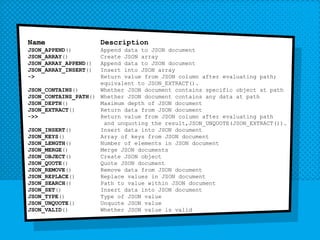
Name Description
JSON_APPEND() Append data to JSON document
JSON_ARRAY() Create JSON array
JSON_ARRAY_APPEND() Append data to JSON document
JSON_ARRAY_INSERT() Insert into JSON array
-> Return value from JSON column after evaluating path;
equivalent to JSON_EXTRACT().
JSON_CONTAINS() Whether JSON document contains specific object at path
JSON_CONTAINS_PATH() Whether JSON document contains any data at path
JSON_DEPTH() Maximum depth of JSON document
JSON_EXTRACT() Return data from JSON document
->> Return value from JSON column after evaluating path
and unquoting the result,JSON_UNQUOTE(JSON_EXTRACT()).
JSON_INSERT() Insert data into JSON document
JSON_KEYS() Array of keys from JSON document
JSON_LENGTH() Number of elements in JSON document
JSON_MERGE() Merge JSON documents
JSON_OBJECT() Create JSON object
JSON_QUOTE() Quote JSON document
JSON_REMOVE() Remove data from JSON document
JSON_REPLACE() Replace values in JSON document
JSON_SEARCH() Path to value within JSON document
JSON_SET() Insert data into JSON document
JSON_TYPE() Type of JSON value
JSON_UNQUOTE() Unquote JSON value
JSON_VALID() Whether JSON value is valid
JSON_EXTRACT
JSON_EXTRACT(json_doc, path[, path …])
mysql> SELECT json_extract(bar,'$.Breed')
FROM foo;
+-----------------------------+
| json_extract(bar,'$.Breed') |
+-----------------------------+
| NULL |
| ["Beagle", "Small"] |
+-----------------------------+
2 rows in set (0.00 sec)
JSON_EXTRACT shorthand ->
column->path
mysql> SELECT bar->'$.Breed' FROM foo;
+---------------------+
| bar->'$.Breed' |
+---------------------+
| NULL |
| ["Beagle", "Small"] |
+---------------------+
2 rows in set (0.00 sec)
Example
mysql> select * from foo;
+------+------------------------------------------------+
| id | bar |
+------+------------------------------------------------+
| 1 | {"name": "Dave"} |
| 2 | {"name": "Jack", "Breed": ["Beagle", "Small"]} |
+------+------------------------------------------------+
2 rows in set (0.00 sec)
JSON_contains
mysql> select * from foo;
+------+------------------------------------------------+
| id | bar |
+------+------------------------------------------------+
| 1 | {"name": "Dave"} |
| 2 | {"name": "Jack", "Breed": ["Beagle", "Small"]} |
+------+------------------------------------------------+
2 rows in set (0.00 sec)
mysql> SELECT json_contains(bar,'{"name": "Dave"}')
FROM foo;
+-------------------------------------------+
| json_contains(bar,'{"name": "Dave"}') |
+-------------------------------------------+
| 1 |
| 0 |
+-------------------------------------------+
JSON_contains_path
mysql> select * from foo;
+------+------------------------------------------------+
| id | bar |
+------+------------------------------------------------+
| 1 | {"name": "Dave"} |
| 2 | {"name": "Jack", "Breed": ["Beagle", "Small"]} |
+------+------------------------------------------------+
2 rows in set (0.00 sec)
mysql> select json_contains_path(bar,'one','$.Breed') from
foo;
+-----------------------------------------+ [ONEALL]
| json_contains_path(bar,'one','$.Breed') |
+-----------------------------------------+
| 0 |
| 1 |
+-----------------------------------------+
2 rows in set (0.00 sec)
20
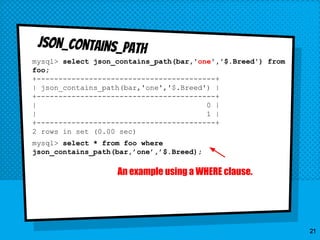
JSON_contains_path
mysql> select json_contains_path(bar,'one','$.Breed') from
foo;
+-----------------------------------------+
| json_contains_path(bar,'one','$.Breed') |
+-----------------------------------------+
| 0 |
| 1 |
+-----------------------------------------+
2 rows in set (0.00 sec)
mysql> select * from foo where
json_contains_path(bar,’one’,’$.Breed);
21
An example using a WHERE clause.
JSON_INSERT
mysql> UPDATE foo set bar = JSON_INSERT(bar, '$[99]', 'x');
Query OK, 2 rows affected (0.01 sec)
Rows matched: 2 Changed: 2 Warnings: 0
mysql> select * from foo;
+------+-------------------------------------------------------+
| id | bar |
+------+-------------------------------------------------------+
| 1 | [{"name": "Dave"}, "x"] |
| 2 | [{"name": "Jack", "Breed": ["Beagle", "Small"]}, "x"] |
+------+-------------------------------------------------------+
2 rows in set (0.00 sec)
22
Insert position,
append to end if
not exist
JSON_REPLACE
UPDATE foo set bar =
JSON_REPLACE(bar, '$[0]',JSON_ARRAY(1,2,3));
Query OK, 2 rows affected (0.00 sec)
Rows matched: 2 Changed: 2 Warnings: 0
mysql> select * from foo;
+------+------------------+
| id | bar |
+------+------------------+
| 1 | [[1, 2, 3], "x"] |
| 2 | [[1, 2, 3], "x"] |
+------+------------------+
...])
JSON_depth
mysql> select * from foo;
+------+-------------------------------------------------------+
| id | bar |
+------+-------------------------------------------------------+
| 1 | [{"name": "Dave"}, "x"] |
| 2 | [{"name": "Jack", "Breed": ["Beagle", "Small"]}, "x"] |
+------+-------------------------------------------------------+
2 rows in set (0.00 sec)
mysql> select json_depth(bar) from foo;
+-----------------+
| json_depth(bar) |
+-----------------+
| 3 |
| 4 |
+-----------------+
JSON_KEYS
select json_keys('{"name" : "dave", "food" : "pizza" }');
+---------------------------------------------------+
| json_keys('{"name" : "dave", "food" : "pizza" }') |
+---------------------------------------------------+
| ["food", "name"] |
+---------------------------------------------------+
1 row in set (0.00 sec)
Note: Keys are sorted!!
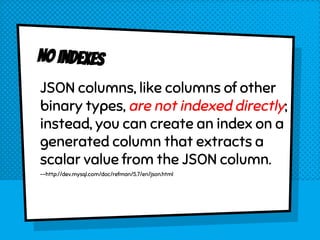
No Indexes
JSON columns, like columns of other
binary types, are not indexed directly;
instead, you can create an index on a
generated column that extracts a
scalar value from the JSON column.
--http://dev.mysql.com/doc/refman/5.7/en/json.html
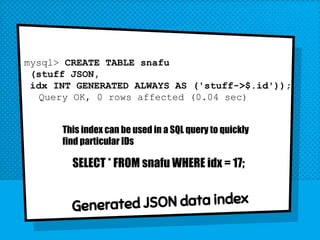
mysql> CREATE TABLE snafu
(stuff JSON,
idx INT GENERATED ALWAYS AS ('stuff->$.id'));
Query OK, 0 rows affected (0.04 sec)
Generated JSON data index
This index can be used in a SQL query to quickly
find particular IDs
SELECT * FROM snafu WHERE idx = 17;
IS THIS JSON STUFF GOOD IDEA?
Schemaless data is handy, easy to implement, and
needs no data architecting. Or DBA
But their is no enforced rigor to the data, is can be
messy, inconsistent (E-mail, email, e_mail, eMail),
and it is hard to get insights into the nature of the
data. Also confusing as data evolves.
But if you need to store JSON formatted data, this is
a pretty good way to do so.
New JSON Functions
This release adds an unquoting extraction operator ->>, sometimes also referred to as an inline
path operator, for use with JSON documents stored in MySQL. The new operator is similar to the ->
operator, but performs JSON unquoting of the value as well. For a JSON column mycol and JSON
path expression mypath, the following three expressions are equivalent:
JSON_UNQUOTE( JSON_EXTRACT(mycol, "$.mypath") )
JSON_UNQUOTE(mycol->"$.mypath")
mycol->>"$.mypath"
The ->> operator can be used in SQL statements wherever JSON_UNQUOTE(JSON_EXTRACT())
would be allowed. This includes (but is not limited to) SELECT lists, WHERE and HAVING clauses, and
ORDER BY and GROUP BY clauses.
Mysql 8 - developer milestone release
New JSON Functions
Starting with MySQL 8.0 (lab release) two new
aggregation functions were added and can be
used to combine data into JSON
arrays/objects:
JSON_ARRAYAGG()
JSON_OBJECTAGG()
Mysql 8 - developer milestone release
preproduction release
The MySQL Document Store is a schema-less and
therefore schema-flexible, storage system for documents.
When using MySQL as a document store, to create documents
describing products you do not need to know and define all
possible attributes of any products before storing them and
operating with them. This differs from working with a
relational database and storing products in a table, when all
columns of the table must be known and defined before
adding any products to the database.
CRUD Operations -- Create, Read, Update and Delete (CRUD) operations
are the four basic operations that can be performed on a database
Collection or Table. In terms of MySQL this means:
X Plugin The MySQL Server plugin which enables communication using X
Protocol. Supports clients that implement X DevAPI and enables you to use
MySQL as a document store.
X Protocol A protocol to communicate with a MySQL Server running X
Plugin. X Protocol supports both CRUD and SQL operations, authentication
via SASL, allows streaming (pipelining) of commands and is extensible on
the protocol and the message layer
See chapter 3 of the MySQL 5.7 Documentation
No SQL!
mysql-py> db.countryinfo.find("_id = 'AUS'")
[
{
"GNP": 351182,
"IndepYear": 1901,
"Name": "Australia",
"_id": "AUS",
"demographics": {
"LifeExpectancy": 79.80000305175781,
"Population": 18886000
},
"geography": {
"Continent": "Oceania",
"Region": "Australia and New Zealand",
"SurfaceArea": 7741220
},
"government": {
"GovernmentForm": "Constitutional Monarchy, Federation",
"HeadOfState": "Elisabeth II"
}
}
]
1 document in set (0.01 sec)
Q/A
David.Stokes@Oracle.com
@Stoker
opensourcedba.wordpress.com
elephantanddolphin.blogger.com
slideshare.net/davidmstokes

MySQL's JSON Data Type and Document Store

  • 1.
    Confoo Vancouver December 6th2016 MySQL’s JSON & Docstore
  • 2.
    "THE FOLLOWING ISINTENDED TO OUTLINE OUR GENERAL PRODUCT DIRECTION. IT IS INTENDED FOR INFORMATION PURPOSES ONLY, AND MAY NOT BE INCORPORATED INTO ANY CONTRACT. IT IS NOT A COMMITMENT TO DELIVER ANY MATERIAL, CODE, OR FUNCTIONALITY, AND SHOULD NOT BE RELIED UPON IN MAKING PURCHASING DECISIONS. THE DEVELOPMENT, RELEASE, AND TIMING OF ANY FEATURES OR FUNCTIONALITY DESCRIBED FOR ORACLE'S PRODUCTS REMAINS AT THE SOLE DISCRETION OF ORACLE." Safe Harbor Agreement
  • 3.
    ● Dave Stokes −Started using PHP when it was called Personal Home Page (and moved from Msql to MySQL about the same time) − Was hired at MySQL AB as a PHP Programmer in the MySQL Certification Group − Now MySQL Community Manager for Oracle − Lives in Justin Texas ● Have pickup truck and hound dog as required by law david.stokes@oracle.com @Stoker
  • 4.
    ● 21 YearsOld Latest Release is MySQL 5.7, MySQL 8 Announced Group Replication and Document Store Oracle’s MySQL Cloud − Enterprise Edition ● Doing very well at Oracle − Hiring − Making $ MySQL Recap JSON Data Type
  • 5.
  • 6.
    { "id": 1, "name": "Agreen door", "price": 12.50, "tags": ["home", "green"] } JSON Example
  • 7.
    UTF8MB4 The JSON standards specifythat all JSON documents will be in the UTF8MB4 character set.
  • 8.
  • 9.
    JSON is adata type like INT or CHAR in MySQL 5.7 -- So you can save a document in column of a row in a table of a database!
  • 10.
    Note: MySQL handles stringsused in JSON context using the utf8mb4 character set and utf8mb4_bin collation. Strings in other character sets are converted to utf8mb4 as necessary. (For strings in the ascii or utf8 character sets, no conversion is needed because ascii and utf8 are subsets of utf8mb4.) --https://dev.mysql.com/doc/refman/5.7/en/json.html
  • 11.
    --https://dev.mysql.com/doc/refman/5.7/en/json.html Optimized storage format:JSON documents stored in JSON columns are converted to an internal format that permits quick read access to document elements. When the server later must read a JSON value stored in this binary format, the value need not be parsed from a text representation. The binary format is structured to enable the server to look up subobjects or nested values directly by key or array index without reading all values before or after them in the document.
  • 12.
    You could store JSONdata in a CHAR/Varchar/text field but there are no easy to use functions to help or you end up using regex -- ughh!!!!
  • 13.
    mysql>CREATE TABLE foobar(foo INT, bar JSON); mysql>INSERT INTO foobar VALUES (1,'{ "name" : "dave", "home" : [ "Justin", "Texas", 76247 ]}'); mysql> SELECT * FROM foobar; +------+------------------------------------------------------+ | foo | bar | +------+------------------------------------------------------+ | 1 | {"home": ["Justin", "Texas", 76247], "name": "dave"} | +------+------------------------------------------------------+ 1 row in set (0.00 sec)
  • 14.
    JSON Functions to... × Create JSON values × Search JSON values × Modify JSON value × Return JSON value attributes
  • 15.
    Name Description JSON_APPEND() Appenddata to JSON document JSON_ARRAY() Create JSON array JSON_ARRAY_APPEND() Append data to JSON document JSON_ARRAY_INSERT() Insert into JSON array -> Return value from JSON column after evaluating path; equivalent to JSON_EXTRACT(). JSON_CONTAINS() Whether JSON document contains specific object at path JSON_CONTAINS_PATH() Whether JSON document contains any data at path JSON_DEPTH() Maximum depth of JSON document JSON_EXTRACT() Return data from JSON document ->> Return value from JSON column after evaluating path and unquoting the result,JSON_UNQUOTE(JSON_EXTRACT()). JSON_INSERT() Insert data into JSON document JSON_KEYS() Array of keys from JSON document JSON_LENGTH() Number of elements in JSON document JSON_MERGE() Merge JSON documents JSON_OBJECT() Create JSON object JSON_QUOTE() Quote JSON document JSON_REMOVE() Remove data from JSON document JSON_REPLACE() Replace values in JSON document JSON_SEARCH() Path to value within JSON document JSON_SET() Insert data into JSON document JSON_TYPE() Type of JSON value JSON_UNQUOTE() Unquote JSON value JSON_VALID() Whether JSON value is valid
  • 16.
    JSON_EXTRACT JSON_EXTRACT(json_doc, path[, path…]) mysql> SELECT json_extract(bar,'$.Breed') FROM foo; +-----------------------------+ | json_extract(bar,'$.Breed') | +-----------------------------+ | NULL | | ["Beagle", "Small"] | +-----------------------------+ 2 rows in set (0.00 sec)
  • 17.
    JSON_EXTRACT shorthand -> column->path mysql>SELECT bar->'$.Breed' FROM foo; +---------------------+ | bar->'$.Breed' | +---------------------+ | NULL | | ["Beagle", "Small"] | +---------------------+ 2 rows in set (0.00 sec)
  • 18.
    Example mysql> select *from foo; +------+------------------------------------------------+ | id | bar | +------+------------------------------------------------+ | 1 | {"name": "Dave"} | | 2 | {"name": "Jack", "Breed": ["Beagle", "Small"]} | +------+------------------------------------------------+ 2 rows in set (0.00 sec)
  • 19.
    JSON_contains mysql> select *from foo; +------+------------------------------------------------+ | id | bar | +------+------------------------------------------------+ | 1 | {"name": "Dave"} | | 2 | {"name": "Jack", "Breed": ["Beagle", "Small"]} | +------+------------------------------------------------+ 2 rows in set (0.00 sec) mysql> SELECT json_contains(bar,'{"name": "Dave"}') FROM foo; +-------------------------------------------+ | json_contains(bar,'{"name": "Dave"}') | +-------------------------------------------+ | 1 | | 0 | +-------------------------------------------+
  • 20.
    JSON_contains_path mysql> select *from foo; +------+------------------------------------------------+ | id | bar | +------+------------------------------------------------+ | 1 | {"name": "Dave"} | | 2 | {"name": "Jack", "Breed": ["Beagle", "Small"]} | +------+------------------------------------------------+ 2 rows in set (0.00 sec) mysql> select json_contains_path(bar,'one','$.Breed') from foo; +-----------------------------------------+ [ONEALL] | json_contains_path(bar,'one','$.Breed') | +-----------------------------------------+ | 0 | | 1 | +-----------------------------------------+ 2 rows in set (0.00 sec) 20
  • 21.
    JSON_contains_path mysql> select json_contains_path(bar,'one','$.Breed')from foo; +-----------------------------------------+ | json_contains_path(bar,'one','$.Breed') | +-----------------------------------------+ | 0 | | 1 | +-----------------------------------------+ 2 rows in set (0.00 sec) mysql> select * from foo where json_contains_path(bar,’one’,’$.Breed); 21 An example using a WHERE clause.
  • 22.
    JSON_INSERT mysql> UPDATE fooset bar = JSON_INSERT(bar, '$[99]', 'x'); Query OK, 2 rows affected (0.01 sec) Rows matched: 2 Changed: 2 Warnings: 0 mysql> select * from foo; +------+-------------------------------------------------------+ | id | bar | +------+-------------------------------------------------------+ | 1 | [{"name": "Dave"}, "x"] | | 2 | [{"name": "Jack", "Breed": ["Beagle", "Small"]}, "x"] | +------+-------------------------------------------------------+ 2 rows in set (0.00 sec) 22 Insert position, append to end if not exist
  • 23.
    JSON_REPLACE UPDATE foo setbar = JSON_REPLACE(bar, '$[0]',JSON_ARRAY(1,2,3)); Query OK, 2 rows affected (0.00 sec) Rows matched: 2 Changed: 2 Warnings: 0 mysql> select * from foo; +------+------------------+ | id | bar | +------+------------------+ | 1 | [[1, 2, 3], "x"] | | 2 | [[1, 2, 3], "x"] | +------+------------------+
  • 24.
    ...]) JSON_depth mysql> select *from foo; +------+-------------------------------------------------------+ | id | bar | +------+-------------------------------------------------------+ | 1 | [{"name": "Dave"}, "x"] | | 2 | [{"name": "Jack", "Breed": ["Beagle", "Small"]}, "x"] | +------+-------------------------------------------------------+ 2 rows in set (0.00 sec) mysql> select json_depth(bar) from foo; +-----------------+ | json_depth(bar) | +-----------------+ | 3 | | 4 | +-----------------+
  • 25.
    JSON_KEYS select json_keys('{"name" :"dave", "food" : "pizza" }'); +---------------------------------------------------+ | json_keys('{"name" : "dave", "food" : "pizza" }') | +---------------------------------------------------+ | ["food", "name"] | +---------------------------------------------------+ 1 row in set (0.00 sec) Note: Keys are sorted!!
  • 26.
    No Indexes JSON columns,like columns of other binary types, are not indexed directly; instead, you can create an index on a generated column that extracts a scalar value from the JSON column. --http://dev.mysql.com/doc/refman/5.7/en/json.html
  • 27.
    mysql> CREATE TABLEsnafu (stuff JSON, idx INT GENERATED ALWAYS AS ('stuff->$.id')); Query OK, 0 rows affected (0.04 sec) Generated JSON data index This index can be used in a SQL query to quickly find particular IDs SELECT * FROM snafu WHERE idx = 17;
  • 28.
    IS THIS JSONSTUFF GOOD IDEA? Schemaless data is handy, easy to implement, and needs no data architecting. Or DBA But their is no enforced rigor to the data, is can be messy, inconsistent (E-mail, email, e_mail, eMail), and it is hard to get insights into the nature of the data. Also confusing as data evolves. But if you need to store JSON formatted data, this is a pretty good way to do so.
  • 29.
    New JSON Functions Thisrelease adds an unquoting extraction operator ->>, sometimes also referred to as an inline path operator, for use with JSON documents stored in MySQL. The new operator is similar to the -> operator, but performs JSON unquoting of the value as well. For a JSON column mycol and JSON path expression mypath, the following three expressions are equivalent: JSON_UNQUOTE( JSON_EXTRACT(mycol, "$.mypath") ) JSON_UNQUOTE(mycol->"$.mypath") mycol->>"$.mypath" The ->> operator can be used in SQL statements wherever JSON_UNQUOTE(JSON_EXTRACT()) would be allowed. This includes (but is not limited to) SELECT lists, WHERE and HAVING clauses, and ORDER BY and GROUP BY clauses. Mysql 8 - developer milestone release
  • 30.
    New JSON Functions Startingwith MySQL 8.0 (lab release) two new aggregation functions were added and can be used to combine data into JSON arrays/objects: JSON_ARRAYAGG() JSON_OBJECTAGG() Mysql 8 - developer milestone release
  • 31.
    preproduction release The MySQLDocument Store is a schema-less and therefore schema-flexible, storage system for documents. When using MySQL as a document store, to create documents describing products you do not need to know and define all possible attributes of any products before storing them and operating with them. This differs from working with a relational database and storing products in a table, when all columns of the table must be known and defined before adding any products to the database.
  • 32.
    CRUD Operations --Create, Read, Update and Delete (CRUD) operations are the four basic operations that can be performed on a database Collection or Table. In terms of MySQL this means: X Plugin The MySQL Server plugin which enables communication using X Protocol. Supports clients that implement X DevAPI and enables you to use MySQL as a document store. X Protocol A protocol to communicate with a MySQL Server running X Plugin. X Protocol supports both CRUD and SQL operations, authentication via SASL, allows streaming (pipelining) of commands and is extensible on the protocol and the message layer See chapter 3 of the MySQL 5.7 Documentation
  • 33.
    No SQL! mysql-py> db.countryinfo.find("_id= 'AUS'") [ { "GNP": 351182, "IndepYear": 1901, "Name": "Australia", "_id": "AUS", "demographics": { "LifeExpectancy": 79.80000305175781, "Population": 18886000 }, "geography": { "Continent": "Oceania", "Region": "Australia and New Zealand", "SurfaceArea": 7741220 }, "government": { "GovernmentForm": "Constitutional Monarchy, Federation", "HeadOfState": "Elisabeth II" } } ] 1 document in set (0.01 sec)
  • 34.