What's SQL ? Structured Query Language , is a database computer language designed for managing data in relational database management systems (RDBMS), and originally based upon relational algebra. Its scope includes data query and update, schema creation and modification, and data access control.
Downloading MySQL To download  MySQL , go to  http://www.mysql.com/get/Downloads/MySQL-3.23/mysql-3.23.58-win.zip/from/pick  and choose a file mirror to download from.
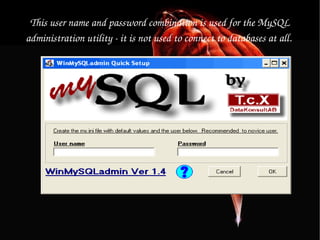
Installing MySQL Instructions: 1. Firstly, we have to extract the MySQL zip archive to a temporary file and run  setup.exe  from the extracted directory. 2. You can safely use all the default options for this installer. 3. Once the setup wizard is complete it is safe to delete the files you have just extracted (the mysql-3.23.58-win folder). 4. Run the file  C:\mysql\bin\winmysqladmin.exe  and a user name and a password of your choice.
This user name and password combination is used for the MySQL administration utility - it is not used to connect to databases at all.  Installation of MySQL is now complete.
To test that Apache recognizes the MySQL installation go to http://127.0.0.1/test.php in a web browser again and scroll down the page until the MySQL section.   If “MySQL Support” is marked as enabled, you have successfully installed MySQL and should now have a complete working Apache, MySQL, PHP environment.
Basic And Advance SQL Commands
CREATE TABLE SYNTAX: CREATE TABLE [table_name] ( [column_name1] INT AUTO_INCREMENT, [column_name2] VARCHAR(30) NOT NULL, [column_name3] ENUM('guest', 'customer', 'admin')NULL, [column_name4] DATE NULL, [column_name5] VARCHAR(30) NOT NULL, [column_name6] DATETIME NOT NULL, [column_name7] CHAR(1) NULL, [column_name8] BLOB NULL, [column_name9] TEXT NOT NULL, UNIQUE(username), PRIMARY KEY (column_name1) ); Example: CREATE TABLE user ( userid INT AUTO_INCREMENT, username VARCHAR(30) NOT NULL, group_type ENUM('guest', 'customer', 'admin') NULL, date_of_birth DATE NULL, password VARCHAR(30) NOT NULL, registration_date DATETIME NOT NULL, account_disable CHAR(1) NULL, image BLOB NULL, comment TEXT NOT NULL, UNIQUE(username), PRIMARY KEY (userid) );
INSERT STATEMENTS Syntax: INSERT INTO table_name ( `col_A`, `col_B`, `col_C`) VALUES ( `col_A_data`, `col_B_data`, `col_C_data`) ; Example: INSERT INTO music ( 'id', `artist`, `album`) VALUES ( '1', `the beatles`, `Abbey Road`);
REPLACE STATEMENTS Syntax: REPLACE INTO table_name ( `col_A`, `col_B`) VALUES ( `col A data`, `col B data`) ;  Example: REPLACE INTO music ( 'id', `artist`, `album`) VALUES ( '1', `the beatles`, `abbey road`);
UPDATE STATEMENTS  Syntax: UPDATE table_name SET col_B='new_data'  WHERE col_A='reference_data' ;  Example: UPDATE music SET title='Come Together' WHERE id=1;
Add a new column "male" in table user. Syntax: ALTER TABLE [table_name] ADD COLUMN [column_name] CHAR(1) NOT NULL; Example: ALTER TABLE user ADD COLUMN male CHAR(1) NOT NULL;
Change column name "male" into "gender" in table user and change the type to VARCHAR(3) and allow NULL values. Syntax: ALTER TABLE [table_name] CHANGE [old_column] [new_column] VARCHAR(3) NULL; Example: ALTER TABLE user CHANGE male gender VARCHAR (3) NULL;
Change the size of column "gender" from 3 to 6 in table user. Syntax: ALTER TABLE [table_name] MODIFY [column_name] VARCHAR(6); Example: ALTER TABLE user MODIFY gender VARCHAR(6);
SELECT STATEMENTS Syntax: SELECT * FROM table_name WHERE 1 ; Example: SELECT * FROM music WHERE 1;
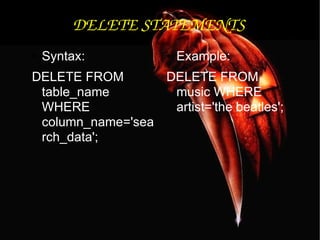
DELETE STATEMENTS Syntax: DELETE FROM table_name WHERE column_name='search_data'; Example: DELETE FROM music WHERE artist='the beatles';
Show field formats of the selected table. Syntax: DESCRIBE [table_name]; Example: DESCRIBE mos_menu;
To see database's field formats. mysql> describe [table name];
To delete a db. mysql> drop database [database name]; Example: DROP DATABASE demodb;
To delete a table. mysql> drop table [table name]; Example: DROP TABLE user;
Show all data in a table. mysql> SELECT * FROM [table name]; Example: SELECT * FROM mos_menu;
Show all records from mos_menu table containing name "Home". SELECT * FROM [table_name] WHERE [field_name]=[value]; Example: SELECT * FROM mos_menu WHERE name = "Home";
Returns the columns and column information pertaining to the designated table. mysql> show columns from [table name];
Show certain selected rows with the value "whatever". mysql> SELECT * FROM [table name] WHERE [field name] = "whatever";
Show all records containing the name "Bob" AND the phone number '12345678'. mysql> SELECT * FROM [table name] WHERE name = "Bob" AND phone_number = '12345678';
Show all records not containing the name "Bob" and the phone number '12345678' order by the phone_number field. mysql> SELECT * FROM [table name] WHERE name != "Bob" AND phone_number = '12345678' order by phone_number;
Show all records starting with the letters 'bob' AND the phone number '12345678'. mysql> SELECT * FROM [table name] WHERE name like "Bob%" AND phone_number = '12345678';
Show all records starting with the letters 'bob' AND the phone number '12345678' limit to records 1 through 5. mysql> SELECT * FROM [table name] WHERE name like "Bob%" AND phone_number = '12345678' limit 1,5;
Use a regular expression to find records. Use "REGEXP BINARY" to force case-sensitivity. This finds any record beginning with a. mysql> SELECT * FROM [table name] WHERE rec RLIKE "^a";
Show unique records. mysql> SELECT DISTINCT [column name] FROM [table name];
Show selected records sorted in an ascending (asc) or descending (desc). mysql> SELECT [col1],[col2] FROM [table name] ORDER BY [col2] DESC;
Return number of rows. mysql> SELECT COUNT(*) FROM [table name];
Sum column. mysql> SELECT SUM(*) FROM [table name];
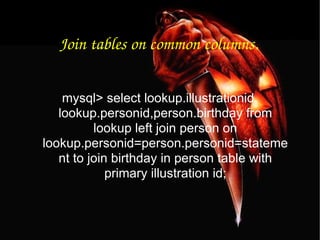
Join tables on common columns. mysql> select lookup.illustrationid, lookup.personid,person.birthday from lookup left join person on lookup.personid=person.personid=statement to join birthday in person table with primary illustration id;
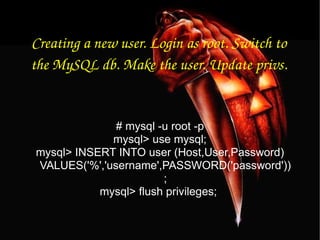
Creating a new user. Login as root. Switch to the MySQL db. Make the user. Update privs. # mysql -u root -p mysql> use mysql; mysql> INSERT INTO user (Host,User,Password) VALUES('%','username',PASSWORD('password')); mysql> flush privileges;
Change a users password from unix shell. # [mysql dir]/bin/mysqladmin -u username -h hostname.blah.org -p password 'new-password'
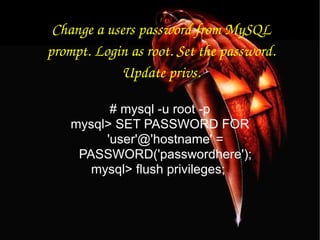
Change a users password from MySQL prompt. Login as root. Set the password. Update privs. # mysql -u root -p mysql> SET PASSWORD FOR 'user'@'hostname' = PASSWORD('passwordhere'); mysql> flush privileges;
Recover a MySQL root password. Stop the MySQL server process. Start again with no grant tables. Login to MySQL as root. Set new password. Exit MySQL and restart MySQL server. # /etc/init.d/mysql stop # mysqld_safe --skip-grant-tables & # mysql -u root mysql> use mysql; mysql> update user set password=PASSWORD("newrootpassword") where User='root'; mysql> flush privileges; mysql> quit # /etc/init.d/mysql stop # /etc/init.d/mysql start
Set a root password if there is on root password. # mysqladmin -u root password newpassword
Update a root password. # mysqladmin -u root -p oldpassword newpassword
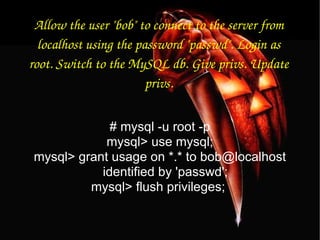
Allow the user "bob" to connect to the server from localhost using the password "passwd". Login as root. Switch to the MySQL db. Give privs. Update privs. # mysql -u root -p mysql> use mysql; mysql> grant usage on *.* to bob@localhost identified by 'passwd'; mysql> flush privileges;
Give user privilages for a db. Login as root. Switch to the MySQL db. Grant privs. Update privs. # mysql -u root -p mysql> use mysql; mysql> INSERT INTO db (Host,Db,User,Select_priv,Insert_priv,Update_priv,Delete_priv,Create_priv,Drop_priv) VALUES ('%','databasename','username','Y','Y','Y','Y','Y','N'); mysql> flush privileges; or mysql> grant all privileges on databasename.* to username@localhost; mysql> flush privileges;
To update info already in a table. mysql> UPDATE [table name] SET Select_priv = 'Y',Insert_priv = 'Y',Update_priv = 'Y' where [field name] = 'user';
Delete a row(s) from a table. mysql> DELETE from [table name] where [field name] = 'whatever';
Update database permissions/privilages. mysql> flush privileges;
Delete a column. mysql> alter table [table name] drop column [column name];
Add a new column to db. mysql> alter table [table name] add column [new column name] varchar (20);
Change column name. mysql> alter table [table name] change [old column name] [new column name] varchar (50);
Make a unique column so you get no dupes. mysql> alter table [table name] add unique ([column name]);
Make a column bigger. mysql> alter table [table name] modify [column name] VARCHAR(3);
Delete unique from table. mysql> alter table [table name] drop index [colmn name];
Load a CSV file into a table. mysql> LOAD DATA INFILE '/tmp/filename.csv' replace INTO TABLE [table name] FIELDS TERMINATED BY ',' LINES TERMINATED BY '\n' (field1,field2,field3);
Dump all databases for backup. Backup file is sql commands to recreate all db's. # [mysql dir]/bin/mysqldump -u root -ppassword --opt >/tmp/alldatabases.sql
Dump one database for backup. # [mysql dir]/bin/mysqldump -u username -ppassword --databases databasename >/tmp/databasename.sql
Dump a table from a database. # [mysql dir]/bin/mysqldump -c -u username -ppassword databasename tablename > /tmp/databasename.tablename.sql
Restore database (or database table) from backup. # [mysql dir]/bin/mysql -u username -ppassword databasename < /tmp/databasename.sql
T H A N K  Y O U

My sql presentation

  • 1.
    What's SQL ?Structured Query Language , is a database computer language designed for managing data in relational database management systems (RDBMS), and originally based upon relational algebra. Its scope includes data query and update, schema creation and modification, and data access control.
  • 2.
    Downloading MySQL Todownload MySQL , go to http://www.mysql.com/get/Downloads/MySQL-3.23/mysql-3.23.58-win.zip/from/pick and choose a file mirror to download from.
  • 3.
    Installing MySQL Instructions:1. Firstly, we have to extract the MySQL zip archive to a temporary file and run setup.exe from the extracted directory. 2. You can safely use all the default options for this installer. 3. Once the setup wizard is complete it is safe to delete the files you have just extracted (the mysql-3.23.58-win folder). 4. Run the file C:\mysql\bin\winmysqladmin.exe and a user name and a password of your choice.
  • 4.
    This user nameand password combination is used for the MySQL administration utility - it is not used to connect to databases at all. Installation of MySQL is now complete.
  • 5.
    To test thatApache recognizes the MySQL installation go to http://127.0.0.1/test.php in a web browser again and scroll down the page until the MySQL section. If “MySQL Support” is marked as enabled, you have successfully installed MySQL and should now have a complete working Apache, MySQL, PHP environment.
  • 6.
    Basic And AdvanceSQL Commands
  • 7.
    CREATE TABLE SYNTAX:CREATE TABLE [table_name] ( [column_name1] INT AUTO_INCREMENT, [column_name2] VARCHAR(30) NOT NULL, [column_name3] ENUM('guest', 'customer', 'admin')NULL, [column_name4] DATE NULL, [column_name5] VARCHAR(30) NOT NULL, [column_name6] DATETIME NOT NULL, [column_name7] CHAR(1) NULL, [column_name8] BLOB NULL, [column_name9] TEXT NOT NULL, UNIQUE(username), PRIMARY KEY (column_name1) ); Example: CREATE TABLE user ( userid INT AUTO_INCREMENT, username VARCHAR(30) NOT NULL, group_type ENUM('guest', 'customer', 'admin') NULL, date_of_birth DATE NULL, password VARCHAR(30) NOT NULL, registration_date DATETIME NOT NULL, account_disable CHAR(1) NULL, image BLOB NULL, comment TEXT NOT NULL, UNIQUE(username), PRIMARY KEY (userid) );
  • 8.
    INSERT STATEMENTS Syntax:INSERT INTO table_name ( `col_A`, `col_B`, `col_C`) VALUES ( `col_A_data`, `col_B_data`, `col_C_data`) ; Example: INSERT INTO music ( 'id', `artist`, `album`) VALUES ( '1', `the beatles`, `Abbey Road`);
  • 9.
    REPLACE STATEMENTS Syntax:REPLACE INTO table_name ( `col_A`, `col_B`) VALUES ( `col A data`, `col B data`) ; Example: REPLACE INTO music ( 'id', `artist`, `album`) VALUES ( '1', `the beatles`, `abbey road`);
  • 10.
    UPDATE STATEMENTS Syntax: UPDATE table_name SET col_B='new_data' WHERE col_A='reference_data' ; Example: UPDATE music SET title='Come Together' WHERE id=1;
  • 11.
    Add a newcolumn &quot;male&quot; in table user. Syntax: ALTER TABLE [table_name] ADD COLUMN [column_name] CHAR(1) NOT NULL; Example: ALTER TABLE user ADD COLUMN male CHAR(1) NOT NULL;
  • 12.
    Change column name&quot;male&quot; into &quot;gender&quot; in table user and change the type to VARCHAR(3) and allow NULL values. Syntax: ALTER TABLE [table_name] CHANGE [old_column] [new_column] VARCHAR(3) NULL; Example: ALTER TABLE user CHANGE male gender VARCHAR (3) NULL;
  • 13.
    Change the sizeof column &quot;gender&quot; from 3 to 6 in table user. Syntax: ALTER TABLE [table_name] MODIFY [column_name] VARCHAR(6); Example: ALTER TABLE user MODIFY gender VARCHAR(6);
  • 14.
    SELECT STATEMENTS Syntax:SELECT * FROM table_name WHERE 1 ; Example: SELECT * FROM music WHERE 1;
  • 15.
    DELETE STATEMENTS Syntax:DELETE FROM table_name WHERE column_name='search_data'; Example: DELETE FROM music WHERE artist='the beatles';
  • 16.
    Show field formatsof the selected table. Syntax: DESCRIBE [table_name]; Example: DESCRIBE mos_menu;
  • 17.
    To see database'sfield formats. mysql> describe [table name];
  • 18.
    To delete adb. mysql> drop database [database name]; Example: DROP DATABASE demodb;
  • 19.
    To delete atable. mysql> drop table [table name]; Example: DROP TABLE user;
  • 20.
    Show all datain a table. mysql> SELECT * FROM [table name]; Example: SELECT * FROM mos_menu;
  • 21.
    Show all recordsfrom mos_menu table containing name &quot;Home&quot;. SELECT * FROM [table_name] WHERE [field_name]=[value]; Example: SELECT * FROM mos_menu WHERE name = &quot;Home&quot;;
  • 22.
    Returns the columnsand column information pertaining to the designated table. mysql> show columns from [table name];
  • 23.
    Show certain selectedrows with the value &quot;whatever&quot;. mysql> SELECT * FROM [table name] WHERE [field name] = &quot;whatever&quot;;
  • 24.
    Show all recordscontaining the name &quot;Bob&quot; AND the phone number '12345678'. mysql> SELECT * FROM [table name] WHERE name = &quot;Bob&quot; AND phone_number = '12345678';
  • 25.
    Show all recordsnot containing the name &quot;Bob&quot; and the phone number '12345678' order by the phone_number field. mysql> SELECT * FROM [table name] WHERE name != &quot;Bob&quot; AND phone_number = '12345678' order by phone_number;
  • 26.
    Show all recordsstarting with the letters 'bob' AND the phone number '12345678'. mysql> SELECT * FROM [table name] WHERE name like &quot;Bob%&quot; AND phone_number = '12345678';
  • 27.
    Show all recordsstarting with the letters 'bob' AND the phone number '12345678' limit to records 1 through 5. mysql> SELECT * FROM [table name] WHERE name like &quot;Bob%&quot; AND phone_number = '12345678' limit 1,5;
  • 28.
    Use a regularexpression to find records. Use &quot;REGEXP BINARY&quot; to force case-sensitivity. This finds any record beginning with a. mysql> SELECT * FROM [table name] WHERE rec RLIKE &quot;^a&quot;;
  • 29.
    Show unique records.mysql> SELECT DISTINCT [column name] FROM [table name];
  • 30.
    Show selected recordssorted in an ascending (asc) or descending (desc). mysql> SELECT [col1],[col2] FROM [table name] ORDER BY [col2] DESC;
  • 31.
    Return number ofrows. mysql> SELECT COUNT(*) FROM [table name];
  • 32.
    Sum column. mysql>SELECT SUM(*) FROM [table name];
  • 33.
    Join tables oncommon columns. mysql> select lookup.illustrationid, lookup.personid,person.birthday from lookup left join person on lookup.personid=person.personid=statement to join birthday in person table with primary illustration id;
  • 34.
    Creating a newuser. Login as root. Switch to the MySQL db. Make the user. Update privs. # mysql -u root -p mysql> use mysql; mysql> INSERT INTO user (Host,User,Password) VALUES('%','username',PASSWORD('password')); mysql> flush privileges;
  • 35.
    Change a userspassword from unix shell. # [mysql dir]/bin/mysqladmin -u username -h hostname.blah.org -p password 'new-password'
  • 36.
    Change a userspassword from MySQL prompt. Login as root. Set the password. Update privs. # mysql -u root -p mysql> SET PASSWORD FOR 'user'@'hostname' = PASSWORD('passwordhere'); mysql> flush privileges;
  • 37.
    Recover a MySQLroot password. Stop the MySQL server process. Start again with no grant tables. Login to MySQL as root. Set new password. Exit MySQL and restart MySQL server. # /etc/init.d/mysql stop # mysqld_safe --skip-grant-tables & # mysql -u root mysql> use mysql; mysql> update user set password=PASSWORD(&quot;newrootpassword&quot;) where User='root'; mysql> flush privileges; mysql> quit # /etc/init.d/mysql stop # /etc/init.d/mysql start
  • 38.
    Set a rootpassword if there is on root password. # mysqladmin -u root password newpassword
  • 39.
    Update a rootpassword. # mysqladmin -u root -p oldpassword newpassword
  • 40.
    Allow the user&quot;bob&quot; to connect to the server from localhost using the password &quot;passwd&quot;. Login as root. Switch to the MySQL db. Give privs. Update privs. # mysql -u root -p mysql> use mysql; mysql> grant usage on *.* to bob@localhost identified by 'passwd'; mysql> flush privileges;
  • 41.
    Give user privilagesfor a db. Login as root. Switch to the MySQL db. Grant privs. Update privs. # mysql -u root -p mysql> use mysql; mysql> INSERT INTO db (Host,Db,User,Select_priv,Insert_priv,Update_priv,Delete_priv,Create_priv,Drop_priv) VALUES ('%','databasename','username','Y','Y','Y','Y','Y','N'); mysql> flush privileges; or mysql> grant all privileges on databasename.* to username@localhost; mysql> flush privileges;
  • 42.
    To update infoalready in a table. mysql> UPDATE [table name] SET Select_priv = 'Y',Insert_priv = 'Y',Update_priv = 'Y' where [field name] = 'user';
  • 43.
    Delete a row(s)from a table. mysql> DELETE from [table name] where [field name] = 'whatever';
  • 44.
  • 45.
    Delete a column.mysql> alter table [table name] drop column [column name];
  • 46.
    Add a newcolumn to db. mysql> alter table [table name] add column [new column name] varchar (20);
  • 47.
    Change column name.mysql> alter table [table name] change [old column name] [new column name] varchar (50);
  • 48.
    Make a uniquecolumn so you get no dupes. mysql> alter table [table name] add unique ([column name]);
  • 49.
    Make a columnbigger. mysql> alter table [table name] modify [column name] VARCHAR(3);
  • 50.
    Delete unique fromtable. mysql> alter table [table name] drop index [colmn name];
  • 51.
    Load a CSVfile into a table. mysql> LOAD DATA INFILE '/tmp/filename.csv' replace INTO TABLE [table name] FIELDS TERMINATED BY ',' LINES TERMINATED BY '\n' (field1,field2,field3);
  • 52.
    Dump all databasesfor backup. Backup file is sql commands to recreate all db's. # [mysql dir]/bin/mysqldump -u root -ppassword --opt >/tmp/alldatabases.sql
  • 53.
    Dump one databasefor backup. # [mysql dir]/bin/mysqldump -u username -ppassword --databases databasename >/tmp/databasename.sql
  • 54.
    Dump a tablefrom a database. # [mysql dir]/bin/mysqldump -c -u username -ppassword databasename tablename > /tmp/databasename.tablename.sql
  • 55.
    Restore database (ordatabase table) from backup. # [mysql dir]/bin/mysql -u username -ppassword databasename < /tmp/databasename.sql
  • 56.
    T H AN K Y O U