OFFICE OF DISTANCE AND ELEARNING
PgMO
Jira Dashboards
For Everyone
OFFICE OF DISTANCE AND ELEARNING
PgMO
TRANSPARENCY
Transparency is vital
to agile processes, as
it allows everyone to
see and understand
what is really
happening in each
iteration, achieving
better communication
and trust on the team
and in the organization.
OFFICE OF DISTANCE AND ELEARNING
PgMO
WHAT IS A JIRA DASHBOARD?
A collection of Jira
“gadgets” displayed on a
page that contain live data
for the purpose of sharing
information about a
project, or group of
projects.
OFFICE OF DISTANCE AND ELEARNING
PgMO
NEW DASHBOARD
Dashboards > Manage Dashboards > Create New Dashboard
 Sandbox – name.#
 Jira-administrators
 Add
 Blank Dashboard
OFFICE OF DISTANCE AND ELEARNING
PgMO
LAYOUT
Select Two Columns (sorry, no rows)
OFFICE OF DISTANCE AND ELEARNING
PgMO
ADD GADGETS
Add Gadget > Load All Gadgets
• Issues Calendar
• Agile Wallboard Gadget
• Assigned to Me
• Issue Statistics
• Pie Chart
• Countdown Gadget
OFFICE OF DISTANCE AND ELEARNING
PgMO
SCOPE
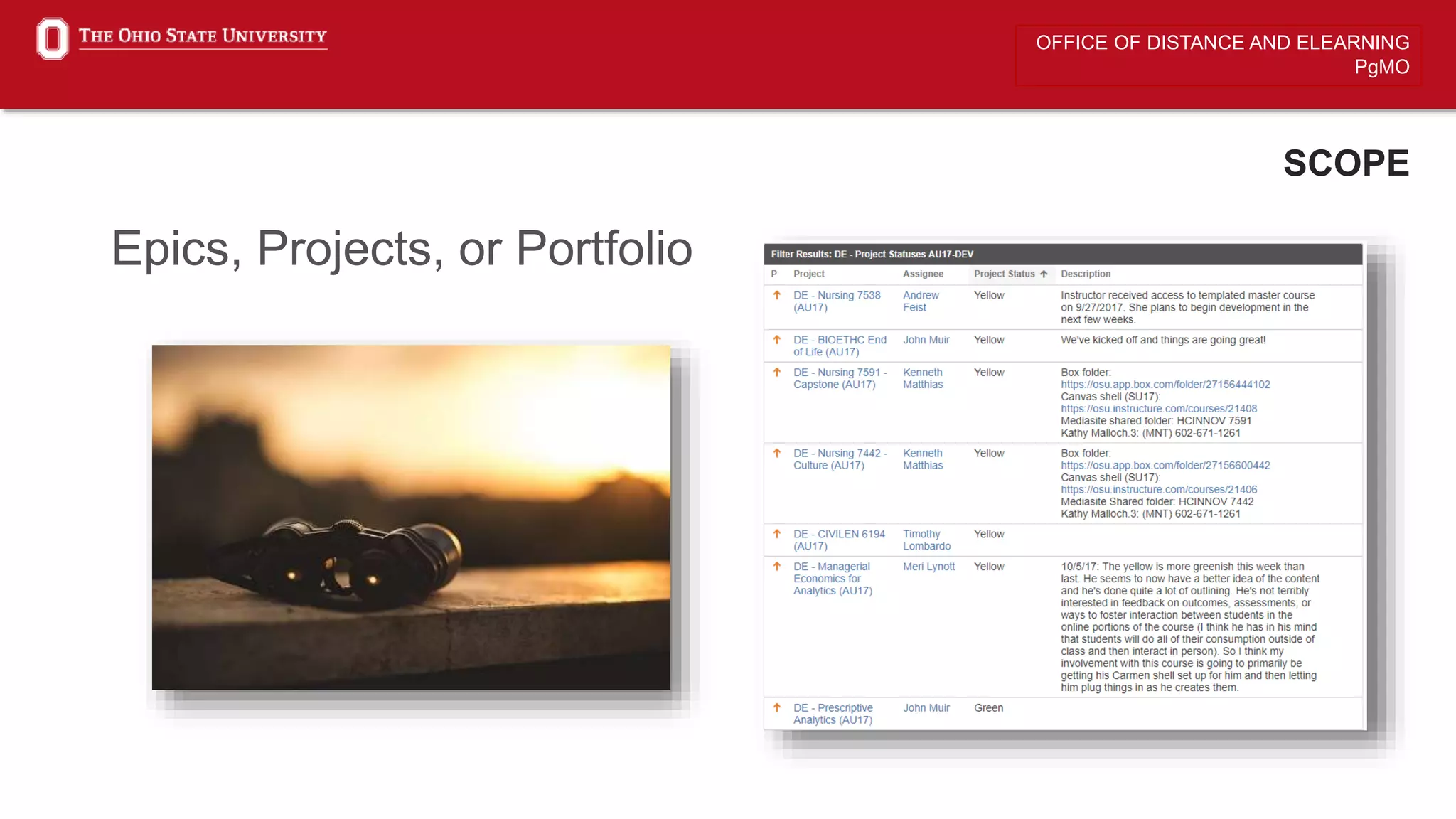
Epics, Projects, or Portfolio
OFFICE OF DISTANCE AND ELEARNING
PgMO
PROJECTS AND FILTERS
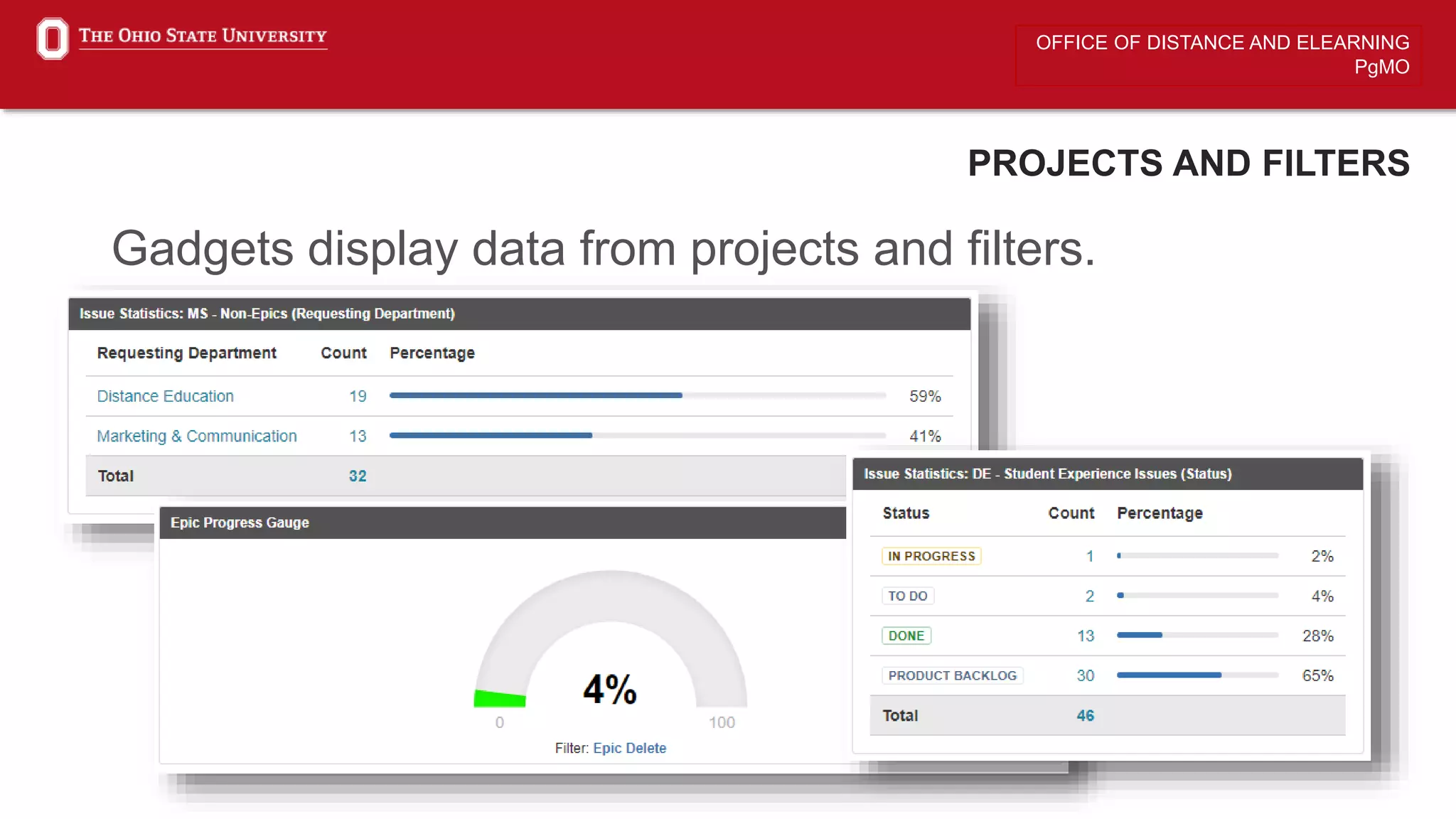
Gadgets display data from projects and filters.
OFFICE OF DISTANCE AND ELEARNING
PgMO
SIMPLE FILTERS
Project > Issues > View All Issues
• Issue Type
• Status
• Assignee
• Resolution
• More…
Naming Convention: Dept. Abbr. – Project Name – Filter
OFFICE OF DISTANCE AND ELEARNING
PgMO
ADD GADGETS
Add Gadget > Load All Gadgets
• Filter Results
• Two Dimensional Filter Statistics
• Projects
• Column Order
• Jira Roadmap
• Custom Content
• Quick Links
OFFICE OF DISTANCE AND ELEARNING
PgMO
JQL
JQL stands for JIRA Query Language (not to be confused
with Java Query Language). It is for everyone!
Field - Fields are different types of information in the system. JIRA fields include
priority, fixVersion, issue type, date created, etc.
Value - Values are the actual data in the query: v2.3, Bug, 10/21/2014, etc.
Operator - Operators are the heart of the query. They relate the field to the
value. Common operators include equals (=), not equals (!=), less than (<), etc.
Keyword - Keywords are specific words in the language that have special
meaning. In this post we will be focused on AND and OR.

Jira Dashboards

  • 1.
    OFFICE OF DISTANCEAND ELEARNING PgMO Jira Dashboards For Everyone
  • 2.
    OFFICE OF DISTANCEAND ELEARNING PgMO TRANSPARENCY Transparency is vital to agile processes, as it allows everyone to see and understand what is really happening in each iteration, achieving better communication and trust on the team and in the organization.
  • 3.
    OFFICE OF DISTANCEAND ELEARNING PgMO WHAT IS A JIRA DASHBOARD? A collection of Jira “gadgets” displayed on a page that contain live data for the purpose of sharing information about a project, or group of projects.
  • 4.
    OFFICE OF DISTANCEAND ELEARNING PgMO NEW DASHBOARD Dashboards > Manage Dashboards > Create New Dashboard  Sandbox – name.#  Jira-administrators  Add  Blank Dashboard
  • 5.
    OFFICE OF DISTANCEAND ELEARNING PgMO LAYOUT Select Two Columns (sorry, no rows)
  • 6.
    OFFICE OF DISTANCEAND ELEARNING PgMO ADD GADGETS Add Gadget > Load All Gadgets • Issues Calendar • Agile Wallboard Gadget • Assigned to Me • Issue Statistics • Pie Chart • Countdown Gadget
  • 7.
    OFFICE OF DISTANCEAND ELEARNING PgMO SCOPE Epics, Projects, or Portfolio
  • 8.
    OFFICE OF DISTANCEAND ELEARNING PgMO PROJECTS AND FILTERS Gadgets display data from projects and filters.
  • 9.
    OFFICE OF DISTANCEAND ELEARNING PgMO SIMPLE FILTERS Project > Issues > View All Issues • Issue Type • Status • Assignee • Resolution • More… Naming Convention: Dept. Abbr. – Project Name – Filter
  • 10.
    OFFICE OF DISTANCEAND ELEARNING PgMO ADD GADGETS Add Gadget > Load All Gadgets • Filter Results • Two Dimensional Filter Statistics • Projects • Column Order • Jira Roadmap • Custom Content • Quick Links
  • 11.
    OFFICE OF DISTANCEAND ELEARNING PgMO JQL JQL stands for JIRA Query Language (not to be confused with Java Query Language). It is for everyone! Field - Fields are different types of information in the system. JIRA fields include priority, fixVersion, issue type, date created, etc. Value - Values are the actual data in the query: v2.3, Bug, 10/21/2014, etc. Operator - Operators are the heart of the query. They relate the field to the value. Common operators include equals (=), not equals (!=), less than (<), etc. Keyword - Keywords are specific words in the language that have special meaning. In this post we will be focused on AND and OR.