




















#yegdigitalstrat @danaditomaso#yegdigitalstrat @danaditomaso
USING GOOGLE ANALYTICS
DANA DITOMASO
#yegdigitalstrat @danaditomaso#yegdigitalstrat @danaditomaso
Google Analytics
is lying to you.
#yegdigitalstrat @danaditomaso#yegdigitalstrat @danaditomaso
(At a minimum,
it’s misleading.)
#yegdigitalstrat @danaditomaso#yegdigitalstrat @danaditomaso
Why?
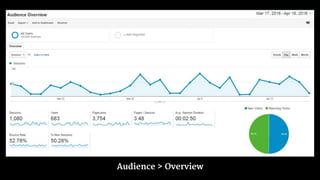
Audience > Overview
#yegdigitalstrat @danaditomaso
Sessions:
A group of interactions.
More here:
https://support.google.com/analytics/answer/2731565
#yegdigitalstrat @danaditomaso
More here:
https://support.google.com/analytics/answer/2992042
Users:
The number of people who
interacted with your site.
#yegdigitalstrat @danaditomaso
Pageviews:
The total number of pages
viewed.
#yegdigitalstrat @danaditomaso
Pages / Session:
Pages viewed per session, on
average.
#yegdigitalstrat @danaditomaso
Avg Session Duration:
Average time spent on site.
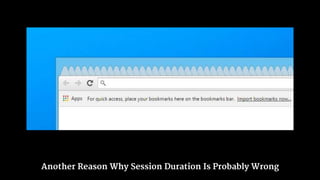
Another Reason Why Session Duration Is Probably Wrong
#yegdigitalstrat @danaditomaso
Bounce Rate:
The percentage of single-
page sessions.
More here:
https://support.google.com/analytics/answer/1009409
#yegdigitalstrat @danaditomaso
% New:
Percentage of “new”
visitors.
#yegdigitalstrat @danaditomaso#yegdigitalstrat @danaditomaso
What is Google Analytics
good for?
#yegdigitalstrat @danaditomaso
What’s the point of
analytics?
#yegdigitalstrat @danaditomaso#yegdigitalstrat @danaditomaso
Are you spending time &
money on the right things?
#yegdigitalstrat @danaditomaso
What are the right things?
#yegdigitalstrat @danaditomaso
Go back to your goals.
#yegdigitalstrat @danaditomaso#yegdigitalstrat @danaditomaso
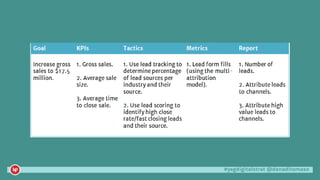
Every goal can be broken
down four ways.
#yegdigitalstrat @danaditomaso
KPI
What will we measure?
#yegdigitalstrat @danaditomaso
Tactics
How will we get there?
#yegdigitalstrat @danaditomaso
Metrics
What data do we need?
#yegdigitalstrat @danaditomaso
Report
How can we show results?
#yegdigitalstrat @danaditomaso
(real client example)
#yegdigitalstrat @danaditomaso#yegdigitalstrat @danaditomaso
Your job is insight, not data.
#yegdigitalstrat @danaditomaso
There are better places
to start.
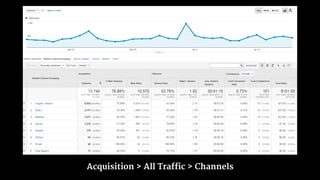
Acquisition > All Traffic > Channels
#yegdigitalstrat @danaditomaso
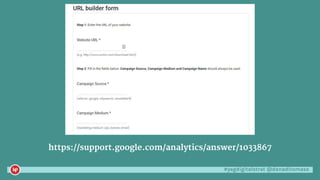
https://support.google.com/analytics/answer/1033867
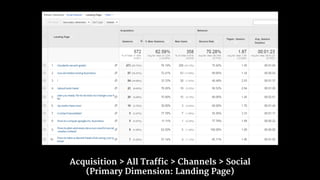
Acquisition > All Traffic > Channels > Social
(Primary Dimension: Landing Page)
#yegdigitalstrat @danaditomaso
Your goal shouldn’t
just be visits.
#yegdigitalstrat @danaditomaso
Build in “conversions”.
#yegdigitalstrat @danaditomaso#yegdigitalstrat @danaditomaso
A brief word about
conversions.
#yegdigitalstrat @danaditomaso
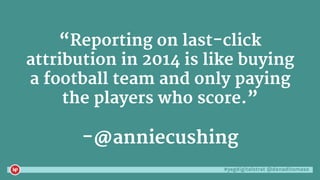
“Reporting on last-click
attribution in 2014 is like buying
a football team and only paying
the players who score.”
-@anniecushing
#yegdigitalstrat @danaditomaso#yegdigitalstrat @danaditomaso
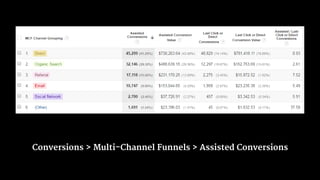
Give credit where
credit is due.
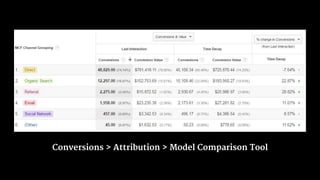
Conversions > Attribution > Model Comparison Tool
Conversions > Multi-Channel Funnels > Assisted Conversions
#yegdigitalstrat @danaditomaso#yegdigitalstrat @danaditomaso
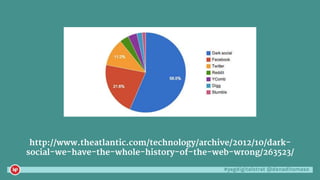
And then there’s
Dark Social.
#yegdigitalstrat @danaditomaso
You can’t actually track
everything.
#yegdigitalstrat @danaditomaso
Text Messages
gchat
Slack
Private Browsing
Gmail
Apps
#yegdigitalstrat @danaditomaso
http://www.theatlantic.com/technology/archive/2012/10/dark-
social-we-have-the-whole-history-of-the-web-wrong/263523/
#yegdigitalstrat @danaditomaso
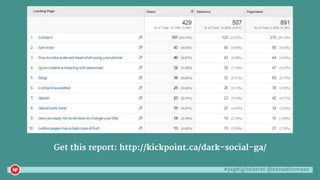
Get this report: http://kickpoint.ca/dark-social-ga/
#yegdigitalstrat @danaditomaso#yegdigitalstrat @danaditomaso
Before You Get Too Serious
#yegdigitalstrat @danaditomaso
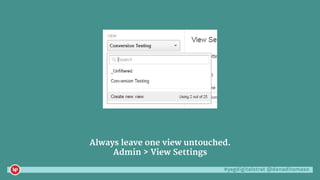
Always leave one view untouched.
Admin > View Settings
#yegdigitalstrat @danaditomaso
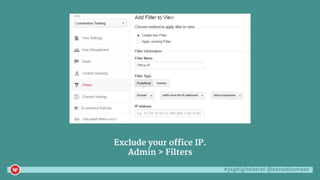
Exclude your office IP.
Admin > Filters
#yegdigitalstrat @danaditomaso
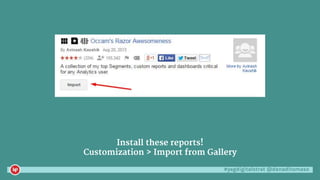
Install these reports!
Customization > Import from Gallery
#yegdigitalstrat @danaditomaso#yegdigitalstrat @danaditomaso
Going Further
#yegdigitalstrat @danaditomaso
https://www.annielytics.com/annielytics-dashboard-course/
#yegdigitalstrat @danaditomaso
http://www.kaushik.net/avinash/
#yegdigitalstrat @danaditomaso
http://kickpoint.ca/contact/newsletter/
#yegdigitalstrat @danaditomaso#yegdigitalstrat @danaditomaso
DANA DITOMASO
THANK YOU!

Introduction to Google Analytics

Editor's Notes

  • #5 The data isn’t accurate and the metrics that seem important aren’t.
  • #6 This is the first report you see when you open up Analytics, so you assume it’s really important and full of really good data, right?
  • #7 This is relatively okay.
  • #8 This is misleading because people really do use more than one device and one browser to access your site. Which we all know isn’t true. It’s like associating your SIN with your licence plate. So if you report on new vs returning visits, you’re actually not celebrating new visitors. It’s just people who happen to be using another way to access your site, or cleared their cookies, or it’s been a while, or, or…. You should only report on user-based data when you have a login option on your site, visitors actually use it, you’re using universal analytics, you modified your google analytics code to capture your members user id, and you set up a view that uses that ID to see who is new/returning. So basically almost no one, ever.
  • #9 How can this be bad? Well how about you have a pop-up or iframe that loads when people hit your site and suddenly you have multiple pageviews for the price of one. Plus every time I hit reload, that’s a pageview. Pageviews are the new hits.
  • #10 So if pageviews is wrong and sessions are wrong, this is wrong divided by wrong.
  • #11 Okay, this one is sneaky. If users only visit a single page, Google doesn’t actually know how long they spent on the page. So this metric is really only based on a small subset of users. For example, if you have a page with an average session duration of 7 minutes, but that page also shows a pages/session of say 1.20, that means that only those people who clicked another page (and it’s a very small number) decided your time on page.
  • #12 Plus how many people hoard tabs for weeks?
  • #13 Bounce rate is possibly the most misunderstood metric. Like pageviews, it can be easily skewed. I once saw a site that had an almost 0 bounce rate. Why? Because they called a second pageload as soon as the first page was loaded. Magic! Bounce rate is also meaningless without context. Maybe if people only looked at one page, that’s good. Depends on your goals.
  • #14 And we already talked about why this is a bad metric.
  • #25 Real client example.
  • #28 Far more useful, as here you can see how people got to your site and how that relates to your conversions. Then you can drill into each channel and start poking around.
  • #29 The UTM builder helps you add in attribution and is really useful for campaigns. But don’t mess it up! If Google doesn’t understand, it goes in (other) hell. All lowercase, all the time. If you don’t know source/medium, go back to previous slide and click source/medium to see it. Medium is the channel.
  • #30 For example, what pages did social users land on?
  • #32 Conversions are more than people just buying stuff. Did someone click a link to your Facebook page? What about joining your newsletter? Or becoming a member? Or filling out a form? Or downloading a PDF? Google Analyticator or Google Analytics Dashboard for WordPress will help you auto tag these events.
  • #34 Follow Annie, she’s great.