












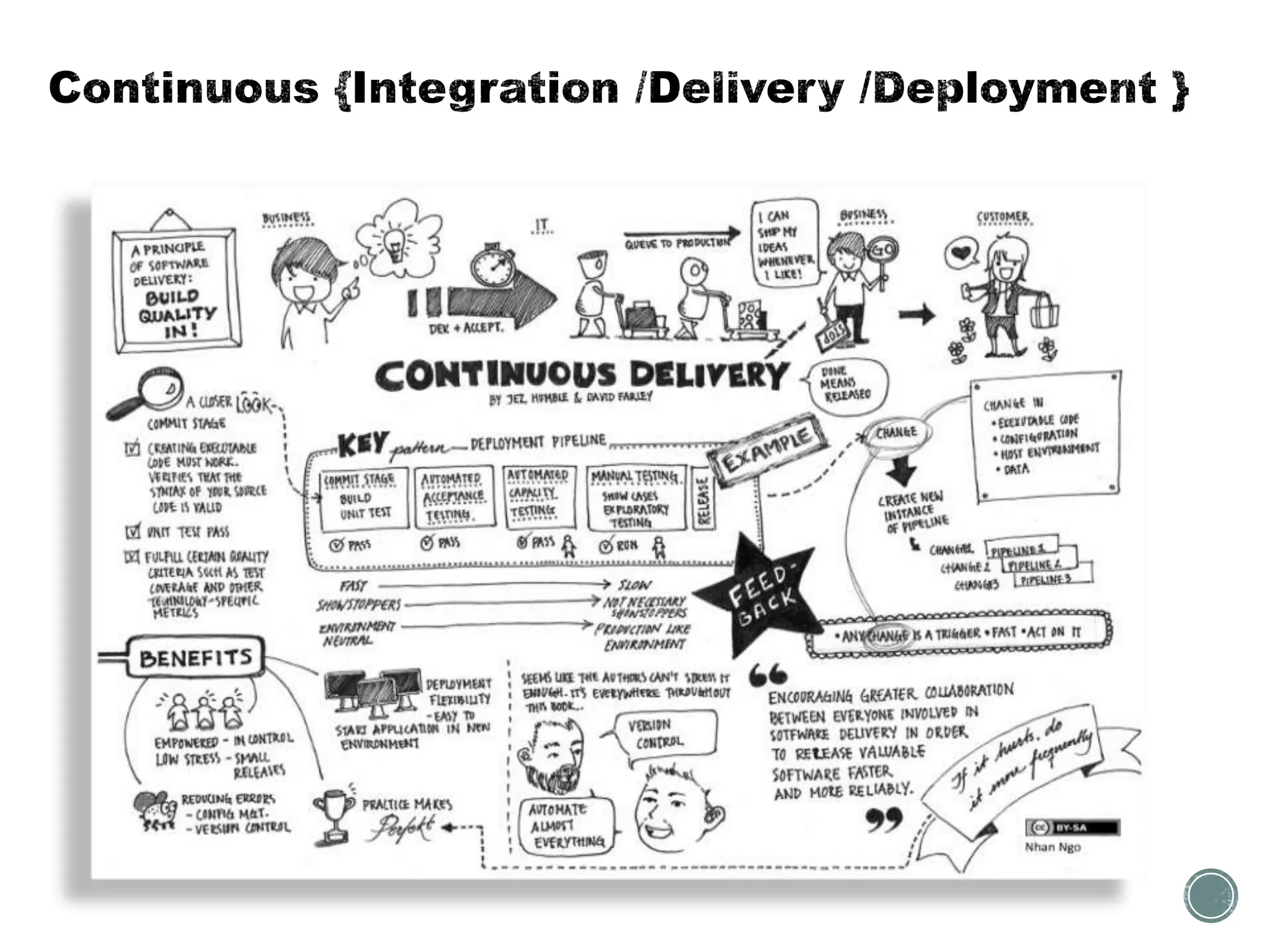
Practice in software engineering, of merging all developer working copies with a shared mainline several times a day.
The main aim of CI is to prevent integration problems (merge hell or integration hell).
• Developers check out code into their private workspaces, commit changes to the repository.
• The CI server monitors the repositories and checks out changes when they occur.
• The CI server builds the system and runs unit and integration tests.
• The CI server releases deployable artefacts via some artifact repository.
• The CI server assigns a build label to the version of the code it just built.
• If the build or tests fail, the CI server alerts the team.
• The team fix the issue at the earliest opportunity.
• Continue to continually integrate and test throughout the project.
• Maintain a single source repository
• Automate the build
• Make your build self-testing
• Every commit should build on an integration machine
• Keep the build fast
• Test in a clone of the production environment
• Make it easy for anyone to get the latest executable
• Everyone can see what’s happening
• Automate deployment
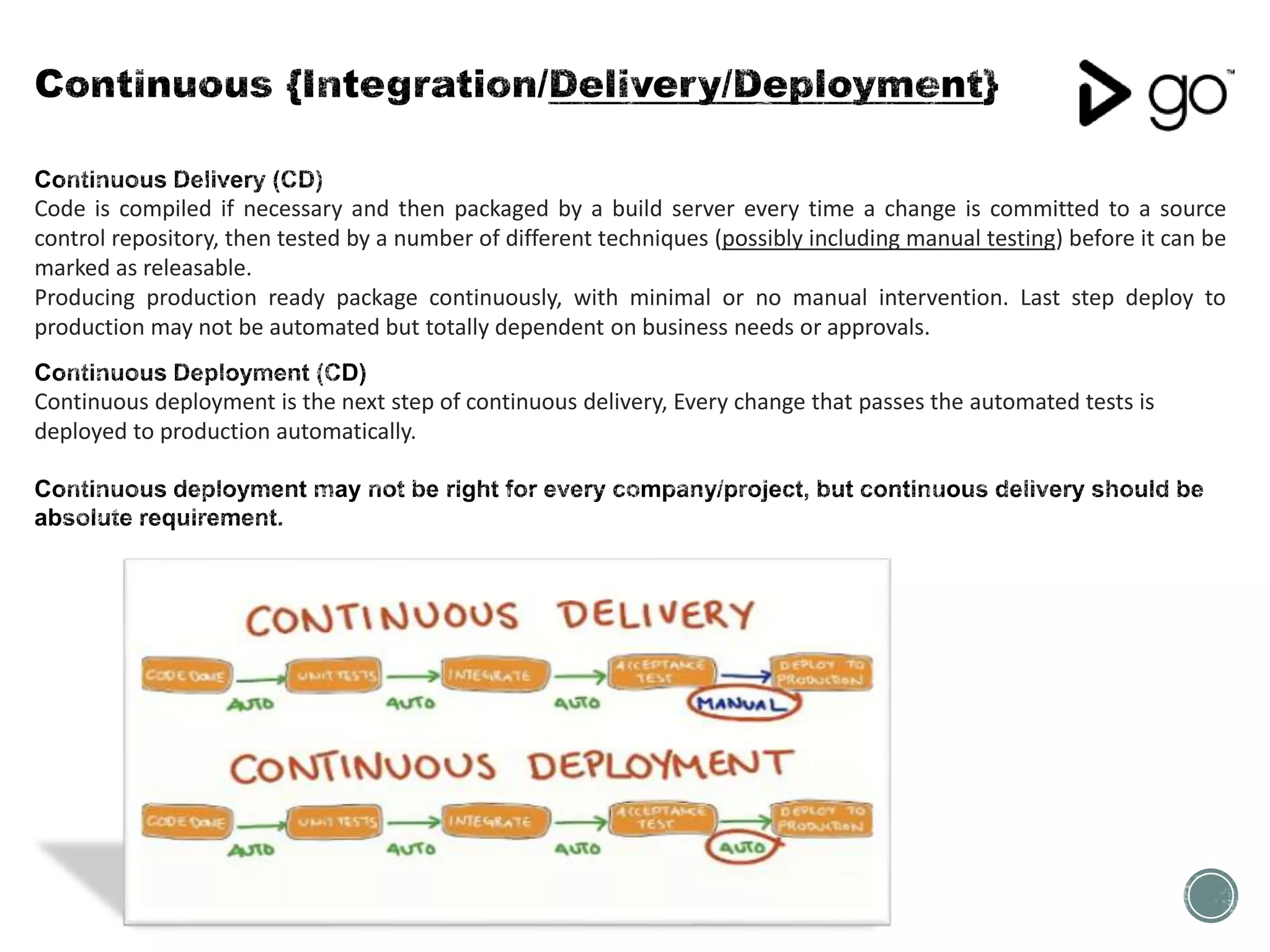
Code is compiled if necessary and then packaged by a build server every time a change is committed to a source
control repository, then tested by a number of different techniques (possibly including manual testing) before it can be
marked as releasable.
Producing production ready package continuously, with minimal or no manual intervention. Last step deploy to
production may not be automated but totally dependent on business needs or approvals.
Continuous deployment is the next step of continuous delivery, Every change that passes the automated tests is
deployed to production automatically.
• Though Works release first Continuous Integration Server named “Cruise Control” as a free software.
• Later in July 2008 release Continuous Delivery Product called “Cruise”
• Later “Cruise” renamed as “GO”
• Earlier in 2014 Though Works made “GO” Open Source [www.go.cd]
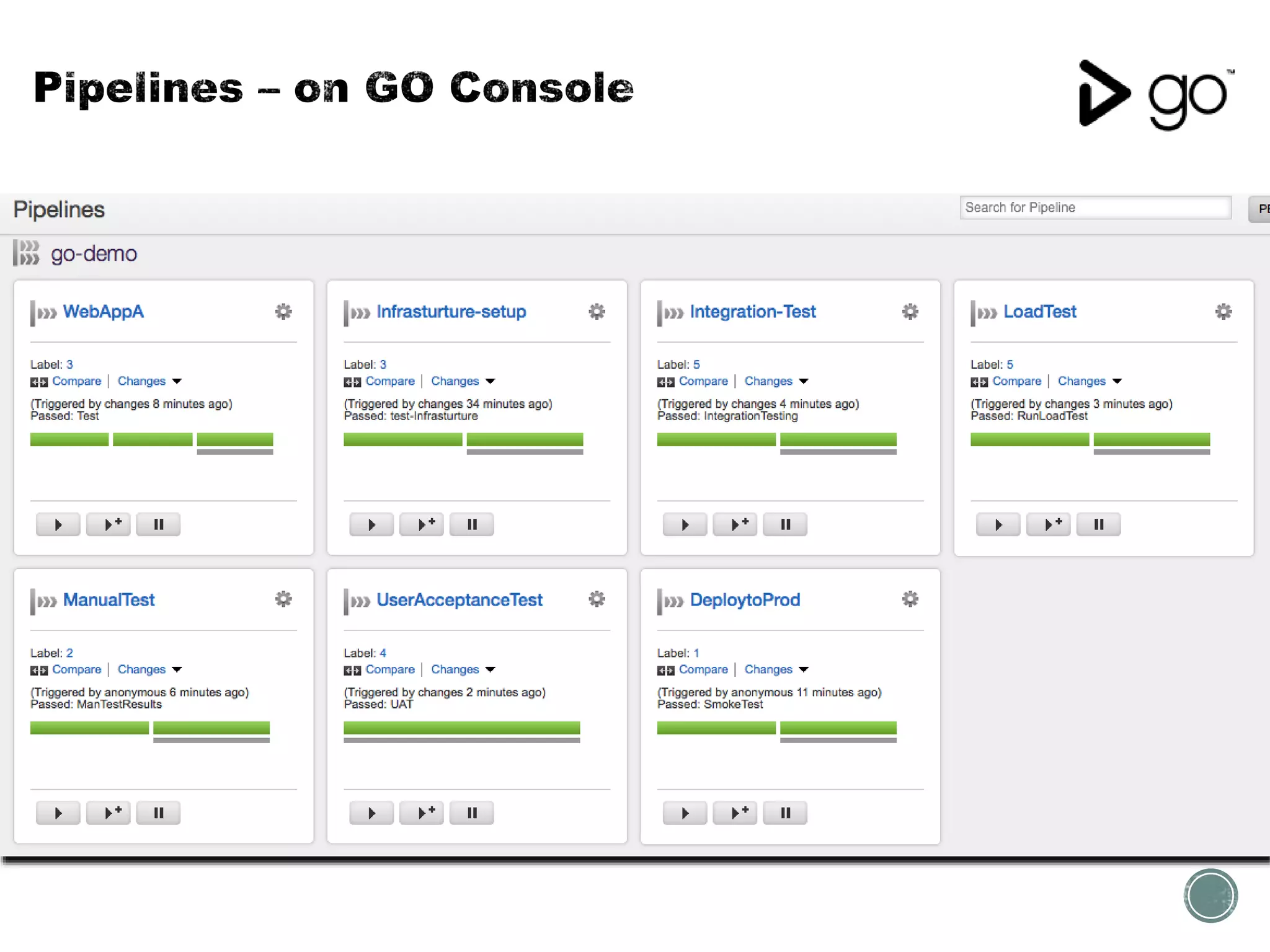
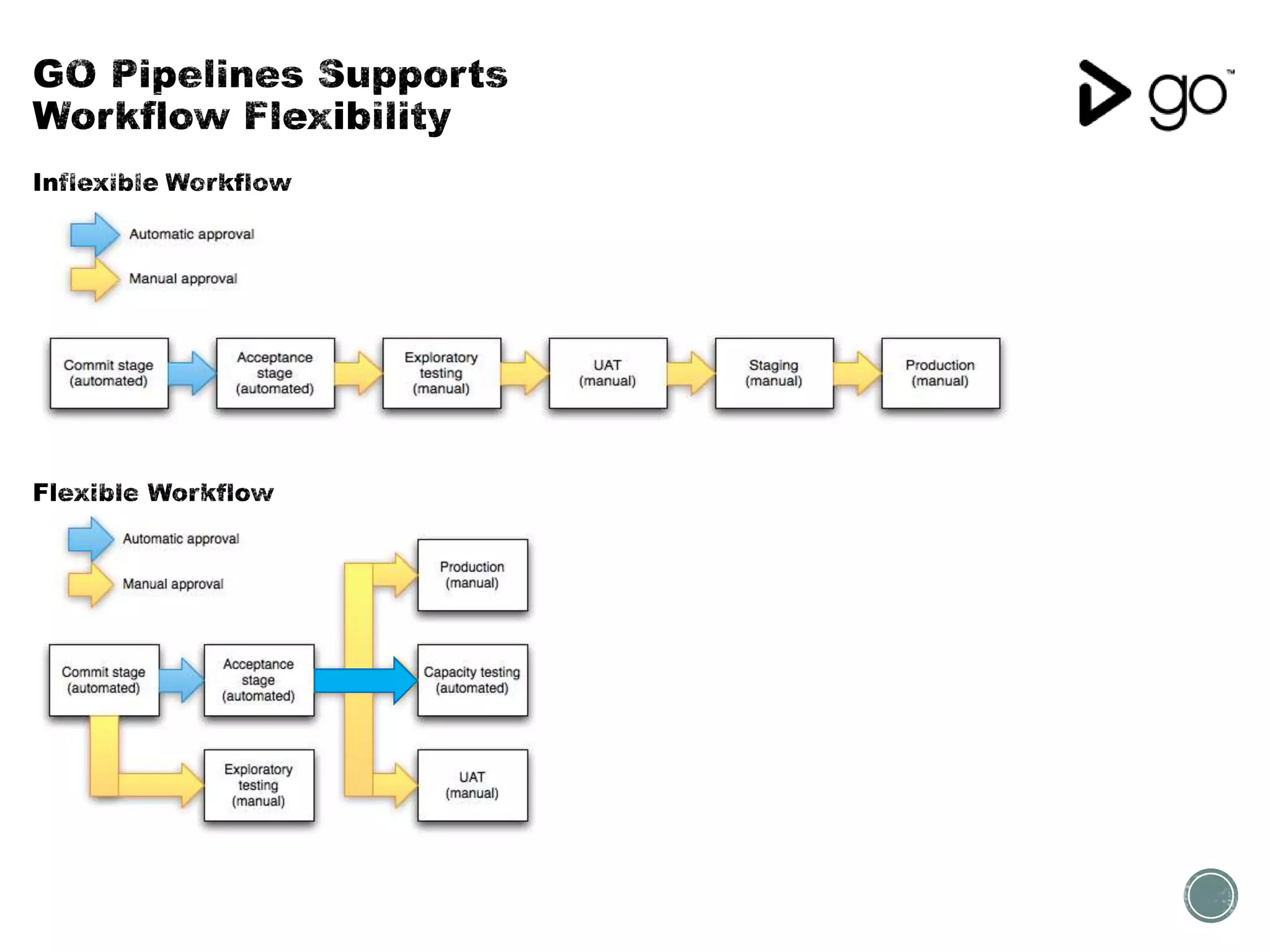
• Pipelines at core : Pipelines can be used to model complex build and deploy scenario.
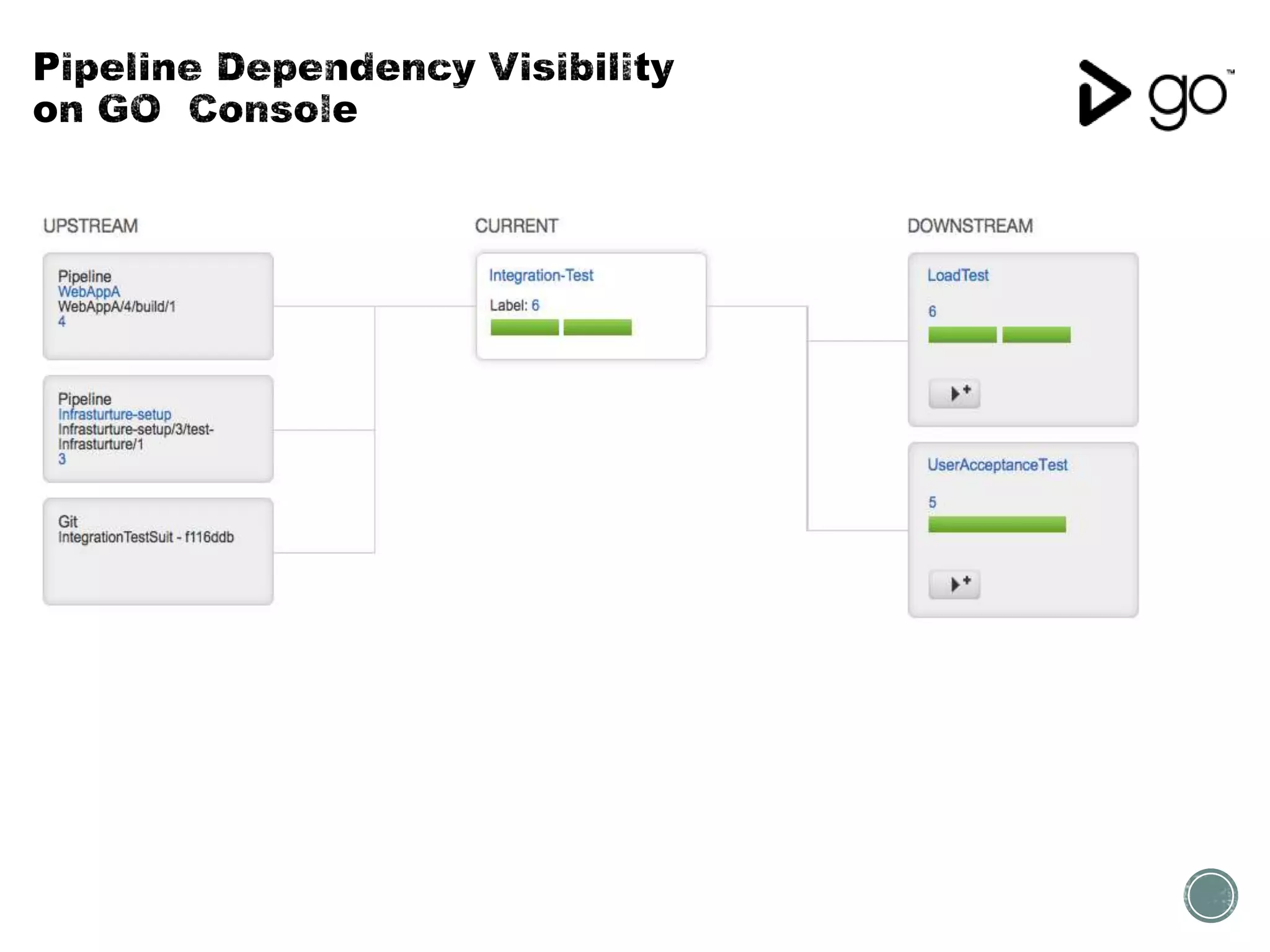
• Visibility: Go's Value Stream Map visualizes your entire CD workflow. With a single glance you can trace a
change from commit all the way to deployment.
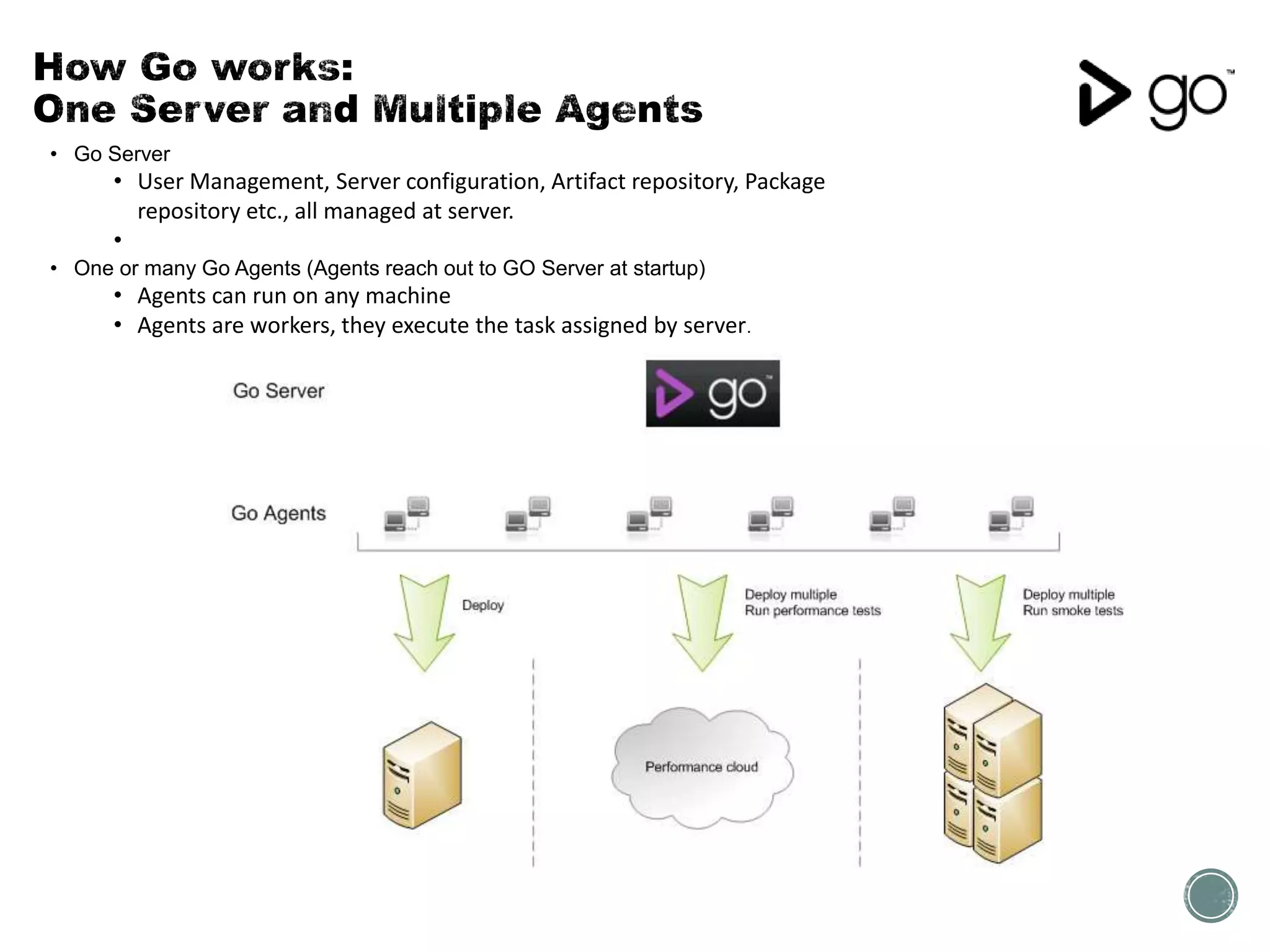
• Go Server
• User Management, Server configuration, Artifact repository, Package
repository etc., all managed at server.
•
• One or many Go Agents (Agents reach out to GO Server at startup)
• Agents can run on any machine
• Agents are workers, they execute the task assigned by server.
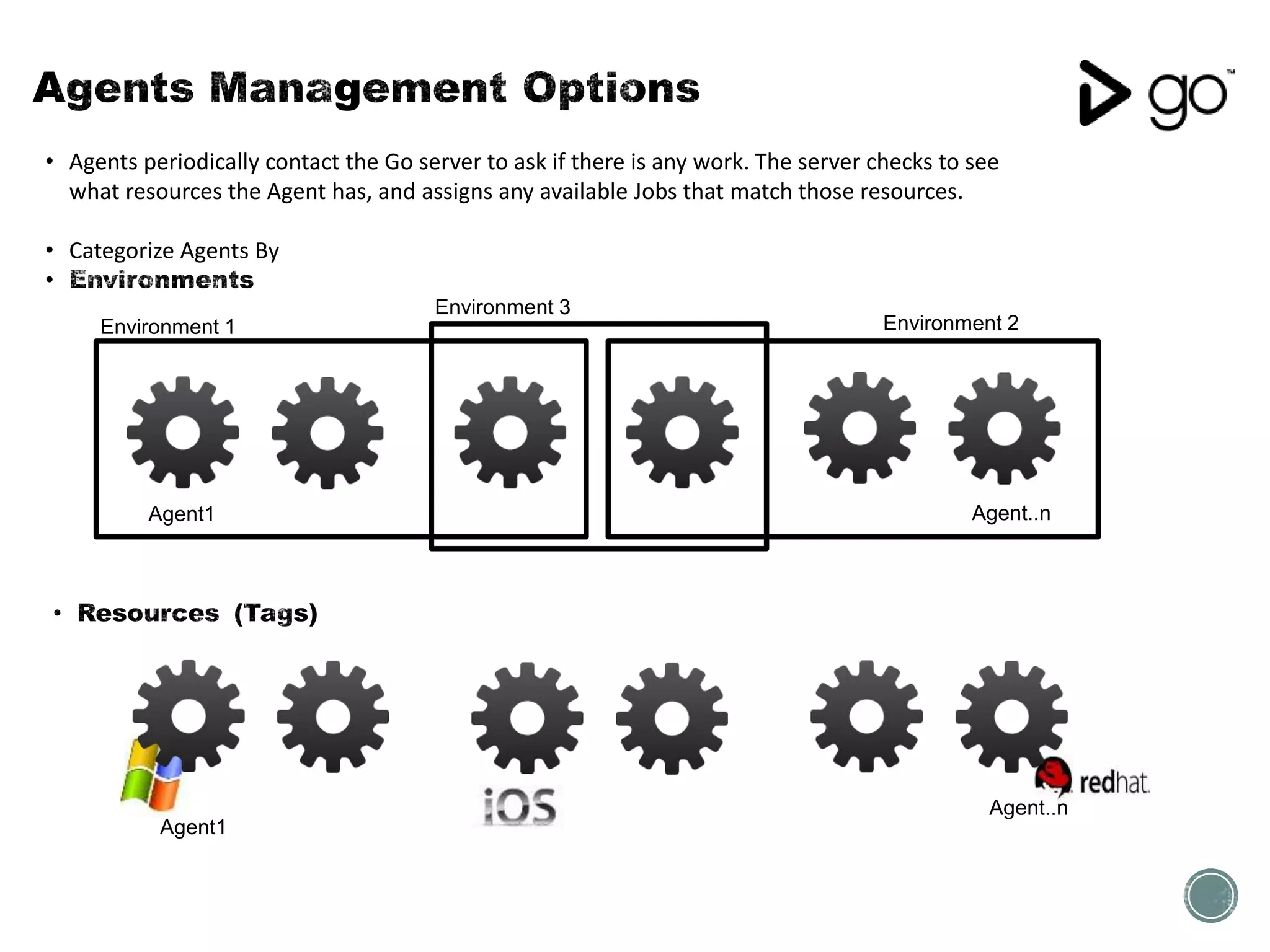
• Agents periodically contact the Go server to ask if there is any work. The server checks to see
what resources the Agent has, and assigns any available Jobs that match those resources.
• Categorize Agents By
Environment 1 Environment 2
Environment 3
Agent1 Agent..n
Agent1
Agent..n
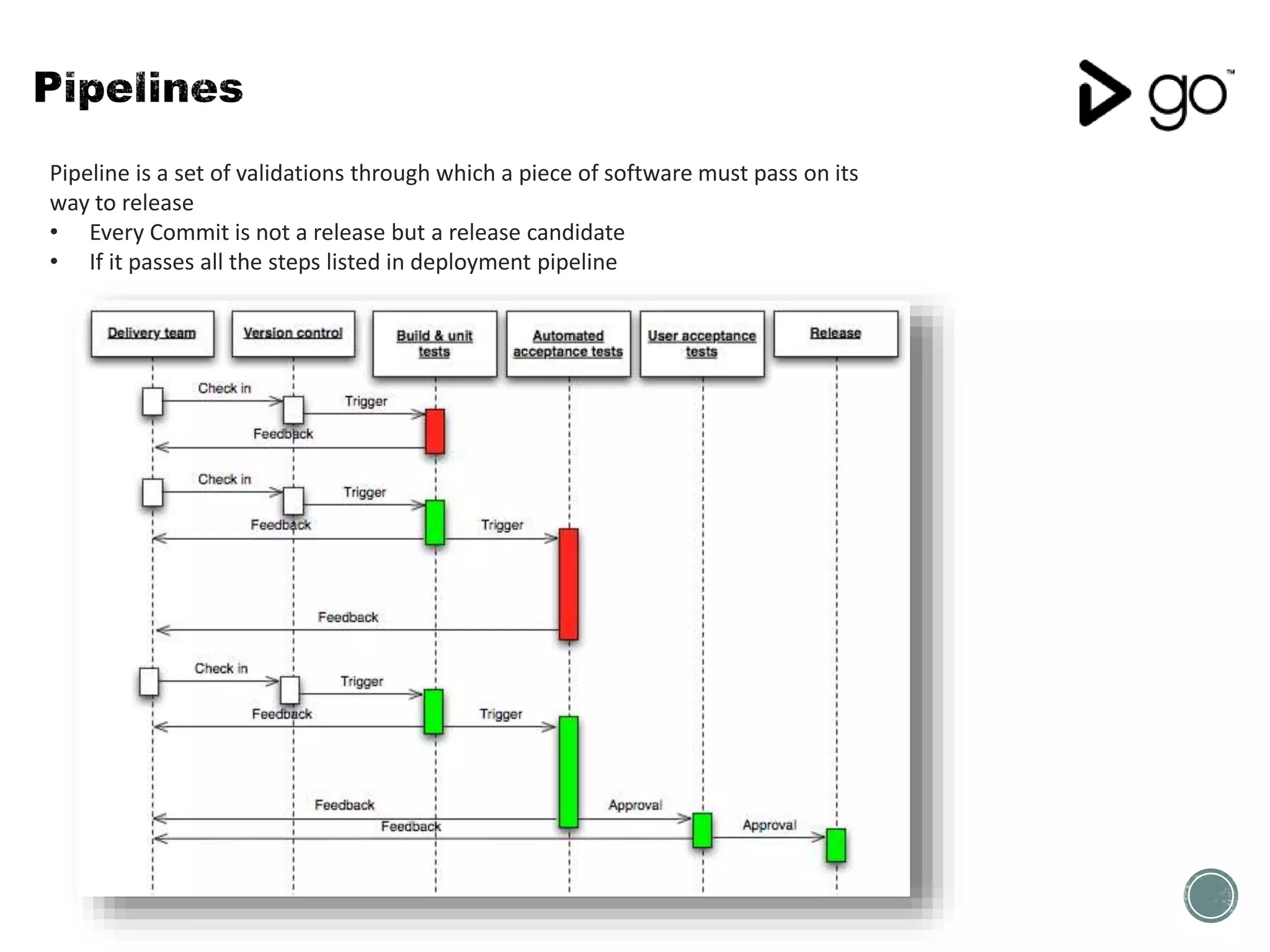
Pipeline is a set of validations through which a piece of software must pass on its
way to release
• Every Commit is not a release but a release candidate
• If it passes all the steps listed in deployment pipeline
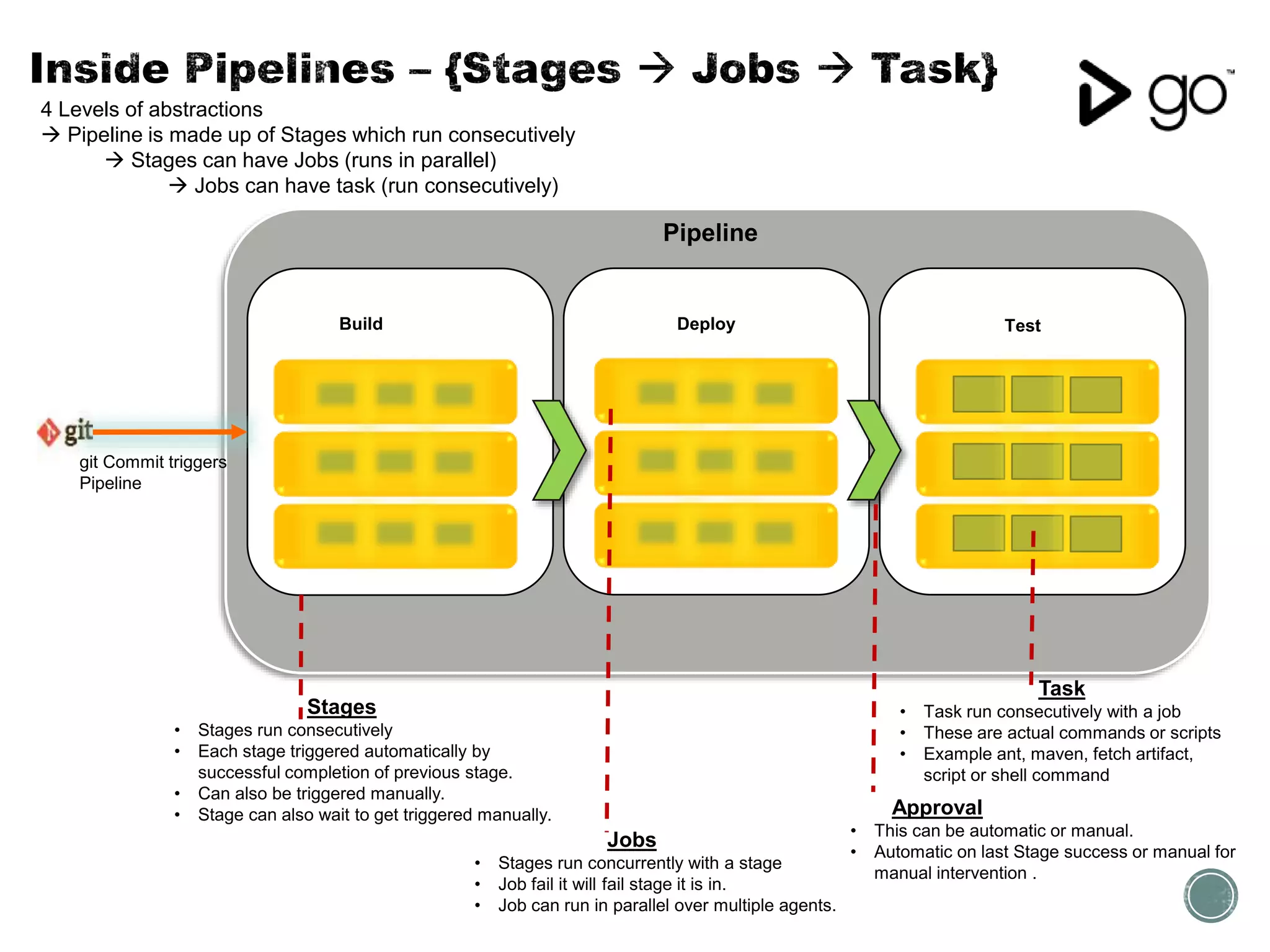
Stages
• Stages run consecutively
• Each stage triggered automatically by
successful completion of previous stage.
• Can also be triggered manually.
• Stage can also wait to get triggered manually.
git Commit triggers
Pipeline
Build
Jobs
• Stages run concurrently with a stage
• Job fail it will fail stage it is in.
• Job can run in parallel over multiple agents.
Task
• Task run consecutively with a job
• These are actual commands or scripts
• Example ant, maven, fetch artifact,
script or shell command
Approval
• This can be automatic or manual.
• Automatic on last Stage success or manual for
manual intervention .
4 Levels of abstractions
 Pipeline is made up of Stages which run consecutively
 Stages can have Jobs (runs in parallel)
 Jobs can have task (run consecutively)
Deploy Test
Pipeline
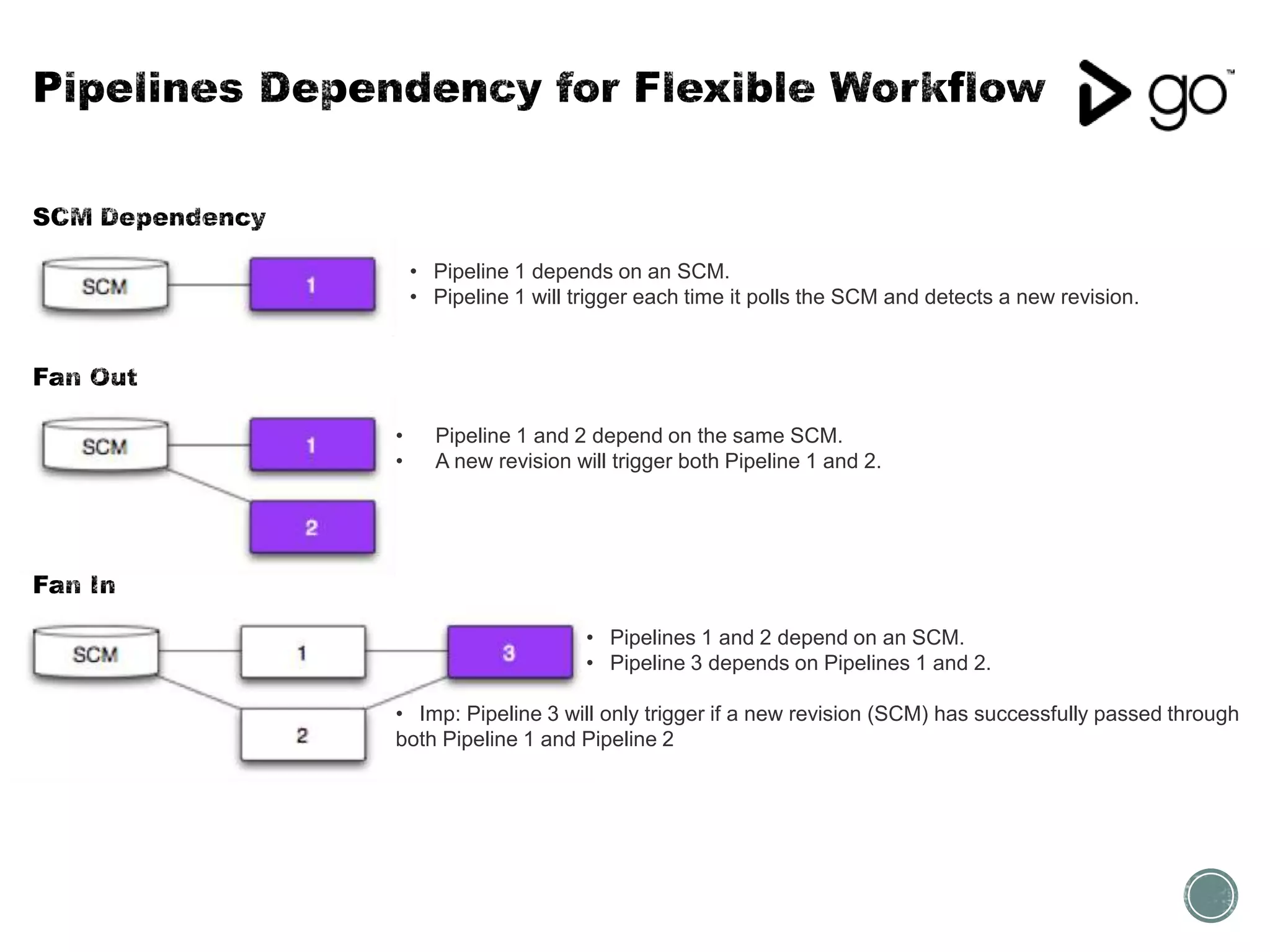
• Pipeline 1 depends on an SCM.
• Pipeline 1 will trigger each time it polls the SCM and detects a new revision.
• Pipeline 1 and 2 depend on the same SCM.
• A new revision will trigger both Pipeline 1 and 2.
• Pipelines 1 and 2 depend on an SCM.
• Pipeline 3 depends on Pipelines 1 and 2.
• Imp: Pipeline 3 will only trigger if a new revision (SCM) has successfully passed through
both Pipeline 1 and Pipeline 2
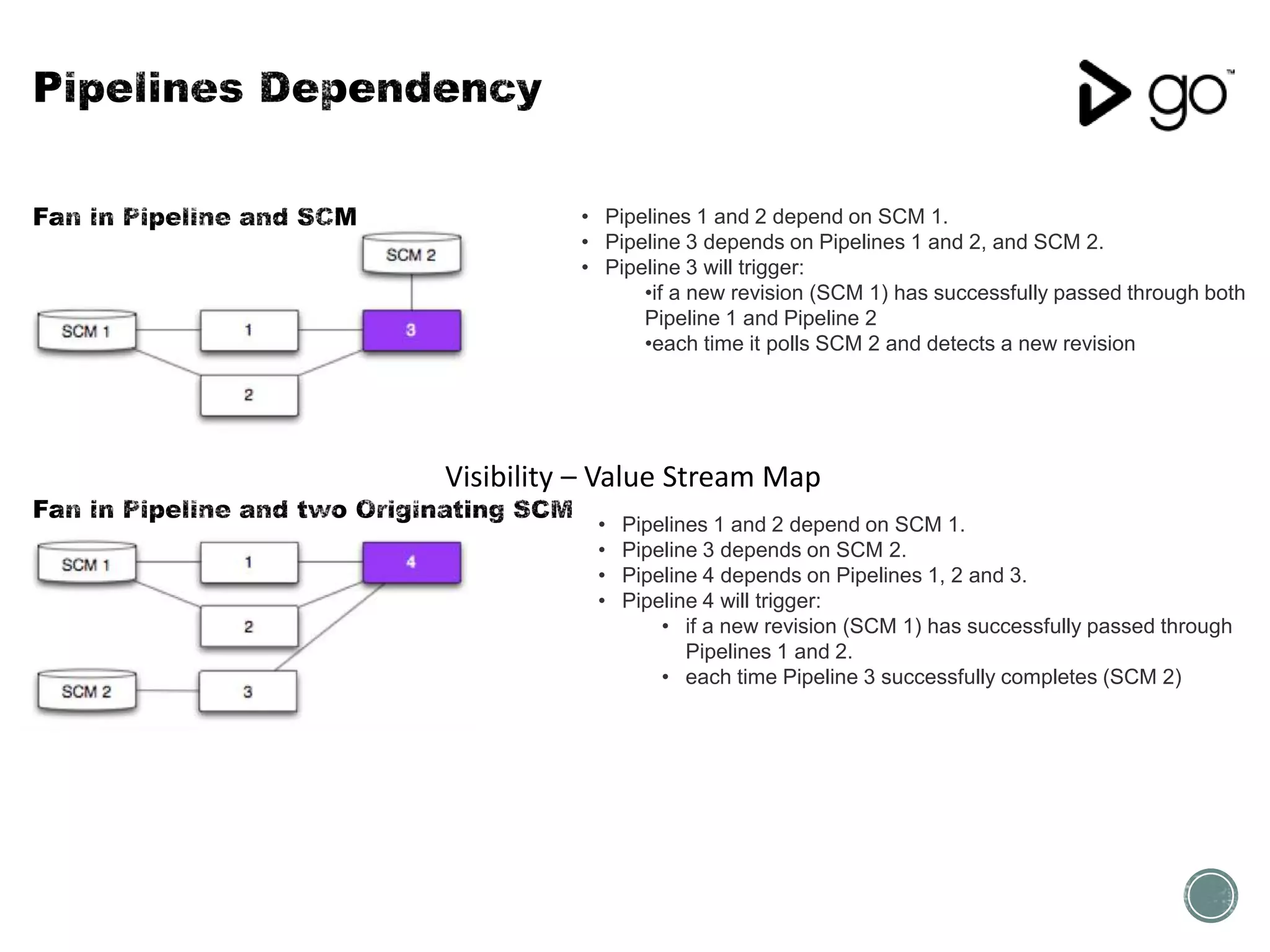
• Pipelines 1 and 2 depend on SCM 1.
• Pipeline 3 depends on Pipelines 1 and 2, and SCM 2.
• Pipeline 3 will trigger:
•if a new revision (SCM 1) has successfully passed through both
Pipeline 1 and Pipeline 2
•each time it polls SCM 2 and detects a new revision
• Pipelines 1 and 2 depend on SCM 1.
• Pipeline 3 depends on SCM 2.
• Pipeline 4 depends on Pipelines 1, 2 and 3.
• Pipeline 4 will trigger:
• if a new revision (SCM 1) has successfully passed through
Pipelines 1 and 2.
• each time Pipeline 3 successfully completes (SCM 2)
Visibility – Value Stream Map
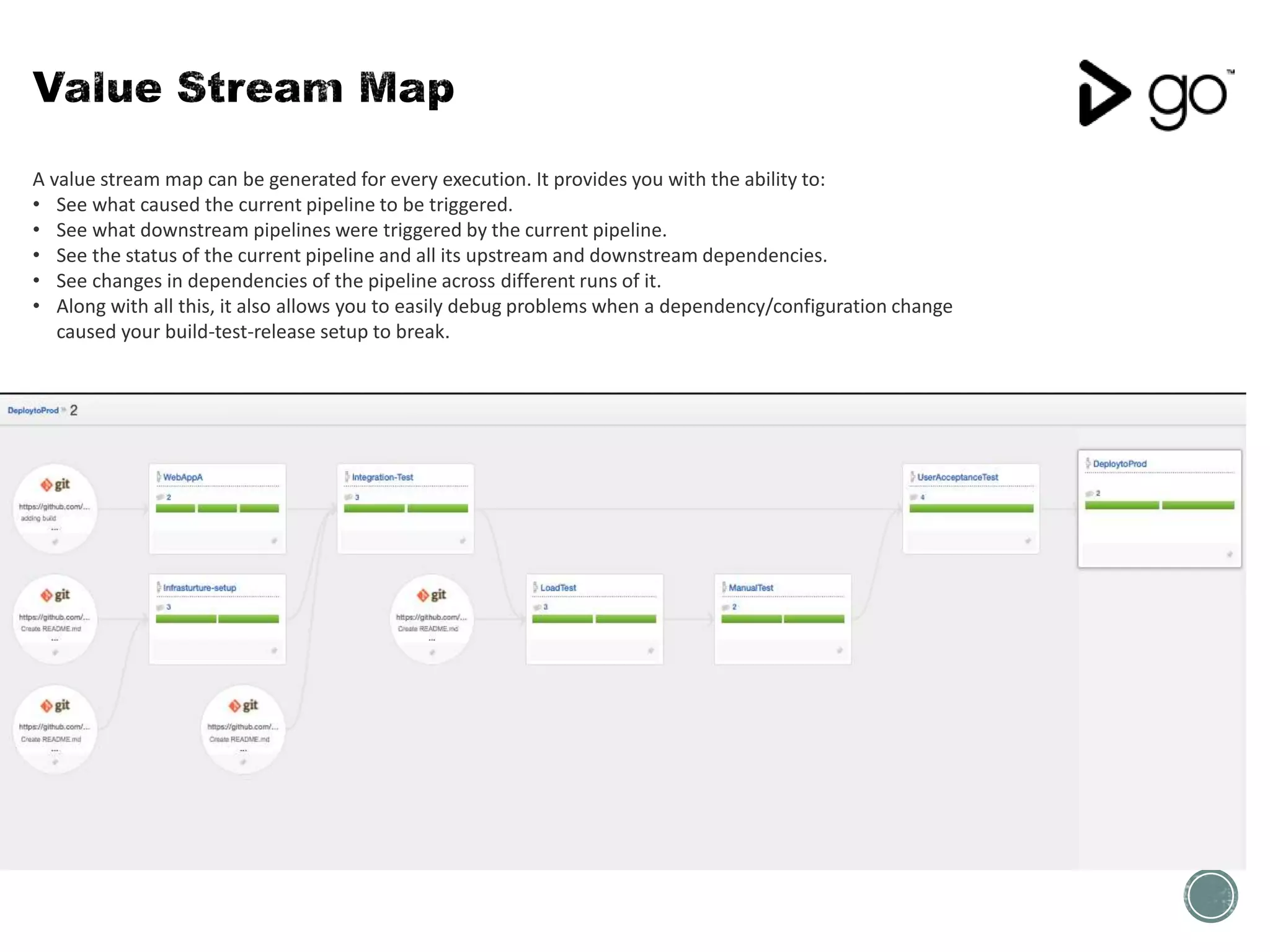
A value stream map can be generated for every execution. It provides you with the ability to:
• See what caused the current pipeline to be triggered.
• See what downstream pipelines were triggered by the current pipeline.
• See the status of the current pipeline and all its upstream and downstream dependencies.
• See changes in dependencies of the pipeline across different runs of it.
• Along with all this, it also allows you to easily debug problems when a dependency/configuration change
caused your build-test-release setup to break.
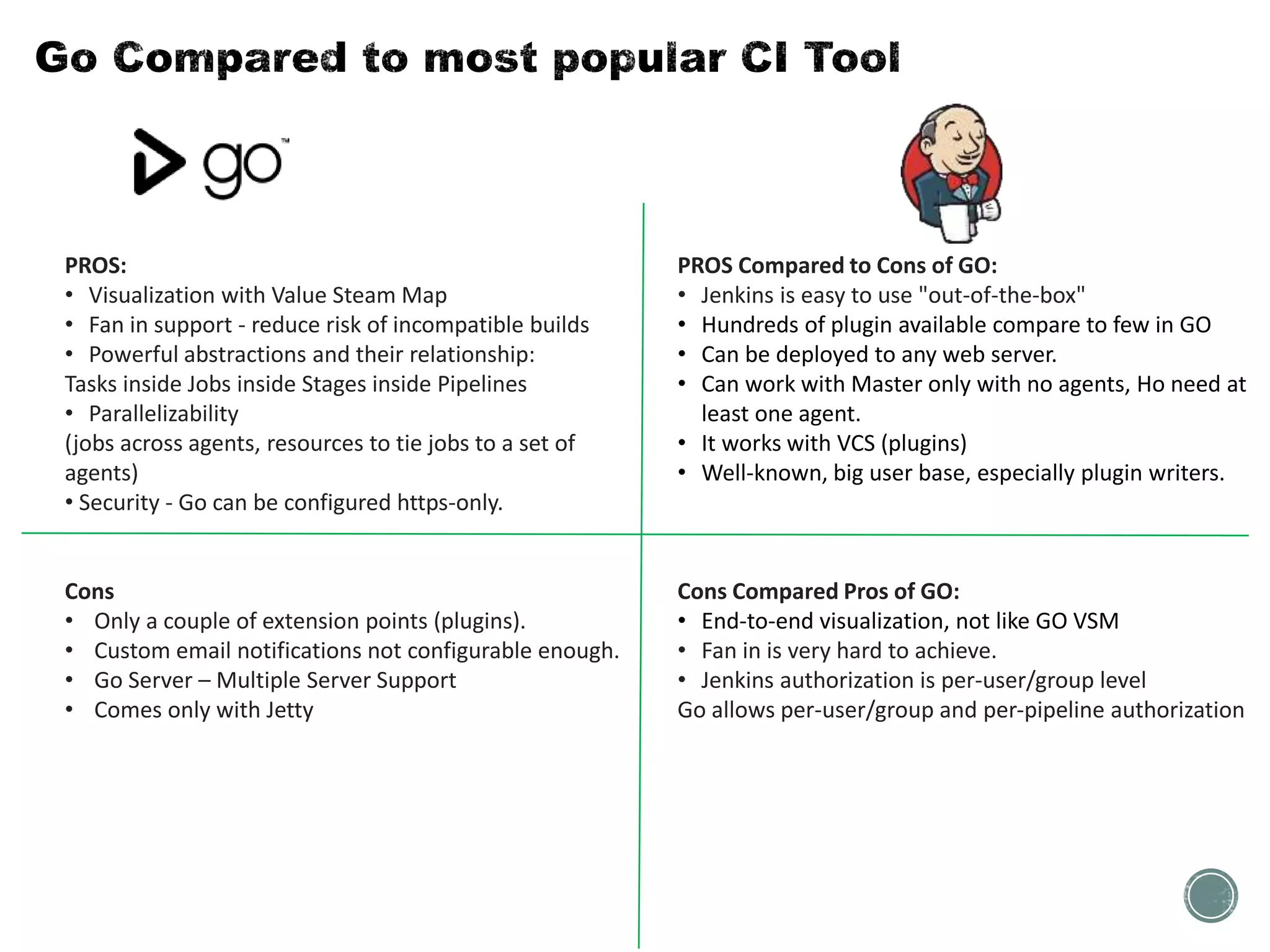
PROS:
• Visualization with Value Steam Map
• Fan in support - reduce risk of incompatible builds
• Powerful abstractions and their relationship:
Tasks inside Jobs inside Stages inside Pipelines
• Parallelizability
(jobs across agents, resources to tie jobs to a set of
agents)
• Security - Go can be configured https-only.
Cons
• Only a couple of extension points (plugins).
• Custom email notifications not configurable enough.
• Go Server – Multiple Server Support
• Comes only with Jetty
PROS Compared to Cons of GO:
• Jenkins is easy to use "out-of-the-box"
• Hundreds of plugin available compare to few in GO
• Can be deployed to any web server.
• Can work with Master only with no agents, Ho need at
least one agent.
• It works with VCS (plugins)
• Well-known, big user base, especially plugin writers.
Cons Compared Pros of GO:
• End-to-end visualization, not like GO VSM
• Fan in is very hard to achieve.
• Jenkins authorization is per-user/group level
Go allows per-user/group and per-pipeline authorization
• Learning from working with MomentumSI team.
• Thoughtworks GO Products Docs
http://www.thoughtworks.com/products/docs/go/13.1/help/concepts_in_go.html
• Go Open Source Website
http://www.go.cd/
• Continuous Delivery.com
http://continuousdelivery.com/2010/09/deployment-pipeline-anti-patterns
• Continuous Delivery: Reliable Software Releases through Build, Test, and Deployment Automation (Addison-Wesley
Signature Series (Fowler)) http://amzn.com/0321601912

Introduction to Go

  • 2.
  • 4.
    Practice in softwareengineering, of merging all developer working copies with a shared mainline several times a day. The main aim of CI is to prevent integration problems (merge hell or integration hell). • Developers check out code into their private workspaces, commit changes to the repository. • The CI server monitors the repositories and checks out changes when they occur. • The CI server builds the system and runs unit and integration tests. • The CI server releases deployable artefacts via some artifact repository. • The CI server assigns a build label to the version of the code it just built. • If the build or tests fail, the CI server alerts the team. • The team fix the issue at the earliest opportunity. • Continue to continually integrate and test throughout the project. • Maintain a single source repository • Automate the build • Make your build self-testing • Every commit should build on an integration machine • Keep the build fast • Test in a clone of the production environment • Make it easy for anyone to get the latest executable • Everyone can see what’s happening • Automate deployment
  • 5.
    Code is compiledif necessary and then packaged by a build server every time a change is committed to a source control repository, then tested by a number of different techniques (possibly including manual testing) before it can be marked as releasable. Producing production ready package continuously, with minimal or no manual intervention. Last step deploy to production may not be automated but totally dependent on business needs or approvals. Continuous deployment is the next step of continuous delivery, Every change that passes the automated tests is deployed to production automatically.
  • 6.
    • Though Worksrelease first Continuous Integration Server named “Cruise Control” as a free software. • Later in July 2008 release Continuous Delivery Product called “Cruise” • Later “Cruise” renamed as “GO” • Earlier in 2014 Though Works made “GO” Open Source [www.go.cd] • Pipelines at core : Pipelines can be used to model complex build and deploy scenario. • Visibility: Go's Value Stream Map visualizes your entire CD workflow. With a single glance you can trace a change from commit all the way to deployment.
  • 7.
    • Go Server •User Management, Server configuration, Artifact repository, Package repository etc., all managed at server. • • One or many Go Agents (Agents reach out to GO Server at startup) • Agents can run on any machine • Agents are workers, they execute the task assigned by server.
  • 8.
    • Agents periodicallycontact the Go server to ask if there is any work. The server checks to see what resources the Agent has, and assigns any available Jobs that match those resources. • Categorize Agents By Environment 1 Environment 2 Environment 3 Agent1 Agent..n Agent1 Agent..n
  • 9.
    Pipeline is aset of validations through which a piece of software must pass on its way to release • Every Commit is not a release but a release candidate • If it passes all the steps listed in deployment pipeline
  • 11.
    Stages • Stages runconsecutively • Each stage triggered automatically by successful completion of previous stage. • Can also be triggered manually. • Stage can also wait to get triggered manually. git Commit triggers Pipeline Build Jobs • Stages run concurrently with a stage • Job fail it will fail stage it is in. • Job can run in parallel over multiple agents. Task • Task run consecutively with a job • These are actual commands or scripts • Example ant, maven, fetch artifact, script or shell command Approval • This can be automatic or manual. • Automatic on last Stage success or manual for manual intervention . 4 Levels of abstractions  Pipeline is made up of Stages which run consecutively  Stages can have Jobs (runs in parallel)  Jobs can have task (run consecutively) Deploy Test Pipeline
  • 13.
    • Pipeline 1depends on an SCM. • Pipeline 1 will trigger each time it polls the SCM and detects a new revision. • Pipeline 1 and 2 depend on the same SCM. • A new revision will trigger both Pipeline 1 and 2. • Pipelines 1 and 2 depend on an SCM. • Pipeline 3 depends on Pipelines 1 and 2. • Imp: Pipeline 3 will only trigger if a new revision (SCM) has successfully passed through both Pipeline 1 and Pipeline 2
  • 14.
    • Pipelines 1and 2 depend on SCM 1. • Pipeline 3 depends on Pipelines 1 and 2, and SCM 2. • Pipeline 3 will trigger: •if a new revision (SCM 1) has successfully passed through both Pipeline 1 and Pipeline 2 •each time it polls SCM 2 and detects a new revision • Pipelines 1 and 2 depend on SCM 1. • Pipeline 3 depends on SCM 2. • Pipeline 4 depends on Pipelines 1, 2 and 3. • Pipeline 4 will trigger: • if a new revision (SCM 1) has successfully passed through Pipelines 1 and 2. • each time Pipeline 3 successfully completes (SCM 2) Visibility – Value Stream Map
  • 16.
    A value streammap can be generated for every execution. It provides you with the ability to: • See what caused the current pipeline to be triggered. • See what downstream pipelines were triggered by the current pipeline. • See the status of the current pipeline and all its upstream and downstream dependencies. • See changes in dependencies of the pipeline across different runs of it. • Along with all this, it also allows you to easily debug problems when a dependency/configuration change caused your build-test-release setup to break.
  • 17.
    PROS: • Visualization withValue Steam Map • Fan in support - reduce risk of incompatible builds • Powerful abstractions and their relationship: Tasks inside Jobs inside Stages inside Pipelines • Parallelizability (jobs across agents, resources to tie jobs to a set of agents) • Security - Go can be configured https-only. Cons • Only a couple of extension points (plugins). • Custom email notifications not configurable enough. • Go Server – Multiple Server Support • Comes only with Jetty PROS Compared to Cons of GO: • Jenkins is easy to use "out-of-the-box" • Hundreds of plugin available compare to few in GO • Can be deployed to any web server. • Can work with Master only with no agents, Ho need at least one agent. • It works with VCS (plugins) • Well-known, big user base, especially plugin writers. Cons Compared Pros of GO: • End-to-end visualization, not like GO VSM • Fan in is very hard to achieve. • Jenkins authorization is per-user/group level Go allows per-user/group and per-pipeline authorization
  • 19.
    • Learning fromworking with MomentumSI team. • Thoughtworks GO Products Docs http://www.thoughtworks.com/products/docs/go/13.1/help/concepts_in_go.html • Go Open Source Website http://www.go.cd/ • Continuous Delivery.com http://continuousdelivery.com/2010/09/deployment-pipeline-anti-patterns • Continuous Delivery: Reliable Software Releases through Build, Test, and Deployment Automation (Addison-Wesley Signature Series (Fowler)) http://amzn.com/0321601912

Editor's Notes

  • #5 http://blog.crisp.se/2013/02/05/yassalsundman/continuous-delivery-vs-continuous-deployment
  • #6 http://blog.crisp.se/2013/02/05/yassalsundman/continuous-delivery-vs-continuous-deployment
  • #7 http://blog.crisp.se/2013/02/05/yassalsundman/continuous-delivery-vs-continuous-deployment
  • #8 http://blog.crisp.se/2013/02/05/yassalsundman/continuous-delivery-vs-continuous-deployment
  • #9 http://blog.crisp.se/2013/02/05/yassalsundman/continuous-delivery-vs-continuous-deployment
  • #10 http://blog.crisp.se/2013/02/05/yassalsundman/continuous-delivery-vs-continuous-deployment
  • #11 http://blog.crisp.se/2013/02/05/yassalsundman/continuous-delivery-vs-continuous-deployment
  • #12 http://blog.crisp.se/2013/02/05/yassalsundman/continuous-delivery-vs-continuous-deployment
  • #13 http://continuousdelivery.com/2010/09/deployment-pipeline-anti-patterns
  • #14 http://blog.crisp.se/2013/02/05/yassalsundman/continuous-delivery-vs-continuous-deployment
  • #15 http://blog.crisp.se/2013/02/05/yassalsundman/continuous-delivery-vs-continuous-deployment
  • #16 http://blog.crisp.se/2013/02/05/yassalsundman/continuous-delivery-vs-continuous-deployment
  • #17 http://blog.crisp.se/2013/02/05/yassalsundman/continuous-delivery-vs-continuous-deployment
  • #18 http://blog.crisp.se/2013/02/05/yassalsundman/continuous-delivery-vs-continuous-deployment
  • #20 http://blog.crisp.se/2013/02/05/yassalsundman/continuous-delivery-vs-continuous-deployment