DevOps - CI/CD
- Presented by
Sandeep Kumar J
Software Engineer
Jouve India Private Limited
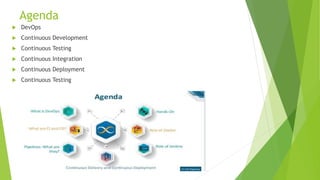
Agenda
 DevOps
 Continuous Development
 Continuous Testing
 Continuous Integration
 Continuous Deployment
 Continuous Testing
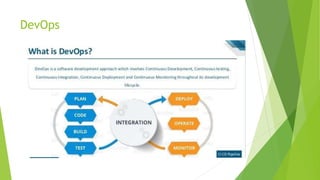
DevOps
DevOps
 First it was Waterfall, next it was Agile, and now it's DevOps. This is how modern
developers approach building great products.
 Waterfall:
 - Delivery at End
 - Cost, Time will be high due to last minute discovery/change
 Agile:
 - Sprint based release
 - More Human Effort
 - Again Cost and Time can be high if its properly not executed or planned
 Devops-
 - Continous Integration and Delivery
 - Risk of last minute surprise is very less due to early stage tunings
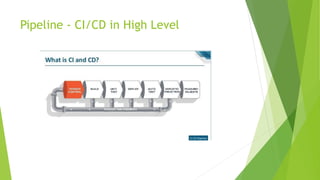
Pipeline - CI/CD in High Level
Continuous Development
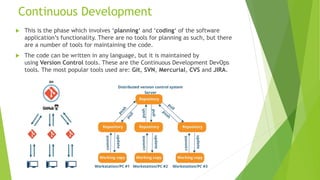
 This is the phase which involves ‘planning‘ and ‘coding‘ of the software
application’s functionality. There are no tools for planning as such, but there
are a number of tools for maintaining the code.
 The code can be written in any language, but it is maintained by
using Version Control tools. These are the Continuous Development DevOps
tools. The most popular tools used are: Git, SVN, Mercurial, CVS and JIRA.
Continuous Development
 So why is it important to main versions of the code? Which of the Dev vs
Ops problem does it solve? Let’s understand that first.
 Versions are maintained (in a central repository), to hold a single source of
truth. So that all the developers can collaborate on the ‘latest committed’
code, and even operations can have access to that same code when they plan
to make a release.
 Whenever a mishap happens during a release, or even if there are lots of bugs
in the code (faulty feature), there is nothing to worry. Ops can quickly
rollback the deployed code and thus revert back to the previous stable state.
Continuous Testing
 When the code is developed, it is maddening to release it straight to
deployment. The code should first be tested for bugs and performance.
 Automation testing is the answer to a lot of cries of manual testers. Tools
like Selenium, TestNG, JUnit/NUnit are used to automate the execution of
our test cases. So, what are its benefits?
 Automation testing saves a lot of time, effort and labor for executing the
tests manually.
 Besides that, report generation is a big plus. The task of evaluating which test
cases failed in a test suite gets simpler.
Continuous Testing
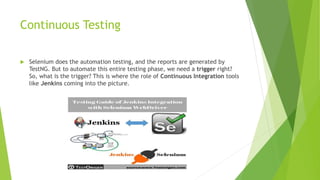
 Selenium does the automation testing, and the reports are generated by
TestNG. But to automate this entire testing phase, we need a trigger right?
So, what is the trigger? This is where the role of Continuous Integration tools
like Jenkins coming into the picture.
Continuous Testing
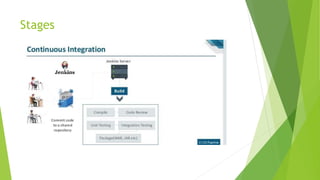
Continuous Integration
 With continuous integration, developers frequently integrate their code into
a main branch of a common repository.
 The big idea here is to reduce integration costs by having developers do it
sooner and more frequently. In practice, a developer will often discover
boundary conflicts between new and existing code at the time of integration.
 The goal of CI is to refine integration into a simple, easily-repeatable
everyday development task that will serve to reduce overall build costs and
reveal defects early in the cycle.
 To reduce friction during integration tasks, continuous integration relies on
test suites and an automated test execution.
 Most popular CI tool in the market is Jenkins. but also available in other tools
such as GitLab CI,
Continuous Integration
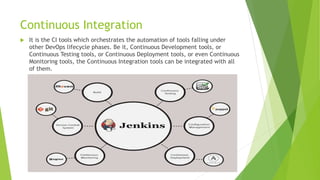
 It is the CI tools which orchestrates the automation of tools falling under
other DevOps lifecycle phases. Be it, Continuous Development tools, or
Continuous Testing tools, or Continuous Deployment tools, or even Continuous
Monitoring tools, the Continuous Integration tools can be integrated with all
of them.
Continuous Integration
 CD - When integrated with Git/ SVN, Jenkins can schedule jobs (pulling the code from
shared repositories) automatically and make it ready for builds and testing (Continuous
Development). Jenkins can build jobs either at scheduled times of day or when ever there
is a commit pushed to the central repository.
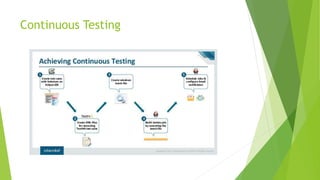
 CT- When integrated with testing tools like Selenium, we can achieve Continuous Testing.
How? The developed code can be built using tools like Maven/ Ant/ Gradle.
 When the code is built, then Selenium can automate the execution of that code. How does
it automate it? By creating a suite of test cases and executing the test cases one after the
other.
 The role of Jenkins/ Hudson/ Bamboo here would be to schedule/ automate “Selenium to
automate test case execution”.
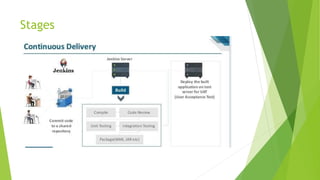
 CD - When integrated with Continuous Deployment tools, Jenkins/ Hudson/ Bamboo can
trigger thedeployments planned by configuration management/ containerization tools.
 CM - And finally, Jenkins/ Hudson can be integrated with monitoring tools like Splunk/ ELK/
Nagios/ NewRelic, to continuously monitor the status & performance of the server where
the deployments have been made.
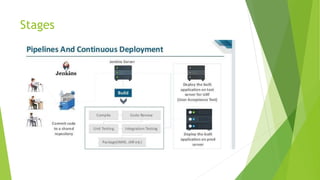
Continuous Deployment
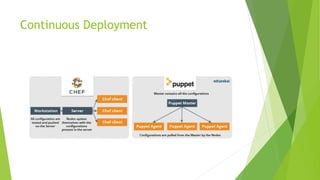
 Configuration Management tools or Containerization tools. Both set of tools
here help in achieving Continuous Deployment (CD).
 In simpler words, it is the act
of releasing deployments to servers, scheduling updates on all servers and
most importantly keeping the configurations consistent across all the severs
 For this, we have tools like Puppet, Chef, Ansible, SaltStack and more. But
the best tool here is Puppet. Puppet & the other CM tools work based on the
master-slave architecture. When there is a deployment made to the master,
the master is responsible for replicating those changes across all the slaves
Continuous Deployment
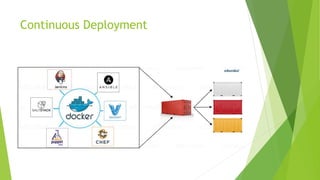
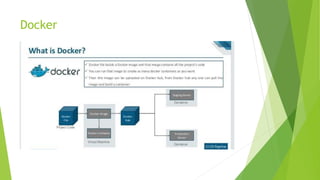
 Containerization tools are other set of tools which help in maintaining
consistency across the environments where the application is developed,
tested and deployed. It eliminates any chance of errors/ failure in production
environment by packaging and replicating the same dependencies and
packages used in development/ testing/ staging environment and The clear
winner here is Docker.
 Amazon ECS, Azure Container Service and Google Container Engine are a
few of the cloud services that have started radical support for Docker
containers.
Continuous Deployment
Docker
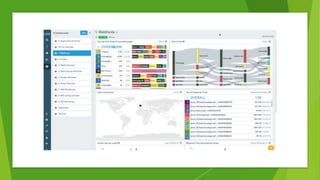
Continuous Monitoring
 Monitoring is as important as developing the application because there will
always be a chance of bugs which escape undetected during the testing
phase.
 Splunk, ELK Stack, Nagios, Sensu, NewRelic are some of the popular tools
for monitoring. When used in combination with Jenkins, we achieve
Continuous Monitoring.
 Monitoring tools also report failure/ unfavorable conditions before your
clients/ customers get to experience the faulty features.
 Splunk and ELK stack are the two tools which is a major competitors.
Continuous Monitoring
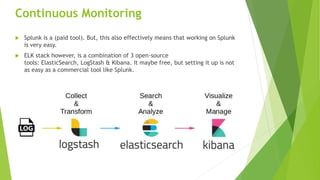
 Splunk is a (paid tool). But, this also effectively means that working on Splunk
is very easy.
 ELK stack however, is a combination of 3 open-source
tools: ElasticSearch, LogStash & Kibana. It maybe free, but setting it up is not
as easy as a commercial tool like Splunk.
Beats
 Beats are a collection of lightweight (resource efficient, no dependencies,
small) and open source log shippers that act as agents installed on the
different servers in your infrastructure for collecting logs or metrics.
 Types:
Filebeat
Filebeat, as its name implies, is used for collecting and shipping log files, and is
also the most commonly used beat.
Packetbeat
A network packet analyzer, Packetbeat was the first beat introduced. Packetbeat
captures network traffic between servers, and as such can be used for
application and performance monitoring.
Metricbeat
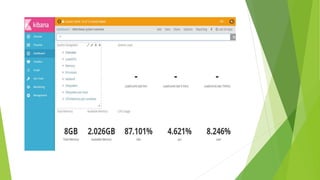
Metricbeat is an extremely popular beat that collects and reports various system-
level metrics for various systems and platforms.
Beats
 Heartbeat
 Heartbeat is meant for “uptime monitoring.”
 Auditbeat
 Auditbeat is a beat that is also still defined as being in experimental stages,
and can be used for auditing user and process activity on your Linux servers.
 Winlogbeat
 Winlogbeat will only interest Windows sysadmins or engineers as it is a beat
designed specifically for collecting Windows Event logs
Stages
Stages
Stages
ANY QUESTIONS ?
THANKS

Devops - Continuous Integration And Continuous Development

  • 1.
    DevOps - CI/CD -Presented by Sandeep Kumar J Software Engineer Jouve India Private Limited
  • 2.
    Agenda  DevOps  ContinuousDevelopment  Continuous Testing  Continuous Integration  Continuous Deployment  Continuous Testing
  • 3.
  • 4.
    DevOps  First itwas Waterfall, next it was Agile, and now it's DevOps. This is how modern developers approach building great products.  Waterfall:  - Delivery at End  - Cost, Time will be high due to last minute discovery/change  Agile:  - Sprint based release  - More Human Effort  - Again Cost and Time can be high if its properly not executed or planned  Devops-  - Continous Integration and Delivery  - Risk of last minute surprise is very less due to early stage tunings
  • 5.
    Pipeline - CI/CDin High Level
  • 6.
    Continuous Development  Thisis the phase which involves ‘planning‘ and ‘coding‘ of the software application’s functionality. There are no tools for planning as such, but there are a number of tools for maintaining the code.  The code can be written in any language, but it is maintained by using Version Control tools. These are the Continuous Development DevOps tools. The most popular tools used are: Git, SVN, Mercurial, CVS and JIRA.
  • 7.
    Continuous Development  Sowhy is it important to main versions of the code? Which of the Dev vs Ops problem does it solve? Let’s understand that first.  Versions are maintained (in a central repository), to hold a single source of truth. So that all the developers can collaborate on the ‘latest committed’ code, and even operations can have access to that same code when they plan to make a release.  Whenever a mishap happens during a release, or even if there are lots of bugs in the code (faulty feature), there is nothing to worry. Ops can quickly rollback the deployed code and thus revert back to the previous stable state.
  • 8.
    Continuous Testing  Whenthe code is developed, it is maddening to release it straight to deployment. The code should first be tested for bugs and performance.  Automation testing is the answer to a lot of cries of manual testers. Tools like Selenium, TestNG, JUnit/NUnit are used to automate the execution of our test cases. So, what are its benefits?  Automation testing saves a lot of time, effort and labor for executing the tests manually.  Besides that, report generation is a big plus. The task of evaluating which test cases failed in a test suite gets simpler.
  • 9.
    Continuous Testing  Seleniumdoes the automation testing, and the reports are generated by TestNG. But to automate this entire testing phase, we need a trigger right? So, what is the trigger? This is where the role of Continuous Integration tools like Jenkins coming into the picture.
  • 10.
  • 11.
    Continuous Integration  Withcontinuous integration, developers frequently integrate their code into a main branch of a common repository.  The big idea here is to reduce integration costs by having developers do it sooner and more frequently. In practice, a developer will often discover boundary conflicts between new and existing code at the time of integration.  The goal of CI is to refine integration into a simple, easily-repeatable everyday development task that will serve to reduce overall build costs and reveal defects early in the cycle.  To reduce friction during integration tasks, continuous integration relies on test suites and an automated test execution.  Most popular CI tool in the market is Jenkins. but also available in other tools such as GitLab CI,
  • 12.
    Continuous Integration  Itis the CI tools which orchestrates the automation of tools falling under other DevOps lifecycle phases. Be it, Continuous Development tools, or Continuous Testing tools, or Continuous Deployment tools, or even Continuous Monitoring tools, the Continuous Integration tools can be integrated with all of them.
  • 13.
    Continuous Integration  CD- When integrated with Git/ SVN, Jenkins can schedule jobs (pulling the code from shared repositories) automatically and make it ready for builds and testing (Continuous Development). Jenkins can build jobs either at scheduled times of day or when ever there is a commit pushed to the central repository.  CT- When integrated with testing tools like Selenium, we can achieve Continuous Testing. How? The developed code can be built using tools like Maven/ Ant/ Gradle.  When the code is built, then Selenium can automate the execution of that code. How does it automate it? By creating a suite of test cases and executing the test cases one after the other.  The role of Jenkins/ Hudson/ Bamboo here would be to schedule/ automate “Selenium to automate test case execution”.  CD - When integrated with Continuous Deployment tools, Jenkins/ Hudson/ Bamboo can trigger thedeployments planned by configuration management/ containerization tools.  CM - And finally, Jenkins/ Hudson can be integrated with monitoring tools like Splunk/ ELK/ Nagios/ NewRelic, to continuously monitor the status & performance of the server where the deployments have been made.
  • 14.
    Continuous Deployment  ConfigurationManagement tools or Containerization tools. Both set of tools here help in achieving Continuous Deployment (CD).  In simpler words, it is the act of releasing deployments to servers, scheduling updates on all servers and most importantly keeping the configurations consistent across all the severs  For this, we have tools like Puppet, Chef, Ansible, SaltStack and more. But the best tool here is Puppet. Puppet & the other CM tools work based on the master-slave architecture. When there is a deployment made to the master, the master is responsible for replicating those changes across all the slaves
  • 15.
    Continuous Deployment  Containerizationtools are other set of tools which help in maintaining consistency across the environments where the application is developed, tested and deployed. It eliminates any chance of errors/ failure in production environment by packaging and replicating the same dependencies and packages used in development/ testing/ staging environment and The clear winner here is Docker.  Amazon ECS, Azure Container Service and Google Container Engine are a few of the cloud services that have started radical support for Docker containers.
  • 16.
  • 17.
  • 18.
  • 19.
    Continuous Monitoring  Monitoringis as important as developing the application because there will always be a chance of bugs which escape undetected during the testing phase.  Splunk, ELK Stack, Nagios, Sensu, NewRelic are some of the popular tools for monitoring. When used in combination with Jenkins, we achieve Continuous Monitoring.  Monitoring tools also report failure/ unfavorable conditions before your clients/ customers get to experience the faulty features.  Splunk and ELK stack are the two tools which is a major competitors.
  • 20.
    Continuous Monitoring  Splunkis a (paid tool). But, this also effectively means that working on Splunk is very easy.  ELK stack however, is a combination of 3 open-source tools: ElasticSearch, LogStash & Kibana. It maybe free, but setting it up is not as easy as a commercial tool like Splunk.
  • 21.
    Beats  Beats area collection of lightweight (resource efficient, no dependencies, small) and open source log shippers that act as agents installed on the different servers in your infrastructure for collecting logs or metrics.  Types: Filebeat Filebeat, as its name implies, is used for collecting and shipping log files, and is also the most commonly used beat. Packetbeat A network packet analyzer, Packetbeat was the first beat introduced. Packetbeat captures network traffic between servers, and as such can be used for application and performance monitoring. Metricbeat Metricbeat is an extremely popular beat that collects and reports various system- level metrics for various systems and platforms.
  • 22.
    Beats  Heartbeat  Heartbeatis meant for “uptime monitoring.”  Auditbeat  Auditbeat is a beat that is also still defined as being in experimental stages, and can be used for auditing user and process activity on your Linux servers.  Winlogbeat  Winlogbeat will only interest Windows sysadmins or engineers as it is a beat designed specifically for collecting Windows Event logs
  • 25.
  • 26.
  • 27.
  • 28.
  • 29.