Learn Version Control with Git 
Undoing Things in Git
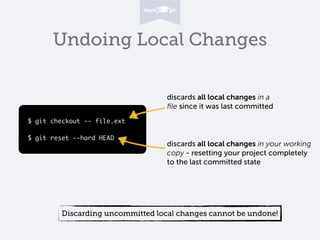
Undoing Local Changes 
$ git checkout -- file.ext 
! 
$ git reset --hard HEAD 
discards all local changes in a 
file since it was last committed 
discards all local changes in your working 
copy - resetting your project completely 
to the last committed state 
Discarding uncommitted local changes cannot be undone!
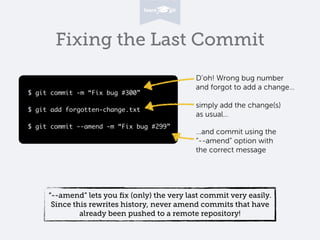
Fixing the Last Commit 
$ git commit -m “Fix bug #300” 
! 
$ git add forgotten-change.txt 
! 
$ git commit --amend -m “Fix bug #299” 
D’oh! Wrong bug number 
and forgot to add a change… 
simply add the change(s) 
as usual… 
…and commit using the 
“--amend” option with 
the correct message 
“--amend” lets you fix (only) the very last commit very easily. 
Since this rewrites history, never amend commits that have 
already been pushed to a remote repository!
Reverting Commits 
C1 
$ git revert 8c1f20a 
C3 C4 
Modifies “index.html” in the “opposite” way: 
(old) <div>About</div> 
(new) <div>About This Project</div> 
C2 
Modified “index.html”: 
(old) <div>About This Project</div> 
(new) <div>About</div> 
Reverting Commit 
“git revert” creates a new commit (C4) that 
reverts the effects of a specified commit (C2).
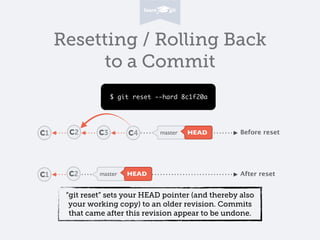
Resetting / Rolling Back 
to a Commit 
C1 C2 C3 C4 master HEAD 
C1 C2 master HEAD 
Before reset 
After reset 
$ git reset --hard 8c1f20a 
“git reset” sets your HEAD pointer (and thereby also 
your working copy) to an older revision. Commits 
that came after this revision appear to be undone.
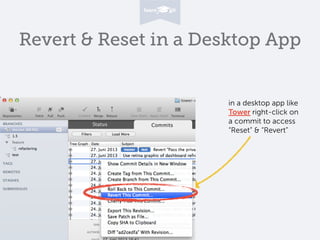
Revert & Reset in a Desktop App 
in a desktop app like 
Tower right-click on 
a commit to access 
“Reset” & “Revert”
Learn Git with our free online book on 
www.git-tower.com/learn

Undoing Things in Git

  • 1.
    Learn Version Controlwith Git Undoing Things in Git
  • 2.
    Undoing Local Changes $ git checkout -- file.ext ! $ git reset --hard HEAD discards all local changes in a file since it was last committed discards all local changes in your working copy - resetting your project completely to the last committed state Discarding uncommitted local changes cannot be undone!
  • 3.
    Fixing the LastCommit $ git commit -m “Fix bug #300” ! $ git add forgotten-change.txt ! $ git commit --amend -m “Fix bug #299” D’oh! Wrong bug number and forgot to add a change… simply add the change(s) as usual… …and commit using the “--amend” option with the correct message “--amend” lets you fix (only) the very last commit very easily. Since this rewrites history, never amend commits that have already been pushed to a remote repository!
  • 4.
    Reverting Commits C1 $ git revert 8c1f20a C3 C4 Modifies “index.html” in the “opposite” way: (old) <div>About</div> (new) <div>About This Project</div> C2 Modified “index.html”: (old) <div>About This Project</div> (new) <div>About</div> Reverting Commit “git revert” creates a new commit (C4) that reverts the effects of a specified commit (C2).
  • 5.
    Resetting / RollingBack to a Commit C1 C2 C3 C4 master HEAD C1 C2 master HEAD Before reset After reset $ git reset --hard 8c1f20a “git reset” sets your HEAD pointer (and thereby also your working copy) to an older revision. Commits that came after this revision appear to be undone.
  • 6.
    Revert & Resetin a Desktop App in a desktop app like Tower right-click on a commit to access “Reset” & “Revert”
  • 7.
    Learn Git withour free online book on www.git-tower.com/learn