
Geographical InformationGeographical Information
System & Remote SensingSystem & Remote Sensing
(GEO 212)(GEO 212)
What we will do?What we will do?
Theoretical background on GIS and RS
Tools and techniques used in GIS/RS
Geospatial analysis using ArcGIS
Introduction to GISIntroduction to GIS
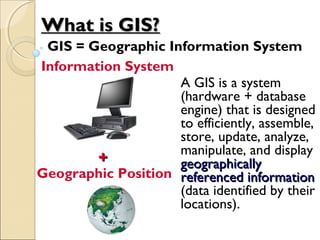
A GIS is a system
(hardware + database
engine) that is designed
to efficiently, assemble,
store, update, analyze,
manipulate, and display
geographicallygeographically
referenced informationreferenced information
(data identified by their
locations).
++
Information System
Geographic Position
What is GIS?What is GIS?
GIS = Geographic Information System
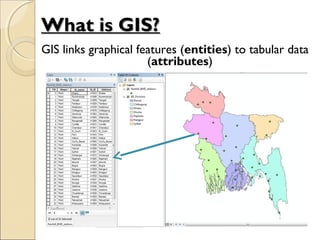
GIS links graphical features (entities) to tabular data
(attributes)
What is GIS?What is GIS?
Data can be:
1. Positioned by its known spatial
coordinates
2. Input and organized (generally in layers)
3. Stored and retrieved
4. Analyzed (usually via a Relational DBMS)
5. Modified and displayed
Key Functions of a GISKey Functions of a GIS
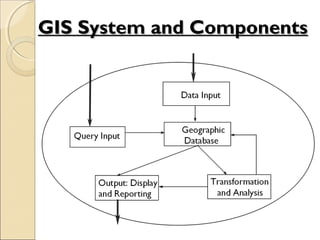
GIS System and ComponentsGIS System and Components
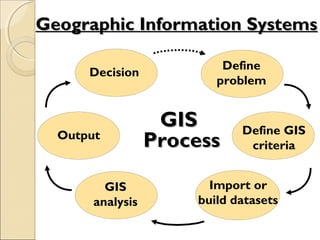
Decision
GISGIS
ProcessProcessOutput
GIS
analysis
Import or
build datasets
Define GIS
criteria
Define
problem
Geographic Information SystemsGeographic Information Systems
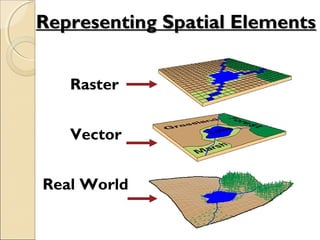
Representing Spatial ElementsRepresenting Spatial Elements
Raster
Vector
Real World
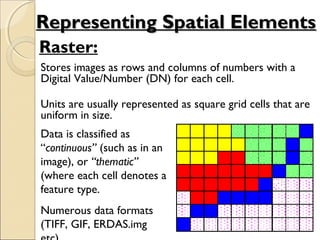
Raster:
Stores images as rows and columns of numbers with a
Digital Value/Number (DN) for each cell.
Units are usually represented as square grid cells that are
uniform in size.
Data is classified as
“continuous” (such as in an
image), or “thematic”
(where each cell denotes a
feature type.
Numerous data formats
(TIFF, GIF, ERDAS.img
Representing Spatial ElementsRepresenting Spatial Elements
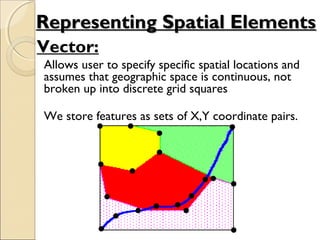
Vector:
Allows user to specify specific spatial locations and
assumes that geographic space is continuous, not
broken up into discrete grid squares
We store features as sets of X,Y coordinate pairs.
Representing Spatial ElementsRepresenting Spatial Elements
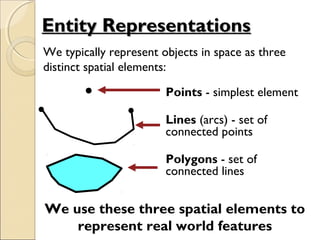
Entity RepresentationsEntity Representations
Points - simplest element
Lines (arcs) - set of
connected points
Polygons - set of
connected lines
We typically represent objects in space as three
distinct spatial elements:
We use these three spatial elements to
represent real world features
AttributesAttributes
• In the raster data model, the cell
value (Digital Number) is the
attribute. Examples: brightness, rainfall
value, landcover code, SST, etc.
• For vector data, attribute records are
linked to point, line & polygon features.
Vector data can store multiple attributes
per feature. Vector features are linked
to attributes by a unique feature number.
Raster vs. VectorRaster vs. Vector
Raster Advantages
1. The most common data format Easy to
perform mathematical and overlay operations
2. Satellite information is easily incorporated
3. Better represents “continuous”- type data
Vector Advantages
1. Accurate positional information that is best for
storing discrete thematic features (e.g., roads,
shorelines, sea-bed features.
2. Compact data storage requirements
3. Can associate unlimited numbers of attributes
with specific features
• Data Assembly
• Data Storage
• Spatial Data Analysis
and Manipulation
• Spatial Data Output
GIS FunctionsGIS Functions
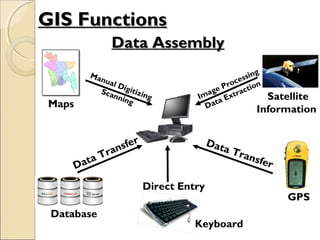
Data AssemblyData Assembly
Maps
Satellite
Information
Data Transfer
Direct Entry
GPS
Manual Digitizing
Scanning
Database
Data Transfer
Keyboard
Image Processing
Data Extraction
GIS FunctionsGIS Functions
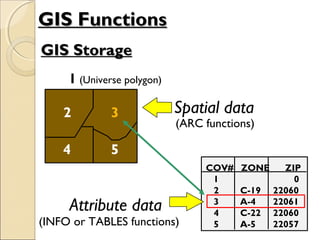
GIS StorageGIS Storage
GIS FunctionsGIS Functions
Spatial data
(ARC functions)
Attribute data
(INFO or TABLES functions)
1 (Universe polygon)
2 3
4 5
3
COV# ZONE ZIP
1 0
2 C-19 22060
3 A-4 22061
4 C-22 22060
5 A-5 22057
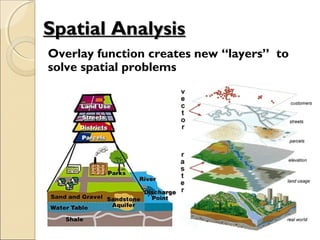
Spatial AnalysisSpatial Analysis
Overlay function creates new “layers” to
solve spatial problems
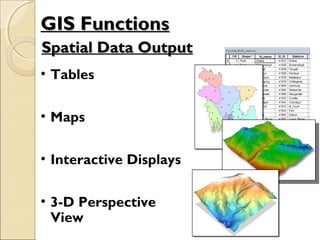
• Tables
• Maps
• Interactive Displays
• 3-D Perspective
View
Spatial Data OutputSpatial Data Output
GIS FunctionsGIS Functions
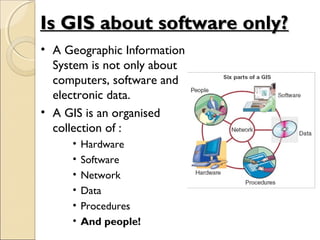
Is GIS about software only?Is GIS about software only?
• A Geographic Information
System is not only about
computers, software and
electronic data.
• A GIS is an organised
collection of :
• Hardware
• Software
• Network
• Data
• Procedures
• And people!
Desktop GISDesktop GIS
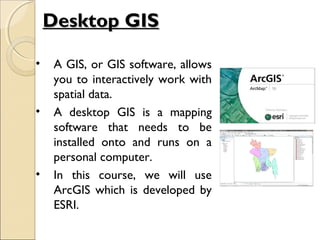
• A GIS, or GIS software, allows
you to interactively work with
spatial data.
• A desktop GIS is a mapping
software that needs to be
installed onto and runs on a
personal computer.
• In this course, we will use
ArcGIS which is developed by
ESRI.
ESRI ArcGIS SystemESRI ArcGIS System
Clients
FilesFiles
(Personal(Personal
Geodatabase,Geodatabase,
Shapefiles, Coverages,Shapefiles, Coverages,
Grids, tins, etc)Grids, tins, etc)
ArcSDE Services
Database storage/access
DatabasesDatabases
Multi-userMulti-user
GeodatabasesGeodatabases
(in Oracle, SQL(in Oracle, SQL
Server,Server,
IBM DBII, etc)IBM DBII, etc)
ArcInfo ArcEditor ArcMap
ArcIMS Services
Map display & query
ArcExplor
er
Browser
ArcPad
ArcEngine/
ArcObjects
Application
Development &
Customization
x: ArcGIS Workstation
Consistent interface
Increasing capability
ArcCatalog
ArcToolbox
ArcCatalog
ArcToolbox
ArcCatalog
ArcToolbox
Source: ESRIHandheld/Wireless
ArcServer Services
Full GIS analysis
Introduction To GIS

Introduction To GIS

  • 1.
    Geographical InformationGeographical Information System& Remote SensingSystem & Remote Sensing (GEO 212)(GEO 212)
  • 2.
    What we willdo?What we will do? Theoretical background on GIS and RS Tools and techniques used in GIS/RS Geospatial analysis using ArcGIS
  • 3.
  • 4.
    A GIS isa system (hardware + database engine) that is designed to efficiently, assemble, store, update, analyze, manipulate, and display geographicallygeographically referenced informationreferenced information (data identified by their locations). ++ Information System Geographic Position What is GIS?What is GIS? GIS = Geographic Information System
  • 5.
    GIS links graphicalfeatures (entities) to tabular data (attributes) What is GIS?What is GIS?
  • 6.
    Data can be: 1.Positioned by its known spatial coordinates 2. Input and organized (generally in layers) 3. Stored and retrieved 4. Analyzed (usually via a Relational DBMS) 5. Modified and displayed Key Functions of a GISKey Functions of a GIS
  • 7.
    GIS System andComponentsGIS System and Components
  • 8.
    Decision GISGIS ProcessProcessOutput GIS analysis Import or build datasets DefineGIS criteria Define problem Geographic Information SystemsGeographic Information Systems
  • 9.
    Representing Spatial ElementsRepresentingSpatial Elements Raster Vector Real World
  • 10.
    Raster: Stores images asrows and columns of numbers with a Digital Value/Number (DN) for each cell. Units are usually represented as square grid cells that are uniform in size. Data is classified as “continuous” (such as in an image), or “thematic” (where each cell denotes a feature type. Numerous data formats (TIFF, GIF, ERDAS.img Representing Spatial ElementsRepresenting Spatial Elements
  • 11.
    Vector: Allows user tospecify specific spatial locations and assumes that geographic space is continuous, not broken up into discrete grid squares We store features as sets of X,Y coordinate pairs. Representing Spatial ElementsRepresenting Spatial Elements
  • 12.
    Entity RepresentationsEntity Representations Points- simplest element Lines (arcs) - set of connected points Polygons - set of connected lines We typically represent objects in space as three distinct spatial elements: We use these three spatial elements to represent real world features
  • 13.
    AttributesAttributes • In theraster data model, the cell value (Digital Number) is the attribute. Examples: brightness, rainfall value, landcover code, SST, etc. • For vector data, attribute records are linked to point, line & polygon features. Vector data can store multiple attributes per feature. Vector features are linked to attributes by a unique feature number.
  • 14.
    Raster vs. VectorRastervs. Vector Raster Advantages 1. The most common data format Easy to perform mathematical and overlay operations 2. Satellite information is easily incorporated 3. Better represents “continuous”- type data Vector Advantages 1. Accurate positional information that is best for storing discrete thematic features (e.g., roads, shorelines, sea-bed features. 2. Compact data storage requirements 3. Can associate unlimited numbers of attributes with specific features
  • 15.
    • Data Assembly •Data Storage • Spatial Data Analysis and Manipulation • Spatial Data Output GIS FunctionsGIS Functions
  • 16.
    Data AssemblyData Assembly Maps Satellite Information DataTransfer Direct Entry GPS Manual Digitizing Scanning Database Data Transfer Keyboard Image Processing Data Extraction GIS FunctionsGIS Functions
  • 17.
    GIS StorageGIS Storage GISFunctionsGIS Functions Spatial data (ARC functions) Attribute data (INFO or TABLES functions) 1 (Universe polygon) 2 3 4 5 3 COV# ZONE ZIP 1 0 2 C-19 22060 3 A-4 22061 4 C-22 22060 5 A-5 22057
  • 18.
    Spatial AnalysisSpatial Analysis Overlayfunction creates new “layers” to solve spatial problems
  • 19.
    • Tables • Maps •Interactive Displays • 3-D Perspective View Spatial Data OutputSpatial Data Output GIS FunctionsGIS Functions
  • 20.
    Is GIS aboutsoftware only?Is GIS about software only? • A Geographic Information System is not only about computers, software and electronic data. • A GIS is an organised collection of : • Hardware • Software • Network • Data • Procedures • And people!
  • 21.
    Desktop GISDesktop GIS •A GIS, or GIS software, allows you to interactively work with spatial data. • A desktop GIS is a mapping software that needs to be installed onto and runs on a personal computer. • In this course, we will use ArcGIS which is developed by ESRI.
  • 22.
    ESRI ArcGIS SystemESRIArcGIS System Clients FilesFiles (Personal(Personal Geodatabase,Geodatabase, Shapefiles, Coverages,Shapefiles, Coverages, Grids, tins, etc)Grids, tins, etc) ArcSDE Services Database storage/access DatabasesDatabases Multi-userMulti-user GeodatabasesGeodatabases (in Oracle, SQL(in Oracle, SQL Server,Server, IBM DBII, etc)IBM DBII, etc) ArcInfo ArcEditor ArcMap ArcIMS Services Map display & query ArcExplor er Browser ArcPad ArcEngine/ ArcObjects Application Development & Customization x: ArcGIS Workstation Consistent interface Increasing capability ArcCatalog ArcToolbox ArcCatalog ArcToolbox ArcCatalog ArcToolbox Source: ESRIHandheld/Wireless ArcServer Services Full GIS analysis