
Novedades de SharePoint 2010, un paso másRamón EspugaSharePoint Area Manager, Gepesarespuga@gepesa.es
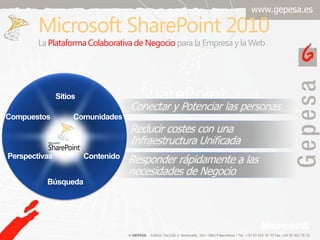
Microsoft SharePoint 2010LaPlataformaColaborativa de Negociopara la Empresa y la WebSitiosConectar y Potenciarlas personasComunidadesCompuestosReducircostes con unaInfraestructuraUnificadaPerspectivasContenidoResponder rápidamente a lasnecesidades de NegocioBúsqueda
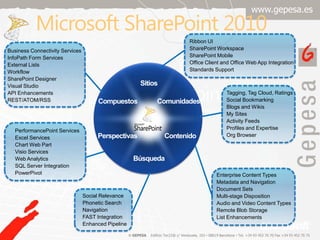
Microsoft SharePoint 2010Ribbon UISharePoint WorkspaceSharePoint MobileOffice Client and Office Web App IntegrationStandards SupportBusiness Connectivity ServicesInfoPath Form ServicesExternal ListsWorkflowSharePoint DesignerVisual StudioAPI EnhancementsREST/ATOM/RSSSitiosTagging, Tag Cloud, RatingsSocial BookmarkingBlogs and WikisMy SitesActivity FeedsProfiles and ExpertiseOrg BrowserComunidadesCompuestosPerformancePoint ServicesExcel ServicesChart Web PartVisio ServicesWeb AnalyticsSQL Server IntegrationPowerPivotContenidoPerspectivasEnterprise Content TypesMetadata and NavigationDocument SetsMulti-stage DispositionAudio and Video Content TypesRemote Blob StorageList EnhancementsBúsquedaSocial RelevancePhonetic SearchNavigationFAST IntegrationEnhanced Pipeline
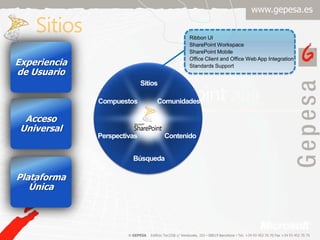
SitiosRibbon UISharePoint WorkspaceSharePoint MobileOffice Client and Office Web App IntegrationStandards SupportExperiencia de UsuarioSitiosAcceso UniversalComunidadesCompuestosContenidoPerspectivasPlataformaÚnicaBúsqueda
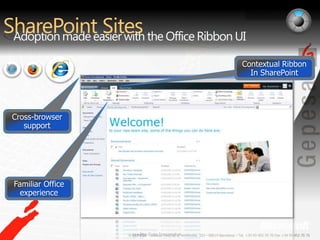
SharePoint SitesAdoption made easier with the Office Ribbon UI Contextual Ribbon In SharePointCross-browser supportFamiliar Office experiencePre-Beta Screenshot.
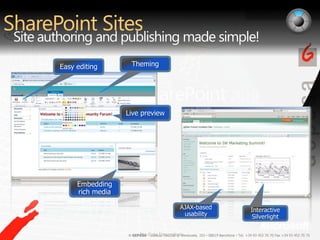
SharePoint SitesSite authoring and publishing made simple!Interactive SilverlightLive previewEmbedding rich mediaThemingAJAX-based usabilityEasy editingPre-Beta Screenshots.
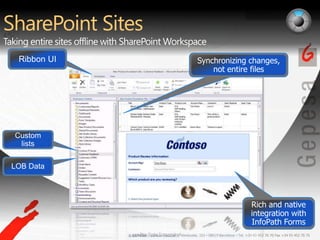
SharePoint SitesTaking entire sites offline with SharePoint WorkspaceCustom listsLOB DataSynchronizing changes, not entire filesRich and native integration with InfoPath FormsRibbon UIPre-Beta Screenshot.
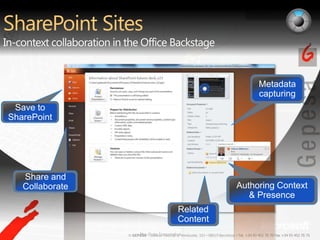
SharePoint SitesIn-context collaboration in the Office BackstageShare and CollaborateSave to SharePointRelated ContentAuthoring Context & PresenceMetadata capturingPre-Beta Screenshot.
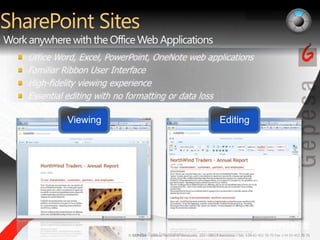
SharePoint SitesWork anywhere with the Office Web ApplicationsOffice Word, Excel, PowerPoint, OneNote web applications Familiar Ribbon User InterfaceHigh-fidelity viewing experienceEssential editing with no formatting or data lossEditingViewingPre-Beta Screenshots.
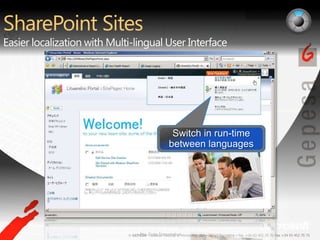
SharePoint SitesEasier localization with Multi-lingual User InterfaceSwitch in run-time between languagesPre-Beta Screenshot.
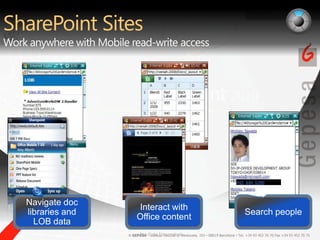
SharePoint SitesWork anywhere with Mobile read-write accessSearch peopleInteract with Office contentNavigate doc libraries and LOB data042 440 5280Pre-Beta Screenshots.
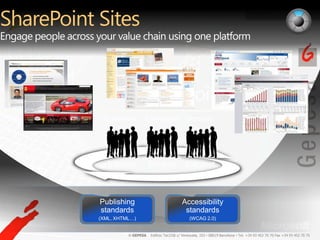
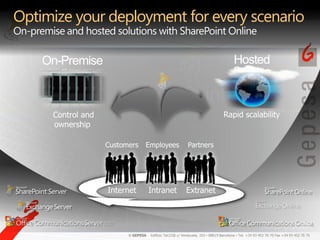
SharePoint Sites Engage people across your value chain using one platformPublishing standards(XML, XHTML…)Accessibility standards(WCAG 2.0) Customers Partners Employees Internet Extranet Intranet
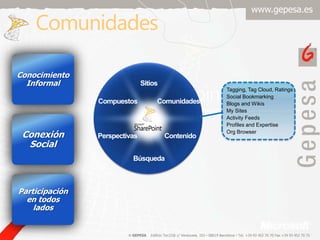
ComunidadesConocimientoInformalTagging, Tag Cloud, RatingsSocial BookmarkingBlogs and WikisMy SitesActivity FeedsProfiles and ExpertiseOrg BrowserSitiosComunidadesCompuestosConexión SocialContenidoPerspectivasParticipación en todosladosBúsqueda
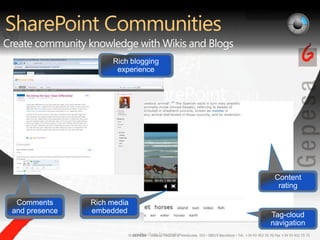
SharePoint CommunitiesCreate community knowledge with Wikis and BlogsRich blogging experienceTag-cloud navigationContent ratingRich media embeddedComments and presencePre-Beta Screenshot.
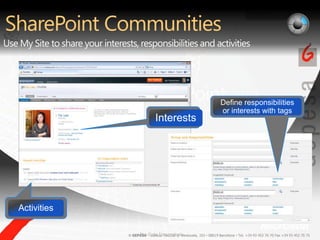
SharePoint CommunitiesUse My Site to share your interests, responsibilities and activitiesInterestsDefine responsibilities or interests with tagsActivitiesPre-Beta Screenshots.
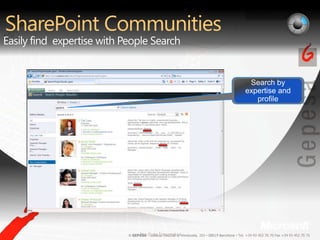
SharePoint CommunitiesEasily find  expertise with People SearchSearch by expertise and profileSearch by expertise and profilePre-Beta Screenshot.
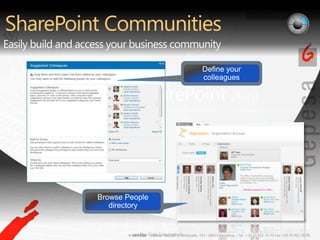
SharePoint CommunitiesEasily build and access your business communityBrowse People directoryDefine your colleaguesPre-Beta Screenshots.
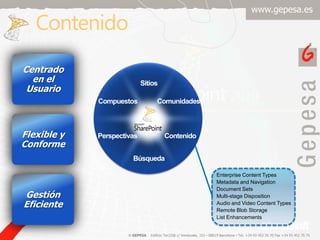
ContenidoCentrado en el UsuarioSitiosComunidadesCompuestosFlexible y ConformeContenidoPerspectivasEnterprise Content TypesMetadata and NavigationDocument SetsMulti-stage DispositionAudio and Video Content TypesRemote Blob StorageList EnhancementsGestiónEficienteBúsqueda
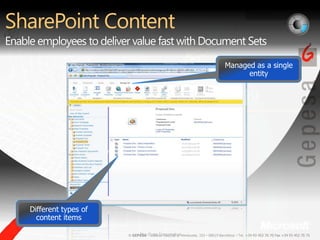
SharePoint ContentEnable employees to deliver value fast with Document SetsManaged as a single entityDifferent types of content itemsPre-Beta Screenshot.
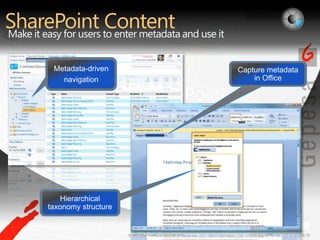
SharePoint ContentMake it easy for users to enter metadata and use itHierarchical taxonomy structureMetadata-drivennavigationCapture metadata in OfficePre-Beta Screenshots.
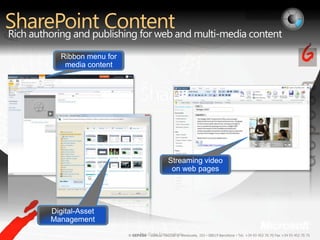
SharePoint ContentRich authoring and publishing for web and multi-media contentMicrosoft Confidential, Prototype OnlyStreaming video on web pagesRibbon menu for media contentDigital-Asset ManagementPre-Beta Screenshots.
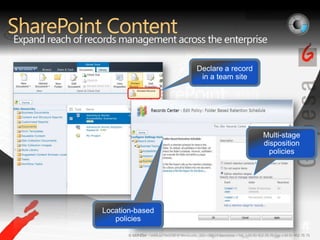
SharePoint ContentExpand reach of records management across the enterpriseDeclare a record in a team siteLocation-based policiesMulti-stage disposition policiesPre-Beta Screenshots.
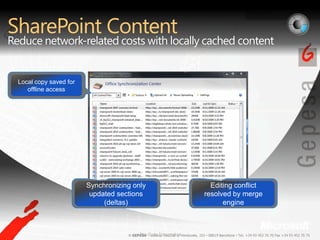
SharePoint ContentReduce network-related costs with locally cached contentEditing conflict resolved by merge engineSynchronizing only updated sections (deltas)Local copy saved for offline accessPre-Beta Screenshot.
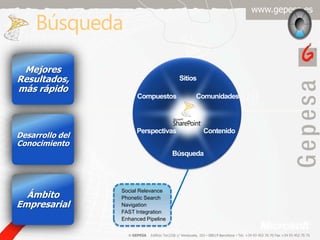
BúsquedaMejoresResultados, másrápidoSitiosComunidadesCompuestosDesarrollo del ConocimientoContenidoPerspectivasÁmbitoEmpresarialBúsquedaSocial RelevancePhonetic SearchNavigationFAST IntegrationEnhanced Pipeline
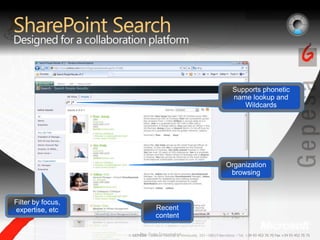
SharePointSearchDesigned for a collaboration platformSupports phonetic name lookup and WildcardsOrganization browsingFilter by focus, expertise, etcRecentcontentPre-Beta Screenshot.
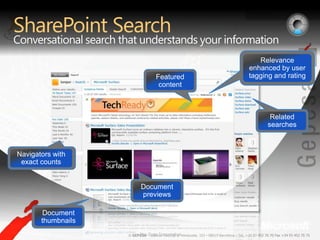
SharePoint SearchConversational search that understands your informationFeatured contentRelated searchesNavigators with exact countsDocument previewsDocument thumbnailsRelevance enhanced by user tagging and ratingPre-Beta Screenshot.
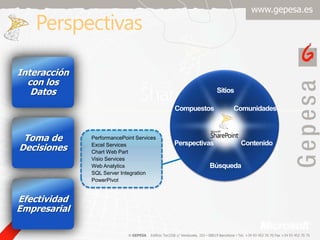
PerspectivasInteracción con los DatosSitiosComunidadesCompuestosToma de DecisionesPerformancePoint ServicesExcel ServicesChart Web PartVisio ServicesWeb AnalyticsSQL Server IntegrationPowerPivotContenidoPerspectivasBúsquedaEfectividadEmpresarial
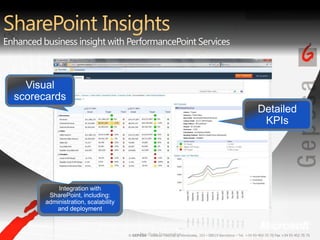
SharePoint InsightsEnhanced business insight with PerformancePoint ServicesIntegration with SharePoint, including: administration, scalability and deploymentVisual scorecardsDetailed KPIsPre-Beta Screenshot.
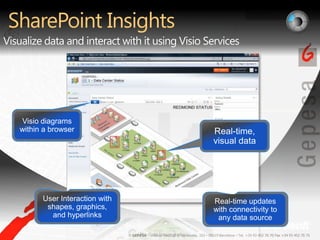
SharePoint InsightsVisualize data and interact with it using Visio ServicesReal-time updates with connectivity to any data sourceUser Interaction with shapes, graphics, and hyperlinksReal-time, visual dataVisio diagrams within a browserPre-Beta Screenshot.
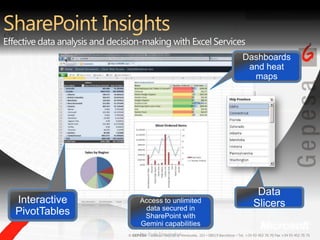
SharePoint InsightsEffective data analysis and decision-making with Excel ServicesAccess to unlimited data secured in SharePoint with Gemini capabilitiesData SlicersInteractive PivotTablesDashboards and heat mapsPre-Beta Screenshot.
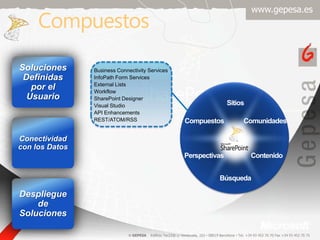
CompuestosSolucionesDefinidaspor el UsuarioBusiness Connectivity ServicesInfoPath Form ServicesExternal ListsWorkflowSharePoint DesignerVisual StudioAPI EnhancementsREST/ATOM/RSSSitiosComunidadesCompuestosConectividad con los DatosContenidoPerspectivasBúsquedaDespliegue de Soluciones
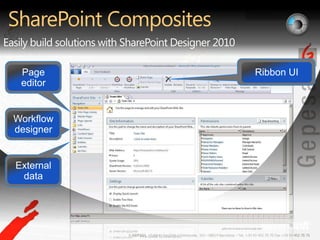
SharePoint CompositesEasily build solutions with SharePoint Designer 2010Workflow designerExternal data Page editorRibbon UIPre-Beta Screenshot.
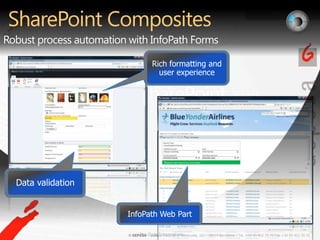
SharePoint CompositesRobust process automation with InfoPath FormsRich formatting and user experience Data validationInfoPath Web PartPre-Beta Screenshots.
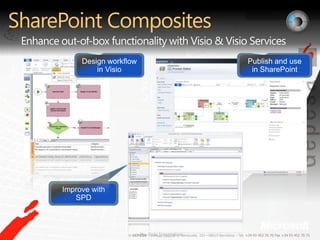
SharePoint CompositesEnhance out-of-box functionality with Visio & Visio ServicesPublish and use in SharePointDesign workflow in VisioImprove with SPDPre-Beta Screenshots.
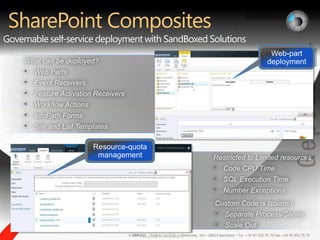
SharePoint CompositesGovernable self-service deployment with SandBoxed SolutionsWhat can be deployed?Web Parts
Event Receivers
Feature Activation Receivers
Workflow Actions
InfoPath Forms

Novedades SharePoint 2010

  • 1.
    Novedades de SharePoint2010, un paso másRamón EspugaSharePoint Area Manager, Gepesarespuga@gepesa.es
  • 2.
    Microsoft SharePoint 2010LaPlataformaColaborativade Negociopara la Empresa y la WebSitiosConectar y Potenciarlas personasComunidadesCompuestosReducircostes con unaInfraestructuraUnificadaPerspectivasContenidoResponder rápidamente a lasnecesidades de NegocioBúsqueda
  • 3.
    Microsoft SharePoint 2010RibbonUISharePoint WorkspaceSharePoint MobileOffice Client and Office Web App IntegrationStandards SupportBusiness Connectivity ServicesInfoPath Form ServicesExternal ListsWorkflowSharePoint DesignerVisual StudioAPI EnhancementsREST/ATOM/RSSSitiosTagging, Tag Cloud, RatingsSocial BookmarkingBlogs and WikisMy SitesActivity FeedsProfiles and ExpertiseOrg BrowserComunidadesCompuestosPerformancePoint ServicesExcel ServicesChart Web PartVisio ServicesWeb AnalyticsSQL Server IntegrationPowerPivotContenidoPerspectivasEnterprise Content TypesMetadata and NavigationDocument SetsMulti-stage DispositionAudio and Video Content TypesRemote Blob StorageList EnhancementsBúsquedaSocial RelevancePhonetic SearchNavigationFAST IntegrationEnhanced Pipeline
  • 4.
    SitiosRibbon UISharePoint WorkspaceSharePointMobileOffice Client and Office Web App IntegrationStandards SupportExperiencia de UsuarioSitiosAcceso UniversalComunidadesCompuestosContenidoPerspectivasPlataformaÚnicaBúsqueda
  • 5.
    SharePoint SitesAdoption madeeasier with the Office Ribbon UI Contextual Ribbon In SharePointCross-browser supportFamiliar Office experiencePre-Beta Screenshot.
  • 6.
    SharePoint SitesSite authoringand publishing made simple!Interactive SilverlightLive previewEmbedding rich mediaThemingAJAX-based usabilityEasy editingPre-Beta Screenshots.
  • 7.
    SharePoint SitesTaking entiresites offline with SharePoint WorkspaceCustom listsLOB DataSynchronizing changes, not entire filesRich and native integration with InfoPath FormsRibbon UIPre-Beta Screenshot.
  • 8.
    SharePoint SitesIn-context collaborationin the Office BackstageShare and CollaborateSave to SharePointRelated ContentAuthoring Context & PresenceMetadata capturingPre-Beta Screenshot.
  • 9.
    SharePoint SitesWork anywherewith the Office Web ApplicationsOffice Word, Excel, PowerPoint, OneNote web applications Familiar Ribbon User InterfaceHigh-fidelity viewing experienceEssential editing with no formatting or data lossEditingViewingPre-Beta Screenshots.
  • 10.
    SharePoint SitesEasier localizationwith Multi-lingual User InterfaceSwitch in run-time between languagesPre-Beta Screenshot.
  • 11.
    SharePoint SitesWork anywherewith Mobile read-write accessSearch peopleInteract with Office contentNavigate doc libraries and LOB data042 440 5280Pre-Beta Screenshots.
  • 12.
    SharePoint Sites Engagepeople across your value chain using one platformPublishing standards(XML, XHTML…)Accessibility standards(WCAG 2.0) Customers Partners Employees Internet Extranet Intranet
  • 13.
    ComunidadesConocimientoInformalTagging, Tag Cloud,RatingsSocial BookmarkingBlogs and WikisMy SitesActivity FeedsProfiles and ExpertiseOrg BrowserSitiosComunidadesCompuestosConexión SocialContenidoPerspectivasParticipación en todosladosBúsqueda
  • 14.
    SharePoint CommunitiesCreate communityknowledge with Wikis and BlogsRich blogging experienceTag-cloud navigationContent ratingRich media embeddedComments and presencePre-Beta Screenshot.
  • 15.
    SharePoint CommunitiesUse MySite to share your interests, responsibilities and activitiesInterestsDefine responsibilities or interests with tagsActivitiesPre-Beta Screenshots.
  • 16.
    SharePoint CommunitiesEasily find expertise with People SearchSearch by expertise and profileSearch by expertise and profilePre-Beta Screenshot.
  • 17.
    SharePoint CommunitiesEasily buildand access your business communityBrowse People directoryDefine your colleaguesPre-Beta Screenshots.
  • 18.
    ContenidoCentrado en elUsuarioSitiosComunidadesCompuestosFlexible y ConformeContenidoPerspectivasEnterprise Content TypesMetadata and NavigationDocument SetsMulti-stage DispositionAudio and Video Content TypesRemote Blob StorageList EnhancementsGestiónEficienteBúsqueda
  • 19.
    SharePoint ContentEnable employeesto deliver value fast with Document SetsManaged as a single entityDifferent types of content itemsPre-Beta Screenshot.
  • 20.
    SharePoint ContentMake iteasy for users to enter metadata and use itHierarchical taxonomy structureMetadata-drivennavigationCapture metadata in OfficePre-Beta Screenshots.
  • 21.
    SharePoint ContentRich authoringand publishing for web and multi-media contentMicrosoft Confidential, Prototype OnlyStreaming video on web pagesRibbon menu for media contentDigital-Asset ManagementPre-Beta Screenshots.
  • 22.
    SharePoint ContentExpand reachof records management across the enterpriseDeclare a record in a team siteLocation-based policiesMulti-stage disposition policiesPre-Beta Screenshots.
  • 23.
    SharePoint ContentReduce network-relatedcosts with locally cached contentEditing conflict resolved by merge engineSynchronizing only updated sections (deltas)Local copy saved for offline accessPre-Beta Screenshot.
  • 24.
    BúsquedaMejoresResultados, másrápidoSitiosComunidadesCompuestosDesarrollo delConocimientoContenidoPerspectivasÁmbitoEmpresarialBúsquedaSocial RelevancePhonetic SearchNavigationFAST IntegrationEnhanced Pipeline
  • 25.
    SharePointSearchDesigned for acollaboration platformSupports phonetic name lookup and WildcardsOrganization browsingFilter by focus, expertise, etcRecentcontentPre-Beta Screenshot.
  • 26.
    SharePoint SearchConversational searchthat understands your informationFeatured contentRelated searchesNavigators with exact countsDocument previewsDocument thumbnailsRelevance enhanced by user tagging and ratingPre-Beta Screenshot.
  • 27.
    PerspectivasInteracción con losDatosSitiosComunidadesCompuestosToma de DecisionesPerformancePoint ServicesExcel ServicesChart Web PartVisio ServicesWeb AnalyticsSQL Server IntegrationPowerPivotContenidoPerspectivasBúsquedaEfectividadEmpresarial
  • 28.
    SharePoint InsightsEnhanced businessinsight with PerformancePoint ServicesIntegration with SharePoint, including: administration, scalability and deploymentVisual scorecardsDetailed KPIsPre-Beta Screenshot.
  • 29.
    SharePoint InsightsVisualize dataand interact with it using Visio ServicesReal-time updates with connectivity to any data sourceUser Interaction with shapes, graphics, and hyperlinksReal-time, visual dataVisio diagrams within a browserPre-Beta Screenshot.
  • 30.
    SharePoint InsightsEffective dataanalysis and decision-making with Excel ServicesAccess to unlimited data secured in SharePoint with Gemini capabilitiesData SlicersInteractive PivotTablesDashboards and heat mapsPre-Beta Screenshot.
  • 31.
    CompuestosSolucionesDefinidaspor el UsuarioBusinessConnectivity ServicesInfoPath Form ServicesExternal ListsWorkflowSharePoint DesignerVisual StudioAPI EnhancementsREST/ATOM/RSSSitiosComunidadesCompuestosConectividad con los DatosContenidoPerspectivasBúsquedaDespliegue de Soluciones
  • 32.
    SharePoint CompositesEasily buildsolutions with SharePoint Designer 2010Workflow designerExternal data Page editorRibbon UIPre-Beta Screenshot.
  • 33.
    SharePoint CompositesRobust processautomation with InfoPath FormsRich formatting and user experience Data validationInfoPath Web PartPre-Beta Screenshots.
  • 34.
    SharePoint CompositesEnhance out-of-boxfunctionality with Visio & Visio ServicesPublish and use in SharePointDesign workflow in VisioImprove with SPDPre-Beta Screenshots.
  • 35.
    SharePoint CompositesGovernable self-servicedeployment with SandBoxed SolutionsWhat can be deployed?Web Parts
  • 36.
  • 37.
  • 38.
  • 39.