DELIVERING VALUE FROM BIG DATA 1
CLOUD COMPUTING FOR
ENVIRONMENTAL ANALYTICS
2
An Introduction to Cloud
Prof David Wallom,
Associate Director - Innovation (Oxford e-Research Centre)
Thanks to NIST Clouds Introduction, Paul Watson (Newcastle)
A Working Definition of Cloud Computing
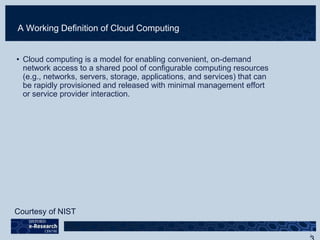
• Cloud computing is a model for enabling convenient, on-demand
network access to a shared pool of configurable computing resources
(e.g., networks, servers, storage, applications, and services) that can
be rapidly provisioned and released with minimal management effort
or service provider interaction.
Courtesy of NIST
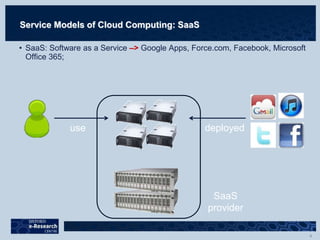
Service Models of Cloud Computing: SaaS
• SaaS: Software as a Service –> Google Apps, Force.com, Facebook, Microsoft
Office 365;
deployeduse
SaaS
provider
5
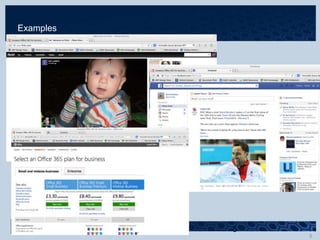
Examples
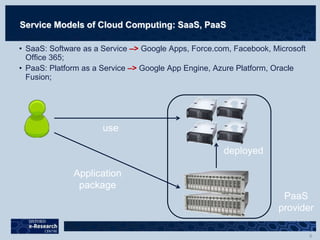
Service Models of Cloud Computing: SaaS, PaaS
• SaaS: Software as a Service –> Google Apps, Force.com, Facebook, Microsoft
Office 365;
• PaaS: Platform as a Service –> Google App Engine, Azure Platform, Oracle
Fusion;
use
Application
package
deployed
PaaS
provider
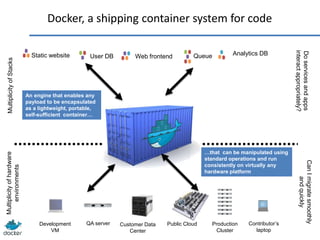
Static website Web frontendUser DB Queue Analytics DB
Development
VM
QA server Public Cloud Contributor’s
laptop
Docker, a shipping container system for code
MultiplicityofStacksMultiplicityofhardware
environments
Production
Cluster
Customer Data
Center
Doservicesandapps
interactappropriately?
CanImigratesmoothly
andquickly
…that can be manipulated using
standard operations and run
consistently on virtually any
hardware platform
An engine that enables any
payload to be encapsulated
as a lightweight, portable,
self-sufficient container…
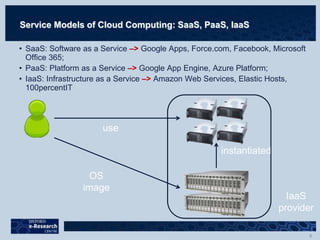
Service Models of Cloud Computing: SaaS, PaaS, IaaS
• SaaS: Software as a Service –> Google Apps, Force.com, Facebook, Microsoft
Office 365;
• PaaS: Platform as a Service –> Google App Engine, Azure Platform;
• IaaS: Infrastructure as a Service –> Amazon Web Services, Elastic Hosts,
100percentIT
use
OS
image
instantiated
IaaS
provider
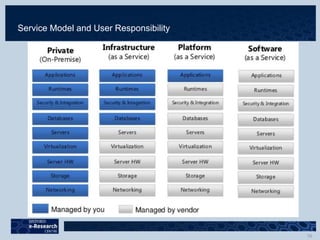
Service Model and User Responsibility
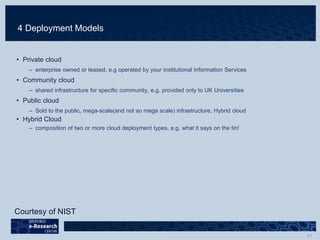
4 Deployment Models
• Private cloud
– enterprise owned or leased, e.g operated by your institutional Information Services
• Community cloud
– shared infrastructure for specific community, e.g. provided only to UK Universities
• Public cloud
– Sold to the public, mega-scale(and not so mega scale) infrastructure, Hybrid cloud
• Hybrid Cloud
– composition of two or more cloud deployment types, e.g. what it says on the tin!
Courtesy of NIST
5 Essential Cloud Characteristics
• On-demand self-service
• High performance network access
• Resource pooling Location independence
• Rapid elasticity/service scalability
• Measured service/usage is accounted for
Courtesy of NIST
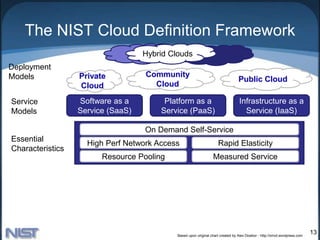
The NIST Cloud Definition Framework
13
Community
Cloud
Private
Cloud
Public Cloud
Hybrid Clouds
Deployment
Models
Service
Models
Essential
Characteristics
Common
Characteristics
Software as a
Service (SaaS)
Platform as a
Service (PaaS)
Infrastructure as a
Service (IaaS)
Resource Pooling
High Perf Network Access Rapid Elasticity
Measured Service
On Demand Self-Service
Low Cost Software
Virtualization Service Orientation
Advanced Security
Homogeneity
Massive Scale Resilient Computing
Geographic Distribution
Based upon original chart created by Alex Dowbor - http://ornot.wordpress.com
Using Software as a Service
Intro to SaaS
• Software as a service (SaaS) is a model of internet based
software delivery where the software company provides
maintenance, daily technical operation, and support for the
software provided to their client.
• Similar/same software delivered to all classes of users with
possible skinning to provide differentiation
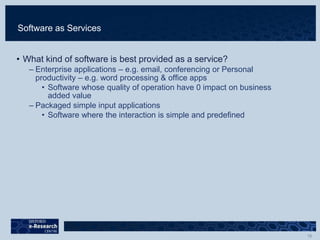
Software as Services
• What kind of software is best provided as a service?
– Enterprise applications – e.g. email, conferencing or Personal
productivity – e.g. word processing & office apps
• Software whose quality of operation have 0 impact on business
added value
– Packaged simple input applications
• Software where the interaction is simple and predefined
Building a SaaS application
• There are three key differentiators that separate a well-
designed SaaS application from a poorly designed one
– scalable
– multi-tenant-efficient
– configurable
Platform as a Service
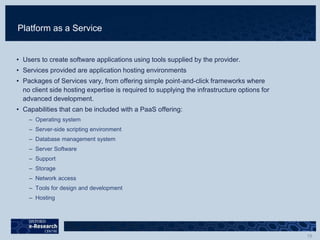
• Users to create software applications using tools supplied by the provider.
• Services provided are application hosting environments
• Packages of Services vary, from offering simple point-and-click frameworks where
no client side hosting expertise is required to supplying the infrastructure options for
advanced development.
• Capabilities that can be included with a PaaS offering:
– Operating system
– Server-side scripting environment
– Database management system
– Server Software
– Support
– Storage
– Network access
– Tools for design and development
– Hosting
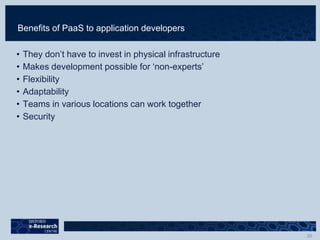
Benefits of PaaS to application developers
• They don’t have to invest in physical infrastructure
• Makes development possible for ‘non-experts’
• Flexibility
• Adaptability
• Teams in various locations can work together
• Security
Infrastructure as a Service
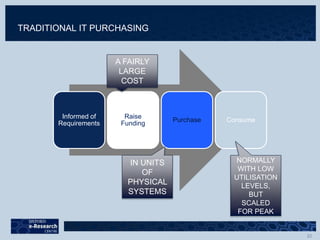
Informed of
Requirements
Raise
Funding
Purchase Consume
A FAIRLY
LARGE
COST
IN UNITS
OF
PHYSICAL
SYSTEMS
NORMALLY
WITH LOW
UTILISATION
LEVELS,
BUT
SCALED
FOR PEAK
TRADITIONAL IT PURCHASING
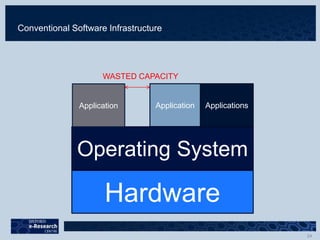
Conventional Software Infrastructure
Hardware
Operating System
Application Application Applications
WASTED CAPACITY
• e.g. Amazon
25
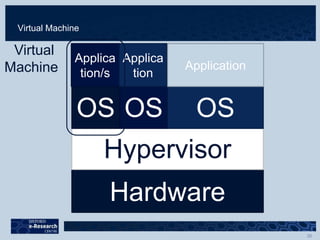
Virtual Machine
Hardware
Hypervisor
OS OS OS
Applica
tion/s
Applica
tion
Application
Virtual
Machine
What’s New about cloud generally?
• On Demand
– illusion of infinite computing resources
– no up-front commitment by users
– Pay for use of resources on a short-term basis as needed
(from “Above the Clouds: A Berkeley View of Cloud Computing”)
The Promise of Clouds
• Agility
• CapEx  OpEx
• Scalability
• The hidden underbelly;
– failure debugging
– currently vendor lock-in
– Network connectivity/bandwidth
– Every IaaS cloud user(developer) must be a systems administrator
Choosing a Cloud Infrastructure
Centralisation Vs Federation
• Centralisation: one large, dedicated datacentre that
serves the demand
• Federation: heterogeneous set of infrastructures
coordinated in order to satisfy demand
Criteria for evaluation
• Funding
• Scalability
• Flexibility
• Maintenance
• Support
• Accountability
• Obsolescence
• Competitiveness
• Security
Introduction to Cloud Computing

Introduction to Cloud Computing

  • 1.
    DELIVERING VALUE FROMBIG DATA 1 CLOUD COMPUTING FOR ENVIRONMENTAL ANALYTICS
  • 2.
    2 An Introduction toCloud Prof David Wallom, Associate Director - Innovation (Oxford e-Research Centre) Thanks to NIST Clouds Introduction, Paul Watson (Newcastle)
  • 3.
    A Working Definitionof Cloud Computing • Cloud computing is a model for enabling convenient, on-demand network access to a shared pool of configurable computing resources (e.g., networks, servers, storage, applications, and services) that can be rapidly provisioned and released with minimal management effort or service provider interaction. Courtesy of NIST
  • 4.
    Service Models ofCloud Computing: SaaS • SaaS: Software as a Service –> Google Apps, Force.com, Facebook, Microsoft Office 365; deployeduse SaaS provider
  • 5.
  • 6.
    Service Models ofCloud Computing: SaaS, PaaS • SaaS: Software as a Service –> Google Apps, Force.com, Facebook, Microsoft Office 365; • PaaS: Platform as a Service –> Google App Engine, Azure Platform, Oracle Fusion; use Application package deployed PaaS provider
  • 7.
    Static website WebfrontendUser DB Queue Analytics DB Development VM QA server Public Cloud Contributor’s laptop Docker, a shipping container system for code MultiplicityofStacksMultiplicityofhardware environments Production Cluster Customer Data Center Doservicesandapps interactappropriately? CanImigratesmoothly andquickly …that can be manipulated using standard operations and run consistently on virtually any hardware platform An engine that enables any payload to be encapsulated as a lightweight, portable, self-sufficient container…
  • 8.
    Service Models ofCloud Computing: SaaS, PaaS, IaaS • SaaS: Software as a Service –> Google Apps, Force.com, Facebook, Microsoft Office 365; • PaaS: Platform as a Service –> Google App Engine, Azure Platform; • IaaS: Infrastructure as a Service –> Amazon Web Services, Elastic Hosts, 100percentIT use OS image instantiated IaaS provider
  • 10.
    Service Model andUser Responsibility
  • 11.
    4 Deployment Models •Private cloud – enterprise owned or leased, e.g operated by your institutional Information Services • Community cloud – shared infrastructure for specific community, e.g. provided only to UK Universities • Public cloud – Sold to the public, mega-scale(and not so mega scale) infrastructure, Hybrid cloud • Hybrid Cloud – composition of two or more cloud deployment types, e.g. what it says on the tin! Courtesy of NIST
  • 12.
    5 Essential CloudCharacteristics • On-demand self-service • High performance network access • Resource pooling Location independence • Rapid elasticity/service scalability • Measured service/usage is accounted for Courtesy of NIST
  • 13.
    The NIST CloudDefinition Framework 13 Community Cloud Private Cloud Public Cloud Hybrid Clouds Deployment Models Service Models Essential Characteristics Common Characteristics Software as a Service (SaaS) Platform as a Service (PaaS) Infrastructure as a Service (IaaS) Resource Pooling High Perf Network Access Rapid Elasticity Measured Service On Demand Self-Service Low Cost Software Virtualization Service Orientation Advanced Security Homogeneity Massive Scale Resilient Computing Geographic Distribution Based upon original chart created by Alex Dowbor - http://ornot.wordpress.com
  • 14.
  • 15.
    Intro to SaaS •Software as a service (SaaS) is a model of internet based software delivery where the software company provides maintenance, daily technical operation, and support for the software provided to their client. • Similar/same software delivered to all classes of users with possible skinning to provide differentiation
  • 16.
    Software as Services •What kind of software is best provided as a service? – Enterprise applications – e.g. email, conferencing or Personal productivity – e.g. word processing & office apps • Software whose quality of operation have 0 impact on business added value – Packaged simple input applications • Software where the interaction is simple and predefined
  • 17.
    Building a SaaSapplication • There are three key differentiators that separate a well- designed SaaS application from a poorly designed one – scalable – multi-tenant-efficient – configurable
  • 18.
  • 19.
    Platform as aService • Users to create software applications using tools supplied by the provider. • Services provided are application hosting environments • Packages of Services vary, from offering simple point-and-click frameworks where no client side hosting expertise is required to supplying the infrastructure options for advanced development. • Capabilities that can be included with a PaaS offering: – Operating system – Server-side scripting environment – Database management system – Server Software – Support – Storage – Network access – Tools for design and development – Hosting
  • 20.
    Benefits of PaaSto application developers • They don’t have to invest in physical infrastructure • Makes development possible for ‘non-experts’ • Flexibility • Adaptability • Teams in various locations can work together • Security
  • 21.
  • 22.
    Informed of Requirements Raise Funding Purchase Consume AFAIRLY LARGE COST IN UNITS OF PHYSICAL SYSTEMS NORMALLY WITH LOW UTILISATION LEVELS, BUT SCALED FOR PEAK TRADITIONAL IT PURCHASING
  • 24.
    Conventional Software Infrastructure Hardware OperatingSystem Application Application Applications WASTED CAPACITY
  • 25.
  • 26.
    Virtual Machine Hardware Hypervisor OS OSOS Applica tion/s Applica tion Application Virtual Machine
  • 28.
    What’s New aboutcloud generally? • On Demand – illusion of infinite computing resources – no up-front commitment by users – Pay for use of resources on a short-term basis as needed (from “Above the Clouds: A Berkeley View of Cloud Computing”)
  • 29.
    The Promise ofClouds • Agility • CapEx  OpEx • Scalability • The hidden underbelly; – failure debugging – currently vendor lock-in – Network connectivity/bandwidth – Every IaaS cloud user(developer) must be a systems administrator
  • 30.
    Choosing a CloudInfrastructure Centralisation Vs Federation • Centralisation: one large, dedicated datacentre that serves the demand • Federation: heterogeneous set of infrastructures coordinated in order to satisfy demand Criteria for evaluation • Funding • Scalability • Flexibility • Maintenance • Support • Accountability • Obsolescence • Competitiveness • Security