

1
Dong Ho Son
POSTECH, Pohang, Korea
donghoson@postech.ac.kr
Introduction to Arduino
2
Table of
Contents
• What is Arduino?
• Many Flavors of Arduino
• Arduino Add-ons
• Arduino Projects
• References
3
What is Arduino?
4
What is Arduino? (1/5)
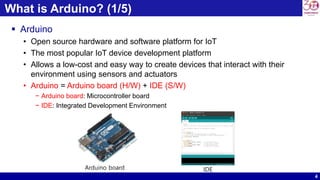
 Arduino
• Open source hardware and software platform for IoT
• The most popular IoT device development platform
• Allows a low-cost and easy way to create devices that interact with their
environment using sensors and actuators
• Arduino = Arduino board (H/W) + IDE (S/W)
− Arduino board: Microcontroller board
− IDE: Integrated Development Environment
Arduino board IDE
5
What is Arduino? (2/5)
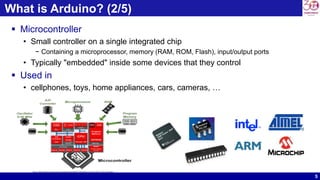
 Microcontroller
• Small controller on a single integrated chip
− Containing a microprocessor, memory (RAM, ROM, Flash), input/output ports
• Typically "embedded" inside some devices that they control
 Used in
• cellphones, toys, home appliances, cars, cameras, …
Source: learn.mikroe.com/ebooks/piccprogramming/chapter/introduction-to-the-world-of-microcontrollers
6
What is Arduino? (3/5)
 Arduino programming language
• based on Wiring, used to develop Arduino programs
 IDE (Integrated Development Environment)
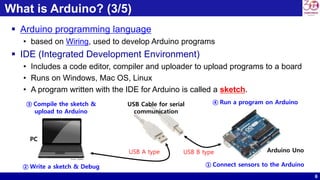
• Includes a code editor, compiler and uploader to upload programs to a board
• Runs on Windows, Mac OS, Linux
• A program written with the IDE for Arduino is called a sketch.
① Connect sensors to the Arduino② Write a sketch & Debug
③ Compile the sketch &
upload to Arduino
④ Run a program on ArduinoUSB Cable for serial
communication
PC
Arduino UnoUSB A type USB B type
Source : pixabay
7
What is Arduino? (4/5)
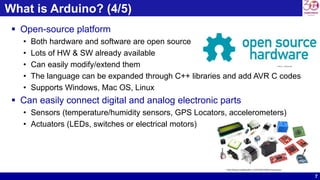
 Open-source platform
• Both hardware and software are open source
• Lots of HW & SW already available
• Can easily modify/extend them
• The language can be expanded through C++ libraries and add AVR C codes
• Supports Windows, Mac OS, Linux
 Can easily connect digital and analog electronic parts
• Sensors (temperature/humidity sensors, GPS Locators, accelerometers)
• Actuators (LEDs, switches or electrical motors)
Source : oshwa.org
http://blog.codebender.cc/2014/02/28/introduction/
8
What is Arduino? (5/5)
 Why use Arduino?
• Easy to use platform
• Ease of programming
• Simple USB interface
• Simple IDE
• Many documents, tutorials, Youtube videos available
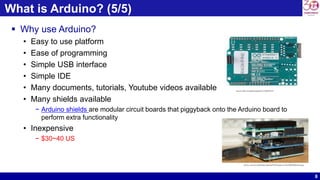
• Many shields available
− Arduino shields are modular circuit boards that piggyback onto the Arduino board to
perform extra functionality
• Inexpensive
− $30~40 US
Source: flickr.com/photos/sparkfun/17683501218
Source: commons.wikimedia.org/wiki/File:Horloge_sur_l%E2%80%99Arduino.jpg
9
Many Flavors of Arduino
10
Many Flavors of Arduino (1/5)
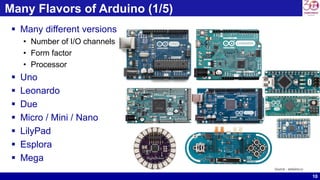
 Many different versions
• Number of I/O channels
• Form factor
• Processor
 Uno
 Leonardo
 Due
 Micro / Mini / Nano
 LilyPad
 Esplora
 Mega
Source : arduino.cc
11
Many Flavors of Arduino (2/5)
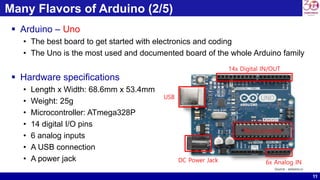
 Arduino – Uno
• The best board to get started with electronics and coding
• The Uno is the most used and documented board of the whole Arduino family
 Hardware specifications
• Length x Width: 68.6mm x 53.4mm
• Weight: 25g
• Microcontroller: ATmega328P
• 14 digital I/O pins
• 6 analog inputs
• A USB connection
• A power jack
14x Digital IN/OUT
Microcontoller
6x Analog INDC Power Jack
USB
Source : arduino.cc
12
Many Flavors of Arduino (3/5)
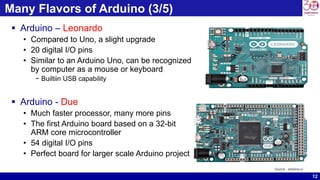
 Arduino – Leonardo
• Compared to Uno, a slight upgrade
• 20 digital I/O pins
• Similar to an Arduino Uno, can be recognized
by computer as a mouse or keyboard
− Builtiin USB capability
 Arduino - Due
• Much faster processor, many more pins
• The first Arduino board based on a 32-bit
ARM core microcontroller
• 54 digital I/O pins
• Perfect board for larger scale Arduino project
Source : arduino.cc
13
Many Flavors of Arduino (4/5)
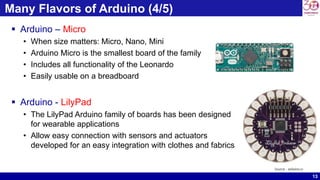
 Arduino – Micro
• When size matters: Micro, Nano, Mini
• Arduino Micro is the smallest board of the family
• Includes all functionality of the Leonardo
• Easily usable on a breadboard
 Arduino - LilyPad
• The LilyPad Arduino family of boards has been designed
for wearable applications
• Allow easy connection with sensors and actuators
developed for an easy integration with clothes and fabrics
Source : arduino.cc
14
Many Flavors of Arduino (5/5)
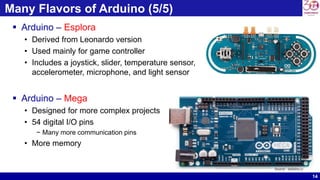
 Arduino – Esplora
• Derived from Leonardo version
• Used mainly for game controller
• Includes a joystick, slider, temperature sensor,
accelerometer, microphone, and light sensor
 Arduino – Mega
• Designed for more complex projects
• 54 digital I/O pins
− Many more communication pins
• More memory
Source : arduino.cc
15
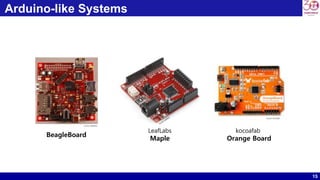
Arduino-like Systems
kocoafab
Orange Board
LeafLabs
Maple
BeagleBoard
Source: wikipedia
Source: Kocoafab
16
Arduino Add-ons
17
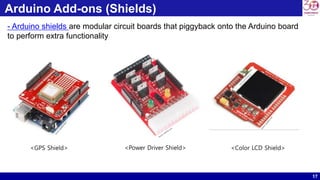
Arduino Add-ons (Shields)
<Color LCD Shield><Power Driver Shield><GPS Shield>
- Arduino shields are modular circuit boards that piggyback onto the Arduino board
to perform extra functionality
18
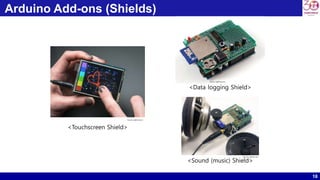
Arduino Add-ons (Shields)
<Touchscreen Shield>
<Data logging Shield>
<Sound (music) Shield>
Source: adafruit.com
19
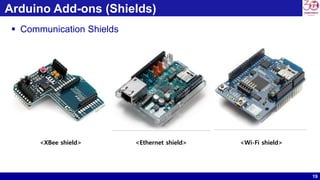
Arduino Add-ons (Shields)
 Communication Shields
<XBee shield> <Ethernet shield> <Wi-Fi shield>
20
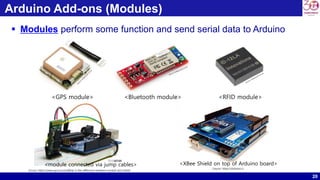
Arduino Add-ons (Modules)
 Modules perform some function and send serial data to Arduino
<GPS module> <Bluetooth module> <RFID module>
Source: https://www.quora.com/What-is-the-difference-between-module-and-shield
<module connected via jump cables>
Source: https://Arduino.cc
<XBee Shield on top of Arduino board>
21
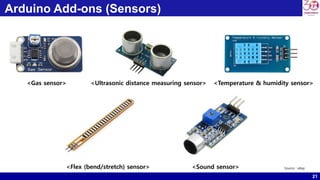
Arduino Add-ons (Sensors)
<Flex (bend/stretch) sensor>
<Gas sensor> <Temperature & humidity sensor><Ultrasonic distance measuring sensor>
<Sound sensor> Source : ebay
22
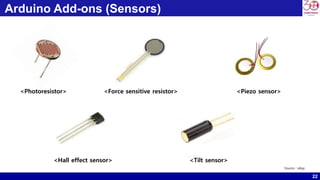
Arduino Add-ons (Sensors)
<Photoresistor> <Force sensitive resistor>
<Hall effect sensor>
<Piezo sensor>
<Tilt sensor>
Source : ebay
23
Arduino Add-ons (Actuators)
 Actuator
• Cause some physical action to be taken
− Turn on a switch, lighting, heating, motor action, display of information, etc.
 Types of Actuators
• Light
− LEDs, Fluorescent lamps, LCD displays, lasers
• Sound
− Buzzers, Beepers, Speakers, MP3/Audio players, synthesizers
• Motion
− DC Motors, Stepper Motors, Servo-motors, solenoids, "muscle-wire", electromagnets
• Power Control
− Control of other electrically operated devices
24
Arduino Projects
25
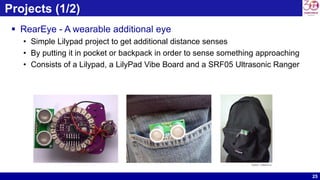
Projects (1/2)
 RearEye - A wearable additional eye
• Simple Lilypad project to get additional distance senses
• By putting it in pocket or backpack in order to sense something approaching
• Consists of a Lilypad, a LilyPad Vibe Board and a SRF05 Ultrasonic Ranger
Source : arduino.cc
26
Projects (2/2)
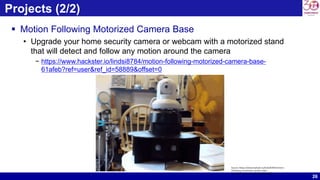
 Motion Following Motorized Camera Base
• Upgrade your home security camera or webcam with a motorized stand
that will detect and follow any motion around the camera
− https://www.hackster.io/lindsi8784/motion-following-motorized-camera-base-
61afeb?ref=user&ref_id=58889&offset=0
Source https://www.hackster.io/lindsi8784/motion-
following-motorized-camera-base-
61afeb?ref=user&ref_id=58889&offset=0
27
Other Interesting Projects
 LED Matrix from processing
• http://www.youtube.com/watch?v=kkJDWrM-K4U
 Arduino Flash Control
• http://www.youtube.com/watch?v=7T1jmj4KClA
 Google Earthwalk
• http://www.youtube.com/watch?v=zoNwJ931aqI
 Ultrasonic grass
• http://www.youtube.com/watch?v=bZIKbuZaJSQ
 Piezo pong
• http://www.youtube.com/watch?v=nXLDyBFsqdg
 Accelerometer and Flash
• http://www.youtube.com/watch?v=49WBPIIo3EE
 Lots of interesting projects you can find in
• http://playground.arduino.cc/projects/arduinoUsers
28
References
29
References
 http://arduino.cc/
• Official homepage – hardware, software, forums, Arduino language, tutorials, etc.
 https://www.youtube.com/watch?time_continue=23&v=UoBUXOOdLXY
• TED Talk - How Arduino is open-souring imagination
 http://ladyada.net/learn/arduino/
• Great Arduino tutorials
 http://todbot.com/blog/category/arduino/
• Various movies, hacks, tutorials on Arduino
 http://freeduino.org/
• Index of Arduino knowledge
 http://adafruit.com/
• Arduino starter kits, Boarduino Arduino clone, lots of cool kits
 http://sparkfun.com/
• Sells Arduino boards and lots of neat sensors & stuff

Introduction to Arduino

  • 1.
    1 Dong Ho Son POSTECH,Pohang, Korea donghoson@postech.ac.kr Introduction to Arduino
  • 2.
    2 Table of Contents • Whatis Arduino? • Many Flavors of Arduino • Arduino Add-ons • Arduino Projects • References
  • 3.
  • 4.
    4 What is Arduino?(1/5)  Arduino • Open source hardware and software platform for IoT • The most popular IoT device development platform • Allows a low-cost and easy way to create devices that interact with their environment using sensors and actuators • Arduino = Arduino board (H/W) + IDE (S/W) − Arduino board: Microcontroller board − IDE: Integrated Development Environment Arduino board IDE
  • 5.
    5 What is Arduino?(2/5)  Microcontroller • Small controller on a single integrated chip − Containing a microprocessor, memory (RAM, ROM, Flash), input/output ports • Typically "embedded" inside some devices that they control  Used in • cellphones, toys, home appliances, cars, cameras, … Source: learn.mikroe.com/ebooks/piccprogramming/chapter/introduction-to-the-world-of-microcontrollers
  • 6.
    6 What is Arduino?(3/5)  Arduino programming language • based on Wiring, used to develop Arduino programs  IDE (Integrated Development Environment) • Includes a code editor, compiler and uploader to upload programs to a board • Runs on Windows, Mac OS, Linux • A program written with the IDE for Arduino is called a sketch. ① Connect sensors to the Arduino② Write a sketch & Debug ③ Compile the sketch & upload to Arduino ④ Run a program on ArduinoUSB Cable for serial communication PC Arduino UnoUSB A type USB B type Source : pixabay
  • 7.
    7 What is Arduino?(4/5)  Open-source platform • Both hardware and software are open source • Lots of HW & SW already available • Can easily modify/extend them • The language can be expanded through C++ libraries and add AVR C codes • Supports Windows, Mac OS, Linux  Can easily connect digital and analog electronic parts • Sensors (temperature/humidity sensors, GPS Locators, accelerometers) • Actuators (LEDs, switches or electrical motors) Source : oshwa.org http://blog.codebender.cc/2014/02/28/introduction/
  • 8.
    8 What is Arduino?(5/5)  Why use Arduino? • Easy to use platform • Ease of programming • Simple USB interface • Simple IDE • Many documents, tutorials, Youtube videos available • Many shields available − Arduino shields are modular circuit boards that piggyback onto the Arduino board to perform extra functionality • Inexpensive − $30~40 US Source: flickr.com/photos/sparkfun/17683501218 Source: commons.wikimedia.org/wiki/File:Horloge_sur_l%E2%80%99Arduino.jpg
  • 9.
  • 10.
    10 Many Flavors ofArduino (1/5)  Many different versions • Number of I/O channels • Form factor • Processor  Uno  Leonardo  Due  Micro / Mini / Nano  LilyPad  Esplora  Mega Source : arduino.cc
  • 11.
    11 Many Flavors ofArduino (2/5)  Arduino – Uno • The best board to get started with electronics and coding • The Uno is the most used and documented board of the whole Arduino family  Hardware specifications • Length x Width: 68.6mm x 53.4mm • Weight: 25g • Microcontroller: ATmega328P • 14 digital I/O pins • 6 analog inputs • A USB connection • A power jack 14x Digital IN/OUT Microcontoller 6x Analog INDC Power Jack USB Source : arduino.cc
  • 12.
    12 Many Flavors ofArduino (3/5)  Arduino – Leonardo • Compared to Uno, a slight upgrade • 20 digital I/O pins • Similar to an Arduino Uno, can be recognized by computer as a mouse or keyboard − Builtiin USB capability  Arduino - Due • Much faster processor, many more pins • The first Arduino board based on a 32-bit ARM core microcontroller • 54 digital I/O pins • Perfect board for larger scale Arduino project Source : arduino.cc
  • 13.
    13 Many Flavors ofArduino (4/5)  Arduino – Micro • When size matters: Micro, Nano, Mini • Arduino Micro is the smallest board of the family • Includes all functionality of the Leonardo • Easily usable on a breadboard  Arduino - LilyPad • The LilyPad Arduino family of boards has been designed for wearable applications • Allow easy connection with sensors and actuators developed for an easy integration with clothes and fabrics Source : arduino.cc
  • 14.
    14 Many Flavors ofArduino (5/5)  Arduino – Esplora • Derived from Leonardo version • Used mainly for game controller • Includes a joystick, slider, temperature sensor, accelerometer, microphone, and light sensor  Arduino – Mega • Designed for more complex projects • 54 digital I/O pins − Many more communication pins • More memory Source : arduino.cc
  • 15.
  • 16.
  • 17.
    17 Arduino Add-ons (Shields) <ColorLCD Shield><Power Driver Shield><GPS Shield> - Arduino shields are modular circuit boards that piggyback onto the Arduino board to perform extra functionality
  • 18.
    18 Arduino Add-ons (Shields) <TouchscreenShield> <Data logging Shield> <Sound (music) Shield> Source: adafruit.com Source: adafruit.com Source: adafruit.com
  • 19.
    19 Arduino Add-ons (Shields) Communication Shields <XBee shield> <Ethernet shield> <Wi-Fi shield>
  • 20.
    20 Arduino Add-ons (Modules) Modules perform some function and send serial data to Arduino <GPS module> <Bluetooth module> <RFID module> Source: https://www.quora.com/What-is-the-difference-between-module-and-shield <module connected via jump cables> Source: https://Arduino.cc <XBee Shield on top of Arduino board>
  • 21.
    21 Arduino Add-ons (Sensors) <Flex(bend/stretch) sensor> <Gas sensor> <Temperature & humidity sensor><Ultrasonic distance measuring sensor> <Sound sensor> Source : ebay
  • 22.
    22 Arduino Add-ons (Sensors) <Photoresistor><Force sensitive resistor> <Hall effect sensor> <Piezo sensor> <Tilt sensor> Source : ebay
  • 23.
    23 Arduino Add-ons (Actuators) Actuator • Cause some physical action to be taken − Turn on a switch, lighting, heating, motor action, display of information, etc.  Types of Actuators • Light − LEDs, Fluorescent lamps, LCD displays, lasers • Sound − Buzzers, Beepers, Speakers, MP3/Audio players, synthesizers • Motion − DC Motors, Stepper Motors, Servo-motors, solenoids, "muscle-wire", electromagnets • Power Control − Control of other electrically operated devices
  • 24.
  • 25.
    25 Projects (1/2)  RearEye- A wearable additional eye • Simple Lilypad project to get additional distance senses • By putting it in pocket or backpack in order to sense something approaching • Consists of a Lilypad, a LilyPad Vibe Board and a SRF05 Ultrasonic Ranger Source : arduino.cc
  • 26.
    26 Projects (2/2)  MotionFollowing Motorized Camera Base • Upgrade your home security camera or webcam with a motorized stand that will detect and follow any motion around the camera − https://www.hackster.io/lindsi8784/motion-following-motorized-camera-base- 61afeb?ref=user&ref_id=58889&offset=0 Source https://www.hackster.io/lindsi8784/motion- following-motorized-camera-base- 61afeb?ref=user&ref_id=58889&offset=0
  • 27.
    27 Other Interesting Projects LED Matrix from processing • http://www.youtube.com/watch?v=kkJDWrM-K4U  Arduino Flash Control • http://www.youtube.com/watch?v=7T1jmj4KClA  Google Earthwalk • http://www.youtube.com/watch?v=zoNwJ931aqI  Ultrasonic grass • http://www.youtube.com/watch?v=bZIKbuZaJSQ  Piezo pong • http://www.youtube.com/watch?v=nXLDyBFsqdg  Accelerometer and Flash • http://www.youtube.com/watch?v=49WBPIIo3EE  Lots of interesting projects you can find in • http://playground.arduino.cc/projects/arduinoUsers
  • 28.
  • 29.
    29 References  http://arduino.cc/ • Officialhomepage – hardware, software, forums, Arduino language, tutorials, etc.  https://www.youtube.com/watch?time_continue=23&v=UoBUXOOdLXY • TED Talk - How Arduino is open-souring imagination  http://ladyada.net/learn/arduino/ • Great Arduino tutorials  http://todbot.com/blog/category/arduino/ • Various movies, hacks, tutorials on Arduino  http://freeduino.org/ • Index of Arduino knowledge  http://adafruit.com/ • Arduino starter kits, Boarduino Arduino clone, lots of cool kits  http://sparkfun.com/ • Sells Arduino boards and lots of neat sensors & stuff