An Introduction to  Program Design CISPROG 1 Hegeman
Introduction A program is a step-by-step series of instructions for a computer Computer programming is the process of writing these instructions Programmers, or developers, design and write programs using a programming language or development tool Java is a programming language that provides the structure for efficient and economical programs
Programming a Computer Companies need developers to build general application software packages Custom applications are built for specific needs Existing programs need maintenance, monitoring, and upgrades  New applications will be needed due to emerging technologies
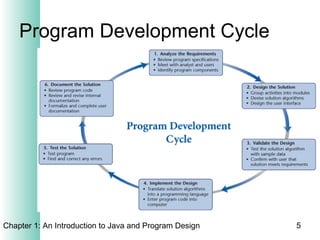
Program Development Cycle
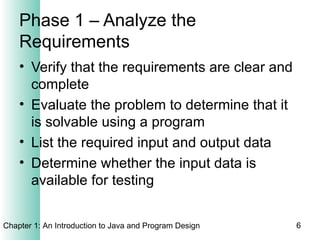
Phase 1 – Analyze the Requirements Verify that the requirements are clear and complete Evaluate the problem to determine that it is solvable using a program List the required input and output data  Determine whether the input data is available for testing
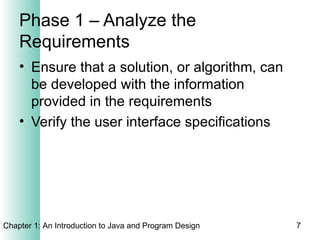
Phase 1 – Analyze the Requirements Ensure that a solution, or algorithm, can be developed with the information provided in the requirements Verify the user interface specifications
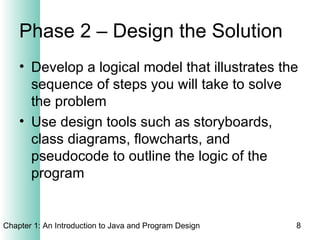
Phase 2 – Design the Solution Develop a logical model that illustrates the sequence of steps you will take to solve the problem Use design tools such as storyboards, class diagrams, flowcharts, and pseudocode to outline the logic of the program
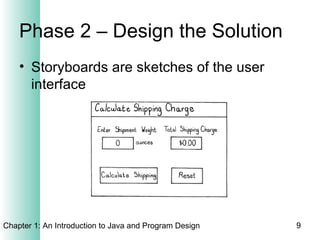
Phase 2 – Design the Solution Storyboards are sketches of the user interface
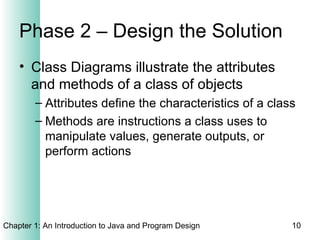
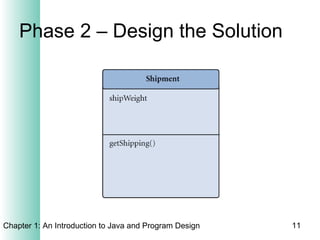
Phase 2 – Design the Solution Class Diagrams illustrate the attributes and methods of a class of objects Attributes define the characteristics of a class Methods are instructions a class uses to manipulate values, generate outputs, or perform actions
Phase 2 – Design the Solution
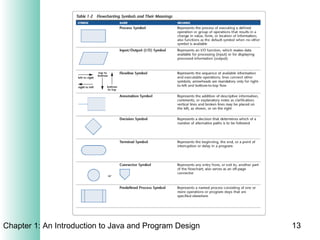
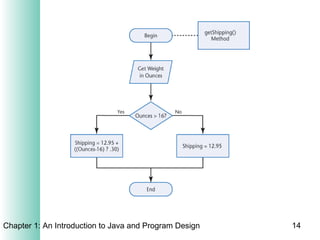
Phase 2 – Design the Solution Flowcharts graphically represent the logic used to develop an algorithm Control structures allow the programmer to specify the code that will execute only if a condition is met Flowcharts use pseudocode, English, or mathematical notation inside symbols to represent the steps of a solution
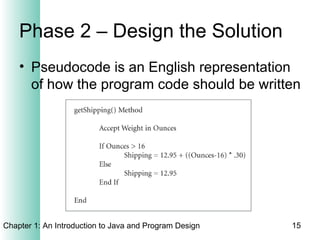
Phase 2 – Design the Solution Pseudocode is an English representation of how the program code should be written
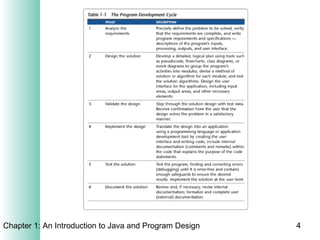
Phase 3 – Validate the Design The programmer steps through the solution with test data The user agrees that the program design solves the problem put forth in the requirements The user verifies that the initial requirements document contains all necessary requirements
Phase 4 – Implement the Design Write the code that translates the design into a program Create the user interface Create comments within the code that explains the purpose of the code Unit testing Test the code as it is written Test related code
Phase 5 – Test the Solution Create a test plan with test cases of sample input data and expected output  Perform integration testing to ensure that  components interact correctly Test boundary values Document any problems If results are unsatisfactory, a new iteration of the development cycle begins
Phase 6 – Document the Solution Requirements documents, program design documents, user interface documents, and documentation of the code Test cases and proof of successful completion of testing Program code should be archived electronically

Intro to prog

  • 1.
    An Introduction to Program Design CISPROG 1 Hegeman
  • 2.
    Introduction A programis a step-by-step series of instructions for a computer Computer programming is the process of writing these instructions Programmers, or developers, design and write programs using a programming language or development tool Java is a programming language that provides the structure for efficient and economical programs
  • 3.
    Programming a ComputerCompanies need developers to build general application software packages Custom applications are built for specific needs Existing programs need maintenance, monitoring, and upgrades New applications will be needed due to emerging technologies
  • 5.
  • 6.
    Phase 1 –Analyze the Requirements Verify that the requirements are clear and complete Evaluate the problem to determine that it is solvable using a program List the required input and output data Determine whether the input data is available for testing
  • 7.
    Phase 1 –Analyze the Requirements Ensure that a solution, or algorithm, can be developed with the information provided in the requirements Verify the user interface specifications
  • 8.
    Phase 2 –Design the Solution Develop a logical model that illustrates the sequence of steps you will take to solve the problem Use design tools such as storyboards, class diagrams, flowcharts, and pseudocode to outline the logic of the program
  • 9.
    Phase 2 –Design the Solution Storyboards are sketches of the user interface
  • 10.
    Phase 2 –Design the Solution Class Diagrams illustrate the attributes and methods of a class of objects Attributes define the characteristics of a class Methods are instructions a class uses to manipulate values, generate outputs, or perform actions
  • 11.
    Phase 2 –Design the Solution
  • 12.
    Phase 2 –Design the Solution Flowcharts graphically represent the logic used to develop an algorithm Control structures allow the programmer to specify the code that will execute only if a condition is met Flowcharts use pseudocode, English, or mathematical notation inside symbols to represent the steps of a solution
  • 15.
    Phase 2 –Design the Solution Pseudocode is an English representation of how the program code should be written
  • 16.
    Phase 3 –Validate the Design The programmer steps through the solution with test data The user agrees that the program design solves the problem put forth in the requirements The user verifies that the initial requirements document contains all necessary requirements
  • 17.
    Phase 4 –Implement the Design Write the code that translates the design into a program Create the user interface Create comments within the code that explains the purpose of the code Unit testing Test the code as it is written Test related code
  • 18.
    Phase 5 –Test the Solution Create a test plan with test cases of sample input data and expected output Perform integration testing to ensure that components interact correctly Test boundary values Document any problems If results are unsatisfactory, a new iteration of the development cycle begins
  • 19.
    Phase 6 –Document the Solution Requirements documents, program design documents, user interface documents, and documentation of the code Test cases and proof of successful completion of testing Program code should be archived electronically