Data Structures  in Alice
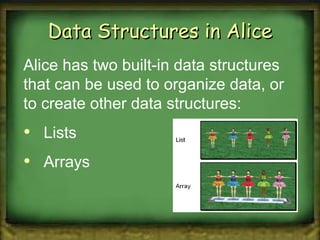
Data Structures in Alice Alice has two built-in data structures that can be used to organize data, or to create other data structures: Lists Arrays
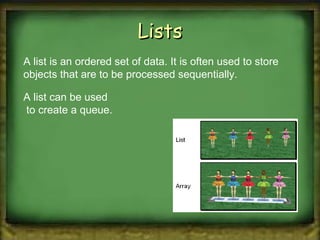
Lists A list is an ordered set of data. It is often used to store objects that are to be processed sequentially.  A list can be used  to create a queue.
Arrays An array is an indexed set of variables, such as  dancer [1] , dancer [2] , dancer [3] ,… It is like a set of boxes that hold things.  A list is a set of items. An array is a set of variables that each  store an item.
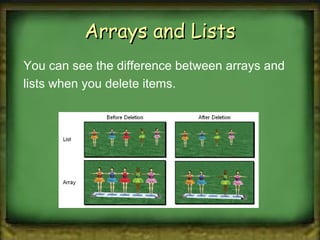
Arrays and Lists You can see the difference between arrays and lists when you delete items.
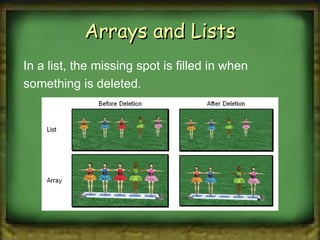
Arrays and Lists In a list, the missing spot is filled in when something is deleted.
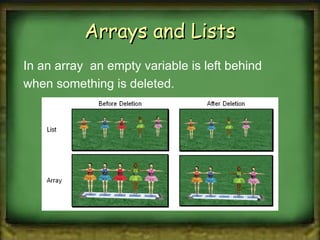
Arrays and Lists In an array  an empty variable is left behind when something is deleted.
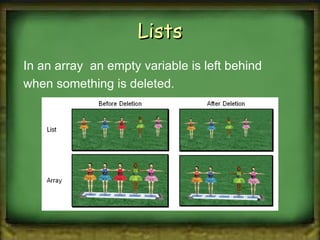
Lists In an array  an empty variable is left behind when something is deleted.
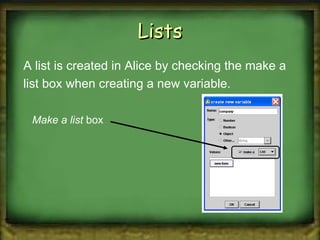
Lists A list is created in Alice by checking the make a list box when creating a new variable. Make a list  box
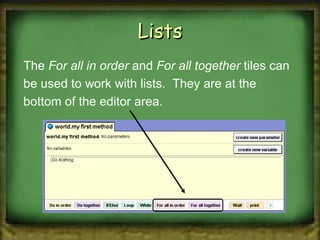
Lists The  For all in order  and  For all together  tiles can be used to work with lists.  They are at the bottom of the editor area.
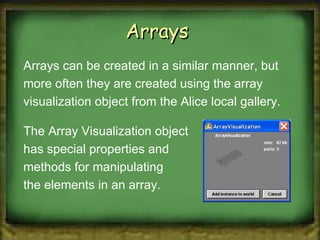
Arrays  Arrays can be created in a similar manner, but more often they are created using the array visualization object from the Alice local gallery. The Array Visualization object  has special properties and  methods for manipulating  the elements in an array.
Arrays  Alice has a set of built-in functions that can be perfomed on

Ch 8 data structures in alice

  • 1.
  • 2.
    Data Structures inAlice Alice has two built-in data structures that can be used to organize data, or to create other data structures: Lists Arrays
  • 3.
    Lists A listis an ordered set of data. It is often used to store objects that are to be processed sequentially. A list can be used to create a queue.
  • 4.
    Arrays An arrayis an indexed set of variables, such as dancer [1] , dancer [2] , dancer [3] ,… It is like a set of boxes that hold things. A list is a set of items. An array is a set of variables that each store an item.
  • 5.
    Arrays and ListsYou can see the difference between arrays and lists when you delete items.
  • 6.
    Arrays and ListsIn a list, the missing spot is filled in when something is deleted.
  • 7.
    Arrays and ListsIn an array an empty variable is left behind when something is deleted.
  • 8.
    Lists In anarray an empty variable is left behind when something is deleted.
  • 9.
    Lists A listis created in Alice by checking the make a list box when creating a new variable. Make a list box
  • 10.
    Lists The For all in order and For all together tiles can be used to work with lists. They are at the bottom of the editor area.
  • 11.
    Arrays Arrayscan be created in a similar manner, but more often they are created using the array visualization object from the Alice local gallery. The Array Visualization object has special properties and methods for manipulating the elements in an array.
  • 12.
    Arrays Alicehas a set of built-in functions that can be perfomed on

Editor's Notes

  • #3 The Redo button will reverse the last use of the Undo button, restoring the previous action. The Ctrl-Y keyboard shortcut also can be used in place of the Redo button.
  • #4 The Redo button will reverse the last use of the Undo button, restoring the previous action. The Ctrl-Y keyboard shortcut also can be used in place of the Redo button.
  • #5 The Redo button will reverse the last use of the Undo button, restoring the previous action. The Ctrl-Y keyboard shortcut also can be used in place of the Redo button.
  • #6 The Redo button will reverse the last use of the Undo button, restoring the previous action. The Ctrl-Y keyboard shortcut also can be used in place of the Redo button.
  • #7 The Redo button will reverse the last use of the Undo button, restoring the previous action. The Ctrl-Y keyboard shortcut also can be used in place of the Redo button.
  • #8 The Redo button will reverse the last use of the Undo button, restoring the previous action. The Ctrl-Y keyboard shortcut also can be used in place of the Redo button.
  • #9 The Redo button will reverse the last use of the Undo button, restoring the previous action. The Ctrl-Y keyboard shortcut also can be used in place of the Redo button.
  • #10 The Redo button will reverse the last use of the Undo button, restoring the previous action. The Ctrl-Y keyboard shortcut also can be used in place of the Redo button.
  • #11 The Redo button will reverse the last use of the Undo button, restoring the previous action. The Ctrl-Y keyboard shortcut also can be used in place of the Redo button.
  • #12 The Redo button will reverse the last use of the Undo button, restoring the previous action. The Ctrl-Y keyboard shortcut also can be used in place of the Redo button.
  • #13 The Redo button will reverse the last use of the Undo button, restoring the previous action. The Ctrl-Y keyboard shortcut also can be used in place of the Redo button.