Information Sharing
                             Self-Learning
                        Social Networking
                           Business Affairs
            Advertisement and Marketing
Nowadays Internet is needed for Everything
In 1998 the Internet had about 50 million users.

In addition, mobile access increased rapidly as mobile
technology spread throughout the world.

Today the Internet has an estimated 542 million
servers and about 1.3 billion users. Of the estimated 3
billion mobile phones in use, about 15 percent are
Internet-enabled, adding 450 million devices to the
Internet.
Focus is Important
Clear Idea about required information really helps.
Right word at right place
Effective use of search engines
Stay away from adds and pop-ups
Social website contacts might help allot
-- or and | Either
“ “ Double Quote
- Not operator
~ to find Similar Terms/Words
   * Wildcard Operator
  define: (define: Life)
Number Range(from .. To) (best books 2002..2007)
  site: ( site: www.notinwords.com internet)
  link: (to find in URLs)
movie: to find particular movie
music: for finding particular music and artist
currency:     currency: [12 meters in yards]
filetype:           filetype:doc
 inurl:              a term only within the URL
intitle:             a term only within the Title
intext               a term only within the Body of form
inanchor:            a term only within the Text used for
                    link Description
cached:             To find old version pages
Web 1.0
Info – Centric Web
 The first generation of the World Wide Web
  (WWW), characterized by separate static websites.

 It is one-way broadcasting.


 It is invented 1989 by Tim Berners- Lee.


 It was widely used between 1998 and 2001, and it is still
  used beside Web 2.0 in almost all web sites.
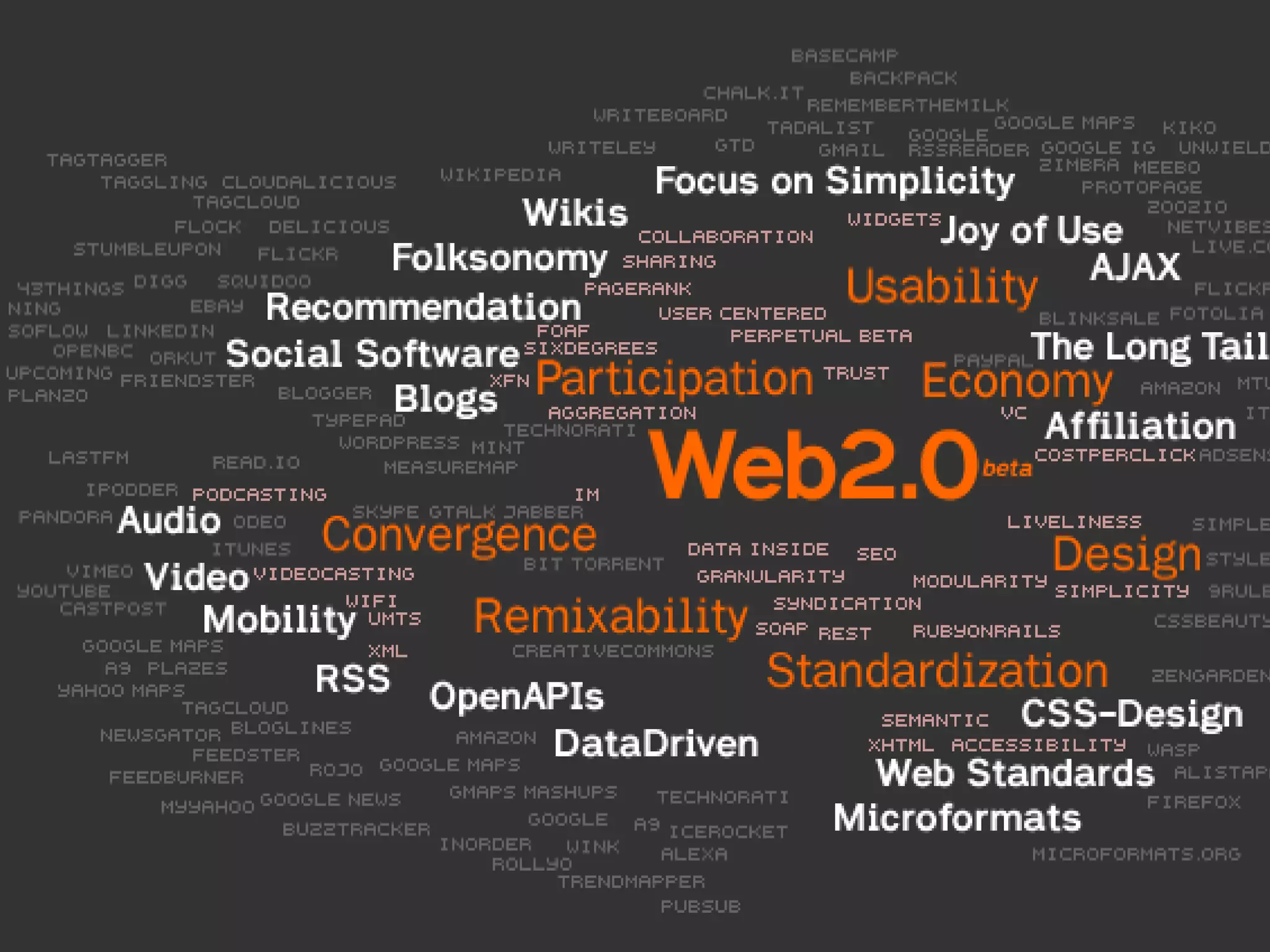
Web 2.0
Web 2.0 is the network as platform,
spanning all connected devices;
Web 2.0 applications are those that make the most of the
intrinsic advantages of that platform:
delivering software as a continually-updated service that gets
better the more people use it,
consuming and remixing data from multiple sources,
including individual users, while providing their own data and
services in a form that allows remixing by others,
creating network effects through an "architecture of
participation," and going beyond the page metaphor of Web 1.0
to deliver rich user experiences.


                        Tim O'Reilly, “Web 2.0: Compact Definition?”
Web 2.0
People Centric Web
 Technologies and Trends
   Social networking sites:    Open Services:
     Facebook, MySpace, Hi5      Google.
      , … etc.                  P2P:
   Tagging or Labeling           Bit Torrent.
    Content:                    New Web technologies:
     Del.icio.us.                XML, RSS, Ajax.
   Wikis:                      Open Source Software
     Wikipedia.
   Community-generated
    content:
     eBay.
Web 3.0
Machine Centric Web
 Different meanings are intended to describe the evolution
  of Web usage and interaction between the many possible
  evolutionary paths.
 The third generation of Web technologies and services that
  emphasize a machine-facilitated understanding of
  information on the Web.
 Semantic Web
       Intelligent System Planning
       Business and Network Applications
       … etc.
 Video Web
 Web 3D
 Augmentation of Life
Semantic Web (Starting Point of Web 3.0)
Intelligent System Planning

 Example:
   The Question: ”I’m looking for a warm place to vacation
  and I have a budget of 3000 Rs. and I have an 11-year-old
  child and I want Chicken for dinner ”

       Today’s System, such query can lead to hours of sifting (through lists
        of flights, hotel, car rentals) and the options are often at odds with
        one another.

       Web 3.0 will call up a complete vacation package that was planned as
        meticulously as if it had been assembled by a human travel agent.
Its fact that surfing the internet for some entertainment do increase
the employee productivity..but time of surfing should be under
control.

Social networking sites keep you in touch with your friend and
family which makes you feel connected while at work.

Some recent examples of internet fun activities affecting Reality

Flash mob.
Blood donation.
Each One Teach One
Celebrity Blogs
Five Minutes, A fame
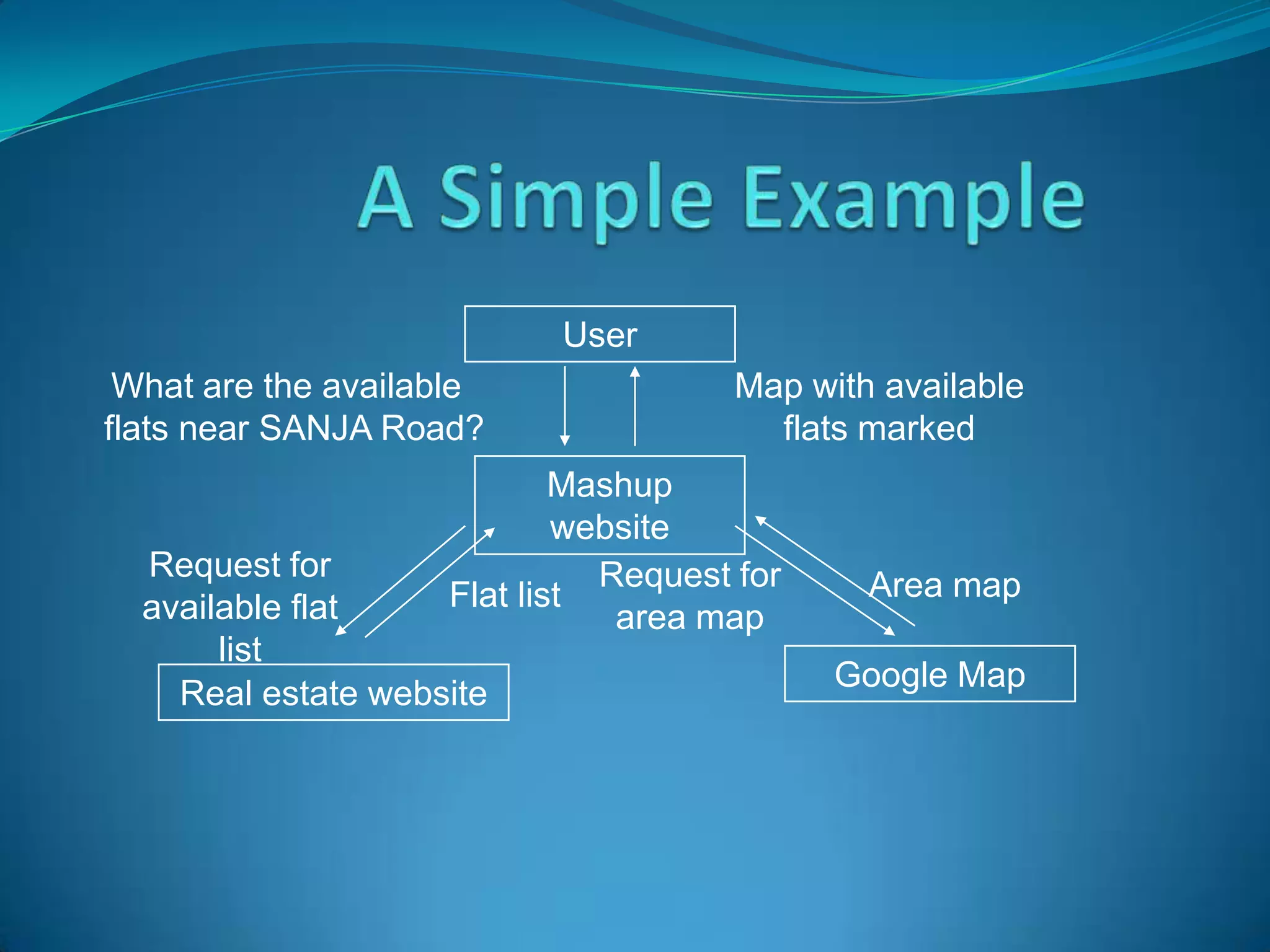
What is a Mashup?
 A Mashup is a web application that combines data from
  more than one source into a single integrated tool.

 Content used in Mashup is typically sourced from a third
  party via a public interface or so called API
User
 What are the available               Map with available
flats near SANJA Road?                  flats marked
                            Mashup
                            website
  Request for                 Request for
                    Flat list                 Area map
  available flat               area map
       list
                                            Google Map
    Real estate website
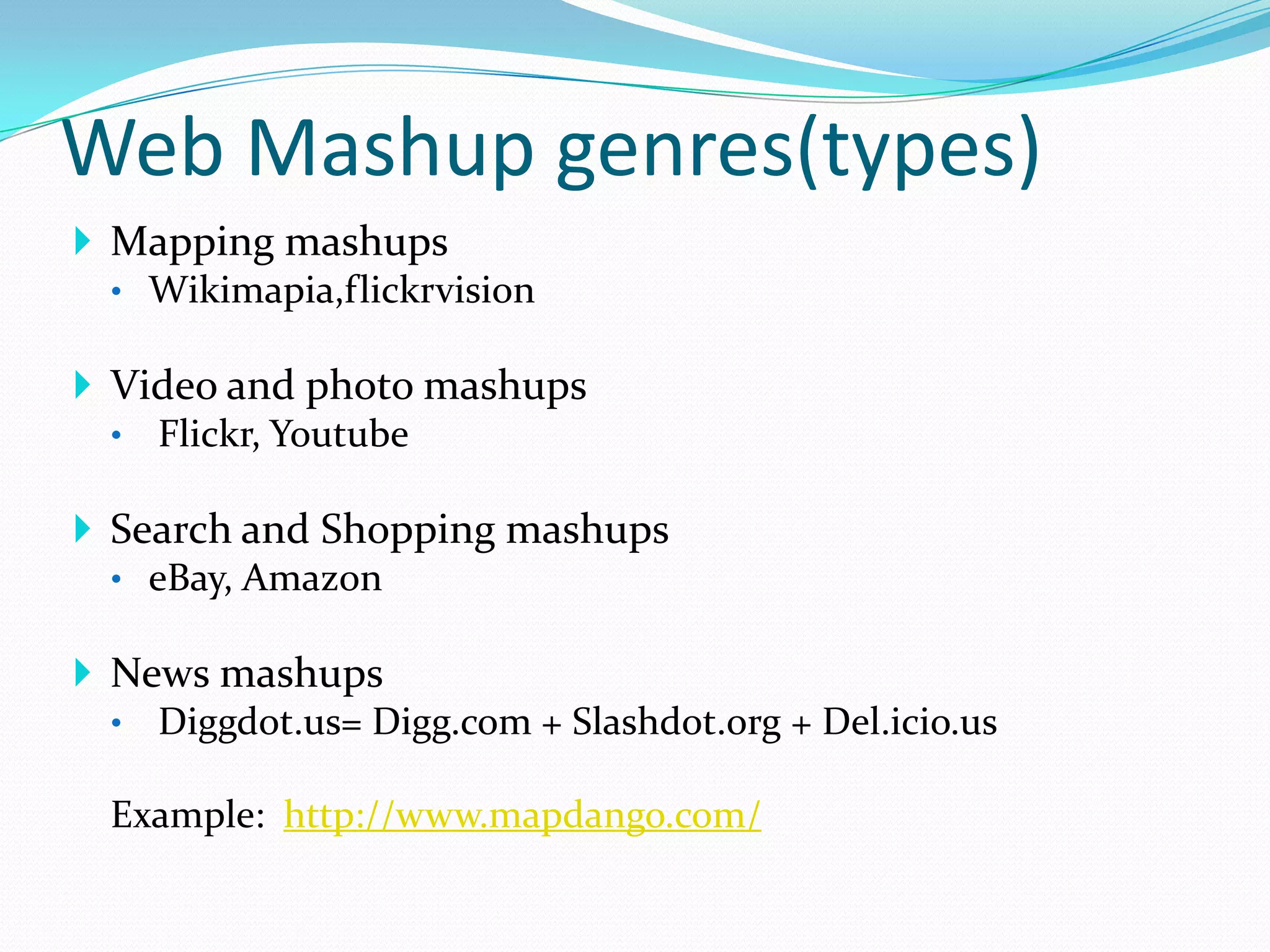
Web Mashup genres(types)
 Mapping mashups
  • Wikimapia,flickrvision

 Video and photo mashups
  • Flickr, Youtube

 Search and Shopping mashups
  • eBay, Amazon

 News mashups
  • Diggdot.us= Digg.com + Slashdot.org + Del.icio.us

  Example: http://www.mapdango.com/
How to shop online?
 Many people are new to online shopping and don't really
  know how it works.
 From a user’s point of view online shopping is pretty
  straight forward..
 Online shopping has three major steps outlined simply
  as find what you want, enter in your address and
  other information, and make the purchase.
 How Does Online Shopping Work from a Website?
 The website is like a storefront for a business, with all of their
  merchandise displayed on their website. Also to make things
  easier all the merchandise is usually categorized into
  categories. Like for instance clothes will be categorized into
  men’s clothing and women’s clothing, shoes into men’s
  footwear and women’s foot wear etc.

 So How Does Online Shopping Work When You are Looking
  for Something?

 Almost every online store has a search option which allows
  you to find exactly what you are looking for. For instance, you
  can enter in the term “shirts” into a store’s search bar and the
  website’s search engine will give you a list of all the shirts that
  are available. You can then click on what you want to know
  more about and read the details relating to the shirt like the
  sizes available, colors, etc.
 How Does Online Shopping Work When You Find What You Want?

 When you have found what you are looking for you add that item to
  your shopping cart. The virtual shopping cart acts like a real shopping
  cart in which you can put any thing you want. On many commercial
  websites close to each item you will find an icon of a shopping cart with
  the tag ‘add to cart’ you then click on the icon and the item will then be
  added to your cart. You continue doing this until you have finished
  shopping.

 What Happens Last?

 What happens at the very end is you click on the icon that says check
  out. The check out system works exactly as a traditional shopping store
  were you take your shopping cart to the counter and the store clerk then
  begins to add things up so you can pay for it. However, unlike a
  traditional store check out does not take a long time no matter how much
  you have added to your cart. It will present you with a grand total of all
  items and the option to remove what you don’t want. You then enter in
  your address and credit card information and the items you purchased is
  then shipped to you.
How we can Pay while buying
Online?
 Online Payment Methods (PaisaPay)


 Online Bank Transfer ,Credit Card , Debit Card , Cash
 Card

 Offline Payment Methods


 PaisaPay Cash on Delivery,Cheques,Demand
 Draft,Buyer picks up and pays
Lets Recharge your Mobiles Online

Internet,web 2.0,3.0,search techniques

  • 1.
    Information Sharing Self-Learning Social Networking Business Affairs Advertisement and Marketing Nowadays Internet is needed for Everything
  • 2.
    In 1998 theInternet had about 50 million users. In addition, mobile access increased rapidly as mobile technology spread throughout the world. Today the Internet has an estimated 542 million servers and about 1.3 billion users. Of the estimated 3 billion mobile phones in use, about 15 percent are Internet-enabled, adding 450 million devices to the Internet.
  • 3.
    Focus is Important ClearIdea about required information really helps. Right word at right place Effective use of search engines Stay away from adds and pop-ups Social website contacts might help allot
  • 4.
    -- or and| Either “ “ Double Quote - Not operator ~ to find Similar Terms/Words * Wildcard Operator define: (define: Life) Number Range(from .. To) (best books 2002..2007) site: ( site: www.notinwords.com internet) link: (to find in URLs)
  • 5.
    movie: to findparticular movie music: for finding particular music and artist currency: currency: [12 meters in yards] filetype: filetype:doc inurl: a term only within the URL intitle: a term only within the Title intext a term only within the Body of form inanchor: a term only within the Text used for link Description cached: To find old version pages
  • 6.
    Web 1.0 Info –Centric Web  The first generation of the World Wide Web (WWW), characterized by separate static websites.  It is one-way broadcasting.  It is invented 1989 by Tim Berners- Lee.  It was widely used between 1998 and 2001, and it is still used beside Web 2.0 in almost all web sites.
  • 7.
    Web 2.0 Web 2.0is the network as platform, spanning all connected devices; Web 2.0 applications are those that make the most of the intrinsic advantages of that platform: delivering software as a continually-updated service that gets better the more people use it, consuming and remixing data from multiple sources, including individual users, while providing their own data and services in a form that allows remixing by others, creating network effects through an "architecture of participation," and going beyond the page metaphor of Web 1.0 to deliver rich user experiences. Tim O'Reilly, “Web 2.0: Compact Definition?”
  • 9.
    Web 2.0 People CentricWeb  Technologies and Trends  Social networking sites:  Open Services:  Facebook, MySpace, Hi5  Google. , … etc.  P2P:  Tagging or Labeling  Bit Torrent. Content:  New Web technologies:  Del.icio.us.  XML, RSS, Ajax.  Wikis:  Open Source Software  Wikipedia.  Community-generated content:  eBay.
  • 10.
    Web 3.0 Machine CentricWeb  Different meanings are intended to describe the evolution of Web usage and interaction between the many possible evolutionary paths.  The third generation of Web technologies and services that emphasize a machine-facilitated understanding of information on the Web.  Semantic Web  Intelligent System Planning  Business and Network Applications  … etc.  Video Web  Web 3D  Augmentation of Life
  • 11.
    Semantic Web (StartingPoint of Web 3.0) Intelligent System Planning  Example: The Question: ”I’m looking for a warm place to vacation and I have a budget of 3000 Rs. and I have an 11-year-old child and I want Chicken for dinner ”  Today’s System, such query can lead to hours of sifting (through lists of flights, hotel, car rentals) and the options are often at odds with one another.  Web 3.0 will call up a complete vacation package that was planned as meticulously as if it had been assembled by a human travel agent.
  • 12.
    Its fact thatsurfing the internet for some entertainment do increase the employee productivity..but time of surfing should be under control. Social networking sites keep you in touch with your friend and family which makes you feel connected while at work. Some recent examples of internet fun activities affecting Reality Flash mob. Blood donation. Each One Teach One Celebrity Blogs Five Minutes, A fame
  • 13.
    What is aMashup?  A Mashup is a web application that combines data from more than one source into a single integrated tool.  Content used in Mashup is typically sourced from a third party via a public interface or so called API
  • 14.
    User What arethe available Map with available flats near SANJA Road? flats marked Mashup website Request for Request for Flat list Area map available flat area map list Google Map Real estate website
  • 15.
    Web Mashup genres(types) Mapping mashups • Wikimapia,flickrvision  Video and photo mashups • Flickr, Youtube  Search and Shopping mashups • eBay, Amazon  News mashups • Diggdot.us= Digg.com + Slashdot.org + Del.icio.us Example: http://www.mapdango.com/
  • 16.
    How to shoponline?  Many people are new to online shopping and don't really know how it works.  From a user’s point of view online shopping is pretty straight forward..  Online shopping has three major steps outlined simply as find what you want, enter in your address and other information, and make the purchase.
  • 17.
     How DoesOnline Shopping Work from a Website?  The website is like a storefront for a business, with all of their merchandise displayed on their website. Also to make things easier all the merchandise is usually categorized into categories. Like for instance clothes will be categorized into men’s clothing and women’s clothing, shoes into men’s footwear and women’s foot wear etc.  So How Does Online Shopping Work When You are Looking for Something?  Almost every online store has a search option which allows you to find exactly what you are looking for. For instance, you can enter in the term “shirts” into a store’s search bar and the website’s search engine will give you a list of all the shirts that are available. You can then click on what you want to know more about and read the details relating to the shirt like the sizes available, colors, etc.
  • 18.
     How DoesOnline Shopping Work When You Find What You Want?  When you have found what you are looking for you add that item to your shopping cart. The virtual shopping cart acts like a real shopping cart in which you can put any thing you want. On many commercial websites close to each item you will find an icon of a shopping cart with the tag ‘add to cart’ you then click on the icon and the item will then be added to your cart. You continue doing this until you have finished shopping.  What Happens Last?  What happens at the very end is you click on the icon that says check out. The check out system works exactly as a traditional shopping store were you take your shopping cart to the counter and the store clerk then begins to add things up so you can pay for it. However, unlike a traditional store check out does not take a long time no matter how much you have added to your cart. It will present you with a grand total of all items and the option to remove what you don’t want. You then enter in your address and credit card information and the items you purchased is then shipped to you.
  • 19.
    How we canPay while buying Online?  Online Payment Methods (PaisaPay)  Online Bank Transfer ,Credit Card , Debit Card , Cash Card  Offline Payment Methods  PaisaPay Cash on Delivery,Cheques,Demand Draft,Buyer picks up and pays
  • 20.
    Lets Recharge yourMobiles Online