LESSON 1:
INTRODUCTION TO
INFORMATION AND
COMMUNICATION
TECHNOLOGIES
OBJECTIVES
 Improve your knowledge on how ICT affects
their everyday lives and the state of our nation;
 Compare and contrast the difference between
online platforms, sites, and content;
 Understand the feature of Web 2.0;
 Understand the future of the World Wide Web
through Web 3.0; and
 Learn the different trends in ICT and use them
to their advantage.
INFORMATION AND COMMUNICATION TECHNOLOGIES
(ICT)
Deals with the use of different
communication technologies such
as mobile phone, telephone,
internet , etc. to locate, save,
send, and edit information.
ICT IN THE PHILIPPINES
 ICT hub of Asia
 BPO (Business Process Outcome)
 2013 edition of Measuring the information society
by the International Telecommunication Union,
there are 106.8 cellphones per 100 Filipinos you
meet.
 Annual Survey of Philippine business and
Industries, NSO, in 2010 the industry shares 19.3%
of the total population here in the Philippines.
ICT, ME, AND MY COMMUNITY
Company/ Establishment Name: ____________________
Address: ________________________________________
Nature of business: ______________________________
Guide questions:
1. What are the different ways for the customers and/ or suppliers to
contact you?
2. How often do you use your phone for business? Estimate only.
3. Does your establishment have Internet connection? If yes, what is its
purpose? If no, would you consider having it in the future? Why or
why not?
4. Does your business have a website? If yes how does it help the
company? If no, have you consider having one in the future? Why or
why not?
5. (If applicable) Would you consider giving free WIFI access in the
future? If you already have it, does it help boost sales?
Web 1.0 or Static
Static also known as flat page or
stationary page
The page is “as is” and cannot be
manipulated by the user.
Web 2.0 or Dynamic
 Coined by Darcy DiNucci on January 1999.
 It is the evolution of Web 1.0 by adding web page
 It allows user to interact with the page: instead of
just reading a page, the user may be able to comment
or create a user account.
 It also allows user to use web browsers instead of just
using their operating system.
 Browser can now be used for their user interface,
application software (or web application), and even
for storage.
Features of web 2.0
Folksonomy – allows users to categorize
and classify/arrange information using freely chosen
keyword(e.g., tagging). Popular social networking
sites such as Twitter, Instagram, Facebook, etc. use
tags start with the pound sign(#). This is also refer to
a hashtag.
Rich user experience – content is
dynamic and it is responsive to user’s input. An
example would be a website that shows local
content. Your account is used to modify what you see
in their website.
User Participation – the owner of
the website is not the only one who is able to put
content. Others are able to place a content of their
own by means of comments, reviews, and
evaluation. Some websites allow readers to comment
on an article, participate in the a poll, or review a
specific product.
Long tail – Services that are offered on
demand rather that on a one time purchase . In
certain case, time-base pricing is better than file
size-base pricing or vice versa. This is synonymous
to subscribing to a data plan that charges you for
the amount of time you spent in the internet, or a
data plan that charges you for the amount of
bandwidth you use.
Software as a service – user will
subscribe to software only when needed rather
than purchasing them. This is a cheaper option if
you do not always need to use a software . For
instance , Google Docs is a free web-based
application that allows the user to create and edit
word processing and spreadsheet documents
online. Software as a service allows you to “rent” a
software for a minimal free.
Mass Participation – diverse
information sharing through universal web access.
Since most users can use the internet, web 2.0’s
content is based on people from various culture.
Web 3.0 and the Semantic Web
 Semantic web is a movement led by the World Wide
Web Consortium (W3C).
 The term coined by the inventor of the World Wide
Web, Tim Berners-Lee. He also noted that the
Semantic Web is a Component for Web 3.0.
 According to the W3C, “ The Semantic Web provides
a common framework that allows data to be shared
and reused across application, enterprise, and
communities boundaries.”
Aim of Web 3.0
 To have machine (or serves) understand the user’s to
be able to deliver web content specifically targeting
the user.
 To do better. This is through studying personal
preferences of an individual user and showing
results based on those preferences. The internet is
able to predict the best possible answer to your
question by “learning” from your previous choices.
Several problems in Web 3.0
1. Compatibility. HTML files and current web
browser could not support web 3.0.
2. Security. The user’s security is also in question
since the machine is saving his or her preferences.
3. Vastness. The World Wide Web already contains
billions of web pages.
4. Vagueness. Certain words are imprecise. The
words “old” and “small” would depend on the user.
5. Logic. Since machine use logic, there are certain
limitations for a computer to be able to predict
what the user is preferring to at a given time.
TRENDS IN ICT
1. Convergence
Technological convergence is the synergy of
technological advancements to work on a similar
goal or task. It is using several technologies to
accomplish a task conveniently.
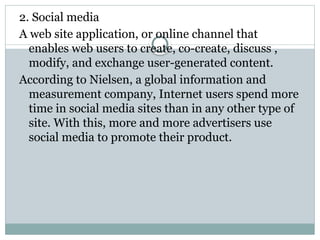
2. Social media
A web site application, or online channel that
enables web users to create, co-create, discuss ,
modify, and exchange user-generated content.
According to Nielsen, a global information and
measurement company, Internet users spend more
time in social media sites than in any other type of
site. With this, more and more advertisers use
social media to promote their product.
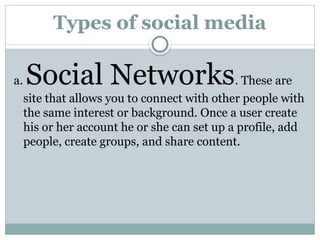
Types of social media
a. Social Networks. These are
site that allows you to connect with other people with
the same interest or background. Once a user create
his or her account he or she can set up a profile, add
people, create groups, and share content.
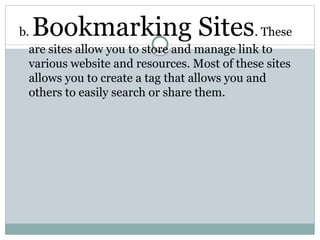
b. Bookmarking Sites. These
are sites allow you to store and manage link to
various website and resources. Most of these sites
allows you to create a tag that allows you and
others to easily search or share them.
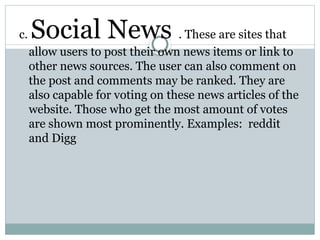
c. Social News . These are sites that
allow users to post their own news items or link to
other news sources. The user can also comment on
the post and comments may be ranked. They are
also capable for voting on these news articles of the
website. Those who get the most amount of votes
are shown most prominently. Examples: reddit
and Digg
d.Media Sharing. These are sites
that allow you to upload and share media content
like images, music, and video. Most of these site
have additional social features like liking,
commenting, and having user profiles.
Example: Flicker, YouTube, and Instagram
e. Microblogging. These are
sites that focus on short updates from the user.
Those subscribe to the user will be able to receive
these updates.
Example: Twitter and Plurk
f. Blog and Forums.
These websites allow user to post their content.
Other users are able to comment on the said topic.
These are several free blogging platforms like
Blogger, WordPress, and Tumblr. On the other
hand, forums are typically part of a certain website
or web service.
3. Mobile Technologies.
The popularity of smartphones and tablets has
taken a major rise over the years. This is largely
because of the devices’ capability to do task that
were originally found in personal computers.
Several of these device are capable of using high-
speed internet. Today the latest mobile device use
4G Networking (LTE), which currently the fastest
mobile network.
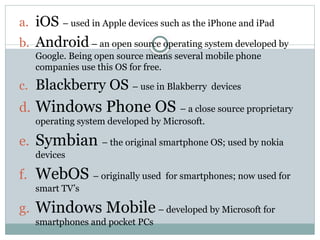
a. iOS – used in Apple devices such as the iPhone and iPad
b. Android– an open source operating system developed by
Google. Being open source means several mobile phone
companies use this OS for free.
c. Blackberry OS – use in Blakberry devices
d. Windows Phone OS – a close source proprietary
operating system developed by Microsoft.
e. Symbian – the original smartphone OS; used by nokia
devices
f. WebOS – originally used for smartphones; now used for
smart TV’s
g. Windows Mobile– developed by Microsoft for
smartphones and pocket PCs
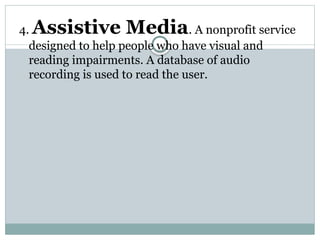
4. Assistive Media. A nonprofit service
designed to help people who have visual and
reading impairments. A database of audio
recording is used to read the user.
Key Terms
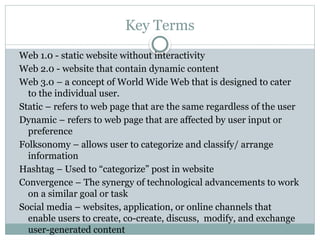
Web 1.0 - static website without interactivity
Web 2.0 - website that contain dynamic content
Web 3.0 – a concept of World Wide Web that is designed to cater
to the individual user.
Static – refers to web page that are the same regardless of the user
Dynamic – refers to web page that are affected by user input or
preference
Folksonomy – allows user to categorize and classify/ arrange
information
Hashtag – Used to “categorize” post in website
Convergence – The synergy of technological advancements to work
on a similar goal or task
Social media – websites, application, or online channels that
enable users to create, co-create, discuss, modify, and exchange
user-generated content
1-E-Tech-lesson-1.pptxKMLKNKLM;LMLMLM;,;.M,;L

1-E-Tech-lesson-1.pptxKMLKNKLM;LMLMLM;,;.M,;L

  • 1.
    LESSON 1: INTRODUCTION TO INFORMATIONAND COMMUNICATION TECHNOLOGIES
  • 2.
    OBJECTIVES  Improve yourknowledge on how ICT affects their everyday lives and the state of our nation;  Compare and contrast the difference between online platforms, sites, and content;  Understand the feature of Web 2.0;  Understand the future of the World Wide Web through Web 3.0; and  Learn the different trends in ICT and use them to their advantage.
  • 3.
    INFORMATION AND COMMUNICATIONTECHNOLOGIES (ICT) Deals with the use of different communication technologies such as mobile phone, telephone, internet , etc. to locate, save, send, and edit information.
  • 4.
    ICT IN THEPHILIPPINES  ICT hub of Asia  BPO (Business Process Outcome)  2013 edition of Measuring the information society by the International Telecommunication Union, there are 106.8 cellphones per 100 Filipinos you meet.  Annual Survey of Philippine business and Industries, NSO, in 2010 the industry shares 19.3% of the total population here in the Philippines.
  • 5.
    ICT, ME, ANDMY COMMUNITY Company/ Establishment Name: ____________________ Address: ________________________________________ Nature of business: ______________________________ Guide questions: 1. What are the different ways for the customers and/ or suppliers to contact you? 2. How often do you use your phone for business? Estimate only. 3. Does your establishment have Internet connection? If yes, what is its purpose? If no, would you consider having it in the future? Why or why not? 4. Does your business have a website? If yes how does it help the company? If no, have you consider having one in the future? Why or why not? 5. (If applicable) Would you consider giving free WIFI access in the future? If you already have it, does it help boost sales?
  • 6.
    Web 1.0 orStatic Static also known as flat page or stationary page The page is “as is” and cannot be manipulated by the user.
  • 7.
    Web 2.0 orDynamic  Coined by Darcy DiNucci on January 1999.  It is the evolution of Web 1.0 by adding web page  It allows user to interact with the page: instead of just reading a page, the user may be able to comment or create a user account.  It also allows user to use web browsers instead of just using their operating system.  Browser can now be used for their user interface, application software (or web application), and even for storage.
  • 8.
    Features of web2.0 Folksonomy – allows users to categorize and classify/arrange information using freely chosen keyword(e.g., tagging). Popular social networking sites such as Twitter, Instagram, Facebook, etc. use tags start with the pound sign(#). This is also refer to a hashtag.
  • 9.
    Rich user experience– content is dynamic and it is responsive to user’s input. An example would be a website that shows local content. Your account is used to modify what you see in their website. User Participation – the owner of the website is not the only one who is able to put content. Others are able to place a content of their own by means of comments, reviews, and evaluation. Some websites allow readers to comment on an article, participate in the a poll, or review a specific product.
  • 10.
    Long tail –Services that are offered on demand rather that on a one time purchase . In certain case, time-base pricing is better than file size-base pricing or vice versa. This is synonymous to subscribing to a data plan that charges you for the amount of time you spent in the internet, or a data plan that charges you for the amount of bandwidth you use.
  • 11.
    Software as aservice – user will subscribe to software only when needed rather than purchasing them. This is a cheaper option if you do not always need to use a software . For instance , Google Docs is a free web-based application that allows the user to create and edit word processing and spreadsheet documents online. Software as a service allows you to “rent” a software for a minimal free.
  • 12.
    Mass Participation –diverse information sharing through universal web access. Since most users can use the internet, web 2.0’s content is based on people from various culture.
  • 13.
    Web 3.0 andthe Semantic Web  Semantic web is a movement led by the World Wide Web Consortium (W3C).  The term coined by the inventor of the World Wide Web, Tim Berners-Lee. He also noted that the Semantic Web is a Component for Web 3.0.  According to the W3C, “ The Semantic Web provides a common framework that allows data to be shared and reused across application, enterprise, and communities boundaries.”
  • 14.
    Aim of Web3.0  To have machine (or serves) understand the user’s to be able to deliver web content specifically targeting the user.  To do better. This is through studying personal preferences of an individual user and showing results based on those preferences. The internet is able to predict the best possible answer to your question by “learning” from your previous choices.
  • 15.
    Several problems inWeb 3.0 1. Compatibility. HTML files and current web browser could not support web 3.0. 2. Security. The user’s security is also in question since the machine is saving his or her preferences. 3. Vastness. The World Wide Web already contains billions of web pages. 4. Vagueness. Certain words are imprecise. The words “old” and “small” would depend on the user. 5. Logic. Since machine use logic, there are certain limitations for a computer to be able to predict what the user is preferring to at a given time.
  • 16.
    TRENDS IN ICT 1.Convergence Technological convergence is the synergy of technological advancements to work on a similar goal or task. It is using several technologies to accomplish a task conveniently.
  • 17.
    2. Social media Aweb site application, or online channel that enables web users to create, co-create, discuss , modify, and exchange user-generated content. According to Nielsen, a global information and measurement company, Internet users spend more time in social media sites than in any other type of site. With this, more and more advertisers use social media to promote their product.
  • 18.
    Types of socialmedia a. Social Networks. These are site that allows you to connect with other people with the same interest or background. Once a user create his or her account he or she can set up a profile, add people, create groups, and share content.
  • 19.
    b. Bookmarking Sites.These are sites allow you to store and manage link to various website and resources. Most of these sites allows you to create a tag that allows you and others to easily search or share them.
  • 20.
    c. Social News. These are sites that allow users to post their own news items or link to other news sources. The user can also comment on the post and comments may be ranked. They are also capable for voting on these news articles of the website. Those who get the most amount of votes are shown most prominently. Examples: reddit and Digg
  • 21.
    d.Media Sharing. Theseare sites that allow you to upload and share media content like images, music, and video. Most of these site have additional social features like liking, commenting, and having user profiles. Example: Flicker, YouTube, and Instagram
  • 22.
    e. Microblogging. Theseare sites that focus on short updates from the user. Those subscribe to the user will be able to receive these updates. Example: Twitter and Plurk
  • 23.
    f. Blog andForums. These websites allow user to post their content. Other users are able to comment on the said topic. These are several free blogging platforms like Blogger, WordPress, and Tumblr. On the other hand, forums are typically part of a certain website or web service.
  • 24.
    3. Mobile Technologies. Thepopularity of smartphones and tablets has taken a major rise over the years. This is largely because of the devices’ capability to do task that were originally found in personal computers. Several of these device are capable of using high- speed internet. Today the latest mobile device use 4G Networking (LTE), which currently the fastest mobile network.
  • 25.
    a. iOS –used in Apple devices such as the iPhone and iPad b. Android– an open source operating system developed by Google. Being open source means several mobile phone companies use this OS for free. c. Blackberry OS – use in Blakberry devices d. Windows Phone OS – a close source proprietary operating system developed by Microsoft. e. Symbian – the original smartphone OS; used by nokia devices f. WebOS – originally used for smartphones; now used for smart TV’s g. Windows Mobile– developed by Microsoft for smartphones and pocket PCs
  • 26.
    4. Assistive Media.A nonprofit service designed to help people who have visual and reading impairments. A database of audio recording is used to read the user.
  • 27.
    Key Terms Web 1.0- static website without interactivity Web 2.0 - website that contain dynamic content Web 3.0 – a concept of World Wide Web that is designed to cater to the individual user. Static – refers to web page that are the same regardless of the user Dynamic – refers to web page that are affected by user input or preference Folksonomy – allows user to categorize and classify/ arrange information Hashtag – Used to “categorize” post in website Convergence – The synergy of technological advancements to work on a similar goal or task Social media – websites, application, or online channels that enable users to create, co-create, discuss, modify, and exchange user-generated content