INTERNET SAFETY What is your child really doing online?
Did you know? 1 in 3 teenagers plan to meet someone they have contacted on the Internet. Half of 16 and 17 year-olds say their parents know very little or nothing about what they are doing online. Potential Internet predator threats decrease when parents educate their children about internet safety. According to the National Center for Missing and Exploited Children
Allen County School Kentucky Education Technology Policies  Acceptable Use Policy A written agreement, signed by students, and their parents, and teachers, outlining the terms and conditions of Internet use. Required to be signed and returned to school at first of school year. Abide by Copyright and Fair Use Laws. Avoid Plagiarism.  E-Mail accounts provided for students.
Online Social Networks IM Cell Phones & Computers MySpace Xanga Facebook TagWorld Piczo Friendster Livejournal A profile is free. Anyone can lie about his/her age. Anyone can post a fake picture or picture not approved by person in the picture. Friends’ List Predators are online on most of these sites.
 
BLOGGING Blogs:  Journals posted on the Internet Weblogs:  Another name for Blog Blogs are maintained in chronological order by date of post.  People who read the blog are usually welcome to post replies, their thoughts, etc.  This makes most blogs interactive. Blogging makes the writer feel like they are writing confidentially because they are behind a screen.  However, the reality is that anyone online can read the blog.  This can be dangerous.
Chat Rooms…Free e-mail accounts… …YOUTUBE…  What else? A Web site, part of a Web site, or part of an online service, that provides a venue for communities of users with a common interest to communicate in real time. You can create a bogus personality…you type messages to other participants and they reply. You never know who is going to be reading your messages or responding to them…caution!!! Anyone can upload to share videos, photographs they produce, copy or find.  One may watch, or link to, them, not copy them. Sometimes these venues are moderated by limiting who is allowed or by moderation volunteers patrolling. Google… to Free e-mail providers, to locate Chat Rooms and Video Networking
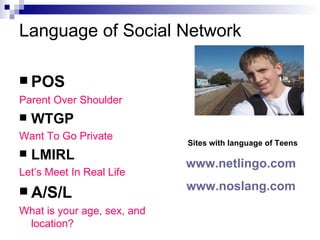
Language of Social Network POS Parent Over Shoulder WTGP Want To Go Private LMIRL Let’s Meet In Real Life A/S/L What is your age, sex, and location? Sites with language of Teens www.netlingo.com   www.noslang.com
CYBER BULLYING Cyber Bullying is verbal harassment that occurs during online activities and cell phone texting. The Internet is the new playground, and there are no off hours. 58% of kids have not told their parents or any adult about something mean or hurtful that had happened to them online. Forms of Cyber Bullying: A threatening e-mail Nasty instant messaging Repeated notes sent to the cell phone A website set up to mock  “ Borrowing” someone’s screen name & pretending to be them while posting a message. Forwarding supposedly private messages, pictures or videos to others.
 
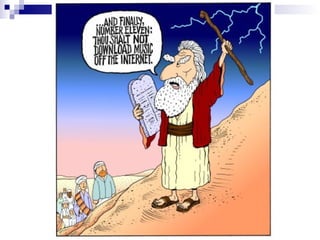
Peer to Peer Networking Napster is now legal; others are not like Kazaa, Blubster, and Limewire.  These are media sharing sites/services. P2P applications downloaded to your computer allows your computer to communicate directly with another. P2P networks have been the centerpiece of intellectual property lawsuits, especially music-also pirated movies, software. DANGER –Virus, Spyware, Trojan, Adware and frequent pop-up browsers and other annoying hassles. Illegal, Unethical and Immoral.
 
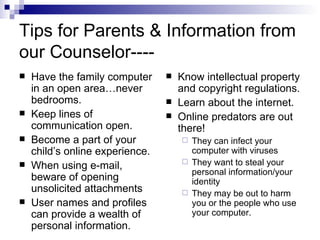
Tips for Parents & Information from our Counselor---- Have the family computer in an open area…never bedrooms. Keep lines of communication open. Become a part of your child’s online experience. When using e-mail, beware of opening unsolicited attachments User names and profiles can provide a wealth of personal information. Know intellectual property and copyright regulations. Learn about the internet. Online predators are out there! They can infect your computer with viruses They want to steal your personal information/your identity They may be out to harm you or the people who use your computer.
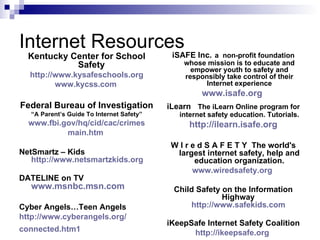
Internet Resources Kentucky Center for School Safety  http://www.kysafeschools.org www.kycss.com   Federal Bureau of Investigation “ A Parent’s Guide To Internet Safety” www.fbi.gov/hq/cid/cac/crimes main.htm   NetSmartz – Kids  http://www.netsmartzkids.org DATELINE on TV  www.msnbc.msn.com Cyber Angels…Teen Angels http://www.cyberangels.org/ connected.htm1   iSAFE Inc.   a  non-profit foundation whose mission is to educate and empower youth to safety and responsibly take control of their Internet experience www.isafe.org   iLearn   The iLearn Online program for internet safety education. Tutorials. http://ilearn.isafe.org W I r e d S A F E T Y  The world's largest internet safety, help and education organization. www.wiredsafety.org   Child Safety on the Information Highway  http://www.safekids.com   iKeepSafe Internet Safety Coalition http://ikeepsafe.org
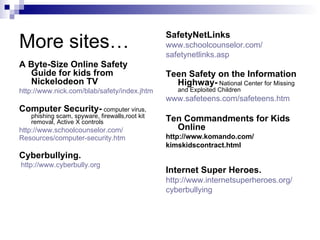
More sites… A Byte-Size Online Safety Guide for kids from Nickelodeon TV http://www.nick.com/blab/safety/index.jhtm Computer Security-  computer virus, phishing scam, spyware, firewalls,root kit removal, Active X controls http://www.schoolcounselor.com/ Resources/computer-security.htm   Cyberbullying. http://www.cyberbully.org   SafetyNetLinks www.schoolcounselor.com/ safetynetlinks.asp   Teen Safety on the Information Highway-  National Center for Missing and Exploited Children www.safeteens.com/safeteens.htm   Ten Commandments for Kids Online http://www.komando.com/  kimskidscontract.html  Internet Super Heroes. http:// www.internetsuperheroes.org / cyberbullying
Safety Nets for your computers… Windows XP allows separate accounts to be set up on one computer.  Administrator with unlimited rights or Single user with limited rights. Internet Explorer allows an Administrator Account to set controls on usage.  Handout provides step by step directions with illustrations. iBoss from Phantom Technologies-Users can block access to specific programs and generates reports on Internet Activity which can be viewed automatically  E-mailed. SnoopStick from CYBERsitter – Install on three computers can view activity on home computer from your office.  OWN YOUR SPACE by Linda McCarthy book written for teenagers and internet usage.
Slide show created by: Fran Catlett, LMS/STC Kerri Hammons, Counselor  Harmony Elementary Oldham County  March 20, 2007 Edited by Carolyn Pitchford JBMS Allen County

Internet Safety for Your Child

  • 1.
    INTERNET SAFETY Whatis your child really doing online?
  • 2.
    Did you know?1 in 3 teenagers plan to meet someone they have contacted on the Internet. Half of 16 and 17 year-olds say their parents know very little or nothing about what they are doing online. Potential Internet predator threats decrease when parents educate their children about internet safety. According to the National Center for Missing and Exploited Children
  • 3.
    Allen County SchoolKentucky Education Technology Policies Acceptable Use Policy A written agreement, signed by students, and their parents, and teachers, outlining the terms and conditions of Internet use. Required to be signed and returned to school at first of school year. Abide by Copyright and Fair Use Laws. Avoid Plagiarism. E-Mail accounts provided for students.
  • 4.
    Online Social NetworksIM Cell Phones & Computers MySpace Xanga Facebook TagWorld Piczo Friendster Livejournal A profile is free. Anyone can lie about his/her age. Anyone can post a fake picture or picture not approved by person in the picture. Friends’ List Predators are online on most of these sites.
  • 5.
  • 6.
    BLOGGING Blogs: Journals posted on the Internet Weblogs: Another name for Blog Blogs are maintained in chronological order by date of post. People who read the blog are usually welcome to post replies, their thoughts, etc. This makes most blogs interactive. Blogging makes the writer feel like they are writing confidentially because they are behind a screen. However, the reality is that anyone online can read the blog. This can be dangerous.
  • 7.
    Chat Rooms…Free e-mailaccounts… …YOUTUBE… What else? A Web site, part of a Web site, or part of an online service, that provides a venue for communities of users with a common interest to communicate in real time. You can create a bogus personality…you type messages to other participants and they reply. You never know who is going to be reading your messages or responding to them…caution!!! Anyone can upload to share videos, photographs they produce, copy or find. One may watch, or link to, them, not copy them. Sometimes these venues are moderated by limiting who is allowed or by moderation volunteers patrolling. Google… to Free e-mail providers, to locate Chat Rooms and Video Networking
  • 8.
    Language of SocialNetwork POS Parent Over Shoulder WTGP Want To Go Private LMIRL Let’s Meet In Real Life A/S/L What is your age, sex, and location? Sites with language of Teens www.netlingo.com www.noslang.com
  • 9.
    CYBER BULLYING CyberBullying is verbal harassment that occurs during online activities and cell phone texting. The Internet is the new playground, and there are no off hours. 58% of kids have not told their parents or any adult about something mean or hurtful that had happened to them online. Forms of Cyber Bullying: A threatening e-mail Nasty instant messaging Repeated notes sent to the cell phone A website set up to mock “ Borrowing” someone’s screen name & pretending to be them while posting a message. Forwarding supposedly private messages, pictures or videos to others.
  • 10.
  • 11.
    Peer to PeerNetworking Napster is now legal; others are not like Kazaa, Blubster, and Limewire. These are media sharing sites/services. P2P applications downloaded to your computer allows your computer to communicate directly with another. P2P networks have been the centerpiece of intellectual property lawsuits, especially music-also pirated movies, software. DANGER –Virus, Spyware, Trojan, Adware and frequent pop-up browsers and other annoying hassles. Illegal, Unethical and Immoral.
  • 12.
  • 13.
    Tips for Parents& Information from our Counselor---- Have the family computer in an open area…never bedrooms. Keep lines of communication open. Become a part of your child’s online experience. When using e-mail, beware of opening unsolicited attachments User names and profiles can provide a wealth of personal information. Know intellectual property and copyright regulations. Learn about the internet. Online predators are out there! They can infect your computer with viruses They want to steal your personal information/your identity They may be out to harm you or the people who use your computer.
  • 14.
    Internet Resources KentuckyCenter for School Safety http://www.kysafeschools.org www.kycss.com Federal Bureau of Investigation “ A Parent’s Guide To Internet Safety” www.fbi.gov/hq/cid/cac/crimes main.htm NetSmartz – Kids http://www.netsmartzkids.org DATELINE on TV www.msnbc.msn.com Cyber Angels…Teen Angels http://www.cyberangels.org/ connected.htm1 iSAFE Inc. a non-profit foundation whose mission is to educate and empower youth to safety and responsibly take control of their Internet experience www.isafe.org iLearn The iLearn Online program for internet safety education. Tutorials. http://ilearn.isafe.org W I r e d S A F E T Y The world's largest internet safety, help and education organization. www.wiredsafety.org Child Safety on the Information Highway http://www.safekids.com iKeepSafe Internet Safety Coalition http://ikeepsafe.org
  • 15.
    More sites… AByte-Size Online Safety Guide for kids from Nickelodeon TV http://www.nick.com/blab/safety/index.jhtm Computer Security- computer virus, phishing scam, spyware, firewalls,root kit removal, Active X controls http://www.schoolcounselor.com/ Resources/computer-security.htm Cyberbullying. http://www.cyberbully.org SafetyNetLinks www.schoolcounselor.com/ safetynetlinks.asp Teen Safety on the Information Highway- National Center for Missing and Exploited Children www.safeteens.com/safeteens.htm Ten Commandments for Kids Online http://www.komando.com/ kimskidscontract.html Internet Super Heroes. http:// www.internetsuperheroes.org / cyberbullying
  • 16.
    Safety Nets foryour computers… Windows XP allows separate accounts to be set up on one computer. Administrator with unlimited rights or Single user with limited rights. Internet Explorer allows an Administrator Account to set controls on usage. Handout provides step by step directions with illustrations. iBoss from Phantom Technologies-Users can block access to specific programs and generates reports on Internet Activity which can be viewed automatically E-mailed. SnoopStick from CYBERsitter – Install on three computers can view activity on home computer from your office. OWN YOUR SPACE by Linda McCarthy book written for teenagers and internet usage.
  • 17.
    Slide show createdby: Fran Catlett, LMS/STC Kerri Hammons, Counselor Harmony Elementary Oldham County March 20, 2007 Edited by Carolyn Pitchford JBMS Allen County