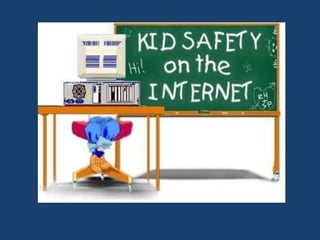
INTERNET SAFETY
What is the Internet
&
Why is it important to be safe?
What are some of the names for
THE INTERNET
• CYBERSPACE
• THE WEB
• THE NET
• THE INFORMATION HIGHWAY
• THE WORLD WIDE WEB
• W3
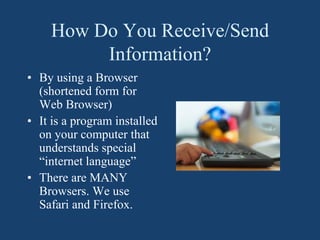
How Do You Receive/Send
Information?
• By using a Browser
(shortened form for
Web Browser)
• It is a program installed
on your computer that
understands special
“internet language”
• There are MANY
Browsers. We use
Safari and Firefox.
Looking for Something?
• Looking up information
on the internet is called
browsing because you use
a browser.
• Some people call it
“surfing”
• If you know the address,
you can just type it in.
Rules for the Real World vs. the Net
• Stranger Danger
• Say you’re sorry when
you hurt someone
• Go to bed on time
• Share your toys and take
turns playing a game.
• Brush your teeth
• Don’t answer the door
when Mom’s in the
shower
• Never meet someone in
person you’ve met in the
cyber world.
• Limit time on the
computer. Have a social
life.
• Never give out personal
information
• Don’t respond to
messages that are
threatening or obscene.
MORE BASIC RULES TO KEEP SAFE
• Never share your name, age, phone number,
address, or even your school
• Never send any pictures to a stranger
• Keep passwords private - Don’t share even with
your school buddies.
• Never open an email from someone you don’t
recognize. It may contain a virus that will totally
shut down your computer OR let someone use your
computer without your knowing it.
• Visit age appropriate sites.
• Tell an adult you trust if you see something that
makes you feel uncomfortable.
INTERNET SAFETY AT HOME
• Schools or libraries must certify they have an
Internet safety policy that blocks or filters access
to pictures that are harmful to minors
• While at home, these same protections are not in
place so students could have access to
inappropriate content
• At home, families are expected to ensure Internet
safety measures. You may work with your Internet
providers, or cellphone carriers to provide specific
restrictions.
KEEPING YOUR CHILD SAFE AT
HOME
• CIPA laws for schools or libraries may not extend to the
home, but that doesn’t mean your child’s home internet
experience has to go unprotected.
• Educating your child on internet safety and creating a
list of the parental control options you need will help
you choose which internet service provider will work
best for you and your family.
• Keep your child informed about why internet safety is
important. By encouraging your child to make smart
choices while online, you’re helping them develop the
confidence to use the internet safely and respectfully.
WHAT YOU CAN DO AT HOME
• Set up Internet filtering
– Use your router or internet service provider’s security app to
configure child-safe internet filtering
• Block websites and keywords you don’t want your child to
access
– You can block websites and keywords through your router or
internet service provider’s security app
– Another way to configure internet filtering is by only allowing your
child access to certain websites and keywords
• Schedule when your child can access the internet
– You can set up access times through your router or internet service
provider’s security app
ARE YOU REALLY YOU?
• Some of your online
“friends may not be
who they say they
are.
• Someone who tells
you “she” is a
teenager could be a
40-year old man
posing as a teenager.
Gee, you sound
really cute and we
have the same
birthday! We must
be destined to meet!
Well, I don’t mind admitting I was
homecoming queen and maybe we could
celebrate our birthdays together.
Have You Given Out This Kind
of Information?
THINK BEFORE YOU POST
• To post or not to post, that is the
question. Think before you post.
DO NOT post something that you
would not want your grandmother
to read. Everything that an
individual posts no matter how
old or young you are stays online.
• The places you visit and things you
say, leave a trail on the internet
that never goes away.
• All of this digital communication is
called your “digital footprint”.
The “trail” you leave in
cyberspace and on any
form of digital
communication is
called your
“digital footprint.”
Your digital foot-print
may reflect positively on you as a person ……
or it may not.
I T’S U P T O Y O U!
The words we say, the pictures we
post, the places we visit make
up our digital “reputations.”
They cannot be washed away
like footprints in the sand.
Don’t be a Cyber Bully
Just like there are bullies in the real world, there are
bullies in the cyber world. The words you say online
can hurt just as bad as being physically hurt.
In the Real world vs the Cyber world
a Bully uses Intimidation as their
favorite tool.
YOU ARE NOT ALONE!
How Do You
Stop a Cyber
Bully?
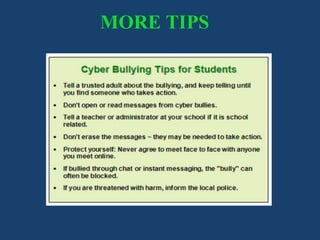
MORE TIPS
Tools for Families
• https://www.bark.us/blog/parental-control-
guide-apps-devices/
– Bark Features: Text Message and Email Monitoring,
Social Network Monitoring, Internet Monitoring,
Alerts, and Check-In Requests
• https://apps.apple.com/us/app/parental-control-
app-kidslox/id914825567
– Kidslox Features: Family Location Tracker, Screen
Time Controls, and Parental Controls
THE INTERNET CAN OPEN ALL KINDS OF NEW WORLDS,
BUT REMEMBER TO BE A “WEB WISE KID” AND BE SAFE!
Resources
• https://www.commonsense.org/education/toolkit/a
udience/family-engagement-online-privacy-safety
• https://www.allconnect.com/blog/keeping-kids-
safe-online
• https://rems.ed.gov/docs/Cyber_Safety_K-
12_Fact_Sheet_508C.PDF

internet and safety.pdf

  • 2.
    INTERNET SAFETY What isthe Internet & Why is it important to be safe?
  • 3.
    What are someof the names for THE INTERNET • CYBERSPACE • THE WEB • THE NET • THE INFORMATION HIGHWAY • THE WORLD WIDE WEB • W3
  • 4.
    How Do YouReceive/Send Information? • By using a Browser (shortened form for Web Browser) • It is a program installed on your computer that understands special “internet language” • There are MANY Browsers. We use Safari and Firefox.
  • 6.
    Looking for Something? •Looking up information on the internet is called browsing because you use a browser. • Some people call it “surfing” • If you know the address, you can just type it in.
  • 8.
    Rules for theReal World vs. the Net • Stranger Danger • Say you’re sorry when you hurt someone • Go to bed on time • Share your toys and take turns playing a game. • Brush your teeth • Don’t answer the door when Mom’s in the shower • Never meet someone in person you’ve met in the cyber world. • Limit time on the computer. Have a social life. • Never give out personal information • Don’t respond to messages that are threatening or obscene.
  • 9.
    MORE BASIC RULESTO KEEP SAFE • Never share your name, age, phone number, address, or even your school • Never send any pictures to a stranger • Keep passwords private - Don’t share even with your school buddies. • Never open an email from someone you don’t recognize. It may contain a virus that will totally shut down your computer OR let someone use your computer without your knowing it. • Visit age appropriate sites. • Tell an adult you trust if you see something that makes you feel uncomfortable.
  • 10.
    INTERNET SAFETY ATHOME • Schools or libraries must certify they have an Internet safety policy that blocks or filters access to pictures that are harmful to minors • While at home, these same protections are not in place so students could have access to inappropriate content • At home, families are expected to ensure Internet safety measures. You may work with your Internet providers, or cellphone carriers to provide specific restrictions.
  • 11.
    KEEPING YOUR CHILDSAFE AT HOME • CIPA laws for schools or libraries may not extend to the home, but that doesn’t mean your child’s home internet experience has to go unprotected. • Educating your child on internet safety and creating a list of the parental control options you need will help you choose which internet service provider will work best for you and your family. • Keep your child informed about why internet safety is important. By encouraging your child to make smart choices while online, you’re helping them develop the confidence to use the internet safely and respectfully.
  • 12.
    WHAT YOU CANDO AT HOME • Set up Internet filtering – Use your router or internet service provider’s security app to configure child-safe internet filtering • Block websites and keywords you don’t want your child to access – You can block websites and keywords through your router or internet service provider’s security app – Another way to configure internet filtering is by only allowing your child access to certain websites and keywords • Schedule when your child can access the internet – You can set up access times through your router or internet service provider’s security app
  • 14.
    ARE YOU REALLYYOU? • Some of your online “friends may not be who they say they are. • Someone who tells you “she” is a teenager could be a 40-year old man posing as a teenager. Gee, you sound really cute and we have the same birthday! We must be destined to meet! Well, I don’t mind admitting I was homecoming queen and maybe we could celebrate our birthdays together.
  • 16.
    Have You GivenOut This Kind of Information?
  • 18.
    THINK BEFORE YOUPOST • To post or not to post, that is the question. Think before you post. DO NOT post something that you would not want your grandmother to read. Everything that an individual posts no matter how old or young you are stays online. • The places you visit and things you say, leave a trail on the internet that never goes away. • All of this digital communication is called your “digital footprint”.
  • 19.
    The “trail” youleave in cyberspace and on any form of digital communication is called your “digital footprint.” Your digital foot-print may reflect positively on you as a person …… or it may not. I T’S U P T O Y O U!
  • 20.
    The words wesay, the pictures we post, the places we visit make up our digital “reputations.” They cannot be washed away like footprints in the sand.
  • 21.
    Don’t be aCyber Bully Just like there are bullies in the real world, there are bullies in the cyber world. The words you say online can hurt just as bad as being physically hurt. In the Real world vs the Cyber world a Bully uses Intimidation as their favorite tool.
  • 22.
  • 23.
    How Do You Stopa Cyber Bully?
  • 24.
  • 25.
    Tools for Families •https://www.bark.us/blog/parental-control- guide-apps-devices/ – Bark Features: Text Message and Email Monitoring, Social Network Monitoring, Internet Monitoring, Alerts, and Check-In Requests • https://apps.apple.com/us/app/parental-control- app-kidslox/id914825567 – Kidslox Features: Family Location Tracker, Screen Time Controls, and Parental Controls
  • 26.
    THE INTERNET CANOPEN ALL KINDS OF NEW WORLDS, BUT REMEMBER TO BE A “WEB WISE KID” AND BE SAFE!
  • 27.