Past, Current, and Future Use of Technology in Education Hardware and Future Trends  Virtual Learning  Evaluating Technology  Acceptable Use and Legal Issues Presented by: Sue Dutter, Stacy Smith,  Beth Sullivan, Diane Vang
Current reports on technology from the US government Student access to internet at home and at school by age and income levels Some current and future technologies: PDA’s, tablets, brain-computer interface. Horizon 2007 Report – annual report that outlines trends and new technologies Why is Technology Important?
Administration Officials Underscore Importance of Advanced Educational Technology to Future Success of Students, Workers at Release of  2020 Visions  Report Technology Administration (TA), The Technology Administration is an agency of the US Department of Commerce   http://www.technology.gov/PRel/pr020918.htm
Highlights From Education Under Secretary Hickok  "We still educate students based on an agricultural timetable, in an industrial setting, but tell students they live in a digital age. Our nation needs a revolution in the way we educate students.” “ Technology can allow us to think of new ways of achieving the same goal - but through different means,"
White Papers on Technology – Lists papers describing the evolution of  technology in schools and related topics. http://www.ed. gov /Technology/Futures/ toc .html
Connected to the future: A report on children’s Internet use from the Corporation for Public Broadcasting This study reports on patterns of Internet use in US households with children.  Sixty-five percent of US children use the Internet up 59% from 2000.  35 percent of preschool children 6 percent in 2000.  This is the fastest growing age group. 98 percent of high income families own computers compared with 65 percent of low income families.  Children were online 5.9 hours per week in 2002 compared with 3.1 hours per week in 2000.  The older the child, the more time spent online.    http:// caret. iste .org/index. cfm ? StudyID =1035&fuseaction= studySummary
http://www.nelliemuller.com/Future_Trends_in_Educational_% 20Technology.htm From Future Trends in Educational Technology Learners now depend more on information retrieval then they do on knowledge. Teachers will become facilitators who focus on social skills.  Home schooling and web based courses will increase
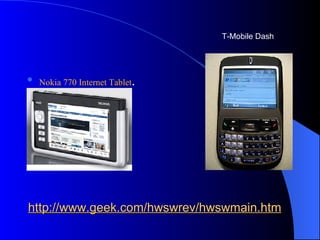
http://www.geek.com/hwswrev/hwswmain.htm Nokia 770 Internet Tablet .  T-Mobile Dash
The most interesting technology: Brain-computer interface  A  brain-computer interface  (BCI), sometimes called a  direct neural interface  or a  brain-machine interface , is a direct communication pathway between a human brain and an external device. Developed in the 1990’s.
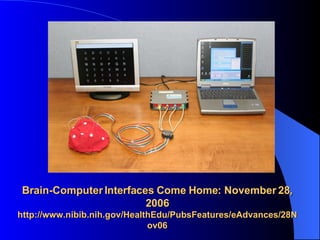
Directions for Use – this was recently displayed at Cebit trade show in Las Vegas A cap fits over the users head. Electrodes are placed over the brain and fluctuations in voltage are read and interpreted by a software program. Currently the software requires training. Newer systems require fewer electrodes and improved software. Current cost $4,000 and dropping http://www.computerworld.com.au/index.php/id;361485560;fp;16;fpid;1
Brain-Computer Interfaces Come Home: November 28, 2006 http://www.nibib.nih.gov/HealthEdu/PubsFeatures/eAdvances/28Nov06
http://www.gtec.at/content.htm
Virtual Learning Options Distance Learning Tutorials  Virtual Classrooms Web-based Learning In Jan. 2005, the National Education Technology Plan released by the US Dept. of Education reported that “25% of K-12 public schools offered some form of virtual instruction and predicted that, in the next decade, almost every state and school will follow”. Wood, C. (2005). High School.Com,  Edutopia,  Retrieved  March 2, 2007 from  http://edutopia.org/onlinelearning
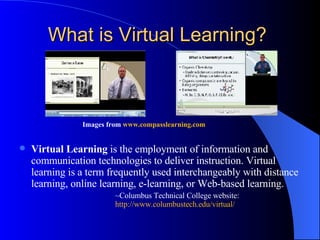
What is Virtual Learning?   Images from  www.compasslearning.com   Virtual Learning  is the employment of information and communication technologies to deliver instruction. Virtual learning is a term frequently used interchangeably with distance learning, online learning, e-learning, or Web-based learning.  ~Columbus Technical College website:  http://www. columbustech . edu /virtual/
Far-flung hatchling to full-fledged industry Gary Marx in  Sixteen Trends  states that  “ Distance learning is no longer an innovation; it has become a staple.” (p 97) Compass Learning  CCC Successmaker Atomic Learning Check out the demo and sample activities at  http://www.childu.com/ from the Compass Learning Odyssey website.
Benefits… Web-based ~ access anytime, anyplace Global community of learners Access to more course options, including AP courses Accommodates different learning styles Individualized, self-paced learning Flexible Immediate feedback
Concerns… Lack of social interaction Isolation Less personal (human) attention from teacher Web-based – cheating opportunities  Lack of audio processing Promotion of hyperactivity
Virtual School Principal’s  To-do List Train teachers Create partnership between teachers and parents Lead through collaboration Focus on student achievement-not on discipline Get to know families, not just individual children Develop a vision and spread the word Frey, B. (2005). A Virtual School Principal’s To-Do List,  T.H.E. Journal , 32 (6), p 34
Specific items to consider before committing to a Virtual Learning Program… What policies need to be developed? Is the curriculum self-paced?  What kind of interactions are provided? Can interactions be reviewed by administrators? Are different learning styles accommodated? learning disabilities?  Course completion rates/success rates? Resource considerations; personnel, technology, budget Security measures Professional development for teachers What support is included? Technical, personnel, student Will this provide quality education? Pape,L. (2004). Choosing Online Education: Good policies will lead to better decisions about virtual learning options,  School Administrator,  61 (4), p 10.
My summer school experience… Superintendent’s proposal His vision His research Implementation ~ pilot What is NYSED doing? The future of Online/Virtual Learning… Time will tell…
How to Evaluate Educational Technology The Principal’s Role:  -Find out if the technology meets  the student’s and school’s needs. -Is it cost-effective?
People to help you evaluate educational technology Review your school policies Consult with your technology director  Survey your teachers for technology expertise Contact your local BOCES Hire an evaluation company
When you have to evaluate the technology yourself Read a book Peruse technological magazines and journals for information Check the Internet for product reviews and evaluations by other educators Use the US Government’s guide for evaluating technology for educational use Learn how to use the technology and try it!
Legal Issues and   Technology Copyright Laws Are you, your staff or your students breaking       the law?    Fair Use Guidelines, the TEACH Act, the Digital Millennium Copyright Act (Education and Copyright Harmonization Act)
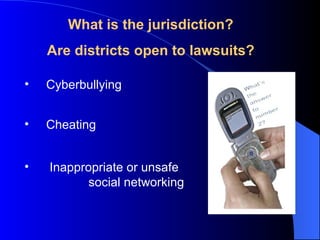
Cyberbullying What is the  jurisdiction? Are districts open to lawsuits? Cheating Inappropriate or unsafe  social networking
Filtering If the proposed Deleting Online Predators Act (H. R. 5319)  is passed, all social networking sites will be blocked in schools including: Blogs Wiki’s Social book marking YouTube Any other sites that allow users to create or edit content. Filtering required for access to E-rate dollars
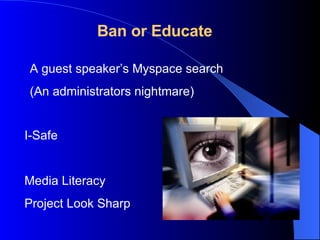
Ban or Educate I-Safe Media Literacy Project Look Sharp A guest speaker’s Myspace search (An administrators nightmare)
Acceptable Use Policies What technology is being used? Who has access? What use is acceptable?  What do the state and national laws consider acceptable? Is I-Safe or other training required? Copyright, cyber bullying, cheating and cell phone policies should be addressed.
Where do technology administrators learn about new technologies? The 2007 Horizon Report:  a collaboration between The New Media Consortium and the EDU CAUSE Learning Initiative
Time-to-Adoption:  One Year or Less User-Created Content Web 2.0 technologies – audience creates content. Create collaborative, student-authored resources. Give voice to communities and encourage idea  sharing. Social Networking – takes advantage of students interest in socializing Encourage community and self-expression. Immersion in a foreign language environment. Extend the impact and life span of conferences and  workshops.
Time-to-Adoption: Two to Three Years Mobile Phones - Widespread adoption of mobile phones for education. Soon phones will include projection systems, removing the barrier of the small screen; such devices are now in prototype. Offer self-paced audio and video tours Virtual Worlds – scalable 3D environments. Expand understanding of cultural and societal experiences. Stage theatrical productions. Learn through simulations and role-playing.
Time-to-Adoption: Four to Five Years The New Scholarship and Emerging Forms of Publication Protecting integrity vs collaboration and peer review.  Cut costs while reaching more people Massively Multiplayer Educational Gaming Many players in goal oriented games that are competitive or collaborative Used for foreign language, leadership skills, strategy and competitive practice

Grad presentation

  • 1.
    Past, Current, andFuture Use of Technology in Education Hardware and Future Trends Virtual Learning Evaluating Technology Acceptable Use and Legal Issues Presented by: Sue Dutter, Stacy Smith, Beth Sullivan, Diane Vang
  • 2.
    Current reports ontechnology from the US government Student access to internet at home and at school by age and income levels Some current and future technologies: PDA’s, tablets, brain-computer interface. Horizon 2007 Report – annual report that outlines trends and new technologies Why is Technology Important?
  • 3.
    Administration Officials UnderscoreImportance of Advanced Educational Technology to Future Success of Students, Workers at Release of 2020 Visions Report Technology Administration (TA), The Technology Administration is an agency of the US Department of Commerce http://www.technology.gov/PRel/pr020918.htm
  • 4.
    Highlights From EducationUnder Secretary Hickok "We still educate students based on an agricultural timetable, in an industrial setting, but tell students they live in a digital age. Our nation needs a revolution in the way we educate students.” “ Technology can allow us to think of new ways of achieving the same goal - but through different means,"
  • 5.
    White Papers onTechnology – Lists papers describing the evolution of technology in schools and related topics. http://www.ed. gov /Technology/Futures/ toc .html
  • 6.
    Connected to thefuture: A report on children’s Internet use from the Corporation for Public Broadcasting This study reports on patterns of Internet use in US households with children. Sixty-five percent of US children use the Internet up 59% from 2000. 35 percent of preschool children 6 percent in 2000. This is the fastest growing age group. 98 percent of high income families own computers compared with 65 percent of low income families. Children were online 5.9 hours per week in 2002 compared with 3.1 hours per week in 2000. The older the child, the more time spent online. http:// caret. iste .org/index. cfm ? StudyID =1035&fuseaction= studySummary
  • 7.
    http://www.nelliemuller.com/Future_Trends_in_Educational_% 20Technology.htm FromFuture Trends in Educational Technology Learners now depend more on information retrieval then they do on knowledge. Teachers will become facilitators who focus on social skills. Home schooling and web based courses will increase
  • 8.
  • 9.
    The most interestingtechnology: Brain-computer interface A brain-computer interface (BCI), sometimes called a direct neural interface or a brain-machine interface , is a direct communication pathway between a human brain and an external device. Developed in the 1990’s.
  • 10.
    Directions for Use– this was recently displayed at Cebit trade show in Las Vegas A cap fits over the users head. Electrodes are placed over the brain and fluctuations in voltage are read and interpreted by a software program. Currently the software requires training. Newer systems require fewer electrodes and improved software. Current cost $4,000 and dropping http://www.computerworld.com.au/index.php/id;361485560;fp;16;fpid;1
  • 11.
    Brain-Computer Interfaces ComeHome: November 28, 2006 http://www.nibib.nih.gov/HealthEdu/PubsFeatures/eAdvances/28Nov06
  • 12.
  • 13.
    Virtual Learning OptionsDistance Learning Tutorials Virtual Classrooms Web-based Learning In Jan. 2005, the National Education Technology Plan released by the US Dept. of Education reported that “25% of K-12 public schools offered some form of virtual instruction and predicted that, in the next decade, almost every state and school will follow”. Wood, C. (2005). High School.Com, Edutopia, Retrieved March 2, 2007 from http://edutopia.org/onlinelearning
  • 14.
    What is VirtualLearning? Images from www.compasslearning.com Virtual Learning is the employment of information and communication technologies to deliver instruction. Virtual learning is a term frequently used interchangeably with distance learning, online learning, e-learning, or Web-based learning. ~Columbus Technical College website: http://www. columbustech . edu /virtual/
  • 15.
    Far-flung hatchling tofull-fledged industry Gary Marx in Sixteen Trends states that “ Distance learning is no longer an innovation; it has become a staple.” (p 97) Compass Learning CCC Successmaker Atomic Learning Check out the demo and sample activities at http://www.childu.com/ from the Compass Learning Odyssey website.
  • 16.
    Benefits… Web-based ~access anytime, anyplace Global community of learners Access to more course options, including AP courses Accommodates different learning styles Individualized, self-paced learning Flexible Immediate feedback
  • 17.
    Concerns… Lack ofsocial interaction Isolation Less personal (human) attention from teacher Web-based – cheating opportunities Lack of audio processing Promotion of hyperactivity
  • 18.
    Virtual School Principal’s To-do List Train teachers Create partnership between teachers and parents Lead through collaboration Focus on student achievement-not on discipline Get to know families, not just individual children Develop a vision and spread the word Frey, B. (2005). A Virtual School Principal’s To-Do List, T.H.E. Journal , 32 (6), p 34
  • 19.
    Specific items toconsider before committing to a Virtual Learning Program… What policies need to be developed? Is the curriculum self-paced? What kind of interactions are provided? Can interactions be reviewed by administrators? Are different learning styles accommodated? learning disabilities? Course completion rates/success rates? Resource considerations; personnel, technology, budget Security measures Professional development for teachers What support is included? Technical, personnel, student Will this provide quality education? Pape,L. (2004). Choosing Online Education: Good policies will lead to better decisions about virtual learning options, School Administrator, 61 (4), p 10.
  • 20.
    My summer schoolexperience… Superintendent’s proposal His vision His research Implementation ~ pilot What is NYSED doing? The future of Online/Virtual Learning… Time will tell…
  • 21.
    How to EvaluateEducational Technology The Principal’s Role: -Find out if the technology meets the student’s and school’s needs. -Is it cost-effective?
  • 22.
    People to helpyou evaluate educational technology Review your school policies Consult with your technology director Survey your teachers for technology expertise Contact your local BOCES Hire an evaluation company
  • 23.
    When you haveto evaluate the technology yourself Read a book Peruse technological magazines and journals for information Check the Internet for product reviews and evaluations by other educators Use the US Government’s guide for evaluating technology for educational use Learn how to use the technology and try it!
  • 24.
    Legal Issues and Technology Copyright Laws Are you, your staff or your students breaking the law? Fair Use Guidelines, the TEACH Act, the Digital Millennium Copyright Act (Education and Copyright Harmonization Act)
  • 25.
    Cyberbullying What isthe jurisdiction? Are districts open to lawsuits? Cheating Inappropriate or unsafe social networking
  • 26.
    Filtering If theproposed Deleting Online Predators Act (H. R. 5319) is passed, all social networking sites will be blocked in schools including: Blogs Wiki’s Social book marking YouTube Any other sites that allow users to create or edit content. Filtering required for access to E-rate dollars
  • 27.
    Ban or EducateI-Safe Media Literacy Project Look Sharp A guest speaker’s Myspace search (An administrators nightmare)
  • 28.
    Acceptable Use PoliciesWhat technology is being used? Who has access? What use is acceptable? What do the state and national laws consider acceptable? Is I-Safe or other training required? Copyright, cyber bullying, cheating and cell phone policies should be addressed.
  • 29.
    Where do technologyadministrators learn about new technologies? The 2007 Horizon Report: a collaboration between The New Media Consortium and the EDU CAUSE Learning Initiative
  • 30.
    Time-to-Adoption: OneYear or Less User-Created Content Web 2.0 technologies – audience creates content. Create collaborative, student-authored resources. Give voice to communities and encourage idea sharing. Social Networking – takes advantage of students interest in socializing Encourage community and self-expression. Immersion in a foreign language environment. Extend the impact and life span of conferences and workshops.
  • 31.
    Time-to-Adoption: Two toThree Years Mobile Phones - Widespread adoption of mobile phones for education. Soon phones will include projection systems, removing the barrier of the small screen; such devices are now in prototype. Offer self-paced audio and video tours Virtual Worlds – scalable 3D environments. Expand understanding of cultural and societal experiences. Stage theatrical productions. Learn through simulations and role-playing.
  • 32.
    Time-to-Adoption: Four toFive Years The New Scholarship and Emerging Forms of Publication Protecting integrity vs collaboration and peer review. Cut costs while reaching more people Massively Multiplayer Educational Gaming Many players in goal oriented games that are competitive or collaborative Used for foreign language, leadership skills, strategy and competitive practice