
Basic Internet Browsers(Comparison)
&
Search/ Metasearch Engine
Jesus Ernesto Reyes
JRU-High School
2k13 – 2k14
Internet Explorer
PROS
• Hardware acceleration. Minimalist interface. Download manager
with malware protection. Improved tab function. Many security
features. Tracking Protection. Improved standards support.
Pinned tabs make sites like apps in Windows 7.
CONS
• Behind other browsers in HTML5 support. Only works in
Windows 7 and Vista.
BOTTOM LINE
• Microsoft's Web browser is a big improvement over IE8, but it's
largely stood still for over a year, while other browsers have
advanced.
Mozilla Firefox
• PROS
Clean, minimal interface. Fast performance. Innovative tab
implementation. Highly customizable. Good HTML5 support. Good
security. Most cross-platform support. Social network integration
via API. Syncing for tabs, history, passwords and now extensions.
Built-in PDF viewer. Independent from large vendor. Compatible
with MacBook Retina displays.
• CONS
Lacks client-side tracking protection like that found in IE9. Lacks
Chrome's built in Flash and Instant page view. Slightly trails
Chrome in HTML5 features.
• BOTTOM LINE
Firefox offers clean design, fast performance, new standards support,
and constant improvements? Now, with browser health reporting.
Google Chrome
• PROS
Leading support for HTML 5. Fast. Hardware acceleration. Excellent
security. Instant site prediction and loading. Extensions. Syncing.
Built-in Flash player and PDF reader. Spell checking.
• CONS
Do Not Track privacy feature is buried and discouraged. Still some
occasional minor site incompatibilities. Fonts occasionally
jagged.
• BOTTOM LINE
The race is tightening up, but Google Chrome remains the Windows
Web browser to beat, in terms of speed, features, and support
for new standards.
Abstraction:
Ideal web browser is subjective, since it is
on the appreciation of the internet users
what features they’re utilizing every time
they are surfing the cyberspace.
Search Engines
or
Metasearch Engines?
SEARCH ENGINES
• It is a tool for finding information, especially on
the INTERNET or WORLD WIDE WEB. Search
engines are essentially massive
DATABASES that cover wide swaths of the
Internet.
• It has three components:
– Spiders (Crawler; Link-finder)
– Index or Database
– Search tool or Search and Retrieval Mechanism
SPIDERS ( CRAWLER, LINK-FINDER)
• Robot software uses HTTP to request documents
associated with a certain URL.
• A computer program that harvests web links from
page to page.
INDEX OR DATABASE
• A database that is organized and
searchable of the Spider's harvested
result
Search tool or Search and
Retrieval Mechanism
• Software that allows users to search the Index
and return results in a predetermined order.
• But a Search Engine also is commonly used to
refer to any software that searches an Index
of Words or material types
COMMON TYPES OF SEARCH ENGINES
• Yahoo.com
• Google.com
• Bing.com
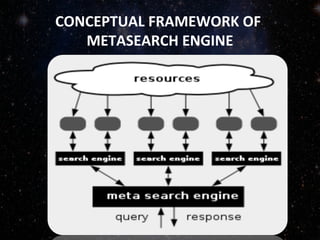
METASEARCH ENGINE
• A metasearch engine is  a search  tool 
that 
sends  user  requests  to  several  other  search 
engines and/or databases and aggregates the 
results  into  a  single  list  or  displays  them 
according to their source
CONCEPTUAL FRAMEWORK OF
METASEARCH ENGINE
BOOLEAN EXPRESSION
•  Is an expression that results in a boolean 
value, that is, in a value of 
either true or false.
• It is important in constructing your 
queries to search for it affirms, negates, 
or discriminate word/s involved.
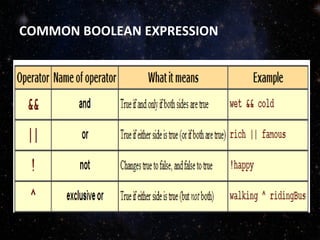
COMMON BOOLEAN EXPRESSION
Agreement:
• E-mail: History and Concept
– Uses: Advantages and Disadvantages (3)
– Parts and requirements
– Features and functions
• What are the shortcut keys in surfing the net
• What are emoticons and chat shortcuts.
– Samples and their meanings.
Kingsoft Office
Make Presentation much more fun

Internet browser and search engines

  • 1.
    Basic Internet Browsers(Comparison) & Search/Metasearch Engine Jesus Ernesto Reyes JRU-High School 2k13 – 2k14
  • 2.
    Internet Explorer PROS • Hardwareacceleration. Minimalist interface. Download manager with malware protection. Improved tab function. Many security features. Tracking Protection. Improved standards support. Pinned tabs make sites like apps in Windows 7. CONS • Behind other browsers in HTML5 support. Only works in Windows 7 and Vista. BOTTOM LINE • Microsoft's Web browser is a big improvement over IE8, but it's largely stood still for over a year, while other browsers have advanced.
  • 3.
    Mozilla Firefox • PROS Clean,minimal interface. Fast performance. Innovative tab implementation. Highly customizable. Good HTML5 support. Good security. Most cross-platform support. Social network integration via API. Syncing for tabs, history, passwords and now extensions. Built-in PDF viewer. Independent from large vendor. Compatible with MacBook Retina displays. • CONS Lacks client-side tracking protection like that found in IE9. Lacks Chrome's built in Flash and Instant page view. Slightly trails Chrome in HTML5 features. • BOTTOM LINE Firefox offers clean design, fast performance, new standards support, and constant improvements? Now, with browser health reporting.
  • 4.
    Google Chrome • PROS Leadingsupport for HTML 5. Fast. Hardware acceleration. Excellent security. Instant site prediction and loading. Extensions. Syncing. Built-in Flash player and PDF reader. Spell checking. • CONS Do Not Track privacy feature is buried and discouraged. Still some occasional minor site incompatibilities. Fonts occasionally jagged. • BOTTOM LINE The race is tightening up, but Google Chrome remains the Windows Web browser to beat, in terms of speed, features, and support for new standards.
  • 5.
    Abstraction: Ideal web browseris subjective, since it is on the appreciation of the internet users what features they’re utilizing every time they are surfing the cyberspace.
  • 6.
  • 7.
    SEARCH ENGINES • Itis a tool for finding information, especially on the INTERNET or WORLD WIDE WEB. Search engines are essentially massive DATABASES that cover wide swaths of the Internet. • It has three components: – Spiders (Crawler; Link-finder) – Index or Database – Search tool or Search and Retrieval Mechanism
  • 8.
    SPIDERS ( CRAWLER,LINK-FINDER) • Robot software uses HTTP to request documents associated with a certain URL. • A computer program that harvests web links from page to page.
  • 9.
    INDEX OR DATABASE •A database that is organized and searchable of the Spider's harvested result
  • 10.
    Search tool orSearch and Retrieval Mechanism • Software that allows users to search the Index and return results in a predetermined order. • But a Search Engine also is commonly used to refer to any software that searches an Index of Words or material types
  • 11.
    COMMON TYPES OFSEARCH ENGINES • Yahoo.com • Google.com • Bing.com
  • 12.
    METASEARCH ENGINE • A metasearchengine is  a search  tool  that  sends  user  requests  to  several  other  search  engines and/or databases and aggregates the  results  into  a  single  list  or  displays  them  according to their source
  • 13.
  • 14.
    BOOLEAN EXPRESSION •  Is an expression that results in a boolean  value, that is, in a value of  either true or false. •It is important in constructing your  queries to search for it affirms, negates,  or discriminate word/s involved.
  • 15.
  • 16.
    Agreement: • E-mail: Historyand Concept – Uses: Advantages and Disadvantages (3) – Parts and requirements – Features and functions • What are the shortcut keys in surfing the net • What are emoticons and chat shortcuts. – Samples and their meanings.
  • 17.