XP
1
Internet and Web Basics
XP
New Perspectives on Browser and E-mail Basics
Tutorial 1
2
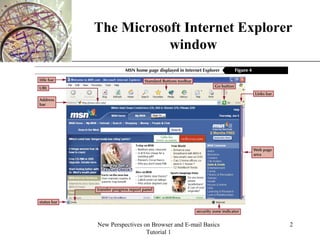
The Microsoft Internet Explorer
window
XP
New Perspectives on Browser and E-mail Basics
Tutorial 1
3
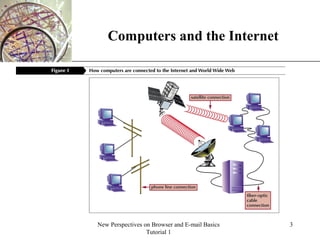
Computers and the Internet
XP
New Perspectives on Browser and E-mail Basics
Tutorial 1
4
Learn about Web addresses and URLs
• Each computer on the Internet has an unique identification
number, called an IP (Internet Protocol) address.
• The IP addressing system currently in use on the Internet
uses a four-part number.
• Each part of the address is a number ranging from 0 to
255, and each part is separated from the previous part by a
period, for example: 106.29.242.17.
• Although each computer connected to the Internet has a
unique IP address, most Web browsers use domain name
addressing to locate Web sites and pages.
XP
New Perspectives on Browser and E-mail Basics
Tutorial 1
5
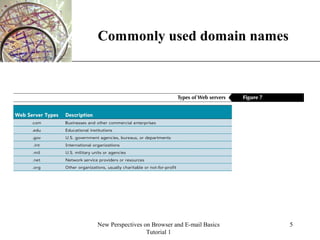
Commonly used domain names
XP
New Perspectives on Browser and E-mail Basics
Tutorial 1
6
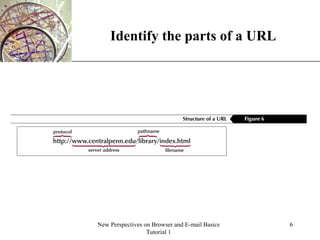
Identify the parts of a URL
XP
New Perspectives on Browser and E-mail Basics
Tutorial 1
7
Anchor tags are used
to define hyperlinks
• Text files on Web servers are coded with HTML
formatting tags that enable your browser to read text.
• The tag that gives HTML its power, however, is the anchor
tag.
• Each anchor tag used in an HTML document, or Web
page, creates a hypertext link or hypermedia link to other
HTML documents or to other media.
• These links are a different color than other text on the
page, and are sometimes underlined. When you click the
link, you connect to another Web page.

Internet and Web Basics

  • 1.
  • 2.
    XP New Perspectives onBrowser and E-mail Basics Tutorial 1 2 The Microsoft Internet Explorer window
  • 3.
    XP New Perspectives onBrowser and E-mail Basics Tutorial 1 3 Computers and the Internet
  • 4.
    XP New Perspectives onBrowser and E-mail Basics Tutorial 1 4 Learn about Web addresses and URLs • Each computer on the Internet has an unique identification number, called an IP (Internet Protocol) address. • The IP addressing system currently in use on the Internet uses a four-part number. • Each part of the address is a number ranging from 0 to 255, and each part is separated from the previous part by a period, for example: 106.29.242.17. • Although each computer connected to the Internet has a unique IP address, most Web browsers use domain name addressing to locate Web sites and pages.
  • 5.
    XP New Perspectives onBrowser and E-mail Basics Tutorial 1 5 Commonly used domain names
  • 6.
    XP New Perspectives onBrowser and E-mail Basics Tutorial 1 6 Identify the parts of a URL
  • 7.
    XP New Perspectives onBrowser and E-mail Basics Tutorial 1 7 Anchor tags are used to define hyperlinks • Text files on Web servers are coded with HTML formatting tags that enable your browser to read text. • The tag that gives HTML its power, however, is the anchor tag. • Each anchor tag used in an HTML document, or Web page, creates a hypertext link or hypermedia link to other HTML documents or to other media. • These links are a different color than other text on the page, and are sometimes underlined. When you click the link, you connect to another Web page.