
Saturday, January 21, 2017
Project Title
INTERACTIVE FLOOR PROJECTION
SYSTEM
Presented By:
Mafaz Ahmed
Saturday, January 21, 2017
REVIEW:
Saturday, January 21, 2017
The purpose of this project was to make an interactive
floor. We used the projector for projection on the floor on
a specific area . When any object will entered in projected
area then floor will interact virtually .Floor is fully
designed with our desired type of animation. Designed
like produce waves in water, spreading leaves or flowers
etc.
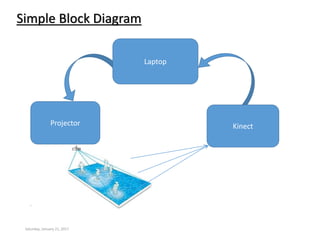
Kinect
Laptop
Simple Block Diagram
Saturday, January 21, 2017
Projector
Saturday, January 21, 2017
Software Installation for Kinect Sensor
Kinect for studio v1.8.0
Developer Toolkit for SDK v1.8.0
Drivers installation of Kinect.
Sensor Interfacing with computer
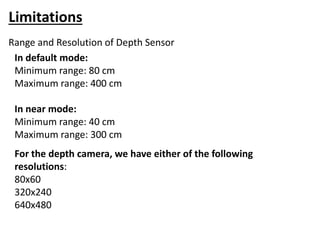
In default mode:
Minimum range: 80 cm
Maximum range: 400 cm
In near mode:
Minimum range: 40 cm
Maximum range: 300 cm
For the depth camera, we have either of the following
resolutions:
80x60
320x240
640x480
Limitations
Range and Resolution of Depth Sensor
Software Required and Algorithm Development
1.Visual Studio 2010 or latest.
2.Opencv2.4.1 Library for Image Processing.
Saturday, January 21, 2017
3.OpenGL for animation Design.
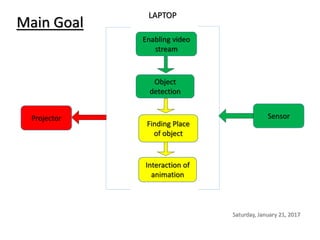
Main Goal
Saturday, January 21, 2017
Sensor
Interaction of
animation
Object
detection
Enabling video
stream
Finding Place
of object
Projector
LAPTOP
Saturday, January 21, 2017
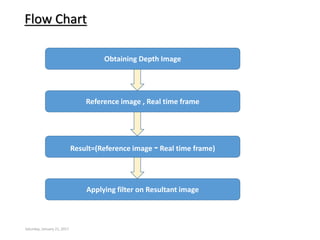
Flow Chart
Reference image , Real time frame
Result=(Reference image -Real time frame)
Obtaining Depth Image
Applying filter on Resultant image
Saturday, January 21, 2017
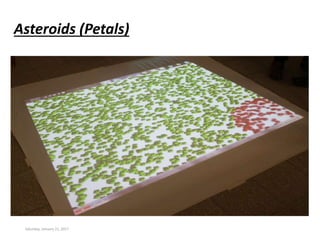
Asteroids (Petals)
Saturday, January 21, 2017
Creating Asteroids (Petals)
OpenGL is used for creating asteroids.
Set the coordinates 640x480 and create a window.
Set numOfAsteroids = 1000.
Set up Asteroids to place the petal randomly in the these
coordinates using void setUpAsteroidCoords() and with
random angles.
Check if given petals are contained within the coordinate
system bool isInBounds(float x, float y).
Draw petal with different colours and same dimension(x,y,z)
in 3D using void drawAsteroid().
Then Display.
Saturday, January 21, 2017
Bolb Detection
A Blob is a group of connected pixels in an image that
share some common property.
OpenCV provides a convenient way to detect blobs and
filter them based on different characteristics.
How does Blob detection works ?
Thresholding
Grouping
Merging
Centre & Radius Calculation
Saturday, January 21, 2017
Filtering Blobs by Color, Size and Shape
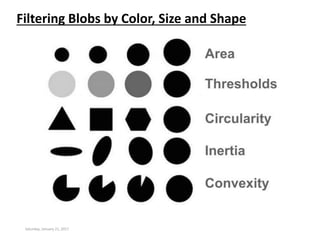
The parameters for SimpleBlobDetector can be set to filter the type of blobs
we want.
By Colour
Set filterByColor=1, then set blodColor=0 for darker blobs and
blobColor = 255 for lighter blobs.
By Size
Set filterByArea = 1, then select minArea and MaxArea.
By Shape
Now shape has three different parameters.
• Circularity
This just measures how close to a circle the blob. To filter by
circularity, set filterByCircularity = 1. Then set appropriate values
for minCircularity and maxCircularity.
For circle, circularity is 1.
For Square, circularity is 0.785
Saturday, January 21, 2017
Filtering Blobs by Color, Size and Shape
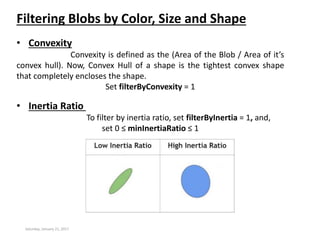
• Convexity
Convexity is defined as the (Area of the Blob / Area of it’s
convex hull). Now, Convex Hull of a shape is the tightest convex shape
that completely encloses the shape.
Set filterByConvexity = 1
• Inertia Ratio
To filter by inertia ratio, set filterByInertia = 1, and,
set 0 ≤ minInertiaRatio ≤ 1
Saturday, January 21, 2017
Filtering Blobs by Color, Size and Shape
Saturday, January 21, 2017
Interaction with Blobs(Object)
 Movement of petals will according to the location of blobs.
 We know the center of blobs.
 If blobs appear in the frame, then the petals should moves in the
random directions.
How It is done
 First find the distance between each petal with respect to blob.
 Set the threshold value to 100.
 If the distance is less than 100 than moves the petal in random direction.
Restoring Initial Position of Moved Petal
 At first we have stored the coordinates of each petal in array.
 Apply algorithm, which will continuously measure the distance.
 If distance is more than threshold than move the petal to initial position.
The End
Any Questions
Saturday, January 21, 2017

INTERACTIVE FLOOR PROJECTION SYSTEM

  • 1.
    Saturday, January 21,2017 Project Title INTERACTIVE FLOOR PROJECTION SYSTEM
  • 2.
  • 3.
    REVIEW: Saturday, January 21,2017 The purpose of this project was to make an interactive floor. We used the projector for projection on the floor on a specific area . When any object will entered in projected area then floor will interact virtually .Floor is fully designed with our desired type of animation. Designed like produce waves in water, spreading leaves or flowers etc.
  • 4.
  • 5.
    Saturday, January 21,2017 Software Installation for Kinect Sensor Kinect for studio v1.8.0 Developer Toolkit for SDK v1.8.0 Drivers installation of Kinect. Sensor Interfacing with computer
  • 6.
    In default mode: Minimumrange: 80 cm Maximum range: 400 cm In near mode: Minimum range: 40 cm Maximum range: 300 cm For the depth camera, we have either of the following resolutions: 80x60 320x240 640x480 Limitations Range and Resolution of Depth Sensor
  • 7.
    Software Required andAlgorithm Development 1.Visual Studio 2010 or latest. 2.Opencv2.4.1 Library for Image Processing. Saturday, January 21, 2017 3.OpenGL for animation Design.
  • 8.
    Main Goal Saturday, January21, 2017 Sensor Interaction of animation Object detection Enabling video stream Finding Place of object Projector LAPTOP
  • 9.
    Saturday, January 21,2017 Flow Chart Reference image , Real time frame Result=(Reference image -Real time frame) Obtaining Depth Image Applying filter on Resultant image
  • 10.
    Saturday, January 21,2017 Asteroids (Petals)
  • 11.
    Saturday, January 21,2017 Creating Asteroids (Petals) OpenGL is used for creating asteroids. Set the coordinates 640x480 and create a window. Set numOfAsteroids = 1000. Set up Asteroids to place the petal randomly in the these coordinates using void setUpAsteroidCoords() and with random angles. Check if given petals are contained within the coordinate system bool isInBounds(float x, float y). Draw petal with different colours and same dimension(x,y,z) in 3D using void drawAsteroid(). Then Display.
  • 12.
    Saturday, January 21,2017 Bolb Detection A Blob is a group of connected pixels in an image that share some common property. OpenCV provides a convenient way to detect blobs and filter them based on different characteristics. How does Blob detection works ? Thresholding Grouping Merging Centre & Radius Calculation
  • 13.
    Saturday, January 21,2017 Filtering Blobs by Color, Size and Shape The parameters for SimpleBlobDetector can be set to filter the type of blobs we want. By Colour Set filterByColor=1, then set blodColor=0 for darker blobs and blobColor = 255 for lighter blobs. By Size Set filterByArea = 1, then select minArea and MaxArea. By Shape Now shape has three different parameters. • Circularity This just measures how close to a circle the blob. To filter by circularity, set filterByCircularity = 1. Then set appropriate values for minCircularity and maxCircularity. For circle, circularity is 1. For Square, circularity is 0.785
  • 14.
    Saturday, January 21,2017 Filtering Blobs by Color, Size and Shape • Convexity Convexity is defined as the (Area of the Blob / Area of it’s convex hull). Now, Convex Hull of a shape is the tightest convex shape that completely encloses the shape. Set filterByConvexity = 1 • Inertia Ratio To filter by inertia ratio, set filterByInertia = 1, and, set 0 ≤ minInertiaRatio ≤ 1
  • 15.
    Saturday, January 21,2017 Filtering Blobs by Color, Size and Shape
  • 16.
    Saturday, January 21,2017 Interaction with Blobs(Object)  Movement of petals will according to the location of blobs.  We know the center of blobs.  If blobs appear in the frame, then the petals should moves in the random directions. How It is done  First find the distance between each petal with respect to blob.  Set the threshold value to 100.  If the distance is less than 100 than moves the petal in random direction. Restoring Initial Position of Moved Petal  At first we have stored the coordinates of each petal in array.  Apply algorithm, which will continuously measure the distance.  If distance is more than threshold than move the petal to initial position.
  • 17.