Sync, Async,
Multithreading in C#
Tuan Chau, Minh Huynh
May, 2020
Presenter
Tuan Chau
tuanchau@kms-technology.com
tuanchau.mt@gmail.com
2
Minh Huynh
minhhuynh@kms-technology.com
minhhuynh1703@gmail.com
AGENDA
• What is Synchronous ?
• And What is Asynchronous ?
• Task – Task Parallel Library
• Multi-Threading
• Thread Pool
• Thread Safety – Debug when working with
Threading
3
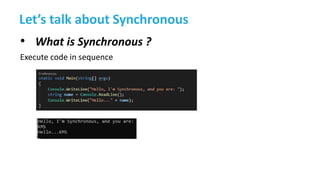
Let’s talk about Synchronous
• What is Synchronous ?
Execute code in sequence
4
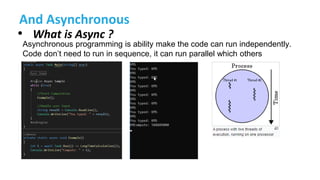
And Asynchronous
• What is Async ?
5
Asynchronous programming is ability make the code can run independently.
Code don’t need to run in sequence, it can run parallel which others
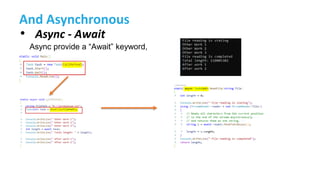
And Asynchronous
• Async - Await
7
Async provide a “Await” keyword,
What is Task
• Task
8
A task is an object that represents some work that should be done. The task can tell
you if the work is completed and if the operation returns a result, the task gives you the
result.
What is Task
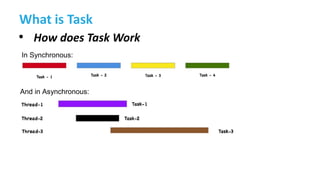
• How does Task Work
9
In Synchronous:
And in Asynchronous:
Task Parallel Library (TPL)
13
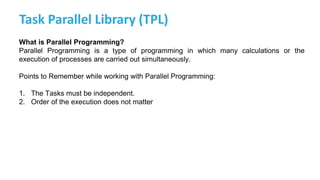
What is Parallel Programming?
Parallel Programming is a type of programming in which many calculations or the
execution of processes are carried out simultaneously.
Points to Remember while working with Parallel Programming:
1. The Tasks must be independent.
2. Order of the execution does not matter
Task Parallel Library (TPL)
• What is TPL?
14
The Task Parallel Library (TPL) in .NET, is a set of public types and APIs in the
System.Threading and System.Threading.Tasks namespaces. TPL has been created in
order to help developers to easily add parallelism and concurrency in their .NET
applications.
The next following example will help you understand about TPL ☺
Task Parallel Library (TPL)
• C# supports two types of parallelism:
15
1. Data parallelism
2. Task parallelism
Task Parallel Library (TPL)
• Data parallelism
16
In the case of Data Parallelism, the operation is applied to each element of a collection. Means each
process does the same work on unique and independent pieces of data.
1. Parallel.For
2. Parallel.ForEach
Task Parallel Library (TPL)
• Parallel.For
17
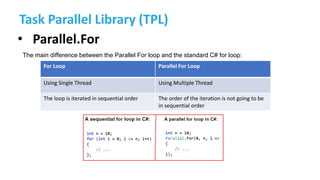
The main difference between the Parallel For loop and the standard C# for loop:
For Loop Parallel For Loop
Using Single Thread Using Multiple Thread
The loop is iterated in sequential order The order of the iteration is not going to be
in sequential order
Task Parallel Library (TPL)
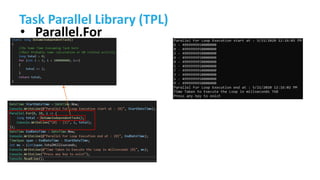
• Parallel.For
18
Task Parallel Library (TPL)
• Parallel.For
19
Task Parallel Library (TPL)
• Parallel.For
20
Task Parallel Library (TPL)
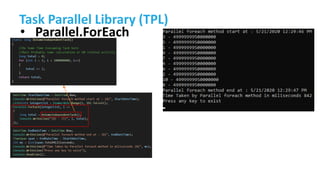
• Parallel.ForEach
21
Task Parallel Library (TPL)
• Parallel.ForEach
22
Task Parallel Library (TPL)
• Task parallelism
23
In the case of Task Parallelism independent computations are executed in parallel. Means each process
performs a different function or executes different code sections that are independent.
1. Parallel.Invoke
Task Parallel Library (TPL)
• Parallel.For
24
Task Parallel Library (TPL)
• Parallel.ForEach
25
Task Parallel Library (TPL)
• Parallel.ForEach
26
What is Multi-Threading
• Multi-threading
27
Multithreading is a process in which multiple threads work simultaneously.
It is a process to achieve multitasking. It saves time because multiple tasks
are being executed at a time.
To use Multi-thread, we will
use the namespace
System.Threading
What is Multi-Threading
• Life Cycle of Multi-thread
28
What is Multi-Threading
• Life Cycle of Multi-thread
• Unstarted: Instance of a thread is created, but haven’t call
Start().
• Ready: Thread is ready to run and waiting for CPU cycle.
• Running: Only one thread within a process can be executed at a
time. At the time of execution, the thread is running state.
• Not-Runnable: Thread is not executable when:
– Sleep() was called.
– Wait() was called.
– Prevented by I/O process.
• Dead: Thread is completed or removed.
29
What is Multi-Threading
30
The Thread is in unstarted State
What is Multi-Threading
31
The thread is in Running State
What is Multi-Threading
32
The thread is not runnable state
Kỹ hơn cho
wait/sleep/join
What is Multi-Threading
33
The thread is in Dead State
End thread
What is Multi-Threading
• Method of Thread class
34
Join(): Allows one thread to wait until
another thread completes its execution.
What is Multi-Threading
• Method of Thread class
35
Join(): Allows one thread to wait until another thread completes its execution.
With join() Without join()
What is Multi-Threading
• Method of Thread class
36
Abort(): use for terminating a thread.
Abort() will throws ThreadAbortException to the thread in which it called
What is Multi-Threading
• ThreadAbortException
37
Exception when use Abort():
• SecurityException: If the caller does not have the required
permission.
• ThreadStateException: If the thread that is being aborted is
currently suspended.
Thread Pool
38
38
Thread Pool
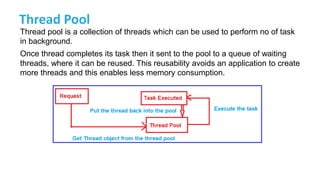
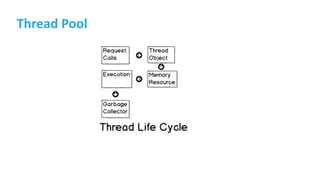
Thread pool is a collection of threads which can be used to perform no of task
in background.
Once thread completes its task then it sent to the pool to a queue of waiting
threads, where it can be reused. This reusability avoids an application to create
more threads and this enables less memory consumption.
39
Thread Pool
Using namespace System.Threading
40
Thread Pool
41
Task vs Thread vs BackgroundWorker
42
Pros Cons
Thread - an Actual OS-Level Thread Costly.
Each thread consumes a non-trivial
amount of memory for its stack, and adds
additional CPU overhead as the processor
context-switch between Thread.
ThreadPool - a wrapper around a pool of
threads,
Avoid creating too many Thread.
Best use for short operations, where the
caller does not need the result.
If submit too many task, it can get full and
later work can end up waiting for long-
running items to finish
Task - does not create its own OS thread.
instead, tasks are executed by a
TaskScheduler which simply runs on the
ThreadPool
Task allows user find out when it finishes
and return result.
Task provides LongRunning option, which
will tell the TaskScheduler to spin up a new
Thread rather than running on ThreadPool
Synchronous waiting for a task is bad
practice, it prevents the calling thread
from doing other works, and can lead to
deadlocks
BackgroundWorker - create a thread and
run it in background (
Thread.IsBackground = true)
use when a time-consuming process need
to be executed without affecting the
responsive of user interface.
What is Multi-Threading
• How to pass a parameter to thread
48
In Thread class, ParameterizedThreadStart delegate provides an easy way to
pass an object containing data to a thread when you call the Thread.Start method
overload.
Thread Priority
• What is Thread Priority
49
In a Multithreading environment, each thread has their own priority. A thread’s priority shows how
frequently a thread gains the access to CPU resources. Whenever we create a thread in C#, it
always has some priority assigned to it.
public ThreadPriority Priority{ get; set; }
The priorities are:
• Highest: The value of this priorities is 4.
• Above Normal: The value of this priorities is 3
• Normal: The value of this priorities is 2
• Below Normal: The value of this priorities is 1
• Lowest: The value of this priorities is 0
Thread Priority
50
Thread Priority
51
Thread Synchronization
• Lock an object when being used by a thread
52
Lock keyword ensures that one thread is executing a piece of code at one
time. The lock keyword ensures that one thread does not enter a critical section
of code while another thread is in that critical section.
There are 2 way to do:
• Using Lock keyword
• Using Monitor
Thread Synchronization
• Lock
53
Thread Synchronization
• Lock
54
Thread Synchronization
• Lock an object when being used by a thread
55
Monitor provides a mechanism that synchronizes access to objects. It can
be done by acquiring a significant lock so that only one thread can enter in a
given piece of code at one time. Monitor is no different from lock but the
monitor class provides more control over the synchronization of various
threads trying to access the same lock of code.
The Monitor class has the following methods for the synchronize access to a
region of code by taking and releasing a lock:
• Monitor.Enter
• Monitor.TryEnter
• Monitor.Exit
• Monitor.Wait
• Monitor.Pulse
Monitor.PulseAll
Thread Synchronization
• Lock an object when being used by a thread
56
Lock and monitor are basically used for the same purpose in multithreading, the
difference is that only when we want more control over synchronization with multiple
threads running for a specific section of code.
Thread Synchronization
• Monitor
– It is associated with an object on demand.
– It is unbound, which means it can be called directly from
any context.
– An instance of the Monitor class cannot be created.
57
Thread Synchronization
58
ACTION DESCRIPTION
Enter, TryEnter Acquires a lock for an object. This action also marks the beginning of a critical section. No
other thread can enter the critical section unless it is executing the instructions in the critical
section using a different locked object.
Wait Releases the lock on an object in order to permit other threads to lock and access the
object. The calling thread waits while another thread accesses the object. Pulse signals are
used to notify waiting threads about changes to an object's state.
Pulse (signal),
PulseAll
Sends a signal to one or more waiting threads. The signal notifies a waiting thread that the state of
the locked object has changed, and the owner of the lock is ready to release the lock. The waiting
thread is placed in the object's ready queue so that it might eventually receive the lock for the
object. Once the thread has the lock, it can check the new state of the object to see if the required
state has been reached.
Exit Releases the lock on an object. This action also marks the end of a critical section protected by the
locked object.
Thread Synchronization
• Monitor.Enter()
Acquires an exclusive lock on a specified object.
59
Thread Synchronization
62
Signaling With Monitor
Using Wait – Pulse – PulseAll
Wait and Pulse signaling, however, has some disadvantages over event wait
handles:
• Wait/Pulse cannot span application domains or processes on a computer.
• You must remember to protect all variables related to the signaling logic with
locks.
• Wait/Pulse programs may confuse developers relying on Microsoft’s
documentation.
Thread Synchronization
63
Signaling With Monitor
Exception of Multi-Threading
• Cross Thread Exception
A cross-thread operation in C# is a call that accesses components from a different thread.
67
Exception of Multi-Threading
• Cross Thread Exception
68
What is Thread safety
Thread safety is a technique which manipulates shared data structure in a
manner that guarantees the safe execution of a piece of code by the multiple
threads at the same time. (what)
Thread safety help to remove 2 conditions in the code: (why to use)
•Race Condition
•Deadlocks
Thread safety is often achieved by synchronizing threads to make sure that
any updates are atomic. (how)
What is Thread safety
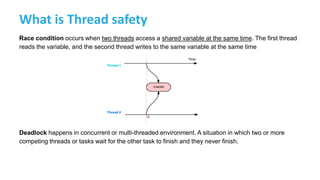
Race condition occurs when two threads access a shared variable at the same time. The first thread
reads the variable, and the second thread writes to the same variable at the same time
Deadlock happens in concurrent or multi-threaded environment. A situation in which two or more
competing threads or tasks wait for the other task to finish and they never finish.
What is Thread safety
How to make a Thread-safe
•The Interlocked Class :
•The Monitor Class
•ReaderWriterLock Class (.NET 2.0)
•Lock Event (.NET 4.0)
•ManualResetEvents
•Mutex
•Semaphore
What is Thread safety
• The Interlocked static class provides methods to turn nonatomic operations into atomic ones.
• Helps with threaded programs. It safely changes the value of a shared variable from multiple
threads
• The Interlocked has three basic
operations:
Increment
Decrement
Add
Exchange
CompareExchange
The Interlocked class
What is Thread safety
• Thread-safety
73
Mutex:
Mutex works like a lock in C# for thread synchronization, but it works across multiple processes. Mutex
provides safety against the external threads.
The Mutex class provides the WaitOne() method which we need to call to lock the resource and
similarly it provides ReleaseMutex() which is used to unlock the resource. Note that a Mutex can only
be released from the same thread which obtained it.
What is Thread safety
• Mutex
74
What is Thread safety
• Thread-safety
75
Semaphore:
The Semaphore in C# is used to limit the number of threads that can have access to a shared resource
concurrently.
In other words, we can say that Semaphore allows one or more threads to enter into the
critical section and execute the task concurrently with thread safety.
So, in real-time, we need to use Semaphore when we have a limited number of resources and we want
to limit the number of threads that can use it.
What is Thread safety
• Thread-safety
76
Semaphore:
The Semaphore in C# is used to limit the number of threads that can have access to a shared resource
concurrently.
In other words, we can say that Semaphore allows one or more threads to enter into the
critical section and execute the task concurrently with thread safety.
So, in real-time, we need to use Semaphore when we have a limited number of resources and we want
to limit the number of threads that can use it.
What is Thread safety
• Thread-safety
77
Semaphore:
Semaphore semaphore = new Semaphore(2,3); //(InitialCount, MaximumCount)
The InitialCount parameter sets the value for the Int32 variable. That is it defines the initial number of
requests for the semaphore that can be granted concurrently.
MaximumCount parameter defines the maximum number of requests for the semaphore that can be
granted concurrently.
What is Thread safety
• Mutex
78
Debugging in Multi-threading
• Example
79
Debugging in Multi-threading
• Parallel Stacks Window
80
Debugging in Multi-threading
• Task Window
81
Debugging in Multi-threading
• Parallel Watch
82
Foreground and Background Thread
93
FOREGROUND BACKGROUND
• Foreground threads are those threads that keep
running even after the application exits or quits.
It also has the ability to prevent the current
application from terminating.
• The CLR will not shut down the application until
all Foreground Threads have stopped.
• Background Threads are those threads that will
quit if our main application quits. In short, if our
main application quits, the background thread
will also quit.
• Background threads are views by the CLR and if
all foreground threads have terminated, any
and all background threads are automatically
stopped when the application quits.
From the main thread, we can create other threads for doing the desired task in the program.
The process of developing a program for execution with multiple threads is called
multithreaded programming and the process of execution is called multithreading.
References
94
• Jon Skeet – (2019). C# in Depth, Fourth Edition. Manning Publications
• C#.NET Tutorials For Beginners and Professionals - https://dotnettutorials.net/
• Artemakis Artemiou – (2019) - .NET Multithreading Example Using Task Parallel Library -
https://www.mssqltips.com/sqlservertip/5991/net-multithreading-example-using-task-parallel-
library/
95

Sync, async and multithreading

  • 1.
    Sync, Async, Multithreading inC# Tuan Chau, Minh Huynh May, 2020
  • 2.
  • 3.
    AGENDA • What isSynchronous ? • And What is Asynchronous ? • Task – Task Parallel Library • Multi-Threading • Thread Pool • Thread Safety – Debug when working with Threading 3
  • 4.
    Let’s talk aboutSynchronous • What is Synchronous ? Execute code in sequence 4
  • 5.
    And Asynchronous • Whatis Async ? 5 Asynchronous programming is ability make the code can run independently. Code don’t need to run in sequence, it can run parallel which others
  • 6.
    And Asynchronous • Async- Await 7 Async provide a “Await” keyword,
  • 7.
    What is Task •Task 8 A task is an object that represents some work that should be done. The task can tell you if the work is completed and if the operation returns a result, the task gives you the result.
  • 8.
    What is Task •How does Task Work 9 In Synchronous: And in Asynchronous:
  • 9.
    Task Parallel Library(TPL) 13 What is Parallel Programming? Parallel Programming is a type of programming in which many calculations or the execution of processes are carried out simultaneously. Points to Remember while working with Parallel Programming: 1. The Tasks must be independent. 2. Order of the execution does not matter
  • 10.
    Task Parallel Library(TPL) • What is TPL? 14 The Task Parallel Library (TPL) in .NET, is a set of public types and APIs in the System.Threading and System.Threading.Tasks namespaces. TPL has been created in order to help developers to easily add parallelism and concurrency in their .NET applications. The next following example will help you understand about TPL ☺
  • 11.
    Task Parallel Library(TPL) • C# supports two types of parallelism: 15 1. Data parallelism 2. Task parallelism
  • 12.
    Task Parallel Library(TPL) • Data parallelism 16 In the case of Data Parallelism, the operation is applied to each element of a collection. Means each process does the same work on unique and independent pieces of data. 1. Parallel.For 2. Parallel.ForEach
  • 13.
    Task Parallel Library(TPL) • Parallel.For 17 The main difference between the Parallel For loop and the standard C# for loop: For Loop Parallel For Loop Using Single Thread Using Multiple Thread The loop is iterated in sequential order The order of the iteration is not going to be in sequential order
  • 14.
    Task Parallel Library(TPL) • Parallel.For 18
  • 15.
    Task Parallel Library(TPL) • Parallel.For 19
  • 16.
    Task Parallel Library(TPL) • Parallel.For 20
  • 17.
    Task Parallel Library(TPL) • Parallel.ForEach 21
  • 18.
    Task Parallel Library(TPL) • Parallel.ForEach 22
  • 19.
    Task Parallel Library(TPL) • Task parallelism 23 In the case of Task Parallelism independent computations are executed in parallel. Means each process performs a different function or executes different code sections that are independent. 1. Parallel.Invoke
  • 20.
    Task Parallel Library(TPL) • Parallel.For 24
  • 21.
    Task Parallel Library(TPL) • Parallel.ForEach 25
  • 22.
    Task Parallel Library(TPL) • Parallel.ForEach 26
  • 23.
    What is Multi-Threading •Multi-threading 27 Multithreading is a process in which multiple threads work simultaneously. It is a process to achieve multitasking. It saves time because multiple tasks are being executed at a time. To use Multi-thread, we will use the namespace System.Threading
  • 24.
    What is Multi-Threading •Life Cycle of Multi-thread 28
  • 25.
    What is Multi-Threading •Life Cycle of Multi-thread • Unstarted: Instance of a thread is created, but haven’t call Start(). • Ready: Thread is ready to run and waiting for CPU cycle. • Running: Only one thread within a process can be executed at a time. At the time of execution, the thread is running state. • Not-Runnable: Thread is not executable when: – Sleep() was called. – Wait() was called. – Prevented by I/O process. • Dead: Thread is completed or removed. 29
  • 26.
    What is Multi-Threading 30 TheThread is in unstarted State
  • 27.
    What is Multi-Threading 31 Thethread is in Running State
  • 28.
    What is Multi-Threading 32 Thethread is not runnable state Kỹ hơn cho wait/sleep/join
  • 29.
    What is Multi-Threading 33 Thethread is in Dead State End thread
  • 30.
    What is Multi-Threading •Method of Thread class 34 Join(): Allows one thread to wait until another thread completes its execution.
  • 31.
    What is Multi-Threading •Method of Thread class 35 Join(): Allows one thread to wait until another thread completes its execution. With join() Without join()
  • 32.
    What is Multi-Threading •Method of Thread class 36 Abort(): use for terminating a thread. Abort() will throws ThreadAbortException to the thread in which it called
  • 33.
    What is Multi-Threading •ThreadAbortException 37 Exception when use Abort(): • SecurityException: If the caller does not have the required permission. • ThreadStateException: If the thread that is being aborted is currently suspended.
  • 34.
  • 35.
    Thread Pool Thread poolis a collection of threads which can be used to perform no of task in background. Once thread completes its task then it sent to the pool to a queue of waiting threads, where it can be reused. This reusability avoids an application to create more threads and this enables less memory consumption. 39
  • 36.
    Thread Pool Using namespaceSystem.Threading 40
  • 37.
  • 38.
    Task vs Threadvs BackgroundWorker 42 Pros Cons Thread - an Actual OS-Level Thread Costly. Each thread consumes a non-trivial amount of memory for its stack, and adds additional CPU overhead as the processor context-switch between Thread. ThreadPool - a wrapper around a pool of threads, Avoid creating too many Thread. Best use for short operations, where the caller does not need the result. If submit too many task, it can get full and later work can end up waiting for long- running items to finish Task - does not create its own OS thread. instead, tasks are executed by a TaskScheduler which simply runs on the ThreadPool Task allows user find out when it finishes and return result. Task provides LongRunning option, which will tell the TaskScheduler to spin up a new Thread rather than running on ThreadPool Synchronous waiting for a task is bad practice, it prevents the calling thread from doing other works, and can lead to deadlocks BackgroundWorker - create a thread and run it in background ( Thread.IsBackground = true) use when a time-consuming process need to be executed without affecting the responsive of user interface.
  • 39.
    What is Multi-Threading •How to pass a parameter to thread 48 In Thread class, ParameterizedThreadStart delegate provides an easy way to pass an object containing data to a thread when you call the Thread.Start method overload.
  • 40.
    Thread Priority • Whatis Thread Priority 49 In a Multithreading environment, each thread has their own priority. A thread’s priority shows how frequently a thread gains the access to CPU resources. Whenever we create a thread in C#, it always has some priority assigned to it. public ThreadPriority Priority{ get; set; } The priorities are: • Highest: The value of this priorities is 4. • Above Normal: The value of this priorities is 3 • Normal: The value of this priorities is 2 • Below Normal: The value of this priorities is 1 • Lowest: The value of this priorities is 0
  • 41.
  • 42.
  • 43.
    Thread Synchronization • Lockan object when being used by a thread 52 Lock keyword ensures that one thread is executing a piece of code at one time. The lock keyword ensures that one thread does not enter a critical section of code while another thread is in that critical section. There are 2 way to do: • Using Lock keyword • Using Monitor
  • 44.
  • 45.
  • 46.
    Thread Synchronization • Lockan object when being used by a thread 55 Monitor provides a mechanism that synchronizes access to objects. It can be done by acquiring a significant lock so that only one thread can enter in a given piece of code at one time. Monitor is no different from lock but the monitor class provides more control over the synchronization of various threads trying to access the same lock of code. The Monitor class has the following methods for the synchronize access to a region of code by taking and releasing a lock: • Monitor.Enter • Monitor.TryEnter • Monitor.Exit • Monitor.Wait • Monitor.Pulse Monitor.PulseAll
  • 47.
    Thread Synchronization • Lockan object when being used by a thread 56 Lock and monitor are basically used for the same purpose in multithreading, the difference is that only when we want more control over synchronization with multiple threads running for a specific section of code.
  • 48.
    Thread Synchronization • Monitor –It is associated with an object on demand. – It is unbound, which means it can be called directly from any context. – An instance of the Monitor class cannot be created. 57
  • 49.
    Thread Synchronization 58 ACTION DESCRIPTION Enter,TryEnter Acquires a lock for an object. This action also marks the beginning of a critical section. No other thread can enter the critical section unless it is executing the instructions in the critical section using a different locked object. Wait Releases the lock on an object in order to permit other threads to lock and access the object. The calling thread waits while another thread accesses the object. Pulse signals are used to notify waiting threads about changes to an object's state. Pulse (signal), PulseAll Sends a signal to one or more waiting threads. The signal notifies a waiting thread that the state of the locked object has changed, and the owner of the lock is ready to release the lock. The waiting thread is placed in the object's ready queue so that it might eventually receive the lock for the object. Once the thread has the lock, it can check the new state of the object to see if the required state has been reached. Exit Releases the lock on an object. This action also marks the end of a critical section protected by the locked object.
  • 50.
    Thread Synchronization • Monitor.Enter() Acquiresan exclusive lock on a specified object. 59
  • 51.
    Thread Synchronization 62 Signaling WithMonitor Using Wait – Pulse – PulseAll Wait and Pulse signaling, however, has some disadvantages over event wait handles: • Wait/Pulse cannot span application domains or processes on a computer. • You must remember to protect all variables related to the signaling logic with locks. • Wait/Pulse programs may confuse developers relying on Microsoft’s documentation.
  • 52.
  • 53.
    Exception of Multi-Threading •Cross Thread Exception A cross-thread operation in C# is a call that accesses components from a different thread. 67
  • 54.
    Exception of Multi-Threading •Cross Thread Exception 68
  • 55.
    What is Threadsafety Thread safety is a technique which manipulates shared data structure in a manner that guarantees the safe execution of a piece of code by the multiple threads at the same time. (what) Thread safety help to remove 2 conditions in the code: (why to use) •Race Condition •Deadlocks Thread safety is often achieved by synchronizing threads to make sure that any updates are atomic. (how)
  • 56.
    What is Threadsafety Race condition occurs when two threads access a shared variable at the same time. The first thread reads the variable, and the second thread writes to the same variable at the same time Deadlock happens in concurrent or multi-threaded environment. A situation in which two or more competing threads or tasks wait for the other task to finish and they never finish.
  • 57.
    What is Threadsafety How to make a Thread-safe •The Interlocked Class : •The Monitor Class •ReaderWriterLock Class (.NET 2.0) •Lock Event (.NET 4.0) •ManualResetEvents •Mutex •Semaphore
  • 58.
    What is Threadsafety • The Interlocked static class provides methods to turn nonatomic operations into atomic ones. • Helps with threaded programs. It safely changes the value of a shared variable from multiple threads • The Interlocked has three basic operations: Increment Decrement Add Exchange CompareExchange The Interlocked class
  • 59.
    What is Threadsafety • Thread-safety 73 Mutex: Mutex works like a lock in C# for thread synchronization, but it works across multiple processes. Mutex provides safety against the external threads. The Mutex class provides the WaitOne() method which we need to call to lock the resource and similarly it provides ReleaseMutex() which is used to unlock the resource. Note that a Mutex can only be released from the same thread which obtained it.
  • 60.
    What is Threadsafety • Mutex 74
  • 61.
    What is Threadsafety • Thread-safety 75 Semaphore: The Semaphore in C# is used to limit the number of threads that can have access to a shared resource concurrently. In other words, we can say that Semaphore allows one or more threads to enter into the critical section and execute the task concurrently with thread safety. So, in real-time, we need to use Semaphore when we have a limited number of resources and we want to limit the number of threads that can use it.
  • 62.
    What is Threadsafety • Thread-safety 76 Semaphore: The Semaphore in C# is used to limit the number of threads that can have access to a shared resource concurrently. In other words, we can say that Semaphore allows one or more threads to enter into the critical section and execute the task concurrently with thread safety. So, in real-time, we need to use Semaphore when we have a limited number of resources and we want to limit the number of threads that can use it.
  • 63.
    What is Threadsafety • Thread-safety 77 Semaphore: Semaphore semaphore = new Semaphore(2,3); //(InitialCount, MaximumCount) The InitialCount parameter sets the value for the Int32 variable. That is it defines the initial number of requests for the semaphore that can be granted concurrently. MaximumCount parameter defines the maximum number of requests for the semaphore that can be granted concurrently.
  • 64.
    What is Threadsafety • Mutex 78
  • 65.
  • 66.
    Debugging in Multi-threading •Parallel Stacks Window 80
  • 67.
  • 68.
  • 69.
    Foreground and BackgroundThread 93 FOREGROUND BACKGROUND • Foreground threads are those threads that keep running even after the application exits or quits. It also has the ability to prevent the current application from terminating. • The CLR will not shut down the application until all Foreground Threads have stopped. • Background Threads are those threads that will quit if our main application quits. In short, if our main application quits, the background thread will also quit. • Background threads are views by the CLR and if all foreground threads have terminated, any and all background threads are automatically stopped when the application quits. From the main thread, we can create other threads for doing the desired task in the program. The process of developing a program for execution with multiple threads is called multithreaded programming and the process of execution is called multithreading.
  • 70.
    References 94 • Jon Skeet– (2019). C# in Depth, Fourth Edition. Manning Publications • C#.NET Tutorials For Beginners and Professionals - https://dotnettutorials.net/ • Artemakis Artemiou – (2019) - .NET Multithreading Example Using Task Parallel Library - https://www.mssqltips.com/sqlservertip/5991/net-multithreading-example-using-task-parallel- library/
  • 71.