Java/J2EE Programming Training
Threads
Page 1Classification: Restricted
Agenda
• Threads
Page 2Classification: Restricted
Objectives
• Write code to define, instantiate and start new threads using both
java.lang.Thread and java.lang.Runnable.
• Recognize conditions that might prevent a thread from executing.
• Write code using synchronized wait, notify and notifyAll to protect
against concurrent access problems and to communicate between
threads.
• Define the interaction among threads and object locks when executing
synchronized wait, notify or notifyAll.
Page 3Classification: Restricted
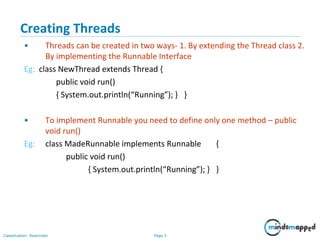
Creating Threads
• Threads can be created in two ways- 1. By extending the Thread class 2.
By implementing the Runnable Interface
Eg: class NewThread extends Thread {
public void run()
{ System.out.println(“Running”); } }
• To implement Runnable you need to define only one method – public
void run()
Eg: class MadeRunnable implements Runnable {
public void run()
{ System.out.println(“Running”); } }
Page 4Classification: Restricted
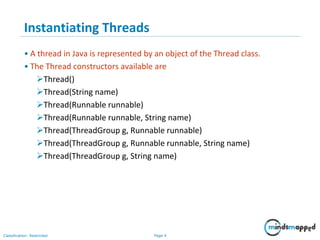
Instantiating Threads
• A thread in Java is represented by an object of the Thread class.
• The Thread constructors available are
Thread()
Thread(String name)
Thread(Runnable runnable)
Thread(Runnable runnable, String name)
Thread(ThreadGroup g, Runnable runnable)
Thread(ThreadGroup g, Runnable runnable, String name)
Thread(ThreadGroup g, String name)
Page 5Classification: Restricted
Starting a Thread
• When start() method is called on a Thread object, the thread moves from
the new state to the runnable state
• When the Thread Scheduler gives the thread a chance to execute, the
run() method will be invoked
Eg:
class MyRunnable implements Runnable {
public void run() {
for(int i=0;i<10;i++) System.out.println(“Running”); }
public static void main(String args[])
{
Thread t=new Thread(new MyRunnable());
t.start();
} }
Page 6Classification: Restricted
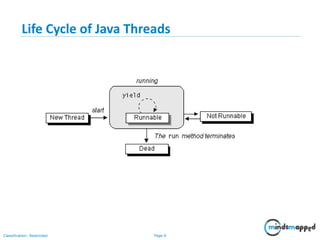
From Sun tutorial:
Life Cycle of Java Threads
Page 7Classification: Restricted
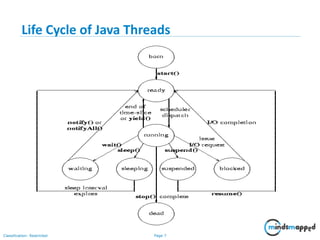
Life Cycle of Java Threads
Page 8Classification: Restricted
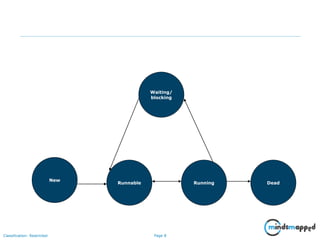
Waiting/
blocking
New
Runnable Running Dead
Transitioning between thread states
Page 9Classification: Restricted
Sleep, Yield, isAlive
• The sleep() method puts the currently executing thread to sleep for a given
time in milliseconds
public static void sleep(long millis) throws InterruptedException
• The yield() method causes the current thread to move from the running state
to the runnable state, so that another thread can have a chance. There is no
guarantee that the next thread chosen for running will be a different thread
public static void yield() – not used now
• The isAlive() method returns true if the thread upon which it is called has
been started, but not yet dead
public final boolean isAlive()
Page 10Classification: Restricted
Setting Thread Priority
• By default every thread gets the priority of the thread of execution that
creates it
• The setPriority() method is used to set the priority of a Thread, which
varies from 1 to 10
Eg:
MyRunnable runnable=new MyRunnable();
Thread t=new Thread();
t.setPriority(8);
t.start();
• The Thread class has 3 constants – Thread.NORM_PRIORITY(5),
Thread.MIN_PRIORITY(1) and Thread.MAX_PRIORITY(10)
Page 11Classification: Restricted
join()
• When a thread calls join() on another thread, the currently running thread
will wait until the thread it joins with has completed
Eg:
Thread t=new Thread();
t.start();
t.join();
• The overloaded join() methods are
void join() - Waits for this thread to die
void join(long millis)
- Waits at most millis milliseconds for this thread to die.
void join(long millis, int nanos)
Page 12Classification: Restricted
Extra points to remember…
• Many threads can be in the runnable state, but only one thread can be
actually running at a time
• The order in which threads were started might differ from the order in
which they actually run
• It is legal to invoke the run() method directly, but it does not start a new
thread of execution
• start() method should be invoked only once on a Thread object, else it
will throw an exception
• A thread is considered dead, when it’s run method returns. A dead
thread cannot be started again
• sleep() and yield() are static methods
Page 13Classification: Restricted
Objectives
• Write code using synchronized wait, notify and notifyAll to protect
against concurrent access problems and to communicate between
threads.
• Define the interaction among threads and object locks when executing
synchronized wait, notify or notifyAll.
Page 14Classification: Restricted
Synchronization
• Every object in Java has one and only one lock which ensures synchronized
access to the resource
• If a thread has obtained the lock, no other thread can enter the
synchronized code till the lock is released
• When the thread holding the lock exits the synchronized code, the lock is
released. Now some other thread can enter the synchronized code.
• If a thread tries to get the lock of an object and finds that the lock is already
taken, the thread goes into a blocked state till the lock is released
Page 15Classification: Restricted
synchronized keyword
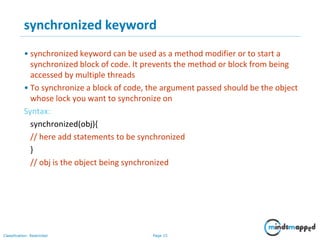
• synchronized keyword can be used as a method modifier or to start a
synchronized block of code. It prevents the method or block from being
accessed by multiple threads
• To synchronize a block of code, the argument passed should be the object
whose lock you want to synchronize on
Syntax:
synchronized(obj){
// here add statements to be synchronized
}
// obj is the object being synchronized
Page 16Classification: Restricted
Example – synchronized method
• class ThreadTest implements Runnable{
• public void call(String msg) {
• Synchronized ( new ThreadTest()) {
• System.out.print("("+msg);
• }
• Synchronized ( new ThreadTest()) {
• System.out.print("("+msg);
• }
• try{ Thread.sleep(5000); }
• catch (InterruptedException e){}
• System.out.println(")");
• }
• public void run() {
• call(Thread.currentThread().getName());
• }
• public static void main(String args[]) {
• ThreadTest t=new ThreadTest();
• Thread t1=new Thread(t);
• t1.start();
• Thread t2=new Thread(t);
• t2.start(); } }
Page 17Classification: Restricted
Example – synchronized block
Eg: class ThreadTest implements Runnable{
• public void call(String msg) {
• System.out.print("("+msg);
• try{ Thread.sleep(5000); }
• catch (InterruptedException e){}
• System.out.println(")"); }
• public void run() {
synchronized(this) {call(Thread.currentThread().getName()); }
• }
• public static void main(String args[]) {
• ThreadTest t=new ThreadTest();
• Thread t1=new Thread(t); t1.start();
• Thread t2=new Thread(t); t2.start();
• } }
Page 18Classification: Restricted
wait() and notify()
• The methods wait(), notify() and notifyAll() are defined in the
java.lang.Object class
• A thread gives up the lock on a synchronized object and moves from the
running state to the waiting state when the wait() method is invoked
• The notify() method is used to signal one of the threads waiting on the
object to return to the runnable state
• The notifyAll() method sends the signal to all the threads waiting on the
object to return to the runnable state
• A thread can invoke wait() or notify() on a particular object only if it
currently holds the lock on that object
Page 19Classification: Restricted
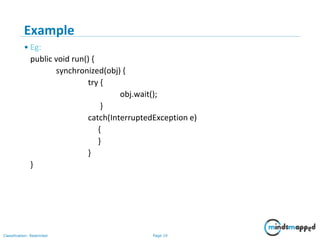
Example
• Eg:
public void run() {
synchronized(obj) {
try {
obj.wait();
}
catch(InterruptedException e)
{
}
}
}
Page 20Classification: Restricted
Extra points to remember…
• Static methods can be synchronized, using the lock from the
java.lang.Class object representing that class
• If a thread sleeps while executing synchonized code, the lock is not
released
• Methods or code blocks can be synchronized, but not variables
• A class can have both synchronized and non synchronized methods
• Only one thread can access the synchronized code of an object at a time,
but any number of threads can access the same object’s non-synchronized
code
• wait(), notify() and notifyAll() should be called only from within
synchronized code
Page 21Classification: Restricted
Thank You

Java Thread

  • 1.
  • 2.
  • 3.
    Page 2Classification: Restricted Objectives •Write code to define, instantiate and start new threads using both java.lang.Thread and java.lang.Runnable. • Recognize conditions that might prevent a thread from executing. • Write code using synchronized wait, notify and notifyAll to protect against concurrent access problems and to communicate between threads. • Define the interaction among threads and object locks when executing synchronized wait, notify or notifyAll.
  • 4.
    Page 3Classification: Restricted CreatingThreads • Threads can be created in two ways- 1. By extending the Thread class 2. By implementing the Runnable Interface Eg: class NewThread extends Thread { public void run() { System.out.println(“Running”); } } • To implement Runnable you need to define only one method – public void run() Eg: class MadeRunnable implements Runnable { public void run() { System.out.println(“Running”); } }
  • 5.
    Page 4Classification: Restricted InstantiatingThreads • A thread in Java is represented by an object of the Thread class. • The Thread constructors available are Thread() Thread(String name) Thread(Runnable runnable) Thread(Runnable runnable, String name) Thread(ThreadGroup g, Runnable runnable) Thread(ThreadGroup g, Runnable runnable, String name) Thread(ThreadGroup g, String name)
  • 6.
    Page 5Classification: Restricted Startinga Thread • When start() method is called on a Thread object, the thread moves from the new state to the runnable state • When the Thread Scheduler gives the thread a chance to execute, the run() method will be invoked Eg: class MyRunnable implements Runnable { public void run() { for(int i=0;i<10;i++) System.out.println(“Running”); } public static void main(String args[]) { Thread t=new Thread(new MyRunnable()); t.start(); } }
  • 7.
    Page 6Classification: Restricted FromSun tutorial: Life Cycle of Java Threads
  • 8.
  • 9.
    Page 8Classification: Restricted Waiting/ blocking New RunnableRunning Dead Transitioning between thread states
  • 10.
    Page 9Classification: Restricted Sleep,Yield, isAlive • The sleep() method puts the currently executing thread to sleep for a given time in milliseconds public static void sleep(long millis) throws InterruptedException • The yield() method causes the current thread to move from the running state to the runnable state, so that another thread can have a chance. There is no guarantee that the next thread chosen for running will be a different thread public static void yield() – not used now • The isAlive() method returns true if the thread upon which it is called has been started, but not yet dead public final boolean isAlive()
  • 11.
    Page 10Classification: Restricted SettingThread Priority • By default every thread gets the priority of the thread of execution that creates it • The setPriority() method is used to set the priority of a Thread, which varies from 1 to 10 Eg: MyRunnable runnable=new MyRunnable(); Thread t=new Thread(); t.setPriority(8); t.start(); • The Thread class has 3 constants – Thread.NORM_PRIORITY(5), Thread.MIN_PRIORITY(1) and Thread.MAX_PRIORITY(10)
  • 12.
    Page 11Classification: Restricted join() •When a thread calls join() on another thread, the currently running thread will wait until the thread it joins with has completed Eg: Thread t=new Thread(); t.start(); t.join(); • The overloaded join() methods are void join() - Waits for this thread to die void join(long millis) - Waits at most millis milliseconds for this thread to die. void join(long millis, int nanos)
  • 13.
    Page 12Classification: Restricted Extrapoints to remember… • Many threads can be in the runnable state, but only one thread can be actually running at a time • The order in which threads were started might differ from the order in which they actually run • It is legal to invoke the run() method directly, but it does not start a new thread of execution • start() method should be invoked only once on a Thread object, else it will throw an exception • A thread is considered dead, when it’s run method returns. A dead thread cannot be started again • sleep() and yield() are static methods
  • 14.
    Page 13Classification: Restricted Objectives •Write code using synchronized wait, notify and notifyAll to protect against concurrent access problems and to communicate between threads. • Define the interaction among threads and object locks when executing synchronized wait, notify or notifyAll.
  • 15.
    Page 14Classification: Restricted Synchronization •Every object in Java has one and only one lock which ensures synchronized access to the resource • If a thread has obtained the lock, no other thread can enter the synchronized code till the lock is released • When the thread holding the lock exits the synchronized code, the lock is released. Now some other thread can enter the synchronized code. • If a thread tries to get the lock of an object and finds that the lock is already taken, the thread goes into a blocked state till the lock is released
  • 16.
    Page 15Classification: Restricted synchronizedkeyword • synchronized keyword can be used as a method modifier or to start a synchronized block of code. It prevents the method or block from being accessed by multiple threads • To synchronize a block of code, the argument passed should be the object whose lock you want to synchronize on Syntax: synchronized(obj){ // here add statements to be synchronized } // obj is the object being synchronized
  • 17.
    Page 16Classification: Restricted Example– synchronized method • class ThreadTest implements Runnable{ • public void call(String msg) { • Synchronized ( new ThreadTest()) { • System.out.print("("+msg); • } • Synchronized ( new ThreadTest()) { • System.out.print("("+msg); • } • try{ Thread.sleep(5000); } • catch (InterruptedException e){} • System.out.println(")"); • } • public void run() { • call(Thread.currentThread().getName()); • } • public static void main(String args[]) { • ThreadTest t=new ThreadTest(); • Thread t1=new Thread(t); • t1.start(); • Thread t2=new Thread(t); • t2.start(); } }
  • 18.
    Page 17Classification: Restricted Example– synchronized block Eg: class ThreadTest implements Runnable{ • public void call(String msg) { • System.out.print("("+msg); • try{ Thread.sleep(5000); } • catch (InterruptedException e){} • System.out.println(")"); } • public void run() { synchronized(this) {call(Thread.currentThread().getName()); } • } • public static void main(String args[]) { • ThreadTest t=new ThreadTest(); • Thread t1=new Thread(t); t1.start(); • Thread t2=new Thread(t); t2.start(); • } }
  • 19.
    Page 18Classification: Restricted wait()and notify() • The methods wait(), notify() and notifyAll() are defined in the java.lang.Object class • A thread gives up the lock on a synchronized object and moves from the running state to the waiting state when the wait() method is invoked • The notify() method is used to signal one of the threads waiting on the object to return to the runnable state • The notifyAll() method sends the signal to all the threads waiting on the object to return to the runnable state • A thread can invoke wait() or notify() on a particular object only if it currently holds the lock on that object
  • 20.
    Page 19Classification: Restricted Example •Eg: public void run() { synchronized(obj) { try { obj.wait(); } catch(InterruptedException e) { } } }
  • 21.
    Page 20Classification: Restricted Extrapoints to remember… • Static methods can be synchronized, using the lock from the java.lang.Class object representing that class • If a thread sleeps while executing synchonized code, the lock is not released • Methods or code blocks can be synchronized, but not variables • A class can have both synchronized and non synchronized methods • Only one thread can access the synchronized code of an object at a time, but any number of threads can access the same object’s non-synchronized code • wait(), notify() and notifyAll() should be called only from within synchronized code
  • 22.