Todays topics
• The Intent Class
• Starting Activities with Intents
• Explicit Activation
• Implicit Activation via Intent resolution
The Intent Class
• a data structure that represents
1. An operation to be performed, or
2. An event that has occurred
Using Intents to perform Certain Operations
• Intents used to start a single activity
• Intents provide a flexible language for specifying operations to be performed
• Pick a contact
• take a photo
• Dial a phone number
• Open a web-browser
• Open a google map
Android application components can
connect to other Android applications. This
connection is based on a task description
represented by an Intent object
Intents allow you to interact with components from the same
applications as well as with components contributed by other
applications.
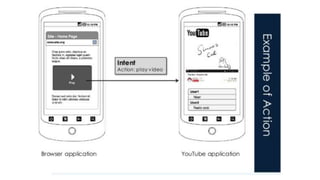
For example, an activity can start an external activity for taking
a picture.
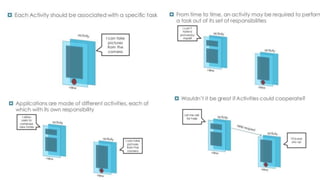
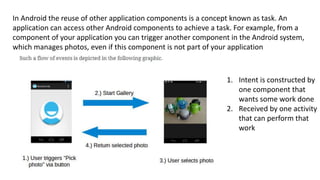
In Android the reuse of other application components is a concept known as task. An
application can access other Android components to achieve a task. For example, from a
component of your application you can trigger another component in the Android system,
which manages photos, even if this component is not part of your application
1. Intent is constructed by
one component that
wants some work done
2. Received by one activity
that can perform that
work
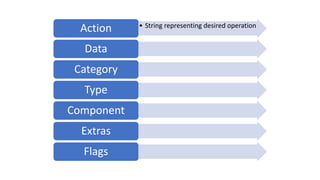
• String representing desired operation
Action
Data
Category
Type
Component
Extras
Flags
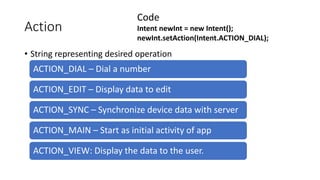
Action
• String representing desired operation
ACTION_DIAL – Dial a number
ACTION_EDIT – Display data to edit
ACTION_SYNC – Synchronize device data with server
ACTION_MAIN – Start as initial activity of app
ACTION_VIEW: Display the data to the user.
Code
Intent newInt = new Intent();
newInt.setAction(Intent.ACTION_DIAL);
Data
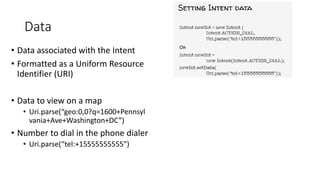
• Data associated with the Intent
• Formatted as a Uniform Resource
Identifier (URI)
• Data to view on a map
• Uri.parse(“geo:0,0?q=1600+Pennsyl
vania+Ave+Washington+DC”)
• Number to dial in the phone dialer
• Uri.parse(“tel:+15555555555”)
Data
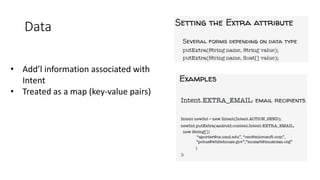
• Add’l information associated with
Intent
• Treated as a map (key-value pairs)
Category
• Additional information about the components that can handle the
intent
• Examples
• Category_browsable – can be invoked by a browser to display data
ref’s by a URI
• Category_launcher – can be the initial activity of a task & is listed
in top-level app launcher
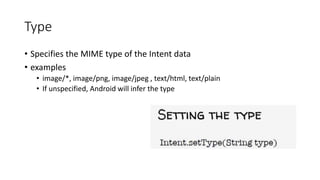
Type
• Specifies the MIME type of the Intent data
• examples
• image/*, image/png, image/jpeg , text/html, text/plain
• If unspecified, Android will infer the type
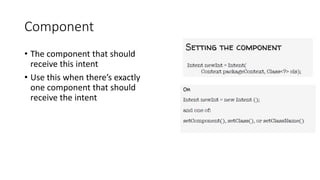
Component
• The component that should
receive this intent
• Use this when there’s exactly
one component that should
receive the intent
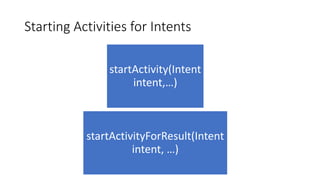
Starting Activities for Intents
startActivity(Intent
intent,…)
startActivityForResult(Intent
intent, …)
Target Activity
• Can be named explicitly by setting the intent’s component
• Can be determined implicitly
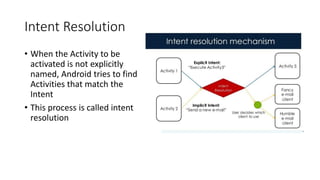
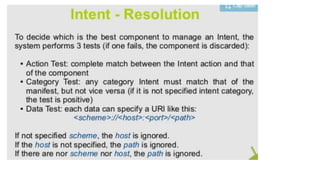
Intent Resolution
• When the Activity to be
activated is not explicitly
named, Android tries to find
Activities that match the
Intent
• This process is called intent
resolution
Intent Resolution
•An Intent describing a desired operation
•Intent Filters which describe which
operations an Activity can handle Specified
either in AndroidManifest.xml or
programmatically
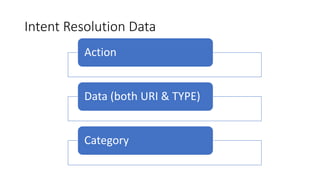
Intent Resolution Data
Action
Data (both URI & TYPE)
Category
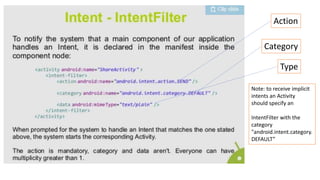
Action
Category
Type
Note: to receive implicit
intents an Activity
should specify an
IntentFilter with the
category
"android.intent.category.
DEFAULT”
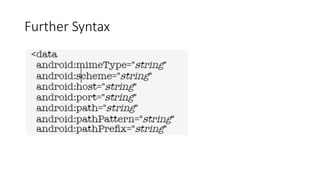
Further Syntax

Intents

  • 1.
    Todays topics • TheIntent Class • Starting Activities with Intents • Explicit Activation • Implicit Activation via Intent resolution
  • 2.
    The Intent Class •a data structure that represents 1. An operation to be performed, or 2. An event that has occurred
  • 3.
    Using Intents toperform Certain Operations • Intents used to start a single activity • Intents provide a flexible language for specifying operations to be performed • Pick a contact • take a photo • Dial a phone number • Open a web-browser • Open a google map Android application components can connect to other Android applications. This connection is based on a task description represented by an Intent object Intents allow you to interact with components from the same applications as well as with components contributed by other applications. For example, an activity can start an external activity for taking a picture.
  • 5.
    In Android thereuse of other application components is a concept known as task. An application can access other Android components to achieve a task. For example, from a component of your application you can trigger another component in the Android system, which manages photos, even if this component is not part of your application 1. Intent is constructed by one component that wants some work done 2. Received by one activity that can perform that work
  • 7.
    • String representingdesired operation Action Data Category Type Component Extras Flags
  • 8.
    Action • String representingdesired operation ACTION_DIAL – Dial a number ACTION_EDIT – Display data to edit ACTION_SYNC – Synchronize device data with server ACTION_MAIN – Start as initial activity of app ACTION_VIEW: Display the data to the user. Code Intent newInt = new Intent(); newInt.setAction(Intent.ACTION_DIAL);
  • 9.
    Data • Data associatedwith the Intent • Formatted as a Uniform Resource Identifier (URI) • Data to view on a map • Uri.parse(“geo:0,0?q=1600+Pennsyl vania+Ave+Washington+DC”) • Number to dial in the phone dialer • Uri.parse(“tel:+15555555555”)
  • 10.
    Data • Add’l informationassociated with Intent • Treated as a map (key-value pairs)
  • 11.
    Category • Additional informationabout the components that can handle the intent • Examples • Category_browsable – can be invoked by a browser to display data ref’s by a URI • Category_launcher – can be the initial activity of a task & is listed in top-level app launcher
  • 12.
    Type • Specifies theMIME type of the Intent data • examples • image/*, image/png, image/jpeg , text/html, text/plain • If unspecified, Android will infer the type
  • 13.
    Component • The componentthat should receive this intent • Use this when there’s exactly one component that should receive the intent
  • 14.
    Starting Activities forIntents startActivity(Intent intent,…) startActivityForResult(Intent intent, …)
  • 15.
    Target Activity • Canbe named explicitly by setting the intent’s component • Can be determined implicitly
  • 16.
    Intent Resolution • Whenthe Activity to be activated is not explicitly named, Android tries to find Activities that match the Intent • This process is called intent resolution
  • 17.
    Intent Resolution •An Intentdescribing a desired operation •Intent Filters which describe which operations an Activity can handle Specified either in AndroidManifest.xml or programmatically
  • 18.
    Intent Resolution Data Action Data(both URI & TYPE) Category
  • 20.
    Action Category Type Note: to receiveimplicit intents an Activity should specify an IntentFilter with the category "android.intent.category. DEFAULT”
  • 21.