ANDROID APPLICATION
DEVELOPMENT
Submitted By-
Mayank Bhatt
SubmittedTo-
Ms. Niharika Joshi
Content
• Views
• Using views
• View groups
• Layout
• Common layout classes
• Event handling
• Activity
• Implementing activities
• Intent
• Activity states and App visibility
Views
• Views are android’s basic user interface building blocks
• Base class for widgets
• Responsible for drawing and event handling
UsingViews
• Set properties
• Set focus
• Set up listeners
• Set visibility
View groups
• Contains other views.
• Base class for layouts and view containers
• This class also defines theViewGroup.LayoutParams class
Layout
• Specific types of view groups
• Subclasses of view groups
• Contains child views
Common layout classes
• Constraint layout
• Linear layout
• Relative layout
• Table layout
• Grid layout
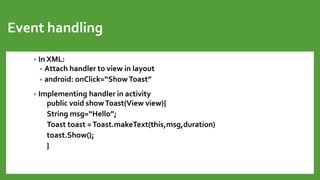
Event handling
• In XML:
• Attach handler to view in layout
• android: onClick=“ShowToast”
• Implementing handler in activity
public void showToast(View view){
String msg=“Hello”;
Toast toast =Toast.makeText(this,msg,duration)
toast.Show();
}
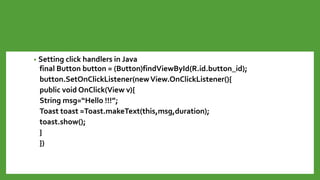
• Setting click handlers in Java
final Button button = (Button)findViewById(R.id.button_id);
button.SetOnClickListener(newView.OnClickListener(){
public void OnClick(View v){
String msg=“Hello !!!”;
Toast toast =Toast.makeText(this,msg,duration);
toast.show();
}
})
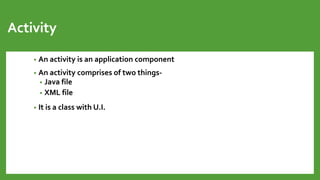
Activity
• An activity is an application component
• An activity comprises of two things-
• Java file
• XML file
• It is a class with U.I.
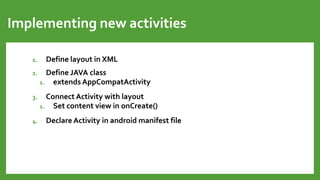
Implementing new activities
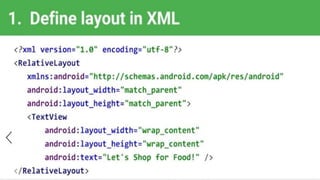
1. Define layout in XML
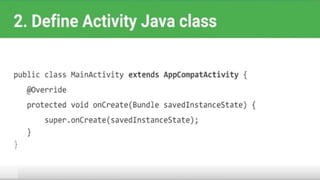
2. Define JAVA class
1. extends AppCompatActivity
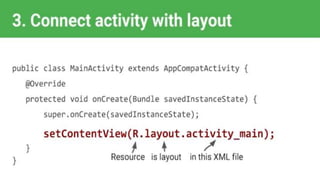
3. Connect Activity with layout
1. Set content view in onCreate()
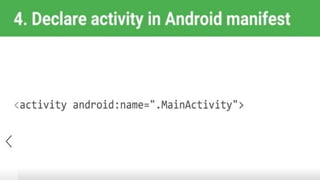
4. Declare Activity in android manifest file
Activity states and App visibility
• Created
• Started
• Resume
• Paused
• Stopped
• Destroyed
Intent
• An intent is a description of an operation to be performed.
• An intent is an object used to request an operation from another app
component.
What can Intents do?
• Start activities
• Start services
• Deliver Broadcasts
Types Of Intents
• Explicit Intent
• These intents designate the target component by its name and they
are typically used for application-internal messages
• Implicit Intent
• These intents do not name a target and the field for the component
name is left blank.
Add a SlideTitle -
5

Android application development

  • 1.
    ANDROID APPLICATION DEVELOPMENT Submitted By- MayankBhatt SubmittedTo- Ms. Niharika Joshi
  • 2.
    Content • Views • Usingviews • View groups • Layout • Common layout classes • Event handling • Activity • Implementing activities • Intent • Activity states and App visibility
  • 3.
    Views • Views areandroid’s basic user interface building blocks • Base class for widgets • Responsible for drawing and event handling
  • 4.
    UsingViews • Set properties •Set focus • Set up listeners • Set visibility
  • 5.
    View groups • Containsother views. • Base class for layouts and view containers • This class also defines theViewGroup.LayoutParams class
  • 6.
    Layout • Specific typesof view groups • Subclasses of view groups • Contains child views
  • 7.
    Common layout classes •Constraint layout • Linear layout • Relative layout • Table layout • Grid layout
  • 8.
    Event handling • InXML: • Attach handler to view in layout • android: onClick=“ShowToast” • Implementing handler in activity public void showToast(View view){ String msg=“Hello”; Toast toast =Toast.makeText(this,msg,duration) toast.Show(); }
  • 9.
    • Setting clickhandlers in Java final Button button = (Button)findViewById(R.id.button_id); button.SetOnClickListener(newView.OnClickListener(){ public void OnClick(View v){ String msg=“Hello !!!”; Toast toast =Toast.makeText(this,msg,duration); toast.show(); } })
  • 10.
    Activity • An activityis an application component • An activity comprises of two things- • Java file • XML file • It is a class with U.I.
  • 11.
    Implementing new activities 1.Define layout in XML 2. Define JAVA class 1. extends AppCompatActivity 3. Connect Activity with layout 1. Set content view in onCreate() 4. Declare Activity in android manifest file
  • 16.
    Activity states andApp visibility • Created • Started • Resume • Paused • Stopped • Destroyed
  • 17.
    Intent • An intentis a description of an operation to be performed. • An intent is an object used to request an operation from another app component.
  • 18.
    What can Intentsdo? • Start activities • Start services • Deliver Broadcasts
  • 19.
    Types Of Intents •Explicit Intent • These intents designate the target component by its name and they are typically used for application-internal messages • Implicit Intent • These intents do not name a target and the field for the component name is left blank.
  • 20.

Editor's Notes

  • #5 All of the views in a window are arranged in a single tree. You can add views either from code or by specifying a tree of views in one or more XML layout files. There are many specialized subclasses of views that act as controls or are capable of displaying text, images, or other content. Once you have created a tree of views, there are typically a few types of common operations you may wish to perform: Set properties: for example setting the text of a TextView. The available properties and the methods that set them will vary among the different subclasses of views. Note that properties that are known at build time can be set in the XML layout files. Set focus: The framework will handle moving focus in response to user input. To force focus to a specific view, call requestFocus(). Set up listeners: Views allow clients to set listeners that will be notified when something interesting happens to the view. For example, all views will let you set a listener to be notified when the view gains or loses focus. You can register such a listener using setOnFocusChangeListener(android.view.View.OnFocusChangeListener). Other view subclasses offer more specialized listeners. For example, a Button exposes a listener to notify clients when the button is clicked. Set visibility: You can hide or show views using setVisibility(int). Note: The Android framework is responsible for measuring, laying out and drawing views. You should not call methods that perform these actions on views yourself unless you are actually implementing a ViewGroup.
  • #11 Whatever you see on screen all the ui they all are presented by activity. It can be a complete window , floating window
  • #12 we create layout in layout folder which is inside res folder we need a java file which extends appcompatactivity we need to connect a XML file with java file that’s where onCreate method comes in
  • #17 not visible, visible, visible , partially invisible, hidden, gone from memory
  • #18 Intent is a class which is used to invoke all the android fundamental components(activities, services, broadcast receivers, content provider) except content provider.