© 2018 Bloomberg Finance L.P. All rights reserved.
Integrating Existing C++
Libraries into PySpark
Spark+AI Summit 2018
June 5, 2018
Esther Kundin
Senior Software Developer
© 2018 Bloomberg Finance L.P. All rights reserved.
About Me
• Esther Kundin
— Senior Software Developer
— Lead architect and engineer
— Machine Learning and Text Analysis
— Open Source contributor
© 2018 Bloomberg Finance L.P. All rights reserved.
Outline
• Why Bother – A Real-Life Use Case
• PySpark Overview
• Interfacing to Your C++ Code
• Putting It All Together
• Challenges
• C++ Tips and Tricks
• Takeaways
• Q&A
© 2018 Bloomberg Finance L.P. All rights reserved.
A Real-Life Use Case
© 2018 Bloomberg Finance L.P. All rights reserved.
Why Bother – A Real-Life Use Case
• Realtime system is processing news stories and giving sentiment scores –
convert text to buy, sell or neutral signals on equities mentioned in it
• <10 ms response time
• Want to run the exact same code in real-time and against history
Image courtesy of https://flic.kr/p/ayDEMD
© 2018 Bloomberg Finance L.P. All rights reserved.
Why Bother – A Real-Life Use Case
• Need to rerun backfill on historical data – 2 TB (compressed)
• Want to run the exact same code against history
• SLA: < 24 hours to recompute entire history
• Can do backfills for new models – monthly basis
Image courtesy of https://flic.kr/p/ayDEMD
© 2018 Bloomberg Finance L.P. All rights reserved.
PySpark Overview
© 2018 Bloomberg Finance L.P. All rights reserved.
PySpark Overview
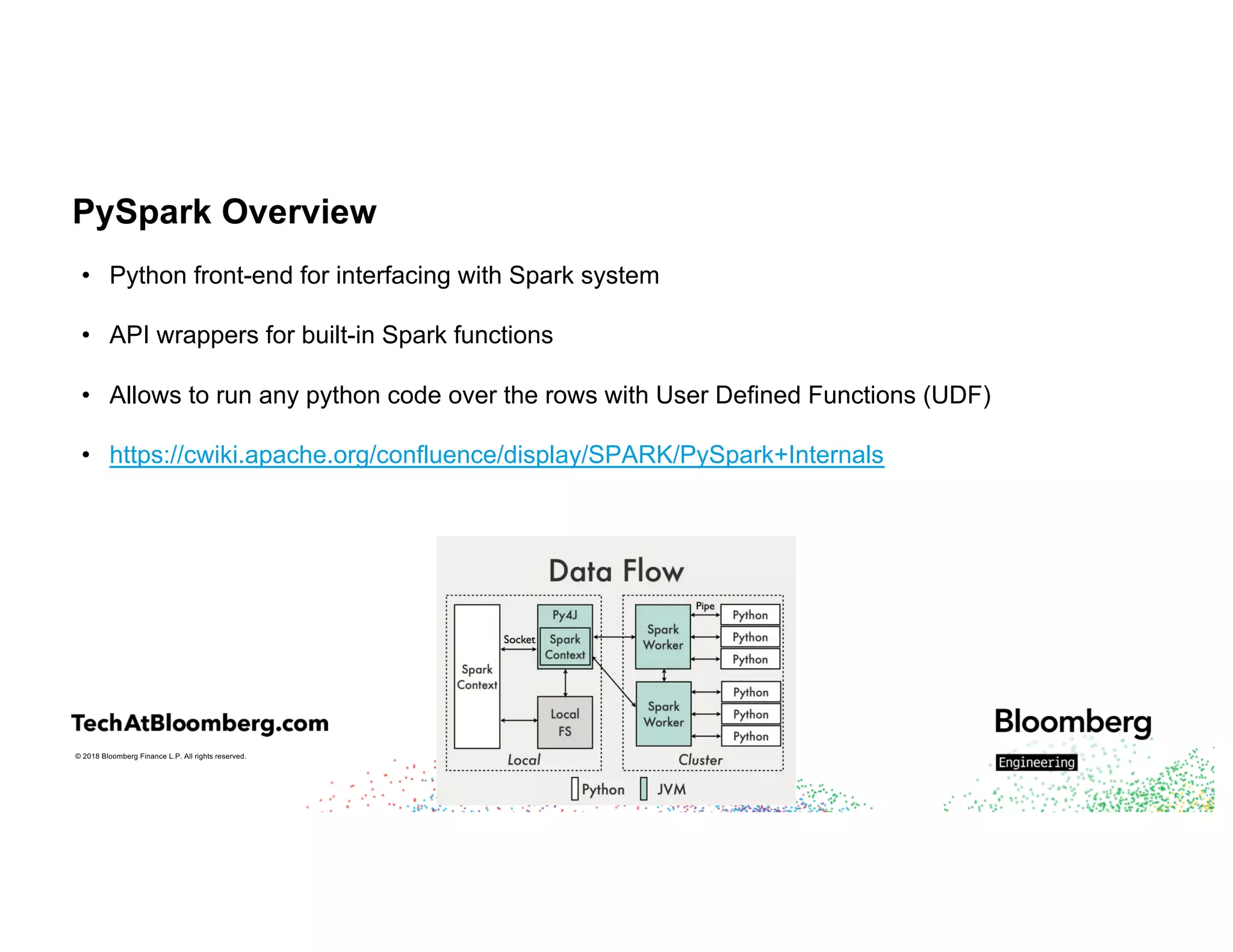
• Python front-end for interfacing with Spark system
• API wrappers for built-in Spark functions
• Allows to run any python code over the rows with User Defined Functions (UDF)
• https://cwiki.apache.org/confluence/display/SPARK/PySpark+Internals
© 2018 Bloomberg Finance L.P. All rights reserved.
Python UDFs
• Native Python code
• Function objects are pickled and passed to workers
• Row data passed to Python workers one at a time
• Code will pass from Python runtime-> JVM runtime -> Python runtime and back
• [SPARK-22216] [SPARK-21187] – support vectorized UDF support with Arrow format –
see Li Jin’s talk
© 2018 Bloomberg Finance L.P. All rights reserved.
Interfacing to your C++ Code
© 2018 Bloomberg Finance L.P. All rights reserved.
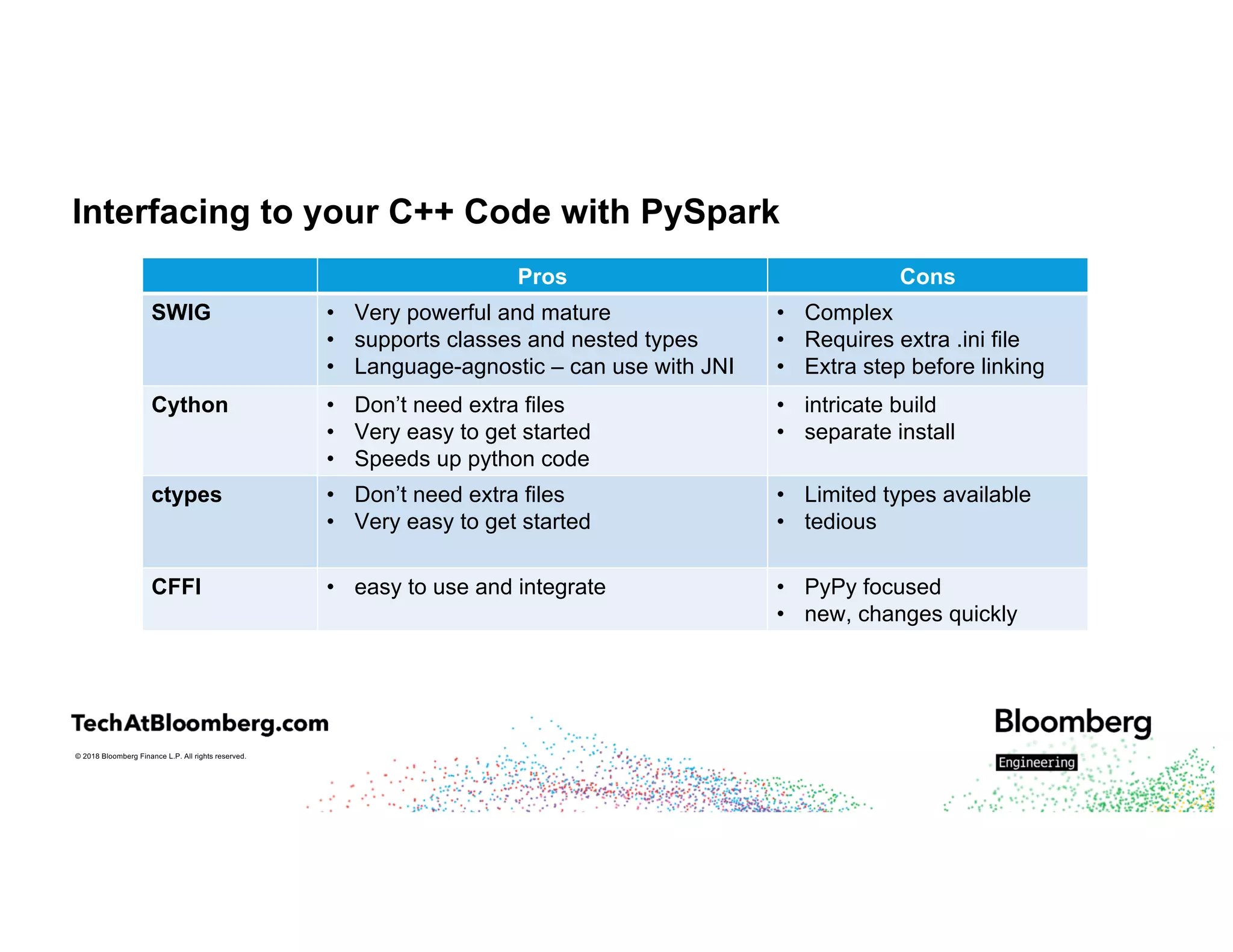
Interfacing to your C++ Code with PySpark
Pros Cons
SWIG • Very powerful and mature
• supports classes and nested types
• Language-agnostic – can use with JNI
• Complex
• Requires extra .ini file
• Extra step before linking
Cython • Don’t need extra files
• Very easy to get started
• Speeds up python code
• intricate build
• separate install
ctypes • Don’t need extra files
• Very easy to get started
• Limited types available
• tedious
CFFI • easy to use and integrate • PyPy focused
• new, changes quickly
© 2018 Bloomberg Finance L.P. All rights reserved.
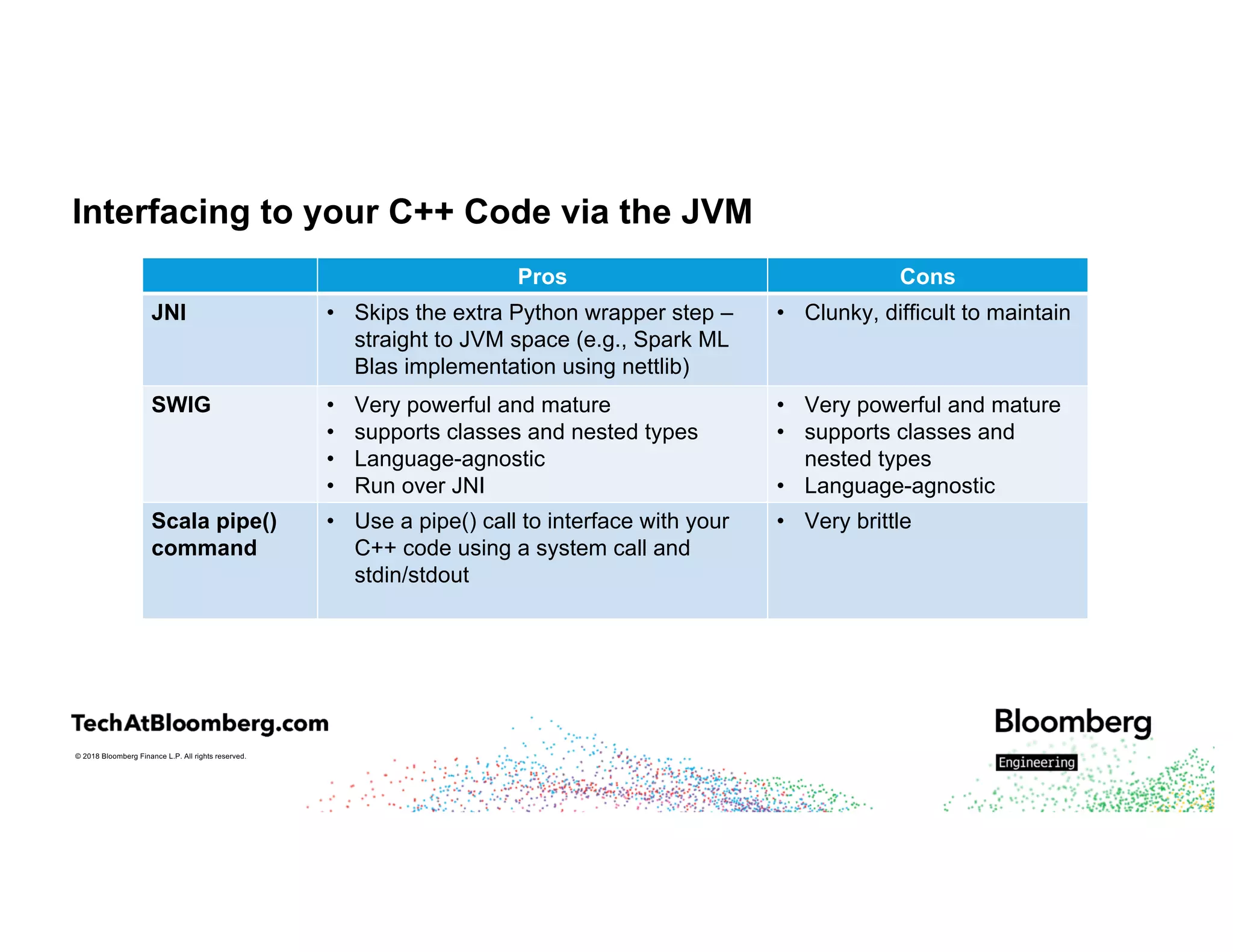
Interfacing to your C++ Code via the JVM
Pros Cons
JNI • Skips the extra Python wrapper step –
straight to JVM space (e.g., Spark ML
Blas implementation using nettlib)
• Clunky, difficult to maintain
SWIG • Very powerful and mature
• supports classes and nested types
• Language-agnostic
• Run over JNI
• Very powerful and mature
• supports classes and
nested types
• Language-agnostic
Scala pipe()
command
• Use a pipe() call to interface with your
C++ code using a system call and
stdin/stdout
• Very brittle
© 2018 Bloomberg Finance L.P. All rights reserved.
Interfacing to your C++ Code –
SWIG + PySpark Example
© 2018 Bloomberg Finance L.P. All rights reserved.
Why SWIG + PySpark Example
• SWIG wrapper was already written
• Maintenance – institutional knowledge dictated the choice of Python
• Back-end work, less concerned with exact time it takes to run
• Final run took ~24 hours
© 2018 Bloomberg Finance L.P. All rights reserved.
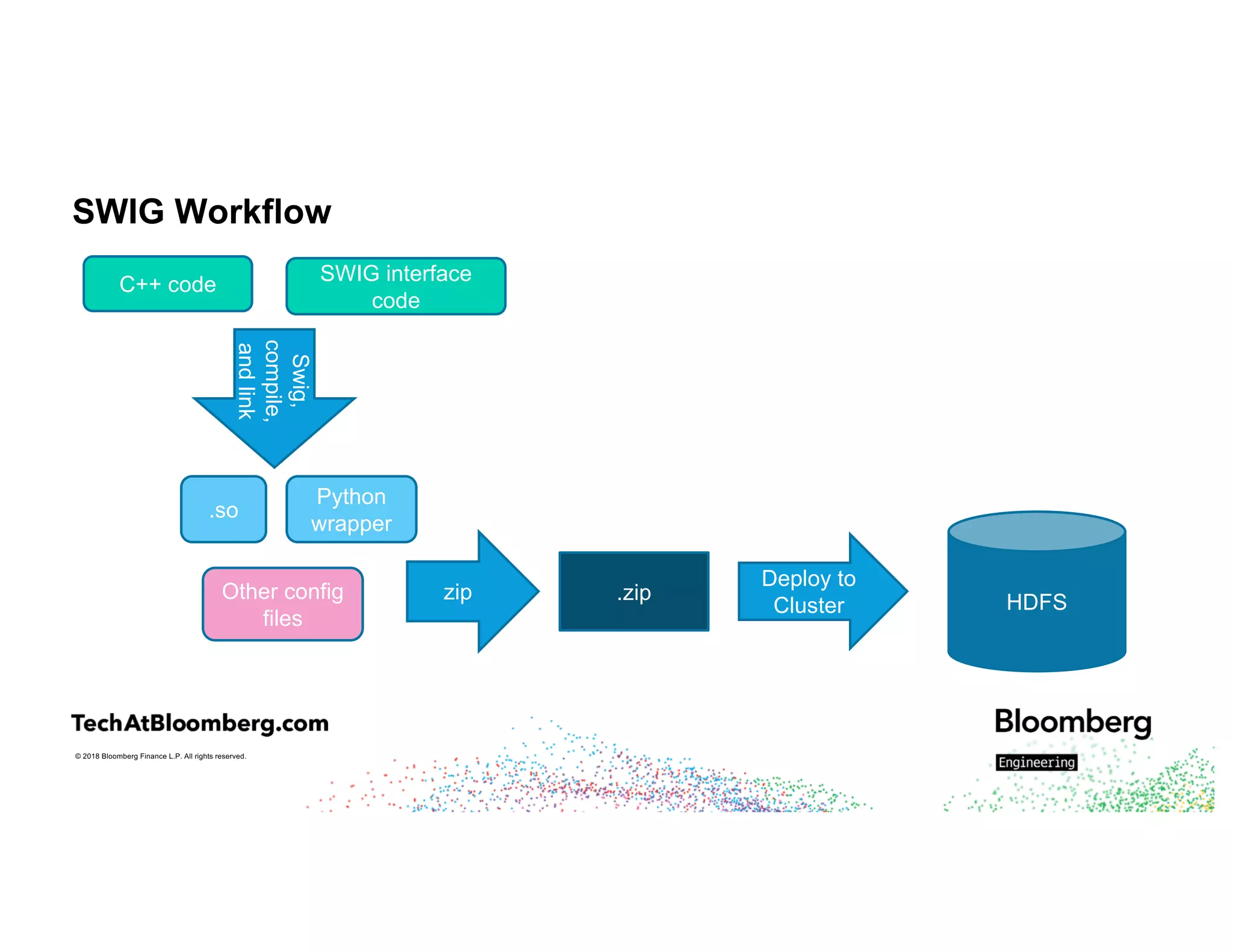
SWIG Workflow
C++ code SWIG interface
code
Swig,
compile,
andlink
.so
Other config
files
zip .zip
Deploy to
Cluster HDFS
Python
wrapper
© 2018 Bloomberg Finance L.P. All rights reserved.
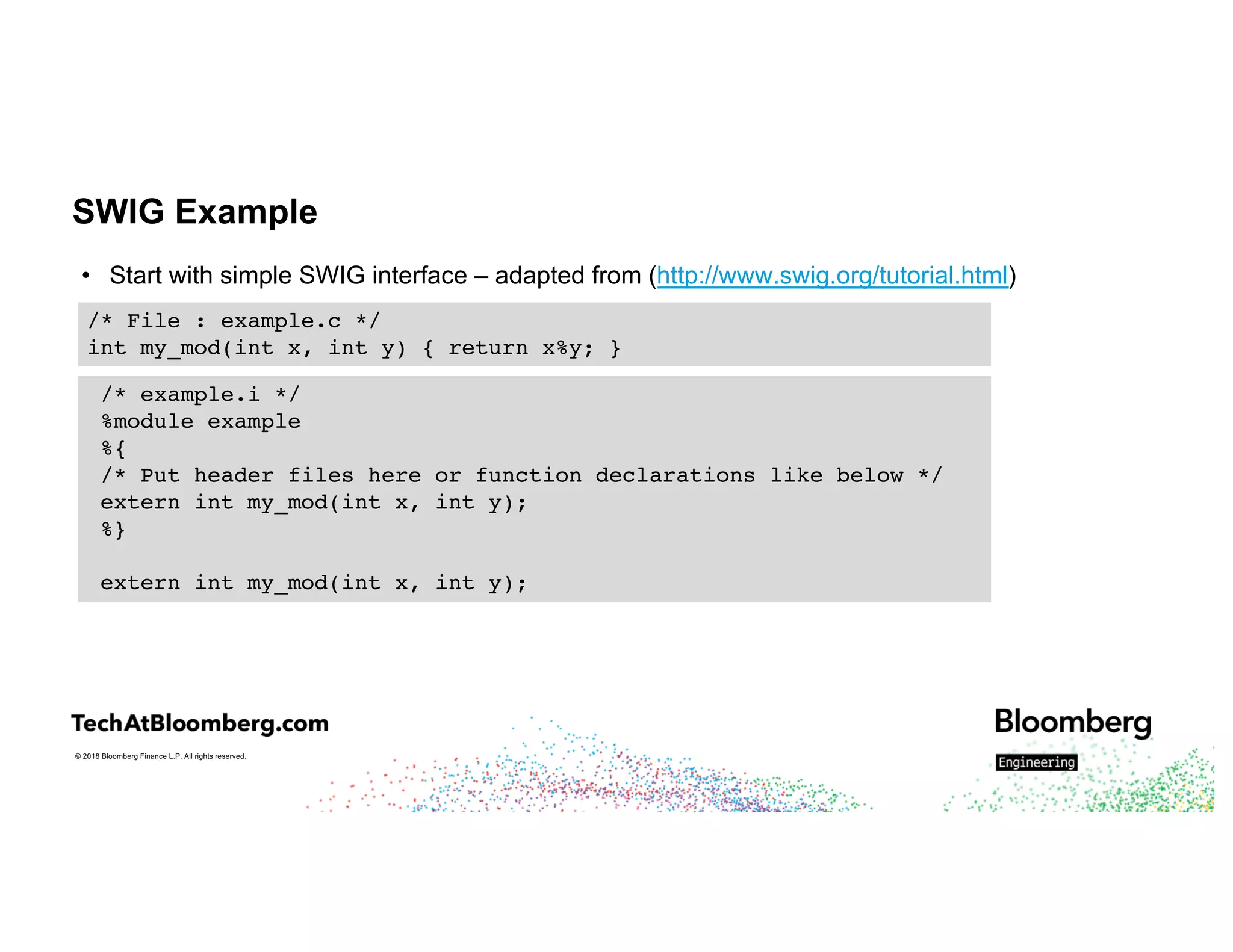
SWIG Example
• Start with simple SWIG interface – adapted from (http://www.swig.org/tutorial.html)
/* File : example.c */
int my_mod(int x, int y) { return x%y; }
/* example.i */
%module example
%{
/* Put header files here or function declarations like below */
extern int my_mod(int x, int y);
%}
extern int my_mod(int x, int y);
© 2018 Bloomberg Finance L.P. All rights reserved.
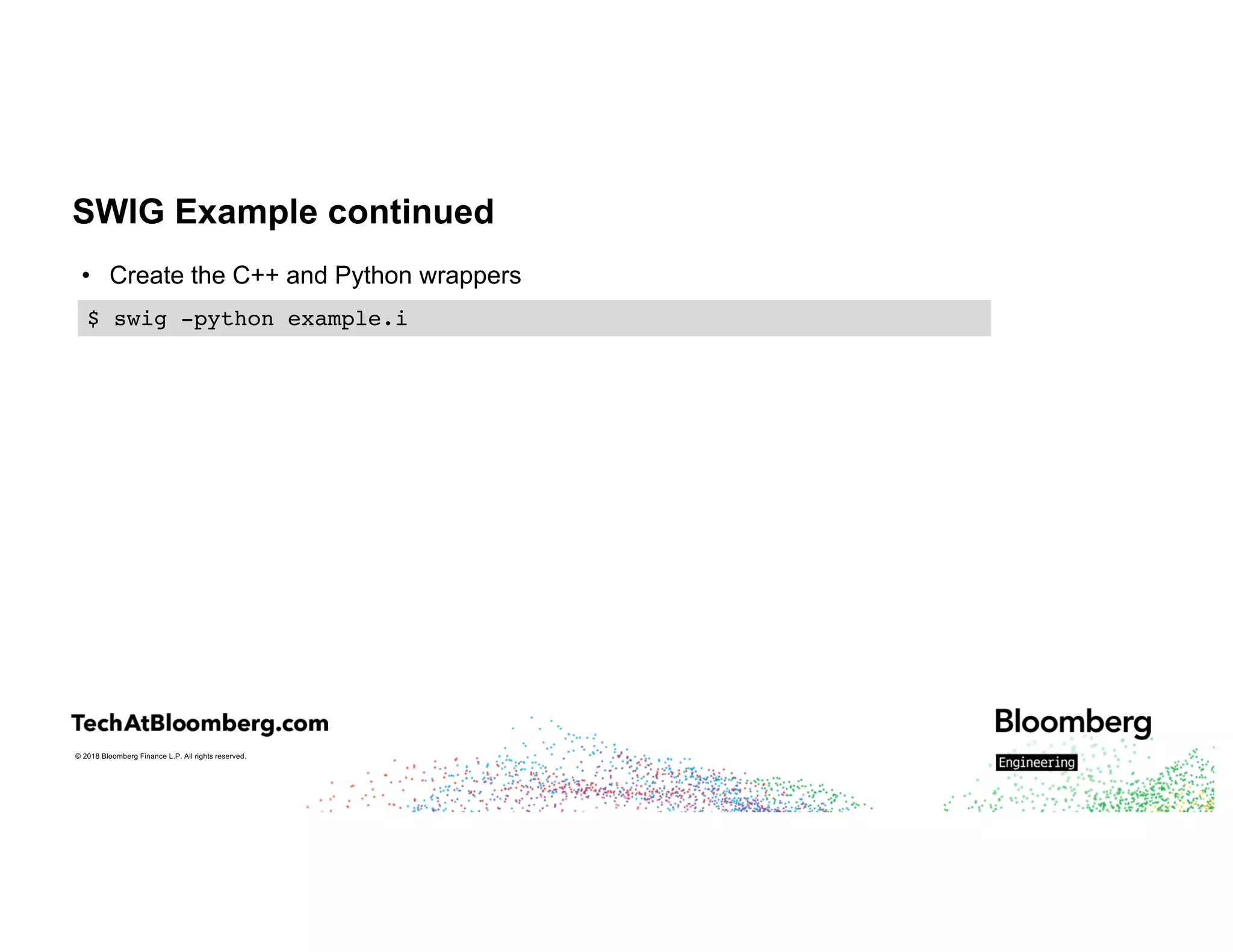
SWIG Example continued
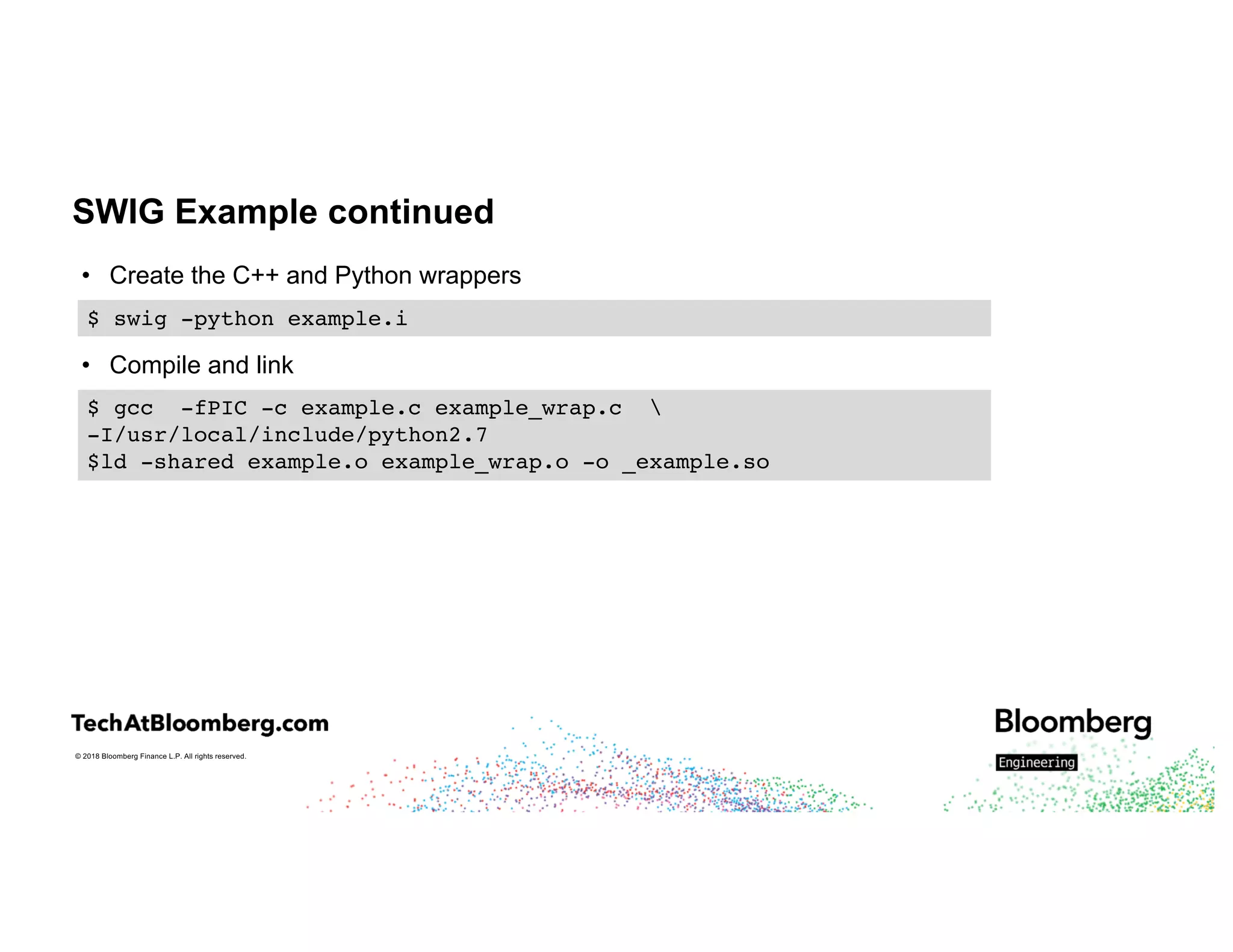
• Create the C++ and Python wrappers
$ swig -python example.i
© 2018 Bloomberg Finance L.P. All rights reserved.
SWIG Example continued
• Create the C++ and Python wrappers
• Compile and link
$ swig -python example.i
$ gcc -fPIC -c example.c example_wrap.c 
-I/usr/local/include/python2.7
$ld -shared example.o example_wrap.o -o _example.so
© 2018 Bloomberg Finance L.P. All rights reserved.
SWIG Example continued
• Create the C++ and Python wrappers
• Compile and link
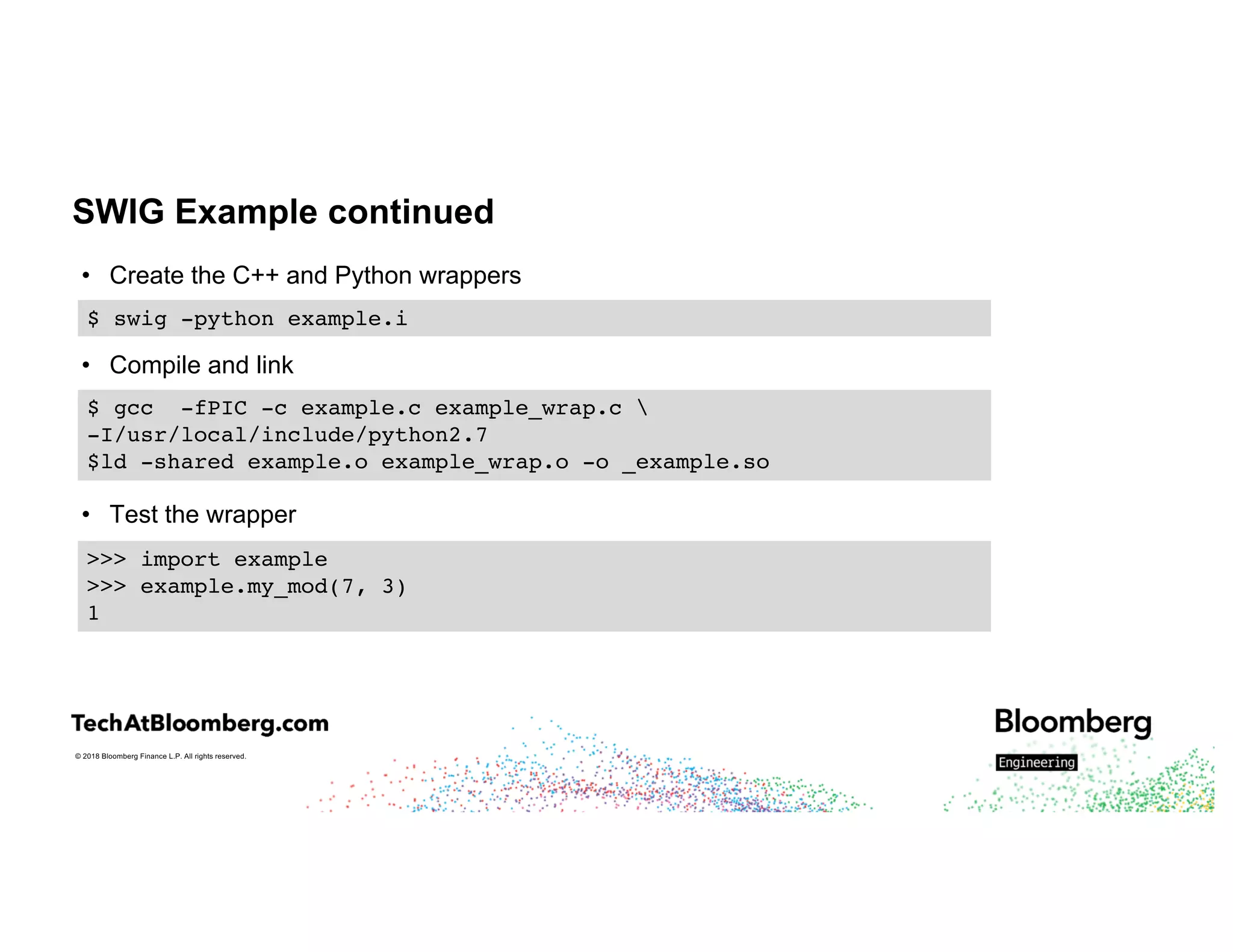
• Test the wrapper
$ swig -python example.i
$ gcc -fPIC -c example.c example_wrap.c 
-I/usr/local/include/python2.7
$ld -shared example.o example_wrap.o -o _example.so
>>> import example
>>> example.my_mod(7, 3)
1
© 2018 Bloomberg Finance L.P. All rights reserved.
SWIG Example continued
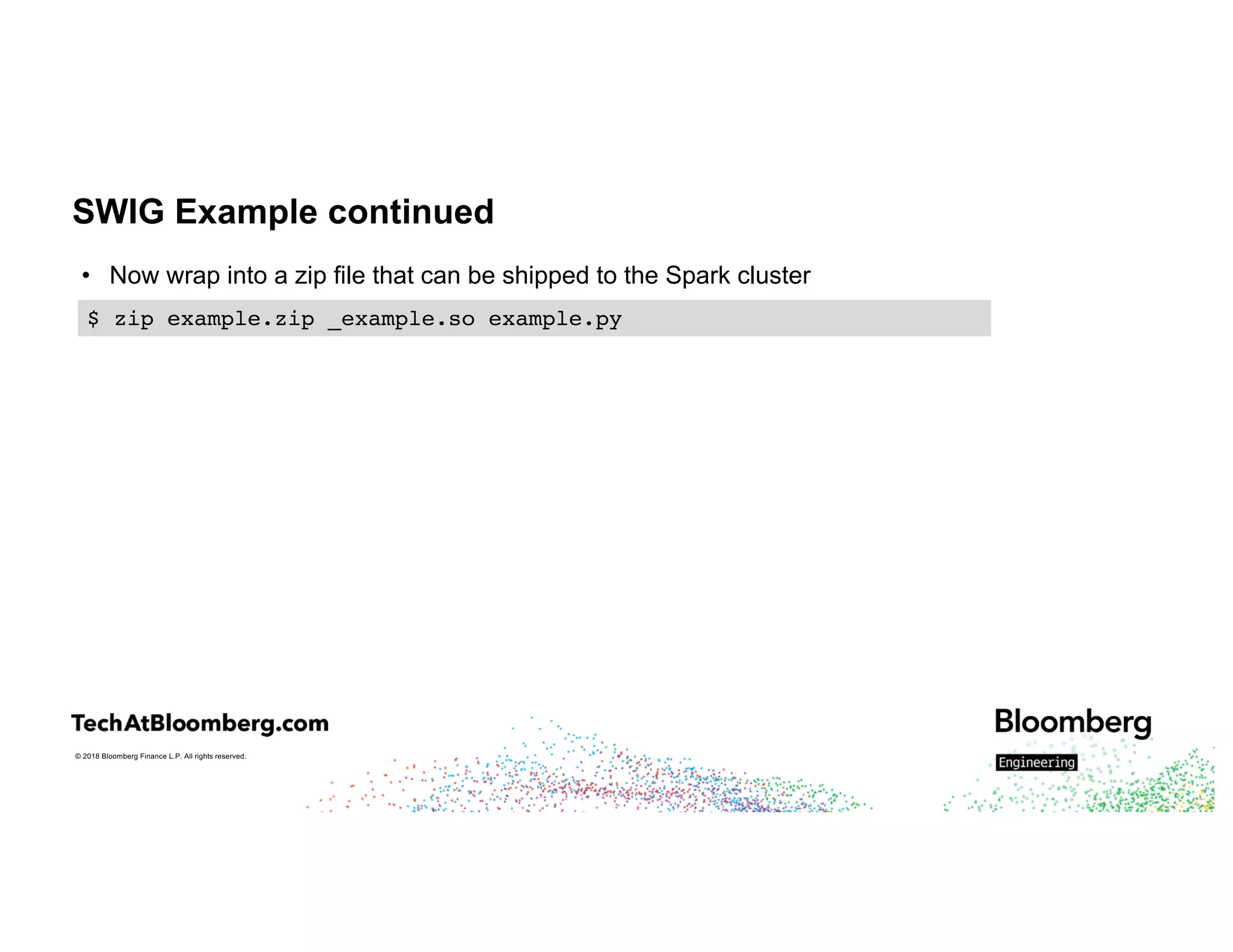
• Now wrap into a zip file that can be shipped to the Spark cluster
$ zip example.zip _example.so example.py
© 2018 Bloomberg Finance L.P. All rights reserved.
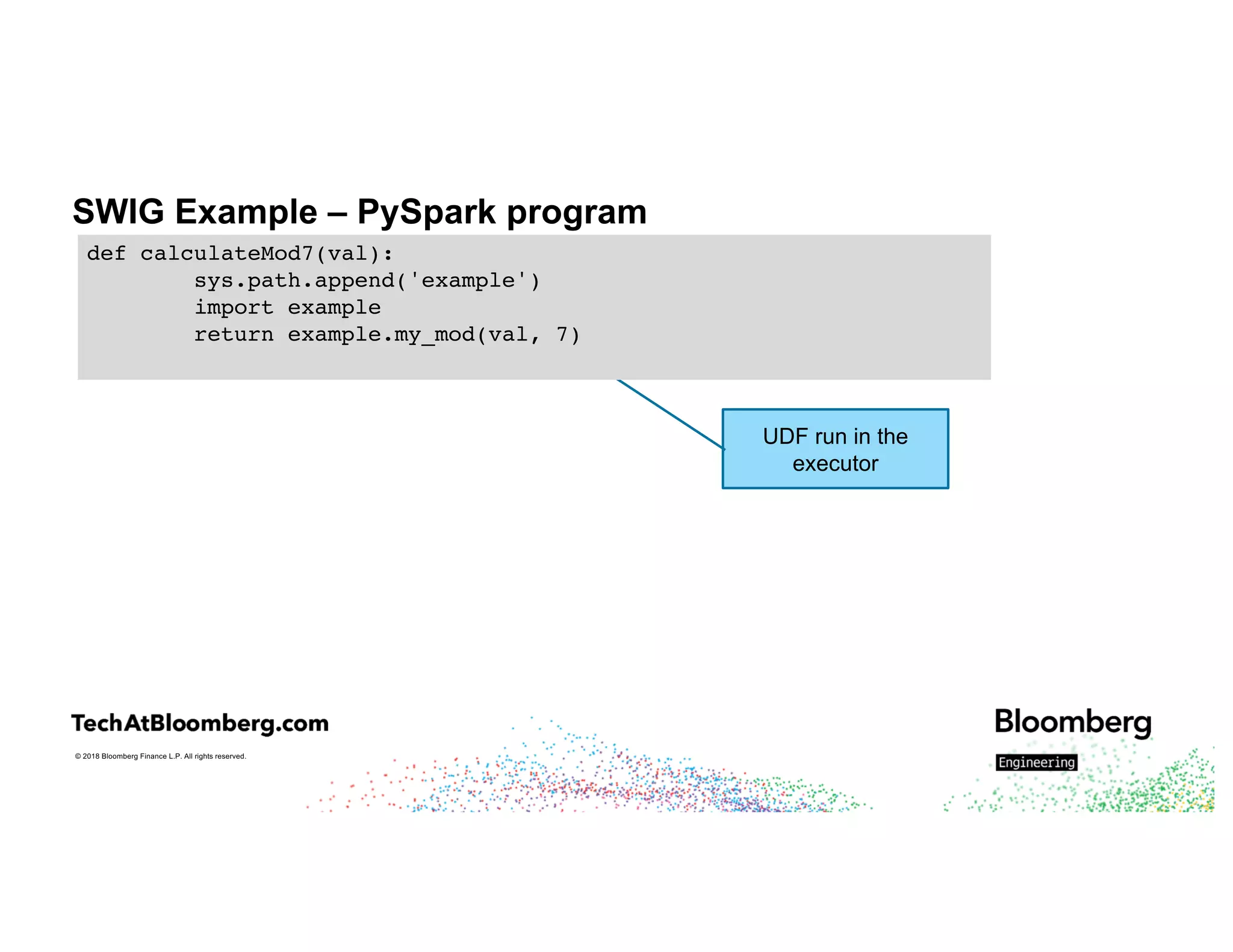
SWIG Example – PySpark program
UDF run in the
executor
def calculateMod7(val):
sys.path.append('example')
import example
return example.my_mod(val, 7)
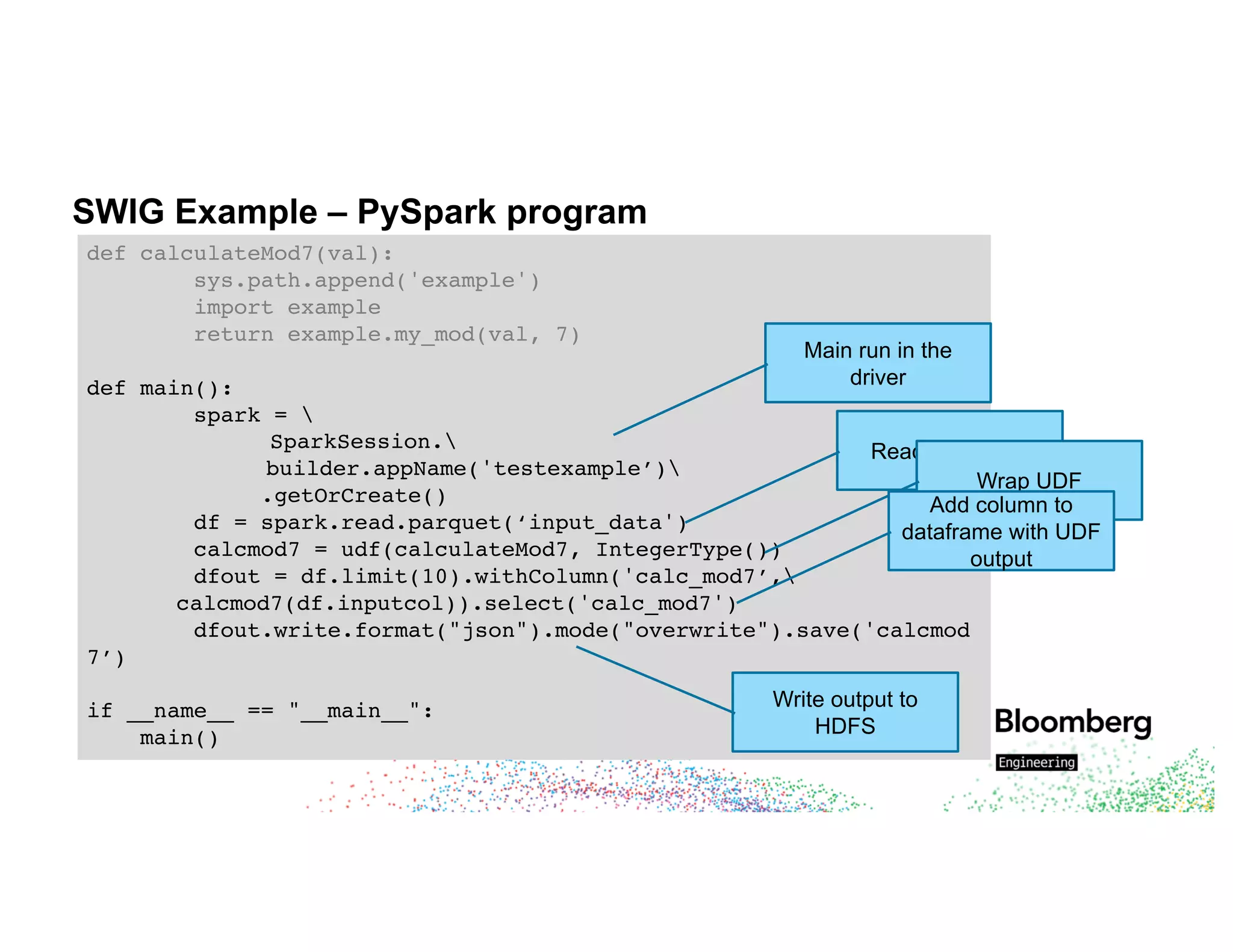
SWIG Example – PySpark program
def calculateMod7(val):
sys.path.append('example')
import example
return example.my_mod(val, 7)
def main():
spark = 
SparkSession.
builder.appName('testexample’)
.getOrCreate()
df = spark.read.parquet(‘input_data')
calcmod7 = udf(calculateMod7, IntegerType())
dfout = df.limit(10).withColumn('calc_mod7’,
calcmod7(df.inputcol)).select('calc_mod7')
dfout.write.format("json").mode("overwrite").save('calcmod
7’)
if __name__ == "__main__":
main()
Main run in the
driver
Read input data
Wrap UDF
Add column to
dataframe with UDF
output
Write output to
HDFS
© 2018 Bloomberg Finance L.P. All rights reserved.
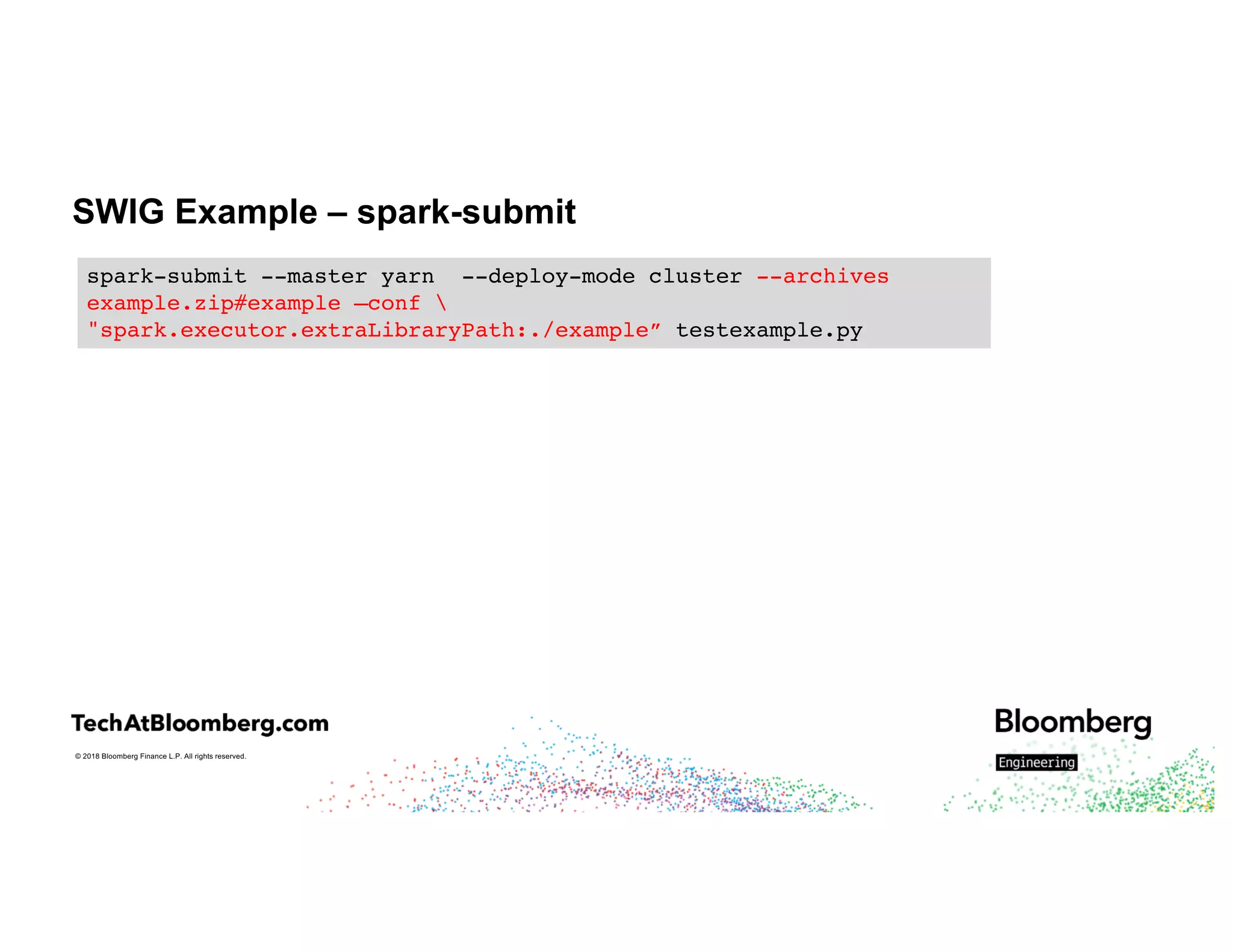
SWIG Example – spark-submit
spark-submit --master yarn --deploy-mode cluster --archives
example.zip#example
spark-submit --master yarn --deploy-mode cluster --archives
example.zip#example –conf 
"spark.executor.extraLibraryPath:./example"
spark-submit --master yarn --deploy-mode cluster --archives
example.zip#example –conf 
"spark.executor.extraLibraryPath:./example” testexample.py
© 2018 Bloomberg Finance L.P. All rights reserved.
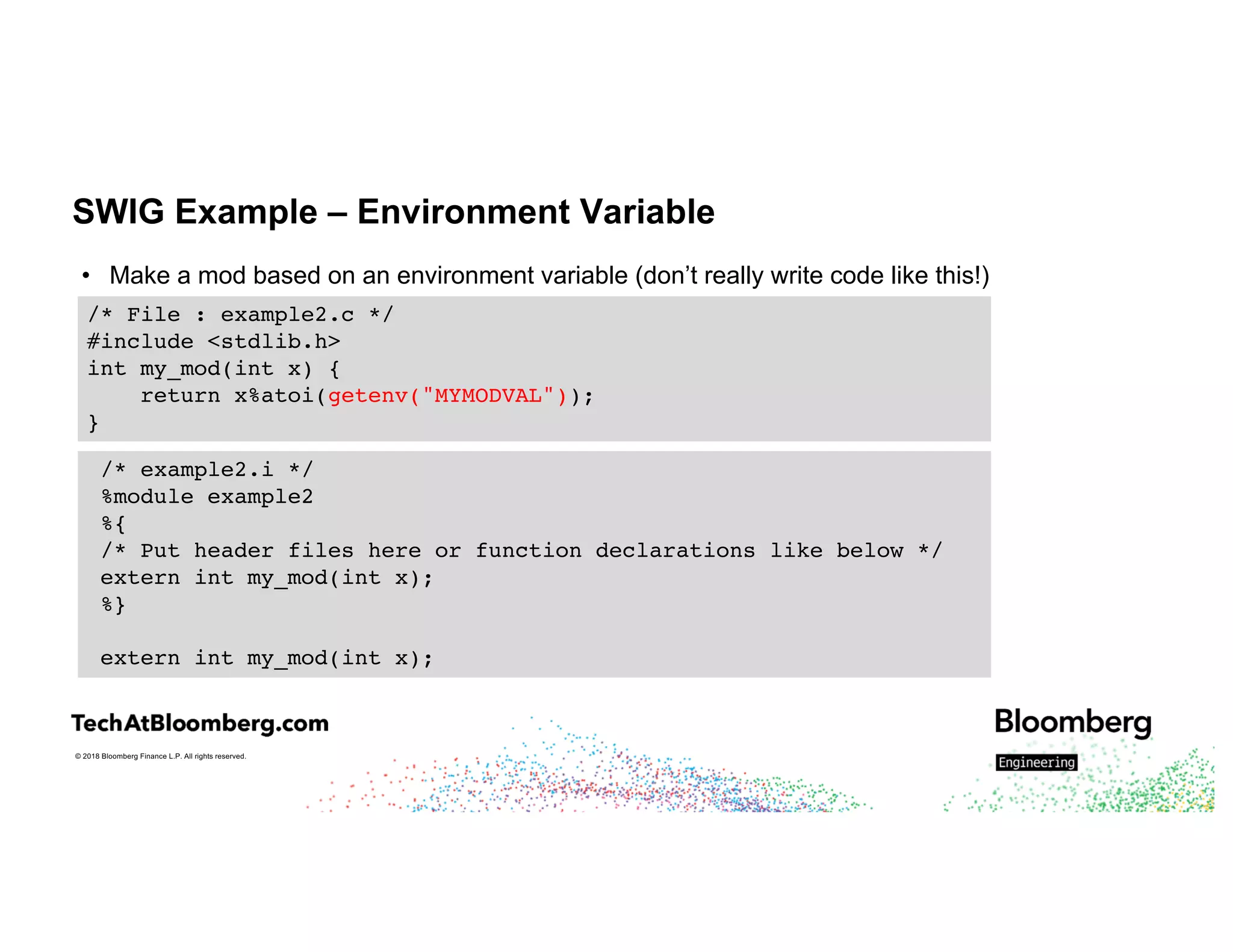
SWIG Example – Environment Variable
• Make a mod based on an environment variable (don’t really write code like this!)
/* File : example2.c */
#include <stdlib.h>
int my_mod(int x) {
return x%atoi(getenv("MYMODVAL"));
}
/* example2.i */
%module example2
%{
/* Put header files here or function declarations like below */
extern int my_mod(int x);
%}
extern int my_mod(int x);
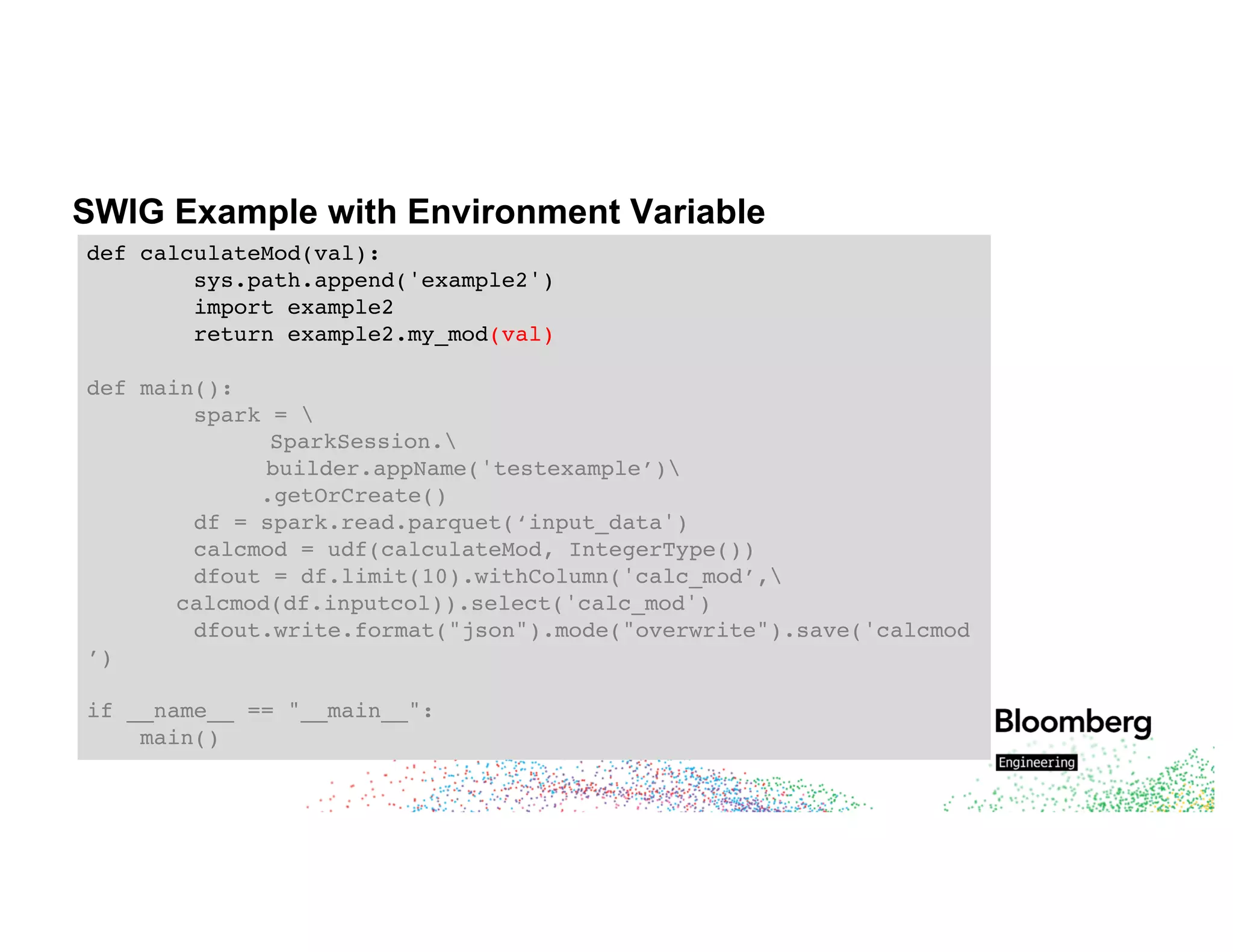
SWIG Example with Environment Variable
def calculateMod(val):
sys.path.append('example2')
import example2
return example2.my_mod(val)
def main():
spark = 
SparkSession.
builder.appName('testexample’)
.getOrCreate()
df = spark.read.parquet(‘input_data')
calcmod = udf(calculateMod, IntegerType())
dfout = df.limit(10).withColumn('calc_mod’,
calcmod(df.inputcol)).select('calc_mod')
dfout.write.format("json").mode("overwrite").save('calcmod
’)
if __name__ == "__main__":
main()
© 2018 Bloomberg Finance L.P. All rights reserved.
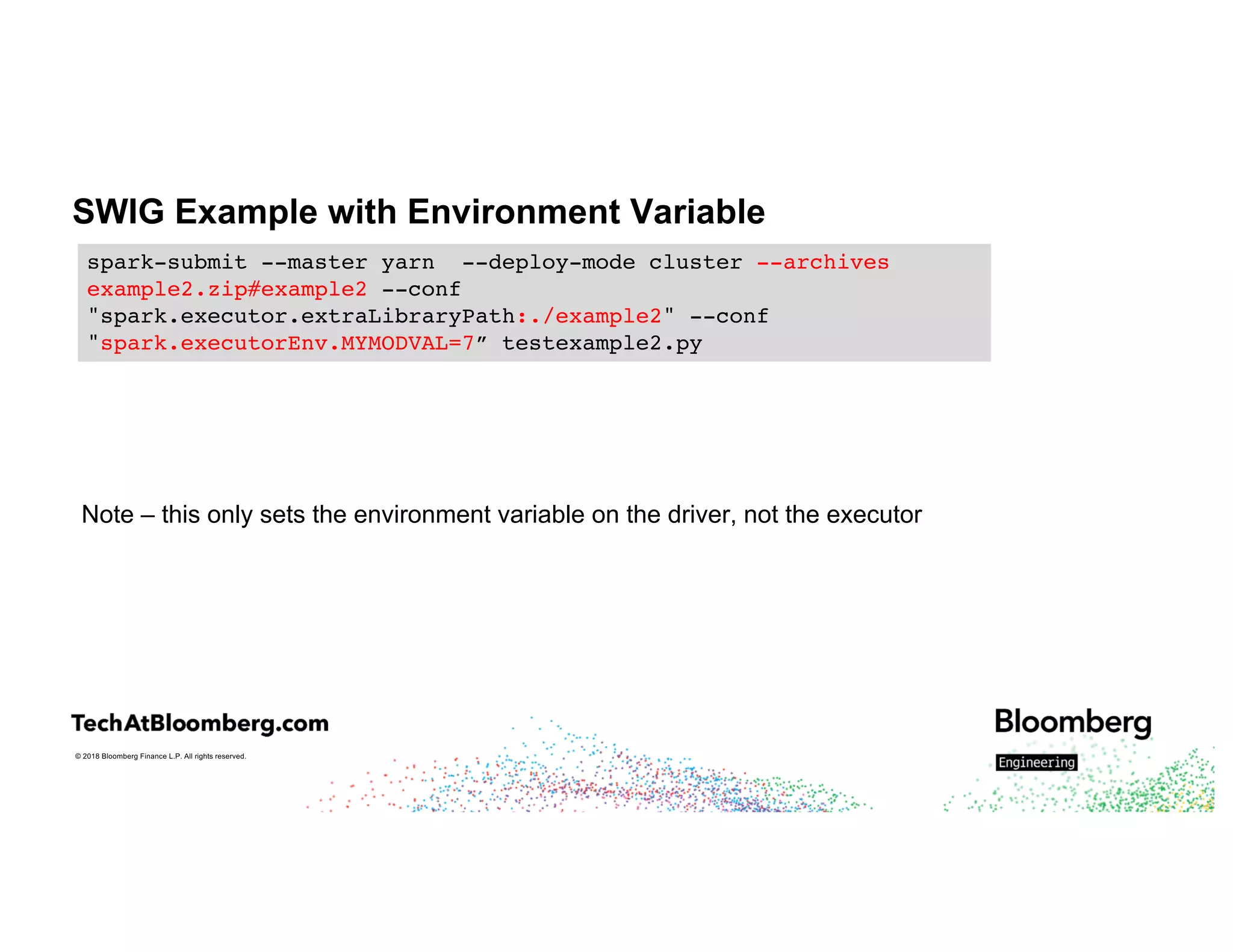
SWIG Example with Environment Variable
Note – this only sets the environment variable on the driver, not the executor
spark-submit --master yarn --deploy-mode cluster --archives
example2.zip#example2 --conf
"spark.executor.extraLibraryPath:./example2" --conf
"spark.executorEnv.MYMODVAL=7” testexample2.py
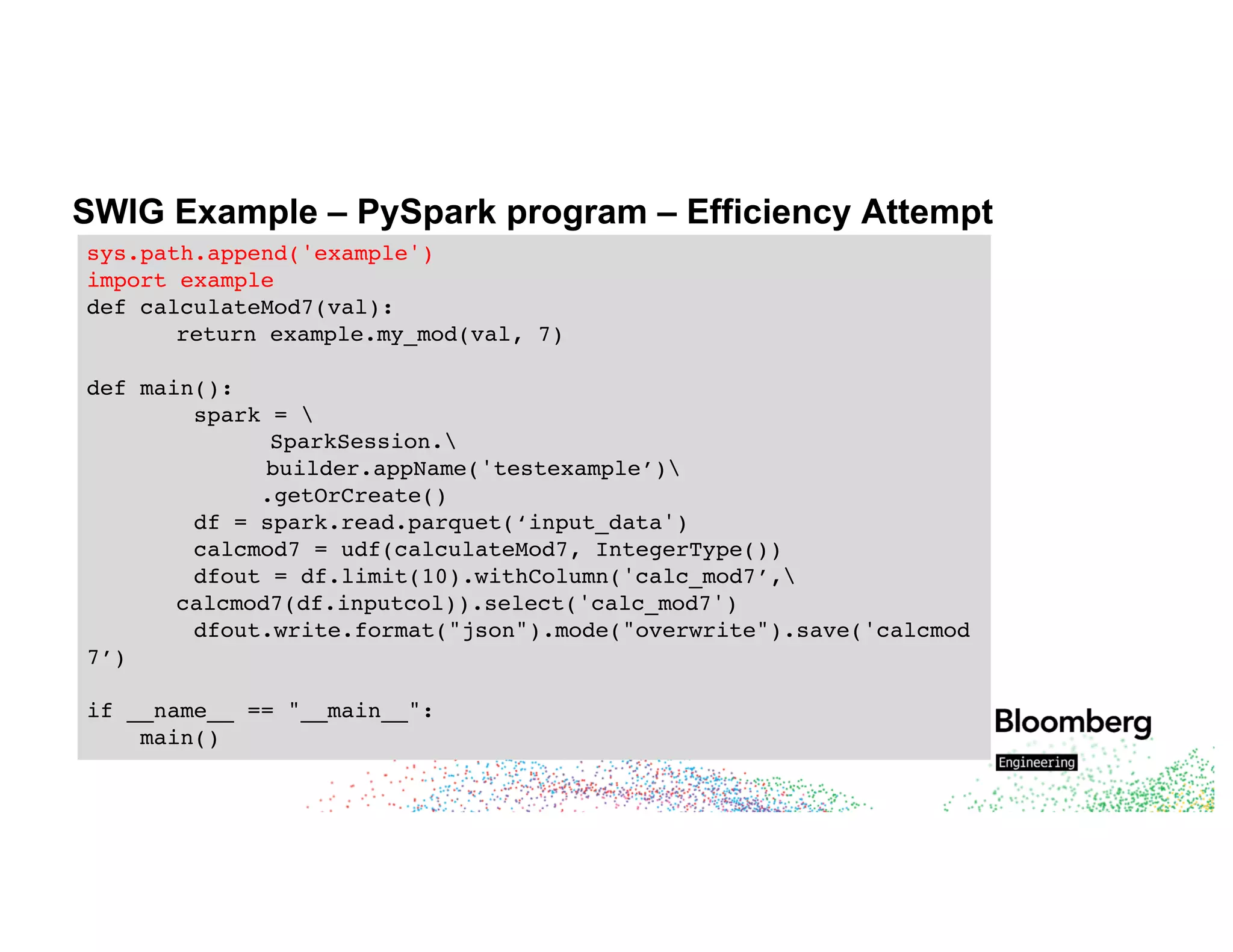
SWIG Example – PySpark program – Efficiency Attempt
sys.path.append('example')
import example
def calculateMod7(val):
return example.my_mod(val, 7)
def main():
spark = 
SparkSession.
builder.appName('testexample’)
.getOrCreate()
df = spark.read.parquet(‘input_data')
calcmod7 = udf(calculateMod7, IntegerType())
dfout = df.limit(10).withColumn('calc_mod7’,
calcmod7(df.inputcol)).select('calc_mod7')
dfout.write.format("json").mode("overwrite").save('calcmod
7’)
if __name__ == "__main__":
main()
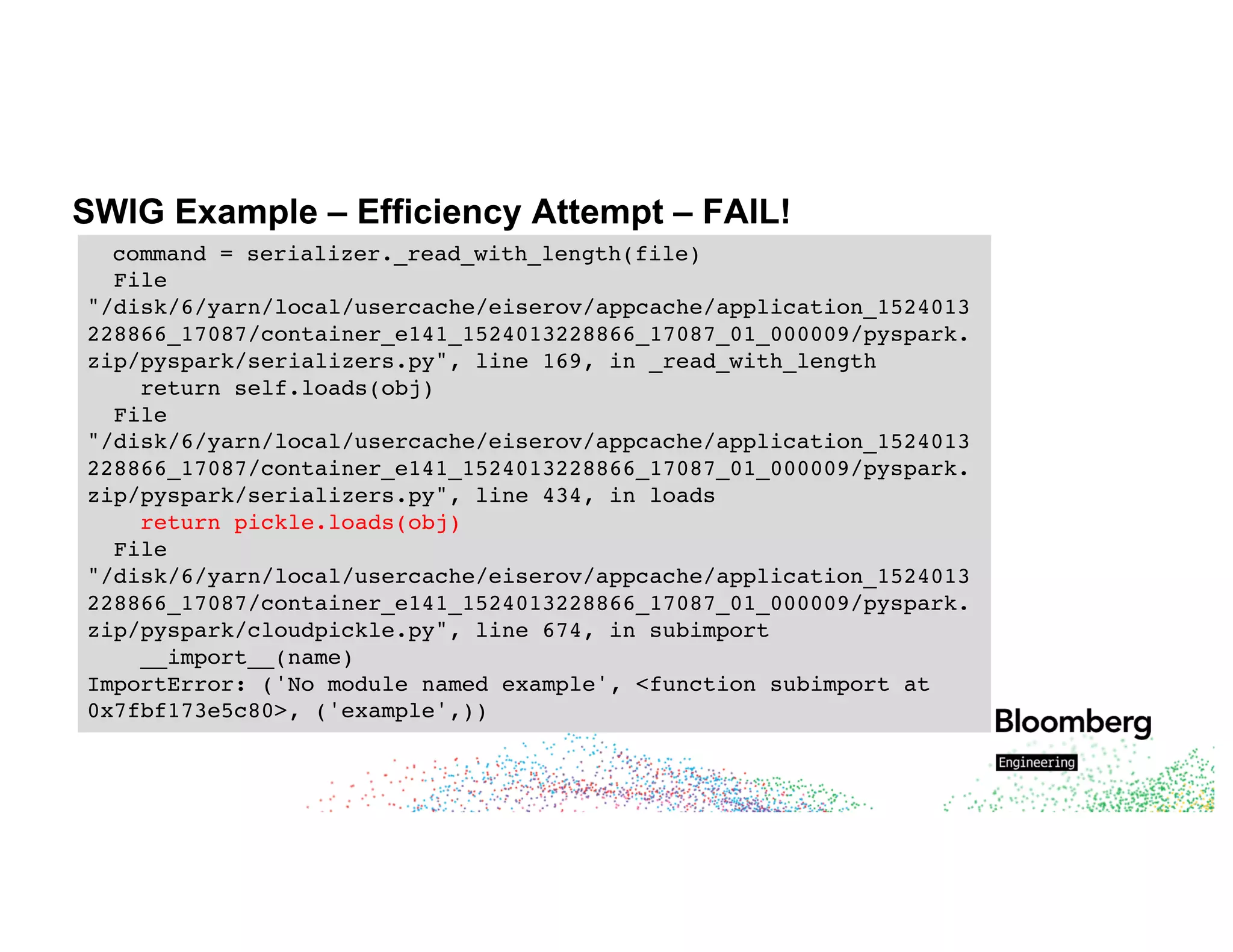
SWIG Example – Efficiency Attempt – FAIL!
command = serializer._read_with_length(file)
File
"/disk/6/yarn/local/usercache/eiserov/appcache/application_1524013
228866_17087/container_e141_1524013228866_17087_01_000009/pyspark.
zip/pyspark/serializers.py", line 169, in _read_with_length
return self.loads(obj)
File
"/disk/6/yarn/local/usercache/eiserov/appcache/application_1524013
228866_17087/container_e141_1524013228866_17087_01_000009/pyspark.
zip/pyspark/serializers.py", line 434, in loads
return pickle.loads(obj)
File
"/disk/6/yarn/local/usercache/eiserov/appcache/application_1524013
228866_17087/container_e141_1524013228866_17087_01_000009/pyspark.
zip/pyspark/cloudpickle.py", line 674, in subimport
__import__(name)
ImportError: ('No module named example', <function subimport at
0x7fbf173e5c80>, ('example',))
© 2018 Bloomberg Finance L.P. All rights reserved.
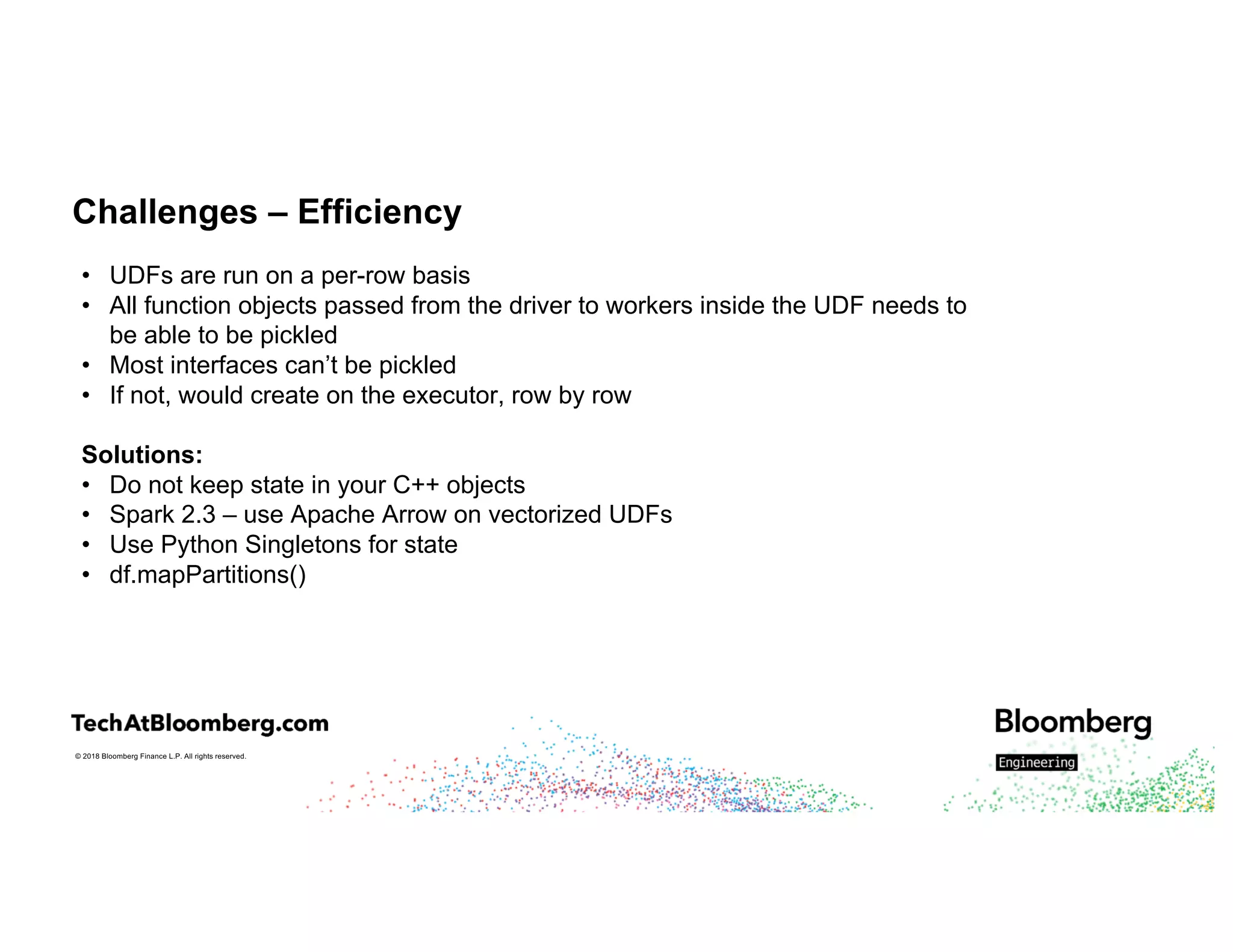
Challenges – Efficiency
• UDFs are run on a per-row basis
• All function objects passed from the driver to workers inside the UDF needs to
be able to be pickled
• Most interfaces can’t be pickled
• If not, would create on the executor, row by row
Solutions:
• Do not keep state in your C++ objects
• Spark 2.3 – use Apache Arrow on vectorized UDFs
• Use Python Singletons for state
• df.mapPartitions()
© 2018 Bloomberg Finance L.P. All rights reserved.
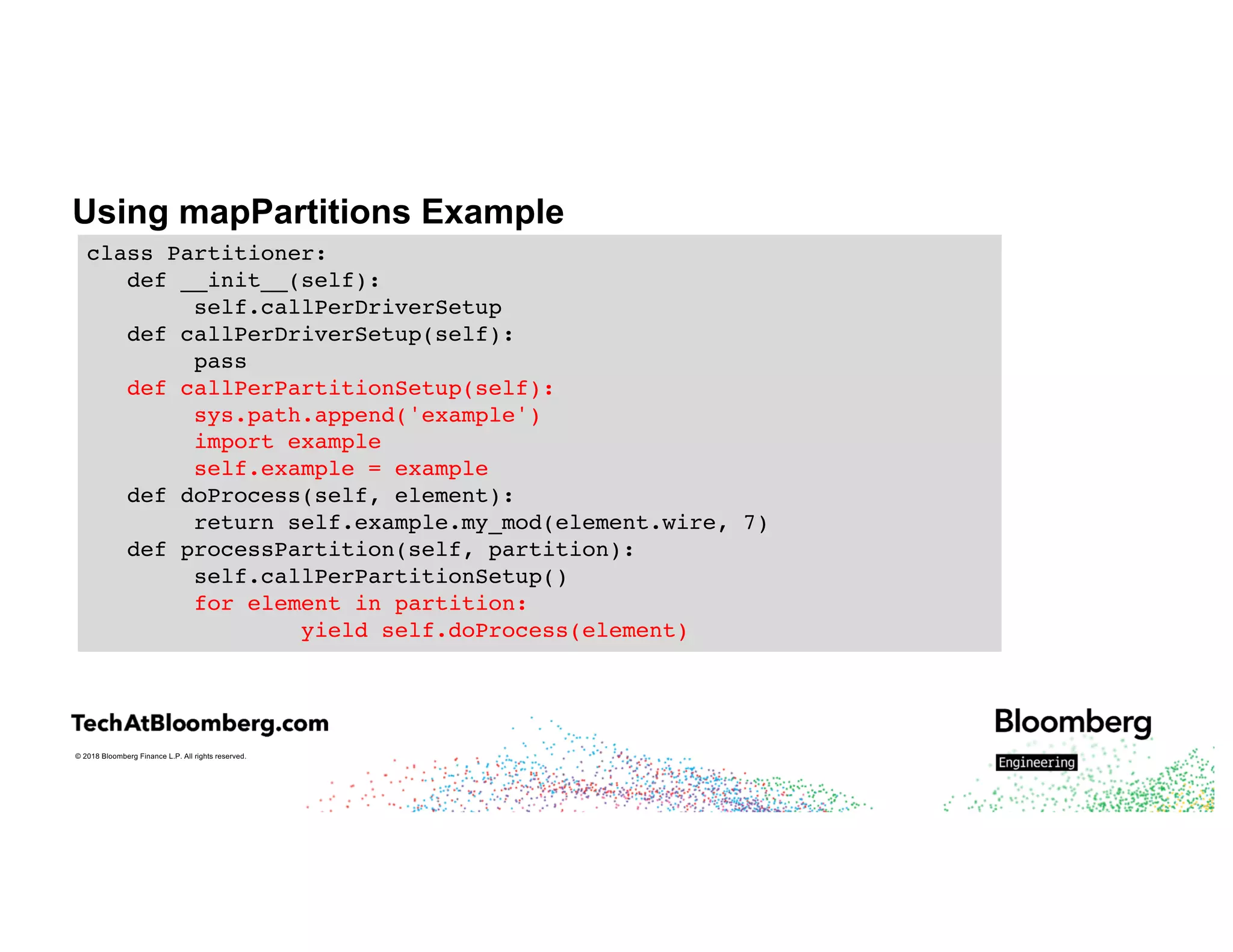
Using mapPartitions Example
class Partitioner:
def __init__(self):
self.callPerDriverSetup
def callPerDriverSetup(self):
pass
def callPerPartitionSetup(self):
sys.path.append('example')
import example
self.example = example
def doProcess(self, element):
return self.example.my_mod(element.wire, 7)
def processPartition(self, partition):
self.callPerPartitionSetup()
for element in partition:
yield self.doProcess(element)
© 2018 Bloomberg Finance L.P. All rights reserved.
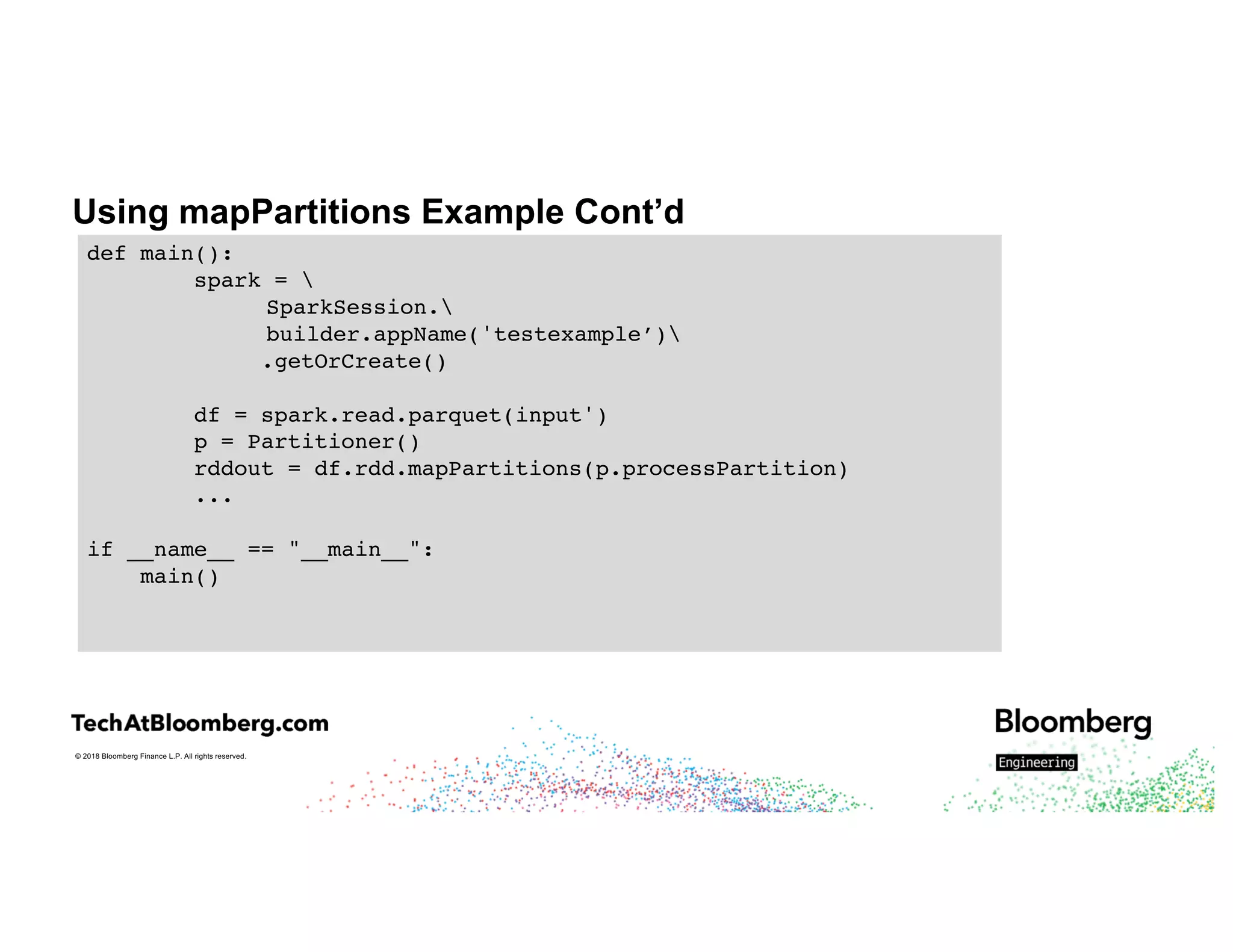
Using mapPartitions Example Cont’d
def main():
spark = 
SparkSession.
builder.appName('testexample’)
.getOrCreate()
df = spark.read.parquet(input')
p = Partitioner()
rddout = df.rdd.mapPartitions(p.processPartition)
...
if __name__ == "__main__":
main()
© 2018 Bloomberg Finance L.P. All rights reserved.
Putting It All Together
© 2018 Bloomberg Finance L.P. All rights reserved.
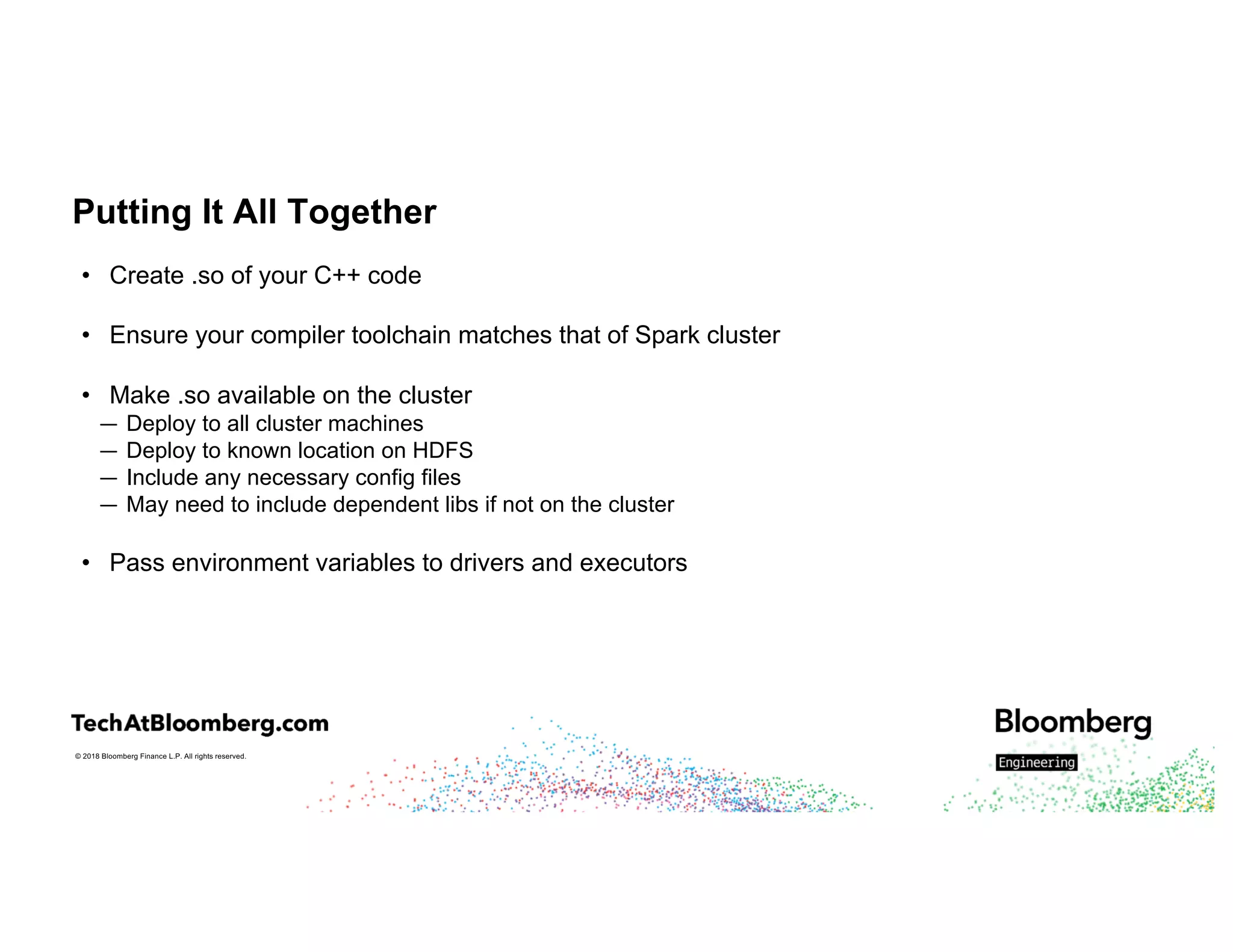
Putting It All Together
• Create .so of your C++ code
• Ensure your compiler toolchain matches that of Spark cluster
• Make .so available on the cluster
— Deploy to all cluster machines
— Deploy to known location on HDFS
— Include any necessary config files
— May need to include dependent libs if not on the cluster
• Pass environment variables to drivers and executors
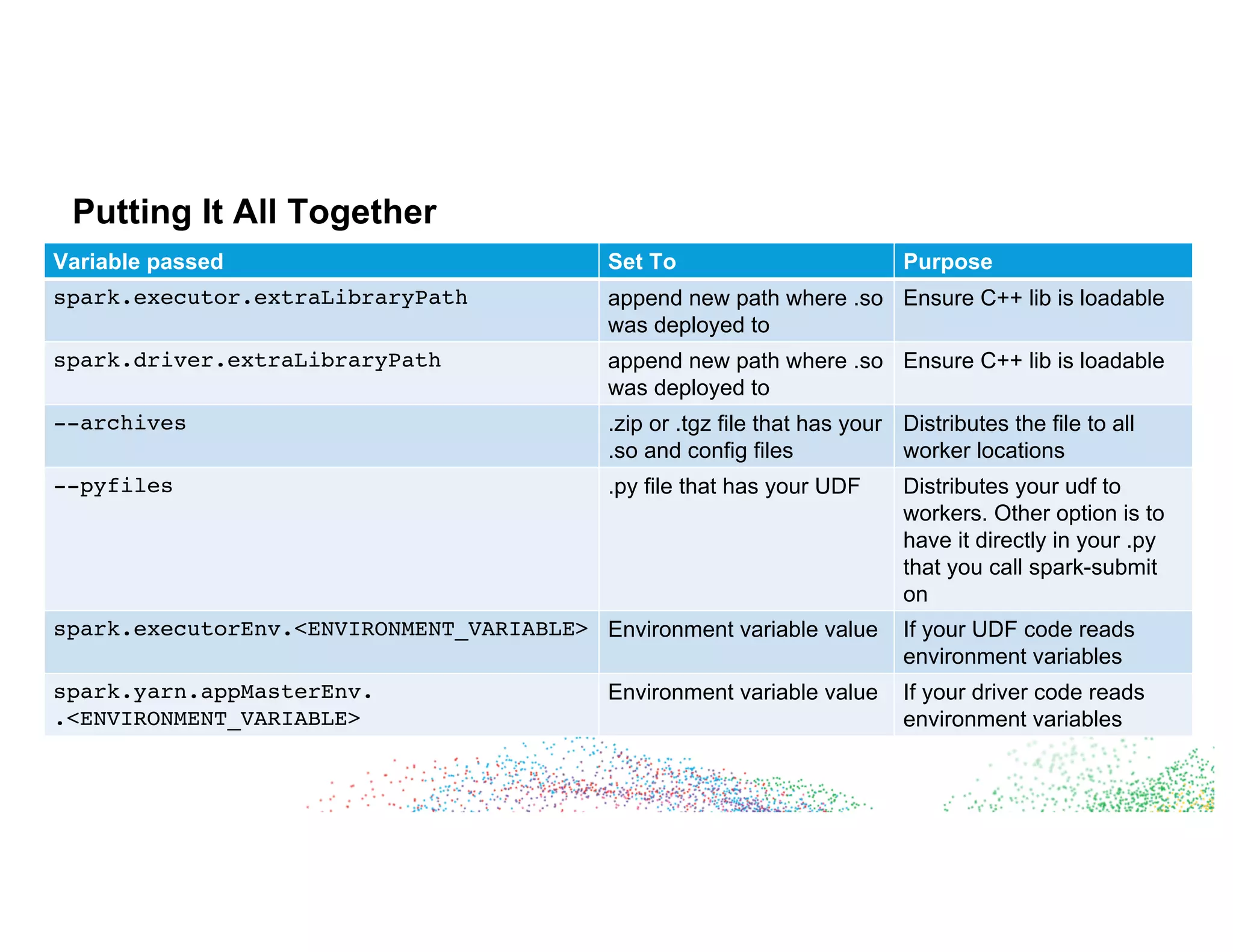
Putting It All Together
Variable passed Set To Purpose
spark.executor.extraLibraryPath append new path where .so
was deployed to
Ensure C++ lib is loadable
spark.driver.extraLibraryPath append new path where .so
was deployed to
Ensure C++ lib is loadable
--archives .zip or .tgz file that has your
.so and config files
Distributes the file to all
worker locations
--pyfiles .py file that has your UDF Distributes your udf to
workers. Other option is to
have it directly in your .py
that you call spark-submit
on
spark.executorEnv.<ENVIRONMENT_VARIABLE> Environment variable value If your UDF code reads
environment variables
spark.yarn.appMasterEnv.
.<ENVIRONMENT_VARIABLE>
Environment variable value If your driver code reads
environment variables
© 2018 Bloomberg Finance L.P. All rights reserved.
Putting It All Together
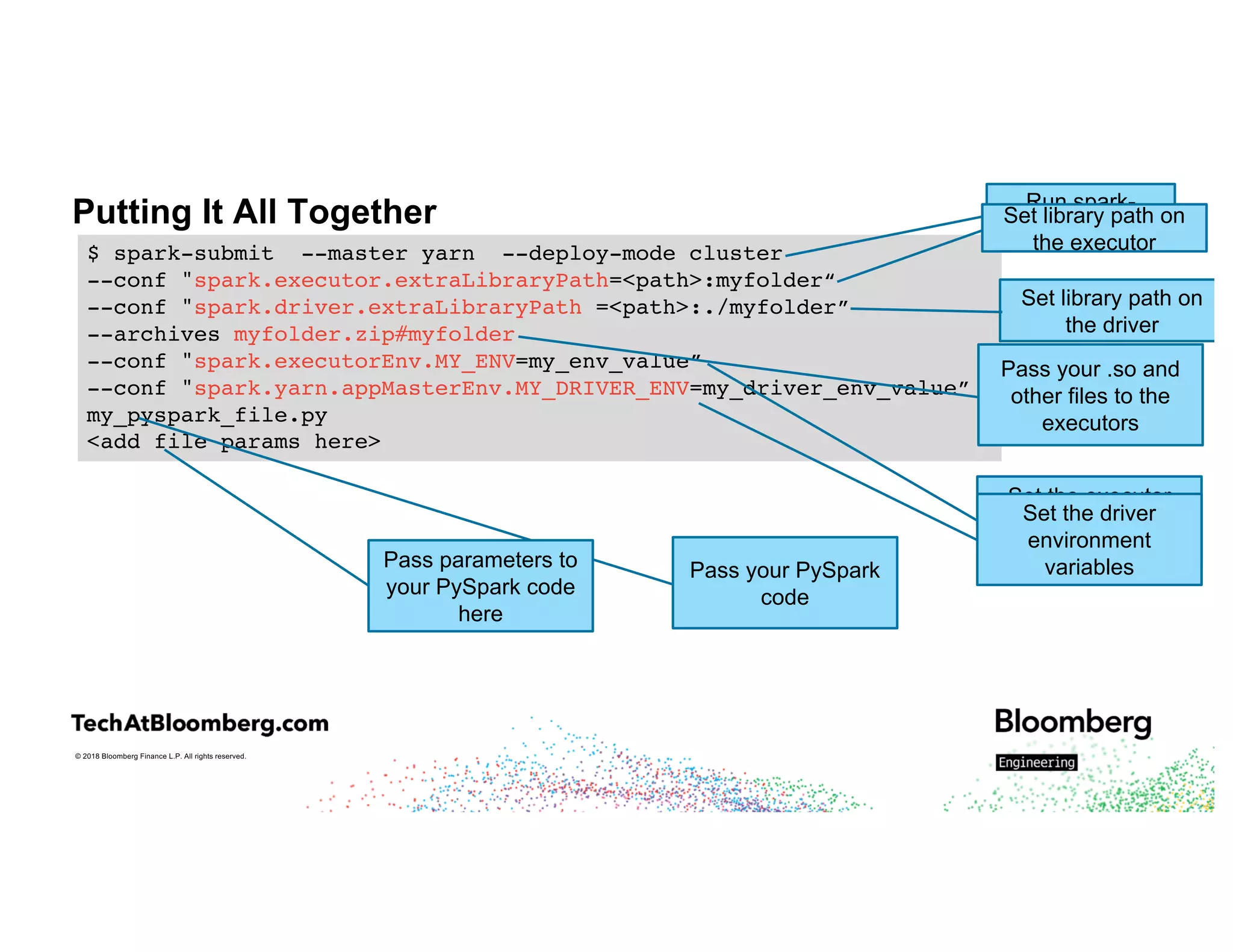
$ spark-submit --master yarn --deploy-mode cluster
--conf "spark.executor.extraLibraryPath=<path>:myfolder“
--conf "spark.driver.extraLibraryPath =<path>:./myfolder”
--archives myfolder.zip#myfolder
--conf "spark.executorEnv.MY_ENV=my_env_value”
--conf "spark.yarn.appMasterEnv.MY_DRIVER_ENV=my_driver_env_value”
my_pyspark_file.py
<add file params here>
Run spark-
submit
Set library path on
the driver
Pass your .so and
other files to the
executors
Set the executor
environment
variables
Set the driver
environment
variablesPass your PySpark
code
Pass parameters to
your PySpark code
here
Set library path on
the executor
© 2018 Bloomberg Finance L.P. All rights reserved.
Challenges
© 2018 Bloomberg Finance L.P. All rights reserved.
Challenges – Memory
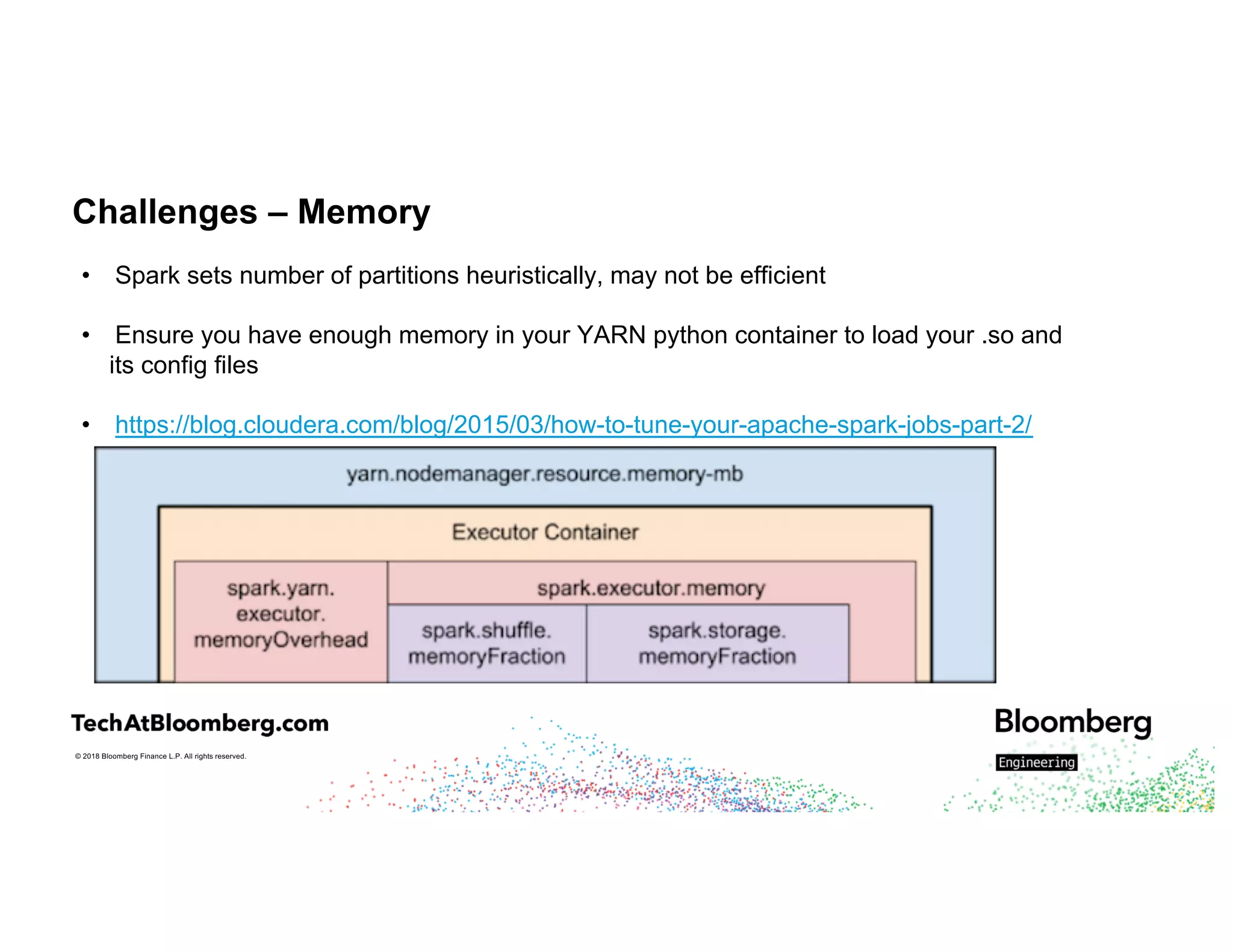
• Spark sets number of partitions heuristically, may not be efficient
• Ensure you have enough memory in your YARN python container to load your .so and
its config files
• https://blog.cloudera.com/blog/2015/03/how-to-tune-your-apache-spark-jobs-part-2/
© 2018 Bloomberg Finance L.P. All rights reserved.
Memory Settings
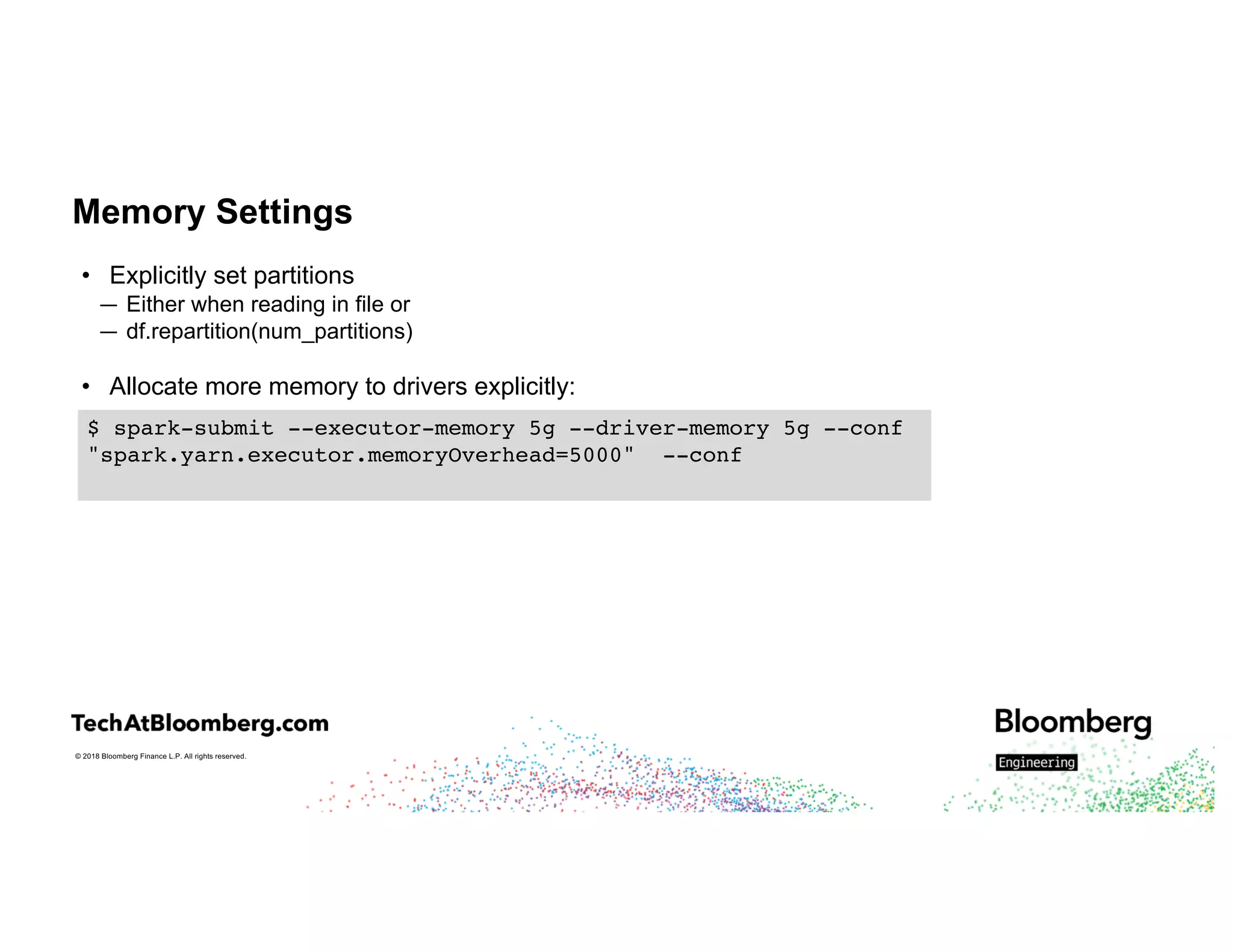
• Explicitly set partitions
— Either when reading in file or
— df.repartition(num_partitions)
• Allocate more memory to drivers explicitly:
$ spark-submit --executor-memory 5g --driver-memory 5g --conf
"spark.yarn.executor.memoryOverhead=5000" --conf
© 2018 Bloomberg Finance L.P. All rights reserved.
C++ Tips and Tricks
© 2018 Bloomberg Finance L.P. All rights reserved.
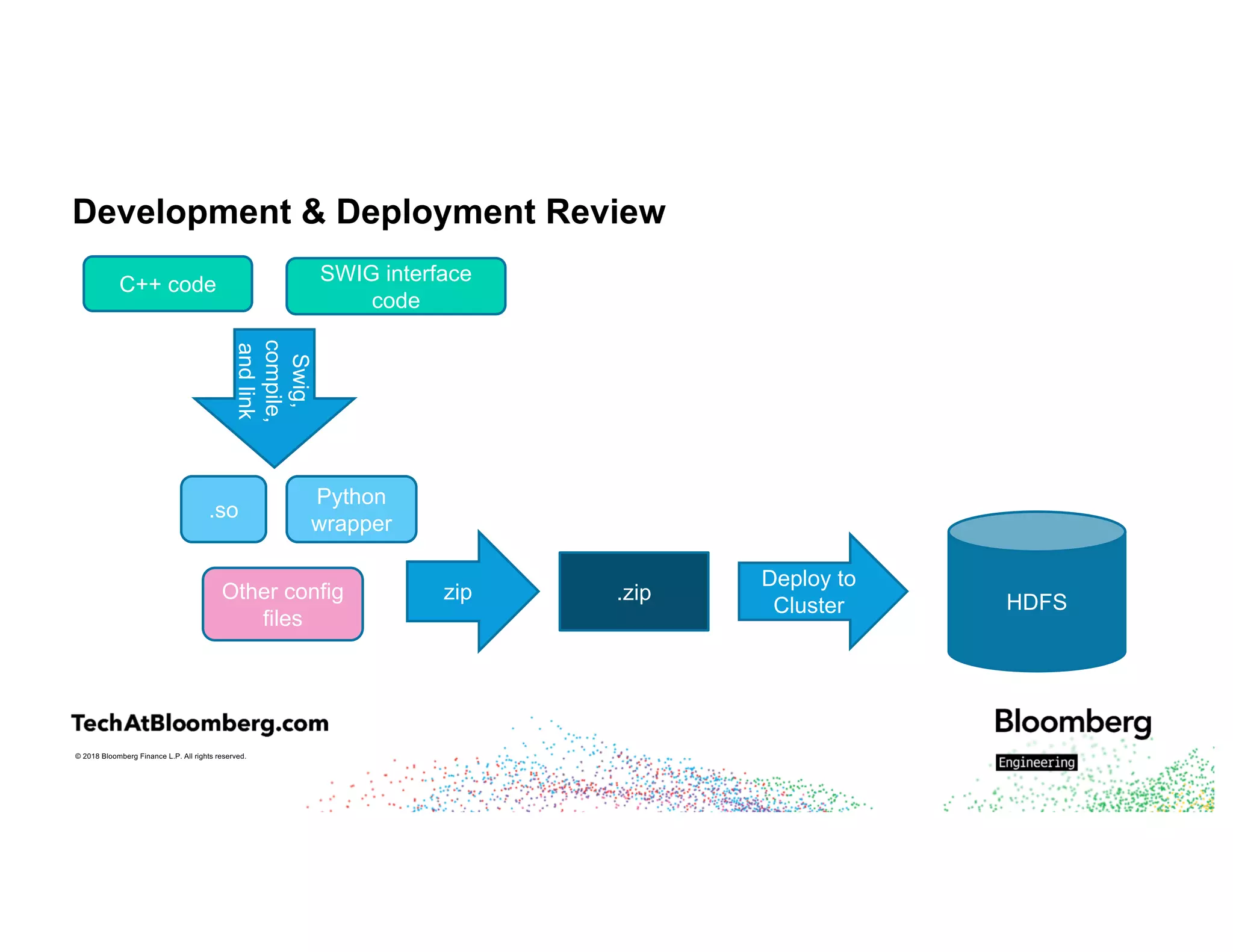
Development & Deployment Review
C++ code SWIG interface
code
Swig,
compile,
andlink
.so
Other config
files
zip .zip
Deploy to
Cluster HDFS
Python
wrapper
© 2018 Bloomberg Finance L.P. All rights reserved.
C++ Tips and Tricks
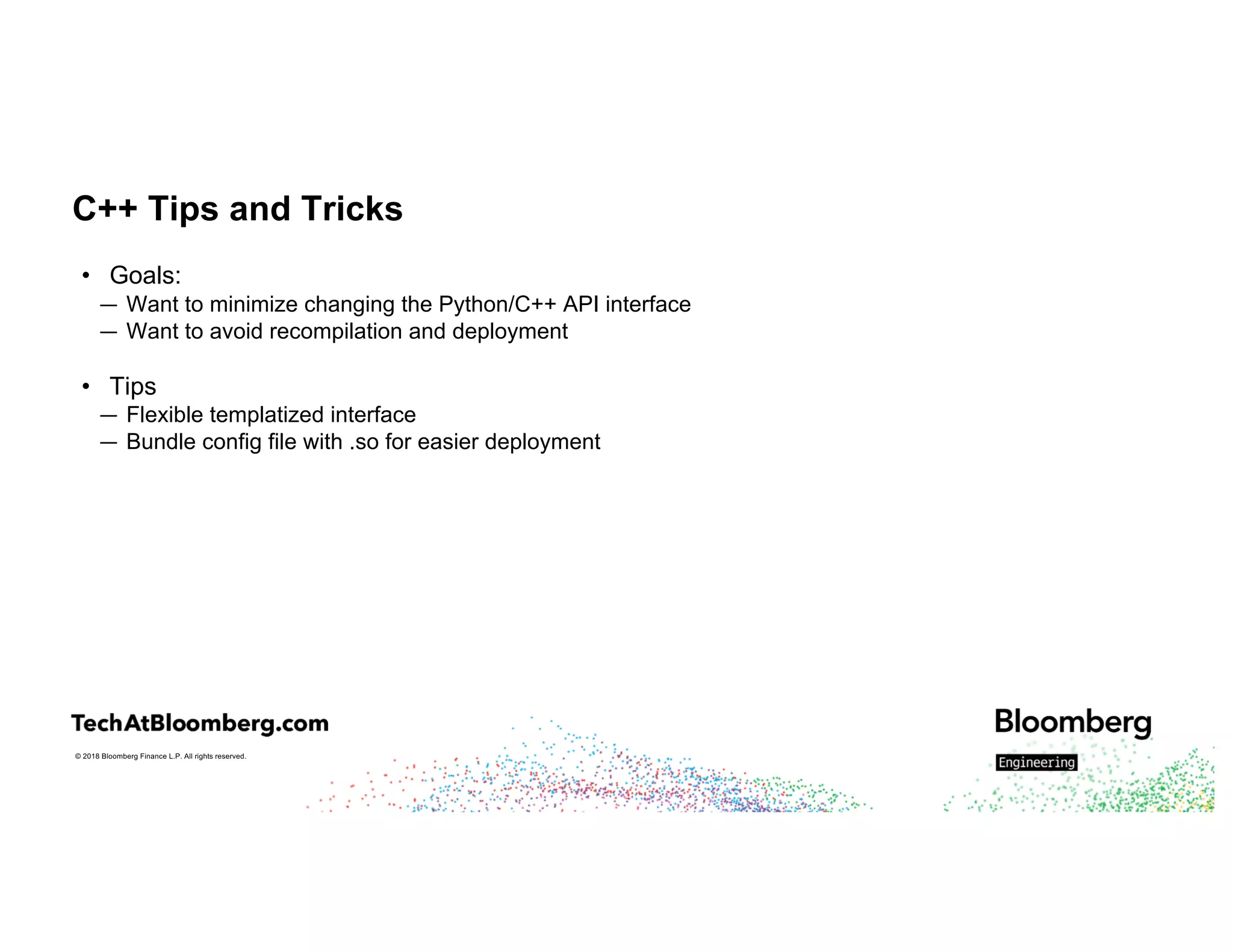
• Goals:
— Want to minimize changing the Python/C++ API interface
— Want to avoid recompilation and deployment
• Tips
— Flexible templatized interface
— Bundle config file with .so for easier deployment
© 2018 Bloomberg Finance L.P. All rights reserved.
Conclusion
• Was able to run backfill of all data on existing models in <24 hours
• Was able to generate backfills on new models iteratively
© 2018 Bloomberg Finance L.P. All rights reserved.
Takeaways
• Spark is flexible enough to include C++ code
• Deploy all dependent code to cluster
• Tweak spark-submit commands to properly pick it up
• Write flexible C++ code to minimize overhead
© 2018 Bloomberg Finance L.P. All rights reserved.
We are hiring!
Questions?
https://www.bloomberg.com/careers

Integrating Existing C++ Libraries into PySpark with Esther Kundin

  • 1.
    © 2018 BloombergFinance L.P. All rights reserved. Integrating Existing C++ Libraries into PySpark Spark+AI Summit 2018 June 5, 2018 Esther Kundin Senior Software Developer
  • 2.
    © 2018 BloombergFinance L.P. All rights reserved. About Me • Esther Kundin — Senior Software Developer — Lead architect and engineer — Machine Learning and Text Analysis — Open Source contributor
  • 3.
    © 2018 BloombergFinance L.P. All rights reserved. Outline • Why Bother – A Real-Life Use Case • PySpark Overview • Interfacing to Your C++ Code • Putting It All Together • Challenges • C++ Tips and Tricks • Takeaways • Q&A
  • 4.
    © 2018 BloombergFinance L.P. All rights reserved. A Real-Life Use Case
  • 5.
    © 2018 BloombergFinance L.P. All rights reserved. Why Bother – A Real-Life Use Case • Realtime system is processing news stories and giving sentiment scores – convert text to buy, sell or neutral signals on equities mentioned in it • <10 ms response time • Want to run the exact same code in real-time and against history Image courtesy of https://flic.kr/p/ayDEMD
  • 6.
    © 2018 BloombergFinance L.P. All rights reserved. Why Bother – A Real-Life Use Case • Need to rerun backfill on historical data – 2 TB (compressed) • Want to run the exact same code against history • SLA: < 24 hours to recompute entire history • Can do backfills for new models – monthly basis Image courtesy of https://flic.kr/p/ayDEMD
  • 7.
    © 2018 BloombergFinance L.P. All rights reserved. PySpark Overview
  • 8.
    © 2018 BloombergFinance L.P. All rights reserved. PySpark Overview • Python front-end for interfacing with Spark system • API wrappers for built-in Spark functions • Allows to run any python code over the rows with User Defined Functions (UDF) • https://cwiki.apache.org/confluence/display/SPARK/PySpark+Internals
  • 9.
    © 2018 BloombergFinance L.P. All rights reserved. Python UDFs • Native Python code • Function objects are pickled and passed to workers • Row data passed to Python workers one at a time • Code will pass from Python runtime-> JVM runtime -> Python runtime and back • [SPARK-22216] [SPARK-21187] – support vectorized UDF support with Arrow format – see Li Jin’s talk
  • 10.
    © 2018 BloombergFinance L.P. All rights reserved. Interfacing to your C++ Code
  • 11.
    © 2018 BloombergFinance L.P. All rights reserved. Interfacing to your C++ Code with PySpark Pros Cons SWIG • Very powerful and mature • supports classes and nested types • Language-agnostic – can use with JNI • Complex • Requires extra .ini file • Extra step before linking Cython • Don’t need extra files • Very easy to get started • Speeds up python code • intricate build • separate install ctypes • Don’t need extra files • Very easy to get started • Limited types available • tedious CFFI • easy to use and integrate • PyPy focused • new, changes quickly
  • 12.
    © 2018 BloombergFinance L.P. All rights reserved. Interfacing to your C++ Code via the JVM Pros Cons JNI • Skips the extra Python wrapper step – straight to JVM space (e.g., Spark ML Blas implementation using nettlib) • Clunky, difficult to maintain SWIG • Very powerful and mature • supports classes and nested types • Language-agnostic • Run over JNI • Very powerful and mature • supports classes and nested types • Language-agnostic Scala pipe() command • Use a pipe() call to interface with your C++ code using a system call and stdin/stdout • Very brittle
  • 13.
    © 2018 BloombergFinance L.P. All rights reserved. Interfacing to your C++ Code – SWIG + PySpark Example
  • 14.
    © 2018 BloombergFinance L.P. All rights reserved. Why SWIG + PySpark Example • SWIG wrapper was already written • Maintenance – institutional knowledge dictated the choice of Python • Back-end work, less concerned with exact time it takes to run • Final run took ~24 hours
  • 15.
    © 2018 BloombergFinance L.P. All rights reserved. SWIG Workflow C++ code SWIG interface code Swig, compile, andlink .so Other config files zip .zip Deploy to Cluster HDFS Python wrapper
  • 16.
    © 2018 BloombergFinance L.P. All rights reserved. SWIG Example • Start with simple SWIG interface – adapted from (http://www.swig.org/tutorial.html) /* File : example.c */ int my_mod(int x, int y) { return x%y; } /* example.i */ %module example %{ /* Put header files here or function declarations like below */ extern int my_mod(int x, int y); %} extern int my_mod(int x, int y);
  • 17.
    © 2018 BloombergFinance L.P. All rights reserved. SWIG Example continued • Create the C++ and Python wrappers $ swig -python example.i
  • 18.
    © 2018 BloombergFinance L.P. All rights reserved. SWIG Example continued • Create the C++ and Python wrappers • Compile and link $ swig -python example.i $ gcc -fPIC -c example.c example_wrap.c -I/usr/local/include/python2.7 $ld -shared example.o example_wrap.o -o _example.so
  • 19.
    © 2018 BloombergFinance L.P. All rights reserved. SWIG Example continued • Create the C++ and Python wrappers • Compile and link • Test the wrapper $ swig -python example.i $ gcc -fPIC -c example.c example_wrap.c -I/usr/local/include/python2.7 $ld -shared example.o example_wrap.o -o _example.so >>> import example >>> example.my_mod(7, 3) 1
  • 20.
    © 2018 BloombergFinance L.P. All rights reserved. SWIG Example continued • Now wrap into a zip file that can be shipped to the Spark cluster $ zip example.zip _example.so example.py
  • 21.
    © 2018 BloombergFinance L.P. All rights reserved. SWIG Example – PySpark program UDF run in the executor def calculateMod7(val): sys.path.append('example') import example return example.my_mod(val, 7)
  • 22.
    SWIG Example –PySpark program def calculateMod7(val): sys.path.append('example') import example return example.my_mod(val, 7) def main(): spark = SparkSession. builder.appName('testexample’) .getOrCreate() df = spark.read.parquet(‘input_data') calcmod7 = udf(calculateMod7, IntegerType()) dfout = df.limit(10).withColumn('calc_mod7’, calcmod7(df.inputcol)).select('calc_mod7') dfout.write.format("json").mode("overwrite").save('calcmod 7’) if __name__ == "__main__": main() Main run in the driver Read input data Wrap UDF Add column to dataframe with UDF output Write output to HDFS
  • 23.
    © 2018 BloombergFinance L.P. All rights reserved. SWIG Example – spark-submit spark-submit --master yarn --deploy-mode cluster --archives example.zip#example spark-submit --master yarn --deploy-mode cluster --archives example.zip#example –conf "spark.executor.extraLibraryPath:./example" spark-submit --master yarn --deploy-mode cluster --archives example.zip#example –conf "spark.executor.extraLibraryPath:./example” testexample.py
  • 24.
    © 2018 BloombergFinance L.P. All rights reserved. SWIG Example – Environment Variable • Make a mod based on an environment variable (don’t really write code like this!) /* File : example2.c */ #include <stdlib.h> int my_mod(int x) { return x%atoi(getenv("MYMODVAL")); } /* example2.i */ %module example2 %{ /* Put header files here or function declarations like below */ extern int my_mod(int x); %} extern int my_mod(int x);
  • 25.
    SWIG Example withEnvironment Variable def calculateMod(val): sys.path.append('example2') import example2 return example2.my_mod(val) def main(): spark = SparkSession. builder.appName('testexample’) .getOrCreate() df = spark.read.parquet(‘input_data') calcmod = udf(calculateMod, IntegerType()) dfout = df.limit(10).withColumn('calc_mod’, calcmod(df.inputcol)).select('calc_mod') dfout.write.format("json").mode("overwrite").save('calcmod ’) if __name__ == "__main__": main()
  • 26.
    © 2018 BloombergFinance L.P. All rights reserved. SWIG Example with Environment Variable Note – this only sets the environment variable on the driver, not the executor spark-submit --master yarn --deploy-mode cluster --archives example2.zip#example2 --conf "spark.executor.extraLibraryPath:./example2" --conf "spark.executorEnv.MYMODVAL=7” testexample2.py
  • 27.
    SWIG Example –PySpark program – Efficiency Attempt sys.path.append('example') import example def calculateMod7(val): return example.my_mod(val, 7) def main(): spark = SparkSession. builder.appName('testexample’) .getOrCreate() df = spark.read.parquet(‘input_data') calcmod7 = udf(calculateMod7, IntegerType()) dfout = df.limit(10).withColumn('calc_mod7’, calcmod7(df.inputcol)).select('calc_mod7') dfout.write.format("json").mode("overwrite").save('calcmod 7’) if __name__ == "__main__": main()
  • 28.
    SWIG Example –Efficiency Attempt – FAIL! command = serializer._read_with_length(file) File "/disk/6/yarn/local/usercache/eiserov/appcache/application_1524013 228866_17087/container_e141_1524013228866_17087_01_000009/pyspark. zip/pyspark/serializers.py", line 169, in _read_with_length return self.loads(obj) File "/disk/6/yarn/local/usercache/eiserov/appcache/application_1524013 228866_17087/container_e141_1524013228866_17087_01_000009/pyspark. zip/pyspark/serializers.py", line 434, in loads return pickle.loads(obj) File "/disk/6/yarn/local/usercache/eiserov/appcache/application_1524013 228866_17087/container_e141_1524013228866_17087_01_000009/pyspark. zip/pyspark/cloudpickle.py", line 674, in subimport __import__(name) ImportError: ('No module named example', <function subimport at 0x7fbf173e5c80>, ('example',))
  • 29.
    © 2018 BloombergFinance L.P. All rights reserved. Challenges – Efficiency • UDFs are run on a per-row basis • All function objects passed from the driver to workers inside the UDF needs to be able to be pickled • Most interfaces can’t be pickled • If not, would create on the executor, row by row Solutions: • Do not keep state in your C++ objects • Spark 2.3 – use Apache Arrow on vectorized UDFs • Use Python Singletons for state • df.mapPartitions()
  • 30.
    © 2018 BloombergFinance L.P. All rights reserved. Using mapPartitions Example class Partitioner: def __init__(self): self.callPerDriverSetup def callPerDriverSetup(self): pass def callPerPartitionSetup(self): sys.path.append('example') import example self.example = example def doProcess(self, element): return self.example.my_mod(element.wire, 7) def processPartition(self, partition): self.callPerPartitionSetup() for element in partition: yield self.doProcess(element)
  • 31.
    © 2018 BloombergFinance L.P. All rights reserved. Using mapPartitions Example Cont’d def main(): spark = SparkSession. builder.appName('testexample’) .getOrCreate() df = spark.read.parquet(input') p = Partitioner() rddout = df.rdd.mapPartitions(p.processPartition) ... if __name__ == "__main__": main()
  • 32.
    © 2018 BloombergFinance L.P. All rights reserved. Putting It All Together
  • 33.
    © 2018 BloombergFinance L.P. All rights reserved. Putting It All Together • Create .so of your C++ code • Ensure your compiler toolchain matches that of Spark cluster • Make .so available on the cluster — Deploy to all cluster machines — Deploy to known location on HDFS — Include any necessary config files — May need to include dependent libs if not on the cluster • Pass environment variables to drivers and executors
  • 34.
    Putting It AllTogether Variable passed Set To Purpose spark.executor.extraLibraryPath append new path where .so was deployed to Ensure C++ lib is loadable spark.driver.extraLibraryPath append new path where .so was deployed to Ensure C++ lib is loadable --archives .zip or .tgz file that has your .so and config files Distributes the file to all worker locations --pyfiles .py file that has your UDF Distributes your udf to workers. Other option is to have it directly in your .py that you call spark-submit on spark.executorEnv.<ENVIRONMENT_VARIABLE> Environment variable value If your UDF code reads environment variables spark.yarn.appMasterEnv. .<ENVIRONMENT_VARIABLE> Environment variable value If your driver code reads environment variables
  • 35.
    © 2018 BloombergFinance L.P. All rights reserved. Putting It All Together $ spark-submit --master yarn --deploy-mode cluster --conf "spark.executor.extraLibraryPath=<path>:myfolder“ --conf "spark.driver.extraLibraryPath =<path>:./myfolder” --archives myfolder.zip#myfolder --conf "spark.executorEnv.MY_ENV=my_env_value” --conf "spark.yarn.appMasterEnv.MY_DRIVER_ENV=my_driver_env_value” my_pyspark_file.py <add file params here> Run spark- submit Set library path on the driver Pass your .so and other files to the executors Set the executor environment variables Set the driver environment variablesPass your PySpark code Pass parameters to your PySpark code here Set library path on the executor
  • 36.
    © 2018 BloombergFinance L.P. All rights reserved. Challenges
  • 37.
    © 2018 BloombergFinance L.P. All rights reserved. Challenges – Memory • Spark sets number of partitions heuristically, may not be efficient • Ensure you have enough memory in your YARN python container to load your .so and its config files • https://blog.cloudera.com/blog/2015/03/how-to-tune-your-apache-spark-jobs-part-2/
  • 38.
    © 2018 BloombergFinance L.P. All rights reserved. Memory Settings • Explicitly set partitions — Either when reading in file or — df.repartition(num_partitions) • Allocate more memory to drivers explicitly: $ spark-submit --executor-memory 5g --driver-memory 5g --conf "spark.yarn.executor.memoryOverhead=5000" --conf
  • 39.
    © 2018 BloombergFinance L.P. All rights reserved. C++ Tips and Tricks
  • 40.
    © 2018 BloombergFinance L.P. All rights reserved. Development & Deployment Review C++ code SWIG interface code Swig, compile, andlink .so Other config files zip .zip Deploy to Cluster HDFS Python wrapper
  • 41.
    © 2018 BloombergFinance L.P. All rights reserved. C++ Tips and Tricks • Goals: — Want to minimize changing the Python/C++ API interface — Want to avoid recompilation and deployment • Tips — Flexible templatized interface — Bundle config file with .so for easier deployment
  • 42.
    © 2018 BloombergFinance L.P. All rights reserved. Conclusion • Was able to run backfill of all data on existing models in <24 hours • Was able to generate backfills on new models iteratively
  • 43.
    © 2018 BloombergFinance L.P. All rights reserved. Takeaways • Spark is flexible enough to include C++ code • Deploy all dependent code to cluster • Tweak spark-submit commands to properly pick it up • Write flexible C++ code to minimize overhead
  • 44.
    © 2018 BloombergFinance L.P. All rights reserved. We are hiring! Questions? https://www.bloomberg.com/careers