쉽
게
쓰
여
진
Django
개
발
자
란
슬
픈
천
명
인
줄
알
면
서
도
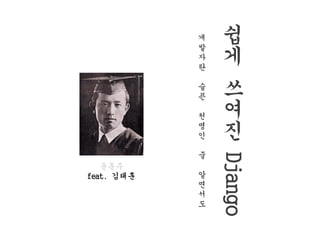
윤동주
feat. 김태훈
김태훈
HeXA
carpedm20
Web?
Web!
Django
Django
장고? 쟁고? 드장고? 디장고? 쥐왕고?
Django가 정의한 Django
Django
Django가 정의한 Django
The web framework for perfectionists with deadlines
Django
내가 봤을 때 Django란
세련된 Web을 더욱 빠르고, 적은 코드로 개발할 수 있게 해주는 도구
Django
그렇다면 Web이란 무엇인가?
거미줄?
Web이란 무엇인가?
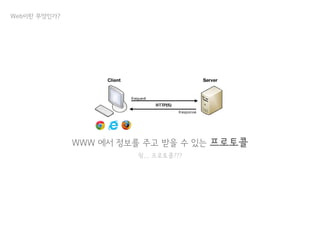
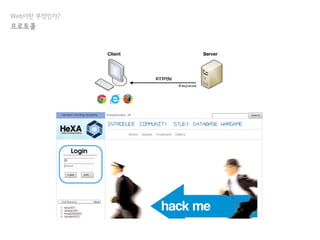
WWW 에서 정보를 주고 받을 수 있는 프로토콜
읭... 프로토콜???
프로토콜
Protocol
Web이란 무엇인가?
통신을 원하는 두 개체간에 무엇을, 어떻게, 언제
통신할 것인가를 서로 약속한 규약
Web이란 무엇인가?
프로토콜
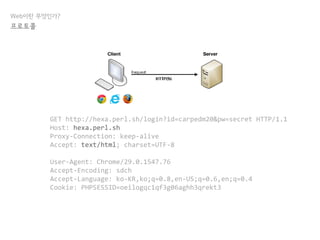
HTTP Request
GET http://hexa.perl.sh/login?id=carpedm20&pw=secret HTTP/1.1
Host: hexa.perl.sh
Proxy-Connection: keep-alive
Accept: text/html; charset=UTF-8
User-Agent: Chrome/29.0.1547.76
Accept-Encoding: sdch
Accept-Language: ko-KR,ko;q=0.8,en-US;q=0.6,en;q=0.4
Cookie: PHPSESSID=oeilogqc1qf3g06aghh3qrekt3
Web이란 무엇인가?
프로토콜
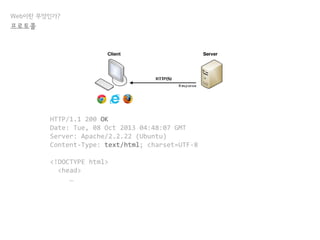
HTTP/1.1 200 OK
Date: Tue, 08 Oct 2013 04:48:07 GMT
Server: Apache/2.2.22 (Ubuntu)
Content-Type: text/html; charset=UTF-8
<!DOCTYPE html>
<head>
…
Web이란 무엇인가?
프로토콜
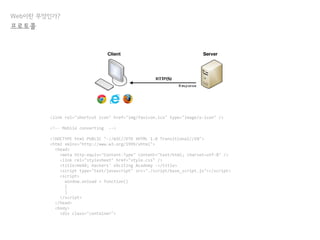
HTTP Request
<link rel="shortcut icon" href="img/favicon.ico" type="image/x-icon" />
<!-- Mobile converting -->
<!DOCTYPE html PUBLIC "-//W3C//DTD XHTML 1.0 Transitional//EN">
<html xmlns="http://www.w3.org/1999/xhtml">
<head>
<meta http-equiv="Content-Type" content="text/html; charset=utf-8" />
<link rel="stylesheet" href="style.css" />
<title>HeXA; Hackers' eXciting Academy -</title>
<script type="text/javascript" src="./script/base_script.js"></script>
<script>
window.onload = function()
{
}
</script>
</head>
<body>
<div class="container">
Web이란 무엇인가?
프로토콜
HTTP Request
HTTP Request
Web이란 무엇인가?
프로토콜
Web이란 무엇인가?
우리가 앞으로 만들 것
구글을 이길 크고 아름다운 X
Web이란 무엇인가?
Input을 받아 Output 을 출력하는 프로그램
우리가 앞으로 만들 것
Web이란 무엇인가?
우리가 앞으로 만들 것
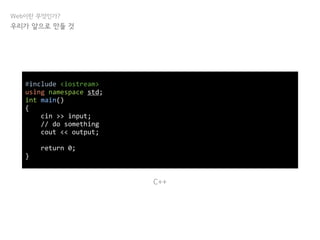
#include <iostream>
using namespace std;
int main()
{
cin >> input;
// do something
cout << output;
return 0;
}
C++
Web이란 무엇인가?
우리가 앞으로 만들 것
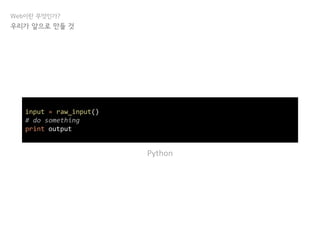
input = raw_input()
# do something
print output
Python
Web이란 무엇인가?
우리가 앞으로 만들 것
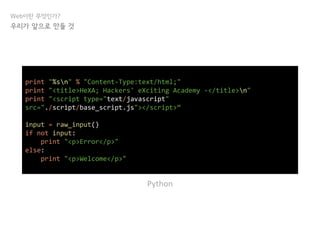
print "%sn" % "Content-Type:text/html;"
print "<title>HeXA; Hackers' eXciting Academy -</title>n"
print "<script type="text/javascript"
src="./script/base_script.js"></script>“
input = raw_input()
if not input:
print "<p>Error</p>"
else:
print "<p>Welcome</p>"
Python
Web이란 무엇인가?
Quiz : HeXA 홈페이지는 몇 번의 print를 해야 할까?
우리가 앞으로 만들 것
기본 구조
기본 구조
하나의 Project, 여러 개의 App
기본 구조
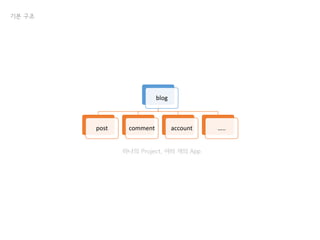
blog
post comment account …..
하나의 Project, 여러 개의 App
기본 구조
뭔지 모르겠다아아아ㅏ 일단 프로젝트를 만들자!
기본 구조
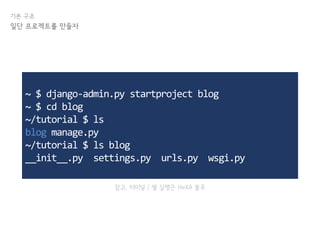
일단 프로젝트를 만들자
~ $ django-admin.py startproject blog
~ $ cd blog
~/tutorial $ ls
blog manage.py
~/tutorial $ ls blog
__init__.py settings.py urls.py wsgi.py
참고. 터미널 / 쉘 실행은 HeXA 블루
기본 구조
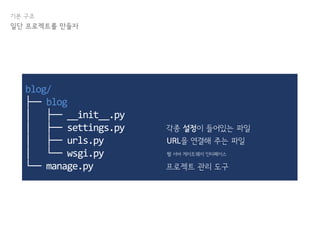
일단 프로젝트를 만들자
blog/
├── blog
│ ├── __init__.py
│ ├── settings.py
│ ├── urls.py
│ └── wsgi.py
└── manage.py 프로젝트 관리 도구
각종 설정이 들어있는 파일
URL을 연결해 주는 파일
웹 서버 게이트웨이 인터페이스
기본 구조
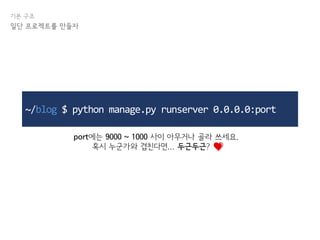
일단 프로젝트를 만들자
~/blog $ python manage.py runserver 0.0.0.0:port
port에는 9000 ~ 1000 사이 아무거나 골라 쓰세요.
혹시 누군가와 겹친다면... 두근두근? .
기본 구조
일단 프로젝트를 만들자
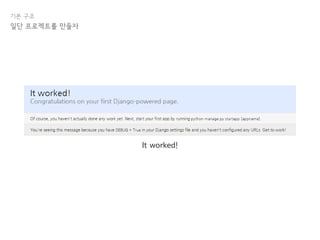
It worked!
기본 구조
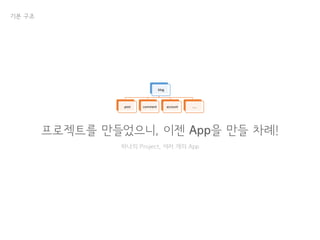
프로젝트를 만들었으니, 이젠 App을 만들 차례!
하나의 Project, 여러 개의 App
blog
post comment account …..
기본 구조
일단 프로젝트를 만들자
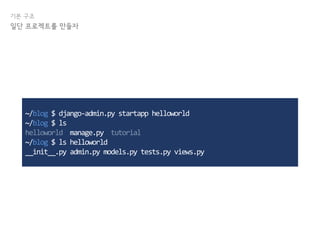
~/blog $ django-admin.py startapp helloworld
~/blog $ ls
helloworld manage.py tutorial
~/blog $ ls helloworld
__init__.py admin.py models.py tests.py views.py
기본 구조
일단 프로젝트를 만들자
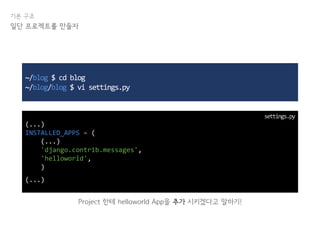
~/blog $ cd blog
~/blog/blog $ vi settings.py
(...)
INSTALLED_APPS = (
(...)
'django.contrib.messages',
'helloworld',
)
(...)
Project 한테 helloworld App을 추가 시키겠다고 말하기!
settings.py
기본 구조
일단 프로젝트를 만들자
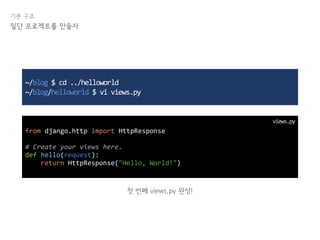
~/blog $ cd ../helloworld
~/blog/helloworld $ vi views.py
from django.http import HttpResponse
# Create your views here.
def hello(request):
return HttpResponse("Hello, World!")
첫 번째 views.py 완성!
views.py
기본 구조
일단 프로젝트를 만들자
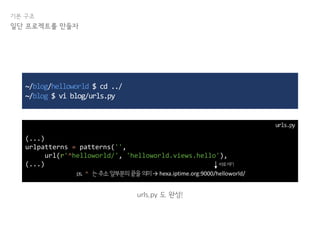
~/blog/helloworld $ cd ../
~/blog $ vi blog/urls.py
(...)
urlpatterns = patterns('',
url(r'^helloworld/', 'helloworld.views.hello'),
(...)
urls.py 도 완성!
urls.py
ps. ^ 는주소앞부분의끝을의미→ hexa.iptime.org:9000/helloworld/
바로여기
기본 구조
일단 프로젝트를 만들자
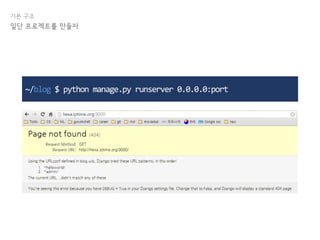
~/blog $ python manage.py runserver 0.0.0.0:port
기본 구조
일단 프로젝트를 만들자
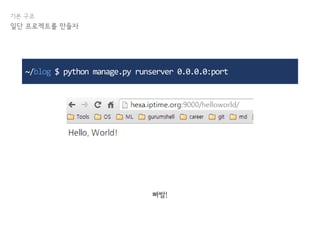
~/blog $ python manage.py runserver 0.0.0.0:port
빠밤!
기본 구조
그렇다면 지금까지 우린 뭘 한 걸까?
기본 구조
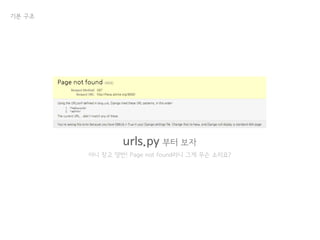
urls.py 부터 보자
아니 장고 양반! Page not found라니 그게 무슨 소리요?
기본 구조
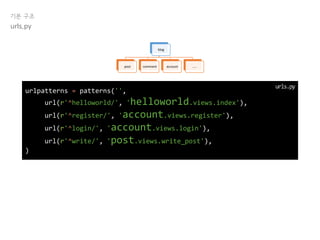
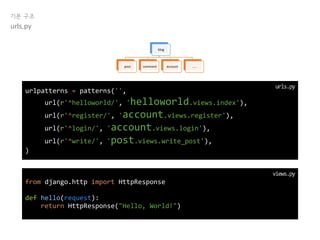
urls.py
urlpatterns = patterns('',
url(r'^helloworld/', 'helloworld.views.index'),
url(r'^register/', 'account.views.register'),
url(r'^login/', 'account.views.login'),
url(r'^write/', 'post.views.write_post'),
)
blog
post comment account …..
urls.py
기본 구조
urls.py
urlpatterns = patterns('',
url(r'^helloworld/', 'helloworld.views.index'),
url(r'^register/', 'account.views.register'),
url(r'^login/', 'account.views.login'),
url(r'^write/', 'post.views.write_post'),
)
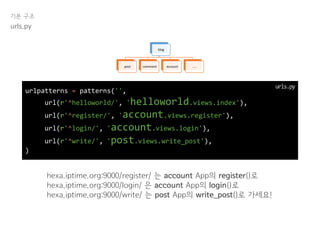
hexa.iptime.org:9000/register/ 는 account App의 register()로
hexa.iptime.org:9000/login/ 은 account App의 login()로
hexa.iptime.org:9000/write/ 는 post App의 write_post()로 가세요!
blog
post comment account …..
urls.py
기본 구조
urls.py
hexa.iptime.org:9000/register/ 는 account App의 register()로
hexa.iptime.org:9000/login/ 은 account App의 login()로
hexa.iptime.org:9000/write/ 는 post App의 write_post()로 가세요!
blog
post comment account …..
from django.http import HttpResponse
def hello(request):
return HttpResponse("Hello, World!")
views.py
urlpatterns = patterns('',
url(r'^helloworld/', 'helloworld.views.index'),
url(r'^register/', 'account.views.register'),
url(r'^login/', 'account.views.login'),
url(r'^write/', 'post.views.write_post'),
)
urls.py
기본 구조
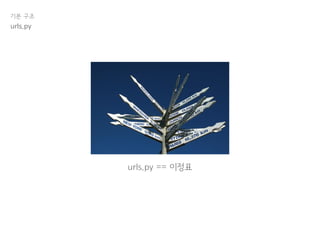
urls.py == 이정표
urls.py
기본 구조
urls.py
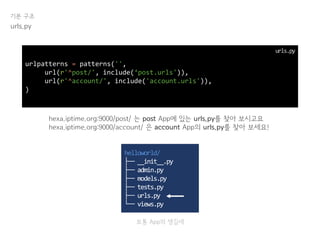
urlpatterns = patterns('',
url(r'^post/', include(‘post.urls')),
url(r'^account/', include('account.urls')),
)
urls.py
hexa.iptime.org:9000/post/ 는 post App에 있는 urls.py를 찾아 보시고요
hexa.iptime.org:9000/account/ 은 account App의 urls.py를 찾아 보세요!
helloworld/
├── __init__.py
├── admin.py
├── models.py
├── tests.py
├── urls.py
└── views.py
보통 App의 생김새
기본 구조
걱정 마! 예제를 준비했어!
urls.py
기본 구조
urls.py
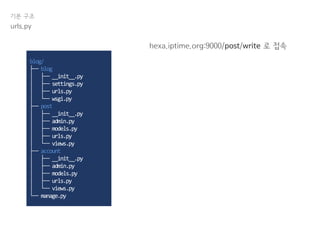
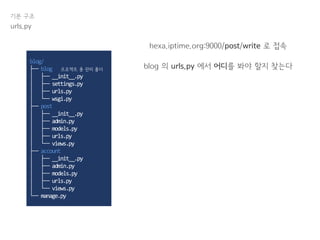
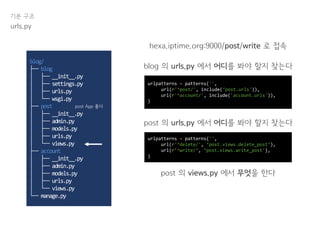
hexa.iptime.org:9000/post/write 로 접속
blog/
├── blog
│ ├── __init__.py
│ ├── settings.py
│ ├── urls.py
│ └── wsgi.py
├── post
│ ├── __init__.py
│ ├── admin.py
│ ├── models.py
│ ├── urls.py
│ └── views.py
├── account
│ ├── __init__.py
│ ├── admin.py
│ ├── models.py
│ ├── urls.py
│ └── views.py
└── manage.py
기본 구조
urls.py
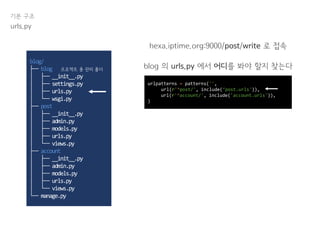
hexa.iptime.org:9000/post/write 로 접속
blog 의 urls.py 에서 어디를 봐야 할지 찾는다
blog/
├── blog
│ ├── __init__.py
│ ├── settings.py
│ ├── urls.py
│ └── wsgi.py
├── post
│ ├── __init__.py
│ ├── admin.py
│ ├── models.py
│ ├── urls.py
│ └── views.py
├── account
│ ├── __init__.py
│ ├── admin.py
│ ├── models.py
│ ├── urls.py
│ └── views.py
└── manage.py
프로젝트 총 관리 폴더
기본 구조
urls.py
hexa.iptime.org:9000/post/write 로 접속
blog 의 urls.py 에서 어디를 봐야 할지 찾는다
urlpatterns = patterns('',
url(r'^post/', include(‘post.urls')),
url(r'^account/', include('account.urls')),
)
blog/
├── blog
│ ├── __init__.py
│ ├── settings.py
│ ├── urls.py
│ └── wsgi.py
├── post
│ ├── __init__.py
│ ├── admin.py
│ ├── models.py
│ ├── urls.py
│ └── views.py
├── account
│ ├── __init__.py
│ ├── admin.py
│ ├── models.py
│ ├── urls.py
│ └── views.py
└── manage.py
프로젝트 총 관리 폴더
기본 구조
urls.py
hexa.iptime.org:9000/post/write 로 접속
blog 의 urls.py 에서 어디를 봐야 할지 찾는다
urlpatterns = patterns('',
url(r'^post/', include(‘post.urls')),
url(r'^account/', include('account.urls')),
)
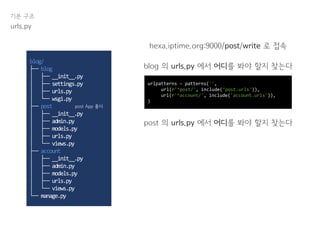
post 의 urls.py 에서 어디를 봐야 할지 찾는다
blog/
├── blog
│ ├── __init__.py
│ ├── settings.py
│ ├── urls.py
│ └── wsgi.py
├── post
│ ├── __init__.py
│ ├── admin.py
│ ├── models.py
│ ├── urls.py
│ └── views.py
├── account
│ ├── __init__.py
│ ├── admin.py
│ ├── models.py
│ ├── urls.py
│ └── views.py
└── manage.py
post App 폴더
urlpatterns = patterns('',
url(r'^delete/', ‘post.views.delete_post’),
url(r’^write/’, ‘post.views.write_post'),
)
기본 구조
urls.py
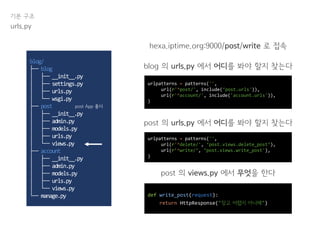
hexa.iptime.org:9000/post/write 로 접속
blog 의 urls.py 에서 어디를 봐야 할지 찾는다
urlpatterns = patterns('',
url(r'^post/', include(‘post.urls')),
url(r'^account/', include('account.urls')),
)
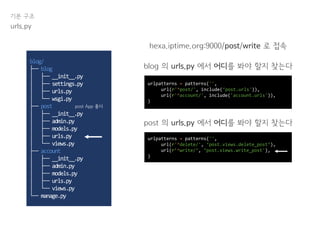
post 의 urls.py 에서 어디를 봐야 할지 찾는다
blog/
├── blog
│ ├── __init__.py
│ ├── settings.py
│ ├── urls.py
│ └── wsgi.py
├── post
│ ├── __init__.py
│ ├── admin.py
│ ├── models.py
│ ├── urls.py
│ └── views.py
├── account
│ ├── __init__.py
│ ├── admin.py
│ ├── models.py
│ ├── urls.py
│ └── views.py
└── manage.py
post App 폴더
기본 구조
urls.py
hexa.iptime.org:9000/post/write 로 접속
blog 의 urls.py 에서 어디를 봐야 할지 찾는다
urlpatterns = patterns('',
url(r'^post/', include(‘post.urls')),
url(r'^account/', include('account.urls')),
)
post 의 urls.py 에서 어디를 봐야 할지 찾는다
blog/
├── blog
│ ├── __init__.py
│ ├── settings.py
│ ├── urls.py
│ └── wsgi.py
├── post
│ ├── __init__.py
│ ├── admin.py
│ ├── models.py
│ ├── urls.py
│ └── views.py
├── account
│ ├── __init__.py
│ ├── admin.py
│ ├── models.py
│ ├── urls.py
│ └── views.py
└── manage.py
post 의 views.py 에서 무엇을 한다
post App 폴더
urlpatterns = patterns('',
url(r'^delete/', ‘post.views.delete_post’),
url(r’^write/’, ‘post.views.write_post'),
)
기본 구조
urls.py
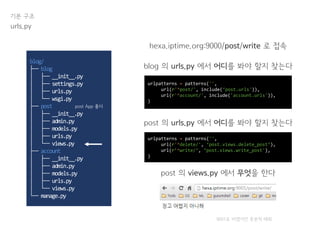
hexa.iptime.org:9000/post/write 로 접속
blog 의 urls.py 에서 어디를 봐야 할지 찾는다
urlpatterns = patterns('',
url(r'^post/', include(‘post.urls')),
url(r'^account/', include('account.urls')),
)
post 의 urls.py 에서 어디를 봐야 할지 찾는다
blog/
├── blog
│ ├── __init__.py
│ ├── settings.py
│ ├── urls.py
│ └── wsgi.py
├── post
│ ├── __init__.py
│ ├── admin.py
│ ├── models.py
│ ├── urls.py
│ └── views.py
├── account
│ ├── __init__.py
│ ├── admin.py
│ ├── models.py
│ ├── urls.py
│ └── views.py
└── manage.py
post 의 views.py 에서 무엇을 한다
def write_post(request):
return HttpResponse("장고 어렵지 아니해")
post App 폴더
urlpatterns = patterns('',
url(r'^delete/', ‘post.views.delete_post’),
url(r’^write/’, ‘post.views.write_post'),
)
기본 구조
urls.py
hexa.iptime.org:9000/post/write 로 접속
blog 의 urls.py 에서 어디를 봐야 할지 찾는다
urlpatterns = patterns('',
url(r'^post/', include(‘post.urls')),
url(r'^account/', include('account.urls')),
)
post 의 urls.py 에서 어디를 봐야 할지 찾는다
blog/
├── blog
│ ├── __init__.py
│ ├── settings.py
│ ├── urls.py
│ └── wsgi.py
├── post
│ ├── __init__.py
│ ├── admin.py
│ ├── models.py
│ ├── urls.py
│ └── views.py
├── account
│ ├── __init__.py
│ ├── admin.py
│ ├── models.py
│ ├── urls.py
│ └── views.py
└── manage.py
post 의 views.py 에서 무엇을 한다
post App 폴더
urlpatterns = patterns('',
url(r'^delete/', ‘post.views.delete_post’),
url(r’^write/’, ‘post.views.write_post'),
)
9001로 바꼈지만 못본척 해줘
즐거운 코딩 타임
뭔 소린진 몰라도 해보면 알겠지
기본 구조
기본 구조
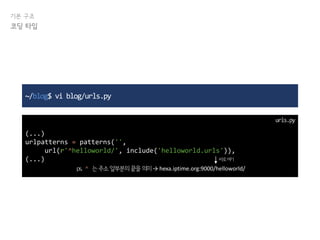
코딩 타임
~/blog$ vi blog/urls.py
(...)
urlpatterns = patterns('',
url(r'^helloworld/', include('helloworld.urls')),
(...)
urls.py
ps. ^ 는주소앞부분의끝을의미→ hexa.iptime.org:9000/helloworld/
바로여기
기본 구조
코딩 타임
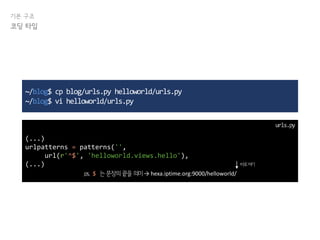
~/blog$ cp blog/urls.py helloworld/urls.py
~/blog$ vi helloworld/urls.py
(...)
urlpatterns = patterns('',
url(r'^$', 'helloworld.views.hello'),
(...)
urls.py
ps. $ 는문장의끝을의미→ hexa.iptime.org:9000/helloworld/
바로여기
기본 구조
코딩 타임
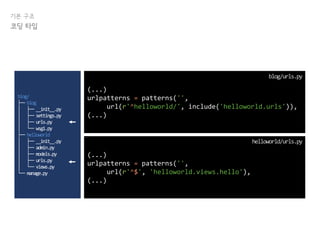
(...)
urlpatterns = patterns('',
url(r'^$', 'helloworld.views.hello'),
(...)
helloworld/urls.py
(...)
urlpatterns = patterns('',
url(r'^helloworld/', include('helloworld.urls')),
(...)
blog/urls.py
blog/
├── blog
│ ├── __init__.py
│ ├── settings.py
│ ├── urls.py
│ └── wsgi.py
├── helloworld
│ ├── __init__.py
│ ├── admin.py
│ ├── models.py
│ ├── urls.py
│ └── views.py
└── manage.py
기본 구조
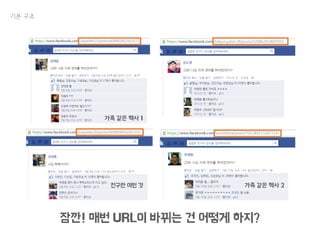
잠깐! 매번 URL이 바뀌는 건 어떻게 하지?
가족 같은 헥사 1
친구란 이런 것 가족 같은 헥사 2
기본 구조
Dynamic URL
다이나믹 듀오 유알엘
기본 구조
Dynamic URL
~/blog$ vi helloworld/urls.py
(...)
urlpatterns = patterns('',
url(r'^$', 'helloworld.views.hello'),
url(r'^([w]+)/', 'helloworld.views.hello'),
(...)
urls.py
ps. w 는모든단어를의미→ /helloworld/123/ or /helloworld/HeXA/
ps2. [w] 는 모든 단어 중 하나를 의미
ps3. [w]+ 는 [w]+가 하나 이상 있다는 의미
ps4. ([w]+) 는 하나의 value 로 취급
기본 구조
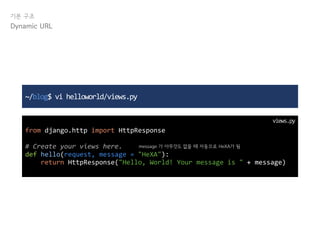
~/blog$ vi helloworld/views.py
from django.http import HttpResponse
# Create your views here.
def hello(request, message = "HeXA"):
return HttpResponse("Hello, World! Your message is " + message)
views.py
Dynamic URL
message 가 아무것도 없을 때 자동으로 HeXA가 됨
기본 구조
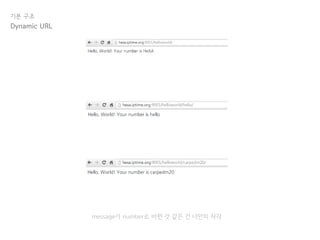
Dynamic URL
message가 number로 바뀐 것 같은 건 너만의 착각
기본 구조
이제 urls.py 와 views.py 가 뭔지는 대충 이해 했겠지?!
못했다면 크고 아름답게 손을 들어!
중간 점검
하프 웨이
중간 점검
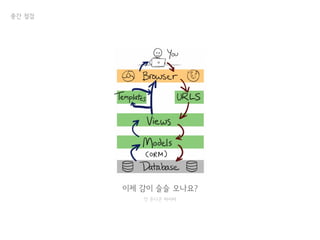
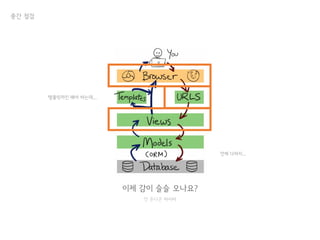
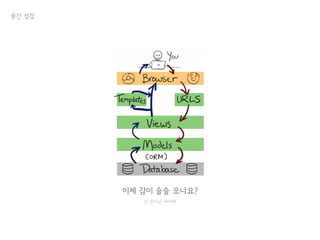
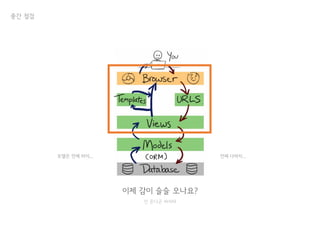
이제 감이 슬슬 오나요?
안 온다곤 하지마
이제 감이 슬슬 오나요?
안 온다곤 하지마
언제 다하지...
템플릿까진 해야 하는데...
중간 점검
기본 구조
일단 프로젝트를 만들자
휴식 타임
여백의 미
피피티 만들기 귀찮아서는 절데 아니야
기본 구조
이제는 template를 알아보자
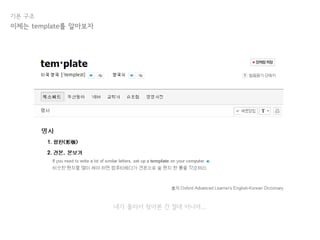
이정돈 ‘중학교 필수 영단어’에서 마스터 했겠지?
기본 구조
내가 몰라서 찾아본 건 절대 아니야...
이제는 template를 알아보자
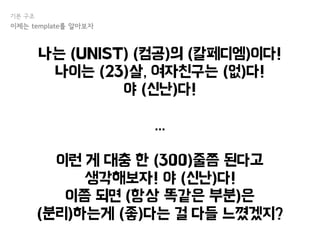
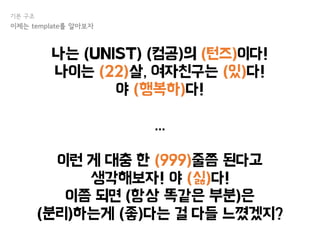
나는 (UNIST) (컴공)의 (칼페디엠)이다!
나이는 (23)살, 여자친구는 (없)다!
야 (신난)다!
...
이런 게 대충 한 (300)줄쯤 된다고
생각해보자! 야 (신난)다!
이쯤 되면 (항상 똑같은 부분)은
(분리)하는게 (좋)다는 걸 다들 느꼈겠지?
기본 구조
이제는 template를 알아보자
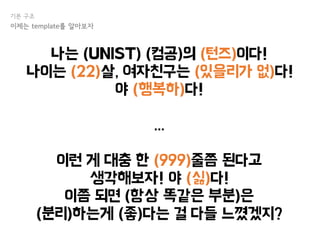
나는 (UNIST) (컴공)의 (턴즈)이다!
나이는 (22)살, 여자친구는 (있)다!
야 (행복하)다!
...
이런 게 대충 한 (999)줄쯤 된다고
생각해보자! 야 (싫)다!
이쯤 되면 (항상 똑같은 부분)은
(분리)하는게 (좋)다는 걸 다들 느꼈겠지?
기본 구조
이제는 template를 알아보자
나는 (UNIST) (컴공)의 (턴즈)이다!
나이는 (22)살, 여자친구는 (있을리가 없)다!
야 (행복하)다!
...
이런 게 대충 한 (999)줄쯤 된다고
생각해보자! 야 (싫)다!
이쯤 되면 (항상 똑같은 부분)은
(분리)하는게 (좋)다는 걸 다들 느꼈겠지?
기본 구조
이제는 template를 알아보자
기본 구조
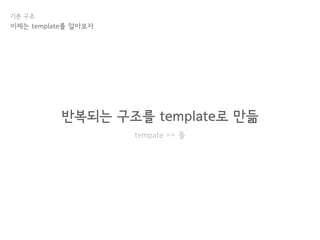
반복되는 구조를 template로 만듦
tempate == 틀
이제는 template를 알아보자
기본 구조
그럼 한번 적용해 보자!
즐겁게 틀을 만들어 봅시다
이제는 template를 알아보자
기본 구조
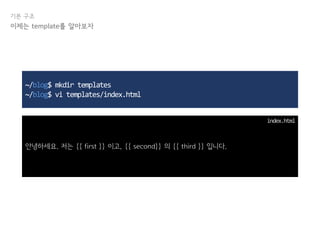
~/blog$ mkdir templates
~/blog$ vi templates/index.html
안녕하세요. 저는 {{ first }} 이고, {{ second}} 의 {{ third }} 입니다.
index.html
이제는 template를 알아보자
기본 구조
잠깐!
까먹었는지 확인해 보자
이제는 template를 알아보자
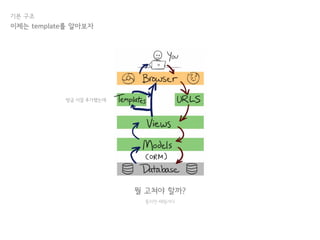
뭘 고쳐야 할까?
틀리면 때릴거다
기본 구조
이제는 template를 알아보자
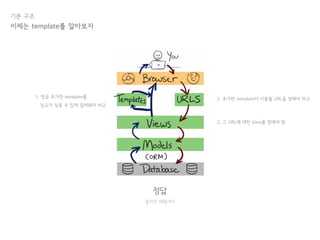
방금 이걸 추가했는데
정답
틀리면 때릴거다
기본 구조
이제는 template를 알아보자
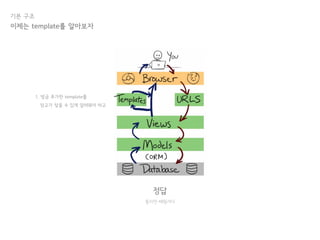
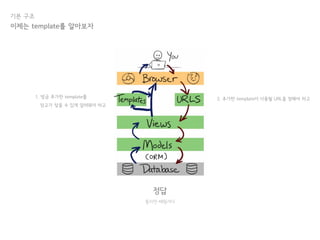
1. 방금 추가한 template를
장고가 찾을 수 있게 알려줘야 하고
정답
틀리면 때릴거다
기본 구조
이제는 template를 알아보자
2. 추가한 template이 사용될 URL을 정해야 하고1. 방금 추가한 template를
장고가 찾을 수 있게 알려줘야 하고
정답
틀리면 때릴거다
기본 구조
이제는 template를 알아보자
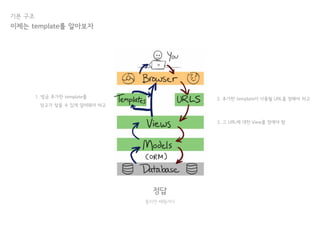
2. 추가한 template이 사용될 URL을 정해야 하고
3. 그 URL에 대한 View를 정애야 함
1. 방금 추가한 template를
장고가 찾을 수 있게 알려줘야 하고
기본 구조
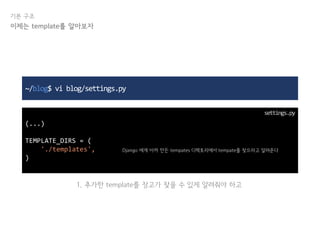
~/blog$ vi blog/settings.py
(...)
TEMPLATE_DIRS = (
'./templates',
)
settings.py
이제는 template를 알아보자
Django 에게 아까 만든 tempates 디렉토리에서 tempate를 찾으라고 알려준다
1. 추가한 template를 장고가 찾을 수 있게 알려줘야 하고
기본 구조
~/blog$ vi helloworld/urls.py
(...)
urlpatterns = patterns('',
url(r'^me/([w]+)/([w]+)/([w]+)/', 'helloworld.views.me'),
(...)
settings.py
이제는 template를 알아보자
name group role
2. 추가한 template이 사용될 URL을 정해야 하고
기본 구조
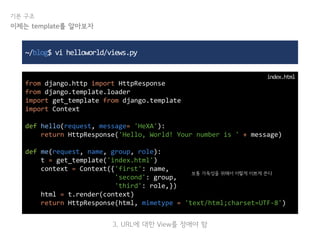
~/blog$ vi helloworld/views.py
from django.http import HttpResponse
from django.template.loader
import get_template from django.template
import Context
def hello(request, message= 'HeXA'):
return HttpResponse('Hello, World! Your number is ' + message)
def me(request, name, group, role):
t = get_template('index.html')
context = Context({'first': name,
'second': group,
'third': role,})
html = t.render(context)
return HttpResponse(html, mimetype = 'text/html;charset=UTF-8')
index.html
이제는 template를 알아보자
보통 가독성을 위해서 이렇게 이쁘게 쓴다
3. URL에 대한 View를 정애야 함
정답
틀리면 때릴거다
기본 구조
이제는 template를 알아보자
2. 추가한 template이 사용될 URL을 정해야 하고
3. 그 URL에 대한 View를 정애야 함
1. 방금 추가한 template를
장고가 찾을 수 있게 알려줘야 하고
기본 구조
이제는 template를 알아보자
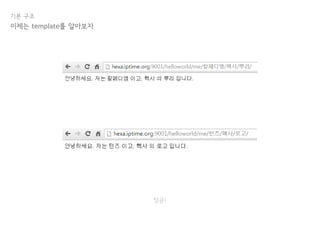
성공!
참 쉽죠?
하핳
마지막 점검
다 이해는 했겠지?
중간 점검
이제 감이 슬슬 오나요?
안 온다곤 하지마
이제 감이 슬슬 오나요?
안 온다곤 하지마
언제 다하지...모델은 언제 하지...
중간 점검
모델은 다음 시간에
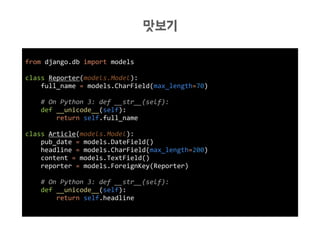
맛보기
뭐지?!
from django.db import models
class Reporter(models.Model):
full_name = models.CharField(max_length=70)
# On Python 3: def __str__(self):
def __unicode__(self):
return self.full_name
class Article(models.Model):
pub_date = models.DateField()
headline = models.CharField(max_length=200)
content = models.TextField()
reporter = models.ForeignKey(Reporter)
# On Python 3: def __str__(self):
def __unicode__(self):
return self.headline
맛보기
필수 잡담 1. pip & virtualenv
넘어가면 너 손해야... 난 몰라
Python?
pip & virtualenv
Python!
pip
pip & virtualenv
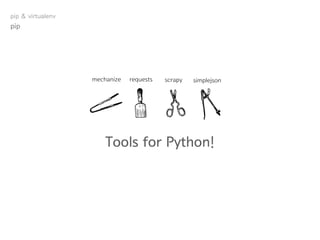
Tools for Python!
mechanize requests scrapy simplejson
pip
pip & virtualenv
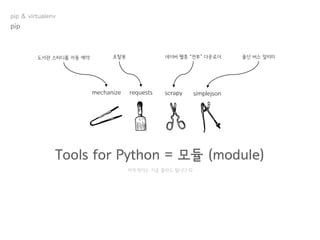
Tools for Python = 모듈 (module)
mechanize requests scrapy simplejson
저게 뭔지는 지금 몰라도 됩니다 
도서관 스터디룸 자동 예약 포탈봇 네이버 웹툰 “전부” 다운로더 울산 버스 알리미
pip
pip & virtualenv
모듈, 어떻게 설치할까?
pip
pip & virtualenv
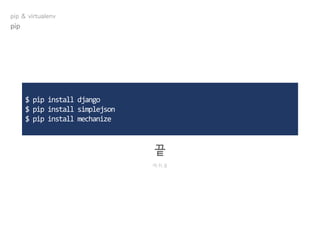
$ pip install django
$ pip install simplejson
$ pip install mechanize
끝
개.쉬.움
pip
pip & virtualenv
유명한 모듈들
pip
pip & virtualenv
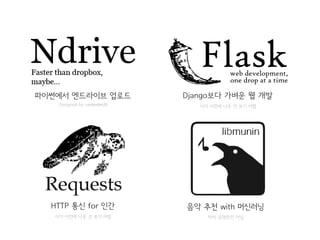
HTTP 통신 for 인간
이거 이전에 나온 건 쓰기 어렵
Django보다 가벼운 웹 개발
이거 이전에 나온 건 쓰기 어렵
파이썬에서 엔드라이브 업로드
Designed by carpedm20
음악 추천 with 머신러닝
딱히 유명한건 아님
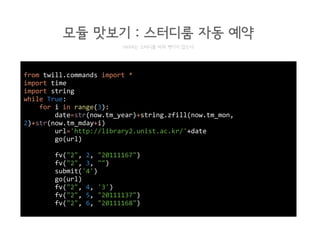
from twill.commands import *
import time
import string
while True:
for i in range(3):
date=str(now.tm_year)+string.zfill(now.tm_mon,
2)+str(now.tm_mday+i)
url='http://library2.unist.ac.kr/'+date
go(url)
fv("2", 2, "20111167")
fv("2", 3, "")
submit('4')
go(url)
fv("2", 4, '3')
fv("2", 5, "20111137")
fv("2", 6, "20111168")
모듈 맛보기 : 스터디룸 자동 예약
HeXA는 스터디룸 따위 뺏기지 않는다
Python
virtualenv
pip & virtualenv
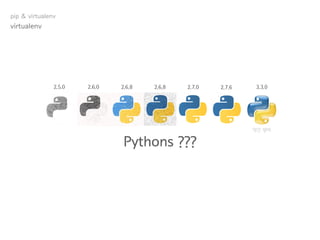
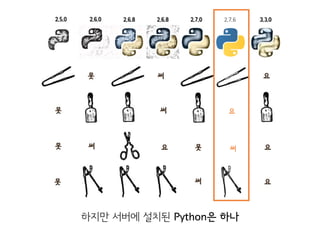
Pythons ???
2.7.62.7.02.6.82.6.8 3.3.02.6.02.5.0
약간 왕따
virtualenv
pip & virtualenv
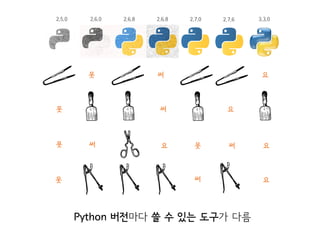
2.7.62.7.02.6.82.6.8 3.3.02.6.02.5.0
Python 버전마다 쓸 수 있는 도구가 다름
못
못 써 요 못 써 요
못 써 요
써 요
못 써 요
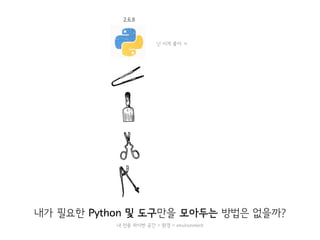
하지만 서버에 설치된 Python은 하나
내가 필요한 Python 및 도구만을 모아두는 방법은 없을까?
난 이게 좋아 ㅋ
내 전용 파이썬 공간 = 환경 = environment
virtualenv 등장!
버추어 파이터 환경 = 가상 환경
virtualenv
pip & virtualenv
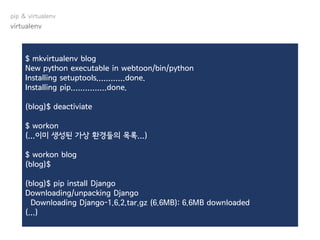
$ mkvirtualenv blog
New python executable in webtoon/bin/python
Installing setuptools............done.
Installing pip...............done.
(blog)$ deactiviate
$ workon
(...이미 생성된 가상 환경들의 목록...)
$ workon blog
(blog)$
(blog)$ pip install Django
Downloading/unpacking Django
Downloading Django-1.6.2.tar.gz (6.6MB): 6.6MB downloaded
(...)
virtualenv
pip & virtualenv
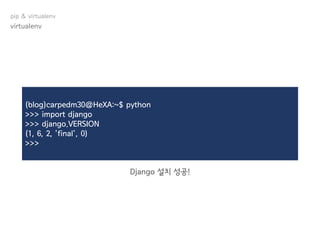
(blog)carpedm30@HeXA:~$ python
>>> import django
>>> django.VERSION
(1, 6, 2, 'final', 0)
>>>
Django 설치 성공!
virtualenv
pip & virtualenv
필수 잡담 2. Python 핵심 가이드
넘어가면 너 손해야... 난 몰라 (2)
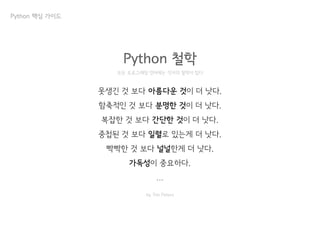
Python 철학
못생긴 것 보다 아름다운 것이 더 낫다.
함축적인 것 보다 분명한 것이 더 낫다.
복잡한 것 보다 간단한 것이 더 낫다.
중첩된 것 보다 일렬로 있는게 더 낫다.
빡빡한 것 보다 널널한게 더 낫다.
가독성이 중요하다.
...
모든 프로그래밍 언어에는 각자의 철학이 있다
by Tim Peters
Python 핵심 가이드
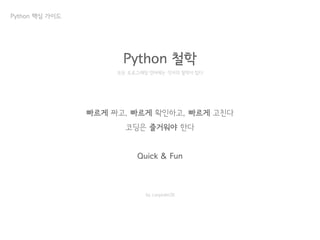
Python 철학
빠르게 짜고, 빠르게 확인하고, 빠르게 고친다
코딩은 즐거워야 한다
Quick & Fun
모든 프로그래밍 언어에는 각자의 철학이 있다
by carpedm20
Python 핵심 가이드
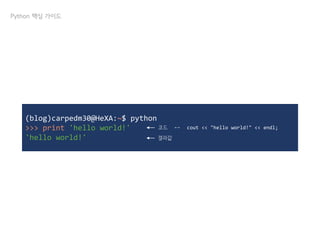
(blog)carpedm30@HeXA:~$ python
>>> print 'hello world!'
'hello world!'
코드 ↔ cout << "hello world!" << endl;
결과값
Python 핵심 가이드
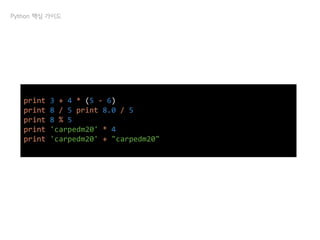
print 3 + 4 * (5 - 6)
print 8 / 5 print 8.0 / 5
print 8 % 5
print 'carpedm20' * 4
print 'carpedm20' + "carpedm20"
Python 핵심 가이드
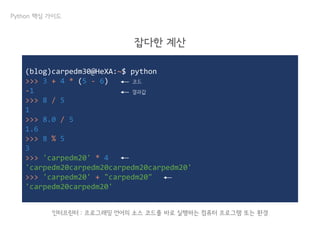
(blog)carpedm30@HeXA:~$ python
>>> 3 + 4 * (5 - 6)
-1
>>> 8 / 5
1
>>> 8.0 / 5
1.6
>>> 8 % 5
3
>>> 'carpedm20' * 4
'carpedm20carpedm20carpedm20carpedm20'
>>> 'carpedm20' + "carpedm20"
'carpedm20carpedm20'
코드
결과값
Python 핵심 가이드
인터프린터 : 프로그래밍 언어의 소스 코드를 바로 실행하는 컴퓨터 프로그램 또는 환경
잡다한 계산
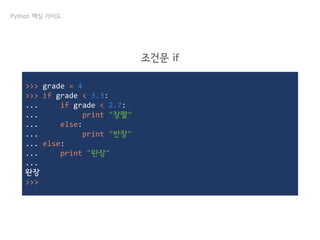
>>> grade = 4
>>> if grade < 3.3:
... if grade < 2.7:
... print "장짤"
... else:
... print "반장"
... else:
... print "완장"
...
완장
>>>
Python 핵심 가이드
조건문 if
>>> sum = 0
>>> for i in range(10):
... sum += I
...
>>> print sum
45
>>> print range(10)
[0, 1, 2, 3, 4, 5, 6, 7, 8, 9]
>>>
Python 핵심 가이드
반복문 for
↔ for (int i = 0; i < 10; i++)
>>> a=[1,2,3]
>>> a[0]+a[1]+a[2]
6
>>> a[1]=5
>>> a
[1, 5, 3]
>>>
Python 핵심 가이드
List
>>> a=(1,2,3)
>>> a[0]+a[1]+a[2]
6
>>> a[1]=5
Traceback (most recent call last):
File "<stdin>", line 1, in <module>
TypeError: 'tuple' object does not support item assignment
>>> a
(1, 2, 3)
>>>
Python 핵심 가이드
Tuple
List 와 달리 = 연산자로 수정이 불가능!
>>> oldbie = [
... ('김태훈', 2011, 23),
... ('한충우', 2011, 22),
... ('김도경', 2013, 23),
... ]
>>> for person in oldbie:
... name, year, old = person
... print name, year, '학번', old, '살'
...
김태훈 2011 학번 23 살
한충우 2011 학번 22 살
김도경 2013 학번 23 살
>>>
Python 핵심 가이드
List & Tuple
이걸 c++로 짠다면?!
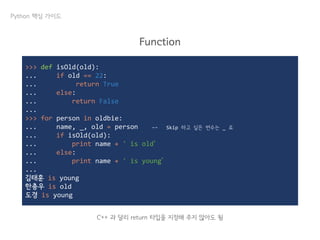
>>> def isOld(old):
... if old == 22:
... return True
... else:
... return False
...
>>> for person in oldbie:
... name, _, old = person
... if isOld(old):
... print name + ' is old‘
... else:
... print name + ' is young‘
...
김태훈 is young
한충우 is old
도경 is young
Python 핵심 가이드
Function
C++ 과 달리 return 타입을 지정해 주지 않아도 됨
↔ Skip 하고 싶은 변수는 _ 로
끝
끝 인줄 알았니?
내가 이렇게까지 설명 했는데, 과제를 해야 하지 않겠니?
기본 구조
PS. 이 ppt는 sparcs의 호떡의 장고세미나를 base로 만들어졌습니다
http://sparcs.kaist.ac.kr/seminar/#hodduc-20120618

쉽게 쓰여진 Django

  • 1.
  • 2.
  • 3.
  • 10.
  • 11.
  • 12.
    Django 장고? 쟁고? 드장고?디장고? 쥐왕고?
  • 15.
  • 16.
    Django가 정의한 Django Theweb framework for perfectionists with deadlines Django
  • 17.
    내가 봤을 때Django란 세련된 Web을 더욱 빠르고, 적은 코드로 개발할 수 있게 해주는 도구 Django
  • 18.
  • 19.
    Web이란 무엇인가? WWW 에서정보를 주고 받을 수 있는 프로토콜 읭... 프로토콜???
  • 20.
  • 21.
    통신을 원하는 두개체간에 무엇을, 어떻게, 언제 통신할 것인가를 서로 약속한 규약 Web이란 무엇인가? 프로토콜
  • 22.
    HTTP Request GET http://hexa.perl.sh/login?id=carpedm20&pw=secretHTTP/1.1 Host: hexa.perl.sh Proxy-Connection: keep-alive Accept: text/html; charset=UTF-8 User-Agent: Chrome/29.0.1547.76 Accept-Encoding: sdch Accept-Language: ko-KR,ko;q=0.8,en-US;q=0.6,en;q=0.4 Cookie: PHPSESSID=oeilogqc1qf3g06aghh3qrekt3 Web이란 무엇인가? 프로토콜
  • 23.
    HTTP/1.1 200 OK Date:Tue, 08 Oct 2013 04:48:07 GMT Server: Apache/2.2.22 (Ubuntu) Content-Type: text/html; charset=UTF-8 <!DOCTYPE html> <head> … Web이란 무엇인가? 프로토콜 HTTP Request
  • 24.
    <link rel="shortcut icon"href="img/favicon.ico" type="image/x-icon" /> <!-- Mobile converting --> <!DOCTYPE html PUBLIC "-//W3C//DTD XHTML 1.0 Transitional//EN"> <html xmlns="http://www.w3.org/1999/xhtml"> <head> <meta http-equiv="Content-Type" content="text/html; charset=utf-8" /> <link rel="stylesheet" href="style.css" /> <title>HeXA; Hackers' eXciting Academy -</title> <script type="text/javascript" src="./script/base_script.js"></script> <script> window.onload = function() { } </script> </head> <body> <div class="container"> Web이란 무엇인가? 프로토콜 HTTP Request
  • 25.
  • 26.
    Web이란 무엇인가? 우리가 앞으로만들 것 구글을 이길 크고 아름다운 X
  • 27.
    Web이란 무엇인가? Input을 받아Output 을 출력하는 프로그램 우리가 앞으로 만들 것
  • 28.
    Web이란 무엇인가? 우리가 앞으로만들 것 #include <iostream> using namespace std; int main() { cin >> input; // do something cout << output; return 0; } C++
  • 29.
    Web이란 무엇인가? 우리가 앞으로만들 것 input = raw_input() # do something print output Python
  • 30.
    Web이란 무엇인가? 우리가 앞으로만들 것 print "%sn" % "Content-Type:text/html;" print "<title>HeXA; Hackers' eXciting Academy -</title>n" print "<script type="text/javascript" src="./script/base_script.js"></script>“ input = raw_input() if not input: print "<p>Error</p>" else: print "<p>Welcome</p>" Python
  • 31.
    Web이란 무엇인가? Quiz :HeXA 홈페이지는 몇 번의 print를 해야 할까? 우리가 앞으로 만들 것
  • 33.
  • 34.
  • 35.
    기본 구조 blog post commentaccount ….. 하나의 Project, 여러 개의 App
  • 36.
    기본 구조 뭔지 모르겠다아아아ㅏ일단 프로젝트를 만들자!
  • 37.
    기본 구조 일단 프로젝트를만들자 ~ $ django-admin.py startproject blog ~ $ cd blog ~/tutorial $ ls blog manage.py ~/tutorial $ ls blog __init__.py settings.py urls.py wsgi.py 참고. 터미널 / 쉘 실행은 HeXA 블루
  • 38.
    기본 구조 일단 프로젝트를만들자 blog/ ├── blog │ ├── __init__.py │ ├── settings.py │ ├── urls.py │ └── wsgi.py └── manage.py 프로젝트 관리 도구 각종 설정이 들어있는 파일 URL을 연결해 주는 파일 웹 서버 게이트웨이 인터페이스
  • 39.
    기본 구조 일단 프로젝트를만들자 ~/blog $ python manage.py runserver 0.0.0.0:port port에는 9000 ~ 1000 사이 아무거나 골라 쓰세요. 혹시 누군가와 겹친다면... 두근두근? .
  • 40.
  • 41.
    기본 구조 프로젝트를 만들었으니,이젠 App을 만들 차례! 하나의 Project, 여러 개의 App blog post comment account …..
  • 42.
    기본 구조 일단 프로젝트를만들자 ~/blog $ django-admin.py startapp helloworld ~/blog $ ls helloworld manage.py tutorial ~/blog $ ls helloworld __init__.py admin.py models.py tests.py views.py
  • 43.
    기본 구조 일단 프로젝트를만들자 ~/blog $ cd blog ~/blog/blog $ vi settings.py (...) INSTALLED_APPS = ( (...) 'django.contrib.messages', 'helloworld', ) (...) Project 한테 helloworld App을 추가 시키겠다고 말하기! settings.py
  • 44.
    기본 구조 일단 프로젝트를만들자 ~/blog $ cd ../helloworld ~/blog/helloworld $ vi views.py from django.http import HttpResponse # Create your views here. def hello(request): return HttpResponse("Hello, World!") 첫 번째 views.py 완성! views.py
  • 45.
    기본 구조 일단 프로젝트를만들자 ~/blog/helloworld $ cd ../ ~/blog $ vi blog/urls.py (...) urlpatterns = patterns('', url(r'^helloworld/', 'helloworld.views.hello'), (...) urls.py 도 완성! urls.py ps. ^ 는주소앞부분의끝을의미→ hexa.iptime.org:9000/helloworld/ 바로여기
  • 46.
    기본 구조 일단 프로젝트를만들자 ~/blog $ python manage.py runserver 0.0.0.0:port
  • 47.
    기본 구조 일단 프로젝트를만들자 ~/blog $ python manage.py runserver 0.0.0.0:port 빠밤!
  • 48.
  • 49.
    기본 구조 urls.py 부터보자 아니 장고 양반! Page not found라니 그게 무슨 소리요?
  • 50.
    기본 구조 urls.py urlpatterns =patterns('', url(r'^helloworld/', 'helloworld.views.index'), url(r'^register/', 'account.views.register'), url(r'^login/', 'account.views.login'), url(r'^write/', 'post.views.write_post'), ) blog post comment account ….. urls.py
  • 51.
    기본 구조 urls.py urlpatterns =patterns('', url(r'^helloworld/', 'helloworld.views.index'), url(r'^register/', 'account.views.register'), url(r'^login/', 'account.views.login'), url(r'^write/', 'post.views.write_post'), ) hexa.iptime.org:9000/register/ 는 account App의 register()로 hexa.iptime.org:9000/login/ 은 account App의 login()로 hexa.iptime.org:9000/write/ 는 post App의 write_post()로 가세요! blog post comment account ….. urls.py
  • 52.
    기본 구조 urls.py hexa.iptime.org:9000/register/ 는account App의 register()로 hexa.iptime.org:9000/login/ 은 account App의 login()로 hexa.iptime.org:9000/write/ 는 post App의 write_post()로 가세요! blog post comment account ….. from django.http import HttpResponse def hello(request): return HttpResponse("Hello, World!") views.py urlpatterns = patterns('', url(r'^helloworld/', 'helloworld.views.index'), url(r'^register/', 'account.views.register'), url(r'^login/', 'account.views.login'), url(r'^write/', 'post.views.write_post'), ) urls.py
  • 53.
    기본 구조 urls.py ==이정표 urls.py
  • 54.
    기본 구조 urls.py urlpatterns =patterns('', url(r'^post/', include(‘post.urls')), url(r'^account/', include('account.urls')), ) urls.py hexa.iptime.org:9000/post/ 는 post App에 있는 urls.py를 찾아 보시고요 hexa.iptime.org:9000/account/ 은 account App의 urls.py를 찾아 보세요! helloworld/ ├── __init__.py ├── admin.py ├── models.py ├── tests.py ├── urls.py └── views.py 보통 App의 생김새
  • 55.
    기본 구조 걱정 마!예제를 준비했어! urls.py
  • 56.
    기본 구조 urls.py hexa.iptime.org:9000/post/write 로접속 blog/ ├── blog │ ├── __init__.py │ ├── settings.py │ ├── urls.py │ └── wsgi.py ├── post │ ├── __init__.py │ ├── admin.py │ ├── models.py │ ├── urls.py │ └── views.py ├── account │ ├── __init__.py │ ├── admin.py │ ├── models.py │ ├── urls.py │ └── views.py └── manage.py
  • 57.
    기본 구조 urls.py hexa.iptime.org:9000/post/write 로접속 blog 의 urls.py 에서 어디를 봐야 할지 찾는다 blog/ ├── blog │ ├── __init__.py │ ├── settings.py │ ├── urls.py │ └── wsgi.py ├── post │ ├── __init__.py │ ├── admin.py │ ├── models.py │ ├── urls.py │ └── views.py ├── account │ ├── __init__.py │ ├── admin.py │ ├── models.py │ ├── urls.py │ └── views.py └── manage.py 프로젝트 총 관리 폴더
  • 58.
    기본 구조 urls.py hexa.iptime.org:9000/post/write 로접속 blog 의 urls.py 에서 어디를 봐야 할지 찾는다 urlpatterns = patterns('', url(r'^post/', include(‘post.urls')), url(r'^account/', include('account.urls')), ) blog/ ├── blog │ ├── __init__.py │ ├── settings.py │ ├── urls.py │ └── wsgi.py ├── post │ ├── __init__.py │ ├── admin.py │ ├── models.py │ ├── urls.py │ └── views.py ├── account │ ├── __init__.py │ ├── admin.py │ ├── models.py │ ├── urls.py │ └── views.py └── manage.py 프로젝트 총 관리 폴더
  • 59.
    기본 구조 urls.py hexa.iptime.org:9000/post/write 로접속 blog 의 urls.py 에서 어디를 봐야 할지 찾는다 urlpatterns = patterns('', url(r'^post/', include(‘post.urls')), url(r'^account/', include('account.urls')), ) post 의 urls.py 에서 어디를 봐야 할지 찾는다 blog/ ├── blog │ ├── __init__.py │ ├── settings.py │ ├── urls.py │ └── wsgi.py ├── post │ ├── __init__.py │ ├── admin.py │ ├── models.py │ ├── urls.py │ └── views.py ├── account │ ├── __init__.py │ ├── admin.py │ ├── models.py │ ├── urls.py │ └── views.py └── manage.py post App 폴더
  • 60.
    urlpatterns = patterns('', url(r'^delete/',‘post.views.delete_post’), url(r’^write/’, ‘post.views.write_post'), ) 기본 구조 urls.py hexa.iptime.org:9000/post/write 로 접속 blog 의 urls.py 에서 어디를 봐야 할지 찾는다 urlpatterns = patterns('', url(r'^post/', include(‘post.urls')), url(r'^account/', include('account.urls')), ) post 의 urls.py 에서 어디를 봐야 할지 찾는다 blog/ ├── blog │ ├── __init__.py │ ├── settings.py │ ├── urls.py │ └── wsgi.py ├── post │ ├── __init__.py │ ├── admin.py │ ├── models.py │ ├── urls.py │ └── views.py ├── account │ ├── __init__.py │ ├── admin.py │ ├── models.py │ ├── urls.py │ └── views.py └── manage.py post App 폴더
  • 61.
    기본 구조 urls.py hexa.iptime.org:9000/post/write 로접속 blog 의 urls.py 에서 어디를 봐야 할지 찾는다 urlpatterns = patterns('', url(r'^post/', include(‘post.urls')), url(r'^account/', include('account.urls')), ) post 의 urls.py 에서 어디를 봐야 할지 찾는다 blog/ ├── blog │ ├── __init__.py │ ├── settings.py │ ├── urls.py │ └── wsgi.py ├── post │ ├── __init__.py │ ├── admin.py │ ├── models.py │ ├── urls.py │ └── views.py ├── account │ ├── __init__.py │ ├── admin.py │ ├── models.py │ ├── urls.py │ └── views.py └── manage.py post 의 views.py 에서 무엇을 한다 post App 폴더 urlpatterns = patterns('', url(r'^delete/', ‘post.views.delete_post’), url(r’^write/’, ‘post.views.write_post'), )
  • 62.
    기본 구조 urls.py hexa.iptime.org:9000/post/write 로접속 blog 의 urls.py 에서 어디를 봐야 할지 찾는다 urlpatterns = patterns('', url(r'^post/', include(‘post.urls')), url(r'^account/', include('account.urls')), ) post 의 urls.py 에서 어디를 봐야 할지 찾는다 blog/ ├── blog │ ├── __init__.py │ ├── settings.py │ ├── urls.py │ └── wsgi.py ├── post │ ├── __init__.py │ ├── admin.py │ ├── models.py │ ├── urls.py │ └── views.py ├── account │ ├── __init__.py │ ├── admin.py │ ├── models.py │ ├── urls.py │ └── views.py └── manage.py post 의 views.py 에서 무엇을 한다 def write_post(request): return HttpResponse("장고 어렵지 아니해") post App 폴더 urlpatterns = patterns('', url(r'^delete/', ‘post.views.delete_post’), url(r’^write/’, ‘post.views.write_post'), )
  • 63.
    기본 구조 urls.py hexa.iptime.org:9000/post/write 로접속 blog 의 urls.py 에서 어디를 봐야 할지 찾는다 urlpatterns = patterns('', url(r'^post/', include(‘post.urls')), url(r'^account/', include('account.urls')), ) post 의 urls.py 에서 어디를 봐야 할지 찾는다 blog/ ├── blog │ ├── __init__.py │ ├── settings.py │ ├── urls.py │ └── wsgi.py ├── post │ ├── __init__.py │ ├── admin.py │ ├── models.py │ ├── urls.py │ └── views.py ├── account │ ├── __init__.py │ ├── admin.py │ ├── models.py │ ├── urls.py │ └── views.py └── manage.py post 의 views.py 에서 무엇을 한다 post App 폴더 urlpatterns = patterns('', url(r'^delete/', ‘post.views.delete_post’), url(r’^write/’, ‘post.views.write_post'), ) 9001로 바꼈지만 못본척 해줘
  • 64.
    즐거운 코딩 타임 뭔소린진 몰라도 해보면 알겠지 기본 구조
  • 65.
    기본 구조 코딩 타임 ~/blog$vi blog/urls.py (...) urlpatterns = patterns('', url(r'^helloworld/', include('helloworld.urls')), (...) urls.py ps. ^ 는주소앞부분의끝을의미→ hexa.iptime.org:9000/helloworld/ 바로여기
  • 66.
    기본 구조 코딩 타임 ~/blog$cp blog/urls.py helloworld/urls.py ~/blog$ vi helloworld/urls.py (...) urlpatterns = patterns('', url(r'^$', 'helloworld.views.hello'), (...) urls.py ps. $ 는문장의끝을의미→ hexa.iptime.org:9000/helloworld/ 바로여기
  • 67.
    기본 구조 코딩 타임 (...) urlpatterns= patterns('', url(r'^$', 'helloworld.views.hello'), (...) helloworld/urls.py (...) urlpatterns = patterns('', url(r'^helloworld/', include('helloworld.urls')), (...) blog/urls.py blog/ ├── blog │ ├── __init__.py │ ├── settings.py │ ├── urls.py │ └── wsgi.py ├── helloworld │ ├── __init__.py │ ├── admin.py │ ├── models.py │ ├── urls.py │ └── views.py └── manage.py
  • 68.
    기본 구조 잠깐! 매번URL이 바뀌는 건 어떻게 하지? 가족 같은 헥사 1 친구란 이런 것 가족 같은 헥사 2
  • 69.
  • 70.
    기본 구조 Dynamic URL ~/blog$vi helloworld/urls.py (...) urlpatterns = patterns('', url(r'^$', 'helloworld.views.hello'), url(r'^([w]+)/', 'helloworld.views.hello'), (...) urls.py ps. w 는모든단어를의미→ /helloworld/123/ or /helloworld/HeXA/ ps2. [w] 는 모든 단어 중 하나를 의미 ps3. [w]+ 는 [w]+가 하나 이상 있다는 의미 ps4. ([w]+) 는 하나의 value 로 취급
  • 71.
    기본 구조 ~/blog$ vihelloworld/views.py from django.http import HttpResponse # Create your views here. def hello(request, message = "HeXA"): return HttpResponse("Hello, World! Your message is " + message) views.py Dynamic URL message 가 아무것도 없을 때 자동으로 HeXA가 됨
  • 72.
    기본 구조 Dynamic URL message가number로 바뀐 것 같은 건 너만의 착각
  • 73.
    기본 구조 이제 urls.py와 views.py 가 뭔지는 대충 이해 했겠지?! 못했다면 크고 아름답게 손을 들어!
  • 74.
  • 75.
    중간 점검 이제 감이슬슬 오나요? 안 온다곤 하지마
  • 76.
    이제 감이 슬슬오나요? 안 온다곤 하지마 언제 다하지... 템플릿까진 해야 하는데... 중간 점검
  • 77.
    기본 구조 일단 프로젝트를만들자 휴식 타임 여백의 미 피피티 만들기 귀찮아서는 절데 아니야
  • 78.
    기본 구조 이제는 template를알아보자 이정돈 ‘중학교 필수 영단어’에서 마스터 했겠지?
  • 79.
    기본 구조 내가 몰라서찾아본 건 절대 아니야... 이제는 template를 알아보자
  • 80.
    나는 (UNIST) (컴공)의(칼페디엠)이다! 나이는 (23)살, 여자친구는 (없)다! 야 (신난)다! ... 이런 게 대충 한 (300)줄쯤 된다고 생각해보자! 야 (신난)다! 이쯤 되면 (항상 똑같은 부분)은 (분리)하는게 (좋)다는 걸 다들 느꼈겠지? 기본 구조 이제는 template를 알아보자
  • 81.
    나는 (UNIST) (컴공)의(턴즈)이다! 나이는 (22)살, 여자친구는 (있)다! 야 (행복하)다! ... 이런 게 대충 한 (999)줄쯤 된다고 생각해보자! 야 (싫)다! 이쯤 되면 (항상 똑같은 부분)은 (분리)하는게 (좋)다는 걸 다들 느꼈겠지? 기본 구조 이제는 template를 알아보자
  • 82.
    나는 (UNIST) (컴공)의(턴즈)이다! 나이는 (22)살, 여자친구는 (있을리가 없)다! 야 (행복하)다! ... 이런 게 대충 한 (999)줄쯤 된다고 생각해보자! 야 (싫)다! 이쯤 되면 (항상 똑같은 부분)은 (분리)하는게 (좋)다는 걸 다들 느꼈겠지? 기본 구조 이제는 template를 알아보자
  • 83.
    기본 구조 반복되는 구조를template로 만듦 tempate == 틀 이제는 template를 알아보자
  • 84.
    기본 구조 그럼 한번적용해 보자! 즐겁게 틀을 만들어 봅시다 이제는 template를 알아보자
  • 85.
    기본 구조 ~/blog$ mkdirtemplates ~/blog$ vi templates/index.html 안녕하세요. 저는 {{ first }} 이고, {{ second}} 의 {{ third }} 입니다. index.html 이제는 template를 알아보자
  • 86.
    기본 구조 잠깐! 까먹었는지 확인해보자 이제는 template를 알아보자
  • 87.
    뭘 고쳐야 할까? 틀리면때릴거다 기본 구조 이제는 template를 알아보자 방금 이걸 추가했는데
  • 88.
    정답 틀리면 때릴거다 기본 구조 이제는template를 알아보자 1. 방금 추가한 template를 장고가 찾을 수 있게 알려줘야 하고
  • 89.
    정답 틀리면 때릴거다 기본 구조 이제는template를 알아보자 2. 추가한 template이 사용될 URL을 정해야 하고1. 방금 추가한 template를 장고가 찾을 수 있게 알려줘야 하고
  • 90.
    정답 틀리면 때릴거다 기본 구조 이제는template를 알아보자 2. 추가한 template이 사용될 URL을 정해야 하고 3. 그 URL에 대한 View를 정애야 함 1. 방금 추가한 template를 장고가 찾을 수 있게 알려줘야 하고
  • 91.
    기본 구조 ~/blog$ viblog/settings.py (...) TEMPLATE_DIRS = ( './templates', ) settings.py 이제는 template를 알아보자 Django 에게 아까 만든 tempates 디렉토리에서 tempate를 찾으라고 알려준다 1. 추가한 template를 장고가 찾을 수 있게 알려줘야 하고
  • 92.
    기본 구조 ~/blog$ vihelloworld/urls.py (...) urlpatterns = patterns('', url(r'^me/([w]+)/([w]+)/([w]+)/', 'helloworld.views.me'), (...) settings.py 이제는 template를 알아보자 name group role 2. 추가한 template이 사용될 URL을 정해야 하고
  • 93.
    기본 구조 ~/blog$ vihelloworld/views.py from django.http import HttpResponse from django.template.loader import get_template from django.template import Context def hello(request, message= 'HeXA'): return HttpResponse('Hello, World! Your number is ' + message) def me(request, name, group, role): t = get_template('index.html') context = Context({'first': name, 'second': group, 'third': role,}) html = t.render(context) return HttpResponse(html, mimetype = 'text/html;charset=UTF-8') index.html 이제는 template를 알아보자 보통 가독성을 위해서 이렇게 이쁘게 쓴다 3. URL에 대한 View를 정애야 함
  • 94.
    정답 틀리면 때릴거다 기본 구조 이제는template를 알아보자 2. 추가한 template이 사용될 URL을 정해야 하고 3. 그 URL에 대한 View를 정애야 함 1. 방금 추가한 template를 장고가 찾을 수 있게 알려줘야 하고
  • 95.
  • 97.
  • 98.
  • 99.
    중간 점검 이제 감이슬슬 오나요? 안 온다곤 하지마
  • 100.
    이제 감이 슬슬오나요? 안 온다곤 하지마 언제 다하지...모델은 언제 하지... 중간 점검
  • 101.
  • 102.
  • 103.
    from django.db importmodels class Reporter(models.Model): full_name = models.CharField(max_length=70) # On Python 3: def __str__(self): def __unicode__(self): return self.full_name class Article(models.Model): pub_date = models.DateField() headline = models.CharField(max_length=200) content = models.TextField() reporter = models.ForeignKey(Reporter) # On Python 3: def __str__(self): def __unicode__(self): return self.headline 맛보기
  • 104.
    필수 잡담 1.pip & virtualenv 넘어가면 너 손해야... 난 몰라
  • 105.
  • 106.
  • 107.
    Tools for Python! mechanizerequests scrapy simplejson pip pip & virtualenv
  • 108.
    Tools for Python= 모듈 (module) mechanize requests scrapy simplejson 저게 뭔지는 지금 몰라도 됩니다  도서관 스터디룸 자동 예약 포탈봇 네이버 웹툰 “전부” 다운로더 울산 버스 알리미 pip pip & virtualenv
  • 109.
  • 110.
    $ pip installdjango $ pip install simplejson $ pip install mechanize 끝 개.쉬.움 pip pip & virtualenv
  • 111.
  • 112.
    HTTP 통신 for인간 이거 이전에 나온 건 쓰기 어렵 Django보다 가벼운 웹 개발 이거 이전에 나온 건 쓰기 어렵 파이썬에서 엔드라이브 업로드 Designed by carpedm20 음악 추천 with 머신러닝 딱히 유명한건 아님
  • 113.
    from twill.commands import* import time import string while True: for i in range(3): date=str(now.tm_year)+string.zfill(now.tm_mon, 2)+str(now.tm_mday+i) url='http://library2.unist.ac.kr/'+date go(url) fv("2", 2, "20111167") fv("2", 3, "") submit('4') go(url) fv("2", 4, '3') fv("2", 5, "20111137") fv("2", 6, "20111168") 모듈 맛보기 : 스터디룸 자동 예약 HeXA는 스터디룸 따위 뺏기지 않는다
  • 114.
  • 115.
  • 116.
    2.7.62.7.02.6.82.6.8 3.3.02.6.02.5.0 Python 버전마다쓸 수 있는 도구가 다름 못 못 써 요 못 써 요 못 써 요 써 요 못 써 요
  • 117.
  • 118.
    내가 필요한 Python및 도구만을 모아두는 방법은 없을까? 난 이게 좋아 ㅋ 내 전용 파이썬 공간 = 환경 = environment
  • 119.
    virtualenv 등장! 버추어 파이터환경 = 가상 환경 virtualenv pip & virtualenv
  • 120.
    $ mkvirtualenv blog Newpython executable in webtoon/bin/python Installing setuptools............done. Installing pip...............done. (blog)$ deactiviate $ workon (...이미 생성된 가상 환경들의 목록...) $ workon blog (blog)$ (blog)$ pip install Django Downloading/unpacking Django Downloading Django-1.6.2.tar.gz (6.6MB): 6.6MB downloaded (...) virtualenv pip & virtualenv
  • 121.
    (blog)carpedm30@HeXA:~$ python >>> importdjango >>> django.VERSION (1, 6, 2, 'final', 0) >>> Django 설치 성공! virtualenv pip & virtualenv
  • 122.
    필수 잡담 2.Python 핵심 가이드 넘어가면 너 손해야... 난 몰라 (2)
  • 123.
    Python 철학 못생긴 것보다 아름다운 것이 더 낫다. 함축적인 것 보다 분명한 것이 더 낫다. 복잡한 것 보다 간단한 것이 더 낫다. 중첩된 것 보다 일렬로 있는게 더 낫다. 빡빡한 것 보다 널널한게 더 낫다. 가독성이 중요하다. ... 모든 프로그래밍 언어에는 각자의 철학이 있다 by Tim Peters Python 핵심 가이드
  • 124.
    Python 철학 빠르게 짜고,빠르게 확인하고, 빠르게 고친다 코딩은 즐거워야 한다 Quick & Fun 모든 프로그래밍 언어에는 각자의 철학이 있다 by carpedm20 Python 핵심 가이드
  • 125.
    (blog)carpedm30@HeXA:~$ python >>> print'hello world!' 'hello world!' 코드 ↔ cout << "hello world!" << endl; 결과값 Python 핵심 가이드
  • 126.
    print 3 +4 * (5 - 6) print 8 / 5 print 8.0 / 5 print 8 % 5 print 'carpedm20' * 4 print 'carpedm20' + "carpedm20" Python 핵심 가이드
  • 127.
    (blog)carpedm30@HeXA:~$ python >>> 3+ 4 * (5 - 6) -1 >>> 8 / 5 1 >>> 8.0 / 5 1.6 >>> 8 % 5 3 >>> 'carpedm20' * 4 'carpedm20carpedm20carpedm20carpedm20' >>> 'carpedm20' + "carpedm20" 'carpedm20carpedm20' 코드 결과값 Python 핵심 가이드 인터프린터 : 프로그래밍 언어의 소스 코드를 바로 실행하는 컴퓨터 프로그램 또는 환경 잡다한 계산
  • 128.
    >>> grade =4 >>> if grade < 3.3: ... if grade < 2.7: ... print "장짤" ... else: ... print "반장" ... else: ... print "완장" ... 완장 >>> Python 핵심 가이드 조건문 if
  • 129.
    >>> sum =0 >>> for i in range(10): ... sum += I ... >>> print sum 45 >>> print range(10) [0, 1, 2, 3, 4, 5, 6, 7, 8, 9] >>> Python 핵심 가이드 반복문 for ↔ for (int i = 0; i < 10; i++)
  • 130.
    >>> a=[1,2,3] >>> a[0]+a[1]+a[2] 6 >>>a[1]=5 >>> a [1, 5, 3] >>> Python 핵심 가이드 List
  • 131.
    >>> a=(1,2,3) >>> a[0]+a[1]+a[2] 6 >>>a[1]=5 Traceback (most recent call last): File "<stdin>", line 1, in <module> TypeError: 'tuple' object does not support item assignment >>> a (1, 2, 3) >>> Python 핵심 가이드 Tuple List 와 달리 = 연산자로 수정이 불가능!
  • 132.
    >>> oldbie =[ ... ('김태훈', 2011, 23), ... ('한충우', 2011, 22), ... ('김도경', 2013, 23), ... ] >>> for person in oldbie: ... name, year, old = person ... print name, year, '학번', old, '살' ... 김태훈 2011 학번 23 살 한충우 2011 학번 22 살 김도경 2013 학번 23 살 >>> Python 핵심 가이드 List & Tuple 이걸 c++로 짠다면?!
  • 133.
    >>> def isOld(old): ...if old == 22: ... return True ... else: ... return False ... >>> for person in oldbie: ... name, _, old = person ... if isOld(old): ... print name + ' is old‘ ... else: ... print name + ' is young‘ ... 김태훈 is young 한충우 is old 도경 is young Python 핵심 가이드 Function C++ 과 달리 return 타입을 지정해 주지 않아도 됨 ↔ Skip 하고 싶은 변수는 _ 로
  • 134.
  • 135.
    끝 인줄 알았니? 내가이렇게까지 설명 했는데, 과제를 해야 하지 않겠니?
  • 136.
    기본 구조 PS. 이ppt는 sparcs의 호떡의 장고세미나를 base로 만들어졌습니다 http://sparcs.kaist.ac.kr/seminar/#hodduc-20120618