End of Course Reflections
Final Thoughts   Ideas Generated                    Selected Contributions

                                Leslie Pirtle
             Foundations of Instructional Technology INST 509
                      Bridgewater State University
                        Professor Thanh Nguyen
                            December 6, 2011
Preface
 Taken as a whole, this class has been of tremendous value to me. It has
 opened my eyes to new ways of viewing things, validated what I’ve
 already learned and put into practice, and afforded me many
 opportunities to “fill in the gaps” where practical application or
 theoretical study was needed.

 For this final reflection upon my INST 509 journey, I have chosen to
 revisit each week’s learning experience with a brief reflection on the
 assignment and the material as well as a acknowledge a fellow learner’s
 contribution. The “Selected Contributions,” were chosen for their
 relevance to my personal situation as a grades 4-8 technology teacher
 and are not intended as a judgment on my part of their overall merits
 as compared to the class as a whole.


 12/6/2011                                                                 2
Introductory Module
                            Blackboard
                Netiquette and Academic Integrity
                   Introduction and Home Page
            Collaborative Learning Agreement Checklist


12/6/2011                                                3
Blackboard Reflections
            • Given the minimal changes in BB since the
              late 90’s I would like to see it:
               – Update the look and feel
               – Add the ability to sort posts by student, date and
                 number of listings
               – Allow for embedded media in posts
               – Add a built-in html generator
               – Include emoticons in its toolbar
               – Remove the “Go” button next to “Select All” –
                 because it doesn’t “go” anywhere!


12/6/2011                                                         4
Netiquette Reflections
            • The most helpful “take away” from this material for
              me was the reminder to use a more pointed subject
              line rather than simply saying “help!” or “hello”

                – I have been making this effort and striving to use a
                  subject that would be easily searchable as well

            • Netiquette has not been a problem with my online
              University of Phoenix (U of Px) students, but it is a
              very important topic for my primary students


12/6/2011                                                                5
Academic Integrity Reflections
            • Academic Integrity, Student Tutorial
              is an excellent resource that I will
              return to frequently

              – The “You write…” “Is it plagiarism?”
                format is an outstanding way of helping
                learners to sort through the thorny
                issues and gray areas of what and when
                to cite

                        (Colorado Community Colleges Online, n.d.)


12/6/2011                                                            6
Academic Integrity Selected Contribution
• This idea is would be an inspired addition to my research
  unit for grades 6, 7, and 8! I really enjoyed reading
  Mary’s contributions

     “What I do in my class is I simply have them go out to a website and construct a couple of
     paragraphs about what they have learned. I then put a few up on the smartboard - items that
     they believe are their own thoughts and ideas... I then highlight what I as a teacher am suspicious
     of and google their exact words. Often times I am lead to directly the website were on and to the
     very sentence that they have "borrowed"... it really drives the point home to them that I don't
     even have to do that much work to check their writing. It sends them a pretty clear
     message, when they watch how easy it is for me to question their credibilty. I tell them as quickly
     as they were able to borrow or cut and paste that item into their paper, I can just as easily catch
     them doing it! It makes for an interesting day in the classroom. Lots of arguments, but a good
     learning experience.!”


                                                            --Mary Ryan, September 29, 2011
                                                                                        (Ryan, 2011)
12/6/2011                                                                                              7
Introduction and Home Page Reflections
            • Our cohort is comprised of a rich tapestry of learners
            • Yet, our shared similarities made me feel very much at
              home. Commonalities for me included being a:

                –   South Shore resident
                –   Silver Lake HS alum
                –   Bridgewater alum
                –   Classroom teacher
                –   Technology teacher
                –   Former college administrator


12/6/2011                                                          8
Collaborative Learning Agreement Checklist Reflections
            •   I didn’t like this system at the beginning but tried to approach it
                with an open mind. After long and careful consideration, I
                concluded that as a matter of teaching style, I would be unlikely
                to use this with my online classes

            •   I prefer the tracking of posts to be automated. I think learners’
                time is better spent working with the subject matter rather than
                these “housekeeping” functions

            •   I worry that this system could actually serve to limit
                conversation—if the student is only required to interact with four
                people in a given week, where is the incentive to read all of the
                posts?

            •   I appreciate that the underlying rationale is to ensure that no
                student is ignored. I just prefer to do this on a case-by-case basis
                through my facilitation. (Perhaps this makes me a control freak?)


12/6/2011                                                                              9
Module 1: Foundations of Instructional Technology


12/6/2011                                      10
Assigned Videos Reflections
            •   The videos
                 – Offered definitions of instructional technology

                 – Portrayed where we are, where we come from and where
                   we are going in terms of the use of technology in learning

                 – While it is hard to fathom a setting in which the teachers I
                   work with would find time to sit through a one plus hour
                   long video, I have exposed them to powerful yet much
                   briefer, “Did You Know?” (McLeod, Fisch &
                   Brenman, 2008)

                 – The Myers (2009) video caused me to consider that while
                   we are putting a lot of effort into understanding the
                   digital natives, perhaps we should help them appreciate
                   where we are coming from as well For example, I think it
                   would be enriching to have students create a footnote on
                   an old manual typewriter or get out of the chair to change
                   the television channel.


12/6/2011                                                                     11
Learning Theories in Education, Reflections
                 •   I was pleased to learn that we will be examining educational
                     theories in greater depth next semester. Because I was not an
                     education major, all of what I know has been acquired from
                     reading and attending workshops.

                 •   Behaviorism
                      –   As a dog training competitor, I have attended seminars by some top animal
                          behaviorists who ascribe to this theory. Interestingly, much of what they teach can
                          be applied in the human classroom. I find behaviorism to be straightforward
                          although limited when compared to subsequently introduced theories.
                 •   Cognitivism
                      –   To me this theory is an enhancement, as it acknowledges a more active role of the
                          learner, by suggesting that knowledge is generated both externally and internally
                 •   Constructivism
                      –   I believe this theory to also be a further enhancement, as it sets the learner in an
                          even more active role in which he or she is actually “building” knowledge in a
                          unique way based upon existing knowledge and personal experiences—framework
                          provided by instructor
                 •   Zone of Proximal Development
                      –   Introduced on the final night of class, theory helps to explain how we benefit from
                          learning in collaborative groups.
12/6/2011                                                                                                  12
Digital Natives, Digital Immigrants, Reflections
              • I first encountered these terms in graduate school
                when our professor determined that ours would be
                her first “digital” cohort

              • I feel that this line will blur as technology becomes a
                way of life for some Digital Immigrants. Just as there
                are differences between those newly arrived to a
                country and those well established in the ex-pat
                community, we already have some people in the
                older generations who have had far more exposure
                to technology than their younger counterparts.


12/6/2011                                                            13
Connectivism
            • I feel this theory is ideal for describing today’s Digital
              Native learner

            • The best definition of Connectivism, in my opinion is
              the original one, cited in Jonassen (p. 186):


               Papert, (1990) coined the term to describe ‘the theory that
               knowledge is built by the learner, not supplied by the
               teacher,’ and that ‘this happens especially felicitously when
               the learner is engaged in the construction of something
               external or atleast sharable…a sand castle, a machine, a
               computer program, a book.’(p3)


12/6/2011                                                                      14
Module 1 Selected Contribution

This student, in relating his own recent secondary school
experience, articulates the pervasive attitude that many of
us, as technology coordinators are faced with when
confronting typical “digital immigrant” teachers:

     Getting Digital Immigrants to fully accept online material will obviously not
     be easy. I used to have some teachers in high school who did not trust
     internet sources. One of them even went as far as to say you can only use
     one online source in your paper, and the rest had to be books. Her only
     reason for this was that "books are more reliable." Yes, there is a great deal
     of junk on the internet, but I think she took that mindset too far.teachers to
     all at least feel comfortable with technology?”
                                                  --Christian Paris, October 6, 2011
                                                                      (Paris, 2011)
12/6/2011                                                                         15
Module 2: Spreadsheets as a Mindtool


12/6/2011                                    16
Module 2-1: Spreadsheets as a Mindtool Assignment

• Create a Spreadsheet for Grades or a Poster

    OR

• Create a hyperlinked game using a spreadsheet

    OR

• Create a spreadsheet that promotes higher order
  thinking with the If then Else statement


12/6/2011                                           17
Module 2-1 Reflections
            • This module demonstrated how spreadsheets can be
              used to promote higher order thinking by enabling
              students to:

                – Graphically represent their learning
                – Quantify and manipulate their discoveries
                – Apply and extrapolate what they learn

            • After going through this material, it became evident
              to me that I need to a much stronger proficiency
              with spreadsheets

            • I was able to apply what I learned the next week at
              school when a teacher asked me to make a banner
              to hang in the hall. It was fun being able to use
              Excel creatively.
12/6/2011                                                           18
Module 2-1 Selected Contribution

“ I was amazed at how many different possibilities there are for a
spreadsheet. In my role, the count and average functions worked
amazingly well. In a job where we have to constantly be checking for
understanding and seeing what else needs to be worked on, creating
this spreadsheet has allowed me the opportunity to see what specific
topics individuals need work on as well as what the class as a whole
could use a little bit more time with.”

                                            Shawn Avery, October 9, 2011

                                                            (Avery, 2011)


12/6/2011                                                              19
Module 2-2: Spreadsheets as Mindtool Assignment
1.    How spreadsheets can be used as :

      a)    Computation, Analysis, and Reasoning,
      b)    Mathematic comprehension
      c)    Visualization
      d)    Simulation modeling.

2.    "Coaching Construction of Spreadsheets“ (Jonassen, 2006)

      a) Example of a 6 Step Lesson Plan with Spreadsheets

3. Develop Lesson Plan

       a) Use Lesson Plan Generator
       b) Create Rubric


12/6/2011                                                        20
Module 2-2 Selected Contribution
• Grocery Shopping Spreadsheet
      –     Students create a family food budget
      –     Students use netgrocer.com to deduct purchases
      –     Students collaborate to organize a party with their budgets
      –     Students compare each family’s list

                                            Cheryl Gleason October 16, 2011

• I would use this lesson in my own lab. I like that is has
  real world application and incrementally moves its way
  up Bloom’s pyramid


12/6/2011                                                                 21
Module 2-2 Reflections
            • The introduction of Jonassen’s (2006) 6 steps, the
              Web Lesson Plan Generator and the required rubric
              added structure and consistency to my classroom
              planning

            • This template ensures that the teacher will cover all
              important aspects of planning a lesson. In my case, it
              brought to light my shortcomings in addressing
              differentiation. It seemed to me that most of my
              classmates seemed to gloss over this topic as well. I
              am looking forward to addressing this issue in my
              Spring semester studies.


12/6/2011                                                          22
Module 3: Concept Mapping as a Mindtool


12/6/2011                                     23
Module 3-1 Assignment
            • Create a Concept Map Using
             Kidspiration Grades K-5

              OR

            • Create a Concept Map Using
             Inspiration Grades 6-Adult


12/6/2011                                  24
Module 3-1 Reflections

            • The introduction to Kidspiration was very
              useful as this is a resource our school has
              paid for, so I plan too find ways in which to
              incorporate it.

            • After exploring both Kidspiration and
              Inspiration, if the purchase decision were to
              have been mine, I would have opted for
              Inspiration instead


12/6/2011                                                     25
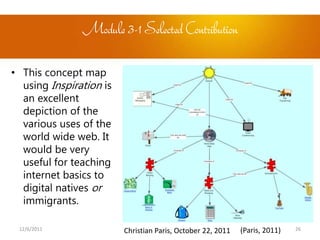
Module 3-1 Selected Contribution

• This concept map
  using Inspiration is
  an excellent
  depiction of the
  various uses of the
  world wide web. It
  would be very
  useful for teaching
  internet basics to
  digital natives or
  immigrants.

 12/6/2011               Christian Paris, October 22, 2011   (Paris, 2011)   26
Module 3-2 Assignment
1.     "Semantic networking engages learners in an analysis of content
       domains that helps them organize their knowledge for better
       comprehension and retention." (Jonassen, 2006)
     –      Do you agree or disagree with this statement?


2.    Coaching Construction of Concept Maps“ (Jonassen, p. 106-110)

      a) Example of a 6 Step Lesson Plan with Spreadsheets

3. Develop Lesson Plan

       a) Use Lesson Plan Generator
       b) Create Rubric


12/6/2011                                                                27
Module 3-2 Selected Contribution
• Halloween Sounds

      – Dan Chase’s concept mapping exercise addressed the Mass Science
        Framework, “Recognize that sound is produced by vibrating objects and
        requires a medium through which to travel. Relate the rate of vibration
        to the pitch of the sound”

• This project was conceived to creatively engage students to learn
  somewhat dry science topic by having them brainstorm a list of
  Halloween noises and then evaluate them for pitch, volume and
  source.

• This project would utilize the multi media capabilities of Kidspiration


12/6/2011                                                                     28
Module 3-2 Reflections
            •    I often use concept mapping for my own thoughts and
                 plans. I do not know why it had never occurred to me to
                 ask my students to employ it. I can see concept mapping
                 helping my students to:
                  – Make connections between concepts
                  – Planning, organizing and constructing knowledge
            •    I really found this suggestion helpful:

                “…scaffolding concept mapping by providing blank nodes and
                links resulted in higher scores on a post test Than providing
                feedback during concept mapping.” (Jonassen, p. 107)

            •    A new requirement at U of Px teachers is that we are to
                 assign a team project for each week. I can require teams
                 to map their research strategies using http://mind42.com/
                 (IRIAN Solutions Software, 2008)
12/6/2011                                                                       29
Module 4: Hypermedia as a Mindtool


12/6/2011                                  30
Module 4-1 Assignment
            • Option 1 Interactive Presentation

              OR

            • Option 2 Jeopardy PowerPoint


12/6/2011                                         31
Module 4-1 Reflections
            • I chose to investigate hypermedia applications that
              were new to me

            • The number and quality of hypermedia teaching
              applications is astounding

            • These tools can be used not only engage learners but
              to allow them more choice in the how, what and when
              then learn.

            • Later in the week, when I attended a training meeting
              at my Town’s Emergency Operations Center, I was able
              to assist the trainer who had attempted to create a
              PowerPoint jeopardy on radiation—a very dull topic
              that we are forced to review on an annual basis

12/6/2011                                                           32
Module 4-1 Selected Contribution

• I was highly impressed with Slides, Flips, and Turns – A
  Winter Story, on Mr. Avery’s Classroom Blog. (Avery,
  2010)

•    This Prezi presentation fuses a traditional low-tech
    drawing assignment with high tech application, it
    recognizes student’s contributions and allows each
    student to go through and review concepts at his or her
    own pace. Outstanding use of hypermedia to engage the
    learner.


12/6/2011                                                    33
Module 4-2 Assignment

1. Discuss advantages and disadvantages of hypermedia

2. Example of a 6 Step Lesson Plan with Hypermedia

3. Develop Lesson Plan

       a) Use Lesson Plan Generator
       b) Create Rubric


12/6/2011                                               34
Module 4-2 Reflections
            •   “Building multimedia and hypermedia presentations
                orients teachers and students away from the notions that
                knowledge is information and that the teacher’s role is
                transmitter of it.” (Jonassen, p. 191)

                 –   In facilitating adult education, I’ve been trained to be the “guide on
                     the side’ rather than “the sage on the stage,” so I’m very comfortable
                     wit this concept. Yet, I hadn’t contemplated the implications for the
                     role of technology in this.

            •   While both the text and discussion board threads have
                pointed out the notion that students may become
                distracted by the decorative aspects of hypermedia
                projects, I have discovered that with proper planning, this
                is easily managed by chunking the project into
                progressively more creative stages.

12/6/2011                                                                                 35
Module 4-2 Selected Contribution
• “Class will collaborate to create a multimedia PowerPoint
  presentation aimed at presenting Spanish vocabulary
  (numbers, colors, words, phrases, food) to 2nd graders in
  the school.”
                                   Lisa Norton, November 13, 2011
                                                    (Norton, 2011)
• This lesson could be easily adapted to my school’s 4th or
  5th grade Portuguese class.

• I like how Lisa has included a concept mapping exercise
  using Kidspiration as a lead in to the core assignment

12/6/2011                                                       36
Module 5Assignment
NETS for Teachers & Students
1.     Review Standards For Global Learning In The Digital Age and then
       discuss the four points listed in the Education Must Change
       section as well as explain why educators need to transform
       learning environments with technology.

2.     For each standard of NETS-Teachers and NETS-Students, provide
       an example and then explain how teachers can demonstrate their
       competencies of NETS standards for teachers and what they
       should do to help their students meet NETS standards for
       students. Also give a description of why you feel/think these
       examples/standards are important.


12/6/2011                                                               37
Module 5 Reflections
            • When I worked for multiple schools, I mapped every
              standard to every activity I developed for grades K-8
              in each school posted here:
              http://gnbces-2011.wikispaces.com/

            • While the teachers I trained are repeating those tech
              projects this year, they make no effort to learn new
              technologies or apply what they’ve learned to
              different activities!

            • The NETS standards are ideals that we should be
              striving for, but classroom teachers must be willing
              to embrace them and this will only happen when
              they are offered time and compensation to do so

12/6/2011                                                            38
Module 5 Selected Contribution

• The contribution below resonated with me because while, science
  and technology should go hand in hand, in my experience, its been
  the science teachers who have been the most resistant to using
  technology.

     “I think I can present to teachers how to acquire benefits from the internet
     in science, where they can find a lot of good resources and which can help
     to maximize the content of learning in that subject.”
                                       Gaby Velasco-Hurtado November 27, 2011


12/6/2011                                                                           39
Last Night of Class Reflections
            •   The final night of class was so beneficial! I gained some
                great ideas for class activities, but the most sage advice
                came from the professor: “Speak to their hearts,” when
                working with teachers resistant to technology.


            •   I thought and thought about how I could apply this advice
                and came up with a plan for the next day. I approached
                our oldest most curmudgeonly teacher and offered to give
                his class a presentation on my overseas teaching
                experience. I was so surprised to see how excited he
                became! Now have a toe in the door….


12/6/2011                                                                    40
Instructional technology requires a melding of
 studied theory and thoughtful practice. This quote
 states it beautifully:

“There are two kinds of truth; the truth that lights the way and the truth
that warms the heart. The first of these is science, and the second is art....
Without art science would be as useless as a pair of high forceps in the
hands of a plumber. Without science art would become a crude mess of
folklore and emotional quackery.” (Chandler, 1976)


 12/6/2011                                                               41
Closure
In closing, INST 509 helped to identify two specific “gaps” in my professional

knowledge and practice: 1) learning how to work with differentiation and 2) creating

and interpreting assessments. I realize that these were not the focus of this survey

course, and I look forward to tackling them in the upcoming semesters. After

fun, stressful, whirlwind 12 weeks, I leave this class a better organized, better prepared

teaching professional. While many of the applications reviewed were not new to me, I

gained wealth of new ways to use them from the selected readings and videos as well

as from my classmates. I am excited to apply and expand upon all that I have
learned!


   12/6/2011                                                                         42
Sources
Avery, S. (2011, October 9). Module 2 -1 - spreadsheets practice [Online forum comment]. Retrieved from

      http://plato.bridgew.edu/bin/common/course.pl?course_id=_7642_1

Avery, S. (2010, December 29). Slides, flips, and turns – a winter story. Retrieved from

      http://mravery.edublogs.org/2010/12/29/awinterstory/)

Chase, D. (2011, October 29) Module 3-2 Concept maps as mindtool [Online forum comment]. Retrieved from

      http://plato.bridgew.edu/bin/common/course.pl?course_id=_7642_1

Colorado Community Colleges Online. (n.d.). Academic integrity student tutorial. Retrieved from

      http://www.ctdlc.org/Members/Hot_Topics/AcademicIntegrity/Students/CaseD.html

Gleason, C. (2011, October 16). Module 2-2 Spreadsheet as a Mindtool [Online forum comment]. Retrieved from

      http://plato.bridgew.edu/bin/common/course.pl?course_id=_7642_1

IRIAN Solutions Software. (2008). Collaborative mind mapping in your browser. Retrieved from http://mind42.com/

Jonassen, D. H. (2006). Modeling with technology, mindtools for conceptual change. Upper Saddle River, NJ: Prentice Hall.

McLeod, S. (Writer), Fisch, K. (Writer), & Brenman, J. (2008). Did you know? shift happens [DVD]. Available from

      http://www.youtube.com/watch?v=cL9Wu2kWwSY
      12/6/2011                                                                                                    43
Meditation PowerPoint template. (2011). [Web Graphic]. Retrieved from http://www.templateswise.com/detail/link-

      183.html

Myers, G. (2009). Instructional Technology - A Glimpse at History [Video file]. Retrieved from Vimio website:

      http://vimeo.com/9991922

Norton, L. (2011, November 14). Module 4-2 – Hypermedia as mindtools [Online forum comment]. Retrieved from

      http://plato.bridgew.edu/bin/common/course.pl?course_id=_7642_1

Paris, C. (2011, October 6). Module 1 - foundation of instructional [Online forum comment]. Retrieved from

      http://plato.bridgew.edu/bin/common/course.pl?course_id=_7642_1

Pirtle, L. (2011, June). Technology showcase. Retrieved from http://gnbces-2011.wikispaces.com/

Roos,ASCAP, E. & Schreer, S. (Composers). (n.d.). My tears. [Song]. Retrieved from
      http://freeplaymusic.com/search/keyword_search.php

Ryan, M. (2011, September 29). Int (b) netiquette & academic integrity [Online forum comment]. Retrieved from

      http://plato.bridgew.edu/bin/common/course.pl?course_id=_7642_1

There_are_two_kinds_of_truth_the_truth. (n.d.). Columbia World of Quotations. Retrieved December 08, 2011, from

      Dictionary.com website: http://quotes.dictionary.com/There_are_two_kinds_of_truth_the_truth
      12/6/2011                                                                                                 44

Inst 509 Final Reflections 12 08-11

  • 1.
    End of CourseReflections Final Thoughts Ideas Generated Selected Contributions Leslie Pirtle Foundations of Instructional Technology INST 509 Bridgewater State University Professor Thanh Nguyen December 6, 2011
  • 2.
    Preface Taken asa whole, this class has been of tremendous value to me. It has opened my eyes to new ways of viewing things, validated what I’ve already learned and put into practice, and afforded me many opportunities to “fill in the gaps” where practical application or theoretical study was needed. For this final reflection upon my INST 509 journey, I have chosen to revisit each week’s learning experience with a brief reflection on the assignment and the material as well as a acknowledge a fellow learner’s contribution. The “Selected Contributions,” were chosen for their relevance to my personal situation as a grades 4-8 technology teacher and are not intended as a judgment on my part of their overall merits as compared to the class as a whole. 12/6/2011 2
  • 3.
    Introductory Module Blackboard Netiquette and Academic Integrity Introduction and Home Page Collaborative Learning Agreement Checklist 12/6/2011 3
  • 4.
    Blackboard Reflections • Given the minimal changes in BB since the late 90’s I would like to see it: – Update the look and feel – Add the ability to sort posts by student, date and number of listings – Allow for embedded media in posts – Add a built-in html generator – Include emoticons in its toolbar – Remove the “Go” button next to “Select All” – because it doesn’t “go” anywhere! 12/6/2011 4
  • 5.
    Netiquette Reflections • The most helpful “take away” from this material for me was the reminder to use a more pointed subject line rather than simply saying “help!” or “hello” – I have been making this effort and striving to use a subject that would be easily searchable as well • Netiquette has not been a problem with my online University of Phoenix (U of Px) students, but it is a very important topic for my primary students 12/6/2011 5
  • 6.
    Academic Integrity Reflections • Academic Integrity, Student Tutorial is an excellent resource that I will return to frequently – The “You write…” “Is it plagiarism?” format is an outstanding way of helping learners to sort through the thorny issues and gray areas of what and when to cite (Colorado Community Colleges Online, n.d.) 12/6/2011 6
  • 7.
    Academic Integrity SelectedContribution • This idea is would be an inspired addition to my research unit for grades 6, 7, and 8! I really enjoyed reading Mary’s contributions “What I do in my class is I simply have them go out to a website and construct a couple of paragraphs about what they have learned. I then put a few up on the smartboard - items that they believe are their own thoughts and ideas... I then highlight what I as a teacher am suspicious of and google their exact words. Often times I am lead to directly the website were on and to the very sentence that they have "borrowed"... it really drives the point home to them that I don't even have to do that much work to check their writing. It sends them a pretty clear message, when they watch how easy it is for me to question their credibilty. I tell them as quickly as they were able to borrow or cut and paste that item into their paper, I can just as easily catch them doing it! It makes for an interesting day in the classroom. Lots of arguments, but a good learning experience.!” --Mary Ryan, September 29, 2011 (Ryan, 2011) 12/6/2011 7
  • 8.
    Introduction and HomePage Reflections • Our cohort is comprised of a rich tapestry of learners • Yet, our shared similarities made me feel very much at home. Commonalities for me included being a: – South Shore resident – Silver Lake HS alum – Bridgewater alum – Classroom teacher – Technology teacher – Former college administrator 12/6/2011 8
  • 9.
    Collaborative Learning AgreementChecklist Reflections • I didn’t like this system at the beginning but tried to approach it with an open mind. After long and careful consideration, I concluded that as a matter of teaching style, I would be unlikely to use this with my online classes • I prefer the tracking of posts to be automated. I think learners’ time is better spent working with the subject matter rather than these “housekeeping” functions • I worry that this system could actually serve to limit conversation—if the student is only required to interact with four people in a given week, where is the incentive to read all of the posts? • I appreciate that the underlying rationale is to ensure that no student is ignored. I just prefer to do this on a case-by-case basis through my facilitation. (Perhaps this makes me a control freak?) 12/6/2011 9
  • 10.
    Module 1: Foundationsof Instructional Technology 12/6/2011 10
  • 11.
    Assigned Videos Reflections • The videos – Offered definitions of instructional technology – Portrayed where we are, where we come from and where we are going in terms of the use of technology in learning – While it is hard to fathom a setting in which the teachers I work with would find time to sit through a one plus hour long video, I have exposed them to powerful yet much briefer, “Did You Know?” (McLeod, Fisch & Brenman, 2008) – The Myers (2009) video caused me to consider that while we are putting a lot of effort into understanding the digital natives, perhaps we should help them appreciate where we are coming from as well For example, I think it would be enriching to have students create a footnote on an old manual typewriter or get out of the chair to change the television channel. 12/6/2011 11
  • 12.
    Learning Theories inEducation, Reflections • I was pleased to learn that we will be examining educational theories in greater depth next semester. Because I was not an education major, all of what I know has been acquired from reading and attending workshops. • Behaviorism – As a dog training competitor, I have attended seminars by some top animal behaviorists who ascribe to this theory. Interestingly, much of what they teach can be applied in the human classroom. I find behaviorism to be straightforward although limited when compared to subsequently introduced theories. • Cognitivism – To me this theory is an enhancement, as it acknowledges a more active role of the learner, by suggesting that knowledge is generated both externally and internally • Constructivism – I believe this theory to also be a further enhancement, as it sets the learner in an even more active role in which he or she is actually “building” knowledge in a unique way based upon existing knowledge and personal experiences—framework provided by instructor • Zone of Proximal Development – Introduced on the final night of class, theory helps to explain how we benefit from learning in collaborative groups. 12/6/2011 12
  • 13.
    Digital Natives, DigitalImmigrants, Reflections • I first encountered these terms in graduate school when our professor determined that ours would be her first “digital” cohort • I feel that this line will blur as technology becomes a way of life for some Digital Immigrants. Just as there are differences between those newly arrived to a country and those well established in the ex-pat community, we already have some people in the older generations who have had far more exposure to technology than their younger counterparts. 12/6/2011 13
  • 14.
    Connectivism • I feel this theory is ideal for describing today’s Digital Native learner • The best definition of Connectivism, in my opinion is the original one, cited in Jonassen (p. 186): Papert, (1990) coined the term to describe ‘the theory that knowledge is built by the learner, not supplied by the teacher,’ and that ‘this happens especially felicitously when the learner is engaged in the construction of something external or atleast sharable…a sand castle, a machine, a computer program, a book.’(p3) 12/6/2011 14
  • 15.
    Module 1 SelectedContribution This student, in relating his own recent secondary school experience, articulates the pervasive attitude that many of us, as technology coordinators are faced with when confronting typical “digital immigrant” teachers: Getting Digital Immigrants to fully accept online material will obviously not be easy. I used to have some teachers in high school who did not trust internet sources. One of them even went as far as to say you can only use one online source in your paper, and the rest had to be books. Her only reason for this was that "books are more reliable." Yes, there is a great deal of junk on the internet, but I think she took that mindset too far.teachers to all at least feel comfortable with technology?” --Christian Paris, October 6, 2011 (Paris, 2011) 12/6/2011 15
  • 16.
    Module 2: Spreadsheetsas a Mindtool 12/6/2011 16
  • 17.
    Module 2-1: Spreadsheetsas a Mindtool Assignment • Create a Spreadsheet for Grades or a Poster OR • Create a hyperlinked game using a spreadsheet OR • Create a spreadsheet that promotes higher order thinking with the If then Else statement 12/6/2011 17
  • 18.
    Module 2-1 Reflections • This module demonstrated how spreadsheets can be used to promote higher order thinking by enabling students to: – Graphically represent their learning – Quantify and manipulate their discoveries – Apply and extrapolate what they learn • After going through this material, it became evident to me that I need to a much stronger proficiency with spreadsheets • I was able to apply what I learned the next week at school when a teacher asked me to make a banner to hang in the hall. It was fun being able to use Excel creatively. 12/6/2011 18
  • 19.
    Module 2-1 SelectedContribution “ I was amazed at how many different possibilities there are for a spreadsheet. In my role, the count and average functions worked amazingly well. In a job where we have to constantly be checking for understanding and seeing what else needs to be worked on, creating this spreadsheet has allowed me the opportunity to see what specific topics individuals need work on as well as what the class as a whole could use a little bit more time with.” Shawn Avery, October 9, 2011 (Avery, 2011) 12/6/2011 19
  • 20.
    Module 2-2: Spreadsheetsas Mindtool Assignment 1. How spreadsheets can be used as : a) Computation, Analysis, and Reasoning, b) Mathematic comprehension c) Visualization d) Simulation modeling. 2. "Coaching Construction of Spreadsheets“ (Jonassen, 2006) a) Example of a 6 Step Lesson Plan with Spreadsheets 3. Develop Lesson Plan a) Use Lesson Plan Generator b) Create Rubric 12/6/2011 20
  • 21.
    Module 2-2 SelectedContribution • Grocery Shopping Spreadsheet – Students create a family food budget – Students use netgrocer.com to deduct purchases – Students collaborate to organize a party with their budgets – Students compare each family’s list Cheryl Gleason October 16, 2011 • I would use this lesson in my own lab. I like that is has real world application and incrementally moves its way up Bloom’s pyramid 12/6/2011 21
  • 22.
    Module 2-2 Reflections • The introduction of Jonassen’s (2006) 6 steps, the Web Lesson Plan Generator and the required rubric added structure and consistency to my classroom planning • This template ensures that the teacher will cover all important aspects of planning a lesson. In my case, it brought to light my shortcomings in addressing differentiation. It seemed to me that most of my classmates seemed to gloss over this topic as well. I am looking forward to addressing this issue in my Spring semester studies. 12/6/2011 22
  • 23.
    Module 3: ConceptMapping as a Mindtool 12/6/2011 23
  • 24.
    Module 3-1 Assignment • Create a Concept Map Using Kidspiration Grades K-5 OR • Create a Concept Map Using Inspiration Grades 6-Adult 12/6/2011 24
  • 25.
    Module 3-1 Reflections • The introduction to Kidspiration was very useful as this is a resource our school has paid for, so I plan too find ways in which to incorporate it. • After exploring both Kidspiration and Inspiration, if the purchase decision were to have been mine, I would have opted for Inspiration instead 12/6/2011 25
  • 26.
    Module 3-1 SelectedContribution • This concept map using Inspiration is an excellent depiction of the various uses of the world wide web. It would be very useful for teaching internet basics to digital natives or immigrants. 12/6/2011 Christian Paris, October 22, 2011 (Paris, 2011) 26
  • 27.
    Module 3-2 Assignment 1. "Semantic networking engages learners in an analysis of content domains that helps them organize their knowledge for better comprehension and retention." (Jonassen, 2006) – Do you agree or disagree with this statement? 2. Coaching Construction of Concept Maps“ (Jonassen, p. 106-110) a) Example of a 6 Step Lesson Plan with Spreadsheets 3. Develop Lesson Plan a) Use Lesson Plan Generator b) Create Rubric 12/6/2011 27
  • 28.
    Module 3-2 SelectedContribution • Halloween Sounds – Dan Chase’s concept mapping exercise addressed the Mass Science Framework, “Recognize that sound is produced by vibrating objects and requires a medium through which to travel. Relate the rate of vibration to the pitch of the sound” • This project was conceived to creatively engage students to learn somewhat dry science topic by having them brainstorm a list of Halloween noises and then evaluate them for pitch, volume and source. • This project would utilize the multi media capabilities of Kidspiration 12/6/2011 28
  • 29.
    Module 3-2 Reflections • I often use concept mapping for my own thoughts and plans. I do not know why it had never occurred to me to ask my students to employ it. I can see concept mapping helping my students to: – Make connections between concepts – Planning, organizing and constructing knowledge • I really found this suggestion helpful: “…scaffolding concept mapping by providing blank nodes and links resulted in higher scores on a post test Than providing feedback during concept mapping.” (Jonassen, p. 107) • A new requirement at U of Px teachers is that we are to assign a team project for each week. I can require teams to map their research strategies using http://mind42.com/ (IRIAN Solutions Software, 2008) 12/6/2011 29
  • 30.
    Module 4: Hypermediaas a Mindtool 12/6/2011 30
  • 31.
    Module 4-1 Assignment • Option 1 Interactive Presentation OR • Option 2 Jeopardy PowerPoint 12/6/2011 31
  • 32.
    Module 4-1 Reflections • I chose to investigate hypermedia applications that were new to me • The number and quality of hypermedia teaching applications is astounding • These tools can be used not only engage learners but to allow them more choice in the how, what and when then learn. • Later in the week, when I attended a training meeting at my Town’s Emergency Operations Center, I was able to assist the trainer who had attempted to create a PowerPoint jeopardy on radiation—a very dull topic that we are forced to review on an annual basis 12/6/2011 32
  • 33.
    Module 4-1 SelectedContribution • I was highly impressed with Slides, Flips, and Turns – A Winter Story, on Mr. Avery’s Classroom Blog. (Avery, 2010) • This Prezi presentation fuses a traditional low-tech drawing assignment with high tech application, it recognizes student’s contributions and allows each student to go through and review concepts at his or her own pace. Outstanding use of hypermedia to engage the learner. 12/6/2011 33
  • 34.
    Module 4-2 Assignment 1.Discuss advantages and disadvantages of hypermedia 2. Example of a 6 Step Lesson Plan with Hypermedia 3. Develop Lesson Plan a) Use Lesson Plan Generator b) Create Rubric 12/6/2011 34
  • 35.
    Module 4-2 Reflections • “Building multimedia and hypermedia presentations orients teachers and students away from the notions that knowledge is information and that the teacher’s role is transmitter of it.” (Jonassen, p. 191) – In facilitating adult education, I’ve been trained to be the “guide on the side’ rather than “the sage on the stage,” so I’m very comfortable wit this concept. Yet, I hadn’t contemplated the implications for the role of technology in this. • While both the text and discussion board threads have pointed out the notion that students may become distracted by the decorative aspects of hypermedia projects, I have discovered that with proper planning, this is easily managed by chunking the project into progressively more creative stages. 12/6/2011 35
  • 36.
    Module 4-2 SelectedContribution • “Class will collaborate to create a multimedia PowerPoint presentation aimed at presenting Spanish vocabulary (numbers, colors, words, phrases, food) to 2nd graders in the school.” Lisa Norton, November 13, 2011 (Norton, 2011) • This lesson could be easily adapted to my school’s 4th or 5th grade Portuguese class. • I like how Lisa has included a concept mapping exercise using Kidspiration as a lead in to the core assignment 12/6/2011 36
  • 37.
    Module 5Assignment NETS forTeachers & Students 1. Review Standards For Global Learning In The Digital Age and then discuss the four points listed in the Education Must Change section as well as explain why educators need to transform learning environments with technology. 2. For each standard of NETS-Teachers and NETS-Students, provide an example and then explain how teachers can demonstrate their competencies of NETS standards for teachers and what they should do to help their students meet NETS standards for students. Also give a description of why you feel/think these examples/standards are important. 12/6/2011 37
  • 38.
    Module 5 Reflections • When I worked for multiple schools, I mapped every standard to every activity I developed for grades K-8 in each school posted here: http://gnbces-2011.wikispaces.com/ • While the teachers I trained are repeating those tech projects this year, they make no effort to learn new technologies or apply what they’ve learned to different activities! • The NETS standards are ideals that we should be striving for, but classroom teachers must be willing to embrace them and this will only happen when they are offered time and compensation to do so 12/6/2011 38
  • 39.
    Module 5 SelectedContribution • The contribution below resonated with me because while, science and technology should go hand in hand, in my experience, its been the science teachers who have been the most resistant to using technology. “I think I can present to teachers how to acquire benefits from the internet in science, where they can find a lot of good resources and which can help to maximize the content of learning in that subject.” Gaby Velasco-Hurtado November 27, 2011 12/6/2011 39
  • 40.
    Last Night ofClass Reflections • The final night of class was so beneficial! I gained some great ideas for class activities, but the most sage advice came from the professor: “Speak to their hearts,” when working with teachers resistant to technology. • I thought and thought about how I could apply this advice and came up with a plan for the next day. I approached our oldest most curmudgeonly teacher and offered to give his class a presentation on my overseas teaching experience. I was so surprised to see how excited he became! Now have a toe in the door…. 12/6/2011 40
  • 41.
    Instructional technology requiresa melding of studied theory and thoughtful practice. This quote states it beautifully: “There are two kinds of truth; the truth that lights the way and the truth that warms the heart. The first of these is science, and the second is art.... Without art science would be as useless as a pair of high forceps in the hands of a plumber. Without science art would become a crude mess of folklore and emotional quackery.” (Chandler, 1976) 12/6/2011 41
  • 42.
    Closure In closing, INST509 helped to identify two specific “gaps” in my professional knowledge and practice: 1) learning how to work with differentiation and 2) creating and interpreting assessments. I realize that these were not the focus of this survey course, and I look forward to tackling them in the upcoming semesters. After fun, stressful, whirlwind 12 weeks, I leave this class a better organized, better prepared teaching professional. While many of the applications reviewed were not new to me, I gained wealth of new ways to use them from the selected readings and videos as well as from my classmates. I am excited to apply and expand upon all that I have learned! 12/6/2011 42
  • 43.
    Sources Avery, S. (2011,October 9). Module 2 -1 - spreadsheets practice [Online forum comment]. Retrieved from http://plato.bridgew.edu/bin/common/course.pl?course_id=_7642_1 Avery, S. (2010, December 29). Slides, flips, and turns – a winter story. Retrieved from http://mravery.edublogs.org/2010/12/29/awinterstory/) Chase, D. (2011, October 29) Module 3-2 Concept maps as mindtool [Online forum comment]. Retrieved from http://plato.bridgew.edu/bin/common/course.pl?course_id=_7642_1 Colorado Community Colleges Online. (n.d.). Academic integrity student tutorial. Retrieved from http://www.ctdlc.org/Members/Hot_Topics/AcademicIntegrity/Students/CaseD.html Gleason, C. (2011, October 16). Module 2-2 Spreadsheet as a Mindtool [Online forum comment]. Retrieved from http://plato.bridgew.edu/bin/common/course.pl?course_id=_7642_1 IRIAN Solutions Software. (2008). Collaborative mind mapping in your browser. Retrieved from http://mind42.com/ Jonassen, D. H. (2006). Modeling with technology, mindtools for conceptual change. Upper Saddle River, NJ: Prentice Hall. McLeod, S. (Writer), Fisch, K. (Writer), & Brenman, J. (2008). Did you know? shift happens [DVD]. Available from http://www.youtube.com/watch?v=cL9Wu2kWwSY 12/6/2011 43
  • 44.
    Meditation PowerPoint template.(2011). [Web Graphic]. Retrieved from http://www.templateswise.com/detail/link- 183.html Myers, G. (2009). Instructional Technology - A Glimpse at History [Video file]. Retrieved from Vimio website: http://vimeo.com/9991922 Norton, L. (2011, November 14). Module 4-2 – Hypermedia as mindtools [Online forum comment]. Retrieved from http://plato.bridgew.edu/bin/common/course.pl?course_id=_7642_1 Paris, C. (2011, October 6). Module 1 - foundation of instructional [Online forum comment]. Retrieved from http://plato.bridgew.edu/bin/common/course.pl?course_id=_7642_1 Pirtle, L. (2011, June). Technology showcase. Retrieved from http://gnbces-2011.wikispaces.com/ Roos,ASCAP, E. & Schreer, S. (Composers). (n.d.). My tears. [Song]. Retrieved from http://freeplaymusic.com/search/keyword_search.php Ryan, M. (2011, September 29). Int (b) netiquette & academic integrity [Online forum comment]. Retrieved from http://plato.bridgew.edu/bin/common/course.pl?course_id=_7642_1 There_are_two_kinds_of_truth_the_truth. (n.d.). Columbia World of Quotations. Retrieved December 08, 2011, from Dictionary.com website: http://quotes.dictionary.com/There_are_two_kinds_of_truth_the_truth 12/6/2011 44