Information Literacy 2013
          From e-learning to Web-learning:
      placeless, connected, expansible, flexible,
                   effective learning

                         stefano.lariccia@uniroma1.it

                  04/09-06/22 / 2013
                                               -


Stefano Lariccia – Digilab -                            Alberto Pigliacelli
Noematics                                                     Europaclub
Sapienza Università di Roma
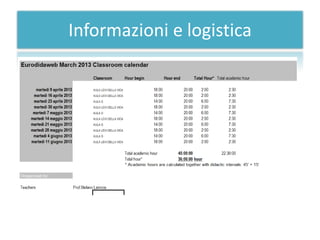
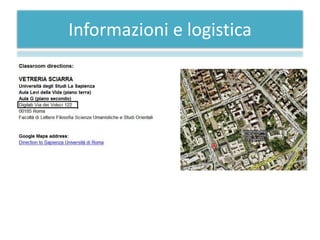
Informazioni e logistica
Premesse e obiettivi del corso

• Quali sono gli obiettivi di
  questo corso?
  1. Introdurre alla Computer Literacy –
     ovvero alla Alfabetizzazione
     Informatica per le Humanities
Premesse e obiettivi del corso
• Quali sono gli obiettivi di questo corso?
  1.       Introdurre alla Computer Literacy –
           Alfabetizzazione Informatica per le Humanities
  2.       Introdurre alla Information Literacy per le
           Humanities come piattaforma di abilità successiva
           alla Computer Literacy
  3.       Fornire le basi “cognitive” per consentire ai
           frequentanti di procedere in maniera autonoma a
           creare da se le competenze di ordine superiore:
       •     Come si raccoglie informazione dal Web
       •     Come si selezione la sorgente più autorevole e affidabile
       •     Come si seleziona, tra i vari formati disponibili, il più
             appropriato ai nostri scopi del momento
Premesse e obiettivi del corso
• Quali sono gli obiettivi di questo corso?
  1.       Introdurre alla Computer Literacy –
           Alfabetizzazione Informatica per le Humanities
  2.       Introdurre alla Information Literacy per le
           Humanities come piattaforma di abilità successiva
           alla Computer Literacy
  3.       Fornire le basi “cognitive” per consentire ai
           frequentanti di procedere in maniera autonoma a
           creare da se le competenze di ordine superiore:
       •     Come si raccoglie informazione dal Web
       •     Come si selezione la sorgente più autorevole e affidabile
       •     Come si seleziona, tra i vari formati disponibili, il più
             appropriato ai nostri scopi del momento
Premesse, obiettivi e metodi
• Quali obiettivi?

• Come saranno conseguiti?
Premesse, obiettivi e metodi
  • How will be achieved?
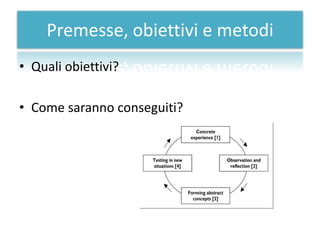
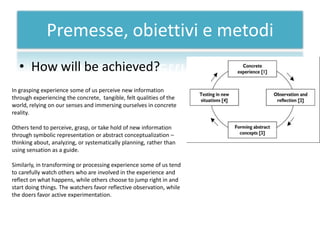
In grasping experience some of us perceive new information
through experiencing the concrete, tangible, felt qualities of the
world, relying on our senses and immersing ourselves in concrete
reality.

Others tend to perceive, grasp, or take hold of new information
through symbolic representation or abstract conceptualization –
thinking about, analyzing, or systematically planning, rather than
using sensation as a guide.

Similarly, in transforming or processing experience some of us tend
to carefully watch others who are involved in the experience and
reflect on what happens, while others choose to jump right in and
start doing things. The watchers favor reflective observation, while
the doers favor active experimentation.
Premesse, obiettivi e metodi
   • How will be achieved?
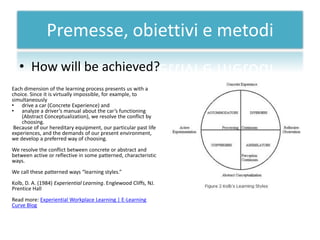
Each dimension of the learning process presents us with a
choice. Since it is virtually impossible, for example, to
simultaneously
• drive a car (Concrete Experience) and
• analyze a driver’s manual about the car’s functioning
    (Abstract Conceptualization), we resolve the conflict by
    choosing.
 Because of our hereditary equipment, our particular past life
experiences, and the demands of our present environment,
we develop a preferred way of choosing.
We resolve the conflict between concrete or abstract and
between active or reflective in some patterned, characteristic
ways.
We call these patterned ways “learning styles.”
Kolb, D. A. (1984) Experiential Learning. Englewood Cliffs, NJ.
Prentice Hall
Read more: Experiential Workplace Learning | E-Learning
Curve Blog
Strumenti cognitivi
• Quali strumenti utilizzeremo?
  – strumenti “informatici” cioè basati
   su computer:
    • linguaggi di programmazione
    • programmi
    • organizzatori di contenuti
    • strumenti di gestione grafica delle
      informazioni
Strumenti cognitivi (2)

• Quali strumenti utilizzeremo?
 – piattaforme Web per la gestione
  di contenuti e di conoscenze:
   • www.comphumanities.org
   • elearning2.uniroma1.it
   • www.editoriaescrittura.org
Web-learning 2.0 basics:
let me introduce to you some useful tool
Web-learning 2.0 basics:
      let me introduce to you some useful tool

1. Internet is a safe place… provided you
   behave safely. Once you will begin to use the
   Web 2.0 you will discover soon that a Web
   2.0 user is overwhelmed by many access
   passwords.
2. First of all, then, you need a keychain
3. My suggestion is: Lastpass; Open Source,
   free,
Web-learning 2.0 basics: (cont.)
1. Internet is a safe place… provided you
   behave safely. Once you will begin to use the
   Web 2.0 you will discover soon that a Web
   2.0 user is overwhelmed by many access
   passwords.
2. First of all, then, you need a keychain
3. My suggestion is: LastPass ****; Open
   Source, free,
Web-learning 2.0 basics: (cont.)
1. Internet is a huge place… and you can loose yourself
   in the clouds…
2. Once you will begin to use the Web 2.0 you will
   discover soon that a Web 2.0 user is overwhelmed
   by many bookmarks ...
3. And the right one is ever in the wrong place. Let’s
   transform Bookmarks into “placeless tags”: xmarks
   will do this work for you
Web-learning 2.0 basics: (cont.)
1. Internet is a huge place… and you can loose
   your own teaching material …
2. Once again you will need a placeless safe
   location to save your didactic presentation ...
3. You’ve got thousands of slideshows
   presentation … And the right one is ever in
   the wrong place. Let’s transform PowerPoint
   into “placeless slide repository”: Slideshare
   will do this work for you
Web-learning 2.0 basics: (cont.)
1. Internet is such a huge repository … and you
   can loose your own book reference list …
2. Once again you will need a placeless safe
   location to save your book references...
3. You’ve got thousands of reading list for your
   students … And the right one is ever in the
   wrong place. Let’s transform “Biblioscape”
   into a “placeless references repository”:
   Citeulike will do this work for you
Web-learning 2.0 basics: (cont.)
1. Internet is such a huge repository … and you
   can loose your own Contact List …
2. Once again you will need a placeless safe
   location to save your book references...
3. You’ve got thousands of reading list for your
   students … And the right one is ever in the
   wrong place. Let’s transform “Outlook” into a
   “placeless contact list and calendar”: Plaxo
   will do this work for you
Web-learning 2.0 basics: (cont.)
1. Internet is such a huge repository … and you can
   loose your own Contact List and Calendar …
2. Once again you will need a placeless safe
   location to save your book references...
3. You’ve got thousands of reading list for your
   students … And the right one is ever in the wrong
   place. Let’s transform “Outlook” into a “placeless
   contact list and calendar”: Google Calendar will do
   this work for you as well
Web-learning 2.0 basics: (cont.)
• Social Network
  – Social Network management systems can be a
    support to learning activities
  – You should try to encourage selection and usage
    of a serious social network like environment
  – Linkedin is a generalist yet “professional oriented”
    SN environment
Web-learning 2.0 - Social Networks
 – Edmodo | Secure Social Learning Network for Teachers and Students
      • www.edmodo.com/; Edmodo provides a safe and easy way for your class to connect and
        collaborate, share content, and access homework, grades and school notices. Our goal is
        to ...
 – TeachersRecess - The Teacher Social Network and File Sharing ...
      • www.teachersrecess.com/ The Teachers Social Network. ... Teachers Recess Community.
        Use the Community to: • Make Friends • Find Colleagues • Network • Share Ideas and
        More! FAQs - Wtf911 swaggsec bitchessss - Help - Register now!
 – Home - Teachers Social Network
      • www.teachersn.com/ - Get in touch with other teachers trough this social network site.
        Exchange teaching experiences, ideas and teaching materials with other teachers and
        students. Lesson Plans - Register - Web Site Terms and ... - About
 – NEA - Online Social Networking for Educators
      • www.nea.org/home/20746.htm - The vast majority of educators use social networking
        discreetly and professionally to make connections that can enhance careers, not
        jeopardize them.
 – 25 Excellent Social Media Sites for Teachers | The Digital Learning ...
      • toponlineuniversityreviews.com/.../25-excellent... - 25 Excellent Social Media Sites for
        Teachers. Are you a teacher who wants to increase collaboration and skill development
        to students? Teamwork can increase ...
Web-learning 2.0 - Social Networks
 – http://www.educationalnetworking.com/List+of+Networks
 – Guidelines for Educators Using Social Networking Sites - Home ...
      •   doug-johnson.squarespace.com/.../guidelines-f... -
      •   7 Aug 2009 – The district strongly discourages teachers from accepting invitations to friend students
          within these social networking sites. When students gain ...
 – Free Educational Resources for Educators and Teachers ...
 – www.teachade.com/ - Stati Uniti -
 – The first social networking website designed specifically for educators. Because of the ability
   to harness the online community, Teachade has become one of the ...
 – Teachers and Social Networks: To Facebook Or Not To Facebook?
      •   blogs.gartner.com/.../teachers-and-social-netwo... -
      •   6 Jun 2009 – First of all, there is no clear code of conduct for teachers on social media: some
          automatically accept any student's or parent 's request, some ...
 – Teaching and learning through social networks | TeachingEnglish ...

 – www.teachingenglish.org.uk/.../teaching-learning-thro...
 – In 2007, the British Council conducted market research into how the Internet has affected the
   preferred learning ...
Web-learning 2.0 - Social Networks
 – Impact of Social Networks on learning and
   teaching activities
    • http://ftp.jrc.es/EURdoc/JRC56958.pdf
Web-learning 2.0 basics: (cont.)


      • University of Auckland,
      • The Auckland University of Technology,
Web-learning 2.0 basics: (cont.)
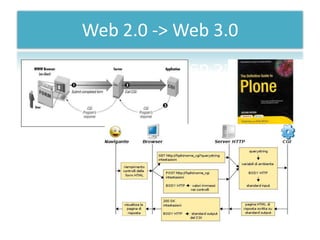
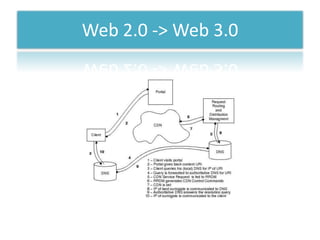
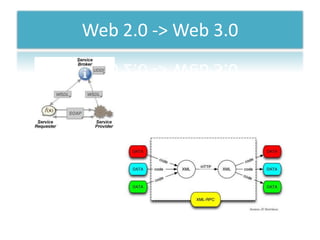
Web 2.0 -> Web 3.0
Web 2.0 -> Web 3.0
Web 2.0 -> Web 3.0
Web 2.0 -> Web 3.0
Web 2.0 -> Web 3.0
Web 2.0 -> Web 3.0
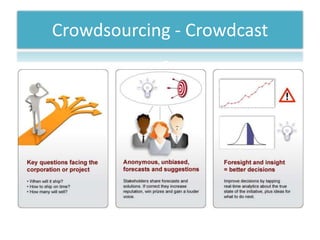
Crowdsourcing - Crowdcast
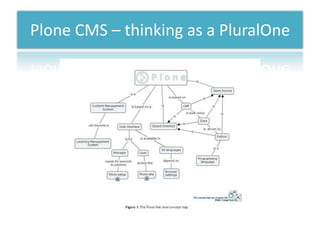
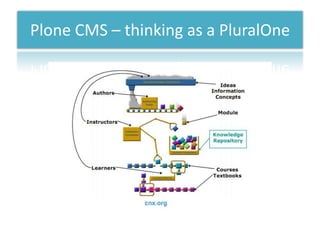
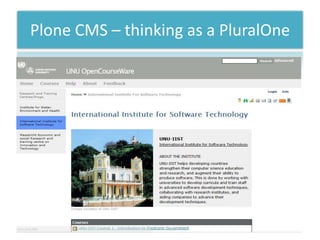
Plone CMS – thinking as a PluralOne
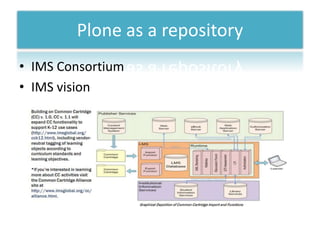
Plone as a repository
• IMS Consortium
• IMS vision
Online Education Experiences using
        Plone as a repository
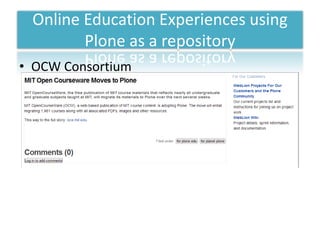
• OCW Consortium
Online Education Experiences using
        Plone as a repository
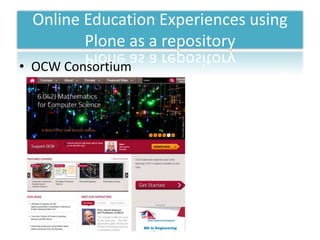
• OCW Consortium
Online Education Experiences using
        Plone as a repository
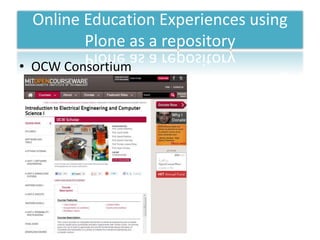
• OCW Consortium
Online Education Experiences using
        Plone as a repository
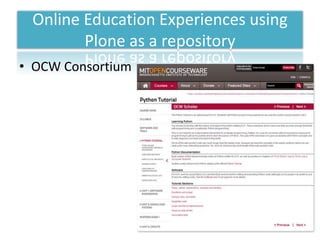
• OCW Consortium
Other Online Education Experiences
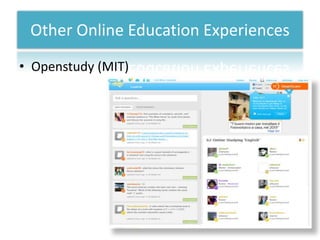
• Openstudy (MIT)
Other Online Education Experiences
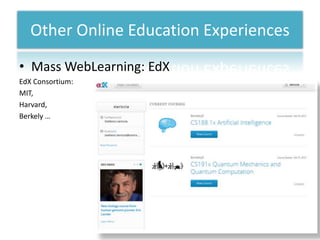
• Mass WebLearning: EdX
EdX Consortium:
MIT,
Harvard,
Berkely …
Other educational
          resources on the Web
• Webinars for secondary schools
  – http://www.evobeaker.com/products-k-
    12/Webinars


• Other resources for teachers
  – http://www.ies.be/training/bridging-the-gap
Resources and references
Resource type and name:              References:
Plone; A definitive Guide to Plone

Exe LO Editor Manual                 http://wikieducator.org/Online_manual/E
                                     mbedding_eXe_resources

Infomation literacy history, criticism and technology

  • 1.
    Information Literacy 2013 From e-learning to Web-learning: placeless, connected, expansible, flexible, effective learning stefano.lariccia@uniroma1.it 04/09-06/22 / 2013 - Stefano Lariccia – Digilab - Alberto Pigliacelli Noematics Europaclub Sapienza Università di Roma
  • 2.
  • 3.
  • 4.
    Premesse e obiettividel corso • Quali sono gli obiettivi di questo corso? 1. Introdurre alla Computer Literacy – ovvero alla Alfabetizzazione Informatica per le Humanities
  • 5.
    Premesse e obiettividel corso • Quali sono gli obiettivi di questo corso? 1. Introdurre alla Computer Literacy – Alfabetizzazione Informatica per le Humanities 2. Introdurre alla Information Literacy per le Humanities come piattaforma di abilità successiva alla Computer Literacy 3. Fornire le basi “cognitive” per consentire ai frequentanti di procedere in maniera autonoma a creare da se le competenze di ordine superiore: • Come si raccoglie informazione dal Web • Come si selezione la sorgente più autorevole e affidabile • Come si seleziona, tra i vari formati disponibili, il più appropriato ai nostri scopi del momento
  • 6.
    Premesse e obiettividel corso • Quali sono gli obiettivi di questo corso? 1. Introdurre alla Computer Literacy – Alfabetizzazione Informatica per le Humanities 2. Introdurre alla Information Literacy per le Humanities come piattaforma di abilità successiva alla Computer Literacy 3. Fornire le basi “cognitive” per consentire ai frequentanti di procedere in maniera autonoma a creare da se le competenze di ordine superiore: • Come si raccoglie informazione dal Web • Come si selezione la sorgente più autorevole e affidabile • Come si seleziona, tra i vari formati disponibili, il più appropriato ai nostri scopi del momento
  • 7.
    Premesse, obiettivi emetodi • Quali obiettivi? • Come saranno conseguiti?
  • 8.
    Premesse, obiettivi emetodi • How will be achieved? In grasping experience some of us perceive new information through experiencing the concrete, tangible, felt qualities of the world, relying on our senses and immersing ourselves in concrete reality. Others tend to perceive, grasp, or take hold of new information through symbolic representation or abstract conceptualization – thinking about, analyzing, or systematically planning, rather than using sensation as a guide. Similarly, in transforming or processing experience some of us tend to carefully watch others who are involved in the experience and reflect on what happens, while others choose to jump right in and start doing things. The watchers favor reflective observation, while the doers favor active experimentation.
  • 9.
    Premesse, obiettivi emetodi • How will be achieved? Each dimension of the learning process presents us with a choice. Since it is virtually impossible, for example, to simultaneously • drive a car (Concrete Experience) and • analyze a driver’s manual about the car’s functioning (Abstract Conceptualization), we resolve the conflict by choosing. Because of our hereditary equipment, our particular past life experiences, and the demands of our present environment, we develop a preferred way of choosing. We resolve the conflict between concrete or abstract and between active or reflective in some patterned, characteristic ways. We call these patterned ways “learning styles.” Kolb, D. A. (1984) Experiential Learning. Englewood Cliffs, NJ. Prentice Hall Read more: Experiential Workplace Learning | E-Learning Curve Blog
  • 10.
    Strumenti cognitivi • Qualistrumenti utilizzeremo? – strumenti “informatici” cioè basati su computer: • linguaggi di programmazione • programmi • organizzatori di contenuti • strumenti di gestione grafica delle informazioni
  • 11.
    Strumenti cognitivi (2) •Quali strumenti utilizzeremo? – piattaforme Web per la gestione di contenuti e di conoscenze: • www.comphumanities.org • elearning2.uniroma1.it • www.editoriaescrittura.org
  • 12.
    Web-learning 2.0 basics: letme introduce to you some useful tool
  • 13.
    Web-learning 2.0 basics: let me introduce to you some useful tool 1. Internet is a safe place… provided you behave safely. Once you will begin to use the Web 2.0 you will discover soon that a Web 2.0 user is overwhelmed by many access passwords. 2. First of all, then, you need a keychain 3. My suggestion is: Lastpass; Open Source, free,
  • 14.
    Web-learning 2.0 basics:(cont.) 1. Internet is a safe place… provided you behave safely. Once you will begin to use the Web 2.0 you will discover soon that a Web 2.0 user is overwhelmed by many access passwords. 2. First of all, then, you need a keychain 3. My suggestion is: LastPass ****; Open Source, free,
  • 15.
    Web-learning 2.0 basics:(cont.) 1. Internet is a huge place… and you can loose yourself in the clouds… 2. Once you will begin to use the Web 2.0 you will discover soon that a Web 2.0 user is overwhelmed by many bookmarks ... 3. And the right one is ever in the wrong place. Let’s transform Bookmarks into “placeless tags”: xmarks will do this work for you
  • 16.
    Web-learning 2.0 basics:(cont.) 1. Internet is a huge place… and you can loose your own teaching material … 2. Once again you will need a placeless safe location to save your didactic presentation ... 3. You’ve got thousands of slideshows presentation … And the right one is ever in the wrong place. Let’s transform PowerPoint into “placeless slide repository”: Slideshare will do this work for you
  • 17.
    Web-learning 2.0 basics:(cont.) 1. Internet is such a huge repository … and you can loose your own book reference list … 2. Once again you will need a placeless safe location to save your book references... 3. You’ve got thousands of reading list for your students … And the right one is ever in the wrong place. Let’s transform “Biblioscape” into a “placeless references repository”: Citeulike will do this work for you
  • 18.
    Web-learning 2.0 basics:(cont.) 1. Internet is such a huge repository … and you can loose your own Contact List … 2. Once again you will need a placeless safe location to save your book references... 3. You’ve got thousands of reading list for your students … And the right one is ever in the wrong place. Let’s transform “Outlook” into a “placeless contact list and calendar”: Plaxo will do this work for you
  • 19.
    Web-learning 2.0 basics:(cont.) 1. Internet is such a huge repository … and you can loose your own Contact List and Calendar … 2. Once again you will need a placeless safe location to save your book references... 3. You’ve got thousands of reading list for your students … And the right one is ever in the wrong place. Let’s transform “Outlook” into a “placeless contact list and calendar”: Google Calendar will do this work for you as well
  • 20.
    Web-learning 2.0 basics:(cont.) • Social Network – Social Network management systems can be a support to learning activities – You should try to encourage selection and usage of a serious social network like environment – Linkedin is a generalist yet “professional oriented” SN environment
  • 21.
    Web-learning 2.0 -Social Networks – Edmodo | Secure Social Learning Network for Teachers and Students • www.edmodo.com/; Edmodo provides a safe and easy way for your class to connect and collaborate, share content, and access homework, grades and school notices. Our goal is to ... – TeachersRecess - The Teacher Social Network and File Sharing ... • www.teachersrecess.com/ The Teachers Social Network. ... Teachers Recess Community. Use the Community to: • Make Friends • Find Colleagues • Network • Share Ideas and More! FAQs - Wtf911 swaggsec bitchessss - Help - Register now! – Home - Teachers Social Network • www.teachersn.com/ - Get in touch with other teachers trough this social network site. Exchange teaching experiences, ideas and teaching materials with other teachers and students. Lesson Plans - Register - Web Site Terms and ... - About – NEA - Online Social Networking for Educators • www.nea.org/home/20746.htm - The vast majority of educators use social networking discreetly and professionally to make connections that can enhance careers, not jeopardize them. – 25 Excellent Social Media Sites for Teachers | The Digital Learning ... • toponlineuniversityreviews.com/.../25-excellent... - 25 Excellent Social Media Sites for Teachers. Are you a teacher who wants to increase collaboration and skill development to students? Teamwork can increase ...
  • 22.
    Web-learning 2.0 -Social Networks – http://www.educationalnetworking.com/List+of+Networks – Guidelines for Educators Using Social Networking Sites - Home ... • doug-johnson.squarespace.com/.../guidelines-f... - • 7 Aug 2009 – The district strongly discourages teachers from accepting invitations to friend students within these social networking sites. When students gain ... – Free Educational Resources for Educators and Teachers ... – www.teachade.com/ - Stati Uniti - – The first social networking website designed specifically for educators. Because of the ability to harness the online community, Teachade has become one of the ... – Teachers and Social Networks: To Facebook Or Not To Facebook? • blogs.gartner.com/.../teachers-and-social-netwo... - • 6 Jun 2009 – First of all, there is no clear code of conduct for teachers on social media: some automatically accept any student's or parent 's request, some ... – Teaching and learning through social networks | TeachingEnglish ... – www.teachingenglish.org.uk/.../teaching-learning-thro... – In 2007, the British Council conducted market research into how the Internet has affected the preferred learning ...
  • 23.
    Web-learning 2.0 -Social Networks – Impact of Social Networks on learning and teaching activities • http://ftp.jrc.es/EURdoc/JRC56958.pdf
  • 24.
  • 25.
    Web-learning 2.0 basics:(cont.) • University of Auckland, • The Auckland University of Technology,
  • 26.
  • 27.
  • 28.
  • 29.
    Web 2.0 ->Web 3.0
  • 30.
    Web 2.0 ->Web 3.0
  • 31.
    Web 2.0 ->Web 3.0
  • 32.
    Web 2.0 ->Web 3.0
  • 33.
    Web 2.0 ->Web 3.0
  • 34.
    Web 2.0 ->Web 3.0
  • 35.
  • 36.
    Plone CMS –thinking as a PluralOne
  • 37.
    Plone CMS –thinking as a PluralOne
  • 38.
    Plone CMS –thinking as a PluralOne
  • 39.
    Plone as arepository • IMS Consortium • IMS vision
  • 40.
    Online Education Experiencesusing Plone as a repository • OCW Consortium
  • 41.
    Online Education Experiencesusing Plone as a repository • OCW Consortium
  • 42.
    Online Education Experiencesusing Plone as a repository • OCW Consortium
  • 43.
    Online Education Experiencesusing Plone as a repository • OCW Consortium
  • 44.
    Other Online EducationExperiences • Openstudy (MIT)
  • 45.
    Other Online EducationExperiences • Mass WebLearning: EdX EdX Consortium: MIT, Harvard, Berkely …
  • 46.
    Other educational resources on the Web • Webinars for secondary schools – http://www.evobeaker.com/products-k- 12/Webinars • Other resources for teachers – http://www.ies.be/training/bridging-the-gap
  • 47.
    Resources and references Resourcetype and name: References: Plone; A definitive Guide to Plone Exe LO Editor Manual http://wikieducator.org/Online_manual/E mbedding_eXe_resources