InfluxDB
The time series database
Modern Factory #workshops

Marcin Szepczyński, July 2016
What is time series
data?
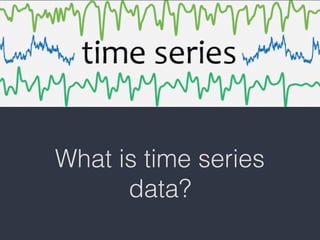
What is time series data?
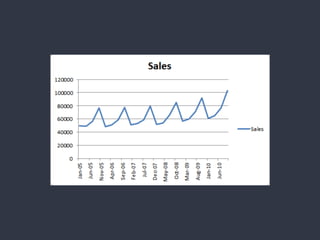
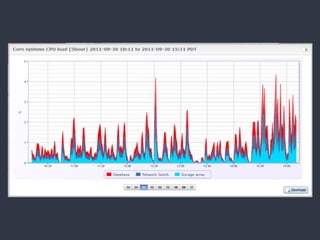
• A time series data is a sequence of data points
made from the same source over the time interval.
• If you have a time series data and plot it, one of
your axes will be always a time.
Examples of time
series data
What is not a time
series data?
Regular vs irregular 

time series
Time series data is good for
• Internet of Things (e.g. sensors data)
• Alerting
• Monitoring
• Real Time Analytics
InfluxDB is I in TICK stack
• Telegraf - time data collector
• InfluxDB - time series database
• Chronograf - time series data visualization
• Kapacitor - time series data processing and
alerting
InfluxDB features
• SQL-like query language
• Schemaless
• Case sensitive
• Data types: string, float64, int64, boolean
Measurement
• Measurement (or Point) is a single record (row) in
InfluxDB data store
• Each measurement has time (as primary key), tags
(indexed columns) and fields (not indexed
columns)
Inserting
INSERT table_name,tag1=value1,tag2=value2 temp=30.5,value=1.5
measurement name 

(„table”)
Inserting
INSERT table_name,tag1=value1,tag2=value2 temp=30.5,value=1.5
measurement name 

(„table”)
Comma is a separator between measurement and tags

Comma is a separator between each tag and each field

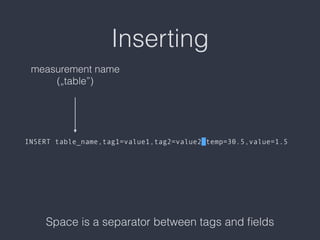
Inserting
INSERT table_name,tag1=value1,tag2=value2 temp=30.5,value=1.5
measurement name 

(„table”)


Space is a separator between tags and fields
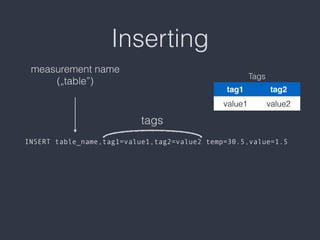
Inserting
INSERT table_name,tag1=value1,tag2=value2 temp=30.5,value=1.5
measurement name 

(„table”)
tags
Tags
tag1 tag2
value1 value2
Inserting
INSERT table_name,tag1=value1,tag2=value2 temp=30.5,value=1.5
measurement name 

(„table”)
fields
Fields
temp value
30.5 1.5
Inserting
INSERT table_name,tag1=value1,tag2=value2 temp=30.5,value=1.5
measurement name 

(„table”)
Comma is a separator between measurement and tags

Comma is a separator between each tag and each field

Space is a separator between tags and fields
tags
fields
Querying
• Show databases:

> SHOW DATABASES
• Select database:

> USE workshop
• Show measurements („tables”)

> SHOW MEASUREMENTS
• Simple select all

> SELECT * FROM measurement_name
Querying (2)
• Select with limit:

> SELECT * FROM measure LIMIT 10
• Select with offset:

> SELECT * FROM measure OFFSET 10
• Select where clause:

> SELECT * FROM measure WHERE tag1 = ’value1’
• Select with order clause:

> SELECT * FROM measure ORDER BY cpu DESC
Querying (3)
• Operators:

= equal to

<>, != not equal to

> greater than

< less than

=~ matches against (REGEX)

!~ doesn’t matches against (REGEX)
Aggregations - COUNT()
Returns the number of non-null values.


> SELECT count(<field>) FROM measure


> SELECT count(cpu) FROM cpu_temp 

WHERE time > '2016-07-04' 

AND time < '2016-07-05' 

GROUP BY time(1h)
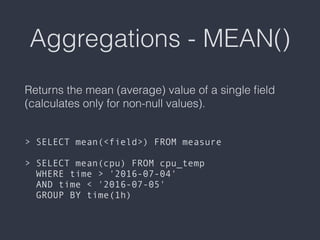
Aggregations - MEAN()
Returns the mean (average) value of a single field
(calculates only for non-null values).


> SELECT mean(<field>) FROM measure


> SELECT mean(cpu) FROM cpu_temp 

WHERE time > '2016-07-04' 

AND time < '2016-07-05' 

GROUP BY time(1h)
Aggregations - MEDIAN()
Returns the middle value from the sorted values in
single field (Its similar to PERCENTILE(field, 50).


> SELECT median(<field>) FROM measure


> SELECT median(cpu) FROM cpu_temp 

WHERE time > '2016-07-04' 

AND time < '2016-07-05' 

GROUP BY time(1h)
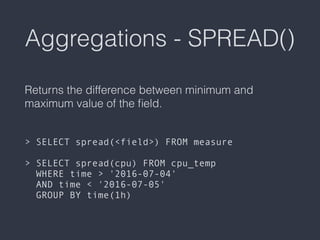
Aggregations - SPREAD()
Returns the difference between minimum and
maximum value of the field.


> SELECT spread(<field>) FROM measure


> SELECT spread(cpu) FROM cpu_temp 

WHERE time > '2016-07-04' 

AND time < '2016-07-05' 

GROUP BY time(1h)
Aggregations - SUM()
Returns the sum of all values in a single field.


> SELECT sum(<field>) FROM measure


> SELECT sum(cpu) FROM cpu_temp 

WHERE time > '2016-07-04' 

AND time < '2016-07-05' 

GROUP BY time(1h)
Selectors - BOTTOM(N)
Returns the smaller N values in a single field.


> SELECT bottom(<field>, <N>) FROM measure


> SELECT bottom(cpu, 5) FROM cpu_temp 

WHERE time > '2016-07-04' 

AND time < '2016-07-05' 

GROUP BY time(1h)
Selectors - FIRST()
Returns the oldest values of a single field.


> SELECT first(<field>) FROM measure


> SELECT first(cpu) FROM cpu_temp 

WHERE time > '2016-07-04' 

AND time < '2016-07-05' 

GROUP BY time(1h)
Selectors - LAST()
Returns the newest values of a single field.


> SELECT last(<field>) FROM measure


> SELECT last(cpu) FROM cpu_temp 

WHERE time > '2016-07-04' 

AND time < '2016-07-05' 

GROUP BY time(1h)
Selectors - MAX()
Returns the highest value in a single field.


> SELECT max(<field>) FROM measure


> SELECT max(cpu) FROM cpu_temp 

WHERE time > '2016-07-04' 

AND time < '2016-07-05' 

GROUP BY time(1h)
Selectors - MIN()
Returns the lowest value in a single field.


> SELECT min(<field>) FROM measure


> SELECT min(cpu) FROM cpu_temp 

WHERE time > '2016-07-04' 

AND time < '2016-07-05' 

GROUP BY time(1h)
Selectors - PERCENTILE(N)
Returns the N-percentile value for sorted values of a
single field.


> SELECT percentile(<field>, <N>) FROM measure


> SELECT percentile(cpu, 95) FROM cpu_temp 

WHERE time > '2016-07-04' 

AND time < '2016-07-05' 

GROUP BY time(1h)
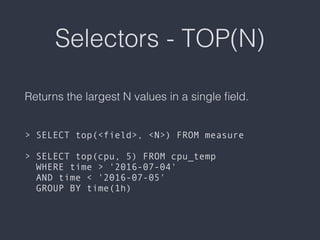
Selectors - TOP(N)
Returns the largest N values in a single field.


> SELECT top(<field>, <N>) FROM measure


> SELECT top(cpu, 5) FROM cpu_temp 

WHERE time > '2016-07-04' 

AND time < '2016-07-05' 

GROUP BY time(1h)
GROUP BY clause
InfluxDB supports GROUP BY clause with tag values,
time intervals, tag values and time intervals and
GROUP BY with fill().
Downsampling
InfluxDB can handle hundreds of thousands of data
points per second. Working with that much data over
a long period of time can create storage concerns. A
natural solution is to downsample the data; keep the
high precision raw data for only a limited time, and
store the lower precision, summarized data for much
longer or forever.
Data retention
A retention policy is the part of InfluxDB’s data
structure that describes for how long InfluxDB keeps
data and how many copies of those data are stored
in the cluster. A database can have several RPs and
RPs are unique per database.
More
https://influxdata.com/videos/
https://docs.influxdata.com/influxdb

Influxdb and time series data

  • 1.
    InfluxDB The time seriesdatabase Modern Factory #workshops
 Marcin Szepczyński, July 2016
  • 2.
    What is timeseries data?
  • 3.
    What is timeseries data? • A time series data is a sequence of data points made from the same source over the time interval. • If you have a time series data and plot it, one of your axes will be always a time.
  • 4.
  • 7.
    What is nota time series data?
  • 10.
    Regular vs irregular
 time series
  • 11.
    Time series datais good for • Internet of Things (e.g. sensors data) • Alerting • Monitoring • Real Time Analytics
  • 12.
    InfluxDB is Iin TICK stack • Telegraf - time data collector • InfluxDB - time series database • Chronograf - time series data visualization • Kapacitor - time series data processing and alerting
  • 13.
    InfluxDB features • SQL-likequery language • Schemaless • Case sensitive • Data types: string, float64, int64, boolean
  • 14.
    Measurement • Measurement (orPoint) is a single record (row) in InfluxDB data store • Each measurement has time (as primary key), tags (indexed columns) and fields (not indexed columns)
  • 15.
  • 16.
    Inserting INSERT table_name,tag1=value1,tag2=value2 temp=30.5,value=1.5 measurementname 
 („table”) Comma is a separator between measurement and tags
 Comma is a separator between each tag and each field

  • 17.
    Inserting INSERT table_name,tag1=value1,tag2=value2 temp=30.5,value=1.5 measurementname 
 („table”) 
 
 Space is a separator between tags and fields
  • 18.
    Inserting INSERT table_name,tag1=value1,tag2=value2 temp=30.5,value=1.5 measurementname 
 („table”) tags Tags tag1 tag2 value1 value2
  • 19.
    Inserting INSERT table_name,tag1=value1,tag2=value2 temp=30.5,value=1.5 measurementname 
 („table”) fields Fields temp value 30.5 1.5
  • 20.
    Inserting INSERT table_name,tag1=value1,tag2=value2 temp=30.5,value=1.5 measurementname 
 („table”) Comma is a separator between measurement and tags
 Comma is a separator between each tag and each field
 Space is a separator between tags and fields tags fields
  • 21.
    Querying • Show databases:
 >SHOW DATABASES • Select database:
 > USE workshop • Show measurements („tables”)
 > SHOW MEASUREMENTS • Simple select all
 > SELECT * FROM measurement_name
  • 22.
    Querying (2) • Selectwith limit:
 > SELECT * FROM measure LIMIT 10 • Select with offset:
 > SELECT * FROM measure OFFSET 10 • Select where clause:
 > SELECT * FROM measure WHERE tag1 = ’value1’ • Select with order clause:
 > SELECT * FROM measure ORDER BY cpu DESC
  • 23.
    Querying (3) • Operators:
 =equal to
 <>, != not equal to
 > greater than
 < less than
 =~ matches against (REGEX)
 !~ doesn’t matches against (REGEX)
  • 24.
    Aggregations - COUNT() Returnsthe number of non-null values.
 
 
 > SELECT count(<field>) FROM measure
 
 > SELECT count(cpu) FROM cpu_temp 
 WHERE time > '2016-07-04' 
 AND time < '2016-07-05' 
 GROUP BY time(1h)
  • 25.
    Aggregations - MEAN() Returnsthe mean (average) value of a single field (calculates only for non-null values).
 
 
 > SELECT mean(<field>) FROM measure
 
 > SELECT mean(cpu) FROM cpu_temp 
 WHERE time > '2016-07-04' 
 AND time < '2016-07-05' 
 GROUP BY time(1h)
  • 26.
    Aggregations - MEDIAN() Returnsthe middle value from the sorted values in single field (Its similar to PERCENTILE(field, 50).
 
 
 > SELECT median(<field>) FROM measure
 
 > SELECT median(cpu) FROM cpu_temp 
 WHERE time > '2016-07-04' 
 AND time < '2016-07-05' 
 GROUP BY time(1h)
  • 27.
    Aggregations - SPREAD() Returnsthe difference between minimum and maximum value of the field.
 
 
 > SELECT spread(<field>) FROM measure
 
 > SELECT spread(cpu) FROM cpu_temp 
 WHERE time > '2016-07-04' 
 AND time < '2016-07-05' 
 GROUP BY time(1h)
  • 28.
    Aggregations - SUM() Returnsthe sum of all values in a single field.
 
 
 > SELECT sum(<field>) FROM measure
 
 > SELECT sum(cpu) FROM cpu_temp 
 WHERE time > '2016-07-04' 
 AND time < '2016-07-05' 
 GROUP BY time(1h)
  • 29.
    Selectors - BOTTOM(N) Returnsthe smaller N values in a single field.
 
 
 > SELECT bottom(<field>, <N>) FROM measure
 
 > SELECT bottom(cpu, 5) FROM cpu_temp 
 WHERE time > '2016-07-04' 
 AND time < '2016-07-05' 
 GROUP BY time(1h)
  • 30.
    Selectors - FIRST() Returnsthe oldest values of a single field.
 
 
 > SELECT first(<field>) FROM measure
 
 > SELECT first(cpu) FROM cpu_temp 
 WHERE time > '2016-07-04' 
 AND time < '2016-07-05' 
 GROUP BY time(1h)
  • 31.
    Selectors - LAST() Returnsthe newest values of a single field.
 
 
 > SELECT last(<field>) FROM measure
 
 > SELECT last(cpu) FROM cpu_temp 
 WHERE time > '2016-07-04' 
 AND time < '2016-07-05' 
 GROUP BY time(1h)
  • 32.
    Selectors - MAX() Returnsthe highest value in a single field.
 
 
 > SELECT max(<field>) FROM measure
 
 > SELECT max(cpu) FROM cpu_temp 
 WHERE time > '2016-07-04' 
 AND time < '2016-07-05' 
 GROUP BY time(1h)
  • 33.
    Selectors - MIN() Returnsthe lowest value in a single field.
 
 
 > SELECT min(<field>) FROM measure
 
 > SELECT min(cpu) FROM cpu_temp 
 WHERE time > '2016-07-04' 
 AND time < '2016-07-05' 
 GROUP BY time(1h)
  • 34.
    Selectors - PERCENTILE(N) Returnsthe N-percentile value for sorted values of a single field.
 
 
 > SELECT percentile(<field>, <N>) FROM measure
 
 > SELECT percentile(cpu, 95) FROM cpu_temp 
 WHERE time > '2016-07-04' 
 AND time < '2016-07-05' 
 GROUP BY time(1h)
  • 35.
    Selectors - TOP(N) Returnsthe largest N values in a single field.
 
 
 > SELECT top(<field>, <N>) FROM measure
 
 > SELECT top(cpu, 5) FROM cpu_temp 
 WHERE time > '2016-07-04' 
 AND time < '2016-07-05' 
 GROUP BY time(1h)
  • 36.
    GROUP BY clause InfluxDBsupports GROUP BY clause with tag values, time intervals, tag values and time intervals and GROUP BY with fill().
  • 37.
    Downsampling InfluxDB can handlehundreds of thousands of data points per second. Working with that much data over a long period of time can create storage concerns. A natural solution is to downsample the data; keep the high precision raw data for only a limited time, and store the lower precision, summarized data for much longer or forever.
  • 38.
    Data retention A retentionpolicy is the part of InfluxDB’s data structure that describes for how long InfluxDB keeps data and how many copies of those data are stored in the cluster. A database can have several RPs and RPs are unique per database.
  • 39.