
Agenda: New Practitioners Track
WORKSHOPAGENDA
8:00 AM – 9:00 AM Breakfast
9:00 AM – 10:00 AM Installing the TICK Stack and Your First Query Noah Crowley
10:00 AM – 10:50 AM Chronograf and Dashboarding David Simmons
10:50 AM – 11:20 AM Break
11:20 AM – 12:10 PM Writing Queries (InfluxQL and TICK) Noah Crowley
12:10 PM – 1:10 PM Lunch
1:10 PM – 2:00 PM Architecting InfluxEnterprise for Success Dean Sheehan
2:00 PM – 2:10 PM Break
2:10 PM – 3:00 PM Optimizing the TICK Stack Dean Sheehan
3:10 PM – 4:00 PM Downsampling Data Michael DeSa
4:00 PM Happy Hour
Dean Sheehan
Senior Director, Pre and
Post Sales
Optimizing the TICK Stack
• What shape is your data?
• Ingest optimization
• Query considerations
• Offloading stream processing
Line protocol
Schema Design
The Line Protocol
• Self describing data
– Points are written to InfluxDB using the Line Protocol, which follows the following format:
<measurement>[,<tag-key>=<tag-value>] [<field-key>=<field-value>] [unix-nano-timestamp]
– This provides extremely high flexibility as new metrics are identified for collection into
InfluxDB. New measure to capture? Just send it to InfluxDB. It’s that easy.
cpu_load,hostname=server02,az=us_west usage_user=24.5,usage_idle=15.3 1234567890000000
Measurement
Tag
Set
Field Set
Timestamp
DON'T ENCODE DATA INTO THE MEASUREMENT NAME
• Measurement names like:
• Encode that information as tags:
cpu.server-5.us-west value=2 1444234982000000000
cpu.server-6.us-west value=4 1444234982000000000
mem-free.server-6.us-west value=2500 1444234982000000000
cpu,host=server-5,region=us-west value=2 1444234982000000000
cpu,host=server-6,region=us-west value=4 1444234982000000000
mem-free,host=server-6,region=us-west value=2500 1444234982000000
What if my plugin sends data like that to InfluxDB?
Write something that sits between your plugin and InfluxDB to sanitize the data OR
use one of our write plugins:
Example - Telegraf’s Graphite input plugin: Takes input like…
…and parses it with the following template…
…resulting in the following points in line protocol hitting the database:
sensu.metric.net.server0.eth0.rx_packets 461295119435 1444234982
sensu.metric.net.server0.eth0.tx_bytes 1093086493388480 1444234982
sensu.metric.net.server0.eth0.rx_bytes 1015633926034834 1444234982
["sensu.metric.* ..measurement.host.interface.field"]
net,host=server0,interface=eth0 rx_packets=461295119435 1444234982
net,host=server0,interface=eth0 tx_bytes=1093086493388480 1444234982
net,host=server0,interface=eth0 rx_bytes=1015633926034834 1444234982
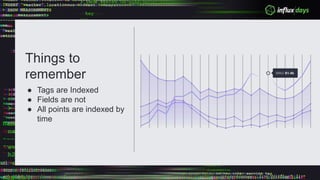
Things to
remember
● Tags are Indexed
● Fields are not
● All points are indexed by
time
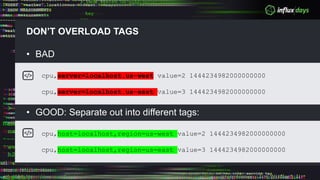
DON’T OVERLOAD TAGS
• BAD
• GOOD: Separate out into different tags:
cpu,server=localhost.us-west value=2 1444234982000000000
cpu,server=localhost.us-east value=3 1444234982000000000
cpu,host=localhost,region=us-west value=2 1444234982000000000
cpu,host=localhost,region=us-east value=3 1444234982000000000
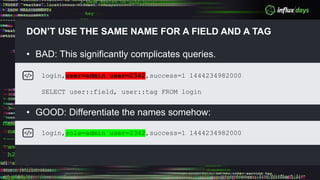
DON’T USE THE SAME NAME FOR A FIELD AND A TAG
• BAD: This significantly complicates queries.
• GOOD: Differentiate the names somehow:
login,user=admin user=2342,success=1 1444234982000
SELECT user::field, user::tag FROM login
login,role=admin user=2342,success=1 1444234982000
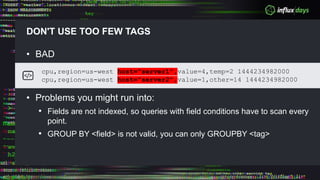
DON'T USE TOO FEW TAGS
• BAD
• Problems you might run into:
• Fields are not indexed, so queries with field conditions have to scan every
point.
• GROUP BY <field> is not valid, you can only GROUPBY <tag>
cpu,region=us-west host="server1",value=4,temp=2 1444234982000
cpu,region=us-west host="server2",value=1,other=14 1444234982000
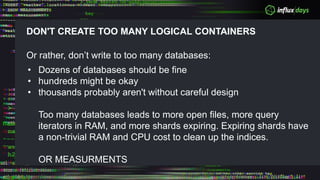
DON'T CREATE TOO MANY LOGICAL CONTAINERS
Or rather, don’t write to too many databases:
• Dozens of databases should be fine
• hundreds might be okay
• thousands probably aren't without careful design
Too many databases leads to more open files, more query
iterators in RAM, and more shards expiring. Expiring shards have
a non-trivial RAM and CPU cost to clean up the indices.
OR MEASURMENTS
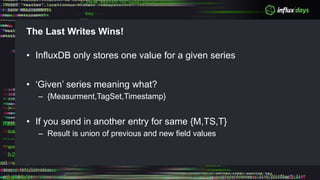
The Last Writes Wins!
• InfluxDB only stores one value for a given series
• ‘Given’ series meaning what?
– {Measurment,TagSet,Timestamp}
• If you send in another entry for same {M,TS,T}
– Result is union of previous and new field values
Worked Example
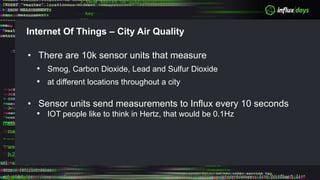
Internet Of Things – City Air Quality
• There are 10k sensor units that measure
• Smog, Carbon Dioxide, Lead and Sulfur Dioxide
• at different locations throughout a city
• Sensor units send measurements to Influx every 10 seconds
• IOT people like to think in Hertz, that would be 0.1Hz
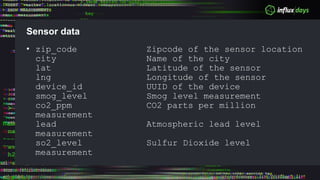
Sensor data
• zip_code Zipcode of the sensor location
city Name of the city
lat Latitude of the sensor
lng Longitude of the sensor
device_id UUID of the device
smog_level Smog level measurement
co2_ppm CO2 parts per million
measurement
lead Atmospheric lead level
measurement
so2_level Sulfur Dioxide level
measurement
Exercise
Why would it be a bad idea to make lat or lng a tag instead of a
field?
Solution
• Why would it be a bad idea to make lat or lng a tag instead of a
field?
– Numeric Property: We probably care about doing math on lat and lng.
That can only work if they are fields.
Exercise
Why would it be a good idea to make lat or lng a tag instead of a
field?
Solution
• Why would it be a good idea to make lat or lng a tag instead of a
field?
– We probably care about filtering or grouping by lat and lng. Filters are
faster with tags, and only tags are valid for grouping.
– If our devices don't move, lat and lng are dependent tags on device_id.
Storing them as tags won't increase series cardinality.
• Keep in mind that you can’t do any of the numeric computations
on tags
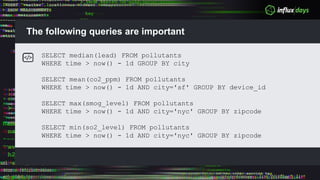
The following queries are important
SELECT median(lead) FROM pollutants
WHERE time > now() - 1d GROUP BY city
SELECT mean(co2_ppm) FROM pollutants
WHERE time > now() - 1d AND city='sf' GROUP BY device_id
SELECT max(smog_level) FROM pollutants
WHERE time > now() - 1d AND city='nyc' GROUP BY zipcode
SELECT min(so2_level) FROM pollutants
WHERE time > now() - 1d AND city='nyc' GROUP BY zipcode
Question
How can we organize our data to support the queries that we want?
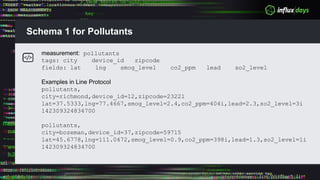
Schema 1 for Pollutants
measurement: pollutants
tags: city device_id zipcode
fields: lat lng smog_level co2_ppm lead so2_level
Examples in Line Protocol
pollutants,
city=richmond,device_id=12,zipcode=23221
lat=37.5333,lng=77.4667,smog_level=2.4,co2_ppm=404i,lead=2.3,so2_level=3i
142309324834700
pollutants,
city=bozeman,device_id=37,zipcode=59715
lat=45.6778,lng=111.0472,smog_level=0.9,co2_ppm=398i,lead=1.3,so2_level=1i
142309324834700
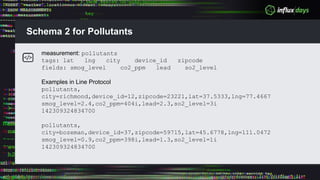
Schema 2 for Pollutants
measurement: pollutants
tags: lat lng city device_id zipcode
fields: smog_level co2_ppm lead so2_level
Examples in Line Protocol
pollutants,
city=richmond,device_id=12,zipcode=23221,lat=37.5333,lng=77.4667
smog_level=2.4,co2_ppm=404i,lead=2.3,so2_level=3i
142309324834700
pollutants,
city=bozeman,device_id=37,zipcode=59715,lat=45.6778,lng=111.0472
smog_level=0.9,co2_ppm=398i,lead=1.3,so2_level=1i
142309324834700
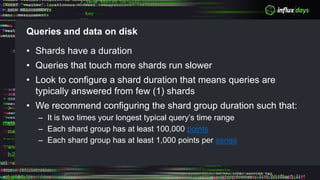
Queries and data on disk
• Shards have a duration
• Queries that touch more shards run slower
• Look to configure a shard duration that means queries are
typically answered from few (1) shards
• We recommend configuring the shard group duration such that:
– It is two times your longest typical query’s time range
– Each shard group has at least 100,000 points
– Each shard group has at least 1,000 points per series
Time Series Index
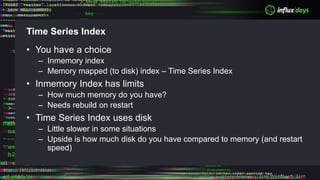
• You have a choice
– Inmemory index
– Memory mapped (to disk) index – Time Series Index
• Inmemory Index has limits
– How much memory do you have?
– Needs rebuild on restart
• Time Series Index uses disk
– Little slower in some situations
– Upside is how much disk do you have compared to memory (and restart
speed)
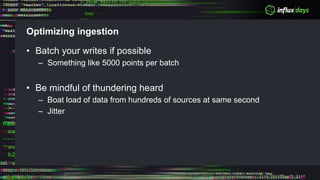
Optimizing ingestion
• Batch your writes if possible
– Something like 5000 points per batch
• Be mindful of thundering heard
– Boat load of data from hundreds of sources at same second
– Jitter
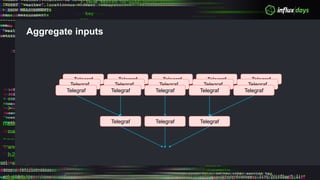
Aggregate inputs
Telegraf Telegraf TelegrafTelegraf Telegraf
Telegraf TelegrafTelegraf
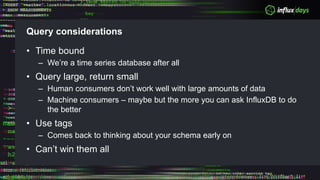
Query considerations
• Time bound
– We’re a time series database after all
• Query large, return small
– Human consumers don’t work well with large amounts of data
– Machine consumers – maybe but the more you can ask InfluxDB to do
the better
• Use tags
– Comes back to thinking about your schema early on
• Can’t win them all
Offload stream processing
• You can clearly run queries periodically to look for worrying
situations
– And generate alarms in your calling code
• Be respectful of the DB engine, it is working hard to store your
data and answer important queries
• Some ‘queries’ might be better handled by observing and
operating on the stream of data InfluxDB sees
• Kapacitor ‘subscribes’ to InfluxDB
Other pearls
• Query limit configuration
• max-concurrent-queries
• max-select-point
• max-select-series
• Queries
• Reminder time-series queries - should always include time
• Backfilling data
• Insert data ordered by timestamp/tags - newest to oldest

OPTIMIZING THE TICK STACK

  • 2.
    Agenda: New PractitionersTrack WORKSHOPAGENDA 8:00 AM – 9:00 AM Breakfast 9:00 AM – 10:00 AM Installing the TICK Stack and Your First Query Noah Crowley 10:00 AM – 10:50 AM Chronograf and Dashboarding David Simmons 10:50 AM – 11:20 AM Break 11:20 AM – 12:10 PM Writing Queries (InfluxQL and TICK) Noah Crowley 12:10 PM – 1:10 PM Lunch 1:10 PM – 2:00 PM Architecting InfluxEnterprise for Success Dean Sheehan 2:00 PM – 2:10 PM Break 2:10 PM – 3:00 PM Optimizing the TICK Stack Dean Sheehan 3:10 PM – 4:00 PM Downsampling Data Michael DeSa 4:00 PM Happy Hour
  • 3.
    Dean Sheehan Senior Director,Pre and Post Sales Optimizing the TICK Stack • What shape is your data? • Ingest optimization • Query considerations • Offloading stream processing
  • 4.
  • 5.
    The Line Protocol •Self describing data – Points are written to InfluxDB using the Line Protocol, which follows the following format: <measurement>[,<tag-key>=<tag-value>] [<field-key>=<field-value>] [unix-nano-timestamp] – This provides extremely high flexibility as new metrics are identified for collection into InfluxDB. New measure to capture? Just send it to InfluxDB. It’s that easy. cpu_load,hostname=server02,az=us_west usage_user=24.5,usage_idle=15.3 1234567890000000 Measurement Tag Set Field Set Timestamp
  • 6.
    DON'T ENCODE DATAINTO THE MEASUREMENT NAME • Measurement names like: • Encode that information as tags: cpu.server-5.us-west value=2 1444234982000000000 cpu.server-6.us-west value=4 1444234982000000000 mem-free.server-6.us-west value=2500 1444234982000000000 cpu,host=server-5,region=us-west value=2 1444234982000000000 cpu,host=server-6,region=us-west value=4 1444234982000000000 mem-free,host=server-6,region=us-west value=2500 1444234982000000
  • 7.
    What if myplugin sends data like that to InfluxDB? Write something that sits between your plugin and InfluxDB to sanitize the data OR use one of our write plugins: Example - Telegraf’s Graphite input plugin: Takes input like… …and parses it with the following template… …resulting in the following points in line protocol hitting the database: sensu.metric.net.server0.eth0.rx_packets 461295119435 1444234982 sensu.metric.net.server0.eth0.tx_bytes 1093086493388480 1444234982 sensu.metric.net.server0.eth0.rx_bytes 1015633926034834 1444234982 ["sensu.metric.* ..measurement.host.interface.field"] net,host=server0,interface=eth0 rx_packets=461295119435 1444234982 net,host=server0,interface=eth0 tx_bytes=1093086493388480 1444234982 net,host=server0,interface=eth0 rx_bytes=1015633926034834 1444234982
  • 8.
    Things to remember ● Tagsare Indexed ● Fields are not ● All points are indexed by time
  • 9.
    DON’T OVERLOAD TAGS •BAD • GOOD: Separate out into different tags: cpu,server=localhost.us-west value=2 1444234982000000000 cpu,server=localhost.us-east value=3 1444234982000000000 cpu,host=localhost,region=us-west value=2 1444234982000000000 cpu,host=localhost,region=us-east value=3 1444234982000000000
  • 10.
    DON’T USE THESAME NAME FOR A FIELD AND A TAG • BAD: This significantly complicates queries. • GOOD: Differentiate the names somehow: login,user=admin user=2342,success=1 1444234982000 SELECT user::field, user::tag FROM login login,role=admin user=2342,success=1 1444234982000
  • 11.
    DON'T USE TOOFEW TAGS • BAD • Problems you might run into: • Fields are not indexed, so queries with field conditions have to scan every point. • GROUP BY <field> is not valid, you can only GROUPBY <tag> cpu,region=us-west host="server1",value=4,temp=2 1444234982000 cpu,region=us-west host="server2",value=1,other=14 1444234982000
  • 12.
    DON'T CREATE TOOMANY LOGICAL CONTAINERS Or rather, don’t write to too many databases: • Dozens of databases should be fine • hundreds might be okay • thousands probably aren't without careful design Too many databases leads to more open files, more query iterators in RAM, and more shards expiring. Expiring shards have a non-trivial RAM and CPU cost to clean up the indices. OR MEASURMENTS
  • 13.
    The Last WritesWins! • InfluxDB only stores one value for a given series • ‘Given’ series meaning what? – {Measurment,TagSet,Timestamp} • If you send in another entry for same {M,TS,T} – Result is union of previous and new field values
  • 14.
  • 15.
    Internet Of Things– City Air Quality • There are 10k sensor units that measure • Smog, Carbon Dioxide, Lead and Sulfur Dioxide • at different locations throughout a city • Sensor units send measurements to Influx every 10 seconds • IOT people like to think in Hertz, that would be 0.1Hz
  • 16.
    Sensor data • zip_codeZipcode of the sensor location city Name of the city lat Latitude of the sensor lng Longitude of the sensor device_id UUID of the device smog_level Smog level measurement co2_ppm CO2 parts per million measurement lead Atmospheric lead level measurement so2_level Sulfur Dioxide level measurement
  • 17.
    Exercise Why would itbe a bad idea to make lat or lng a tag instead of a field?
  • 18.
    Solution • Why wouldit be a bad idea to make lat or lng a tag instead of a field? – Numeric Property: We probably care about doing math on lat and lng. That can only work if they are fields.
  • 19.
    Exercise Why would itbe a good idea to make lat or lng a tag instead of a field?
  • 20.
    Solution • Why wouldit be a good idea to make lat or lng a tag instead of a field? – We probably care about filtering or grouping by lat and lng. Filters are faster with tags, and only tags are valid for grouping. – If our devices don't move, lat and lng are dependent tags on device_id. Storing them as tags won't increase series cardinality. • Keep in mind that you can’t do any of the numeric computations on tags
  • 21.
    The following queriesare important SELECT median(lead) FROM pollutants WHERE time > now() - 1d GROUP BY city SELECT mean(co2_ppm) FROM pollutants WHERE time > now() - 1d AND city='sf' GROUP BY device_id SELECT max(smog_level) FROM pollutants WHERE time > now() - 1d AND city='nyc' GROUP BY zipcode SELECT min(so2_level) FROM pollutants WHERE time > now() - 1d AND city='nyc' GROUP BY zipcode
  • 22.
    Question How can weorganize our data to support the queries that we want?
  • 23.
    Schema 1 forPollutants measurement: pollutants tags: city device_id zipcode fields: lat lng smog_level co2_ppm lead so2_level Examples in Line Protocol pollutants, city=richmond,device_id=12,zipcode=23221 lat=37.5333,lng=77.4667,smog_level=2.4,co2_ppm=404i,lead=2.3,so2_level=3i 142309324834700 pollutants, city=bozeman,device_id=37,zipcode=59715 lat=45.6778,lng=111.0472,smog_level=0.9,co2_ppm=398i,lead=1.3,so2_level=1i 142309324834700
  • 24.
    Schema 2 forPollutants measurement: pollutants tags: lat lng city device_id zipcode fields: smog_level co2_ppm lead so2_level Examples in Line Protocol pollutants, city=richmond,device_id=12,zipcode=23221,lat=37.5333,lng=77.4667 smog_level=2.4,co2_ppm=404i,lead=2.3,so2_level=3i 142309324834700 pollutants, city=bozeman,device_id=37,zipcode=59715,lat=45.6778,lng=111.0472 smog_level=0.9,co2_ppm=398i,lead=1.3,so2_level=1i 142309324834700
  • 25.
    Queries and dataon disk • Shards have a duration • Queries that touch more shards run slower • Look to configure a shard duration that means queries are typically answered from few (1) shards • We recommend configuring the shard group duration such that: – It is two times your longest typical query’s time range – Each shard group has at least 100,000 points – Each shard group has at least 1,000 points per series
  • 26.
    Time Series Index •You have a choice – Inmemory index – Memory mapped (to disk) index – Time Series Index • Inmemory Index has limits – How much memory do you have? – Needs rebuild on restart • Time Series Index uses disk – Little slower in some situations – Upside is how much disk do you have compared to memory (and restart speed)
  • 27.
    Optimizing ingestion • Batchyour writes if possible – Something like 5000 points per batch • Be mindful of thundering heard – Boat load of data from hundreds of sources at same second – Jitter
  • 28.
    Aggregate inputs Telegraf TelegrafTelegrafTelegraf Telegraf Telegraf Telegraf TelegrafTelegraf Telegraf Telegraf Telegraf TelegrafTelegraf Telegraf Telegraf TelegrafTelegraf
  • 29.
    Query considerations • Timebound – We’re a time series database after all • Query large, return small – Human consumers don’t work well with large amounts of data – Machine consumers – maybe but the more you can ask InfluxDB to do the better • Use tags – Comes back to thinking about your schema early on • Can’t win them all
  • 30.
    Offload stream processing •You can clearly run queries periodically to look for worrying situations – And generate alarms in your calling code • Be respectful of the DB engine, it is working hard to store your data and answer important queries • Some ‘queries’ might be better handled by observing and operating on the stream of data InfluxDB sees • Kapacitor ‘subscribes’ to InfluxDB
  • 31.
    Other pearls • Querylimit configuration • max-concurrent-queries • max-select-point • max-select-series • Queries • Reminder time-series queries - should always include time • Backfilling data • Insert data ordered by timestamp/tags - newest to oldest