Implementing Live Synchronous Tools in an Asynchronous Model Robert Letcher Senior Manager,Virtual High School Programs Jeff Pitcher Instructional Designer, High School Science
Pilot to Program Background Model for Successful Launch K12 2005-2006 Implementation as example Lessons Learned Examples of Use
Definitions Asynchronous  – Completion of assignments is primarily done according to the student’s own schedule.  May or may not be self-paced. Synchronous –  Live, real-time, teacher-guided instructional activities performed online, in one-to-one or group environments.  Occur according to a schedule set by the teacher or school.
Background K12, Inc. Educational products and online school curriculum for K-8 and High School Used by… K12-certified Virtual Academy Charter Schools Homeschool families Schools and School Districts Virtual School Programs B and M Classroom Blended Programs Spring 2005 call for Elluminate Pilot Proposals In response to Virtual Academy parent, student, and teacher feedback regarding need for synchronous tools
A Team Approach When possible, include stakeholder representatives Assign Project Manager(s) Assign tasks based on strengths Set deadlines and project plan/parameters Evaluate and Make Recommendations
Determine Need Identify stakeholders/users Students, Parents, Teachers, Staff, Board of Trustees, K12 Interview for interest and use ideas Informal interviews held with sample representatives Real or assumed?  Optional or critical? Real but only  Sometimes  critical Verbalize Need (63) Small-group Instruction Professional development  Assessment Special education Tutoring or skills advancement Parent orientations or workshops Community Involvement Administrative meetings
Choose Tool Choose your tool Gather Options Consider the environment Possibly 40% dial-up, personal computers with questionable processing/memory Needs and Goals  vs. Abilities Audio, video, whiteboard, web sharing, desktop/application sharing Test, test, test
Implementation is not an accident Top-down, bottom-up, or all at once Top-down to enhance buy-in and serve as “beta” group Mandatory vs. optional Initially Optional, but encouraged - Upon acceptance, mandatory Identify Possible Pitfalls Technical issues  Use of Elluminate support line Elluminate Administrators joined Elluminate Technical Support email list Acceptable Use Agreement and Student Code of Conduct Controlled Release for approved uses until evaluation completed
Training is not an accident Start early After school starts is too late Small steps Focus on discreet skills Consider Resources, Bandwidth Fast turn-around time Limited resources No existing experts Align with uses, needs, and comfort-level Identified discrete skills that  all  would need based on role Recognized differing levels of tech-savviness
Rapid ID Model of Training Keep it brief 5 hours total Keep it relevant Only included basic, necessary skills Identify existing collateral Existing Elluminate recordings,  Quick-Start Guides , manuals, & Live Sessions Re-purpose existing collateral for training plan Step-by-step training plan Asynchronous with a deadline Peer Evaluation
Release Follow your plan School Management Leadership Teams Teaching Teams Parents/Students
Evaluation is not an accident or “one and done” Formative Evaluation During Training Peer Review Forms Formative Evaluation During Implementation Online surveys for Attendees Internal Sharepoint Survey for Moderators
Evaluation 5,000+ sessions held ~40,000 attendees (not unique users) 150+ Elluminate Rooms created Staff members averaged 10 sessions per month Average # of attendees = 17 # of sessions moderated from 1 to 180+ Every teacher and Administrator moderated at least one session Used for 45 of the 63 possible uses stated in the pilot proposal Elluminate sessions replaced most conference calls Every staff member moderated at least one session Department-based Elluminate Administrators have been identified and begun training for this role Over 90% of instructional staff successfully completed training.  Found to be meeting the goals set forth in the proposal
Average Hours of Travel Saved = 24.46 hours Areas in need of training The more robust features of Elluminate, such as Application Sharing, Web Tours, the Quiz Manager, and the Graphing Calculator Classroom Management Problems encountered during sessions missing/non-working microphones Slow or lost connections High attendance affects classroom management Inappropriate Direct Messaging, whiteboard use, and user names Including attendees without a computer on Elluminate sessions Moderator Feedback
Evaluate: Review, Re-Train, Re-Design Impact on student/parent/staff “experience” Student and parents want more interaction with each other Classroom Management Guidelines needed for effective and appropriate use Impact on academic achievement Not measured Impact on model of instruction Some teachers quickly and quietly converted Asynch to Synch Impact on time management Scheduling Issues Spending twice as long on school work
Resulting Recommendations Keep sessions short Vary schedule Record whenever possible Plan sessions for interactivity Use to support existing curriculum, not to supplant it Reduce number of sessions offered Train for classroom management
Use examples – Then and Now Elluminate Examples
Lab Work: Hawaiian Island Chain
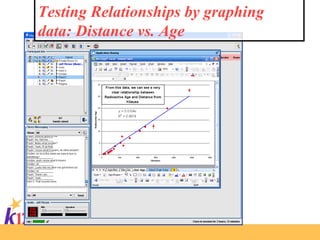
Lab Work: Hawaiian Island Chain Observations *There is a cluster of earthquake activity occurring to the southeast of the big island. *Every island is formed from at least one volcano. *Loihi is forming to the south of the big island. *Older islands are to the northeast of Hawaii. *Extinct islands are to the northeast of Hawaii. *Trenches are formed where earthquakes are at a depth of thirty kilometers or more. *Island arcs form from trenches. Hypothesis:  If the oldest and least active volcanoes are to the northeast of Hawaii, then the youngest and most active volcanoes are located to the southeast of Hawaii. Tests: *My graph shows that age of a volcano increased with distance from Kilauea. *My graph showed 40 percent of the 2006 earthquakes near Hawaii were at a depth of more than 30 km.. *Your graph showed a cluster of earthquake activity near Loihi.
Testing Relationships by graphing data: Distance vs. Age
Testing Relationships by graphing data: Elevation vs. Age
 
 
Students find evidence of magma chambers and are able to characterize the upper mantle beneath the Hawaiian Islands using earthquake data.
Examining the island chain from above – Google Earth allows students to see what’s going on at a specific longitude / Latitude coordinates.
 
Modeling Volcanic Activity.


A Model for the Planning, Training, Implementation, and Evaluation of New Technology Launch Use a Team Approach Determine Need Choose your tool Implementation Plan Create a Training Plan Release Plan for and Carry out Evaluation Evaluate: Review, Re-Train, Re-Design, Recommend

Implementing Live Synchronous Tools In An Asynchronous Model

  • 1.
    Implementing Live SynchronousTools in an Asynchronous Model Robert Letcher Senior Manager,Virtual High School Programs Jeff Pitcher Instructional Designer, High School Science
  • 2.
    Pilot to ProgramBackground Model for Successful Launch K12 2005-2006 Implementation as example Lessons Learned Examples of Use
  • 3.
    Definitions Asynchronous – Completion of assignments is primarily done according to the student’s own schedule. May or may not be self-paced. Synchronous – Live, real-time, teacher-guided instructional activities performed online, in one-to-one or group environments. Occur according to a schedule set by the teacher or school.
  • 4.
    Background K12, Inc.Educational products and online school curriculum for K-8 and High School Used by… K12-certified Virtual Academy Charter Schools Homeschool families Schools and School Districts Virtual School Programs B and M Classroom Blended Programs Spring 2005 call for Elluminate Pilot Proposals In response to Virtual Academy parent, student, and teacher feedback regarding need for synchronous tools
  • 5.
    A Team ApproachWhen possible, include stakeholder representatives Assign Project Manager(s) Assign tasks based on strengths Set deadlines and project plan/parameters Evaluate and Make Recommendations
  • 6.
    Determine Need Identifystakeholders/users Students, Parents, Teachers, Staff, Board of Trustees, K12 Interview for interest and use ideas Informal interviews held with sample representatives Real or assumed? Optional or critical? Real but only Sometimes critical Verbalize Need (63) Small-group Instruction Professional development Assessment Special education Tutoring or skills advancement Parent orientations or workshops Community Involvement Administrative meetings
  • 7.
    Choose Tool Chooseyour tool Gather Options Consider the environment Possibly 40% dial-up, personal computers with questionable processing/memory Needs and Goals vs. Abilities Audio, video, whiteboard, web sharing, desktop/application sharing Test, test, test
  • 8.
    Implementation is notan accident Top-down, bottom-up, or all at once Top-down to enhance buy-in and serve as “beta” group Mandatory vs. optional Initially Optional, but encouraged - Upon acceptance, mandatory Identify Possible Pitfalls Technical issues Use of Elluminate support line Elluminate Administrators joined Elluminate Technical Support email list Acceptable Use Agreement and Student Code of Conduct Controlled Release for approved uses until evaluation completed
  • 9.
    Training is notan accident Start early After school starts is too late Small steps Focus on discreet skills Consider Resources, Bandwidth Fast turn-around time Limited resources No existing experts Align with uses, needs, and comfort-level Identified discrete skills that all would need based on role Recognized differing levels of tech-savviness
  • 10.
    Rapid ID Modelof Training Keep it brief 5 hours total Keep it relevant Only included basic, necessary skills Identify existing collateral Existing Elluminate recordings, Quick-Start Guides , manuals, & Live Sessions Re-purpose existing collateral for training plan Step-by-step training plan Asynchronous with a deadline Peer Evaluation
  • 11.
    Release Follow yourplan School Management Leadership Teams Teaching Teams Parents/Students
  • 12.
    Evaluation is notan accident or “one and done” Formative Evaluation During Training Peer Review Forms Formative Evaluation During Implementation Online surveys for Attendees Internal Sharepoint Survey for Moderators
  • 13.
    Evaluation 5,000+ sessionsheld ~40,000 attendees (not unique users) 150+ Elluminate Rooms created Staff members averaged 10 sessions per month Average # of attendees = 17 # of sessions moderated from 1 to 180+ Every teacher and Administrator moderated at least one session Used for 45 of the 63 possible uses stated in the pilot proposal Elluminate sessions replaced most conference calls Every staff member moderated at least one session Department-based Elluminate Administrators have been identified and begun training for this role Over 90% of instructional staff successfully completed training. Found to be meeting the goals set forth in the proposal
  • 14.
    Average Hours ofTravel Saved = 24.46 hours Areas in need of training The more robust features of Elluminate, such as Application Sharing, Web Tours, the Quiz Manager, and the Graphing Calculator Classroom Management Problems encountered during sessions missing/non-working microphones Slow or lost connections High attendance affects classroom management Inappropriate Direct Messaging, whiteboard use, and user names Including attendees without a computer on Elluminate sessions Moderator Feedback
  • 15.
    Evaluate: Review, Re-Train,Re-Design Impact on student/parent/staff “experience” Student and parents want more interaction with each other Classroom Management Guidelines needed for effective and appropriate use Impact on academic achievement Not measured Impact on model of instruction Some teachers quickly and quietly converted Asynch to Synch Impact on time management Scheduling Issues Spending twice as long on school work
  • 16.
    Resulting Recommendations Keepsessions short Vary schedule Record whenever possible Plan sessions for interactivity Use to support existing curriculum, not to supplant it Reduce number of sessions offered Train for classroom management
  • 17.
    Use examples –Then and Now Elluminate Examples
  • 18.
    Lab Work: HawaiianIsland Chain
  • 19.
    Lab Work: HawaiianIsland Chain Observations *There is a cluster of earthquake activity occurring to the southeast of the big island. *Every island is formed from at least one volcano. *Loihi is forming to the south of the big island. *Older islands are to the northeast of Hawaii. *Extinct islands are to the northeast of Hawaii. *Trenches are formed where earthquakes are at a depth of thirty kilometers or more. *Island arcs form from trenches. Hypothesis: If the oldest and least active volcanoes are to the northeast of Hawaii, then the youngest and most active volcanoes are located to the southeast of Hawaii. Tests: *My graph shows that age of a volcano increased with distance from Kilauea. *My graph showed 40 percent of the 2006 earthquakes near Hawaii were at a depth of more than 30 km.. *Your graph showed a cluster of earthquake activity near Loihi.
  • 20.
    Testing Relationships bygraphing data: Distance vs. Age
  • 21.
    Testing Relationships bygraphing data: Elevation vs. Age
  • 22.
  • 23.
  • 24.
    Students find evidenceof magma chambers and are able to characterize the upper mantle beneath the Hawaiian Islands using earthquake data.
  • 25.
    Examining the islandchain from above – Google Earth allows students to see what’s going on at a specific longitude / Latitude coordinates.
  • 26.
  • 27.
  • 28.
  • 29.
  • 30.
  • 31.
  • 32.
  • 33.
  • 34.
  • 35.
    A Model forthe Planning, Training, Implementation, and Evaluation of New Technology Launch Use a Team Approach Determine Need Choose your tool Implementation Plan Create a Training Plan Release Plan for and Carry out Evaluation Evaluate: Review, Re-Train, Re-Design, Recommend