 SHIVAM GUPTA
 B. Tech in Computer Science &
Engg.
 Faculty of Enggineering &
Technology
 Gurkula Kangri Vishwavidyalay ,
Haridwar
 Year : lllrd
 Roll No : 68
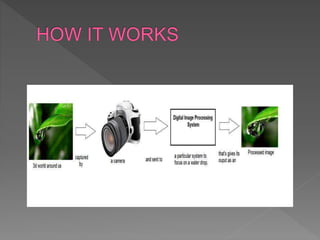
 Digital image processing deals with manipulation of digital images
through a digital computer. It is a subfield of signals and systems
but focus particularly on images. DIP focuses on developing a
computer system that is able to perform processing on an image.
The input of that system is a digital image and the system process
that image using efficient algorithms, and gives an image as an
output. The most common example is Adobe Photoshop. It is one
of the widely used application for processing digital images.
 Signals and systems
 Since DIP is a subfield of signals and systems , so it would
be good if you already have some knowledge about
signals and systems , but it is not necessary. But you must
have some basic concepts of digital electronics.
 Calculus and probability
 Basic understanding of calculus , probability and
differential equations is also required for better
understanding.
 Basic programming skills
 Other than this, it requires some of the basic programming
skills on any of the popular languages such as C++ , Java
, or MATLAB.
 Image sharpening and restoration
 Medical field
 Remote sensing
 Transmission and encoding
 Machine/Robot vision
 Color processing
 Pattern recognition
 Video processing
 Microscopic Imaging
 Pixel is the smallest element of an image. Each pixel
correspond to any one value. In an 8-bit gray scale
image, the value of the pixel between 0 and 255. A pixel
is also known as PEL. You can have more
understanding of the pixel from the pictures given
below.
 The term digital image processing generally refers to processing of a
two-dimensional picture by a digital computer [2]. In a broader
context, it implies digital processing of any two-dimensional data. A
digital image is an array of real numbers represented by a finite
number of bits. The principle advantage of Digital Image Processing
methods is its versatility, repeatability and the preservation of original
data precision. The various Image Processing techniques are:
 Image preprocessing
 Image enhancement
 Image segmentation
 Feature extraction
 Image classification
 Modifying the Image View
 Transforming, translating, rotating and resizing images are common
tasks used to focus the viewer's attention on a specific area of the
image. Transforming Image Geometry provides information on how to
precisely position images using IDL.
 Adding Dimensionality to Image Data
 Some images provide more information when they are placed on a
polygon, surface, or geometric shape such as a sphere. Mapping an
Image onto Geometry shows how to display images over surfaces and
geometric shapes.
 Working with Masks and Calculating Statistics
 Image processing uses some fundamental mathematical methods to
alter image arrays. These include masking, clipping, locating, and
statistics. Working with Masks and Image Statistics introduces these
operations and provides examples of masking and calculating image
statistics.
 Warping Images
 Some data acquisition methods can introduce an unwanted curvature
into an image. Image warping using control points can realign an
image along a regular grid or align two images captured from different
perspectives. See Warping Images for more information.
 Specifying Regions of Interest (ROIs)
 When processing an image, you may want to concentrate on a specific
region of interest (ROI). ROIs can be determined, displayed, and
analyzed within IDL as described in Working with Regions of Interest
(ROIs).
 Manipulating Images in Various Domains
 One of the most useful tools in image processing is the ability to
transform an image from one domain to another. Additional information
can be derived from images displayed in frequency, time-frequency,
Hough, and Radon domains. Moreover, some complex processing
tasks are simpler within these domains. See Transforming Between
Domains for details.
 Enhancing Contrast and Filtering
 Contrasting and filtering provide the ability to smooth, sharpen,
enhance edges and reduce noise within images. See Contrasting and
Filtering for details on manipulating contrast and applying filters to
highlight and extract specific image features.
 Extracting and Analyzing Shapes
 Morphological operations provide a means of determining underlying
image structures. Used in combination, these routines provide the
ability to highlight, extract, and analyze features within an image.
See Extracting and Analyzing Shapes for details
 Sarnoff Corporation
 Kritikal Solutions
 National Instruments
 GE Laboratories
 Ittiam, Bangalore
 Interra Systems, Noida
 Yahoo India (Multimedia Searching)
 nVidia Graphics, Pune (have high
requirements)
 ADE Bangalore, DRDO
THANKS

Image processing (1)

  • 2.
     SHIVAM GUPTA B. Tech in Computer Science & Engg.  Faculty of Enggineering & Technology  Gurkula Kangri Vishwavidyalay , Haridwar  Year : lllrd  Roll No : 68
  • 3.
     Digital imageprocessing deals with manipulation of digital images through a digital computer. It is a subfield of signals and systems but focus particularly on images. DIP focuses on developing a computer system that is able to perform processing on an image. The input of that system is a digital image and the system process that image using efficient algorithms, and gives an image as an output. The most common example is Adobe Photoshop. It is one of the widely used application for processing digital images.
  • 5.
     Signals andsystems  Since DIP is a subfield of signals and systems , so it would be good if you already have some knowledge about signals and systems , but it is not necessary. But you must have some basic concepts of digital electronics.  Calculus and probability  Basic understanding of calculus , probability and differential equations is also required for better understanding.  Basic programming skills  Other than this, it requires some of the basic programming skills on any of the popular languages such as C++ , Java , or MATLAB.
  • 6.
     Image sharpeningand restoration  Medical field  Remote sensing  Transmission and encoding  Machine/Robot vision  Color processing  Pattern recognition  Video processing  Microscopic Imaging
  • 11.
     Pixel isthe smallest element of an image. Each pixel correspond to any one value. In an 8-bit gray scale image, the value of the pixel between 0 and 255. A pixel is also known as PEL. You can have more understanding of the pixel from the pictures given below.
  • 12.
     The termdigital image processing generally refers to processing of a two-dimensional picture by a digital computer [2]. In a broader context, it implies digital processing of any two-dimensional data. A digital image is an array of real numbers represented by a finite number of bits. The principle advantage of Digital Image Processing methods is its versatility, repeatability and the preservation of original data precision. The various Image Processing techniques are:  Image preprocessing  Image enhancement  Image segmentation  Feature extraction  Image classification
  • 13.
     Modifying theImage View  Transforming, translating, rotating and resizing images are common tasks used to focus the viewer's attention on a specific area of the image. Transforming Image Geometry provides information on how to precisely position images using IDL.  Adding Dimensionality to Image Data  Some images provide more information when they are placed on a polygon, surface, or geometric shape such as a sphere. Mapping an Image onto Geometry shows how to display images over surfaces and geometric shapes.  Working with Masks and Calculating Statistics  Image processing uses some fundamental mathematical methods to alter image arrays. These include masking, clipping, locating, and statistics. Working with Masks and Image Statistics introduces these operations and provides examples of masking and calculating image statistics.  Warping Images  Some data acquisition methods can introduce an unwanted curvature into an image. Image warping using control points can realign an image along a regular grid or align two images captured from different perspectives. See Warping Images for more information.
  • 14.
     Specifying Regionsof Interest (ROIs)  When processing an image, you may want to concentrate on a specific region of interest (ROI). ROIs can be determined, displayed, and analyzed within IDL as described in Working with Regions of Interest (ROIs).  Manipulating Images in Various Domains  One of the most useful tools in image processing is the ability to transform an image from one domain to another. Additional information can be derived from images displayed in frequency, time-frequency, Hough, and Radon domains. Moreover, some complex processing tasks are simpler within these domains. See Transforming Between Domains for details.  Enhancing Contrast and Filtering  Contrasting and filtering provide the ability to smooth, sharpen, enhance edges and reduce noise within images. See Contrasting and Filtering for details on manipulating contrast and applying filters to highlight and extract specific image features.  Extracting and Analyzing Shapes  Morphological operations provide a means of determining underlying image structures. Used in combination, these routines provide the ability to highlight, extract, and analyze features within an image. See Extracting and Analyzing Shapes for details
  • 15.
     Sarnoff Corporation Kritikal Solutions  National Instruments  GE Laboratories  Ittiam, Bangalore  Interra Systems, Noida  Yahoo India (Multimedia Searching)  nVidia Graphics, Pune (have high requirements)  ADE Bangalore, DRDO
  • 16.