IFI7174.DT – Lesson 3
JavaScript
JavaScript
• Is a lightweight
– Object Oriented Programming (OOP) language
• Why JavaScript?
– It helps you to add behaviors into your webpages
– It changes HTML Content
– It changes HTML Styles (CSS)
2015 @ Sonia Sousa 2
JavaScript
• Is typically used in browsers
– to power dynamic websites.
• add functionality;
• validate input, and
• communicate with web servers
• JS code is loaded and ran
– Inline within HTML code <script> tags
– In blocks
• <script> JS code </script>
2015 @ Sonia Sousa 3
JavaScript
• Can be:
– Load as an external scripts
• External
– Inline within HTML code <script> tags
– Embedded
• <head>
– functions
• <body>
– event change
<script src="myScript.js"></script>
<script>document.write("<h1>Hello, there!</h1>"); </script>
<head>
<title>Embedded JS Example</title>
<script>
document.write("Oops");
</script>
</head>
2015 @ Sonia Sousa 4
External JS Advantages
• It separates HTML and code
• It makes HTML and JavaScript easier to read
and maintain
• Cached JavaScript files can speed up page
loads
2015 @ Sonia Sousa 5
JS Embedded in HTML
<script>
function myFunction()
{
document.write("Oops! The document disappeared!");
}
</script>
<button onclick="myFunction()">Try it</button>
• <head> </head>
• <body> </body>
2015 @ Sonia Sousa 6
JS inline with HTML
<h1>My Web Page</h1>
<p id="demo">A Paragraph</p>
<button type="button" onclick="myFunction()">Try it</button>
<script>
function myFunction() {
document.getElementById("demo").innerHTML = "Paragraph
changed.";
}
</script>
2015 @ Sonia Sousa 7
• <body> </body>
The Document Object
• When an HTML document is loaded into a web
browser,
– it becomes a document object.
• The document object
– provides properties and methods
• to access all node objects, from within JavaScript
– represents
• the root node of the HTML document
– It controls the
• element, text, attribute, and comment nodes
2015 @ Sonia Sousa 8
Document Object Model (DOM)
• starts by…
1. browser window itself
2. document page,
3. the elements included on
the page; and
4. their attributes.
Source: Wikipedia
The object hierarchy
2015 @ Sonia Sousa 9
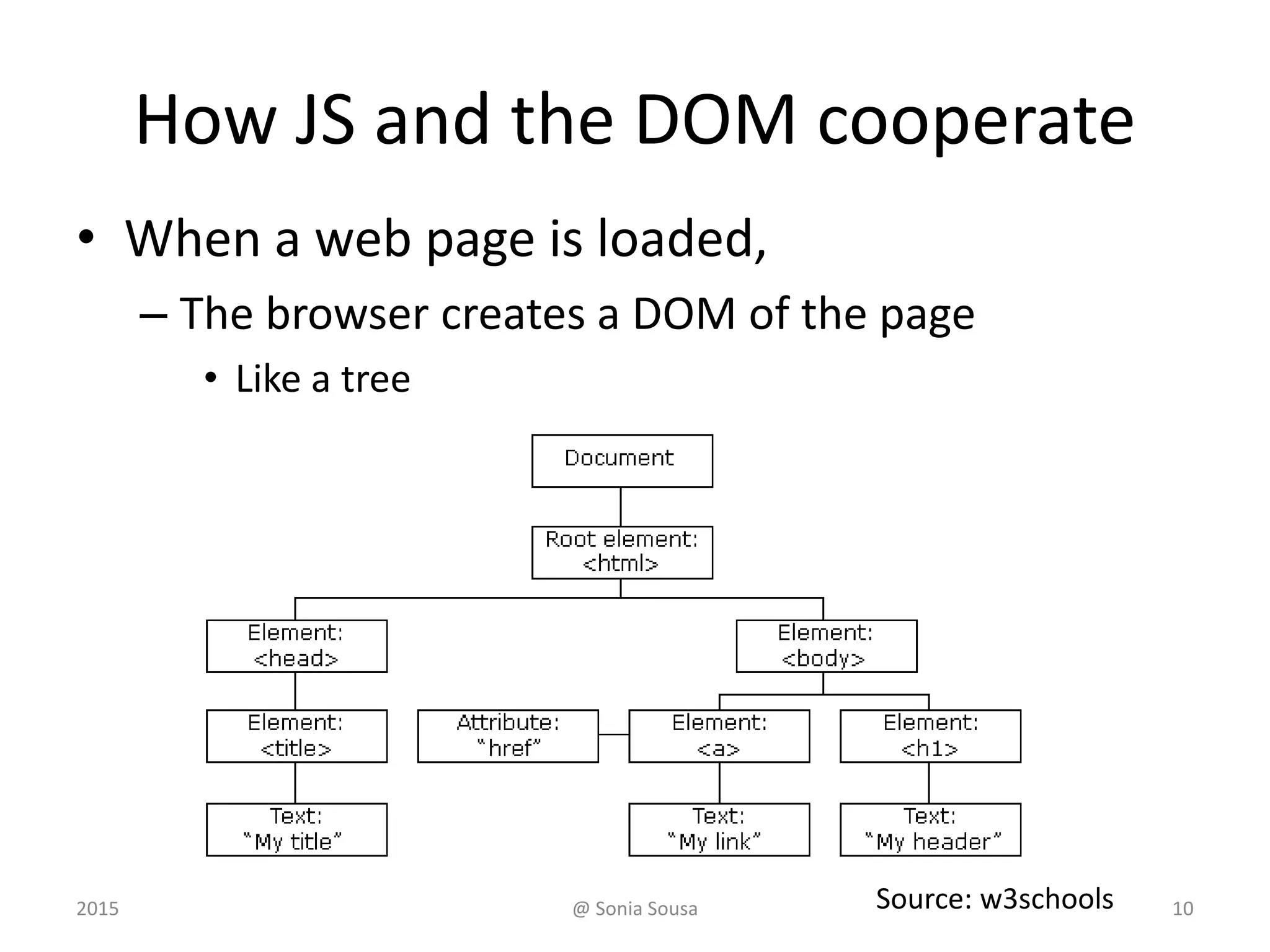
How JS and the DOM cooperate
• When a web page is loaded,
– The browser creates a DOM of the page
• Like a tree
Source: w3schools2015 @ Sonia Sousa 10
DOM
Window
documen
t
meta
Textbox
Radio
button
head body
form[] link Imagestitle div ul
li
Establish the Order of things
2015 @ Sonia Sousa 11
How JS and the DOM cooperate
• JavaScript can change
– the HTML elements in the page
– the HTML attributes in the page
– the CSS styles in the page
• JavaScript can react to
– the events in the page
• This is done by
– object notation
2015 @ Sonia Sousa 12
Object notation
• Access to elements
– be referenced using dot notation
• starting with the highest-level object
– (i.e., window).
» But as the window is in the top hierarchy do not need to
be refereed
– Objects can be referred to
• by name; or id; or by their position on the page
document.getElementById("demo").innerHTML = "Hello JavaScript”;
2015 @ Sonia Sousa 13
JavaScript Syntax
• Basic rules
– Ends with ; (semi-colons)
– ! is case sensitive !
• Comments
– double slash (//)
• 1 line comment
– between /* and */
• More than 1 line comment
2015 @ Sonia Sousa 14
JS programs
• A program is a
– list of "instructions” to be "executed" by the
computer
– These instructions are called statements
• JS statements are separated by semicolons ;
• A statement composed of:
– Values, Operators, Expressions, Keywords, and
Comments.
2015 @ Sonia Sousa 15
JavaScript statements
• Statements includes
– Values, Operators, Expressions, Keywords, and
Comments
– Values are
• Literal or variables
– Functions are
• a block of code that can execute some action
– Events are
• actions triggered by someone
2015 @ Sonia Sousa 16
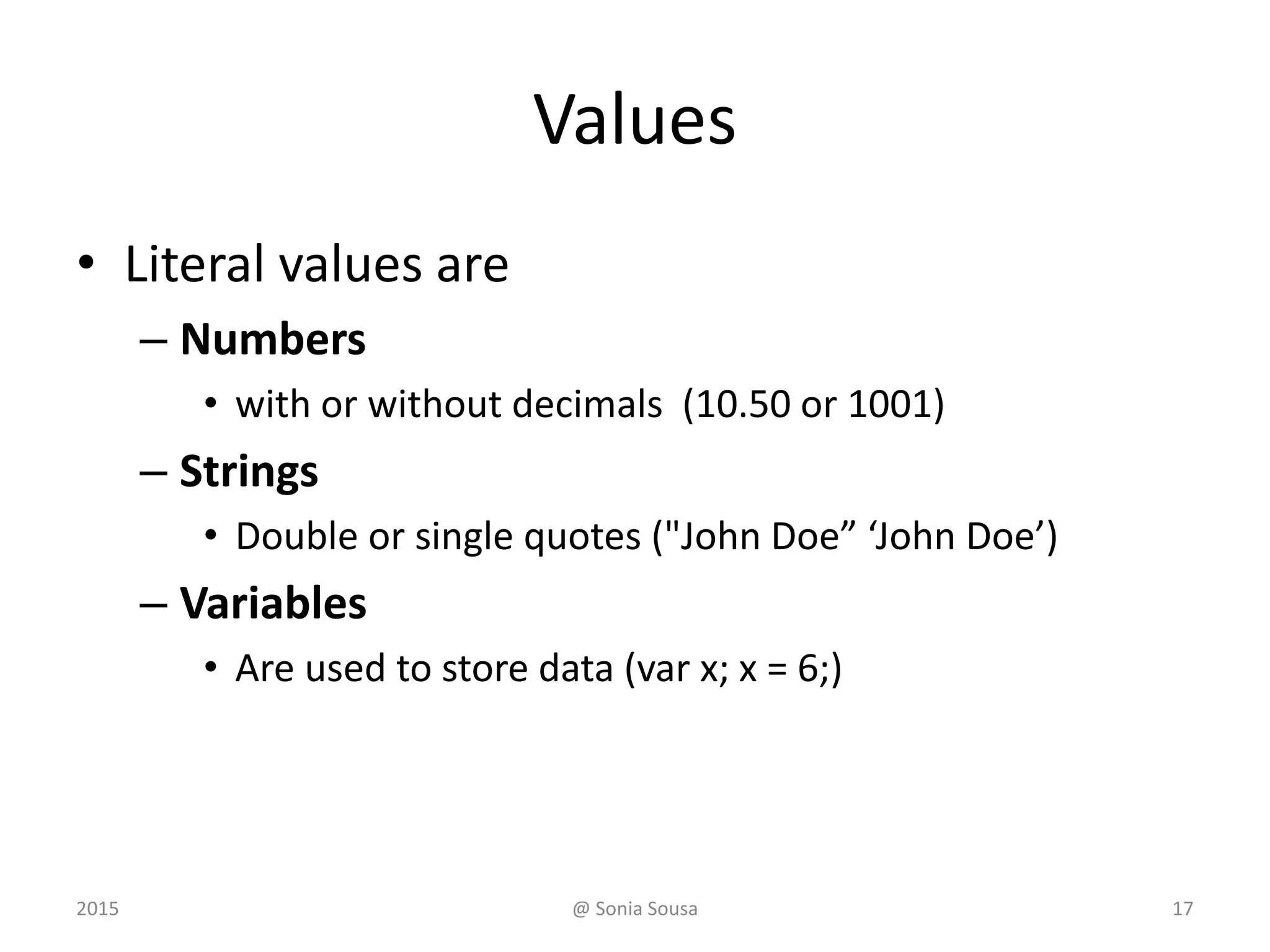
Values
• Literal values are
– Numbers
• with or without decimals (10.50 or 1001)
– Strings
• Double or single quotes ("John Doe” ‘John Doe’)
– Variables
• Are used to store data (var x; x = 6;)
2015 @ Sonia Sousa 17
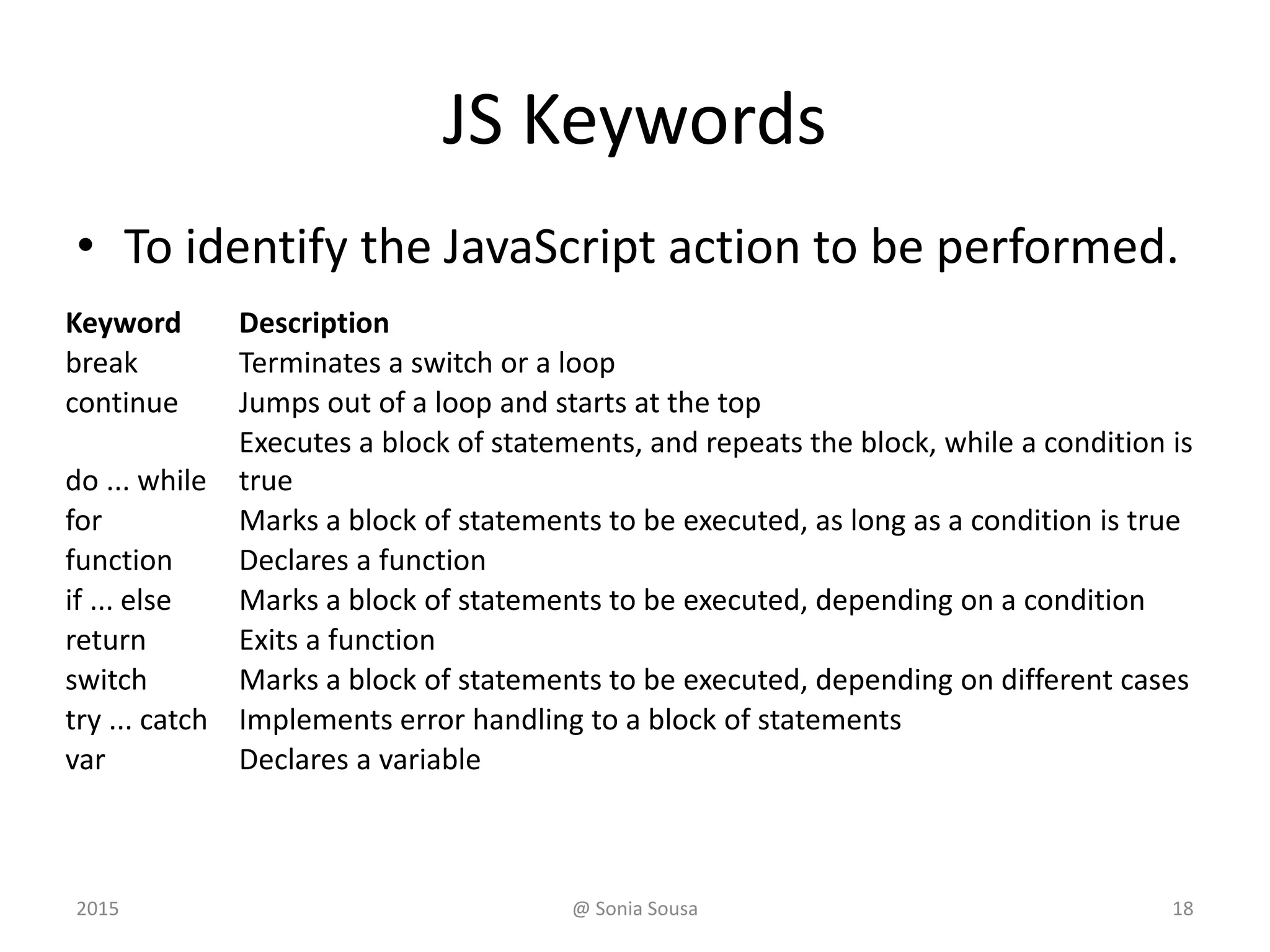
JS Keywords
• To identify the JavaScript action to be performed.
Keyword Description
break Terminates a switch or a loop
continue Jumps out of a loop and starts at the top
do ... while
Executes a block of statements, and repeats the block, while a condition is
true
for Marks a block of statements to be executed, as long as a condition is true
function Declares a function
if ... else Marks a block of statements to be executed, depending on a condition
return Exits a function
switch Marks a block of statements to be executed, depending on different cases
try ... catch Implements error handling to a block of statements
var Declares a variable
2015 @ Sonia Sousa 18
JS Statements
• A statement is the line of code that tell
– the browser to execute something
document.getElementById("demo").innerHTML = "Hello!";
• JavaScript statements
Var x = 5;
var y = 6;
var z = x + y;
document.getElementById("demo").innerHTML = z;
2015 @ Sonia Sousa 19
JavaScript Statements
• Giving a command to the browser
<script>
function myFunction()
{
document.write("Oops! The document
disappeared!");
}
</script>
<button onclick="myFunction()">Try it</button>
<script>
function myFunction()
{
document.write("Oops! The document
disappeared!");
}
</script>
2015 @ Sonia Sousa 20
JS code and Blocks
JS code blocks
JS functions
<script>
function myFunction()
{
document.write("Oops! The document disappeared!");
}
</script>
<script>
1. document.write("<h1>Hello, there!</h1>");
2. document.getElementById("demo").innerHTML="Hello Dolly";
3. document.getElementById("myDIV").innerHTML="How are you?”;
</script>
• Define statements to be executed together
• JavaScript functions are statements grouped in blocks
2015 @ Sonia Sousa 21
JS and HTML Styles (CSS)
• JavaScript can change
– HTML elements
– (CSS) Styles
– Or validate input (data)
• Using methods, conditional and fuctions
• For instance, to change the text
– It uses getElementById() method
document.getElementById("demo").innerHTML = "Hello
JavaScript”;
2015 @ Sonia Sousa 22
JavaScript Variables
• variables are "containers" of information
– We can name it using letters (like x)
• The variable can contain
– Letter, numerical values or expressions
var x=5;
var y=6;
var z=x+y;
"declaring" a variable
assign a value
var carname;
carname="Volvo";
2015 @ Sonia Sousa 23
Declaring (Creating) JS Variables
• Primitive data types
– Number
var x = 5;
– String
var carname = “Volvo XC60";
– Boolean
var x = true;
var y = false;
2015 @ Sonia Sousa 24
Declaring (Creating) JS Variables
• JS Array
var cars=new Array();
cars[0]="Saab";
cars[1]="Volvo";
cars[2]="BMW";
var cars = ["Saab", "Volvo", "BMW"];
• JavaScript Objects
var person = {firstName:"John", lastName:"Doe",
age:50, eyeColor:"blue"};
2015 @ Sonia Sousa 25
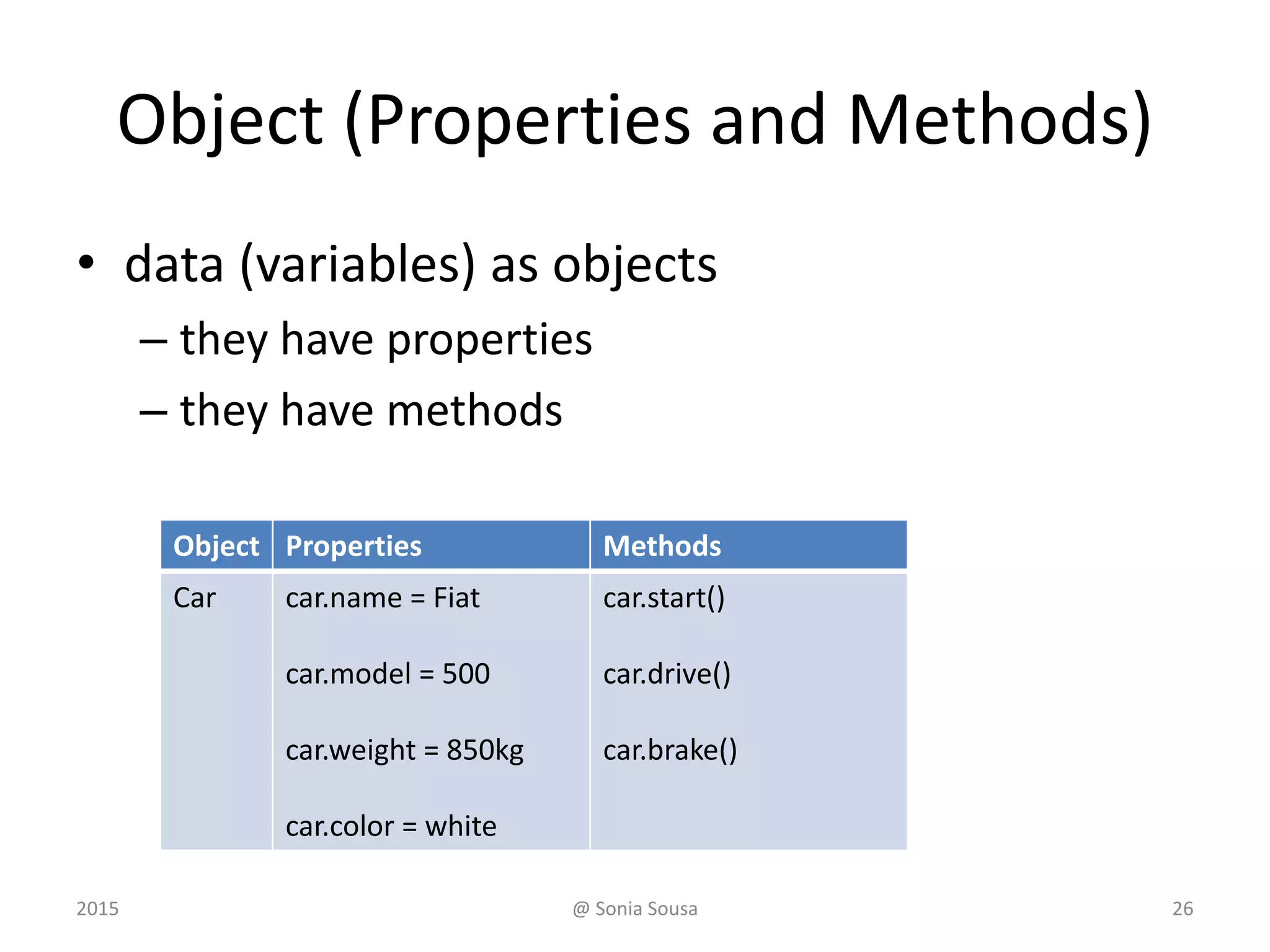
Object (Properties and Methods)
• data (variables) as objects
– they have properties
– they have methods
Object Properties Methods
Car car.name = Fiat
car.model = 500
car.weight = 850kg
car.color = white
car.start()
car.drive()
car.brake()
2015 @ Sonia Sousa 26
JS Operators
• Operators are used to
– assign values to variables using (=)
• var x = 5; var y = 6;
• Arithmetic operators
• Comparison operators
• Logical operators
Operator Description
+ Addition
- Subtraction
* Multiplication
/ Division
% Modulus
++ Increment
-- Decrement
2015 @ Sonia Sousa 27
JS Operators
Opera
tors
example results
+ x=y+2 Addition x=7
- x=y-2 Subtraction x=3
* x=y*2 Multiplication x=10
/ x=y/2 Division x=2.5
++ x=++y Increment x=6
-- x=--y Decrement x=4
== x==8 equal to false
!= x!=8 Not equal to true
> x>8 greater than false
< x<8 less than true
>= x>=8 greater than or equal to false
<= x<=8 Less tan or equal to true
&& (x < 10 && y > 1) and true
|| (x==5 || y==5) or false
! !(x==y) not true
Logical
Comparison
Arithmetic
2015 @ Sonia Sousa 28
Assignment Operators
Operator Example Same as
Resul
t
= x=y
+= x+=y x=x+y
-= x-=y x=y-2
*= x*=y x=x*y
++ x=++y Increment x=6
-- x=--y Decrement x=4
== x==8
!= x!=8
> x>8
< x<8
>= x>=8
<= x<=8
&& (x < 10 && y > 1)
|| (x==5 || y==5)
! !(x==y)
2015 @ Sonia Sousa 29
JS Expressions
• Combine values, variables, and operators
– The computation is called an evaluation
• 5 * 10 evaluates to 50
– can also contain variable values
• x * 10
• "John" + " " + "Doe"
2015 @ Sonia Sousa 30
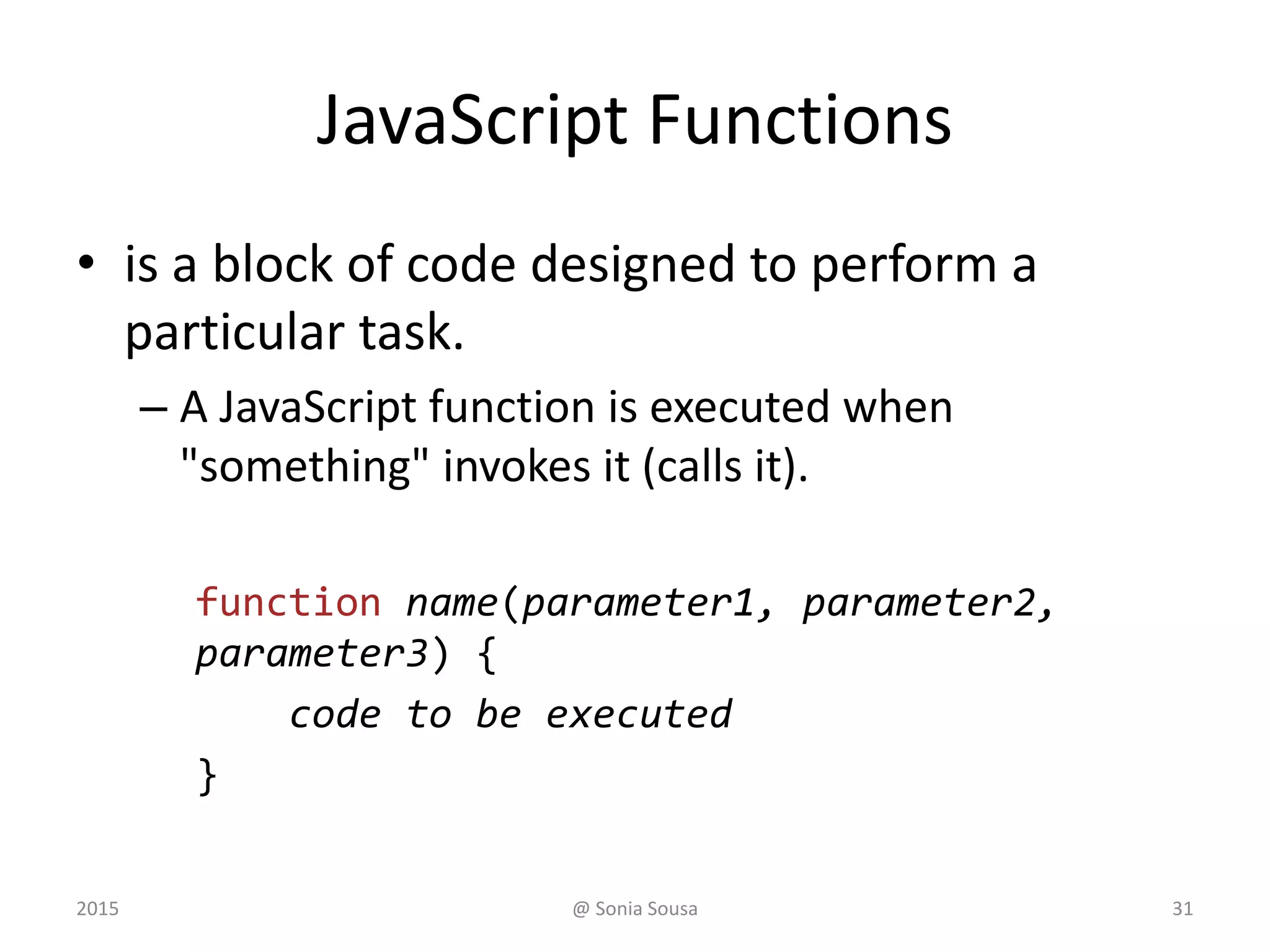
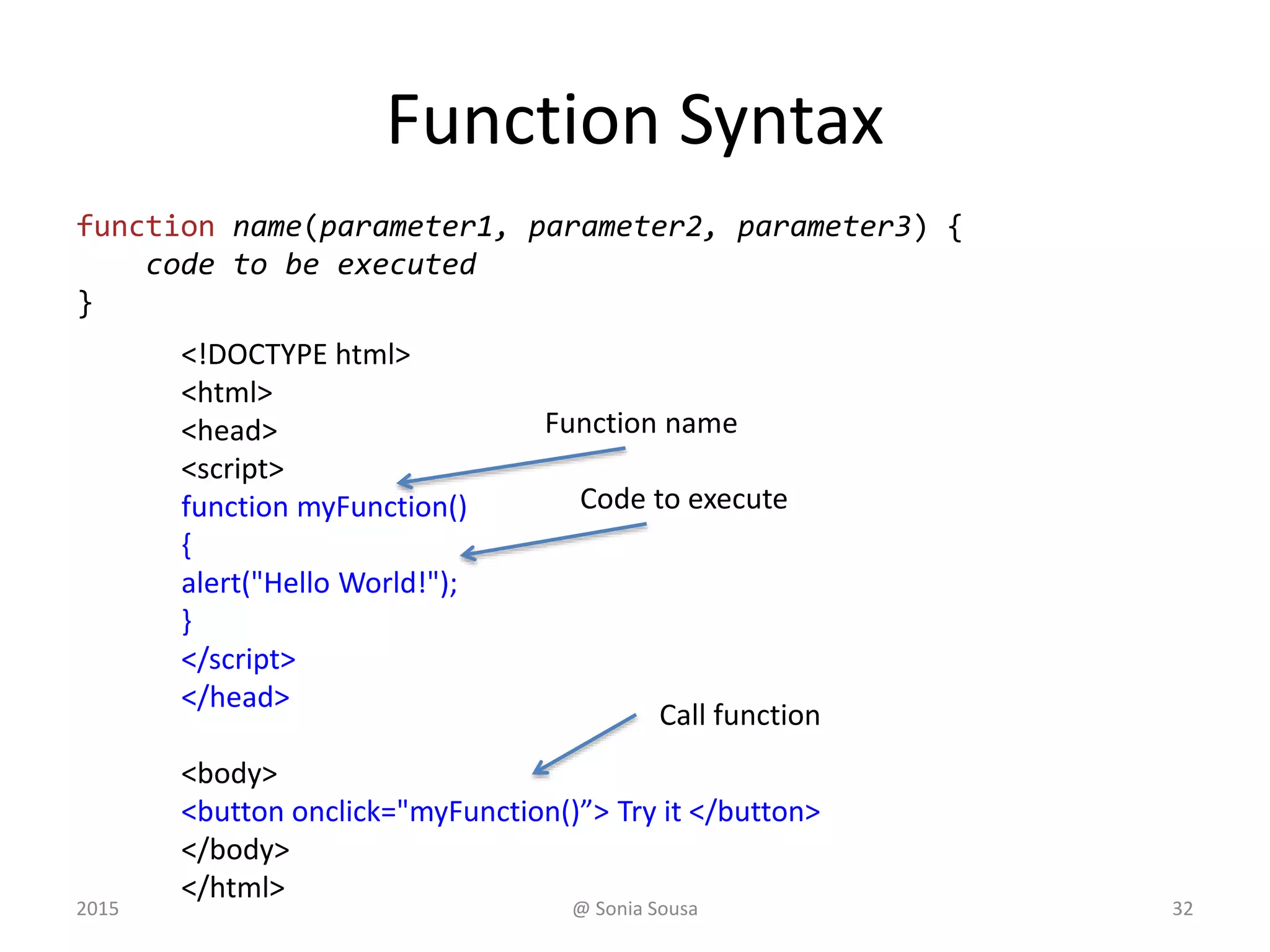
JavaScript Functions
• is a block of code designed to perform a
particular task.
– A JavaScript function is executed when
"something" invokes it (calls it).
function name(parameter1, parameter2,
parameter3) {
code to be executed
}
2015 @ Sonia Sousa 31
Function Syntax
function name(parameter1, parameter2, parameter3) {
code to be executed
}
<!DOCTYPE html>
<html>
<head>
<script>
function myFunction()
{
alert("Hello World!");
}
</script>
</head>
<body>
<button onclick="myFunction()”> Try it </button>
</body>
</html>
Function name
Code to execute
Call function
2015 @ Sonia Sousa 32
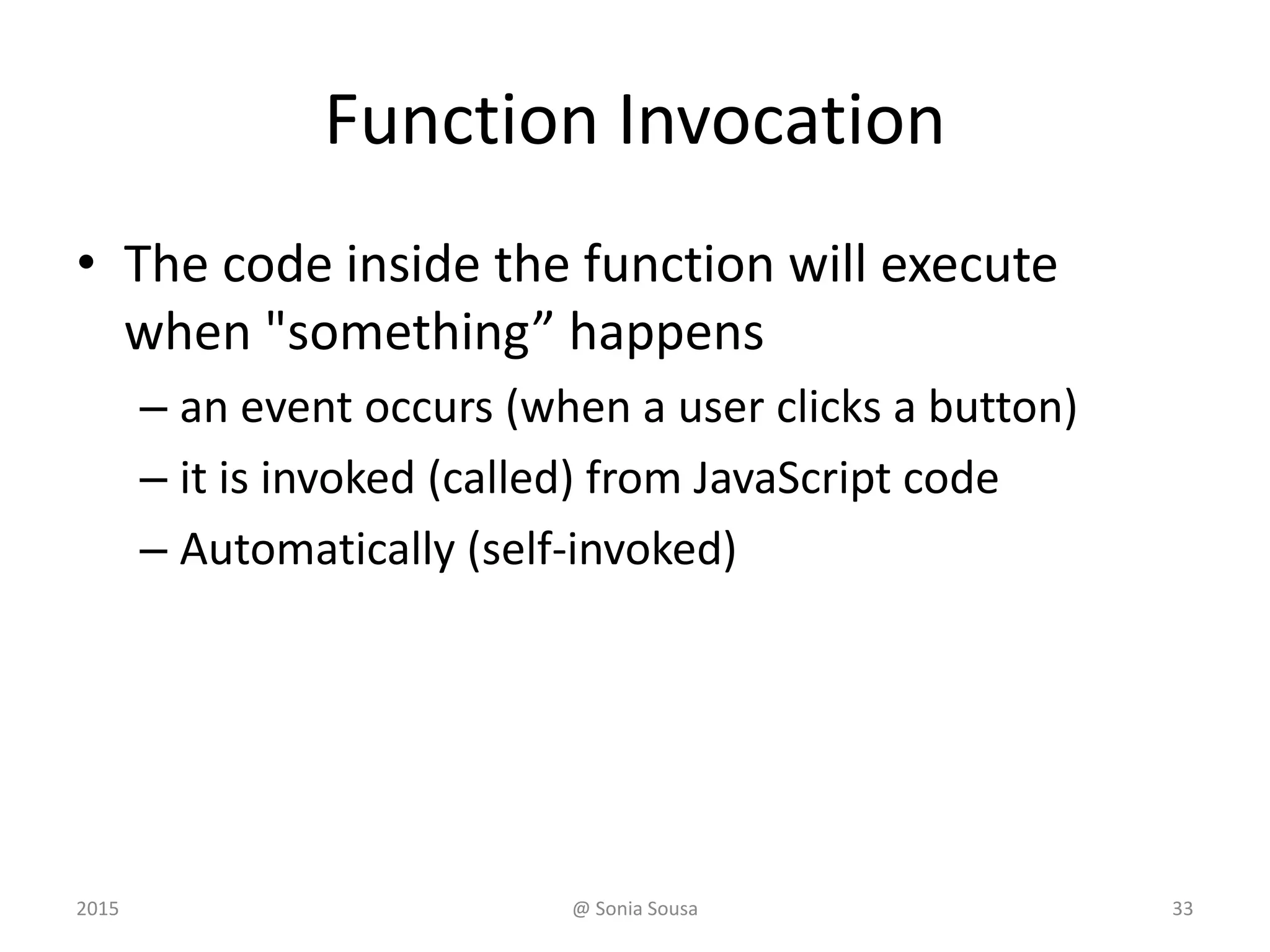
Function Invocation
• The code inside the function will execute
when "something” happens
– an event occurs (when a user clicks a button)
– it is invoked (called) from JavaScript code
– Automatically (self-invoked)
2015 @ Sonia Sousa 33
JavaScript Functions
• A block of code that will be executed when
"someone" calls it
<script>
function myFunction()
{
document.write("Oops! The document disappeared!");
}
</script>
<button onclick="myFunction()">Try it</button>
<script>
function myFunction()
{
document.write("Oops! The document disappeared!");
}
</script>
Code Block
Call
function
2015 @ Sonia Sousa 34
Return values
• Functions often compute a return value.
var x = myFunction(4, 3);
// Function is called, return value will end up in
x
function myFunction(a, b) {
return a * b;
// Function returns the product of a and b
}
2015 @ Sonia Sousa 35
Function with Arguments
</head> <body>
<button onclick="myFunction()">Try it</button>
<button onclick="myFunction('Bob','Builder')">Try it</button>
<script>
function myFunction(name,job)
{
alert("Welcome " + name + ", the " +
job);
}
</script>
2015 @ Sonia Sousa 36
<script>
myFunction(argument1,argument2)
{
some code
}
</script>
Using ID with function
</head> <body>
<p id="demo"></p>
<script>
document.getElementById("demo").innerHTML=myFunction(4,3);
</script>
<script>
function myFunction(a,b)
{
return a*b;
}
</script>
2015 @ Sonia Sousa 37
<script>
myFunction(argument1,argument2)
{
some code
}
</script>
JavaScript Events
• Is something the browser does, or something a user does
– Event handlers
• used to handle, and verify, user input, user actions, and browser
actions.
– HTML events
• An HTML web page has finished loading
• An HTML input field was changed
• An HTML button was clicked
<some-HTML-element some-event="some JavaScript">
<button onclick="this.innerHTML=Date()">The time is?
</button>
2015 @ Sonia Sousa 38
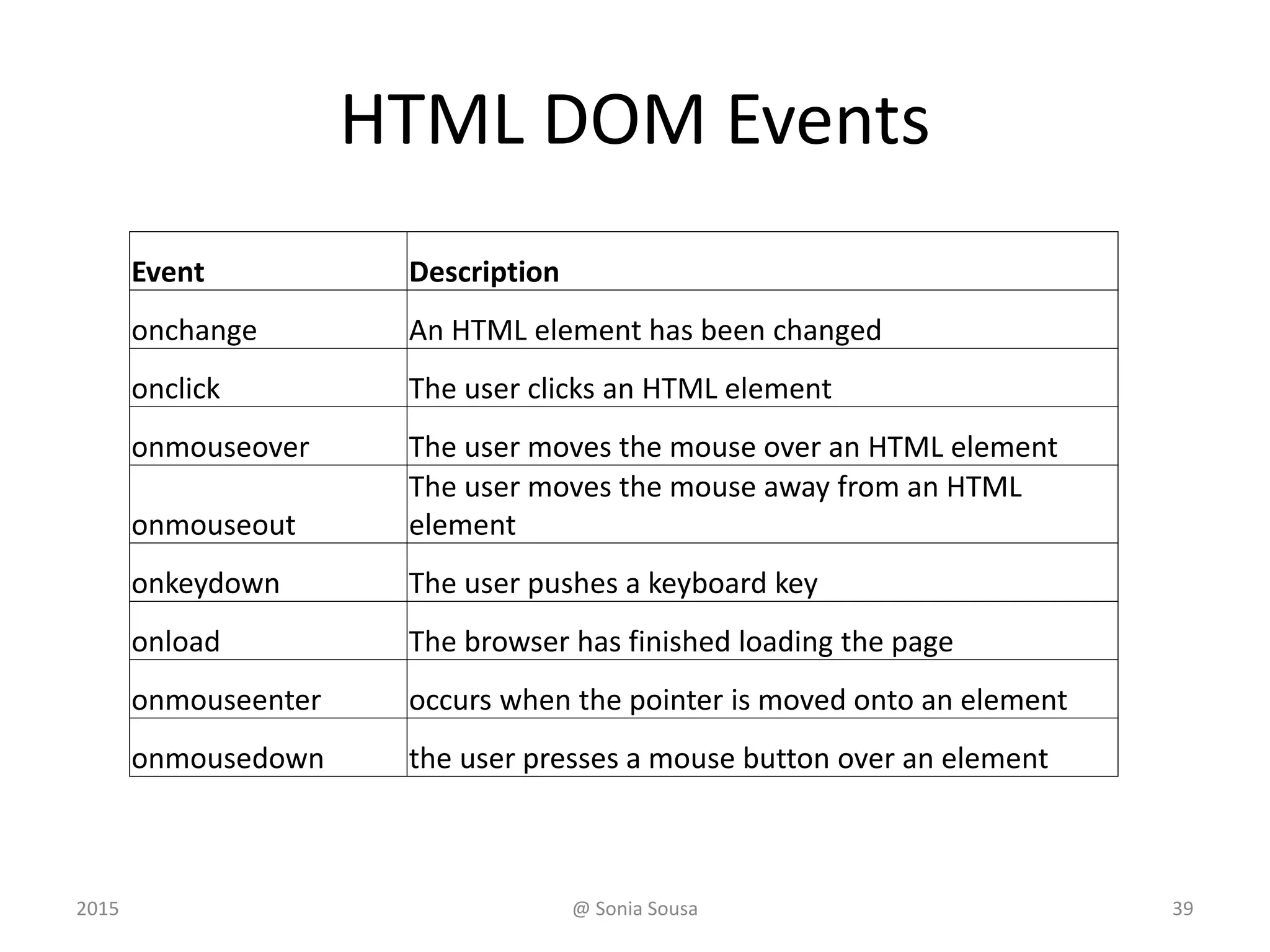
HTML DOM Events
Event Description
onchange An HTML element has been changed
onclick The user clicks an HTML element
onmouseover The user moves the mouse over an HTML element
onmouseout
The user moves the mouse away from an HTML
element
onkeydown The user pushes a keyboard key
onload The browser has finished loading the page
onmouseenter occurs when the pointer is moved onto an element
onmousedown the user presses a mouse button over an element
2015 @ Sonia Sousa 39
JavaScript Strings
• String have Properties and Methods
– Primitive value
• var firstName = "John”
var x = "John";
– String objects
• var firstName = new String("John")
var y = new String("John");
2015 @ Sonia Sousa 40
JavaScript Strings
Method Description
charAt() Returns the character at the specified index (position)
concat() Joins two or more strings, and returns a copy of the joined strings
indexOf()
Returns the position of the first found occurrence of a specified value in a
string
lastIndexOf()
Returns the position of the last found occurrence of a specified value in a
string
localeCompare() Compares two strings in the current locale
replace() Searches a string for a value and returns a new string with the value
search() Searches a string for a value and returns the position of the match
split() Splits a string into an array of substrings
toLocaleLowerCase() Converts a string to lowercase letters, according to the host's locale
toLocaleUpperCase() Converts a string to uppercase letters, according to the host's locale
toLowerCase() Converts a string to lowercase letters
toString() Returns the value of a String object
toUpperCase() Converts a string to uppercase letters
trim() Removes whitespace from both ends of a string
valueOf() Returns the primitive value of a String object
2015 @ Sonia Sousa 41
JavaScript Numbers
• toString() Method
– returns a number as a string
var x = 123;
x.toString();
// returns 123 from variable x
(123).toString();
// returns 123 from literal 123
(100 + 23).toString();
// returns 123 from expression 100 + 23
2015 @ Sonia Sousa 42
JavaScript Math Object
• Allows you to perform mathematical tasks.
Math.random(); // returns a random number
Math.min() Math.max()
Math.random()
Math.round()
2015 @ Sonia Sousa 43
JavaScript Dates
• lets you work with dates
– Date()
– Date(milliseconds)
– Date(dateString)
– Date(year, month, day, hours, minutes, seconds,
milliseconds)
<script>
var d = new Date();
document.getElementById("demo").innerHTML = d;
</script>
2015 @ Sonia Sousa 44
Date and time Methods
Method Description
getDate() Get the day as a number (1-31)
getDay() Get the weekday as a number (0-6)
getFullYear() Get the four digit year (yyyy)
getHours() Get the hour (0-23)
getMilliseconds() Get the milliseconds (0-999)
getMinutes() Get the minutes (0-59)
getMonth() Get the month (0-11)
getSeconds() Get the seconds (0-59)
getTime() Get the time (milliseconds since January 1, 1970)
setDate() Set the day as a number (1-31)
setFullYear() Set the year (optionally month and day)
setHours() Set the hour (0-23)
setMilliseconds() Set the milliseconds (0-999)
setMinutes() Set the minutes (0-59)
setMonth() Set the month (0-11)
setSeconds() Set the seconds (0-59)
setTime() Set the time (milliseconds since January 1, 1970)
2015 @ Sonia Sousa 45
JavaScript Output
• Display Possibilities
– window.alert()
– document.write()
– innerHTML
– console.log()
2015 @ Sonia Sousa 46
window.alert()
• Is used to display data as a window alert
<script>
window.alert(5 + 6);
</script>
2015 @ Sonia Sousa 47
document.write()
• For writing information in the document
– Useful for testing purposes or to replace information
in a HTML page
</script>
document.write("<h2>“your name” </h2>");
document.write("<img src='me.jpg' width='180'>");
</script>
<p>My first paragraph.</p>
<button type="button" onclick="document.write(5 +
6)">Try it</button>
2015 @ Sonia Sousa 48
innerHTML
• To access an HTML element by using
– the document.getElementById(id) method.
• id attribute defines the HTML element
• innerHTML property defines the HTML
<p>My First Paragraph</p>
<p id="demo"></p>
<script>
document.getElementById("demo").innerHTML
="<h3>Welcome</h3>";
</script>
2015 @ Sonia Sousa 49
JS and HTML
• Finding HTML elements
– by id
– by Tag Name
– by Class Name
• Changing elements in HTML
– Write in html
– HTML Content
– Value of an Attribute
document.getElementById("intro");
getElementsByTagName("p");
document.getElementsByClassName("intro");
document.write( );
document.getElementById("p1").innerHTML="New text!";
document.getElementById("image").src="landscape.jpg";
2015 @ Sonia Sousa 50
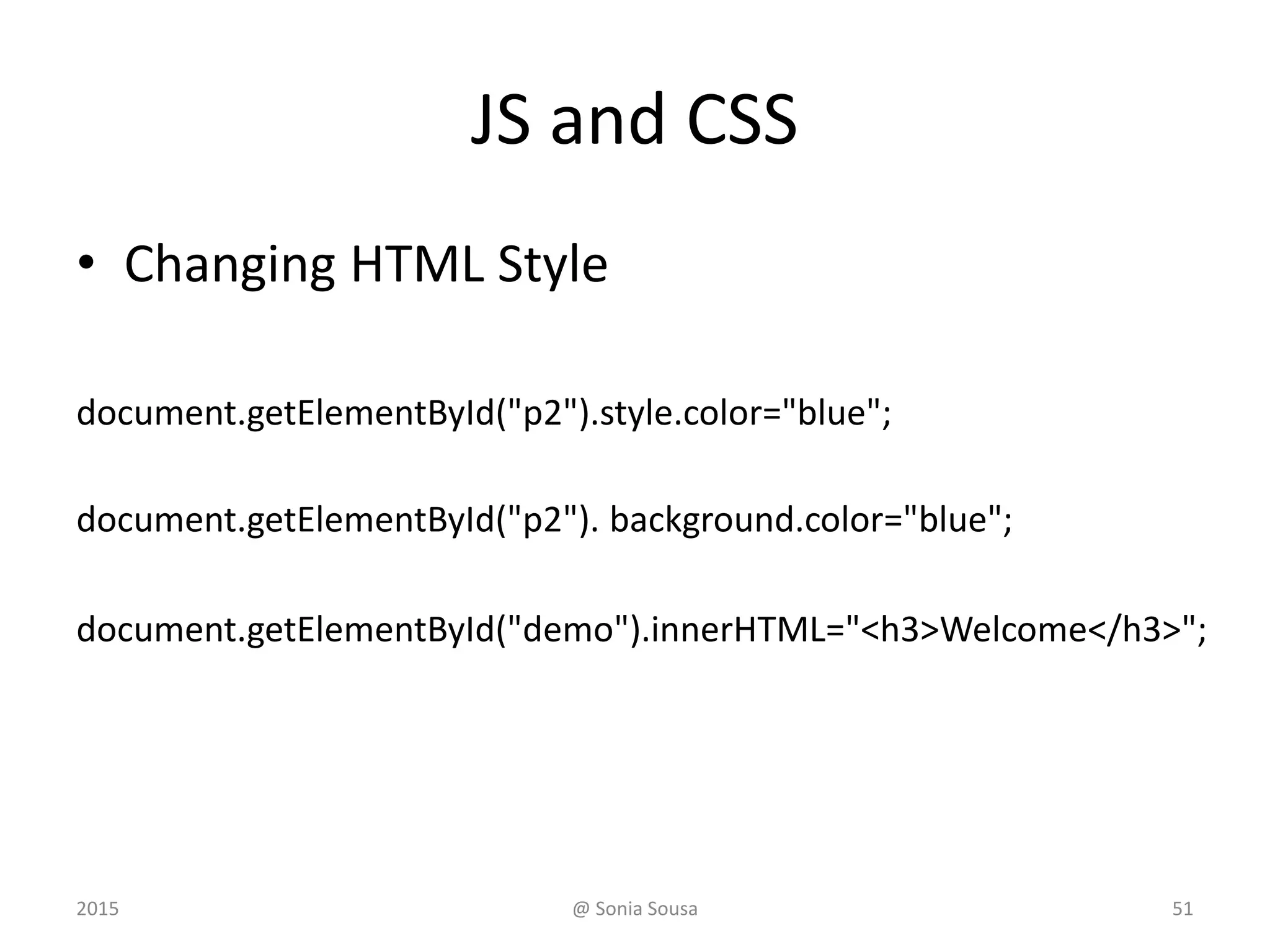
JS and CSS
• Changing HTML Style
document.getElementById("p2").style.color="blue";
document.getElementById("p2"). background.color="blue";
document.getElementById("demo").innerHTML="<h3>Welcome</h3>";
2015 @ Sonia Sousa 51
Js and events
• When an element is clicked on
• Onclick
• onSubmit
– Or reacting to an event
• onmouseover and onmouseout
2015 @ Sonia Sousa 52
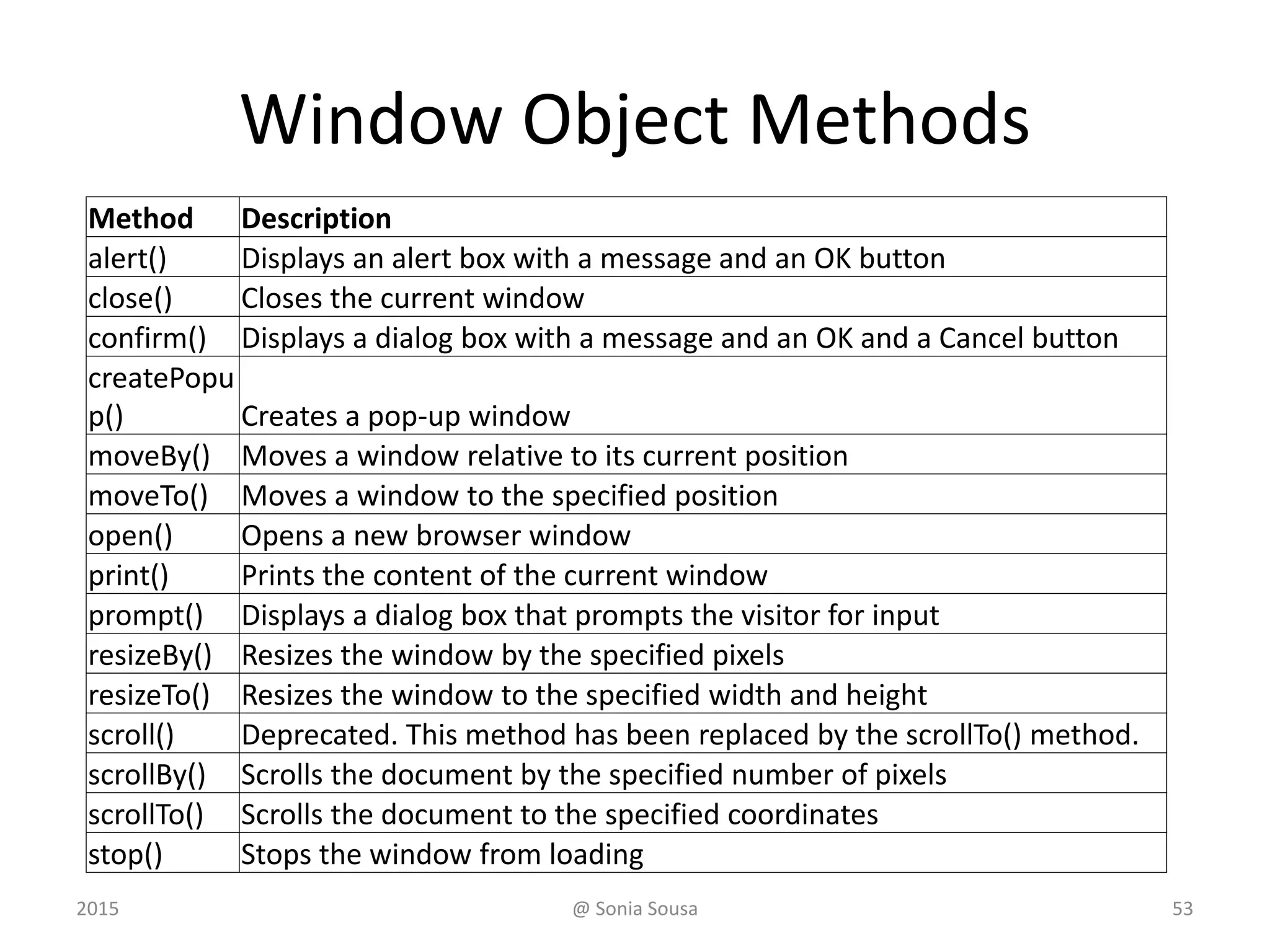
Window Object Methods
Method Description
alert() Displays an alert box with a message and an OK button
close() Closes the current window
confirm() Displays a dialog box with a message and an OK and a Cancel button
createPopu
p() Creates a pop-up window
moveBy() Moves a window relative to its current position
moveTo() Moves a window to the specified position
open() Opens a new browser window
print() Prints the content of the current window
prompt() Displays a dialog box that prompts the visitor for input
resizeBy() Resizes the window by the specified pixels
resizeTo() Resizes the window to the specified width and height
scroll() Deprecated. This method has been replaced by the scrollTo() method.
scrollBy() Scrolls the document by the specified number of pixels
scrollTo() Scrolls the document to the specified coordinates
stop() Stops the window from loading
2015 @ Sonia Sousa 53
Conditionals
• If , if else, else if
– Execute the code if a specified condition is true
if (condition) {
block of code to be executed if the condition is true
} else {
block of code to be executed if the condition is false
}
2015 @ Sonia Sousa 54
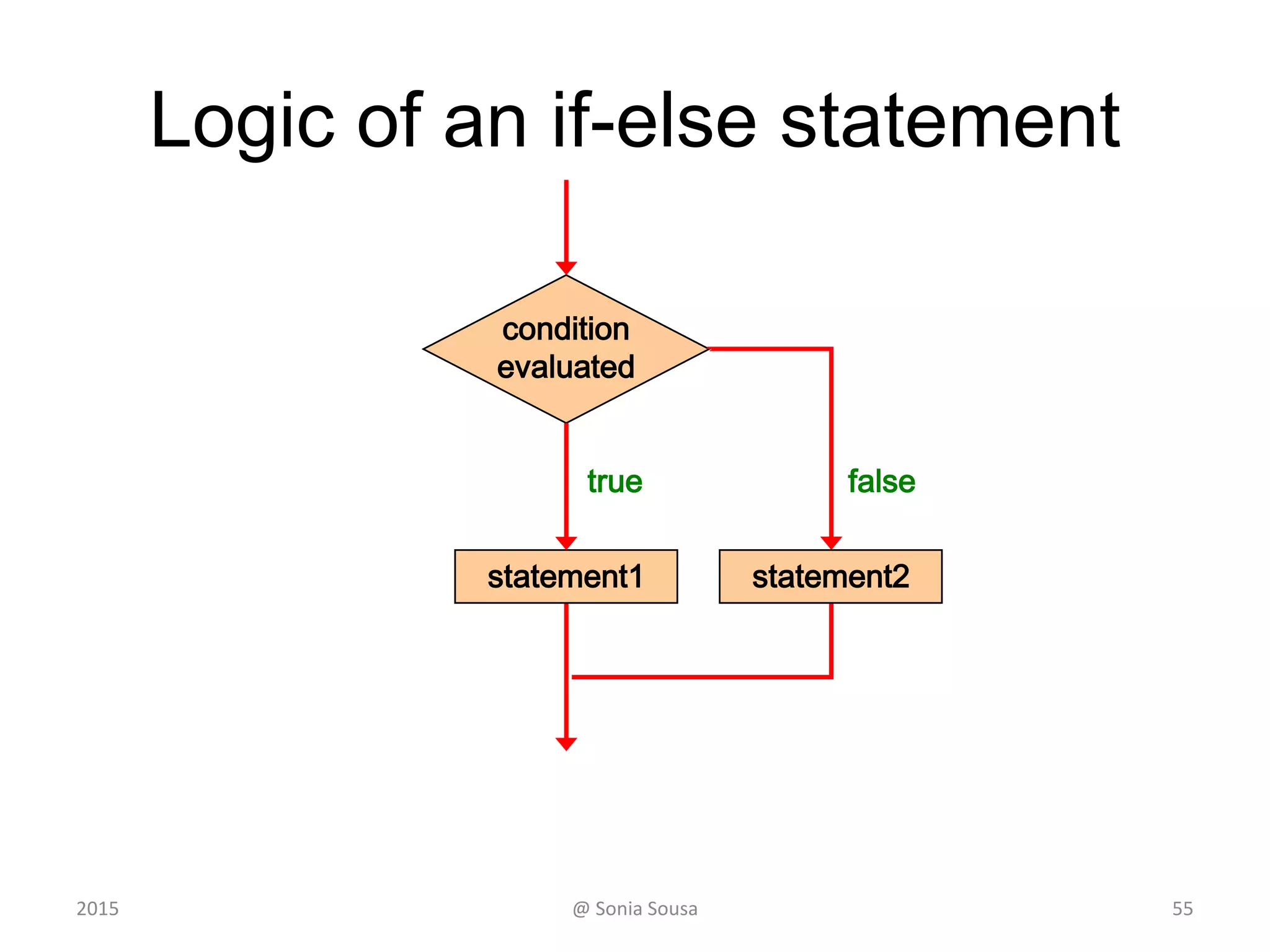
Logic of an if-else statement
condition
evaluated
statement1
true false
statement2
552015 @ Sonia Sousa
Conditionals
• Switch – Case
– perform different actions based on different
conditions.
switch ( expression )
{
case value1 :
statement-list1;
break;
case value2 :
statement-list2;
Break;
case ...
default:
break;
}
switch
and
case
are
reserved
words
If expression
matches value2,
control jumps
to here
2015 @ Sonia Sousa 56
The For Loop
• to run the same code over and over again
– each time with a different value.
for (statement 1; statement 2; statement 3) {
code block to be executed
}
– Statement 1
• is executed before the loop (the code block) starts.
– Statement 2
• defines the condition for running the loop (the code block).
– Statement 3
• is executed each time after the loop (the code block) has been
executed.
2015 @ Sonia Sousa 57
Loops
var i;
for (i = 0; i < 10; i++) {
document.getElementById("demo").innerHTML += i +
"<br>";
}
0
1
2
3
4
5
6
7
8
9
2015 @ Sonia Sousa 58
Conditionals
• If
if (time<20)
{
x="Good day";
}
else
{
x="Good evening";
}
function timegess()
{
var x="";
var time=new Date().getHours();
if (time<10)
{
x="Good morning";
}
else if (time<20)
{
x="Good day";
}
else
{
x="Good evening";
}
}
</script>
2015 @ Sonia Sousa 59
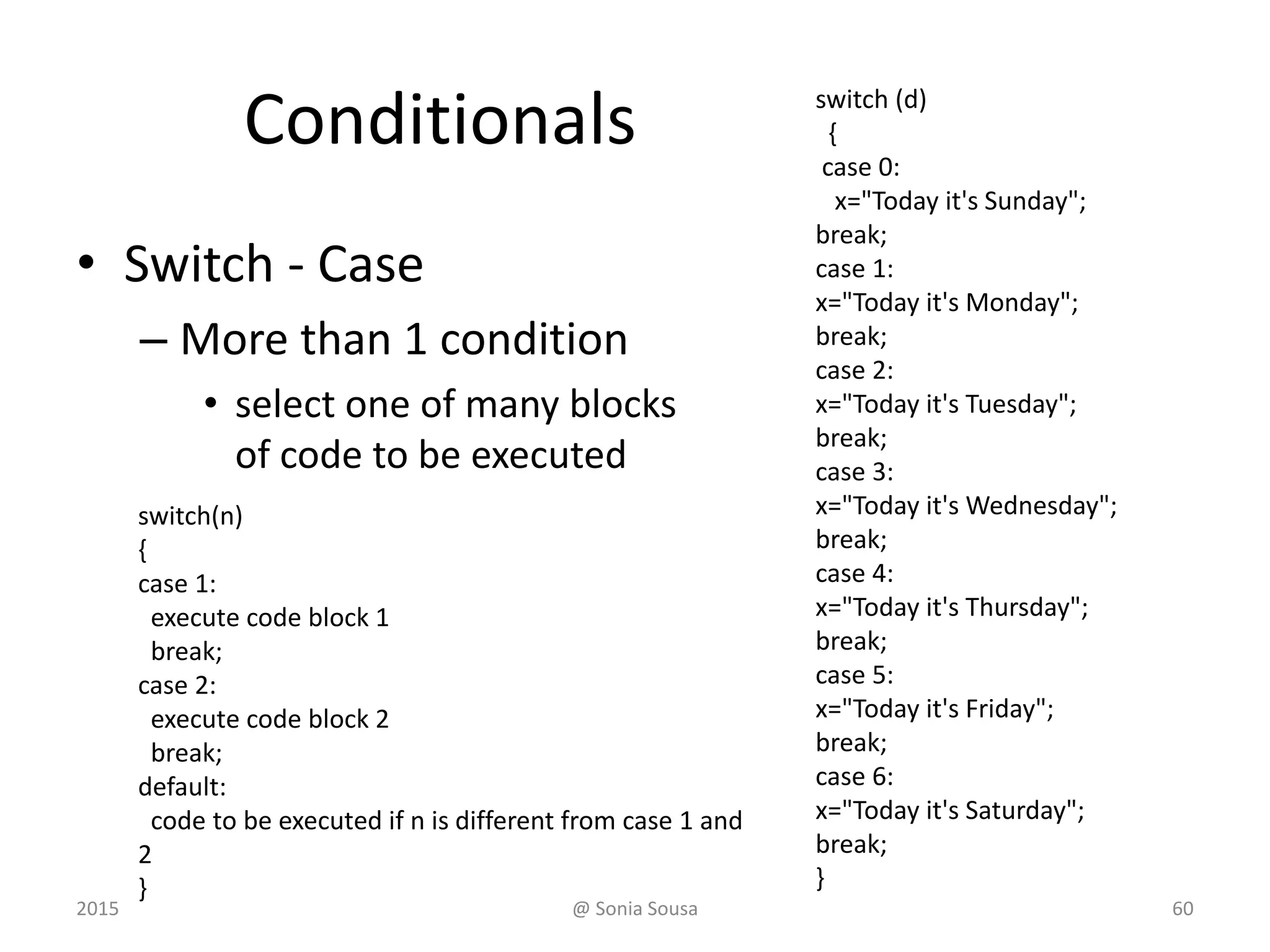
Conditionals
• Switch - Case
– More than 1 condition
• select one of many blocks
of code to be executed
switch(n)
{
case 1:
execute code block 1
break;
case 2:
execute code block 2
break;
default:
code to be executed if n is different from case 1 and
2
}
switch (d)
{
case 0:
x="Today it's Sunday";
break;
case 1:
x="Today it's Monday";
break;
case 2:
x="Today it's Tuesday";
break;
case 3:
x="Today it's Wednesday";
break;
case 4:
x="Today it's Thursday";
break;
case 5:
x="Today it's Friday";
break;
case 6:
x="Today it's Saturday";
break;
}
2015 @ Sonia Sousa 60
JavaScript Form Validation
• A form can be validated using JavaScript
function validateForm() {
var x = document.forms["myForm"]["fname"].value;
if (x == null || x == "") {
alert("Name must be filled out");
return false;
}
}
<form name="myForm" action="demo_form.asp" onsubmit="return
validateForm()" method="post">
Name: <input type="text" name="fname">
<input type="submit" value="Submit">
</form>
2015 @ Sonia Sousa 61
EXERCISE 3 – JAVASCRIPT
2015 @ Sonia Sousa 62

Ifi7174 lesson3

  • 1.
  • 2.
    JavaScript • Is alightweight – Object Oriented Programming (OOP) language • Why JavaScript? – It helps you to add behaviors into your webpages – It changes HTML Content – It changes HTML Styles (CSS) 2015 @ Sonia Sousa 2
  • 3.
    JavaScript • Is typicallyused in browsers – to power dynamic websites. • add functionality; • validate input, and • communicate with web servers • JS code is loaded and ran – Inline within HTML code <script> tags – In blocks • <script> JS code </script> 2015 @ Sonia Sousa 3
  • 4.
    JavaScript • Can be: –Load as an external scripts • External – Inline within HTML code <script> tags – Embedded • <head> – functions • <body> – event change <script src="myScript.js"></script> <script>document.write("<h1>Hello, there!</h1>"); </script> <head> <title>Embedded JS Example</title> <script> document.write("Oops"); </script> </head> 2015 @ Sonia Sousa 4
  • 5.
    External JS Advantages •It separates HTML and code • It makes HTML and JavaScript easier to read and maintain • Cached JavaScript files can speed up page loads 2015 @ Sonia Sousa 5
  • 6.
    JS Embedded inHTML <script> function myFunction() { document.write("Oops! The document disappeared!"); } </script> <button onclick="myFunction()">Try it</button> • <head> </head> • <body> </body> 2015 @ Sonia Sousa 6
  • 7.
    JS inline withHTML <h1>My Web Page</h1> <p id="demo">A Paragraph</p> <button type="button" onclick="myFunction()">Try it</button> <script> function myFunction() { document.getElementById("demo").innerHTML = "Paragraph changed."; } </script> 2015 @ Sonia Sousa 7 • <body> </body>
  • 8.
    The Document Object •When an HTML document is loaded into a web browser, – it becomes a document object. • The document object – provides properties and methods • to access all node objects, from within JavaScript – represents • the root node of the HTML document – It controls the • element, text, attribute, and comment nodes 2015 @ Sonia Sousa 8
  • 9.
    Document Object Model(DOM) • starts by… 1. browser window itself 2. document page, 3. the elements included on the page; and 4. their attributes. Source: Wikipedia The object hierarchy 2015 @ Sonia Sousa 9
  • 10.
    How JS andthe DOM cooperate • When a web page is loaded, – The browser creates a DOM of the page • Like a tree Source: w3schools2015 @ Sonia Sousa 10
  • 11.
    DOM Window documen t meta Textbox Radio button head body form[] linkImagestitle div ul li Establish the Order of things 2015 @ Sonia Sousa 11
  • 12.
    How JS andthe DOM cooperate • JavaScript can change – the HTML elements in the page – the HTML attributes in the page – the CSS styles in the page • JavaScript can react to – the events in the page • This is done by – object notation 2015 @ Sonia Sousa 12
  • 13.
    Object notation • Accessto elements – be referenced using dot notation • starting with the highest-level object – (i.e., window). » But as the window is in the top hierarchy do not need to be refereed – Objects can be referred to • by name; or id; or by their position on the page document.getElementById("demo").innerHTML = "Hello JavaScript”; 2015 @ Sonia Sousa 13
  • 14.
    JavaScript Syntax • Basicrules – Ends with ; (semi-colons) – ! is case sensitive ! • Comments – double slash (//) • 1 line comment – between /* and */ • More than 1 line comment 2015 @ Sonia Sousa 14
  • 15.
    JS programs • Aprogram is a – list of "instructions” to be "executed" by the computer – These instructions are called statements • JS statements are separated by semicolons ; • A statement composed of: – Values, Operators, Expressions, Keywords, and Comments. 2015 @ Sonia Sousa 15
  • 16.
    JavaScript statements • Statementsincludes – Values, Operators, Expressions, Keywords, and Comments – Values are • Literal or variables – Functions are • a block of code that can execute some action – Events are • actions triggered by someone 2015 @ Sonia Sousa 16
  • 17.
    Values • Literal valuesare – Numbers • with or without decimals (10.50 or 1001) – Strings • Double or single quotes ("John Doe” ‘John Doe’) – Variables • Are used to store data (var x; x = 6;) 2015 @ Sonia Sousa 17
  • 18.
    JS Keywords • Toidentify the JavaScript action to be performed. Keyword Description break Terminates a switch or a loop continue Jumps out of a loop and starts at the top do ... while Executes a block of statements, and repeats the block, while a condition is true for Marks a block of statements to be executed, as long as a condition is true function Declares a function if ... else Marks a block of statements to be executed, depending on a condition return Exits a function switch Marks a block of statements to be executed, depending on different cases try ... catch Implements error handling to a block of statements var Declares a variable 2015 @ Sonia Sousa 18
  • 19.
    JS Statements • Astatement is the line of code that tell – the browser to execute something document.getElementById("demo").innerHTML = "Hello!"; • JavaScript statements Var x = 5; var y = 6; var z = x + y; document.getElementById("demo").innerHTML = z; 2015 @ Sonia Sousa 19
  • 20.
    JavaScript Statements • Givinga command to the browser <script> function myFunction() { document.write("Oops! The document disappeared!"); } </script> <button onclick="myFunction()">Try it</button> <script> function myFunction() { document.write("Oops! The document disappeared!"); } </script> 2015 @ Sonia Sousa 20
  • 21.
    JS code andBlocks JS code blocks JS functions <script> function myFunction() { document.write("Oops! The document disappeared!"); } </script> <script> 1. document.write("<h1>Hello, there!</h1>"); 2. document.getElementById("demo").innerHTML="Hello Dolly"; 3. document.getElementById("myDIV").innerHTML="How are you?”; </script> • Define statements to be executed together • JavaScript functions are statements grouped in blocks 2015 @ Sonia Sousa 21
  • 22.
    JS and HTMLStyles (CSS) • JavaScript can change – HTML elements – (CSS) Styles – Or validate input (data) • Using methods, conditional and fuctions • For instance, to change the text – It uses getElementById() method document.getElementById("demo").innerHTML = "Hello JavaScript”; 2015 @ Sonia Sousa 22
  • 23.
    JavaScript Variables • variablesare "containers" of information – We can name it using letters (like x) • The variable can contain – Letter, numerical values or expressions var x=5; var y=6; var z=x+y; "declaring" a variable assign a value var carname; carname="Volvo"; 2015 @ Sonia Sousa 23
  • 24.
    Declaring (Creating) JSVariables • Primitive data types – Number var x = 5; – String var carname = “Volvo XC60"; – Boolean var x = true; var y = false; 2015 @ Sonia Sousa 24
  • 25.
    Declaring (Creating) JSVariables • JS Array var cars=new Array(); cars[0]="Saab"; cars[1]="Volvo"; cars[2]="BMW"; var cars = ["Saab", "Volvo", "BMW"]; • JavaScript Objects var person = {firstName:"John", lastName:"Doe", age:50, eyeColor:"blue"}; 2015 @ Sonia Sousa 25
  • 26.
    Object (Properties andMethods) • data (variables) as objects – they have properties – they have methods Object Properties Methods Car car.name = Fiat car.model = 500 car.weight = 850kg car.color = white car.start() car.drive() car.brake() 2015 @ Sonia Sousa 26
  • 27.
    JS Operators • Operatorsare used to – assign values to variables using (=) • var x = 5; var y = 6; • Arithmetic operators • Comparison operators • Logical operators Operator Description + Addition - Subtraction * Multiplication / Division % Modulus ++ Increment -- Decrement 2015 @ Sonia Sousa 27
  • 28.
    JS Operators Opera tors example results +x=y+2 Addition x=7 - x=y-2 Subtraction x=3 * x=y*2 Multiplication x=10 / x=y/2 Division x=2.5 ++ x=++y Increment x=6 -- x=--y Decrement x=4 == x==8 equal to false != x!=8 Not equal to true > x>8 greater than false < x<8 less than true >= x>=8 greater than or equal to false <= x<=8 Less tan or equal to true && (x < 10 && y > 1) and true || (x==5 || y==5) or false ! !(x==y) not true Logical Comparison Arithmetic 2015 @ Sonia Sousa 28
  • 29.
    Assignment Operators Operator ExampleSame as Resul t = x=y += x+=y x=x+y -= x-=y x=y-2 *= x*=y x=x*y ++ x=++y Increment x=6 -- x=--y Decrement x=4 == x==8 != x!=8 > x>8 < x<8 >= x>=8 <= x<=8 && (x < 10 && y > 1) || (x==5 || y==5) ! !(x==y) 2015 @ Sonia Sousa 29
  • 30.
    JS Expressions • Combinevalues, variables, and operators – The computation is called an evaluation • 5 * 10 evaluates to 50 – can also contain variable values • x * 10 • "John" + " " + "Doe" 2015 @ Sonia Sousa 30
  • 31.
    JavaScript Functions • isa block of code designed to perform a particular task. – A JavaScript function is executed when "something" invokes it (calls it). function name(parameter1, parameter2, parameter3) { code to be executed } 2015 @ Sonia Sousa 31
  • 32.
    Function Syntax function name(parameter1,parameter2, parameter3) { code to be executed } <!DOCTYPE html> <html> <head> <script> function myFunction() { alert("Hello World!"); } </script> </head> <body> <button onclick="myFunction()”> Try it </button> </body> </html> Function name Code to execute Call function 2015 @ Sonia Sousa 32
  • 33.
    Function Invocation • Thecode inside the function will execute when "something” happens – an event occurs (when a user clicks a button) – it is invoked (called) from JavaScript code – Automatically (self-invoked) 2015 @ Sonia Sousa 33
  • 34.
    JavaScript Functions • Ablock of code that will be executed when "someone" calls it <script> function myFunction() { document.write("Oops! The document disappeared!"); } </script> <button onclick="myFunction()">Try it</button> <script> function myFunction() { document.write("Oops! The document disappeared!"); } </script> Code Block Call function 2015 @ Sonia Sousa 34
  • 35.
    Return values • Functionsoften compute a return value. var x = myFunction(4, 3); // Function is called, return value will end up in x function myFunction(a, b) { return a * b; // Function returns the product of a and b } 2015 @ Sonia Sousa 35
  • 36.
    Function with Arguments </head><body> <button onclick="myFunction()">Try it</button> <button onclick="myFunction('Bob','Builder')">Try it</button> <script> function myFunction(name,job) { alert("Welcome " + name + ", the " + job); } </script> 2015 @ Sonia Sousa 36 <script> myFunction(argument1,argument2) { some code } </script>
  • 37.
    Using ID withfunction </head> <body> <p id="demo"></p> <script> document.getElementById("demo").innerHTML=myFunction(4,3); </script> <script> function myFunction(a,b) { return a*b; } </script> 2015 @ Sonia Sousa 37 <script> myFunction(argument1,argument2) { some code } </script>
  • 38.
    JavaScript Events • Issomething the browser does, or something a user does – Event handlers • used to handle, and verify, user input, user actions, and browser actions. – HTML events • An HTML web page has finished loading • An HTML input field was changed • An HTML button was clicked <some-HTML-element some-event="some JavaScript"> <button onclick="this.innerHTML=Date()">The time is? </button> 2015 @ Sonia Sousa 38
  • 39.
    HTML DOM Events EventDescription onchange An HTML element has been changed onclick The user clicks an HTML element onmouseover The user moves the mouse over an HTML element onmouseout The user moves the mouse away from an HTML element onkeydown The user pushes a keyboard key onload The browser has finished loading the page onmouseenter occurs when the pointer is moved onto an element onmousedown the user presses a mouse button over an element 2015 @ Sonia Sousa 39
  • 40.
    JavaScript Strings • Stringhave Properties and Methods – Primitive value • var firstName = "John” var x = "John"; – String objects • var firstName = new String("John") var y = new String("John"); 2015 @ Sonia Sousa 40
  • 41.
    JavaScript Strings Method Description charAt()Returns the character at the specified index (position) concat() Joins two or more strings, and returns a copy of the joined strings indexOf() Returns the position of the first found occurrence of a specified value in a string lastIndexOf() Returns the position of the last found occurrence of a specified value in a string localeCompare() Compares two strings in the current locale replace() Searches a string for a value and returns a new string with the value search() Searches a string for a value and returns the position of the match split() Splits a string into an array of substrings toLocaleLowerCase() Converts a string to lowercase letters, according to the host's locale toLocaleUpperCase() Converts a string to uppercase letters, according to the host's locale toLowerCase() Converts a string to lowercase letters toString() Returns the value of a String object toUpperCase() Converts a string to uppercase letters trim() Removes whitespace from both ends of a string valueOf() Returns the primitive value of a String object 2015 @ Sonia Sousa 41
  • 42.
    JavaScript Numbers • toString()Method – returns a number as a string var x = 123; x.toString(); // returns 123 from variable x (123).toString(); // returns 123 from literal 123 (100 + 23).toString(); // returns 123 from expression 100 + 23 2015 @ Sonia Sousa 42
  • 43.
    JavaScript Math Object •Allows you to perform mathematical tasks. Math.random(); // returns a random number Math.min() Math.max() Math.random() Math.round() 2015 @ Sonia Sousa 43
  • 44.
    JavaScript Dates • letsyou work with dates – Date() – Date(milliseconds) – Date(dateString) – Date(year, month, day, hours, minutes, seconds, milliseconds) <script> var d = new Date(); document.getElementById("demo").innerHTML = d; </script> 2015 @ Sonia Sousa 44
  • 45.
    Date and timeMethods Method Description getDate() Get the day as a number (1-31) getDay() Get the weekday as a number (0-6) getFullYear() Get the four digit year (yyyy) getHours() Get the hour (0-23) getMilliseconds() Get the milliseconds (0-999) getMinutes() Get the minutes (0-59) getMonth() Get the month (0-11) getSeconds() Get the seconds (0-59) getTime() Get the time (milliseconds since January 1, 1970) setDate() Set the day as a number (1-31) setFullYear() Set the year (optionally month and day) setHours() Set the hour (0-23) setMilliseconds() Set the milliseconds (0-999) setMinutes() Set the minutes (0-59) setMonth() Set the month (0-11) setSeconds() Set the seconds (0-59) setTime() Set the time (milliseconds since January 1, 1970) 2015 @ Sonia Sousa 45
  • 46.
    JavaScript Output • DisplayPossibilities – window.alert() – document.write() – innerHTML – console.log() 2015 @ Sonia Sousa 46
  • 47.
    window.alert() • Is usedto display data as a window alert <script> window.alert(5 + 6); </script> 2015 @ Sonia Sousa 47
  • 48.
    document.write() • For writinginformation in the document – Useful for testing purposes or to replace information in a HTML page </script> document.write("<h2>“your name” </h2>"); document.write("<img src='me.jpg' width='180'>"); </script> <p>My first paragraph.</p> <button type="button" onclick="document.write(5 + 6)">Try it</button> 2015 @ Sonia Sousa 48
  • 49.
    innerHTML • To accessan HTML element by using – the document.getElementById(id) method. • id attribute defines the HTML element • innerHTML property defines the HTML <p>My First Paragraph</p> <p id="demo"></p> <script> document.getElementById("demo").innerHTML ="<h3>Welcome</h3>"; </script> 2015 @ Sonia Sousa 49
  • 50.
    JS and HTML •Finding HTML elements – by id – by Tag Name – by Class Name • Changing elements in HTML – Write in html – HTML Content – Value of an Attribute document.getElementById("intro"); getElementsByTagName("p"); document.getElementsByClassName("intro"); document.write( ); document.getElementById("p1").innerHTML="New text!"; document.getElementById("image").src="landscape.jpg"; 2015 @ Sonia Sousa 50
  • 51.
    JS and CSS •Changing HTML Style document.getElementById("p2").style.color="blue"; document.getElementById("p2"). background.color="blue"; document.getElementById("demo").innerHTML="<h3>Welcome</h3>"; 2015 @ Sonia Sousa 51
  • 52.
    Js and events •When an element is clicked on • Onclick • onSubmit – Or reacting to an event • onmouseover and onmouseout 2015 @ Sonia Sousa 52
  • 53.
    Window Object Methods MethodDescription alert() Displays an alert box with a message and an OK button close() Closes the current window confirm() Displays a dialog box with a message and an OK and a Cancel button createPopu p() Creates a pop-up window moveBy() Moves a window relative to its current position moveTo() Moves a window to the specified position open() Opens a new browser window print() Prints the content of the current window prompt() Displays a dialog box that prompts the visitor for input resizeBy() Resizes the window by the specified pixels resizeTo() Resizes the window to the specified width and height scroll() Deprecated. This method has been replaced by the scrollTo() method. scrollBy() Scrolls the document by the specified number of pixels scrollTo() Scrolls the document to the specified coordinates stop() Stops the window from loading 2015 @ Sonia Sousa 53
  • 54.
    Conditionals • If ,if else, else if – Execute the code if a specified condition is true if (condition) { block of code to be executed if the condition is true } else { block of code to be executed if the condition is false } 2015 @ Sonia Sousa 54
  • 55.
    Logic of anif-else statement condition evaluated statement1 true false statement2 552015 @ Sonia Sousa
  • 56.
    Conditionals • Switch –Case – perform different actions based on different conditions. switch ( expression ) { case value1 : statement-list1; break; case value2 : statement-list2; Break; case ... default: break; } switch and case are reserved words If expression matches value2, control jumps to here 2015 @ Sonia Sousa 56
  • 57.
    The For Loop •to run the same code over and over again – each time with a different value. for (statement 1; statement 2; statement 3) { code block to be executed } – Statement 1 • is executed before the loop (the code block) starts. – Statement 2 • defines the condition for running the loop (the code block). – Statement 3 • is executed each time after the loop (the code block) has been executed. 2015 @ Sonia Sousa 57
  • 58.
    Loops var i; for (i= 0; i < 10; i++) { document.getElementById("demo").innerHTML += i + "<br>"; } 0 1 2 3 4 5 6 7 8 9 2015 @ Sonia Sousa 58
  • 59.
    Conditionals • If if (time<20) { x="Goodday"; } else { x="Good evening"; } function timegess() { var x=""; var time=new Date().getHours(); if (time<10) { x="Good morning"; } else if (time<20) { x="Good day"; } else { x="Good evening"; } } </script> 2015 @ Sonia Sousa 59
  • 60.
    Conditionals • Switch -Case – More than 1 condition • select one of many blocks of code to be executed switch(n) { case 1: execute code block 1 break; case 2: execute code block 2 break; default: code to be executed if n is different from case 1 and 2 } switch (d) { case 0: x="Today it's Sunday"; break; case 1: x="Today it's Monday"; break; case 2: x="Today it's Tuesday"; break; case 3: x="Today it's Wednesday"; break; case 4: x="Today it's Thursday"; break; case 5: x="Today it's Friday"; break; case 6: x="Today it's Saturday"; break; } 2015 @ Sonia Sousa 60
  • 61.
    JavaScript Form Validation •A form can be validated using JavaScript function validateForm() { var x = document.forms["myForm"]["fname"].value; if (x == null || x == "") { alert("Name must be filled out"); return false; } } <form name="myForm" action="demo_form.asp" onsubmit="return validateForm()" method="post"> Name: <input type="text" name="fname"> <input type="submit" value="Submit"> </form> 2015 @ Sonia Sousa 61
  • 62.
    EXERCISE 3 –JAVASCRIPT 2015 @ Sonia Sousa 62