JavaScript Objects and
Functions
Dhananjay Kumar [@debug_mode]
Delhi Chapter Lead
Microsoft MVP
Mindcracker MVP
Telerik Evangelist
http://debugmode.net
FB: Dhananjay.25july@gmail.com
JavaScript Objects
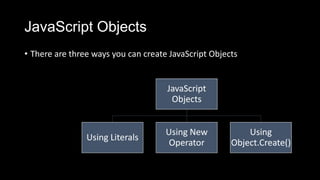
• There are three ways you can create JavaScript Objects
JavaScript
Objects
Using Literals
Using New
Operator
Using
Object.Create()
JavaScript Objects
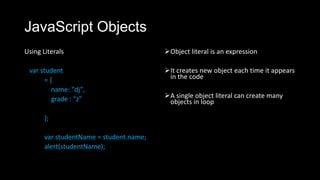
Using Literals
var student
= {
name: "dj",
grade : "z"
};
var studentName = student.name;
alert(studentName);
Object literal is an expression
It creates new object each time it appears
in the code
A single object literal can create many
objects in loop
JavaScript Objects
Using new operator
var student = new Object();
var studentArray = new Array();
new operator creates a new object
new operator initialize created
object also
new operator invokes a function as
give in above code snippet.
Function invoked after new
operator is Constructor
JavaScript Objects
Using Object.Create()
var student = Object.create(
{
name: "dj",
grade: 10
}
);
It is a static function
It always has two parameters
• Prototype
• Properties
JavaScript Objects
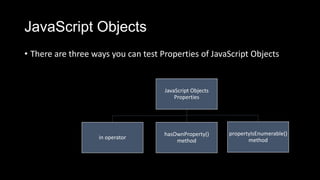
• There are three ways you can test Properties of JavaScript Objects
JavaScript Objects
Properties
in operator
hasOwnProperty()
method
propertyIsEnumerable()
method
JavaScript Objects
in operator
var student = Object.create(
{
name: "dj",
grade: 10
}
);
var studentProperty = "name" in
student
alert(studentProperty);
in operator returns true for own property
in operator returns false if there is no
property with given name
in operator returns true for inherited
property
JavaScript Objects
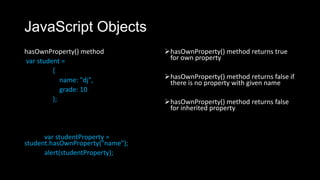
hasOwnProperty() method
var student =
{
name: "dj",
grade: 10
};
var studentProperty =
student.hasOwnProperty("name");
alert(studentProperty);
hasOwnProperty() method returns true
for own property
hasOwnProperty() method returns false if
there is no property with given name
hasOwnProperty() method returns false
for inherited property
JavaScript Objects
propertyIsEnumerable () method
var student =
{
name: "dj",
grade: 10
};
var studentProperty =
student.hasOwnProperty("name");
alert(studentProperty);
propertyIsEnumerable () method returns
true for own property which is
enumerable
propertyIsEnumerable () method returns
false if there is no property with given
name
propertyIsEnumerable () method returns
false for inherited property
JavaScript Objects
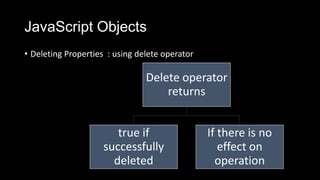
• Deleting Properties : using delete operator
Delete operator
returns
true if
successfully
deleted
If there is no
effect on
operation
JavaScript Objects
Deleting properties
var student =
{
name: "dj",
grade: 10
};
var result = delete student.grade;
alert(result);
var result1 = delete student["grade"];
alert(result1);
 It deletes object’s own property
 It does not delete inherited property. For example you cannot
delete property of student prototype or object it is inheriting
from.
Associative Array
Associative Array : Java
Script Array can be worked
with string index
var arrayofStudent = [];
var student1 = [];
student1["rollnumber"] = 19;
student1["name"] = "John";
student1["grade"] = "A";
arrayofStudent.push(student1);
console.log(arrayofStudent[0]["name"]);
Associative Array is that we can not traverse through array
elements in a loop.
JavaScript object as Associative Array
var student =
{
name: "dj",
grade: 10
};
for (i = 0; i < 10; i++) {
student["marks" + i] = 100 * i;
}
alert(student.marks8);
In Square bracket you
provide property name as
string. String is data type so
can be manipulated at run
time.
With dot you provide
property name as identifier.
Since they are not a data type
so cannot be manipulated at
run time.
For-in loop in JavaScript
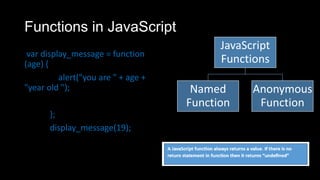
Functions in JavaScript
var display_message = function
(age) {
alert("you are " + age +
"year old ");
};
display_message(19);
JavaScript
Functions
Named
Function
Anonymous
Function
Functions in JavaScript
 You can store it in a variable
You can pass it as parameter of
other function
You can use it in an expression
Functions in JavaScript
Pass by Value
var greetingmessage = "Hey DJ";
function showmessage(greetingmessage)
{
greetingmessage = "I am changing
value";
}
showmessage(greetingmessage);
alert(greetingmessage);
Pass By Reference
var arrayofname = ["dj"];
function showmessage(arrayofname) {
arrayofname[0] = "dhananjay";
}
showmessage(arrayofname);
alert(arrayofname[0]);
Functions in JavaScript
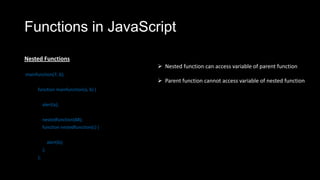
Nested Functions
mainfunction(7, 6);
function mainfunction(a, b) {
alert(a);
nestedfunction(88);
function nestedfunction(c) {
alert(b);
};
};
 Nested function can access variable of parent function
 Parent function cannot access variable of nested function
Functions in JavaScript
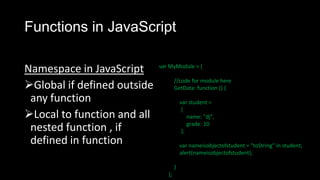
Namespace in JavaScript
Global if defined outside
any function
Local to function and all
nested function , if
defined in function
var MyModule = {
//code for module here
GetData: function () {
var student =
{
name: "dj",
grade: 10
};
var nameisobjectofstudent = "toString" in student;
alert(nameisobjectofstudent);
}
};
Functions in JavaScript
Namespace in JavaScript
Global if defined outside
any function
Local to function and all
nested function , if
defined in function
var MyModule = {
//code for module here
GetData: function () {
var student =
{
name: "dj",
grade: 10
};
var nameisobjectofstudent = "toString" in student;
alert(nameisobjectofstudent);
}
};
Functions in JavaScript
Namespace in JavaScript
Global if defined outside
any function
Local to function and all
nested function , if
defined in function
var studentObject =
{
name: "dj",
marks: 89,
findgrade: function (marks) {
if (marks > 75) {
return "Grade A ";
}
else {
return "Grade B ";
}
}
}
var grade = studentObject.findgrade(99);
alert(grade);
Functions in JavaScript
 It takes a function as argument
 It returns a function as output.
Functions in JavaScript
JavaScript function
Does not do any type checking
on argument values
Does not do any checking on
number of arguments passed
JavaScript function can be called
1. With exact number of
arguments
2. With more number of
arguments than specified
3. With less number of
arguments than specified
Functions in JavaScript
Less Number of Arguments
Functions in JavaScript
Less Number of Arguments
Functions in JavaScript
Less Number of Arguments
Handling undefined
Functions in JavaScript
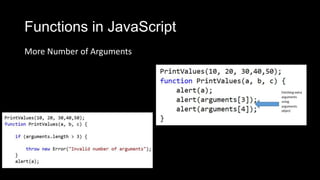
More Number of Arguments

Functions and Objects in JavaScript

  • 1.
    JavaScript Objects and Functions DhananjayKumar [@debug_mode] Delhi Chapter Lead Microsoft MVP Mindcracker MVP Telerik Evangelist http://debugmode.net FB: Dhananjay.25july@gmail.com
  • 2.
    JavaScript Objects • Thereare three ways you can create JavaScript Objects JavaScript Objects Using Literals Using New Operator Using Object.Create()
  • 3.
    JavaScript Objects Using Literals varstudent = { name: "dj", grade : "z" }; var studentName = student.name; alert(studentName); Object literal is an expression It creates new object each time it appears in the code A single object literal can create many objects in loop
  • 4.
    JavaScript Objects Using newoperator var student = new Object(); var studentArray = new Array(); new operator creates a new object new operator initialize created object also new operator invokes a function as give in above code snippet. Function invoked after new operator is Constructor
  • 5.
    JavaScript Objects Using Object.Create() varstudent = Object.create( { name: "dj", grade: 10 } ); It is a static function It always has two parameters • Prototype • Properties
  • 6.
    JavaScript Objects • Thereare three ways you can test Properties of JavaScript Objects JavaScript Objects Properties in operator hasOwnProperty() method propertyIsEnumerable() method
  • 7.
    JavaScript Objects in operator varstudent = Object.create( { name: "dj", grade: 10 } ); var studentProperty = "name" in student alert(studentProperty); in operator returns true for own property in operator returns false if there is no property with given name in operator returns true for inherited property
  • 8.
    JavaScript Objects hasOwnProperty() method varstudent = { name: "dj", grade: 10 }; var studentProperty = student.hasOwnProperty("name"); alert(studentProperty); hasOwnProperty() method returns true for own property hasOwnProperty() method returns false if there is no property with given name hasOwnProperty() method returns false for inherited property
  • 9.
    JavaScript Objects propertyIsEnumerable ()method var student = { name: "dj", grade: 10 }; var studentProperty = student.hasOwnProperty("name"); alert(studentProperty); propertyIsEnumerable () method returns true for own property which is enumerable propertyIsEnumerable () method returns false if there is no property with given name propertyIsEnumerable () method returns false for inherited property
  • 10.
    JavaScript Objects • DeletingProperties : using delete operator Delete operator returns true if successfully deleted If there is no effect on operation
  • 11.
    JavaScript Objects Deleting properties varstudent = { name: "dj", grade: 10 }; var result = delete student.grade; alert(result); var result1 = delete student["grade"]; alert(result1);  It deletes object’s own property  It does not delete inherited property. For example you cannot delete property of student prototype or object it is inheriting from.
  • 12.
    Associative Array Associative Array: Java Script Array can be worked with string index var arrayofStudent = []; var student1 = []; student1["rollnumber"] = 19; student1["name"] = "John"; student1["grade"] = "A"; arrayofStudent.push(student1); console.log(arrayofStudent[0]["name"]); Associative Array is that we can not traverse through array elements in a loop.
  • 13.
    JavaScript object asAssociative Array var student = { name: "dj", grade: 10 }; for (i = 0; i < 10; i++) { student["marks" + i] = 100 * i; } alert(student.marks8); In Square bracket you provide property name as string. String is data type so can be manipulated at run time. With dot you provide property name as identifier. Since they are not a data type so cannot be manipulated at run time.
  • 14.
    For-in loop inJavaScript
  • 15.
    Functions in JavaScript vardisplay_message = function (age) { alert("you are " + age + "year old "); }; display_message(19); JavaScript Functions Named Function Anonymous Function
  • 16.
    Functions in JavaScript You can store it in a variable You can pass it as parameter of other function You can use it in an expression
  • 17.
    Functions in JavaScript Passby Value var greetingmessage = "Hey DJ"; function showmessage(greetingmessage) { greetingmessage = "I am changing value"; } showmessage(greetingmessage); alert(greetingmessage); Pass By Reference var arrayofname = ["dj"]; function showmessage(arrayofname) { arrayofname[0] = "dhananjay"; } showmessage(arrayofname); alert(arrayofname[0]);
  • 18.
    Functions in JavaScript NestedFunctions mainfunction(7, 6); function mainfunction(a, b) { alert(a); nestedfunction(88); function nestedfunction(c) { alert(b); }; };  Nested function can access variable of parent function  Parent function cannot access variable of nested function
  • 19.
    Functions in JavaScript Namespacein JavaScript Global if defined outside any function Local to function and all nested function , if defined in function var MyModule = { //code for module here GetData: function () { var student = { name: "dj", grade: 10 }; var nameisobjectofstudent = "toString" in student; alert(nameisobjectofstudent); } };
  • 20.
    Functions in JavaScript Namespacein JavaScript Global if defined outside any function Local to function and all nested function , if defined in function var MyModule = { //code for module here GetData: function () { var student = { name: "dj", grade: 10 }; var nameisobjectofstudent = "toString" in student; alert(nameisobjectofstudent); } };
  • 21.
    Functions in JavaScript Namespacein JavaScript Global if defined outside any function Local to function and all nested function , if defined in function var studentObject = { name: "dj", marks: 89, findgrade: function (marks) { if (marks > 75) { return "Grade A "; } else { return "Grade B "; } } } var grade = studentObject.findgrade(99); alert(grade);
  • 22.
    Functions in JavaScript It takes a function as argument  It returns a function as output.
  • 23.
    Functions in JavaScript JavaScriptfunction Does not do any type checking on argument values Does not do any checking on number of arguments passed JavaScript function can be called 1. With exact number of arguments 2. With more number of arguments than specified 3. With less number of arguments than specified
  • 24.
    Functions in JavaScript LessNumber of Arguments
  • 25.
    Functions in JavaScript LessNumber of Arguments
  • 26.
    Functions in JavaScript LessNumber of Arguments Handling undefined
  • 27.
    Functions in JavaScript MoreNumber of Arguments