Intrusion Devices
IDS & IPS Ver1.0
Created : 06 March 2015
Agenda
 Understand Intrusion detection and Purpose
 Detecting and Prevention system
 Understand Products
 Implementation Models
 Type of detections and Signature tuning
Intrusion!!!!
 Intrusion !
 Who know where is value data || (APT, Spearfishing)
 Security = visibility + control || (CIA)
 Active visibility >>Visibility is paramount to decision making
 Store information, Analysis and Reporting as retro prospective
 Mitigating the Risk: Defense in Depth
 Firewall Vs Deep packet Inspection Vs IPS
Intrusion Detection is the art of detecting inappropriate, incorrect, or anomalous activity.
Among other tools, an Intrusion Detection System can be used to determine if a computer
network or server has experienced an unauthorized intrusion.
Intrusion Detection System
 IDS || IPS
 Network Sensors - Network Based – NIDS & NIPS
 Host Agents - Host based IDS & IPS - HIPS& HIDS
 Management Consoles
 Where to place
 SIEM
 Incident Management Process
 Risk management
4
Terminologies
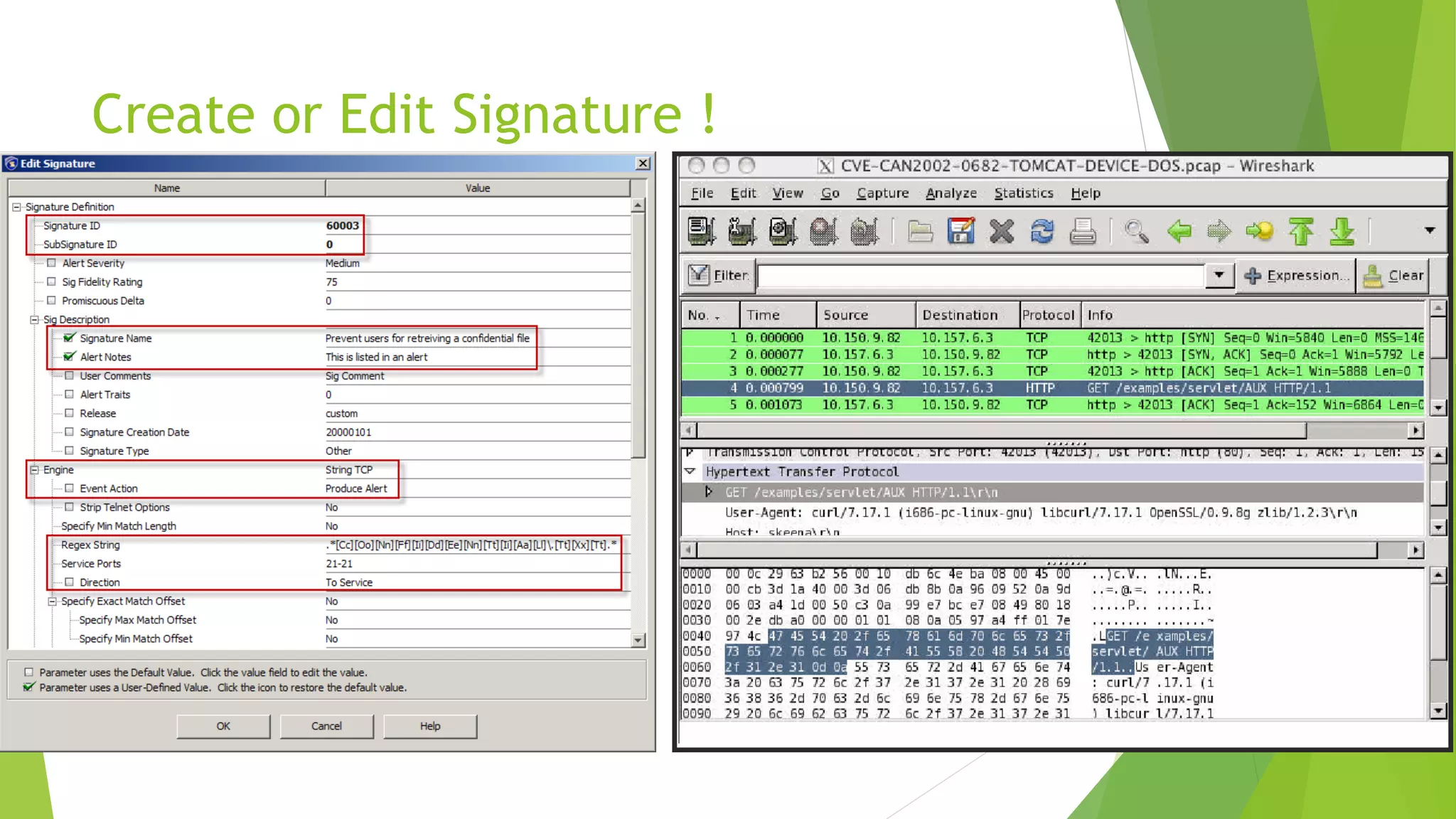
 Signatures explicitly define what activity should be considered malicious
 Simple pattern matching
 Protocol decode-based analysis
 Anomaly detection involves defining “normal” activity and looking for deviations
from this baseline
 False Alarms: State in which the ID system mistakenly reports a benign activity as
being malicious
 False Negative: State in which the ID system does not detect and report actual
malicious activity even though it is monitored
 IBM - PAM : X-Force Protocol Analysis Module (PAM)
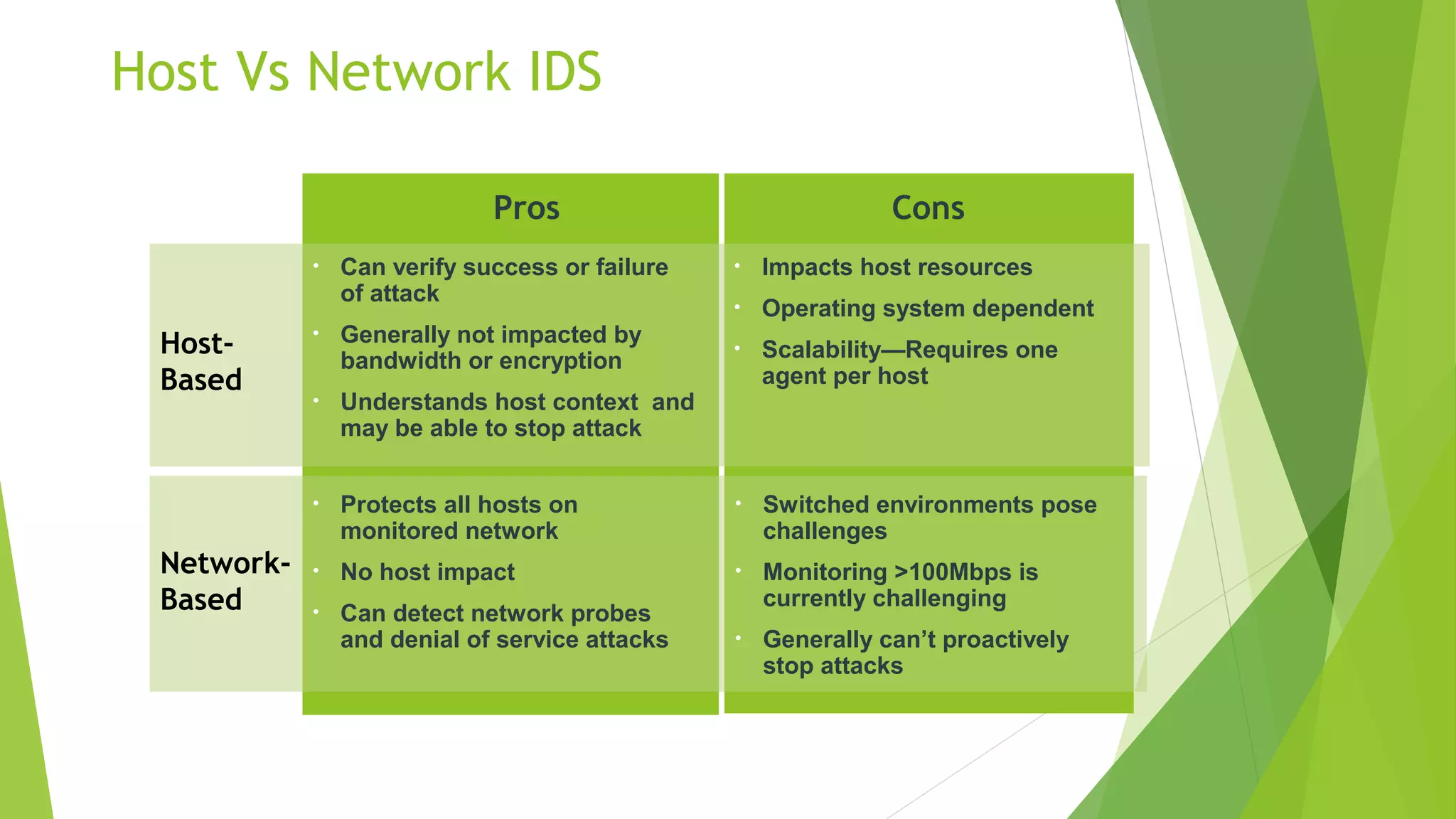
Host Vs Network IDS
Cons
Network-
Based
Host-
Based
Pros
• Can verify success or failure
of attack
• Generally not impacted by
bandwidth or encryption
• Understands host context and
may be able to stop attack
• Impacts host resources
• Operating system dependent
• Scalability—Requires one
agent per host
• Protects all hosts on
monitored network
• No host impact
• Can detect network probes
and denial of service attacks
• Switched environments pose
challenges
• Monitoring >100Mbps is
currently challenging
• Generally can’t proactively
stop attacks
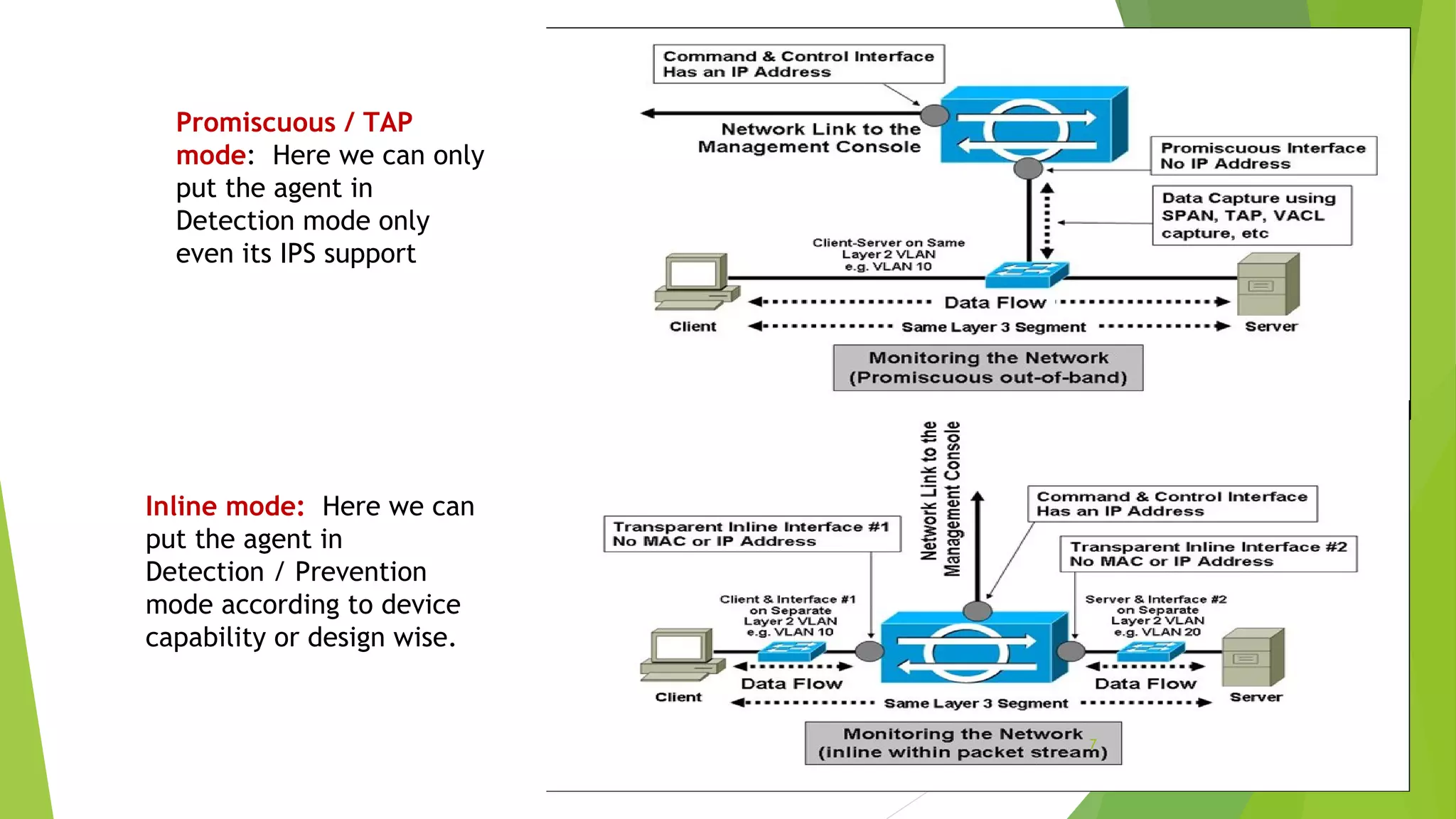
Promiscuous / TAP
mode: Here we can only
put the agent in
Detection mode only
even its IPS support
Inline mode: Here we can
put the agent in
Detection / Prevention
mode according to device
capability or design wise.
7
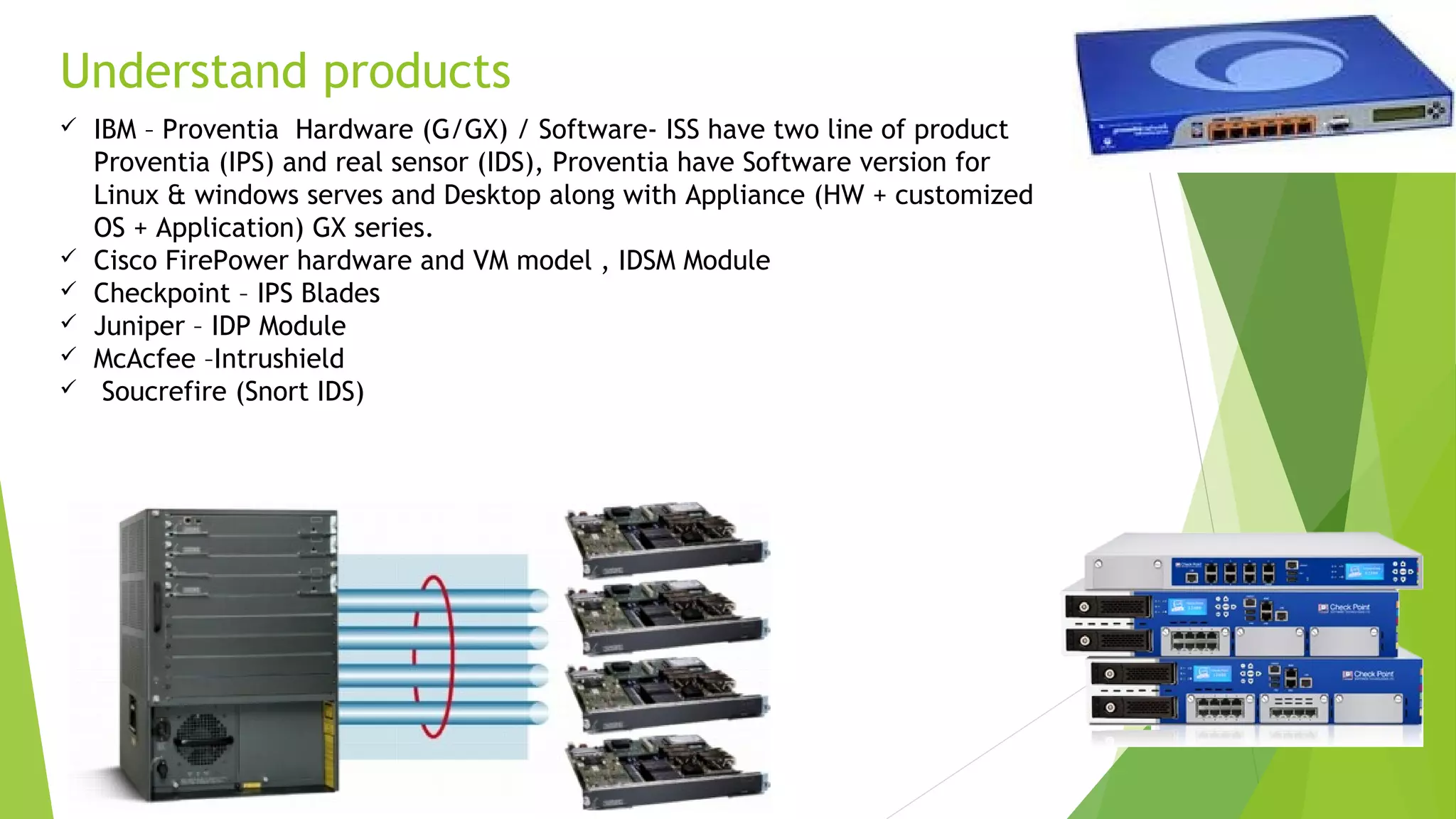
Understand products
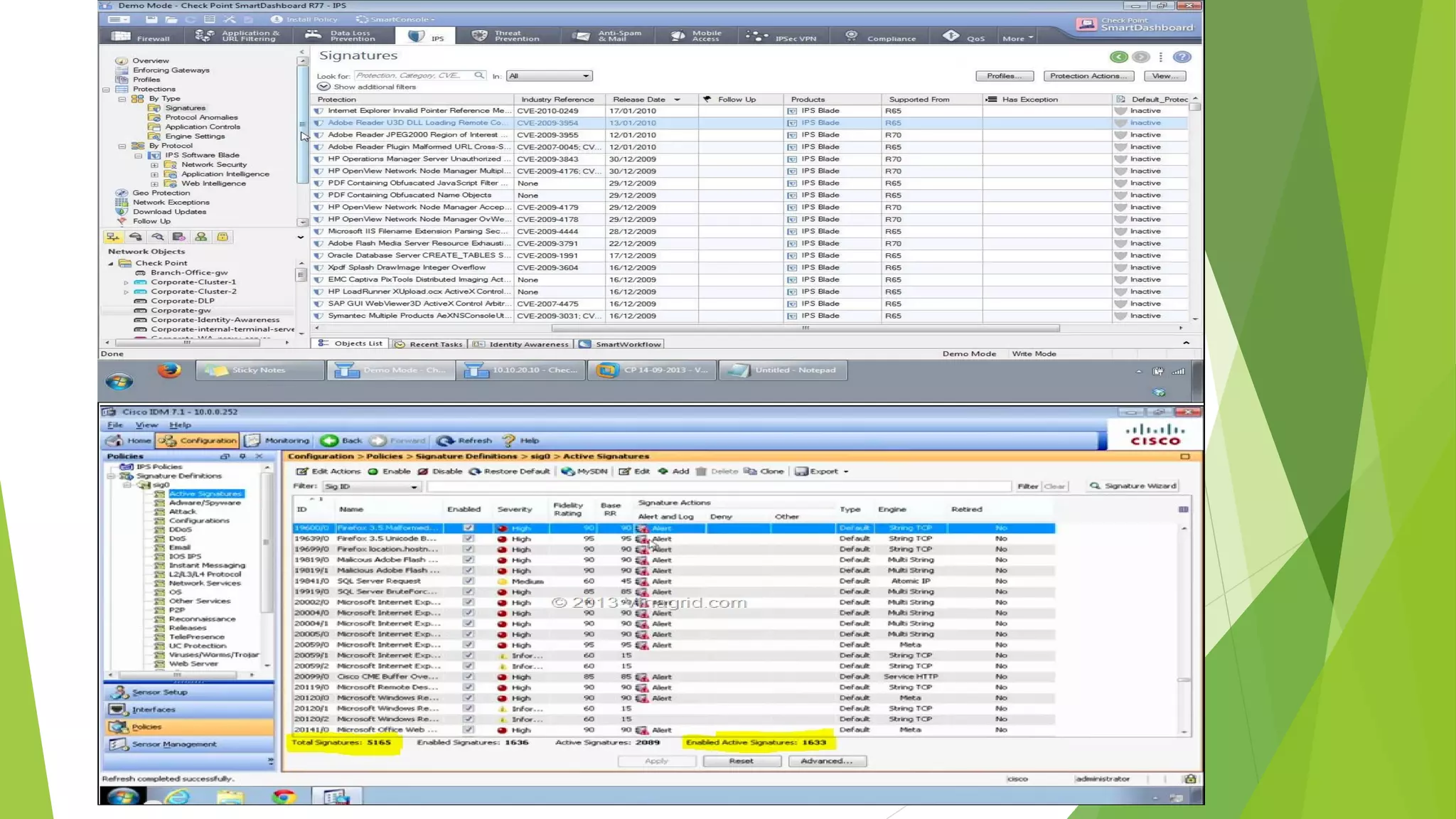
 IBM – Proventia Hardware (G/GX) / Software- ISS have two line of product
Proventia (IPS) and real sensor (IDS), Proventia have Software version for
Linux & windows serves and Desktop along with Appliance (HW + customized
OS + Application) GX series.
 Cisco FirePower hardware and VM model , IDSM Module
 Checkpoint – IPS Blades
 Juniper – IDP Module
 McAcfee –Intrushield
 Soucrefire (Snort IDS)
Create or Edit Signature !
Concerns…
 Return on investment based on visibility, control, and uptime.
 Greatest risk comes from insider threats. Disgruntled employees, curious
employees, outsourced services, and the trends of greater volumes of
contracted services provide a higher level of vulnerability from within the
network
 a known fact is that current IDS implementations have a tendency to drop
packets due to the high throughput of today’s high bandwidth network
devices
 most IDS solutions do not have the ability to decrypt packets inbound or
outbound and this blinds security administrators
What’s next – NG!
 “Real-time Network Awareness (RNA)” - RNA enables organizations to more confidently
protect their networks through a unique patent pending combination of passive network
discovery, behavioral profiling, and integrated vulnerability analysis to deliver the
benefits of real-time network profiling and change management without the drawbacks of
traditional approaches to identifying network assets and vulnerabilities
 Certifications
 Test C2150-561: IBM Security Network Intrusion Prevention System V4.3 Implementation
 McAfee Certified Product Specialist — HIPs; The MCPS — HIPs certification validates
knowledge and experience in working with the McAfee Host Intrusion Prevention system.
 Cisco CCNA Sec- Implementing Cisco Threat Control Solutions; IPS , FW , Cloud and Email
Security
 References
 SANS Documents
 Cisco docs
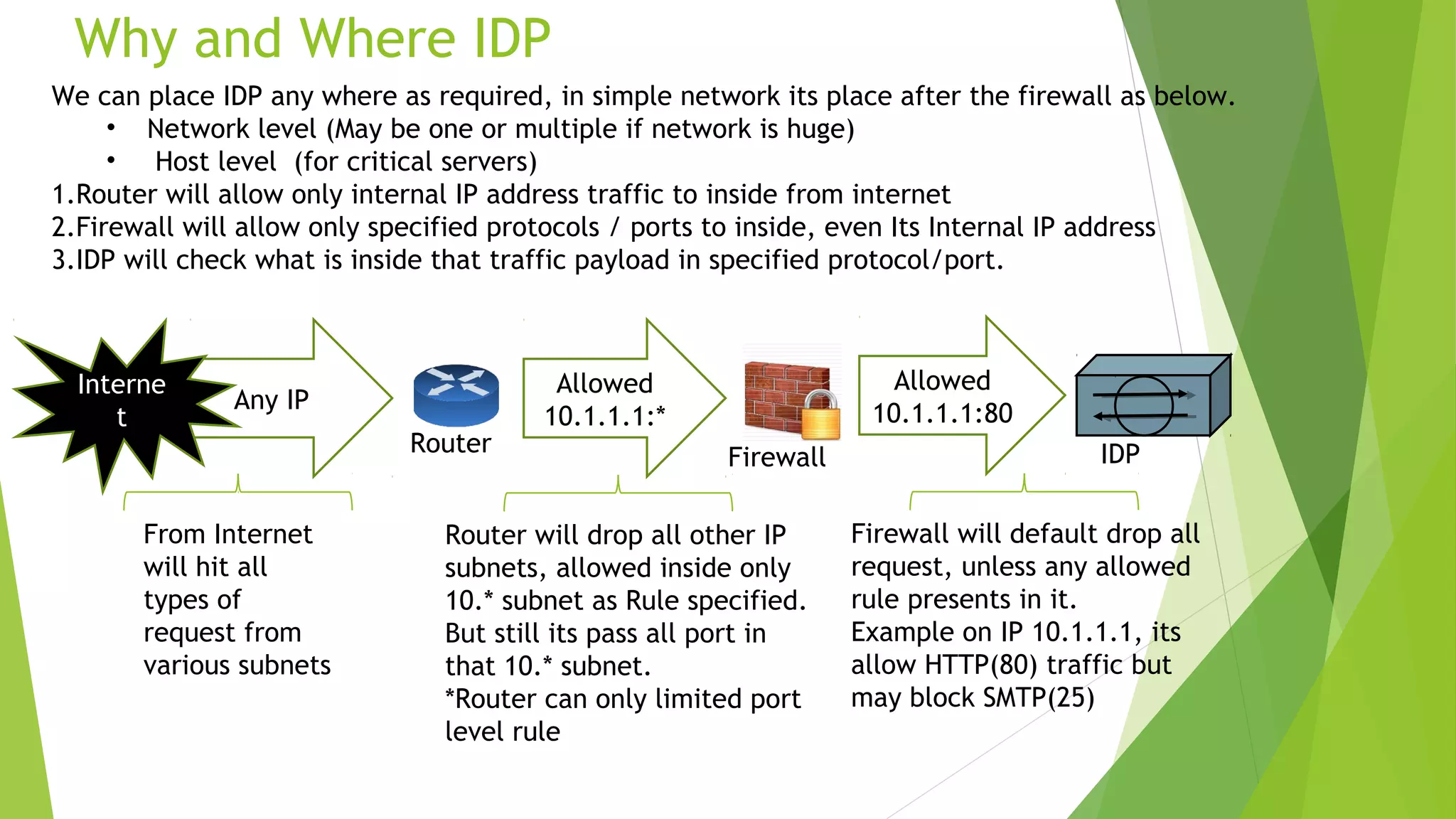
Why and Where IDP
Any IP
Allowed
10.1.1.1:*
Allowed
10.1.1.1:80
From Internet
will hit all
types of
request from
various subnets
Interne
t
Router will drop all other IP
subnets, allowed inside only
10.* subnet as Rule specified.
But still its pass all port in
that 10.* subnet.
*Router can only limited port
level rule
Router
Firewall will default drop all
request, unless any allowed
rule presents in it.
Example on IP 10.1.1.1, its
allow HTTP(80) traffic but
may block SMTP(25)
Firewall IDP
We can place IDP any where as required, in simple network its place after the firewall as below.
• Network level (May be one or multiple if network is huge)
• Host level (for critical servers)
1.Router will allow only internal IP address traffic to inside from internet
2.Firewall will allow only specified protocols / ports to inside, even Its Internal IP address
3.IDP will check what is inside that traffic payload in specified protocol/port.
Demo & Practice
 Untangle Administrator Login : demo.untangle.com
 Go to IDS module and go through Settings where can find all IDS related options
, include signatures , policies, etc.
 This will provide most security technologies demo (FW, AntiSpam..), not
limited to IDS.
 To practice real one, please use GNS3 and original IOS from Cisco in your
laptop.
QA & Thank you
Finto Thomas, CISSP

Idps technology starter v2.0

  • 1.
    Intrusion Devices IDS &IPS Ver1.0 Created : 06 March 2015
  • 2.
    Agenda  Understand Intrusiondetection and Purpose  Detecting and Prevention system  Understand Products  Implementation Models  Type of detections and Signature tuning
  • 3.
    Intrusion!!!!  Intrusion ! Who know where is value data || (APT, Spearfishing)  Security = visibility + control || (CIA)  Active visibility >>Visibility is paramount to decision making  Store information, Analysis and Reporting as retro prospective  Mitigating the Risk: Defense in Depth  Firewall Vs Deep packet Inspection Vs IPS Intrusion Detection is the art of detecting inappropriate, incorrect, or anomalous activity. Among other tools, an Intrusion Detection System can be used to determine if a computer network or server has experienced an unauthorized intrusion.
  • 4.
    Intrusion Detection System IDS || IPS  Network Sensors - Network Based – NIDS & NIPS  Host Agents - Host based IDS & IPS - HIPS& HIDS  Management Consoles  Where to place  SIEM  Incident Management Process  Risk management 4
  • 5.
    Terminologies  Signatures explicitlydefine what activity should be considered malicious  Simple pattern matching  Protocol decode-based analysis  Anomaly detection involves defining “normal” activity and looking for deviations from this baseline  False Alarms: State in which the ID system mistakenly reports a benign activity as being malicious  False Negative: State in which the ID system does not detect and report actual malicious activity even though it is monitored  IBM - PAM : X-Force Protocol Analysis Module (PAM)
  • 6.
    Host Vs NetworkIDS Cons Network- Based Host- Based Pros • Can verify success or failure of attack • Generally not impacted by bandwidth or encryption • Understands host context and may be able to stop attack • Impacts host resources • Operating system dependent • Scalability—Requires one agent per host • Protects all hosts on monitored network • No host impact • Can detect network probes and denial of service attacks • Switched environments pose challenges • Monitoring >100Mbps is currently challenging • Generally can’t proactively stop attacks
  • 7.
    Promiscuous / TAP mode:Here we can only put the agent in Detection mode only even its IPS support Inline mode: Here we can put the agent in Detection / Prevention mode according to device capability or design wise. 7
  • 8.
    Understand products  IBM– Proventia Hardware (G/GX) / Software- ISS have two line of product Proventia (IPS) and real sensor (IDS), Proventia have Software version for Linux & windows serves and Desktop along with Appliance (HW + customized OS + Application) GX series.  Cisco FirePower hardware and VM model , IDSM Module  Checkpoint – IPS Blades  Juniper – IDP Module  McAcfee –Intrushield  Soucrefire (Snort IDS)
  • 10.
    Create or EditSignature !
  • 11.
    Concerns…  Return oninvestment based on visibility, control, and uptime.  Greatest risk comes from insider threats. Disgruntled employees, curious employees, outsourced services, and the trends of greater volumes of contracted services provide a higher level of vulnerability from within the network  a known fact is that current IDS implementations have a tendency to drop packets due to the high throughput of today’s high bandwidth network devices  most IDS solutions do not have the ability to decrypt packets inbound or outbound and this blinds security administrators
  • 12.
    What’s next –NG!  “Real-time Network Awareness (RNA)” - RNA enables organizations to more confidently protect their networks through a unique patent pending combination of passive network discovery, behavioral profiling, and integrated vulnerability analysis to deliver the benefits of real-time network profiling and change management without the drawbacks of traditional approaches to identifying network assets and vulnerabilities  Certifications  Test C2150-561: IBM Security Network Intrusion Prevention System V4.3 Implementation  McAfee Certified Product Specialist — HIPs; The MCPS — HIPs certification validates knowledge and experience in working with the McAfee Host Intrusion Prevention system.  Cisco CCNA Sec- Implementing Cisco Threat Control Solutions; IPS , FW , Cloud and Email Security  References  SANS Documents  Cisco docs
  • 13.
    Why and WhereIDP Any IP Allowed 10.1.1.1:* Allowed 10.1.1.1:80 From Internet will hit all types of request from various subnets Interne t Router will drop all other IP subnets, allowed inside only 10.* subnet as Rule specified. But still its pass all port in that 10.* subnet. *Router can only limited port level rule Router Firewall will default drop all request, unless any allowed rule presents in it. Example on IP 10.1.1.1, its allow HTTP(80) traffic but may block SMTP(25) Firewall IDP We can place IDP any where as required, in simple network its place after the firewall as below. • Network level (May be one or multiple if network is huge) • Host level (for critical servers) 1.Router will allow only internal IP address traffic to inside from internet 2.Firewall will allow only specified protocols / ports to inside, even Its Internal IP address 3.IDP will check what is inside that traffic payload in specified protocol/port.
  • 14.
    Demo & Practice Untangle Administrator Login : demo.untangle.com  Go to IDS module and go through Settings where can find all IDS related options , include signatures , policies, etc.  This will provide most security technologies demo (FW, AntiSpam..), not limited to IDS.  To practice real one, please use GNS3 and original IOS from Cisco in your laptop.
  • 15.
    QA & Thankyou Finto Thomas, CISSP