Designing for Covid-19
Challenge
Session 2
UX Kitchen Presents:
UX KITCHEN
Challenge Update
Challenge Timeline
7 pm Daily Check Ins
Further your project
Final format and Submission
UX KITCHEN
UX KITCHEN
Today’s Session Overview
1. What we learnt last week summary.
2. What is the ideation phase?
a. Value Proposition
i. Insight Statements
ii. ‘How Might We’s
b. Solution Brainstorming
c. User Journey
d. Communication Strategy
e. Sketching & Prototyping
3. Assignment for the week
4. Useful Resources
a. Helpful links
b. Highly suggested tools for collaboration
5. Announcements & Q&A
3
What we learnt last week
Problem analysis summary.
Ideation Phase
Webinar 2:
Designing for Covid-19
UX KITCHEN
UX KITCHEN
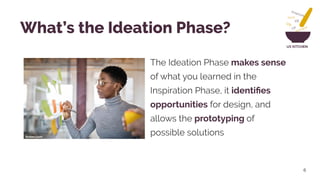
The Ideation Phase makes sense
of what you learned in the
Inspiration Phase, it identifies
opportunities for design, and
allows the prototyping of
possible solutions
6
What’s the Ideation Phase?
forbes.com
UX KITCHEN
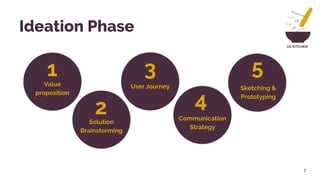
Value
proposition
Solution
Brainstorming
1
2
3
4
5
Ideation Phase
7
User Journey
Communication
Strategy
Sketching &
Prototyping
UX KITCHEN
Value proposition
8
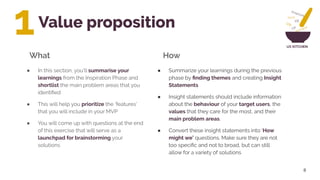
● Summarize your learnings during the previous
phase by finding themes and creating Insight
Statements
● Insight statements should include information
about the behaviour of your target users, the
values that they care for the most, and their
main problem areas.
● Convert these insight statements into ‘How
might we’ questions. Make sure they are not
too specific and not to broad, but can still
allow for a variety of solutions
What How
1
● In this section, you’ll summarise your
learnings from the Inspiration Phase and
shortlist the main problem areas that you
identified
● This will help you prioritize the ‘features’
that you will include in your MVP
● You will come up with questions at the end
of this exercise that will serve as a
launchpad for brainstorming your
solutions
UX KITCHEN● Insight Statements
● ‘How Might We’ Questions
9
Value Proposition Deliverables
UX KITCHENExamples:
● https://youtu.be/sRGk5oKXgCk
Resources:
● How Might We - IDEO Design Kit
● Create Insight Statements - IDEO Design Kit
10
Value Proposition Resources
UX KITCHEN
Solution Brainstorming
● Now it’s time to tap into your
knowledge and creativity to brainstorm
as many solution ideas as you can
● Remember that the best policy is to
promote openness, lots of ideas, and
creativity over immediate feasibility.
Brainstorms work best when the group
is positive, optimistic, and focused on
generating as many ideas as possible.
11
● Go through each of the ‘How Might We’
questions and brainstorm as many ideas
as you can. Allow the team a few minutes
per question to get their ideas down and
then share your ideas.
● Now, cluster similar ideas together and
have each team member pick the top 5
ideas that jump out to them
● You can then vote on the most popular
one
What How
2
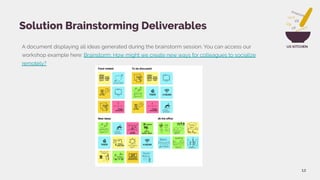
UX KITCHENA document displaying all ideas generated during the brainstorm session. You can access our
workshop example here: Brainstorm: How might we create new ways for colleagues to socialize
remotely?
12
Solution Brainstorming Deliverables
UX KITCHEN
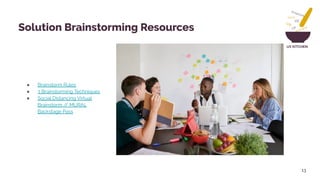
● Brainstorm Rules
● 3 Brainstorming Techniques
● Social Distancing Virtual
Brainstorm // MURAL
Backstage Pass
13
Solution Brainstorming Resources
UX KITCHEN
User Journey
14
● For each goal that you want your user to
achieve, map out their journey under the
following steps: Discovery, Learn and Use,
identifying each of the touchpoints of the
solution that the user interacts with.
● For each user journey it’s vital to understand:
● Motivation: Why are they trying to do it?
● Channels: Where interaction takes place
● Actions: The actual behaviors and steps
taken by users.
● Pain points: What are the challenges
users are facing?
What How
3
● Once you’ve settled an idea, it’s time to
flesh out the concept.
● In this exercise you will map out the
journey that your user will go through with
the experience, service or product that you
create
● A user journey map is a visualization of an
individual’s relationship with a
product/service/experience over time in
different channels
UX KITCHEN
15
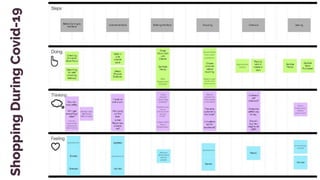
ShoppingDuringCovid-19
UX KITCHEN
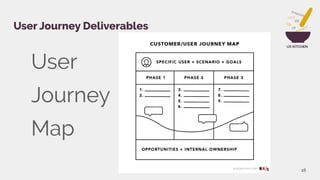
User
Journey
Map
16
User Journey Deliverables
UX KITCHENExamples:
● https://youtu.be/JTqCR84fzeg
Resources:
● A Beginner’s Guide To User Journey Mapping
● How To Create User Journeys
17
User Journey Resources
UX KITCHEN
Communication Strategy
18
● What’s the nature of the solution you’re
looking at ; A service? Digital product? A
policy?
● Consider an ideal journey for an ideal user
starting from acquisition (how you market to
them), onboarding (how you orient them), use,
goal, feedback, customer service etc
● For each bit of the journey, what are the most
obvious, fewest, friendly words you could use
to guide the user on what to do at each
stage?
● Easy ..right? NO! Always test if the words you
chose have the interpretation we’re looking
for.
What How
4
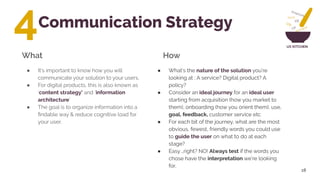
● It’s important to know how you will
communicate your solution to your users.
● For digital products, this is also known as
‘content strategy’ and ‘information
architecture’
● The goal is to organize information into a
findable way & reduce cognitive load for
your user.
UX KITCHEN
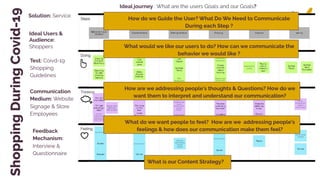
ShoppingDuringCovid-19
19
Solution: Service
How do we Guide the User? What Do We Need to Communicate
During each Step ?
What would we like our users to do? How can we communicate the
behavior we would like ?
How are we addressing people's thoughts & Questions? How do we
want them to interpret and understand our communication?
What do we want people to feel? How are we addressing people's
feelings & how does our communication make them feel?
Ideal Users &
Audience:
Shoppers
Communication
Medium: Website
Signage & Store
Employees
What is our Content Strategy?
Ideal journey : What are the users Goals and our Goals?
Feedback
Mechanism:
Interview &
Questionnaire
Test: Coivd-19
Shopping
Guidelines
UX KITCHEN
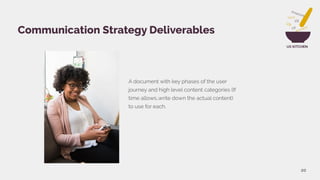
A document with key phases of the user
journey and high level content categories (If
time allows..write down the actual content)
to use for each.
20
Communication Strategy Deliverables
UX KITCHENExamples & Resource
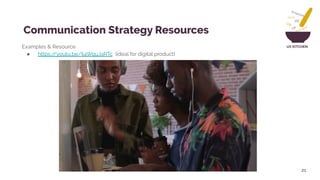
● https://youtu.be/Ij4WquJaRTc (ideal for digital product)
21
Communication Strategy Resources
UX KITCHEN
Sketching & Prototyping
22
● You can make any number of types of
prototypes: Storyboards, Role Plays, models,
service blueprints, mock-ups. The goal here it
to make something tangible that conveys the
idea you want to test.
● Test your prototype with people you’re
designing for. Make sure to Get Feedback.
● Here is where you can now Integrate
Feedback and Iterate.
What How
5
● This is the implementation of your
brainstorm concepts from just words to a
‘tangible’ solution.
● Sketching, wireframes, and paper
prototypes are low-fidelity, while mockups
& prototypes are high-fidelity.
● This help with testing before further
investment of resources & also
communication of the solution to the rest
of the team.
UX KITCHEN
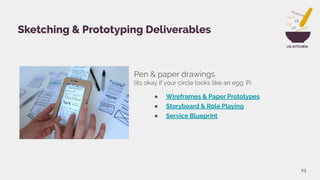
Pen & paper drawings
(its okay if your circle looks like an egg :P)
● Wireframes & Paper Prototypes
● Storyboard & Role Playing
● Service Blueprint
23
Sketching & Prototyping Deliverables
UX KITCHENExamples:
● Crazy 8s
● Design Sprint Sketching
● Storyboard
● Service Blueprinting
● Service Blueprint
● Role Playing
● Prototyping Ideas
Resources:
● https://www.creatlr.com/template/MEXsZg2hbB3sP28GwuYvOb/
service-blueprint-canvas/
●
24
Sketching & Prototyping Resources
UX KITCHEN
25
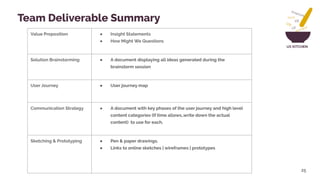
Value Proposition ● Insight Statements
● How Might We Questions
Solution Brainstorming ● A document displaying all ideas generated during the
brainstorm session
User Journey ● User journey map
Communication Strategy ● A document with key phases of the user journey and high level
content categories (If time allows..write down the actual
content) to use for each.
Sketching & Prototyping ● Pen & paper drawings.
● Links to online sketches | wireframes | prototypes
Team Deliverable Summary
UX KITCHEN
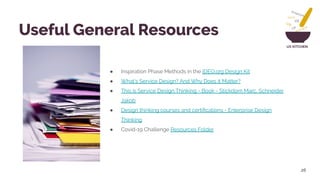
● Inspiration Phase Methods in the IDEO.org Design Kit
● What’s Service Design? And Why Does it Matter?
● This is Service Design Thinking - Book - Stickdorn Marc, Schneider
Jakob
● Design thinking courses and certifications - Enterprise Design
Thinking
● Covid-19 Challenge Resources Folder
26
Useful General Resources
UX KITCHEN
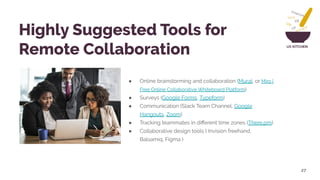
● Online brainstorming and collaboration (Mural, or Miro |
Free Online Collaborative Whiteboard Platform)
● Surveys (Google Forms, Typeform)
● Communication (Slack Team Channel, Google
Hangouts, Zoom)
● Tracking teammates in different time zones (There.pm)
● Collaborative design tools ( Invision freehand,
Balsamiq, Figma )
27
Highly Suggested Tools for
Remote Collaboration
Mentors!
Graham Ingokho
CEO of Decoded Africa, a startup that aims to democratize
technology education across Africa and prepare the continent
for the future of work. He is also a mentor with Google
launchpad, where he advises promising startups across Africa.
Graham was among the first employees at Africa’s Talking,
where he helped it grow from a modest startup to the thriving
business that it is today as Head of Developer Relations. He is
a self taught software engineer and holds a bachelors in
chemical engineering.
Nabila Alibhai
Has a long career in innovation in peace-building and civic
engagement, public health and safety. She has held positions in the
Aga Khan Development Network, the United Nations and the
International Organization for Migration and has worked on projects
in Afghanistan, Pakistan, Kenya,Tanzania, the United States and
Switzerland. She has a Master of Public Health from Yale University
and is trained in conflict resolution. She was recently a mid-career
fellow in MIT’s Special Program for Urban and Regional Studies in
order to advance her efforts on community solidarity through public
spaces.
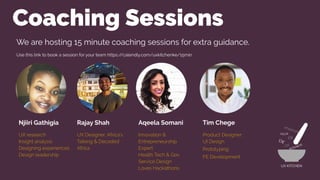
Coaching Sessions
Njiiri Gathigia
UX research
Insight analysis
Designing experiences
Design leadership
Rajay Shah
UX Designer, Africa’s
Talking & Decoded
Africa
Aqeela Somani
Innovation &
Entrepreneurship
Expert
Health Tech & Gov
Service Design
Loves Hackathons
Tim Chege
Product Designer:
UI Design
Prototyping
FE Development
UX KITCHEN
We are hosting 15 minute coaching sessions for extra guidance.
Use this link to book a session for your team https://calendly.com/uxkitchenke/15min
Q&A Time!
Webinar 2:
Designing for Covid-19
Networking!

Ideation webinar

  • 1.
    Designing for Covid-19 Challenge Session2 UX Kitchen Presents: UX KITCHEN
  • 2.
    Challenge Update Challenge Timeline 7pm Daily Check Ins Further your project Final format and Submission UX KITCHEN
  • 3.
    UX KITCHEN Today’s SessionOverview 1. What we learnt last week summary. 2. What is the ideation phase? a. Value Proposition i. Insight Statements ii. ‘How Might We’s b. Solution Brainstorming c. User Journey d. Communication Strategy e. Sketching & Prototyping 3. Assignment for the week 4. Useful Resources a. Helpful links b. Highly suggested tools for collaboration 5. Announcements & Q&A 3
  • 4.
    What we learntlast week Problem analysis summary.
  • 5.
    Ideation Phase Webinar 2: Designingfor Covid-19 UX KITCHEN
  • 6.
    UX KITCHEN The IdeationPhase makes sense of what you learned in the Inspiration Phase, it identifies opportunities for design, and allows the prototyping of possible solutions 6 What’s the Ideation Phase? forbes.com
  • 7.
  • 8.
    UX KITCHEN Value proposition 8 ●Summarize your learnings during the previous phase by finding themes and creating Insight Statements ● Insight statements should include information about the behaviour of your target users, the values that they care for the most, and their main problem areas. ● Convert these insight statements into ‘How might we’ questions. Make sure they are not too specific and not to broad, but can still allow for a variety of solutions What How 1 ● In this section, you’ll summarise your learnings from the Inspiration Phase and shortlist the main problem areas that you identified ● This will help you prioritize the ‘features’ that you will include in your MVP ● You will come up with questions at the end of this exercise that will serve as a launchpad for brainstorming your solutions
  • 9.
    UX KITCHEN● InsightStatements ● ‘How Might We’ Questions 9 Value Proposition Deliverables
  • 10.
    UX KITCHENExamples: ● https://youtu.be/sRGk5oKXgCk Resources: ●How Might We - IDEO Design Kit ● Create Insight Statements - IDEO Design Kit 10 Value Proposition Resources
  • 11.
    UX KITCHEN Solution Brainstorming ●Now it’s time to tap into your knowledge and creativity to brainstorm as many solution ideas as you can ● Remember that the best policy is to promote openness, lots of ideas, and creativity over immediate feasibility. Brainstorms work best when the group is positive, optimistic, and focused on generating as many ideas as possible. 11 ● Go through each of the ‘How Might We’ questions and brainstorm as many ideas as you can. Allow the team a few minutes per question to get their ideas down and then share your ideas. ● Now, cluster similar ideas together and have each team member pick the top 5 ideas that jump out to them ● You can then vote on the most popular one What How 2
  • 12.
    UX KITCHENA documentdisplaying all ideas generated during the brainstorm session. You can access our workshop example here: Brainstorm: How might we create new ways for colleagues to socialize remotely? 12 Solution Brainstorming Deliverables
  • 13.
    UX KITCHEN ● BrainstormRules ● 3 Brainstorming Techniques ● Social Distancing Virtual Brainstorm // MURAL Backstage Pass 13 Solution Brainstorming Resources
  • 14.
    UX KITCHEN User Journey 14 ●For each goal that you want your user to achieve, map out their journey under the following steps: Discovery, Learn and Use, identifying each of the touchpoints of the solution that the user interacts with. ● For each user journey it’s vital to understand: ● Motivation: Why are they trying to do it? ● Channels: Where interaction takes place ● Actions: The actual behaviors and steps taken by users. ● Pain points: What are the challenges users are facing? What How 3 ● Once you’ve settled an idea, it’s time to flesh out the concept. ● In this exercise you will map out the journey that your user will go through with the experience, service or product that you create ● A user journey map is a visualization of an individual’s relationship with a product/service/experience over time in different channels
  • 15.
  • 16.
  • 17.
    UX KITCHENExamples: ● https://youtu.be/JTqCR84fzeg Resources: ●A Beginner’s Guide To User Journey Mapping ● How To Create User Journeys 17 User Journey Resources
  • 18.
    UX KITCHEN Communication Strategy 18 ●What’s the nature of the solution you’re looking at ; A service? Digital product? A policy? ● Consider an ideal journey for an ideal user starting from acquisition (how you market to them), onboarding (how you orient them), use, goal, feedback, customer service etc ● For each bit of the journey, what are the most obvious, fewest, friendly words you could use to guide the user on what to do at each stage? ● Easy ..right? NO! Always test if the words you chose have the interpretation we’re looking for. What How 4 ● It’s important to know how you will communicate your solution to your users. ● For digital products, this is also known as ‘content strategy’ and ‘information architecture’ ● The goal is to organize information into a findable way & reduce cognitive load for your user.
  • 19.
    UX KITCHEN ShoppingDuringCovid-19 19 Solution: Service Howdo we Guide the User? What Do We Need to Communicate During each Step ? What would we like our users to do? How can we communicate the behavior we would like ? How are we addressing people's thoughts & Questions? How do we want them to interpret and understand our communication? What do we want people to feel? How are we addressing people's feelings & how does our communication make them feel? Ideal Users & Audience: Shoppers Communication Medium: Website Signage & Store Employees What is our Content Strategy? Ideal journey : What are the users Goals and our Goals? Feedback Mechanism: Interview & Questionnaire Test: Coivd-19 Shopping Guidelines
  • 20.
    UX KITCHEN A documentwith key phases of the user journey and high level content categories (If time allows..write down the actual content) to use for each. 20 Communication Strategy Deliverables
  • 21.
    UX KITCHENExamples &Resource ● https://youtu.be/Ij4WquJaRTc (ideal for digital product) 21 Communication Strategy Resources
  • 22.
    UX KITCHEN Sketching &Prototyping 22 ● You can make any number of types of prototypes: Storyboards, Role Plays, models, service blueprints, mock-ups. The goal here it to make something tangible that conveys the idea you want to test. ● Test your prototype with people you’re designing for. Make sure to Get Feedback. ● Here is where you can now Integrate Feedback and Iterate. What How 5 ● This is the implementation of your brainstorm concepts from just words to a ‘tangible’ solution. ● Sketching, wireframes, and paper prototypes are low-fidelity, while mockups & prototypes are high-fidelity. ● This help with testing before further investment of resources & also communication of the solution to the rest of the team.
  • 23.
    UX KITCHEN Pen &paper drawings (its okay if your circle looks like an egg :P) ● Wireframes & Paper Prototypes ● Storyboard & Role Playing ● Service Blueprint 23 Sketching & Prototyping Deliverables
  • 24.
    UX KITCHENExamples: ● Crazy8s ● Design Sprint Sketching ● Storyboard ● Service Blueprinting ● Service Blueprint ● Role Playing ● Prototyping Ideas Resources: ● https://www.creatlr.com/template/MEXsZg2hbB3sP28GwuYvOb/ service-blueprint-canvas/ ● 24 Sketching & Prototyping Resources
  • 25.
    UX KITCHEN 25 Value Proposition● Insight Statements ● How Might We Questions Solution Brainstorming ● A document displaying all ideas generated during the brainstorm session User Journey ● User journey map Communication Strategy ● A document with key phases of the user journey and high level content categories (If time allows..write down the actual content) to use for each. Sketching & Prototyping ● Pen & paper drawings. ● Links to online sketches | wireframes | prototypes Team Deliverable Summary
  • 26.
    UX KITCHEN ● InspirationPhase Methods in the IDEO.org Design Kit ● What’s Service Design? And Why Does it Matter? ● This is Service Design Thinking - Book - Stickdorn Marc, Schneider Jakob ● Design thinking courses and certifications - Enterprise Design Thinking ● Covid-19 Challenge Resources Folder 26 Useful General Resources
  • 27.
    UX KITCHEN ● Onlinebrainstorming and collaboration (Mural, or Miro | Free Online Collaborative Whiteboard Platform) ● Surveys (Google Forms, Typeform) ● Communication (Slack Team Channel, Google Hangouts, Zoom) ● Tracking teammates in different time zones (There.pm) ● Collaborative design tools ( Invision freehand, Balsamiq, Figma ) 27 Highly Suggested Tools for Remote Collaboration
  • 28.
    Mentors! Graham Ingokho CEO ofDecoded Africa, a startup that aims to democratize technology education across Africa and prepare the continent for the future of work. He is also a mentor with Google launchpad, where he advises promising startups across Africa. Graham was among the first employees at Africa’s Talking, where he helped it grow from a modest startup to the thriving business that it is today as Head of Developer Relations. He is a self taught software engineer and holds a bachelors in chemical engineering. Nabila Alibhai Has a long career in innovation in peace-building and civic engagement, public health and safety. She has held positions in the Aga Khan Development Network, the United Nations and the International Organization for Migration and has worked on projects in Afghanistan, Pakistan, Kenya,Tanzania, the United States and Switzerland. She has a Master of Public Health from Yale University and is trained in conflict resolution. She was recently a mid-career fellow in MIT’s Special Program for Urban and Regional Studies in order to advance her efforts on community solidarity through public spaces.
  • 29.
    Coaching Sessions Njiiri Gathigia UXresearch Insight analysis Designing experiences Design leadership Rajay Shah UX Designer, Africa’s Talking & Decoded Africa Aqeela Somani Innovation & Entrepreneurship Expert Health Tech & Gov Service Design Loves Hackathons Tim Chege Product Designer: UI Design Prototyping FE Development UX KITCHEN We are hosting 15 minute coaching sessions for extra guidance. Use this link to book a session for your team https://calendly.com/uxkitchenke/15min
  • 30.
  • 31.