ICT SKILLS-1
INPUT, OUTPUT, MEMORY AND STORAGE DEVICES OF A COMPUTER SYSTEM
INDEX
What is Memory?
Types of Memory.
Primary Memory
Secondary Memory
Units of Memory
What is Input Device?
What is Output Device?
What is INPUT DEVICE?
It is responsible for accepting input ( data or instructions )
from the user. This work accomplished with the help of
input devices.
The input devices that we are going to discuss are:
Keyboard Mouse Microphone Scanner
Light Pen Barcode Reader MICR OCR
OMR
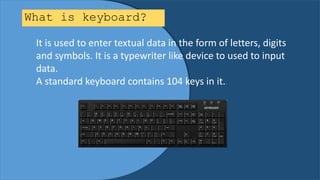
What is keyboard?
It is used to enter textual data in the form of letters, digits
and symbols. It is a typewriter like device to used to input
data.
A standard keyboard contains 104 keys in it.
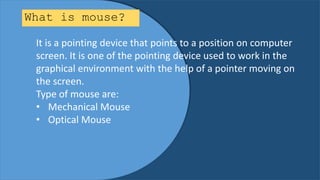
What is mouse?
It is a pointing device that points to a position on computer
screen. It is one of the pointing device used to work in the
graphical environment with the help of a pointer moving on
the screen.
Type of mouse are:
• Mechanical Mouse
• Optical Mouse
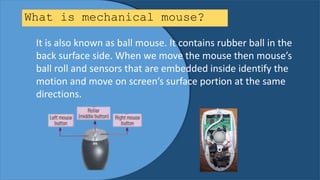
What is mechanical mouse?
It is also known as ball mouse. It contains rubber ball in the
back surface side. When we move the mouse then mouse’s
ball roll and sensors that are embedded inside identify the
motion and move on screen’s surface portion at the same
directions.
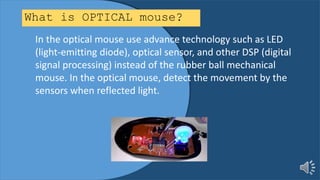
What is OPTICAL mouse?
In the optical mouse use advance technology such as LED
(light-emitting diode), optical sensor, and other DSP (digital
signal processing) instead of the rubber ball mechanical
mouse. In the optical mouse, detect the movement by the
sensors when reflected light.
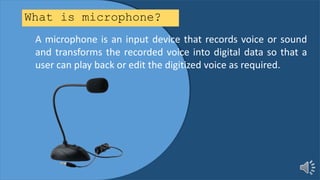
What is microphone?
A microphone is an input device that records voice or sound
and transforms the recorded voice into digital data so that a
user can play back or edit the digitized voice as required.
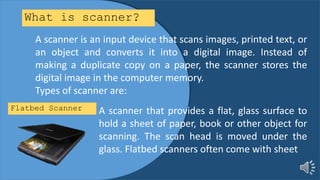
What is scanner?
A scanner is an input device that scans images, printed text, or
an object and converts it into a digital image. Instead of
making a duplicate copy on a paper, the scanner stores the
digital image in the computer memory.
Types of scanner are:
A scanner that provides a flat, glass surface to
hold a sheet of paper, book or other object for
scanning. The scan head is moved under the
glass. Flatbed scanners often come with sheet
Flatbed Scanner
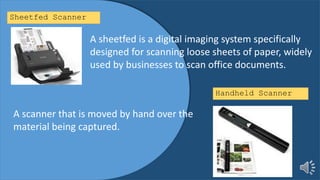
A sheetfed is a digital imaging system specifically
designed for scanning loose sheets of paper, widely
used by businesses to scan office documents.
Sheetfed Scanner
Handheld Scanner
A scanner that is moved by hand over the
material being captured.
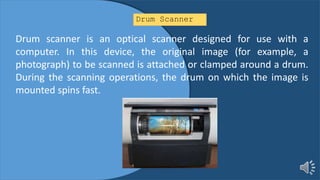
Drum Scanner
Drum scanner is an optical scanner designed for use with a
computer. In this device, the original image (for example, a
photograph) to be scanned is attached or clamped around a drum.
During the scanning operations, the drum on which the image is
mounted spins fast.
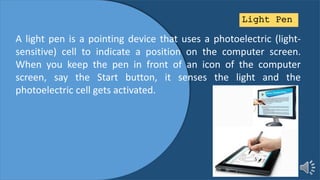
Light Pen
A light pen is a pointing device that uses a photoelectric (light-
sensitive) cell to indicate a position on the computer screen.
When you keep the pen in front of an icon of the computer
screen, say the Start button, it senses the light and the
photoelectric cell gets activated.
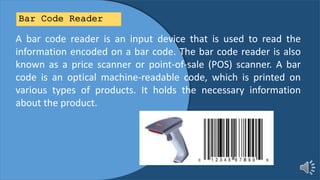
Bar Code Reader
A bar code reader is an input device that is used to read the
information encoded on a bar code. The bar code reader is also
known as a price scanner or point-of-sale (POS) scanner. A bar
code is an optical machine-readable code, which is printed on
various types of products. It holds the necessary information
about the product.
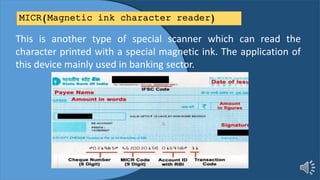
MICR(Magnetic ink character reader)
This is another type of special scanner which can read the
character printed with a special magnetic ink. The application of
this device mainly used in banking sector.
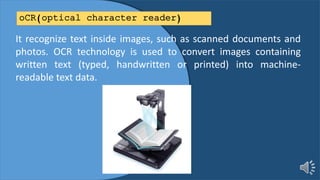
oCR(optical character reader)
It recognize text inside images, such as scanned documents and
photos. OCR technology is used to convert images containing
written text (typed, handwritten or printed) into machine-
readable text data.
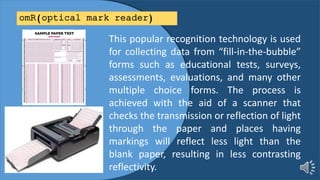
omR(optical mark reader)
This popular recognition technology is used
for collecting data from “fill-in-the-bubble”
forms such as educational tests, surveys,
assessments, evaluations, and many other
multiple choice forms. The process is
achieved with the aid of a scanner that
checks the transmission or reflection of light
through the paper and places having
markings will reflect less light than the
blank paper, resulting in less contrasting
reflectivity.
What is OUTPUT DEVICE?
It is responsible for producing the output in user readable
form. Mainly the output produced in hard or soft format.
The output devices that we are going to discuss are:
Monitors Printers Plotters Speakers
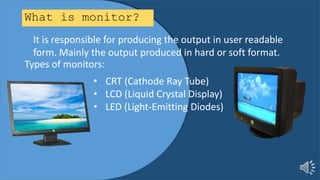
What is monitor?
It is responsible for producing the output in user readable
form. Mainly the output produced in hard or soft format.
Types of monitors:
• CRT (Cathode Ray Tube)
• LCD (Liquid Crystal Display)
• LED (Light-Emitting Diodes)
What is PRINTER?
It is an output device used to get hard copy of the results
produced by the computer. Such type of output is printed
on a paper which is permanent in nature.
Printers can be divided into two categories:
• Impact Printers
• Non-Impact Printers
What is Impact PRINTER?
An impact printer is a type of printer that operates by
striking a metal or plastic head against an ink ribbon. Due
to this mechanical contact they produce a lot of noise
while printing.
Types of Impact printers are:
• Dot Matrix Printer
• Daisy Wheel Printer
• Drum Printer
• Chain Printer
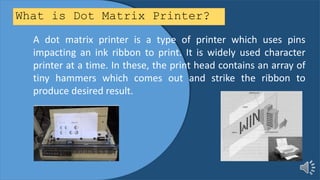
What is Dot Matrix Printer?
A dot matrix printer is a type of printer which uses pins
impacting an ink ribbon to print. It is widely used character
printer at a time. In these, the print head contains an array of
tiny hammers which comes out and strike the ribbon to
produce desired result.
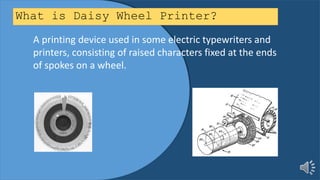
What is Daisy Wheel Printer?
A printing device used in some electric typewriters and
printers, consisting of raised characters fixed at the ends
of spokes on a wheel.
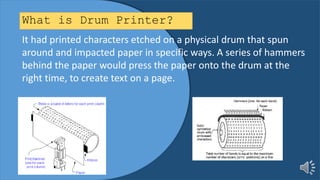
What is Drum Printer?
It had printed characters etched on a physical drum that spun
around and impacted paper in specific ways. A series of hammers
behind the paper would press the paper onto the drum at the
right time, to create text on a page.
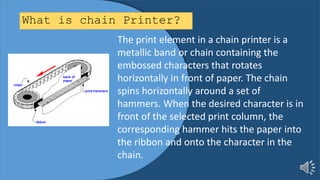
What is chain Printer?
The print element in a chain printer is a
metallic band or chain containing the
embossed characters that rotates
horizontally in front of paper. The chain
spins horizontally around a set of
hammers. When the desired character is in
front of the selected print column, the
corresponding hammer hits the paper into
the ribbon and onto the character in the
chain.
What is non-Impact PRINTER?
Non impact printers are printers which do not have any
physical contact between the print head and the paper. Their
speed is usually measured in Pages Per Minute(PPM)
Types of Non-Impact printers are:
• Inkjet Printers
• Laser Printers
• Thermal Printers
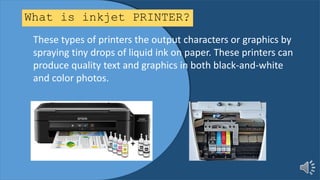
What is inkjet PRINTER?
These types of printers the output characters or graphics by
spraying tiny drops of liquid ink on paper. These printers can
produce quality text and graphics in both black-and-white
and color photos.
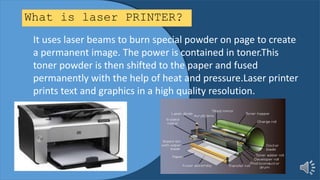
What is laser PRINTER?
It uses laser beams to burn special powder on page to create
a permanent image. The power is contained in toner.This
toner powder is then shifted to the paper and fused
permanently with the help of heat and pressure.Laser printer
prints text and graphics in a high quality resolution.
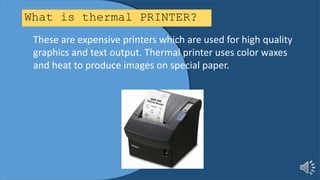
What is thermal PRINTER?
These are expensive printers which are used for high quality
graphics and text output. Thermal printer uses color waxes
and heat to produce images on special paper.
What is plotters?
A plotter is a computer vector graphic printer that gives a hard
copy of the output based on instructions from the system.
Plotters are widely used to print designs of things such as cars,
ships and buildings on a piece of paper using a pen.
Types of plotters:
• Drum Plotter
• Flat-Bed Plotter
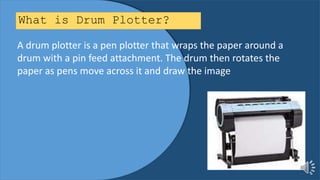
What is Drum Plotter?
A drum plotter is a pen plotter that wraps the paper around a
drum with a pin feed attachment. The drum then rotates the
paper as pens move across it and draw the image
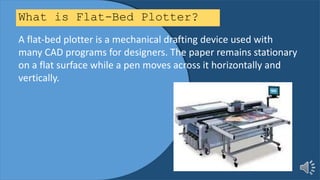
What is Flat-Bed Plotter?
A flat-bed plotter is a mechanical drafting device used with
many CAD programs for designers. The paper remains stationary
on a flat surface while a pen moves across it horizontally and
vertically.
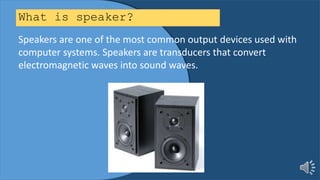
What is speaker?
Speakers are one of the most common output devices used with
computer systems. Speakers are transducers that convert
electromagnetic waves into sound waves.
What is Memory?
It is used to hold processed and unprocessed information
in the computer system. The storage in the system can be
permanent or temporary.
Types of Memory:
• Primary Memory
• Secondary Memory
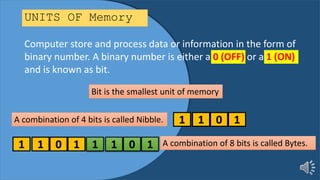
UNITS OF Memory
Computer store and process data or information in the form of
binary number. A binary number is either a 0 (OFF) or a 1 (ON)
and is known as bit.
Bit is the smallest unit of memory
A combination of 4 bits is called Nibble. 1 1 0 1
1 1 0 1 1 1 0 1 A combination of 8 bits is called Bytes.
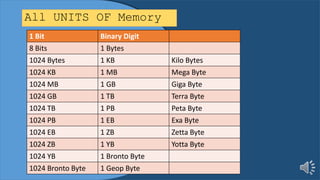
All UNITS OF Memory
1 Bit Binary Digit
8 Bits 1 Bytes
1024 Bytes 1 KB Kilo Bytes
1024 KB 1 MB Mega Byte
1024 MB 1 GB Giga Byte
1024 GB 1 TB Terra Byte
1024 TB 1 PB Peta Byte
1024 PB 1 EB Exa Byte
1024 EB 1 ZB Zetta Byte
1024 ZB 1 YB Yotta Byte
1024 YB 1 Bronto Byte
1024 Bronto Byte 1 Geop Byte
MAIN MEMORY(PRIMARY MEMORY):
In these internal storage devices, data store in the form of electric
charge, i.e., in the form of binary digit 0’s and 1’s.As it is directly interact
with CPU, it is also known as Primary memory.
It is of two type:
RAM(RANDOM ACCESS MEMORY)
ROM(READ ONLY MEMORY)
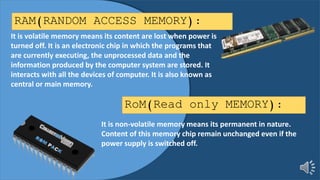
RAM(RANDOM ACCESS MEMORY):
It is volatile memory means its content are lost when power is
turned off. It is an electronic chip in which the programs that
are currently executing, the unprocessed data and the
information produced by the computer system are stored. It
interacts with all the devices of computer. It is also known as
central or main memory.
RoM(Read only MEMORY):
It is non-volatile memory means its permanent in nature.
Content of this memory chip remain unchanged even if the
power supply is switched off.
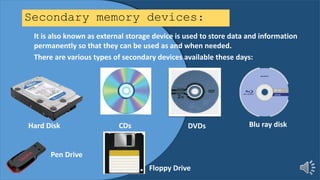
Secondary memory devices:
It is also known as external storage device is used to store data and information
permanently so that they can be used as and when needed.
There are various types of secondary devices available these days:
Hard Disk CDs DVDs
Pen Drive
Blu ray disk
Floppy Drive
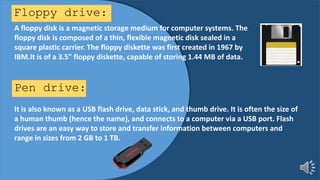
Floppy drive:
A floppy disk is a magnetic storage medium for computer systems. The
floppy disk is composed of a thin, flexible magnetic disk sealed in a
square plastic carrier. The floppy diskette was first created in 1967 by
IBM.It is of a 3.5" floppy diskette, capable of storing 1.44 MB of data.
Pen drive:
It is also known as a USB flash drive, data stick, and thumb drive. It is often the size of
a human thumb (hence the name), and connects to a computer via a USB port. Flash
drives are an easy way to store and transfer information between computers and
range in sizes from 2 GB to 1 TB.
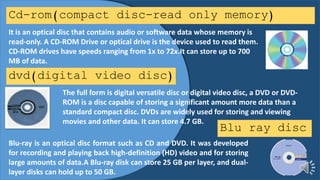
Cd-rom(compact disc-read only memory)
It is an optical disc that contains audio or software data whose memory is
read-only. A CD-ROM Drive or optical drive is the device used to read them.
CD-ROM drives have speeds ranging from 1x to 72x.It can store up to 700
MB of data.
dvd(digital video disc)
The full form is digital versatile disc or digital video disc, a DVD or DVD-
ROM is a disc capable of storing a significant amount more data than a
standard compact disc. DVDs are widely used for storing and viewing
movies and other data. It can store 4.7 GB.
Blu ray disc
Blu-ray is an optical disc format such as CD and DVD. It was developed
for recording and playing back high-definition (HD) video and for storing
large amounts of data.A Blu-ray disk can store 25 GB per layer, and dual-
layer disks can hold up to 50 GB.

ICT SKILLS-1 INPUT,OUTPUT,MEMORY AND STORAGE

  • 1.
    ICT SKILLS-1 INPUT, OUTPUT,MEMORY AND STORAGE DEVICES OF A COMPUTER SYSTEM
  • 2.
    INDEX What is Memory? Typesof Memory. Primary Memory Secondary Memory Units of Memory What is Input Device? What is Output Device?
  • 3.
    What is INPUTDEVICE? It is responsible for accepting input ( data or instructions ) from the user. This work accomplished with the help of input devices. The input devices that we are going to discuss are: Keyboard Mouse Microphone Scanner Light Pen Barcode Reader MICR OCR OMR
  • 4.
    What is keyboard? Itis used to enter textual data in the form of letters, digits and symbols. It is a typewriter like device to used to input data. A standard keyboard contains 104 keys in it.
  • 5.
    What is mouse? Itis a pointing device that points to a position on computer screen. It is one of the pointing device used to work in the graphical environment with the help of a pointer moving on the screen. Type of mouse are: • Mechanical Mouse • Optical Mouse
  • 6.
    What is mechanicalmouse? It is also known as ball mouse. It contains rubber ball in the back surface side. When we move the mouse then mouse’s ball roll and sensors that are embedded inside identify the motion and move on screen’s surface portion at the same directions.
  • 7.
    What is OPTICALmouse? In the optical mouse use advance technology such as LED (light-emitting diode), optical sensor, and other DSP (digital signal processing) instead of the rubber ball mechanical mouse. In the optical mouse, detect the movement by the sensors when reflected light.
  • 8.
    What is microphone? Amicrophone is an input device that records voice or sound and transforms the recorded voice into digital data so that a user can play back or edit the digitized voice as required.
  • 9.
    What is scanner? Ascanner is an input device that scans images, printed text, or an object and converts it into a digital image. Instead of making a duplicate copy on a paper, the scanner stores the digital image in the computer memory. Types of scanner are: A scanner that provides a flat, glass surface to hold a sheet of paper, book or other object for scanning. The scan head is moved under the glass. Flatbed scanners often come with sheet Flatbed Scanner
  • 10.
    A sheetfed isa digital imaging system specifically designed for scanning loose sheets of paper, widely used by businesses to scan office documents. Sheetfed Scanner Handheld Scanner A scanner that is moved by hand over the material being captured.
  • 11.
    Drum Scanner Drum scanneris an optical scanner designed for use with a computer. In this device, the original image (for example, a photograph) to be scanned is attached or clamped around a drum. During the scanning operations, the drum on which the image is mounted spins fast.
  • 12.
    Light Pen A lightpen is a pointing device that uses a photoelectric (light- sensitive) cell to indicate a position on the computer screen. When you keep the pen in front of an icon of the computer screen, say the Start button, it senses the light and the photoelectric cell gets activated.
  • 13.
    Bar Code Reader Abar code reader is an input device that is used to read the information encoded on a bar code. The bar code reader is also known as a price scanner or point-of-sale (POS) scanner. A bar code is an optical machine-readable code, which is printed on various types of products. It holds the necessary information about the product.
  • 14.
    MICR(Magnetic ink characterreader) This is another type of special scanner which can read the character printed with a special magnetic ink. The application of this device mainly used in banking sector.
  • 15.
    oCR(optical character reader) Itrecognize text inside images, such as scanned documents and photos. OCR technology is used to convert images containing written text (typed, handwritten or printed) into machine- readable text data.
  • 16.
    omR(optical mark reader) Thispopular recognition technology is used for collecting data from “fill-in-the-bubble” forms such as educational tests, surveys, assessments, evaluations, and many other multiple choice forms. The process is achieved with the aid of a scanner that checks the transmission or reflection of light through the paper and places having markings will reflect less light than the blank paper, resulting in less contrasting reflectivity.
  • 17.
    What is OUTPUTDEVICE? It is responsible for producing the output in user readable form. Mainly the output produced in hard or soft format. The output devices that we are going to discuss are: Monitors Printers Plotters Speakers
  • 18.
    What is monitor? Itis responsible for producing the output in user readable form. Mainly the output produced in hard or soft format. Types of monitors: • CRT (Cathode Ray Tube) • LCD (Liquid Crystal Display) • LED (Light-Emitting Diodes)
  • 19.
    What is PRINTER? Itis an output device used to get hard copy of the results produced by the computer. Such type of output is printed on a paper which is permanent in nature. Printers can be divided into two categories: • Impact Printers • Non-Impact Printers
  • 20.
    What is ImpactPRINTER? An impact printer is a type of printer that operates by striking a metal or plastic head against an ink ribbon. Due to this mechanical contact they produce a lot of noise while printing. Types of Impact printers are: • Dot Matrix Printer • Daisy Wheel Printer • Drum Printer • Chain Printer
  • 21.
    What is DotMatrix Printer? A dot matrix printer is a type of printer which uses pins impacting an ink ribbon to print. It is widely used character printer at a time. In these, the print head contains an array of tiny hammers which comes out and strike the ribbon to produce desired result.
  • 22.
    What is DaisyWheel Printer? A printing device used in some electric typewriters and printers, consisting of raised characters fixed at the ends of spokes on a wheel.
  • 23.
    What is DrumPrinter? It had printed characters etched on a physical drum that spun around and impacted paper in specific ways. A series of hammers behind the paper would press the paper onto the drum at the right time, to create text on a page.
  • 24.
    What is chainPrinter? The print element in a chain printer is a metallic band or chain containing the embossed characters that rotates horizontally in front of paper. The chain spins horizontally around a set of hammers. When the desired character is in front of the selected print column, the corresponding hammer hits the paper into the ribbon and onto the character in the chain.
  • 25.
    What is non-ImpactPRINTER? Non impact printers are printers which do not have any physical contact between the print head and the paper. Their speed is usually measured in Pages Per Minute(PPM) Types of Non-Impact printers are: • Inkjet Printers • Laser Printers • Thermal Printers
  • 26.
    What is inkjetPRINTER? These types of printers the output characters or graphics by spraying tiny drops of liquid ink on paper. These printers can produce quality text and graphics in both black-and-white and color photos.
  • 27.
    What is laserPRINTER? It uses laser beams to burn special powder on page to create a permanent image. The power is contained in toner.This toner powder is then shifted to the paper and fused permanently with the help of heat and pressure.Laser printer prints text and graphics in a high quality resolution.
  • 28.
    What is thermalPRINTER? These are expensive printers which are used for high quality graphics and text output. Thermal printer uses color waxes and heat to produce images on special paper.
  • 29.
    What is plotters? Aplotter is a computer vector graphic printer that gives a hard copy of the output based on instructions from the system. Plotters are widely used to print designs of things such as cars, ships and buildings on a piece of paper using a pen. Types of plotters: • Drum Plotter • Flat-Bed Plotter
  • 30.
    What is DrumPlotter? A drum plotter is a pen plotter that wraps the paper around a drum with a pin feed attachment. The drum then rotates the paper as pens move across it and draw the image
  • 31.
    What is Flat-BedPlotter? A flat-bed plotter is a mechanical drafting device used with many CAD programs for designers. The paper remains stationary on a flat surface while a pen moves across it horizontally and vertically.
  • 32.
    What is speaker? Speakersare one of the most common output devices used with computer systems. Speakers are transducers that convert electromagnetic waves into sound waves.
  • 33.
    What is Memory? Itis used to hold processed and unprocessed information in the computer system. The storage in the system can be permanent or temporary. Types of Memory: • Primary Memory • Secondary Memory
  • 34.
    UNITS OF Memory Computerstore and process data or information in the form of binary number. A binary number is either a 0 (OFF) or a 1 (ON) and is known as bit. Bit is the smallest unit of memory A combination of 4 bits is called Nibble. 1 1 0 1 1 1 0 1 1 1 0 1 A combination of 8 bits is called Bytes.
  • 35.
    All UNITS OFMemory 1 Bit Binary Digit 8 Bits 1 Bytes 1024 Bytes 1 KB Kilo Bytes 1024 KB 1 MB Mega Byte 1024 MB 1 GB Giga Byte 1024 GB 1 TB Terra Byte 1024 TB 1 PB Peta Byte 1024 PB 1 EB Exa Byte 1024 EB 1 ZB Zetta Byte 1024 ZB 1 YB Yotta Byte 1024 YB 1 Bronto Byte 1024 Bronto Byte 1 Geop Byte
  • 36.
    MAIN MEMORY(PRIMARY MEMORY): Inthese internal storage devices, data store in the form of electric charge, i.e., in the form of binary digit 0’s and 1’s.As it is directly interact with CPU, it is also known as Primary memory. It is of two type: RAM(RANDOM ACCESS MEMORY) ROM(READ ONLY MEMORY)
  • 37.
    RAM(RANDOM ACCESS MEMORY): Itis volatile memory means its content are lost when power is turned off. It is an electronic chip in which the programs that are currently executing, the unprocessed data and the information produced by the computer system are stored. It interacts with all the devices of computer. It is also known as central or main memory. RoM(Read only MEMORY): It is non-volatile memory means its permanent in nature. Content of this memory chip remain unchanged even if the power supply is switched off.
  • 38.
    Secondary memory devices: Itis also known as external storage device is used to store data and information permanently so that they can be used as and when needed. There are various types of secondary devices available these days: Hard Disk CDs DVDs Pen Drive Blu ray disk Floppy Drive
  • 39.
    Floppy drive: A floppydisk is a magnetic storage medium for computer systems. The floppy disk is composed of a thin, flexible magnetic disk sealed in a square plastic carrier. The floppy diskette was first created in 1967 by IBM.It is of a 3.5" floppy diskette, capable of storing 1.44 MB of data. Pen drive: It is also known as a USB flash drive, data stick, and thumb drive. It is often the size of a human thumb (hence the name), and connects to a computer via a USB port. Flash drives are an easy way to store and transfer information between computers and range in sizes from 2 GB to 1 TB.
  • 40.
    Cd-rom(compact disc-read onlymemory) It is an optical disc that contains audio or software data whose memory is read-only. A CD-ROM Drive or optical drive is the device used to read them. CD-ROM drives have speeds ranging from 1x to 72x.It can store up to 700 MB of data. dvd(digital video disc) The full form is digital versatile disc or digital video disc, a DVD or DVD- ROM is a disc capable of storing a significant amount more data than a standard compact disc. DVDs are widely used for storing and viewing movies and other data. It can store 4.7 GB. Blu ray disc Blu-ray is an optical disc format such as CD and DVD. It was developed for recording and playing back high-definition (HD) video and for storing large amounts of data.A Blu-ray disk can store 25 GB per layer, and dual- layer disks can hold up to 50 GB.