iTEC
Designing The
Future Classroom
First Joint Staff
Training
24-26 October, 2016
Romania
Özlem KAPLAN
iTEC -Designing The Future Classroom
iTEC is a four year pan-European project
focused on the designed of the future classroom.
What’s the aim?
The purpose of the iTEC learning activities is to
support teachers in introducing the principle of
innovation into their teaching practice.
Who is
involved?
With funding of €9.45M from the
European Commission, the involvement
of 15 Ministries of Education and school
pilots in up to 1 000 classrooms in 12
countries, iTEC is the largest and most
strategic project yet undertaken by
European Schoolnet and its supporting
Ministries.
Why technology being used?
iTEC takes place at a time when
teachers and learners already
have access to loose and rapidly
expanding collection of ICT
tools.
This way teachers can select and
combine relevant components
The iTEC tehnology approach aims
to make technical components
required by the scenarios
What will be the impact?
More meaningful visions and scenarios for the future classroom based on
user-centered and testing methodology.
Learning activities and design will be co-developed with teachers and
validated in large scale
Direct involvement of 15 MoE in development,school piloting and
dissemination activities will ensure that iTEC results can be adopted by
policy makers at different countries.
Who are the
partners?
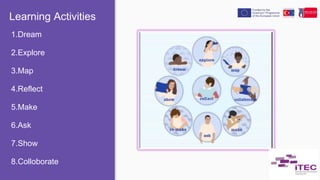
Learning Activities
1.Dream
2.Explore
3.Map
4.Reflect
5.Make
6.Ask
7.Show
8.Colloborate
Approximately 1 lesson
You present a design brief to your class that ties to
the curriculum and the local community, but
leaves room for interpretation.
You inspire the students by providing them with the
motivation for giving their best and by telling
them about the ownership and freedom over the
task.
You present the learning activities process and your
schedule, and negotiate the assessment criteria
with the class. Students form teams, discuss,
question and familiarize themselves with the
design brief.
Approximately 1 lesson
Tools:
Corkboard.me
● Student teams explore the context of their design
either by observing relevant practices or
environments using digital cameras, notebooks
and microphones, or by searching existing works
that relate to their design brief by collecting
examples similar to that which they are intending
to design.
● They share their collected media files on their
blogs and record a reflection
Approximately 1-2
lesson(s)
Tools:
Google, Youtube
● Teams analyse their findings using mind-
mapping techniques. They identify relations,
similarities and differences between the
examples and/or media files they collected.
● Based on their collected information and
analysis, the teams refine their design brief,
especially the design challenges, design results
and audience.
● Then the teams record a reflection. Open ended
questions can be challenging for students to
answer initially
Tools:
Bubbl.us, CmapTools,
Popplet, Mindmeister,
Freemind
Approximately 1 lesson
● Based on their refined design brief and design
ideas, student teams start making. They create
their first prototype, and discuss it afterwards.
The discussion especially relates to how well
the design address the identified design
challenges.
● They then record a reflection and document
their activities.. Highlight the reflection after
this activity and ensure that everyone focuses
on addressing the needs of an audience.
● To avoid free-riders or unequal workload
division, carefully divide tasks and roles within
teams.
Approximately 2 lesson(s)
Tools:
PowerPoint, Animato,
Prezi, Sketchup, Scratch
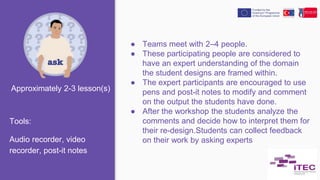
● Teams meet with 2–4 people.
● These participating people are considered to
have an expert understanding of the domain
the student designs are framed within.
● The expert participants are encouraged to use
pens and post-it notes to modify and comment
on the output the students have done.
● After the workshop the students analyze the
comments and decide how to interpret them for
their re-design.Students can collect feedback
on their work by asking experts
Tools:
Audio recorder, video
recorder, post-it notes
Approximately 2-3 lesson(s)
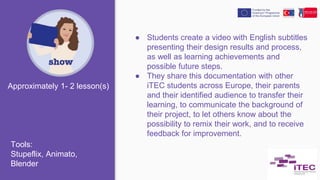
● Students create a video with English subtitles
presenting their design results and process,
as well as learning achievements and
possible future steps.
● They share this documentation with other
iTEC students across Europe, their parents
and their identified audience to transfer their
learning, to communicate the background of
their project, to let others know about the
possibility to remix their work, and to receive
feedback for improvement.
Approximately 1- 2 lesson(s)
Tools:
Stupeflix, Animato,
Blender
● Students and the teacher record, post and
share audio-visual reflections and feedback
of project progress, challenges and future
steps.
● The students slowly build a shared collection
of ways to tackle challenges, which can be
used after the project ended.
Approximately 10 minutes
Tools:
TeamUp, ReFlex,
Redpentool, Voicethread
● Students collaborate with students from
other iTEC schools.
● Ad-hoc and serendipitous collaboration,
driven by the students is encouraged1 lesson
Tools:
Blogger,Social Media
Tools
24-28 October,2016
Cluj-Napoca,Romania
2014-TR01-
KA201-012990
THANK YOU
Özlem KAPLAN

"ICT Integration in Teaching" workshop for our First Joint Staff Training

  • 1.
    iTEC Designing The Future Classroom FirstJoint Staff Training 24-26 October, 2016 Romania Özlem KAPLAN
  • 2.
    iTEC -Designing TheFuture Classroom iTEC is a four year pan-European project focused on the designed of the future classroom.
  • 3.
    What’s the aim? Thepurpose of the iTEC learning activities is to support teachers in introducing the principle of innovation into their teaching practice.
  • 4.
    Who is involved? With fundingof €9.45M from the European Commission, the involvement of 15 Ministries of Education and school pilots in up to 1 000 classrooms in 12 countries, iTEC is the largest and most strategic project yet undertaken by European Schoolnet and its supporting Ministries.
  • 5.
    Why technology beingused? iTEC takes place at a time when teachers and learners already have access to loose and rapidly expanding collection of ICT tools. This way teachers can select and combine relevant components The iTEC tehnology approach aims to make technical components required by the scenarios
  • 6.
    What will bethe impact? More meaningful visions and scenarios for the future classroom based on user-centered and testing methodology. Learning activities and design will be co-developed with teachers and validated in large scale Direct involvement of 15 MoE in development,school piloting and dissemination activities will ensure that iTEC results can be adopted by policy makers at different countries.
  • 7.
  • 8.
  • 9.
    Approximately 1 lesson Youpresent a design brief to your class that ties to the curriculum and the local community, but leaves room for interpretation. You inspire the students by providing them with the motivation for giving their best and by telling them about the ownership and freedom over the task. You present the learning activities process and your schedule, and negotiate the assessment criteria with the class. Students form teams, discuss, question and familiarize themselves with the design brief. Approximately 1 lesson Tools: Corkboard.me
  • 10.
    ● Student teamsexplore the context of their design either by observing relevant practices or environments using digital cameras, notebooks and microphones, or by searching existing works that relate to their design brief by collecting examples similar to that which they are intending to design. ● They share their collected media files on their blogs and record a reflection Approximately 1-2 lesson(s) Tools: Google, Youtube
  • 11.
    ● Teams analysetheir findings using mind- mapping techniques. They identify relations, similarities and differences between the examples and/or media files they collected. ● Based on their collected information and analysis, the teams refine their design brief, especially the design challenges, design results and audience. ● Then the teams record a reflection. Open ended questions can be challenging for students to answer initially Tools: Bubbl.us, CmapTools, Popplet, Mindmeister, Freemind Approximately 1 lesson
  • 12.
    ● Based ontheir refined design brief and design ideas, student teams start making. They create their first prototype, and discuss it afterwards. The discussion especially relates to how well the design address the identified design challenges. ● They then record a reflection and document their activities.. Highlight the reflection after this activity and ensure that everyone focuses on addressing the needs of an audience. ● To avoid free-riders or unequal workload division, carefully divide tasks and roles within teams. Approximately 2 lesson(s) Tools: PowerPoint, Animato, Prezi, Sketchup, Scratch
  • 13.
    ● Teams meetwith 2–4 people. ● These participating people are considered to have an expert understanding of the domain the student designs are framed within. ● The expert participants are encouraged to use pens and post-it notes to modify and comment on the output the students have done. ● After the workshop the students analyze the comments and decide how to interpret them for their re-design.Students can collect feedback on their work by asking experts Tools: Audio recorder, video recorder, post-it notes Approximately 2-3 lesson(s)
  • 14.
    ● Students createa video with English subtitles presenting their design results and process, as well as learning achievements and possible future steps. ● They share this documentation with other iTEC students across Europe, their parents and their identified audience to transfer their learning, to communicate the background of their project, to let others know about the possibility to remix their work, and to receive feedback for improvement. Approximately 1- 2 lesson(s) Tools: Stupeflix, Animato, Blender
  • 15.
    ● Students andthe teacher record, post and share audio-visual reflections and feedback of project progress, challenges and future steps. ● The students slowly build a shared collection of ways to tackle challenges, which can be used after the project ended. Approximately 10 minutes Tools: TeamUp, ReFlex, Redpentool, Voicethread
  • 16.
    ● Students collaboratewith students from other iTEC schools. ● Ad-hoc and serendipitous collaboration, driven by the students is encouraged1 lesson Tools: Blogger,Social Media Tools
  • 17.